


A mid-market logistics company spends six weeks building a customer support AI agent. The agent is smart. It understands intent, handles nuance, and responds in natural language. The team celebrates.
Then they deploy it.
The agent can talk about shipping delays, but it can’t check the ERP for real-time tracking data. It can offer to reschedule deliveries, but it can’t write back to the warehouse management system. It can promise callback updates, but it can’t log anything into the CRM.
Within weeks, the team realizes that most tickets still require human intervention. Every useful action depends on someone manually checking or updating another business system.
This is the gap that kills AI agent ROI. The intelligence is there. The connection isn’t, and it’s one of the most common AI Agent Deployment Mistakes organizations make.
AI agent integration isn’t a nice-to-have technical detail. It’s the difference between a smart chatbot and an operational AI employee that actually moves work forward.
Key Takeaways
- AI agents need three types of access: read, write, and action. Reading data is table stakes. Writing data creates value. Taking actions across systems is where real ROI lives.
- APIs power many AI agent integrations, but the connection itself is only the beginning. Authentication, permission scoping, data mapping, retries, monitoring, and failure handling determine whether that connection is production-ready.
- Native connectors aren’t always better than middleware. The best approach depends on the number of systems, the complexity of data flows, and your team’s capacity to maintain custom code.
- Human-in-the-loop approval is non-negotiable for high-risk actions. Deleting records, approving refunds, or modifying orders should require a human confirmation step.
- Integration testing is harder than agent testing. You need to test across systems with realistic data, handle edge cases like null values and schema changes, and simulate failure modes, which is why an AI Agent Implementation Checklist is essential for catching common integration pitfalls.
- Monitoring is the most overlooked integration requirement. A disconnected integration is a silent failure, the agent thinks it worked, but the data never arrived.
- Your integration architecture should be designed for change. Tools change, APIs version, schemas evolve. The connection layer needs to absorb that change without breaking the agent.
What AI Agent Integration Actually Means
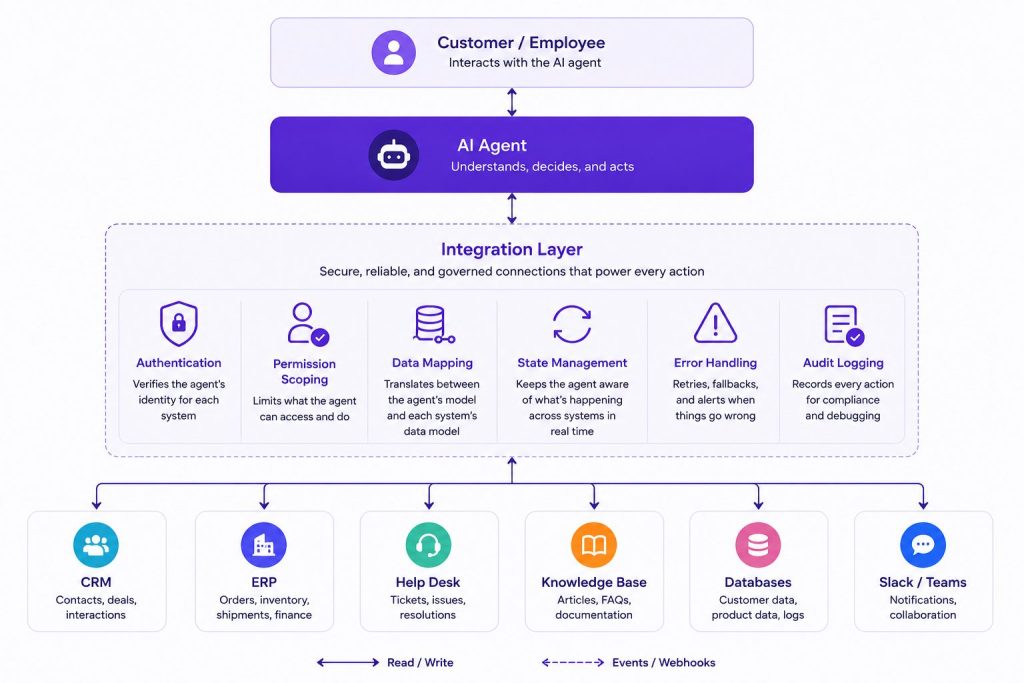
AI agent integration is the technical layer that enables an AI agent to read data from, write data to, and trigger actions across your existing business software.
It’s not just “connecting to an API.” It’s a structured architecture that handles:
- Authentication — Proving the agent’s identity to each system
- Permission scoping — Limiting what the agent can do in each system
- Data mapping — Translating between the agent’s understanding and each system’s data model
- State management — Keeping the agent aware of what’s happening across systems in real time
- Error handling — Retrying, falling back, and alerting when things go wrong
- Audit logging — Recording every action the agent takes for compliance and debugging
Think of it as the nervous system for your AI agent. The agent is the brain. The integration layer is the network that lets it sense, decide, and act. Defining what the agent should be able to do across each system is a core part of the AI Agent Requirements process.

Integration vs. Workflow
This is a common confusion point. An AI agent integration is not the same as an AI workflow.
AI Agent Workflows define the sequence of tasks and decisions the agent follows, while integrations provide the underlying connections that let it read data, update systems, and trigger those actions.
A good AI Agent Platform provides the connection layer for business systems and supports AI Agent Workflows that define what happens across them. When multiple specialized agents must collaborate, AI Agent Orchestration coordinates how those agents share context, tasks, and decisions.
The Three Types of AI Agent Integrations
Every integration falls into one of three categories. Understanding the difference is critical for architecture decisions.
Read Integrations (Data Access)
The agent retrieves information from a system without modifying anything.
| System Type | Example | What the Agent Reads |
| CRM | Salesforce, HubSpot | Contact details, deal stages, interaction history |
| ERP | SAP, NetSuite | Inventory levels, order status, shipping dates |
| Help Desk | Zendesk, Freshdesk | Ticket status, customer history, resolution notes |
| Knowledge Base | Notion, Confluence | Product docs, SOPs, FAQ articles |
| Database | PostgreSQL, Snowflake | Customer records, transaction logs, analytics |
Read integrations are the easiest to implement and the lowest risk. They’re also the minimum viable integration for any useful AI agent.
Portable AI Agents In Seconds, Use Everywhere
Prompt, Test, and Deploy AI Agents Across Social Platforms and LLMs. Automate Everything.
Write Integrations (Data Entry)
The agent creates or updates records in a system.
| Action | Example |
| Create record | Add a new contact to the CRM |
| Update field | Change a deal stage from “Qualified” to “Proposal Sent” |
| Add note | Append a conversation summary to a ticket |
| Log activity | Record a customer interaction with timestamp and outcome |
Write integrations introduce risk. An agent writing incorrect data can corrupt your CRM, create duplicate records, or overwrite important information. Validation and permission scoping become critical here.
Action Integrations (System Operations)
The agent triggers an operation that changes system state or executes business logic.
| Action | Example |
| Send notification | Push a Slack alert to the shipping team |
| Trigger workflow | Start a refund process in the billing system |
| Place order | Create a purchase order in the procurement system |
| Modify status | Change a shipment status from “Processing” to “Shipped” |
| Delete record | Remove a duplicate contact from the CRM |
Action integrations carry the highest risk and the highest reward. They’re where the agent stops being an information source and becomes an operational participant.
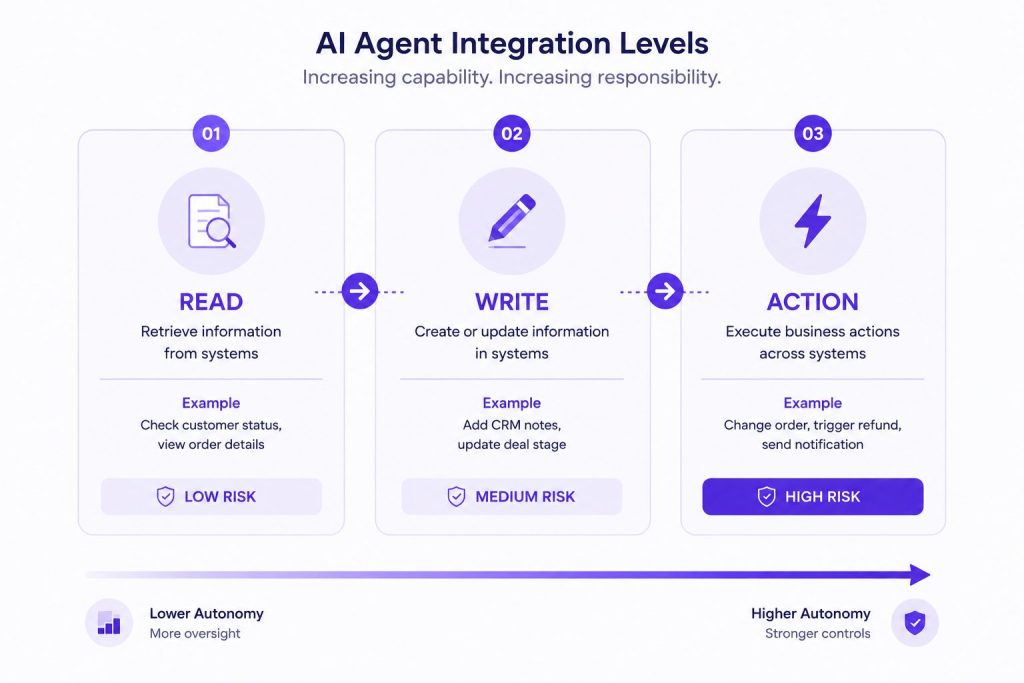
Expert tip: Start with read integrations, add writes for high-confidence data, and gate actions behind human approval. Most failed AI agent deployments tried to do everything at once.
AI Agent Integration Planning Checklist
Before connecting your first business system, document these decisions:
- Which systems must the agent connect to?
- What information does it need to read from each system?
- What information is it allowed to write?
- Which business actions can it trigger?
- Which actions require human approval?
- What authentication method will each connection use?
- Which system is the source of truth for each data type?
- What should happen if an API or connector fails?
- How will failed writes be detected and retried?
- What integration metrics will be monitored after launch?
If you cannot answer these questions clearly, the integration design is not ready for production.
How AI Agents Connect to Business Systems
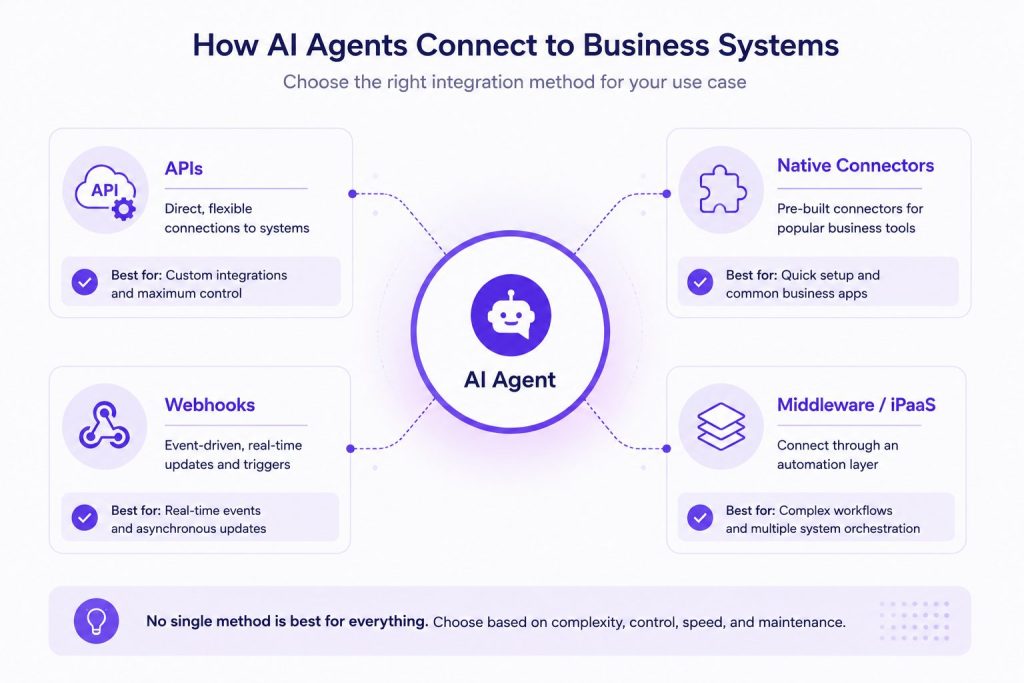
1. REST APIs (The Foundation)
Nearly every modern business system exposes a REST API. This is the most common integration method.
Agent → Integration Layer → API Gateway → Business System
What the integration layer handles:
- Authentication tokens — OAuth 2.0, API keys, or JWT
- Request formatting — Converting the agent’s intent into the correct API call
- Response parsing — Extracting the relevant data from the API response
- Error detection — Checking HTTP status codes and error bodies
- Rate limiting — Respecting the system’s API rate limits
Best for: Established systems with mature APIs (Salesforce, HubSpot, Zendesk, SAP)
Trade-off: High flexibility, but requires maintenance when APIs change.
2. Native Connectors (Pre-Built Integrations)
An AI Agent Builder platform often provides pre-built connectors for popular systems. These handle authentication, data mapping, and common operations out of the box. Botsify follows this platform-first approach by giving teams an environment to build AI agents, connect them with business systems, and extend those connections when more customized workflows or integrations are required.
Best for: Teams that want to integrate quickly without building custom code, or teams building Custom AI Agents that need connection to multiple platforms
Trade-off: Limited to the operations the connector supports. Custom or niche systems may need a different approach.
3. Webhooks (Event-Driven Integration)
Instead of polling a system for changes, the agent subscribes to events. When something happens, the system pushes data to the agent.
System → Webhook → Integration Layer → Agent
Example: A new order is created in Shopify. The webhook fires, the agent receives the order data, checks inventory in the ERP, and sends a confirmation email, all without polling.
Best for: Real-time updates and event-driven workflows
Trade-off: Requires the source system to support webhooks. No built-in retry mechanism, you need to handle delivery failures yourself.
4. Middleware / iPaaS (Integration Platforms)
Tools like Zapier, Make, Workato, and custom middleware sit between the agent and your systems. They handle routing, transformation, and orchestration.
Agent → Middleware → System A
→ System B
→ System C
Best for: Multi-system orchestration, complex data transformations, and teams that want visual flow builders
Trade-off: Adds latency. Can become a bottleneck if not designed for scale. Licensing costs add up.
5. GraphQL & gRPC (Emerging Patterns)
Some modern systems expose GraphQL APIs (flexible querying) or gRPC endpoints (high-performance streaming). These are less common but valuable for specific use cases.
GraphQL: Good for agents that need to query complex, nested data relationships in a single request.
gRPC: Good for high-throughput, low-latency scenarios where the agent is processing real-time data streams.
Authentication & Permissions: Who Is the Agent?
An AI agent isn’t a user. It doesn’t have a desk, a manager, or a training period. But it needs identity, and boundaries.
The Agent Identity Problem
When an agent connects to your CRM, the system asks: Who is this?
| Approach | How It Works | Risk Level |
| Shared API key | One key for the agent, access to everything | High |
| Service account | Dedicated user account for the agent, scoped permissions | Medium |
| Role-based access | Agent inherits permissions from a role with limited scope | Low |
| Contextual access | Agent gets permissions based on the specific task and user context | Lowest |
Recommended: Use a service account with the minimum permissions needed for the agent’s role. If the agent only needs to read contacts and create tickets, that’s all it gets.
Scoping Permissions by Operation
Most systems let you scope permissions at the operation level. Here’s a practical example for a CRM integration:
| Operation | Permission | Risk | Human Approval Needed? |
| Read contacts | ✅ Grant | Low | No |
| Search deals | ✅ Grant | Low | No |
| Create contact | ✅ Grant | Medium | Optional |
| Update deal stage | ✅ Grant | Medium | Optional |
| Delete contact | ❌ Deny | High | Yes |
| Export data | ❌ Deny | High | Yes |
| Modify system settings | ❌ Deny | Critical | Yes |
Authentication Patterns
- OAuth 2.0: Best for systems where the agent acts on behalf of a user. Token refresh is handled by the integration layer.
- API Keys: Simple and effective for system-to-system communication. No user context, but easy to manage.
- JWT (JSON Web Tokens): Good for custom integrations where you need to encode claims about the agent’s identity and permissions in the token itself.
Expert tip: Rotate credentials regularly. An agent’s API key is often more powerful than a human employee’s password. Treat it that way.
Data Mapping and Synchronization
The Schema Mismatch Problem
Your CRM calls a customer “Account.” Your ERP calls it “Customer.” Your help desk calls it “Contact.” The agent needs to know these are the same thing.
Data mapping is the process of defining how fields and records in one system correspond to another. Without it, the agent creates duplicate records, writes to wrong fields, and corrupts data.
This becomes even more important when AI Agent Memory retains customer or task context across interactions, because stale or incorrectly mapped information can follow the agent into future decisions.
Field Mapping
| AI Agent Concept | CRM Field | ERP Field | Help Desk Field |
| Customer Name | Account.Name | Customer.Name | Contact.Name |
| Account.Email | Customer.Email | Contact.Email | |
| Phone | Account.Phone | Customer.Phone | Contact.Phone |
| Order ID | — | Order.OrderID | Ticket.OrderRef |
| Status | Deal.Stage | Order.Status | Ticket.Status |
Synchronization Strategies
| Strategy | How It Works | Best For |
| Real-time sync | Every write triggers immediate sync | Time-sensitive operations (order status, inventory) |
| Batch sync | Data is collected and synced periodically | Reporting, analytics, non-critical records |
| Event-driven sync | System fires webhook on change, agent syncs | Customer updates, ticket changes |
| On-demand sync | Agent pulls data when needed | Low-frequency operations (quarterly account review) |
Handling Conflicts
When two systems disagree, the agent needs a conflict resolution strategy.
- Source of truth: Designate one system as authoritative for each data type. CRM is truth for contacts. ERP is truth for orders.
- Last write wins: Acceptable for non-critical fields. Dangerous for financial or compliance data.
- Human review queue: Push conflicts to a queue for manual resolution. Critical for high-stakes data.
Error Handling, Retries, and Fallbacks
Integrations fail. APIs go down. Networks timeout. Schemas change. An AI agent needs to handle all of this without breaking.
The Retry Strategy
Attempt 1 → Fail → Wait 1s → Attempt 2 → Fail → Wait 5s → Attempt 3 → Fail → Wait 15s → Attempt 4 → Fail → Queue for manual review
| Retry Parameter | Example Starting Point |
| Max retries | 3 |
| Backoff strategy | Exponential (1s, 5s, 15s) |
| Retry on | 429 (rate limit), 502, 503, 504 (server errors) |
| Don’t retry on | 400, 401, 403, 404 (client errors — fix the code) |
| Max total time | 60 seconds |
The Fallback Chain
Good agents don’t just retry. They fall back.
Primary: Look up customer in CRM API
↓ API fails
Fallback 1: Look up customer in cached data (last 24h sync)
↓ Cache miss
Fallback 2: Ask the user for the customer ID
↓ User doesn’t know
Fallback 3: Route to human agent with context
Silent Failures (The Dangerous Ones)
The most dangerous integration failure is the one the agent doesn’t know about.
- The agent thinks it wrote data, but the API returned 200 without actually saving. (Solution: Verify writes with a subsequent read.)
- The agent wrote to the wrong field due to a schema change. (Solution: Schema version validation before every write.)
- The webhook never fired, so the agent never knew the data changed. (Solution: Periodic reconciliation checks.)
Expert tip: Every integration should have a heartbeat check. A simple health endpoint that confirms the connection is alive, the schema is valid, and the agent can perform basic operations.
Integration Testing: What to Test and How
Testing an AI agent integration is harder than testing the agent itself. You need to test across systems, with realistic data, and handle edge cases.
Testing Levels
| Level | What You Test | Tools |
| Unit | Individual integration functions | Mock servers, JSON fixtures |
| Integration | End-to-end data flow between systems | Sandbox environments, test API keys |
| Scenario | Realistic business scenarios | Synthetic data, user simulations |
| Failure | How the agent handles failures | Chaos engineering, network throttling |
| Load | Performance under stress | Load testing, concurrency simulation |
Before you start writing integration code, completing an AI Readiness Assessment helps you understand which systems your agent needs to talk to, what data lives where, and what permissions you’ll need.
Critical Test Cases
- Null value handling — What happens when a required field is empty?
- Schema drift — What happens when a field is renamed or removed?
- Rate limiting — What happens when the agent hits the API limit?
- Timeout — What happens when the API doesn’t respond within 30 seconds?
- Duplicate detection — Does the agent create a duplicate record or find the existing one?
- Permission denial — What happens when the agent tries to do something it’s not allowed to do?
Testing in Production
You can’t test everything in staging. Some issues only surface in production.
- Shadow mode: The agent runs but takes no real actions. Logs what it would have done.
- Mirror mode: The agent takes actions in a parallel sandbox environment that mirrors production data.
- Gradual rollout: Start with 5% of traffic, monitor, then increase.
Production Monitoring: The Overlooked Integration Layer
A disconnected integration is a silent failure. The agent thinks it worked, but the data never arrived. Monitoring is the safety net. Integration monitoring should continue throughout the AI Agent Lifecycle, not stop once the initial deployment is stable.
What to Monitor
| Metric | Why It Matters | Alert Threshold |
| API success rate | Integration health overall | < 95% |
| API response time | User experience impact | > 5 seconds |
| Rate limit hits | Approaching system limits | > 80% of limit |
| Retry count | Integration fragility | > 3 retries per request |
| Schema mismatch errors | API changes breaking integration | Any occurrence |
| Authentication failures | Credential expiration | Any occurrence |
| Data sync lag | Real-time data freshness | > 5 minutes |
Audit Logging
Every action the agent takes should be recorded in an immutable audit log.
Timestamp: 2026-08-10T14:23:11Z
Agent: customer-support-v2
Action: UPDATE
System: Salesforce
Object: Contact (ID: 0035g00000ABCD)
Fields: { phone: “+1234567890” }
Trigger: User request in chat
Status: SUCCESS
Response time: 340ms
Request ID: req_abc123
This isn’t just for debugging. It’s for compliance, security reviews, and building trust with stakeholders who are nervous about letting an AI agent touch production data.
Human Approval for High-Risk Actions
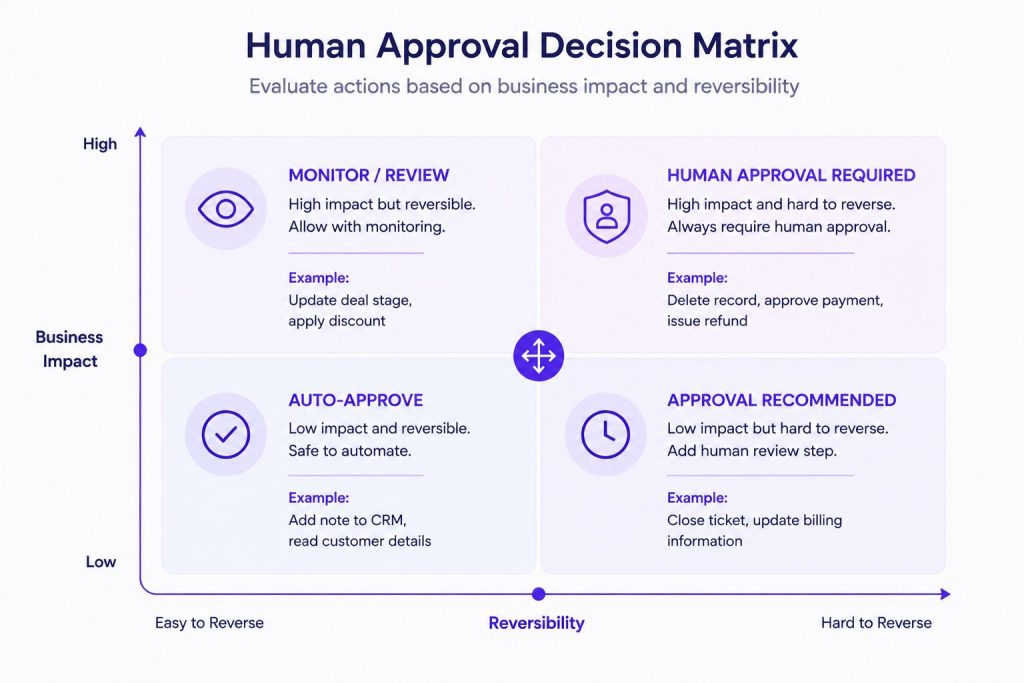
Some actions should never happen without a human in the loop. The question is: which ones? A strong AI Agent Governance model defines these approval boundaries before the agent receives permission to act on production systems.
The Decision Framework
| Criteria | Auto-Approve | Human Approval Needed |
| Data sensitivity | Public info, internal notes | PII, financial data, compliance records |
| Reversibility | Easy to undo (add note) | Hard to undo (delete record, approve payment) |
| Impact radius | Single record, low value | Multiple records, high value, cross-system |
| Confidence threshold | > 95% | < 95% |
| Business rules | Meets all defined rules | Violates rules or falls in gray area |
How Approval Works in Practice
Agent identifies action needed
↓
Integration layer checks: Is this action in the “human approval” list?
↓
If yes: Agent creates a pending action, sends approval request to Slack/email
↓
Human reviews details (what, where, why, impact)
↓
Human approves or rejects
↓
Integration layer executes or cancels
The approval request should include:
- What the agent wants to do (clear, human-readable description)
- Which system and record it affects
- Why the agent thinks this is needed (context from the conversation)
- The impact (what changes, what’s at risk)
- A link to review the full context in the original conversation
End-to-End Example: Order Change Request Across Systems
Let’s walk through a realistic scenario to show how an AI agent moves across multiple business systems.
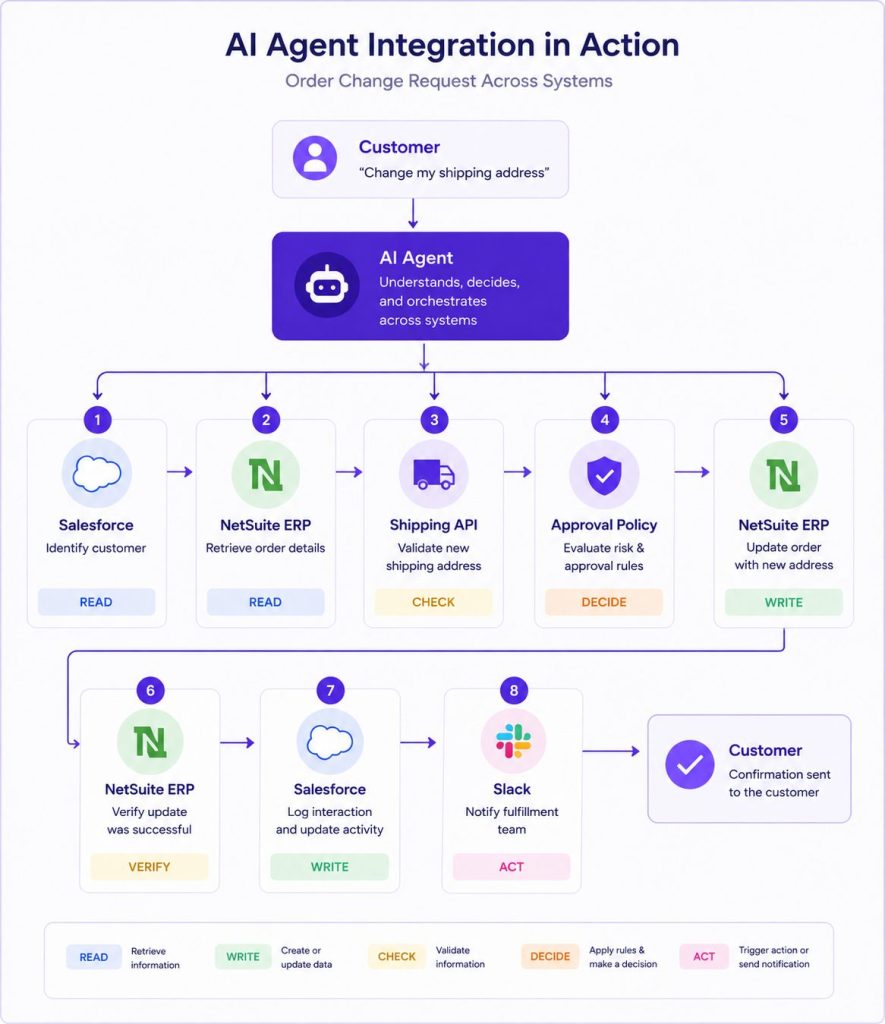

The Scenario
A customer messages the support bot: “I need to change my shipping address for order #ORD-78421. The new address is 42 Maple Street, Austin, TX 78701.”
The Integration Flow
Step 1: Read Customer Identity
- System: CRM (Salesforce)
- Integration: REST API lookup by email
- Agent reads: Customer ID, account tier, existing contact info
- Result: Customer identified as “Acme Corp” (Tier 2)
Step 2: Read Order Details
- System: ERP (NetSuite)
- Integration: REST API query by order ID
- Agent reads: Current order status, shipping address, delivery method, estimated ship date
- Result: Order is in “Processing” status, still changeable. Current address is “100 Elm Street, Austin, TX 78702”
Step 3: Verify Constraints
- System: ERP (NetSuite) + Shipping Provider API
- Agent reads: The new address is in the same city. The shipping method supports this address. No additional shipping cost.
- Result: Change is feasible without extra charges or delays
Step 4: Confirmation with Customer
- Agent: “I can update the shipping address to 42 Maple Street, Austin, TX 78701. Your delivery estimate of August 15th should remain the same. Shall I proceed?”
- Customer: “Yes, please.”
Step 5: Evaluate Approval Requirement
- Integration layer checks: “Shipping address change on an in-progress order” is classified as medium risk.
- Rule: Auto-approve for Tier 1 changes within same city. Manual approval only for cross-city changes or Tier 1 customers.
- Result: Agent proceeds without human approval.
Step 6: Write Update
- System: ERP (NetSuite)
- Integration: REST API PATCH request to update shipping address
- Agent writes: shipping_address → 42 Maple Street, Austin, TX 78701
- Result: API returns 200. Address updated.
Step 7: Verify the Update
- System: ERP (NetSuite)
- Integration: REST API GET request to re-read order
- Agent reads: Confirms the shipping address field now shows the new address
- Result: Verified. Write was successful.
Step 8: Log to CRM
- System: CRM (Salesforce)
- Integration: REST API POST to create activity record
- Agent writes: New activity log — “Shipping address updated from 100 Elm Street to 42 Maple Street. Customer requested via chat. Agent ID: support-v2.”
- Result: Activity logged. Full audit trail maintained.
Step 9: Notify Internal Teams
- System: Slack
- Integration: Webhook
- Agent sends: “@fulfillment-team: Order ORD-78421 shipping address updated to 42 Maple Street, Austin, TX 78701. No delivery impact expected.”
- Result: Notification sent to the fulfillment channel.
Step 10: Confirm to Customer
- Agent: “Done! Your order #ORD-78421 will now ship to 42 Maple Street, Austin, TX 78701. Estimated delivery: August 15th. You’ll receive a tracking link once it ships.”
Systems Touched
| Step | System | Integration Type | Operation |
| 1 | Salesforce CRM | REST API | Read |
| 2 | NetSuite ERP | REST API | Read |
| 3 | Shipping Provider API | REST API | Read |
| 5 | — | Rule engine | Decision |
| 6 | NetSuite ERP | REST API | Write |
| 7 | NetSuite ERP | REST API | Read (verify) |
| 8 | Salesforce CRM | REST API | Write |
| 9 | Slack | Webhook | Action |
| 10 | — | Chat | Action |
Total: 4 systems, 8 integration calls, 1 approval-policy check, and 1 completed customer outcome.
What Production-Ready AI Agent Integration Looks Like
A production-ready integration should be:
- Scoped: The agent has only the permissions required for its role.
- Observable: Every connection exposes health, errors, latency, and retry metrics.
- Recoverable: Failures trigger retries, fallbacks, or human escalation.
- Traceable: Reads, writes, and actions can be audited.
- Testable: Integrations can be validated in sandbox, shadow, or staged environments.
- Maintainable: API changes and schema updates can be handled without redesigning the whole agent.
- Business-aware: High-risk actions follow approval rules instead of relying only on model confidence.
If an integration cannot meet these standards, it may work in a demo but it is not ready for production.
How to Choose the Right Integration Approach
Decision Framework
| If your team has… | And you need to connect… | Start with… |
| No dedicated integration engineers | 1-3 popular systems (CRM, ERP, help desk) | Native connectors on an AI Agent Platform |
| Some API experience | 3-5 systems with standard APIs | Custom API integrations with middleware |
| Dedicated engineering team | 5+ systems including custom/legacy software | Custom integration layer with middleware |
| Enterprise compliance requirements | Any number of systems | Middleware + custom layer with audit logging |
| Rapid prototyping / MVP | 1-2 systems | Native connectors, then migrate to custom |
Build vs. Buy Considerations
When evaluating AI Agent Development Services versus a platform approach, consider:
| Factor | Native Connectors (Platform) | Custom API Integration |
| Time to integration | Hours to days | Weeks to months |
| Maintenance burden | Platform handles API changes | Your team handles updates |
| Flexibility | Limited to supported operations | Full control over every operation |
| Cost | Platform subscription | Engineering time + ongoing maintenance |
| Security | Platform manages auth, encryption | Your team owns the security model |
| Niche systems | May not be supported | Fully supported (you build it) |
For businesses that want to avoid building every connection from scratch, a platform such as Botsify can provide the agent-building layer while still leaving room for custom API integrations where standard connectors are not enough. When comparing the Best AI Agent Platforms, look beyond the number of advertised connectors and evaluate what each connection can actually read, write, trigger, monitor, and secure.
For most teams, the right answer is: start with platform connectors for the 80% use case, build custom integrations for the remaining 20%. This avoids the common trap of spending months building integrations before you’ve validated the agent’s value.
Some organizations prefer to Build In-House vs Development Partner based on their long-term AI strategy and internal engineering capacity. Either way, the integration layer should be designed for change from day one, and an AI Agent Implementation Roadmap helps sequence these decisions across phases.
Conclusion
An AI agent that can’t connect to your business systems is a smart conversation partner with no operational impact. It can answer questions, but it can’t change anything.
The integration layer is where AI agents go from interesting to indispensable. It’s the difference between an agent that can describe a problem and one that can fix it. Between an agent that reads data and one that moves work forward.
Start with read integrations. Validate the agent’s value. Add writes. Gate high-risk actions behind human approval. As your AI Workforce expands, design the integration architecture for change so new agents, tools, APIs, and business processes can connect without rebuilding everything from scratch.
The companies that win with AI agents won’t be the ones with the smartest models. They’ll be the ones whose agents are connected to the systems that actually run the business.
AI Agentic Platform For Building Portable AI Agents
Say Hello To Agentic AI That Connects With Your CRM And Even Other Agents
Frequently Asked Questions
What is AI agent integration?
AI agent integration is the process of connecting an AI agent to business systems so it can read data, write records, and trigger actions. It involves APIs, authentication, data mapping, error handling, and monitoring, not just “connecting” to a tool.
How do AI agents connect to CRMs and ERPs?
AI agents connect to CRMs and ERPs through REST APIs, native platform connectors, or middleware. The integration layer handles authentication (OAuth or API keys), permission scoping, data mapping, and error handling. Most enterprise platforms like Salesforce, HubSpot, and NetSuite support all three methods.
What’s the difference between AI agent integration and AI workflow automation?
Integration is the connection layer that lets an agent access a system. Workflow automation is the sequence of steps the agent follows across multiple systems. An integration enables the workflow. You need both, the connection and the orchestration, for AI agents to operate across your business.
How do you handle security when connecting AI agents to business systems?
Security starts with scoped permissions, the agent only gets access to what it needs. Use service accounts with role-based access, never shared admin credentials. Implement OAuth 2.0 or API keys with rotation policies. Add audit logging for every action. And require human approval for high-risk operations like deleting records or modifying financial data.
What happens when an AI agent’s integration fails?
The agent should retry with exponential backoff, fall back to cached data or alternative systems, and escalate to a human if all options fail. Silent failures are the most dangerous, the agent thinks it worked but the data never arrived. Monitor API success rates, response times, and retry counts to catch failures early.
Can AI agents integrate with custom or legacy systems?
Yes, but the approach differs. Standard APIs work for modern systems. Custom or legacy systems may require middleware, a custom API wrapper, or database-level integration. An AI Agent Development Company can help design the custom integration layer for non-standard systems.