


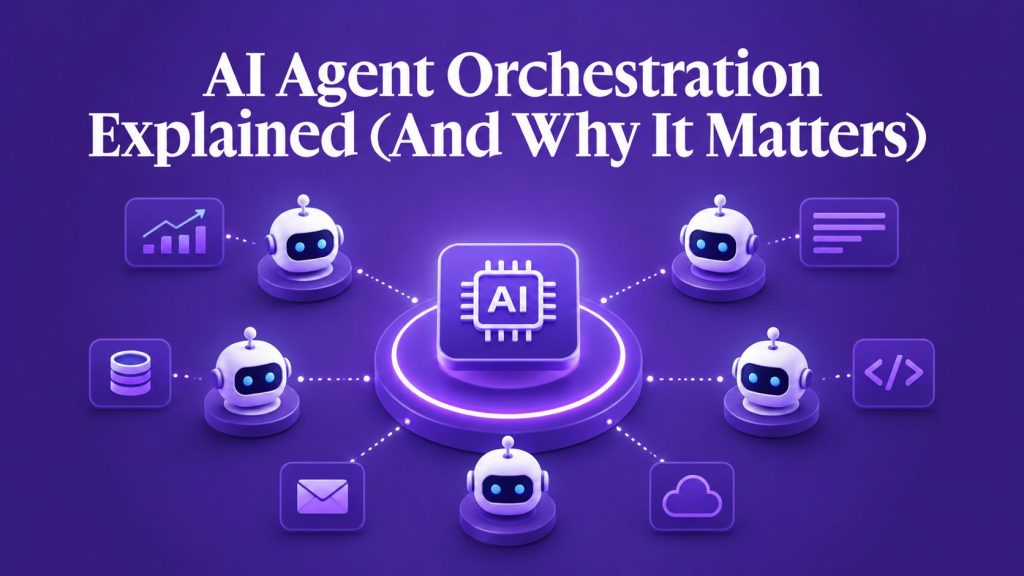
If you’ve been building with AI agents, you’ve probably hit this wall: one agent works fine for simple tasks, but the moment you need it to handle a complex workflow, like qualifying a lead, updating your CRM, scheduling a meeting, and sending a follow-up email, things fall apart.
That’s where AI agent orchestration comes in.
AI agent orchestration is how you coordinate multiple specialized AI agents to work together on complex business processes. Instead of building one massive agent that tries to do everything (and does most of it poorly), you build a team of focused agents that each handle specific tasks and communicate seamlessly.
This isn’t just a technical concept, it’s becoming the standard architecture for any serious AI implementation in business. Companies using multi-agent systems report faster deployment, easier maintenance, and significantly better results than monolithic AI approaches.
In this guide, we’ll break down what AI agent orchestration actually means, how it works in practice, and why your business probably needs it
Key Takeaways
- AI agent orchestration coordinates multiple specialized agents to handle complex workflows that single agents can’t manage effectively
- Multi-agent systems outperform single-agent approaches for business processes requiring multiple tools, data sources, or decision points
- Core orchestration components include task routing, shared memory, tool access control, agent communication protocols, and human handoff triggers
- Real business value comes from reduced development time, easier maintenance, better error handling, and more scalable AI implementations
- Successful orchestration requires clear task boundaries, standardized communication formats, centralized logging, and proper fallback mechanisms
- Platform selection should prioritize native orchestration features over trying to build coordination logic from scratch
- Common mistakes include over-engineering simple workflows, insufficient error handling, and neglecting proper agent specialization
Portable AI Agents In Seconds, Use Everywhere
Prompt, Test, and Deploy AI Agents Across Social Platforms and LLMs. Automate Everything.
What is AI Agent Orchestration?
AI agent orchestration is the process of managing how multiple AI agents work together to complete complex tasks. Think of it like conducting an orchestra, each musician (agent) has a specific role, but they need a conductor (orchestration layer) to coordinate timing, handoffs, and overall execution.
In practical terms, orchestration handles:
– Task routing: Which agent should handle which part of a workflow
– Data handoffs: How information passes between agents
– State management: Tracking where you are in a multi-step process
– Error handling: What happens when an agent fails or gets stuck
– Human escalation: When to bring a person into the loop
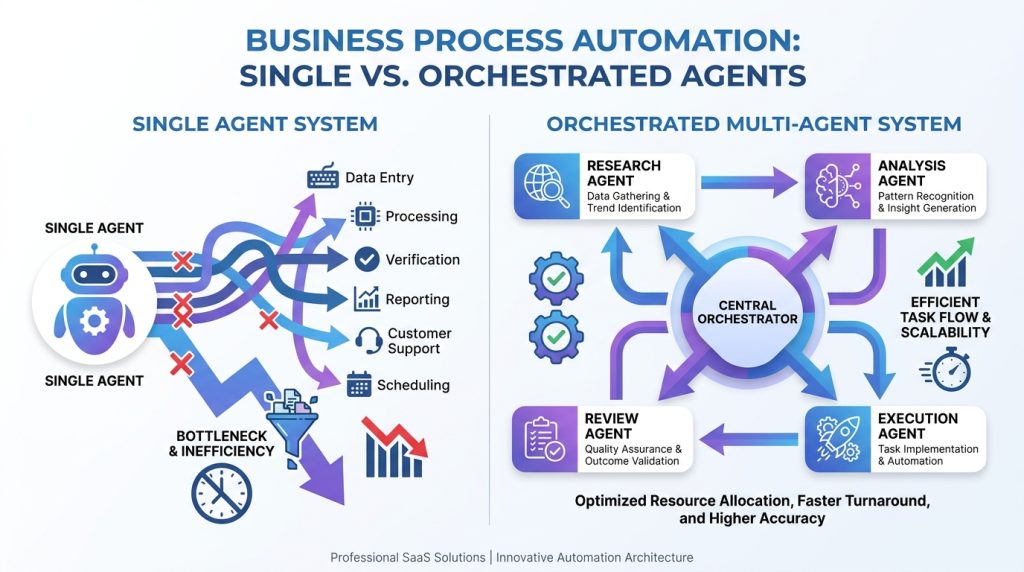

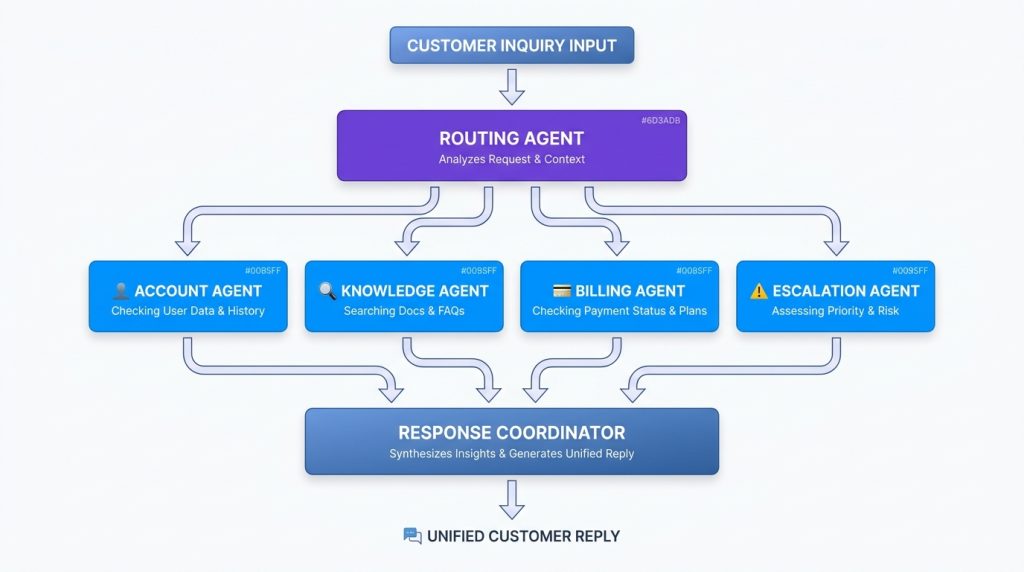
For example, a customer support workflow might involve:
- A classification agent that determines the type of inquiry
- A knowledge agent that searches your documentation
- A response agent that drafts the reply
- An escalation agent that decides if human review is needed
Without proper AI orchestration, you’d need to manually code every handoff, retry logic, and edge case. With orchestration, you define the workflow once and let the system handle coordination.
Why One AI Agent Is Often Not Enough
The single-agent approach sounds appealing at first. Build one powerful agentic AI that can handle everything. But this breaks down fast in real business scenarios.
The jack-of-all-trades problem: When you train or prompt one agent to handle multiple unrelated tasks, like answering support questions, scheduling meetings, and analyzing sales data, it becomes mediocre at all of them. Specialization matters for AI just like it does for humans.
Context overload: Large language models have token limits. A single agent trying to process your entire knowledge base, conversation history, current task, and tool documentation will hit those limits quickly. Performance degrades as context grows.
Debugging nightmares: When your all-in-one agent fails, you’re hunting through thousands of lines of prompts and hundreds of possible tool interactions to find the issue. With specialized agents, you know exactly which component failed.
Scaling limitations: Want to add a new capability? With a monolithic agent, you’re modifying a complex system where changes can break existing functionality. With agent orchestration, you add a new specialized agent without touching the others.
Consider a SaaS company using an AI agent platform for customer onboarding. A single agent attempting to handle account setup, feature configuration, integration testing, and training material delivery will struggle with:
– Maintaining context across a multi-day onboarding process
– Switching between technical API calls and conversational explanation
– Handling errors in one step without breaking the entire flow
– Adapting to different customer profiles and use cases
Multi-agent orchestration solves this by assigning each onboarding stage to a specialized agent that’s optimized for that specific job.
Single-Agent vs Multi-Agent Systems
A single AI agent can work well for straightforward tasks, but business workflows rarely stay simple. As processes involve more tools, decisions, and handoffs, a multi-agent system becomes easier to manage and scale.
| Single-Agent System | Multi-Agent System |
| One agent handles everything | Multiple agents handle specific tasks |
| Simpler to set up | Better for complex workflows |
| Context can become overloaded | Context is distributed across agents |
| Harder to troubleshoot | Easier to identify failures |
| Best for simple automation | Best for end-to-end business processes |
This is why AI agent orchestration is becoming the preferred approach for organizations building larger and more reliable AI systems.
How AI Agent Orchestration Works
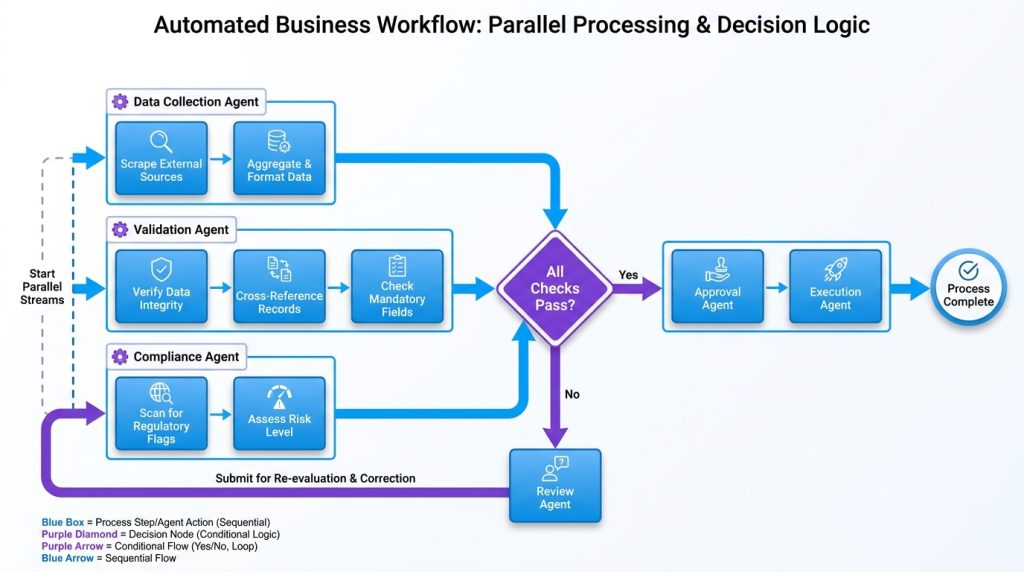
At its core, AI workflow orchestration operates through a central coordination layer that routes tasks, manages state, and facilitates communication between agents.
The orchestration layer acts as the traffic controller. When a new task arrives, it:
- Analyzes the request to understand what needs to happen
- Determines which agents are needed and in what sequence
- Routes the initial task to the first agent
- Monitors execution and handles the output
- Passes results to the next agent in the workflow
- Aggregates final results and delivers them to the user or system
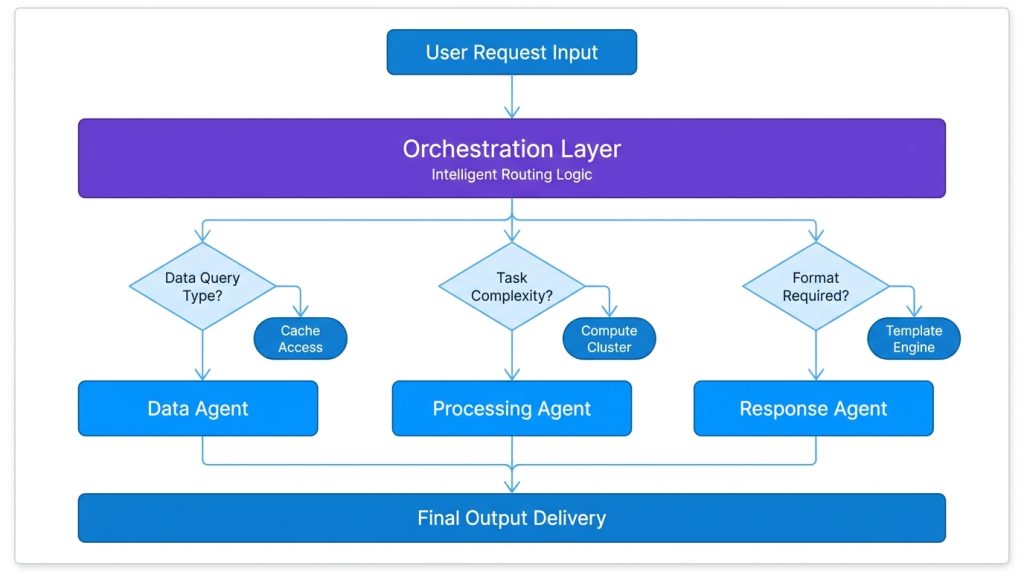
Agent communication happens through standardized message formats. Each agent receives inputs in a consistent structure and returns outputs the same way. This standardization means agents don’t need to know about each other, they just need to follow the communication protocol.
The orchestrator tracks the entire flow, maintains state between steps, and handles errors at any point without the individual agents needing to know about the full workflow.
State management ensures each agent has access to relevant context without being overwhelmed. The orchestration system maintains a workflow state that includes:
– Current position in the workflow
– Outputs from previous agents
– User information and conversation history
– Error logs and retry counts
– Timestamp and workflow metadata
This shared state is selectively passed to each agent, they only see what they need for their specific task.
Core Components of Agent Orchestration
Task Routing
Task routing determines which agent handles which request. This can be:
Rule-based: If the inquiry contains billing keywords, route to the billing agent. Simple but rigid.
AI-powered: Use a lightweight classification model or AI agent builder to analyze requests and route dynamically. More flexible and handles edge cases better.
Hybrid: Combine rules for common scenarios with AI fallback for ambiguous cases. This gives you the speed of rules with the intelligence of AI.
In practice, effective task routing also includes priority handling, load balancing across agent instances, and fallback options when primary agents are unavailable.
Memory Sharing
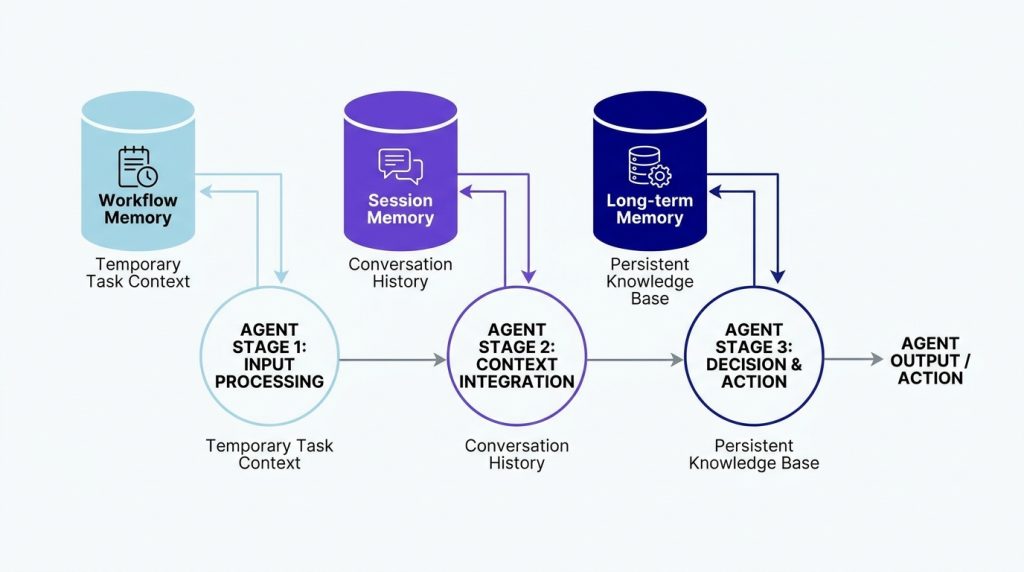
Effective orchestration depends heavily on AI agent memory because agents need access to the right context at the right time. Agents need access to shared context, but not all context. Effective memory sharing involves:
Workflow memory: Information generated during the current process that subsequent agents need
Session memory: User conversation history and preferences relevant to this interaction
Long-term memory: Historical data, past interactions, and learned preferences
Tool outputs: Results from API calls, database queries, or external systems
A multi-agent system might use a customer service scenario where the classification agent identifies a frustrated user and tags the conversation accordingly. The response agent sees that tag and adjusts its tone, while the escalation agent uses it to lower the threshold for human handoff.
Tool Access
In AI workflow management, different agents need access to different tools. Your customer-facing agent shouldn’t have database write access, but your data processing agent needs it.
Tool access control in orchestration systems typically includes:
– Scoped permissions: Each agent gets exactly the tools it needs
– Credential management: Secure handling of API keys and authentication
– Rate limiting: Preventing any single agent from overwhelming external APIs
– Audit logging: Tracking which agent used which tool when
For AI agents for small businesses, this matters even more, you might have one agent handling customer questions and another managing inventory. Clear tool boundaries prevent accidental data corruption.
Agent Communication
Agents communicate through the orchestration layer using standardized message formats. This typically includes:
Input specification: What data format each agent expects to receive
Output contract: What structure each agent promises to return
Status signals: Success, failure, needs-human-review, needs-more-info
Metadata: Confidence scores, processing time, resources used
This standardization is what makes custom AI agents composable, you can swap out one agent for a better version without rewriting your entire workflow.
Human Handoff
Even the best AI agent coordination needs escape hatches. Human handoff triggers ensure complex, sensitive, or ambiguous situations get escalated appropriately.
Effective handoff systems include:
– Clear triggers: Conditions that automatically escalate (low confidence, policy violations, explicit user request)
– Context preservation: The human agent sees everything the AI agents saw
– Resumption capability: After human intervention, the workflow can continue where it left off
– Learning loops: Human decisions feed back into agent training data
A Botpress alternative might offer basic handoff, but a mature AI agent platform provides structured handoff with context, suggested actions, and automatic workflow resumption.
Real Business Use Cases
Customer Support Orchestration
A SaaS company uses multi-agent orchestration for Tier 1 support:
- Intake agent analyzes incoming messages and categorizes them (billing, technical, general inquiry)
- Knowledge agent searches documentation and past tickets for relevant solutions
- Response agent drafts answers using the knowledge agent’s findings
- Sentiment agent evaluates if the customer seems satisfied or frustrated
- Escalation agent decides whether to send the response or hand off to a human
This setup reduced average response time from 4 hours to 12 minutes while maintaining 94% customer satisfaction on AI-handled tickets.
Sales Pipeline Automation
An AI agent agency built a lead qualification system using orchestrated agents:
- Enrichment agent gathers information from LinkedIn, company websites, and databases
- Qualification agent scores leads based on ICP criteria
- Routing agent assigns qualified leads to the right sales rep based on territory and product fit
- Outreach agent drafts personalized initial outreach
- Scheduling agent coordinates meeting availability when prospects respond
The agency deployed this as a white-label AI solution for their clients, each getting a customized version with their specific qualification criteria and sales process.
Content Operations
A marketing team uses agent orchestration for content production:
- Research agent gathers data on trending topics and competitor content
- Outline agent structures the article based on SEO keywords and user intent
- Writing agent produces the draft
- Fact-checking agent verifies claims and adds sources
- SEO agent optimizes formatting, meta descriptions, and internal links
- Publishing agent schedules and posts to the CMS
This multi-agent system reduced content production time by 60% while improving quality scores based on engagement metrics.
IT Operations
An IT team built an incident response system using AI orchestration:
- Monitoring agent watches system metrics and logs
- Detection agent identifies anomalies and potential incidents
- Diagnosis agent analyzes logs and traces to determine root cause
- Remediation agent applies known fixes for common issues
- Documentation agent logs the incident and resolution steps
- Escalation agent alerts humans for unknown or critical issues
This reduced mean time to resolution for common incidents from 45 minutes to under 5 minutes.
Benefits of AI Agent Orchestration
Faster development: Building specialized agents is faster than building one complex agent. You can develop and test each component independently.
Easier maintenance: When something breaks, you know exactly which agent failed. Updates to one agent don’t risk breaking others.
Better performance: Specialized agents outperform generalists. Your classification agent can use a small, fast model while your reasoning agent uses a more powerful one.
Scalability: Need more capacity? Spin up additional instances of bottleneck agents. Can’t do that easily with monolithic systems.
Flexibility: Swap out underperforming agents without rebuilding your entire system. Test new AI agent frameworks for specific tasks without committing everywhere.
Cost optimization: Use expensive models only for agents that need them. Your routing agent doesn’t need GPT-4, it can run on something much cheaper.
Risk reduction: Agents with limited scope and permissions reduce the potential damage from errors or security issues.
Knowledge retention: Each agent can maintain specialized knowledge without polluting the context of other agents.
Companies using the best AI agent platforms with native orchestration report 40-60% faster time-to-production compared to building coordination logic themselves.
What to Look for in an AI Agent Orchestration Platform
Native Orchestration Support
Not all platforms calling themselves an “AI agent platform” actually support multi-agent orchestration. Look for:
– Built-in workflow definition (not just API endpoints)
– Visual workflow builders for non-technical team members
– Pre-built orchestration patterns for common use cases
– State management handled by the platform, not your code
Agent Communication Standards
The platform should enforce consistent communication between agents:
– Standardized input/output formats
– Built-in error handling protocols
– Automatic retry logic for transient failures
– Dead letter queues for unprocessable messages
Monitoring and Observability
You need visibility into what’s happening:
– Real-time workflow execution tracking
– Per-agent performance metrics
– Error rates and failure patterns
– Cost tracking by agent and workflow
– Conversation/task replay for debugging
Flexibility Without Complexity
The best platforms make simple things easy and complex things possible:
– Quick setup for standard workflows
– Deep customization when you need it
– Support for both no-code and code-based agent development
– Integration with best AI agents and AI Agent frameworks
White Label Capabilities
If you’re an AI agent agency or plan to offer AI as a product, look for white label AI agent platform features:
– Customizable branding
– Multi-tenant architecture
– Client-specific agent configurations
– Separate billing and usage tracking
Platforms like Botsify provide native orchestration alongside white-label options, making them suitable for both internal use and client deployments.
Security and Compliance
Orchestration platforms handle data flowing between multiple agents:
– Role-based access control for agents and humans
– Data encryption in transit and at rest
– Audit logs for compliance requirements
– Data residency options for regulated industries
Common Challenges and Mistakes
Over-Engineering Simple Workflows
Not everything needs multi-agent orchestration. If your workflow is truly linear with no branching and three steps or fewer, a single agent probably works fine.
The orchestration overhead only pays off when:
– The workflow has conditional branching
– Different steps need different capabilities or tools
– You need to scale specific components independently
– Multiple teams own different parts of the process
Insufficient Error Handling
Agents will fail. Networks will timeout. APIs will rate-limit you. Your orchestration system must handle this gracefully:
– Define retry policies for each agent
– Set maximum retry counts to prevent infinite loops
– Implement exponential backoff for rate-limited APIs
– Create fallback paths when primary agents fail
– Maintain clear error messages for debugging
Poor Agent Boundaries
Defining where one agent ends and another begins is harder than it looks. Too many small agents create communication overhead. Too few large agents lose the benefits of specialization.
Good agent boundaries typically align with:
– Different tools or data sources
– Distinct skills or knowledge domains
– Different security or permission requirements
– Components owned by different teams
Neglecting State Management
Shared state between agents creates complexity. Poor state management leads to:
– Race conditions when agents run in parallel
– Data inconsistencies when agents fail mid-workflow
– Privacy leaks when agents see data they shouldn’t
– Debugging nightmares when you can’t reproduce issues
Use the platform’s built-in state management rather than building your own unless you have specific requirements it can’t meet.
Ignoring Cost Implications
AI orchestration can get expensive if you’re not careful:
– Calling expensive models for simple classification tasks
– Passing entire conversation histories to every agent
– Running agents in sequence when parallel execution would work
– Not caching results that could be reused
Monitor per-agent costs and optimize accordingly. Often a small, fast model for routing decisions and a larger model only for complex reasoning provides the best cost/performance balance.
Lack of Testing
Testing multi-agent systems is harder than testing single agents:
– Unit test each agent independently
– Integration test common workflow paths
– Chaos test by injecting failures at each step
– Load test to understand performance under stress
– A/B test different agent configurations in production
Build testing into your development process from the start. Adding it later is painful.
Final Thoughts
AI agent orchestration isn’t a nice-to-have anymore, it’s becoming the standard architecture for production AI systems. Single agents work for demos and simple tasks, but complex business processes demand coordination between specialized agents.
The companies seeing the best results from AI aren’t the ones with the most powerful models. They’re the ones with well-orchestrated systems where each agent does one thing exceptionally well and hands off cleanly to the next.
If you’re still building monolithic AI agents, you’re probably hitting walls around complexity, maintenance, and scalability. If you’re considering building orchestration logic from scratch, you’re probably underestimating the engineering effort required.
Start with a platform that handles orchestration natively. Build AI agent solutions with clear boundaries and specific responsibilities. Test thoroughly. Monitor continuously. Iterate based on real usage patterns.
The goal isn’t to build the most sophisticated multi-agent system possible, it’s to build the simplest system that reliably solves your business problem. Sometimes that’s one agent. Usually it’s a few specialized agents working together. Occasionally it’s a complex network of agents handling intricate workflows.
Use orchestration when it adds value, not because it’s technically interesting. Your business results will tell you if you’ve made the right choice.
AI Agentic Platform For Building Portable AI Agents
Say Hello To Agentic AI That Connects With Your CRM And Even Other Agents