


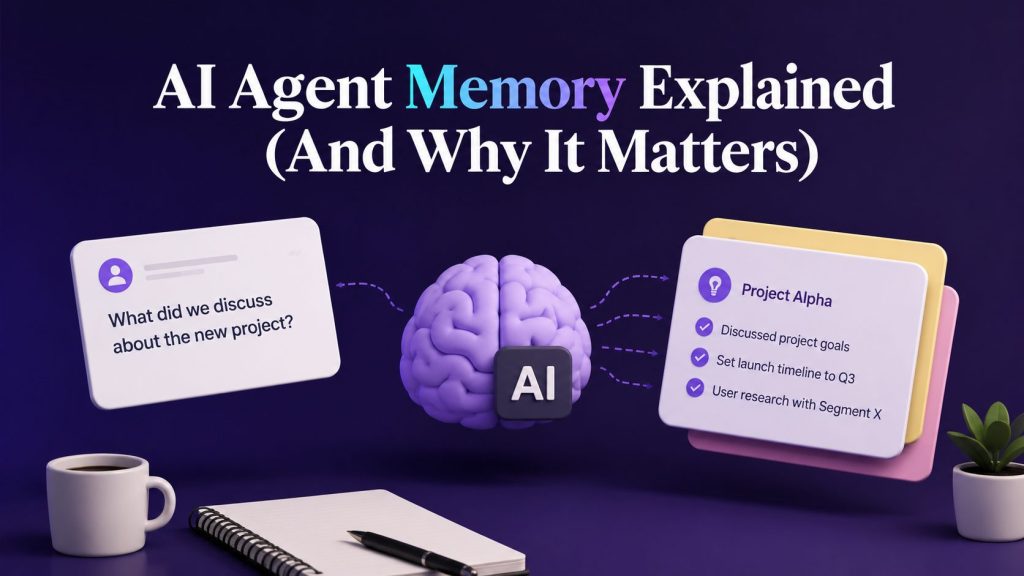
Ever talked to a chatbot that forgot what you said two messages ago?
You ask about pricing. It gives you an answer. Then you ask a follow-up question, and… blank stare. It’s like talking to someone with amnesia.
Frustrating, right?
That’s the difference between a basic chatbot and an AI agent with real memory.
AI agent memory is what separates tools that just respond from intelligent systems that actually think, learn, and improve over time. It’s the invisible layer that makes AI agents feel less robotic and more… useful.
In this guide, we’re breaking down exactly what memory in AI agents actually means, why it’s critical for autonomous AI agents, and how to build (or choose) AI systems that don’t forget everything the moment you close the chat window.
Key Takeaways
– AI agent memory is the ability to store, recall, and use past interactions to inform future decisions, turning reactive bots into intelligent agents
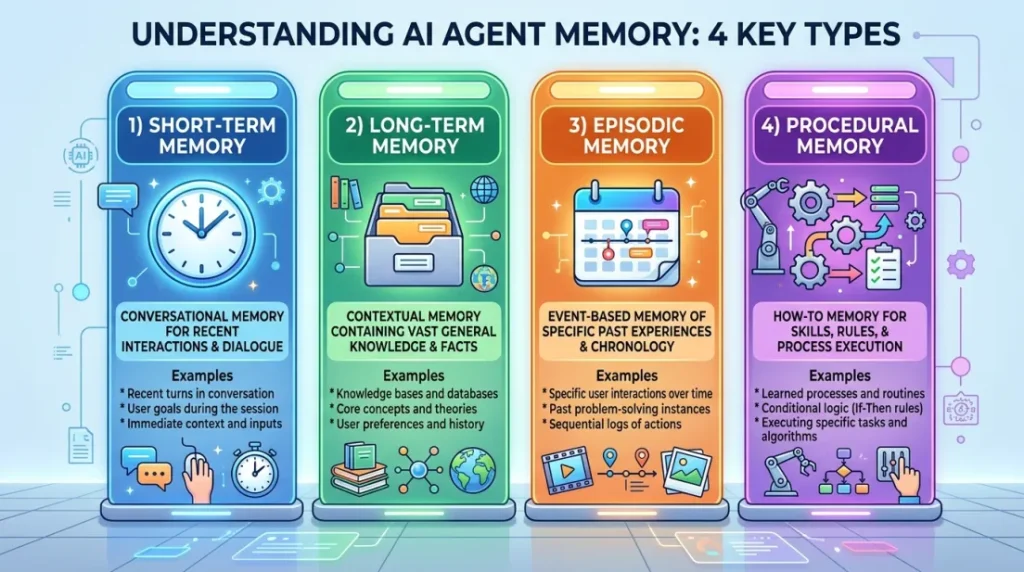
– There are four main types of memory: short-term (conversational), long-term (contextual), episodic (event-based), and procedural (workflow-based)
– Without memory, AI agents fail at multi-step tasks, personalization, and any workflow that requires context across sessions
– Memory powers real-world use cases like sales follow-ups, customer support continuity, and enterprise knowledge retrieval
– Best AI agent platforms handle memory natively with persistent storage, semantic search (RAG), and multi-agent context sharing
What Is AI Agent Memory?
At its core, AI agent memory is the ability of an AI system to store, recall, and use information from past interactions to make better decisions in the future.
Think of it like this:
– A chatbot without memory treats every conversation like it’s the first one. You could tell it your name five times in five different sessions, and it would still ask again.
– An AI agent with memory remembers who you are, what you’ve asked before, and what context matters for the current conversation.
But here’s the thing, memory isn’t just about recalling facts.
It’s about understanding context, learning patterns, and adapting behavior based on what’s happened before.
Portable AI Agents In Seconds, Use Everywhere
Prompt, Test, and Deploy AI Agents Across Social Platforms and LLMs. Automate Everything.
The Technical Definition (Without the Jargon)
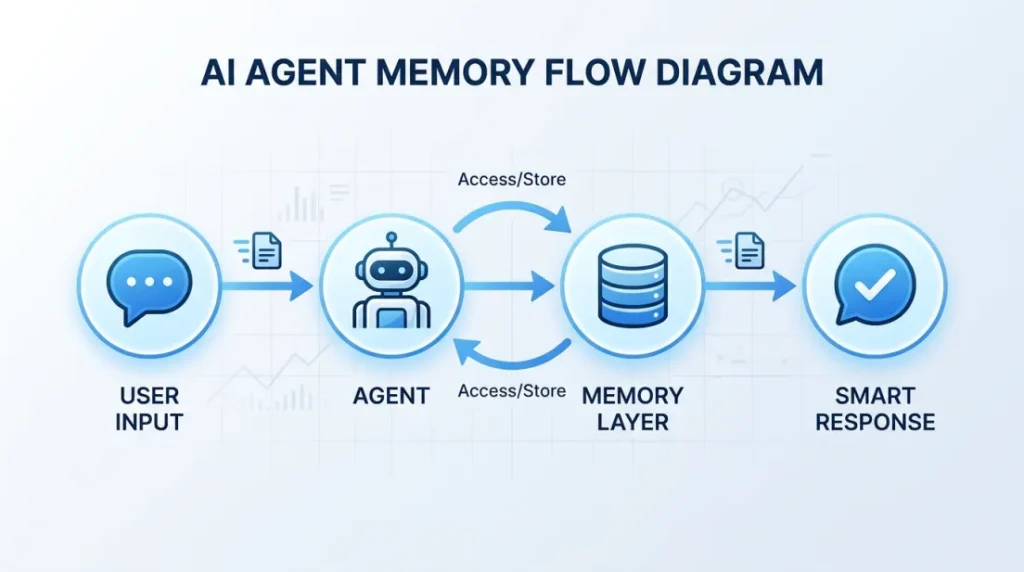
In technical terms, AI agent memory refers to the storage and retrieval mechanisms that allow an agent to:
- Capture relevant data from user interactions (messages, actions, preferences)
- Store that data persistently (not just in a temporary session)
- Retrieve context intelligently when needed (using semantic search, not just keyword matching)
- Apply that context to improve reasoning and decision-making
Modern AI agent frameworks handle this through a combination of databases, embeddings, vector stores, and retrieval-augmented generation (RAG).
But not all platforms do it well, and that’s where most AI agents fall apart.

Why Memory Matters in AI Agents
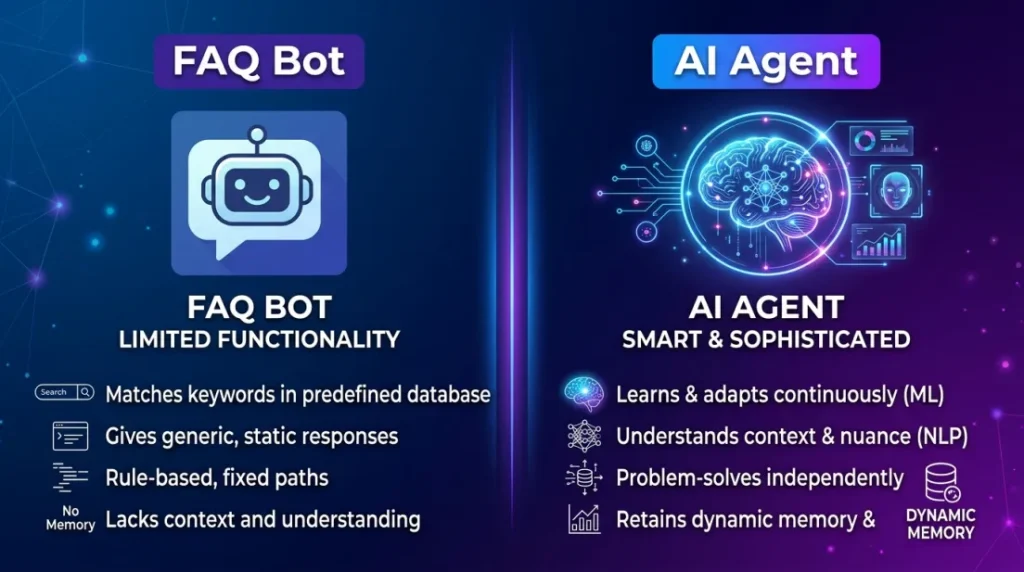
Here’s the truth: without memory, AI agents are just fancy scripts.
They can respond. They can trigger actions. But they can’t think ahead or learn from experience.
Memory is what transforms agents from reactive tools into intelligent systems that:
- Remember user preferences (no need to repeat yourself every session)
- Learn from past conversations (context improves recommendations over time)
- Make smarter decisions (historical data = better reasoning)
- Handle complex, multi-step workflows (without losing the thread halfway through)
- Personalize interactions (feels less robotic, more human)
The Business Impact of AI Agent Memory
Let’s get practical. Here’s what memory enables in real business contexts:
In customer support:
An agent with memory can pull up past tickets, recognize returning customers, and reference previous issues, reducing friction and improving satisfaction.
In sales:
An agent can remember where a lead is in the funnel, what objections they’ve raised, and when to follow up, without manual tracking.
In enterprise operations:
Agents can maintain context across departments, handing off tasks without losing critical details.
In autonomous AI agents:
Memory is what allows agents to operate independently, making decisions based on accumulated knowledge rather than just the current input.
Bottom line: If your AI agent doesn’t have memory, it’s not really an agent, it’s just a glorified FAQ bot. When businesses evaluate the best AI agents, memory is often one of the biggest differentiators. The ability to retain context, recall past interactions, and apply that knowledge over time has a direct impact on how useful an agent becomes in real-world situations.
Types of Memory in AI Agents
Not all memory is created equal.
AI agents use different types of memory depending on the task, the timeframe, and the level of intelligence required.
Here’s the breakdown:
1. Short-Term Memory (Conversational Memory)
What it is:
This is the memory an agent uses during a single conversation. It keeps track of what’s been said in the current session so the agent can maintain context across multiple turns.
Example:
You: “Book me a flight to New York.”
Agent: “Sure! When would you like to leave?”
You: “Friday morning. And make it business class.”
Agent: “Got it, business class flight to New York on Friday morning.”
The agent remembered “New York” from the first message and applied it to the second.
Technical implementation:
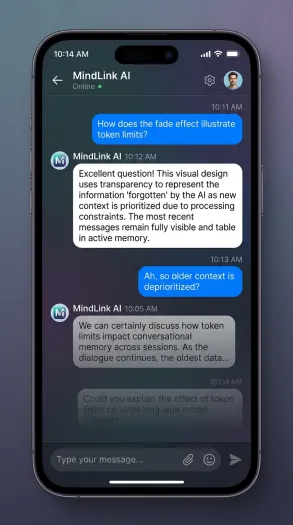
Most modern LLMs (like GPT-4, Claude, etc.) have built-in short-term memory via the conversation context window. But this has limits, typically 8K to 128K tokens, depending on the model.
Use cases:
– Customer support chatbots
– Virtual assistants
– Conversational AI for lead qualification
Failure mode:
If the conversation gets too long, the agent “forgets” earlier parts of the chat because it runs out of context window space. That’s where summarization or long-term memory kicks in.

2. Long-Term Memory (Contextual Memory)
What it is:
This is where agents store information across sessions. Even if you close the chat and come back a week later, the agent remembers.
Example:
First conversation:
You: “My name is Sarah, and I run a marketing agency.”
Agent: “Nice to meet you, Sarah!”
One week later:
You: “Hey, I’m back.”
Agent: “Welcome back, Sarah! How’s the marketing agency going?”
The agent didn’t just store “Sarah” in a database, it contextualized who you are and what matters to you.
Technical implementation:
This requires persistent storage (databases, vector stores) and often uses embeddings to semantically search past interactions.
Use cases:
– Sales agents tracking lead history
– Custom AI agents with user profiles
– AI agents for small businesses that serve repeat customers
Failure mode:
Without intelligent retrieval, long-term memory becomes a junk drawer of irrelevant data. That’s why semantic search (RAG) matters.
3. Episodic Memory
What it is:
This is memory tied to specific events or interactions. It’s the “I remember when you…” type of memory.
Example:
Agent: “Last week, you asked about our pricing. Today, you’re asking about integrations, looks like you’re evaluating us for your team.”
Episodic memory allows agents to recognize patterns, infer intent, and adapt their responses based on the user’s journey.
Technical implementation:
This is often stored as timestamped events in a database, with metadata (user ID, action type, outcome) attached.
Use cases:
– Enterprise AI agents tracking customer journeys
– AI agents for small businesses monitoring repeat interactions
– Autonomous AI agents making decisions based on past outcomes
Failure mode:
If episodes aren’t tagged or contextualized properly, they’re just logs, not intelligence.
4. Procedural Memory
What it is:
This is “how-to” memory, the steps an agent has learned to follow for specific tasks.
Example:
Agent task: “Pull sales data from CRM, format it into a report, and email it to the team every Monday.”
The agent doesn’t need to be told how to do this every time. It’s learned the procedure.
Technical implementation:
This is often stored as workflows, scripts, or learned behaviors (via reinforcement learning or hardcoded automation).
Use cases:
– Workflow automation
– Agentic AI systems replacing manual tasks
– AI agent platforms running recurring jobs
Failure mode:
If procedures aren’t updated when systems change, agents keep executing outdated steps, leading to errors.
How AI Agent Memory Works (The Technical Breakdown)
Alright, let’s get into the mechanics.
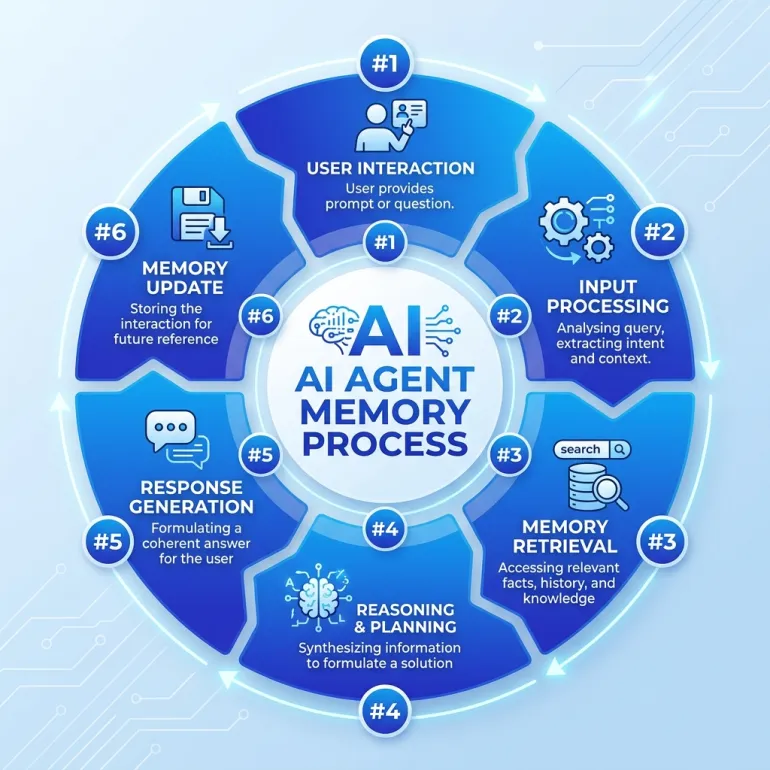
Here’s the step-by-step process of how memory works inside a modern AI agent:
Step 1: User Interaction
The user interacts with the agent, via chat, voice, API call, form submission, etc.
Example: “What’s my order status?”
Step 2: Input Processing
The agent processes the input using natural language understanding (NLU).
It extracts:
– Intent (user wants order status)
– Entities (no specific order number mentioned, needs to retrieve)
– Context (who is this user?)
Step 3: Memory Retrieval
The agent queries its memory layer to pull relevant context:
– User ID: John Doe (logged in via email)
– Past orders: Order #12345, placed 3 days ago
– Previous conversations: Asked about shipping times yesterday
Step 4: Reasoning
The agent combines:
– Current input (“What’s my order status?”)
– Retrieved memory (user = John Doe, last order = #12345)
– Real-time data (pulls order status from database)
Result: “Your order #12345 shipped yesterday. Tracking link: […]”
Step 5: Response Generation
The agent generates a response using the full context.
Instead of saying: “Can you provide your order number?”
It says: “Your order #12345 shipped yesterday. Here’s the tracking link.”
That’s the power of memory.
Step 6: Memory Update
The agent stores this interaction for future reference:
– What the user asked: Order status check
– What the agent provided: Tracking info for #12345
– Outcome: User satisfied (no follow-up complaints)
Next time, if the user asks about shipping again, the agent has even more context.

Why Most AI Agents Fail at Memory
Here’s where it gets messy.
A lot of no-code AI agent builders claim to have memory. But what they actually offer is:
❌ Session-only memory (gone when you close the chat)
❌ Static variables (you can store “name” in a field, but that’s not real learning)
❌ Manual memory management (you have to code the storage/retrieval yourself)
Real memory requires:
- Persistent storage (database-backed, not session cookies)
- Smart retrieval (RAG, embeddings, semantic search, not just SQL queries)
- Context pruning (keeping what matters, ditching what doesn’t)
- Multi-agent memory sharing (agents handing off context to each other)
If your AI agent platform doesn’t handle this natively, you’re building memory systems from scratch.
And trust me, that’s not where you want to spend your engineering time.
Common Memory Failures
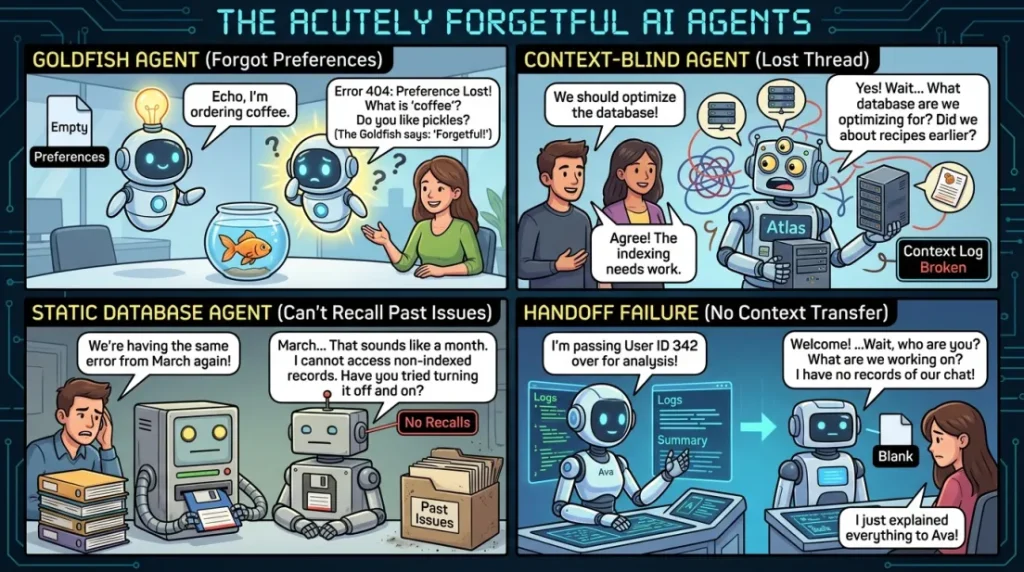
Let’s look at real examples of where AI agents fail:
- The Goldfish Agent
You tell it your preferences in message 1. By message 10, it’s asking you the same questions again.
- The Context-Blind Agent
You’re mid-conversation, and it suddenly forgets what you were talking about because the context window filled up.
- The Static Database Agent
It “remembers” your name and email, but can’t recall that you asked about refunds three times last month.
- The Handoff Failure
You talk to Agent A, then get routed to Agent B. Agent B has no idea what you just said.
All of these are memory failures, and they kill user trust fast.
Real-World Use Cases for AI Agent Memory
Let’s get practical.
Here’s how memory powers real AI agent use cases in production:
1. Sales Follow-Up Agents
Scenario:
An AI agent reaches out to a lead via email. The lead replies: “Not interested right now.”
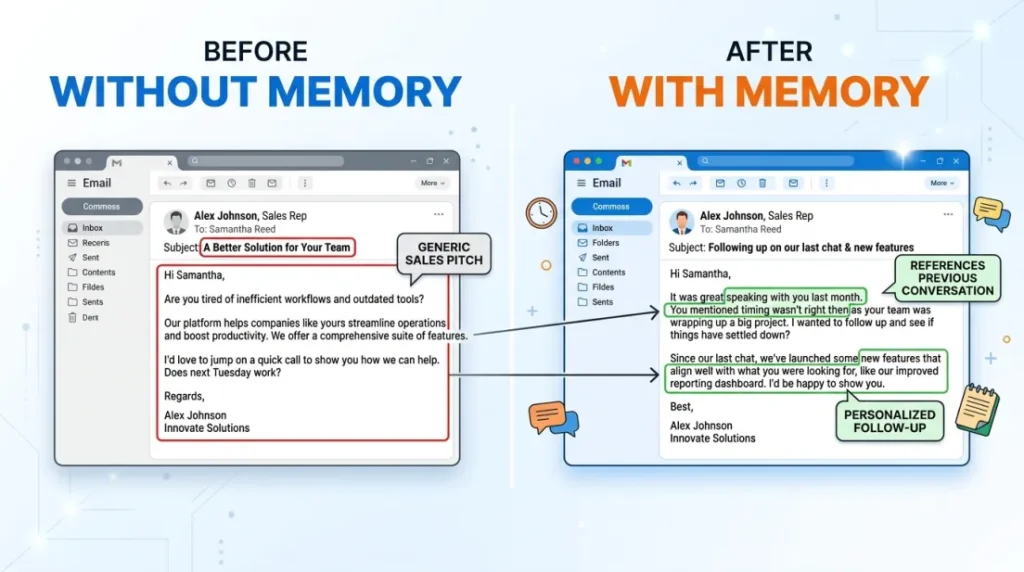
Without memory:
The agent sends the same generic pitch again in 30 days. Lead unsubscribes.
With memory:
The agent waits 30 days, then follows up with:
“Hey Sarah, you mentioned timing wasn’t right last month, has anything changed on your end?”
Result: Higher engagement, lower unsubscribe rate, more conversions.
2. Customer Support Agents
Scenario:
A customer contacts support: “Where’s my order?”
Without memory:
Agent: “Can you provide your order number?”
Customer: (frustrated) “I already told you this yesterday.”
With memory:
Agent: “Hi Sarah! Your order #12345 shipped yesterday. Here’s the tracking link: […]”
Result: Faster resolution, happier customers.
3. Internal Knowledge Agents
Scenario:
An employee asks: “What’s our refund policy for enterprise clients?”
Without memory:
Agent: “Here’s our general refund policy.”
(Not helpful—enterprise policies are different)
With memory:
Agent: “You’re in sales, so here’s the enterprise refund policy: [tailored answer]”
Result: More relevant answers, less time wasted.
4. Onboarding Agents
Scenario:
A new user signs up for your SaaS product.
Without memory:
The agent walks them through the same onboarding flow every session.
With memory:
Agent: “Welcome back! Last time, you set up your first workflow. Ready to add integrations?”
Result: Faster onboarding, better activation rates.
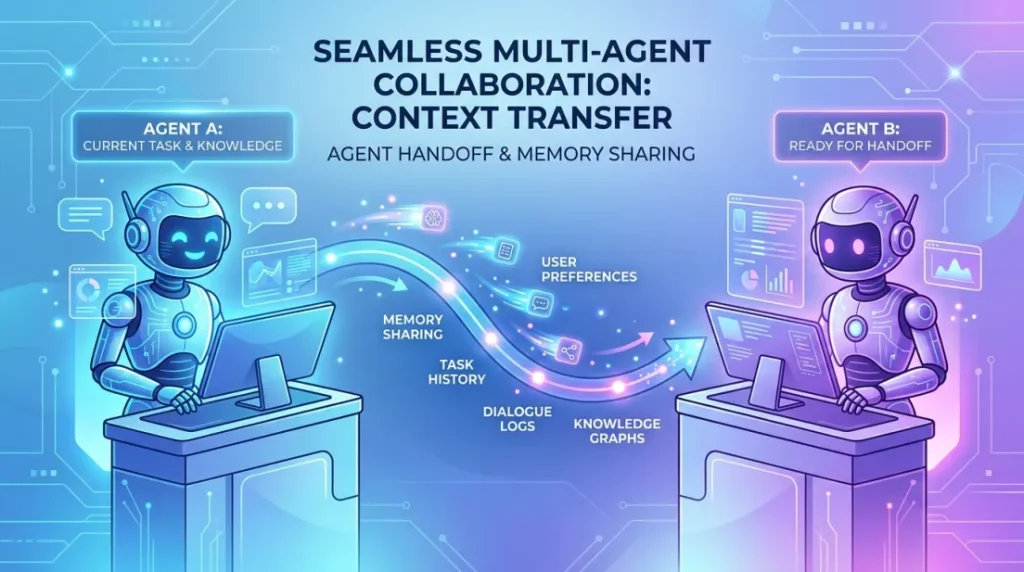
5. Multi-Agent Workflows
Scenario:
A lead qualification agent identifies a hot lead and hands it off to a sales follow-up agent.
Without memory:
The sales agent has no context. Asks the same qualifying questions again.
With memory:
The sales agent picks up exactly where the qualification agent left off, with full context.
Result: Seamless handoffs, better conversions.
How to Build AI Agents with Memory
If you’re building custom AI agents or evaluating the best AI agent platforms, here’s what to look for:
Native Memory Storage
What to ask:
Does the platform store conversation history, user data, and context automatically, or do I have to build it myself?
What good platforms do:
– Automatically persist conversations to a database
– Store user profiles with metadata
– Track interaction history across sessions
Red flags:
– “You can integrate your own database”
– “Memory is session-based by default”
– “Use webhooks to save data externally”
If you’re building memory infrastructure yourself, that’s a month of engineering work, minimum.
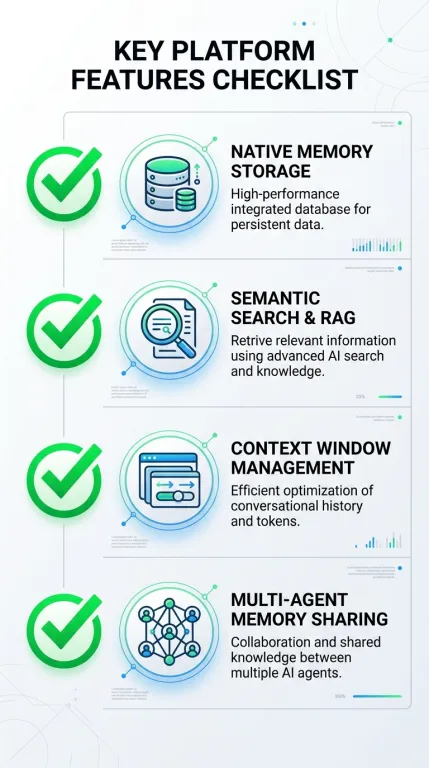

Semantic Search & RAG
What to ask:
Can the agent search its memory intelligently, or is it just keyword matching?
Example:
User: “What did I say about pricing last month?”
Bad memory system: Returns nothing (no exact keyword match for “pricing”).
Good memory system: Uses embeddings to retrieve: “On March 15, you asked about enterprise pricing and mentioned budget constraints.”
What good platforms do:
– Use embeddings (OpenAI, Cohere, etc.) to vectorize past interactions
– Store vectors in a semantic search engine (Pinecone, Weaviate, Qdrant)
– Retrieve relevant context even when wording differs
Red flags:
– “Memory is stored in a SQL database with full-text search”
– No mention of embeddings or RAG
Context Window Management
What to ask:
What happens when a conversation gets too long for the model’s context window?
What good platforms do:
– Automatically summarize old messages
– Prioritize recent + relevant memory
– Prune low-value context
Red flags:
– Agent crashes when conversations exceed token limits
– No automatic summarization
– You have to manually manage context length
Multi-Agent Memory Sharing
What to ask:
If I have multiple agents working together, can they share context?
Example:
A lead qualification agent identifies a hot lead. It hands off to a sales agent. The sales agent should have full context without re-asking questions.
What good platforms do:
– Support agent-to-agent context passing
– Maintain a shared memory layer across agents
– Allow agents to query each other’s memory
Red flags:
– Each agent has isolated memory
– No handoff mechanism
– Manual context passing via APIs
Best AI Agent Platforms for Memory
Alright, let’s talk platforms.
If you’re serious about building AI agents with real memory, here’s what separates the best from the rest:
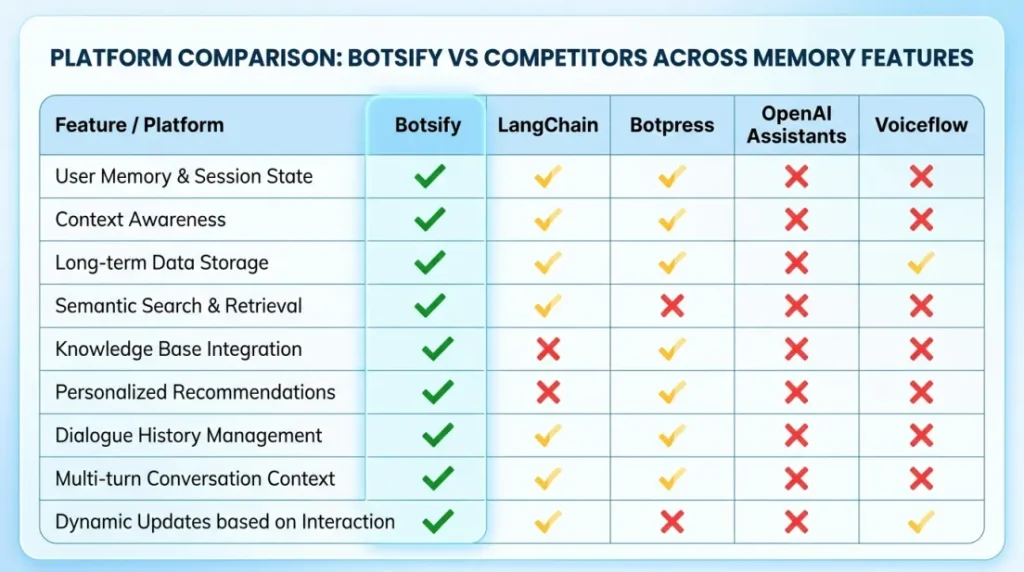
What Makes Botsify Stand Out
Unlike traditional Botpress alternatives or DIY frameworks like LangChain, Botsify is built for persistent, intelligent memory across:
- Multi-channel agents (web, WhatsApp, Slack, CRMs—context follows the user everywhere)
- White label AI agent platforms (agencies can resell with full branding + memory infrastructure included)
- Custom AI agents (no-code builder + API flexibility for advanced memory logic)
- Enterprise AI agents (secure, scalable, compliant—ready for production)
Key memory features:
– Automatic conversation persistence
– Semantic search via embeddings
– Multi-agent context sharing
– User profiles + metadata storage
– Cross-channel memory sync
Whether you’re an AI agent agency building for clients or a business deploying AI agents for small businesses, memory isn’t an optional feature, it’s the foundation.
Other Platforms (And Where They Fall Short)
LangChain:
Great for developers, but you’re building memory systems from scratch. No UI, no hosted solution.
Botpress:
Has basic memory, but lacks semantic search and multi-agent orchestration. Feels clunky at scale.
OpenAI Assistants API:
Good short-term memory, but limited long-term context management. No multi-agent handoffs.
Voiceflow:
Decent for simple bots, but memory is mostly manual variable management, not true intelligence.
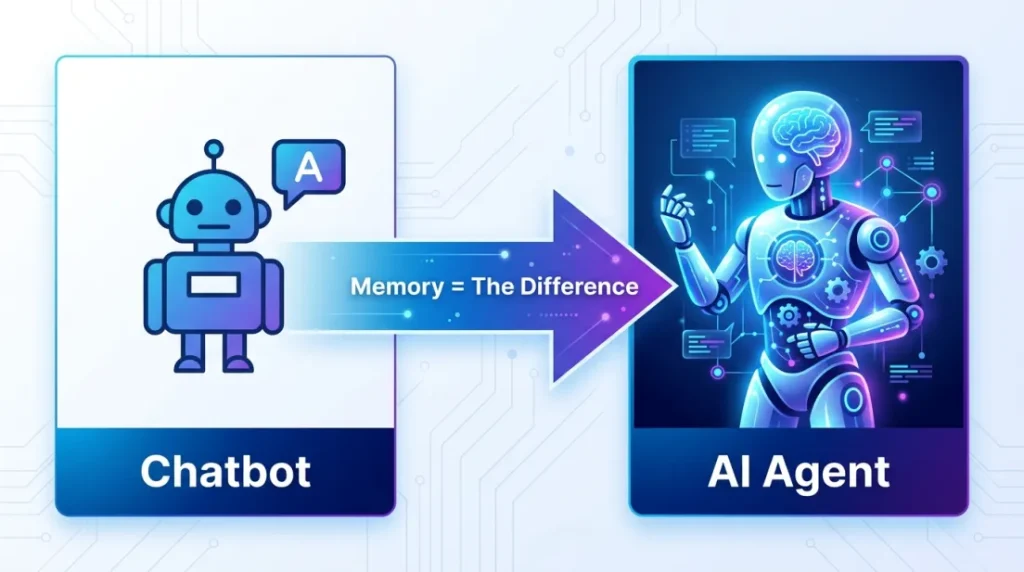
Memory = The Difference Between Bots and Agents
Here’s the bottom line:
Without memory, you have a chatbot.
With memory, you have an AI agent.
Memory is what enables:
– Agent reasoning (making decisions based on past data, not just current input)
– Contextual conversations (feeling less robotic, more human)
– Autonomous AI agents (operating independently without constant human input)
– Personalization (adapting to individual users over time)
– Multi-step workflows (completing complex tasks without losing context)
Today, almost every modern AI platform includes some form of memory, but the quality of implementation varies significantly from one AI agent builder to another.
If you’re serious about building or deploying AI agents, whether for internal operations, customer support, or revenue-driving workflows, memory isn’t optional.
It’s the foundation.
Final Thoughts
AI agent memory is what transforms an AI system from a reactive tool into a useful assistant that can understand context, maintain continuity, and support complex workflows.
Without memory, even the most advanced models struggle to deliver personalized experiences or handle multi-step tasks effectively. As AI agents become more common in business operations, memory will be one of the most important factors separating basic automation from truly intelligent systems.
Understanding how it works today will help you choose and build better AI solutions tomorrow.
AI Agentic Platform For Building Portable AI Agents
Say Hello To Agentic AI That Connects With Your CRM And Even Other Agents