


Your team just spent six weeks building an AI agent. The demo was flawless. Leadership is excited. The support team is ready to hand off Tier 1 queries. Then you deploy, and within hours, the agent starts hallucinating pricing tiers, misrouting escalations, and giving customers instructions that contradict your own knowledge base.
Now you’re in damage control mode. The agent gets pulled. Trust erodes. And the question everyone asks isn’t “how do we fix this?”, it’s “why did we rush this?”
This scenario plays out more often than most teams admit. The technology works. The planning didn’t.
Key Takeaways
- AI agent implementation failures are almost always planning failures, not technology failures.
- Most teams skip the readiness audit and pay for it in the first week of deployment.
- Data quality, permission boundaries, and escalation logic matter more than the underlying model.
- A phased rollout with a pilot group reduces risk and builds organizational confidence.
- Testing needs to cover edge cases, not just happy paths.
- Post-deployment monitoring is a continuous obligation, not a one-time check.
- The same agent will need updates as your products, policies, and customer expectations evolve.
Portable AI Agents In Seconds, Use Everywhere
Prompt, Test, and Deploy AI Agents Across Social Platforms and LLMs. Automate Everything.
Why Most AI Agent Rollouts Fall Short
There’s a pattern in failed AI implementations. The organisation invests heavily in the model, the interface, and the training data. But they treat deployment as a finish line instead of a starting point.
The real issue isn’t technical competence. It’s a readiness gap, the space between “the agent works in a sandbox” and “the agent works reliably with real customers, real data, and real consequences.”
Three things separate successful AI agent implementation from the kind that gets rolled back within a month:
First, context. An agent that performs well on curated test queries will behave differently when faced with the messy, incomplete, and contradictory inputs that real users produce. Your test cases are a theory. Production is the experiment.
Second, boundaries. Without clear scope definitions, escalation paths, and confidence thresholds, your agent will guess when it should defer. And guessing is where the damage happens.
Third, feedback loops. Deployment isn’t the end of the build cycle. It’s the beginning of the learning cycle. Teams that treat post-launch monitoring as optional are betting their reputation on a model that can’t improve.
| Factor | Teams That Succeed | Teams That Struggle |
| Pre-deployment testing | Test for edge cases, ambiguity, and failure modes | Test only happy paths and demo scenarios |
| Escalation design | Clear, documented handoff criteria | Vague “escalate if unsure” instructions |
| Data readiness | Audited, cleaned, structured data sources | Raw exports with minimal preprocessing |
| Rollout strategy | Phased, controlled, measured | Full deployment on day one |
| Post-launch monitoring | Continuous with defined improvement triggers | One-time check after launch |
The checklist that follows exists to close that readiness gap. It’s built from patterns that work across industries, from customer support automation to sales qualification to internal process agents.
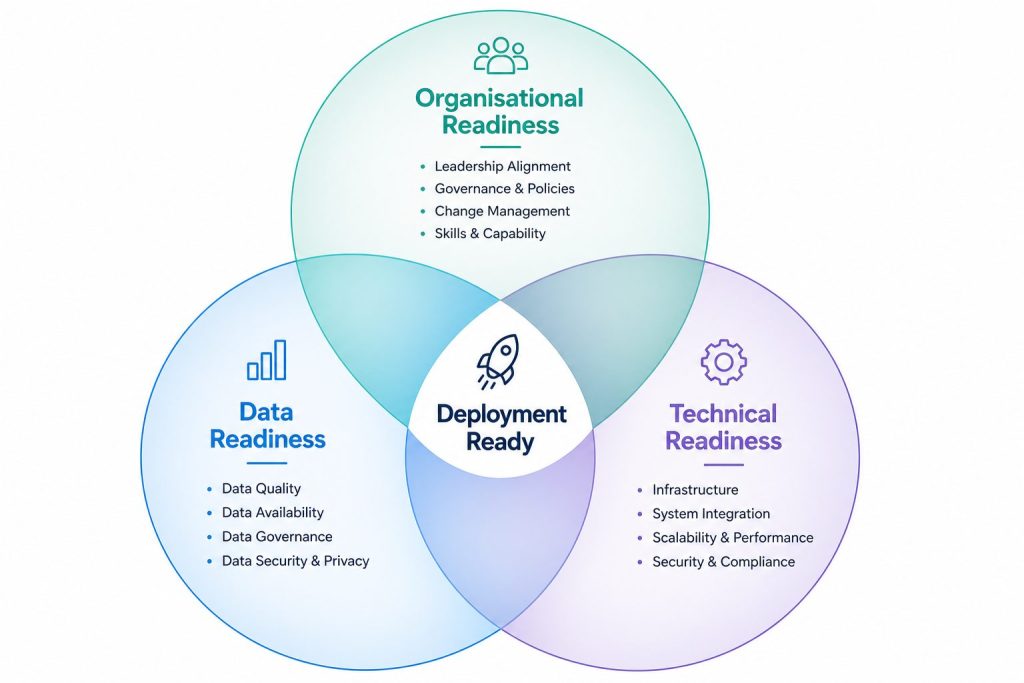
The Pre-Flight Check: Three Readiness Assessments You Can’t Skip
Before you open a single implementation ticket, you need answers to three questions. These aren’t technical questions. They’re strategic. And they determine whether your AI agent implementation will deliver value or create work.
1. Organisational Readiness
Is your team prepared for an agent that handles real work?
This sounds obvious, but it’s the most common failure point. Organisational readiness means:
- Stakeholders agree on what success looks like. Not in vague terms (“better customer experience”) but in measurable outcomes (“first response time under 30 seconds, resolution rate above 70%”).
- The support or operations team understands the agent’s role. They know which cases the agent handles, which cases escalate to them, and how to override the agent when it gets something wrong.
- Someone owns the agent post-deployment. Not “the team”, a specific person who reviews performance, updates training data, and makes decisions about scope changes. Businesses without in-house AI expertise often work with AI Agent Development Services providers to establish governance, implementation processes, and long-term ownership before deployment begins.
Expert tip: Before you build anything, write a one-page “agent charter” that defines the agent’s purpose, scope, success metrics, escalation rules, and owner. Share it with every stakeholder. If people disagree, resolve those disagreements before deployment. An agent built on ambiguity will fail.
2. Data Readiness
Your agent is only as good as the information it has access to. And most organisations underestimate how much data cleanup is needed before deployment.
Run through this checklist with your data sources:
- Is the data current? Outdated pricing, product descriptions, or policies will cause your agent to give wrong answers confidently.
- Is the data consistent? If your knowledge base contradicts your FAQ page, the agent will pick one at random, and it might not be the one you want.
- Is the data structured for retrieval? AI agents don’t read documents like humans do. They need clean, chunked, well-organised content that retrieval systems can search efficiently.
- Are there permission boundaries? If your agent has access to internal documentation, customer records, or pricing tiers, make sure it can only surface what each user is authorised to see.
Expert tip: Run a data audit at least two weeks before you plan to deploy. Give yourself time to fix inconsistencies, remove outdated content, and restructure messy documents. The quality of your agent’s responses will track directly to the quality of your data.
3. Technical Readiness
This is the part most teams focus on. But technical readiness isn’t just about picking the right model or platform. It’s about infrastructure. If your team lacks experience with production AI systems, evaluating an AI Agent Development Company at this stage can help identify infrastructure and deployment gaps before they become expensive problems.
- Latency requirements. Can your stack deliver responses in under two seconds for customer-facing agents? If your agent needs to call external APIs, what happens when those APIs are slow or down?
- Scalability. What happens when traffic spikes? Does your agent queue requests, degrade gracefully, or fall over?
- Monitoring and logging. Can you trace every response the agent gives? If a customer complains about a bad answer, can you find the exact query, the context, and the agent’s reasoning?
- Fallback mechanisms. What happens when the agent can’t answer? Does it escalate to a human, offer alternatives, or just say “I don’t know”?
If you’re building on an AI Agent Platform, most of these infrastructure concerns are handled for you. If you’re assembling components yourself, every item on this list needs a deliberate solution.

The AI Agent Implementation Checklist
This is the core of the article. Print it. Pin it. Use it.
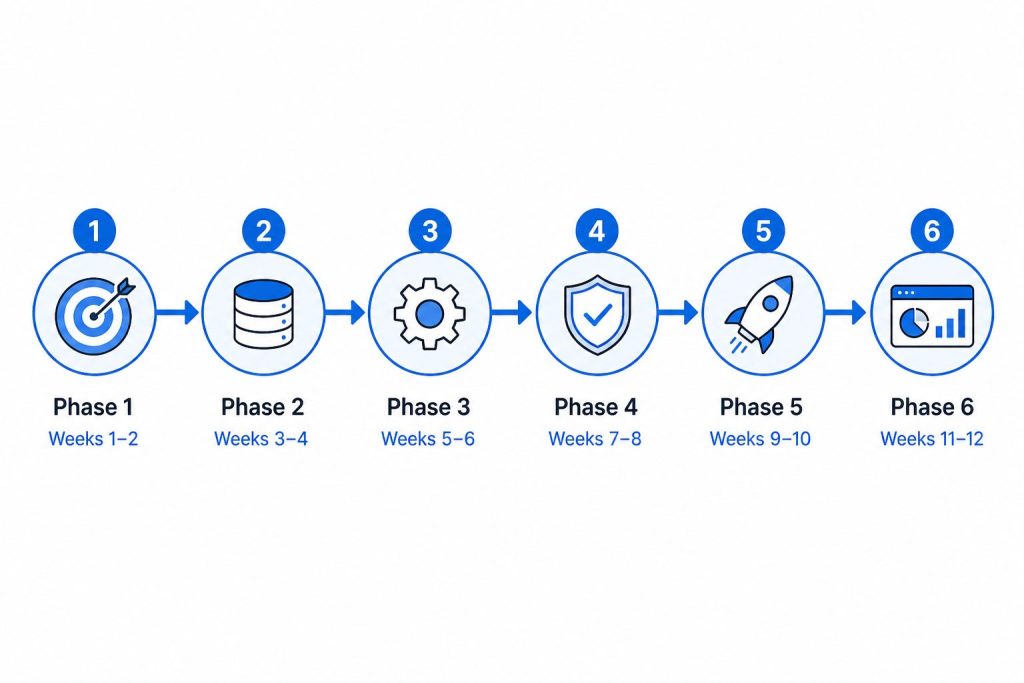
Phase 1: Scope Definition
Why this matters: Scope creep is the silent killer of AI projects. Without clear boundaries, your agent will try to do everything and do nothing well. This stage is where most businesses define their AI agent requirements, documenting exactly what the agent should do, what it should never do, and how success will be measured.
☐ Define the agent’s primary use case in one sentence. Whether you’re deploying customer support, sales, or Custom AI Agents for internal operations, a clearly defined scope prevents unnecessary complexity later.
☐ Identify the top 5-10 question types or tasks the agent will handle. At this stage, it’s also helpful to map your AI Agent Workflows so everyone understands how the agent will handle requests, make decisions, and hand off conversations when needed.
☐ Document what the agent will NOT handle (explicit exclusion list).
☐ Define success metrics with specific targets (e.g., “resolve 60% of Tier 1 queries without escalation”).
☐ Get written sign-off from all stakeholders on scope and metrics.
☐ Identify the agent owner, the person responsible for performance and updates.
Phase 2: Data Preparation
Why this matters: Your agent will repeat your data’s mistakes. If your knowledge base has gaps, contradictions, or outdated information, the agent will amplify those problems at scale.
☐ Audit all data sources the agent will access.
☐ Remove or flag outdated content.
☐ Resolve contradictions between sources (e.g., knowledge base vs. FAQ vs. product docs).
☐ Structure content for retrieval (clean headings, short paragraphs, clear hierarchies).
☐ Set up permission controls for sensitive data.
☐ Create a process for keeping data sources updated.
☐ If your AI agent relies on AI Agent Memory to retain context across conversations, make sure the information it stores is accurate, relevant, and aligned with your privacy policies.
Phase 3: Agent Configuration
Why this matters: Configuration is where you turn a general-purpose model into a specialised tool. This phase determines personality, tone, and behavioural boundaries. A capable AI Agent Builder should make it easy to configure prompts, guardrails, integrations, testing, and deployment without forcing teams into rigid workflows.
☐ Configure the agent’s persona and tone guidelines.
☐ Set confidence thresholds (when should the agent guess vs. when should it escalate?).
☐ Define escalation paths, who gets the handoff, what context is included, and how.
☐ Build guardrails: topics the agent should never discuss, opinions it should never express.
☐ Configure AI Agent Governance rules: audit trails, override permissions, compliance requirements.
☐ Set up logging and monitoring from day one.
Phase 4: Testing
Why this matters: Testing is where you find the gaps your planning missed. A good testing phase catches issues while they’re still fixable.
☐Run happy-path tests for all primary use cases.
☐ Run edge-case tests: ambiguous queries, incomplete information, contradictory requests.
☐ Run adversarial tests: attempts to jailbreak, extract sensitive data, or bypass guardrails.
☐ Run escalation tests to verify handoff quality.
☐ Run user testing with a small group of real users (not the build team).
☐ Document every failure mode and decide whether to fix or scope-exclude.
Phase 5: Pilot Deployment
Why this matters: A pilot lets you validate performance with real users while limiting risk. It’s the difference between a controlled experiment and a gamble.
☐ Select a pilot group (e.g., one support team, one product line, one customer segment).
☐ Set up override and manual-review capabilities for the pilot period.
☐ Communicate the pilot to users: “You’re talking to an AI agent. A human is monitoring and can step in.”
☐ Monitor performance daily. Compare against your success metrics.
☐ Collect feedback from both users and the human team handling escalations.
☐ Decide on go/no-go criteria for full deployment.
Phase 6: Full Deployment
Why this matters: Full deployment is where preparation meets execution. The checklist doesn’t end here, it shifts from preparation to monitoring.
☐ Roll out in waves if possible (by region, team, or traffic volume).
☐ Communicate the deployment to all affected teams.
☐ Verify integrations with all connected systems.
☐ Confirm monitoring dashboards are live and accurate.
☐ Set up the feedback loop: how will the agent improve based on real usage?
☐ Schedule the first performance review (30 days post-deployment).
Testing Your AI Agent: What Most Teams Miss
Testing is the phase where good intentions meet reality. Most teams test for the scenarios they expect. The failures happen in the scenarios they didn’t consider.
The Happy Path Trap
Every team tests the happy path. “Customer asks about a refund policy. The agent responds with the correct policy. The customer is satisfied.” This is necessary but not sufficient.
The real test is the unhappy path:
- Ambiguous queries. “I need help with my account”, which account? What kind of help?
- Incomplete information. “How much does it cost?”, for which product? Which tier? Monthly or annual?
- Contradictory instructions. The agent has been told to prioritise customer satisfaction, but the policy says no refunds after 30 days. How does it handle a 45-day refund request?
- Emotional users. A frustrated customer types in all caps. Does the agent recognise the emotional state and adjust its tone?
The Escalation Quality Test
This is the one test most teams skip. They verify that the agent escalates when it should. They don’t verify that the escalation is useful.
A good escalation includes:
- The user’s original query
- What the agent already tried
- The agent’s confidence score
- Relevant context (account history, product details, previous interactions)
Test this. Hand an escalation to a human agent and ask: “Can you resolve this without asking the customer to repeat themselves?” If the answer is no, your escalation logic needs work.
The Confidence Threshold Trade-off
Setting your confidence threshold involves a trade-off that every team needs to make consciously.
- High threshold (e.g., 95%+): Your agent escalates frequently but rarely makes mistakes. Good for high-risk use cases. Bad for deflection rates.
- Low threshold (e.g., 70%): Your agent handles more queries independently but makes more errors. Good for low-risk use cases where volume matters more than perfection.
There’s no universally correct answer. The right threshold depends on your use case, your risk tolerance, and your team’s capacity to handle escalations.
Expert tip: Start with a higher threshold during the pilot phase, then gradually lower it as you gain confidence in the agent’s performance. You can always tighten it later if error rates climb.
Integration Without Disruption
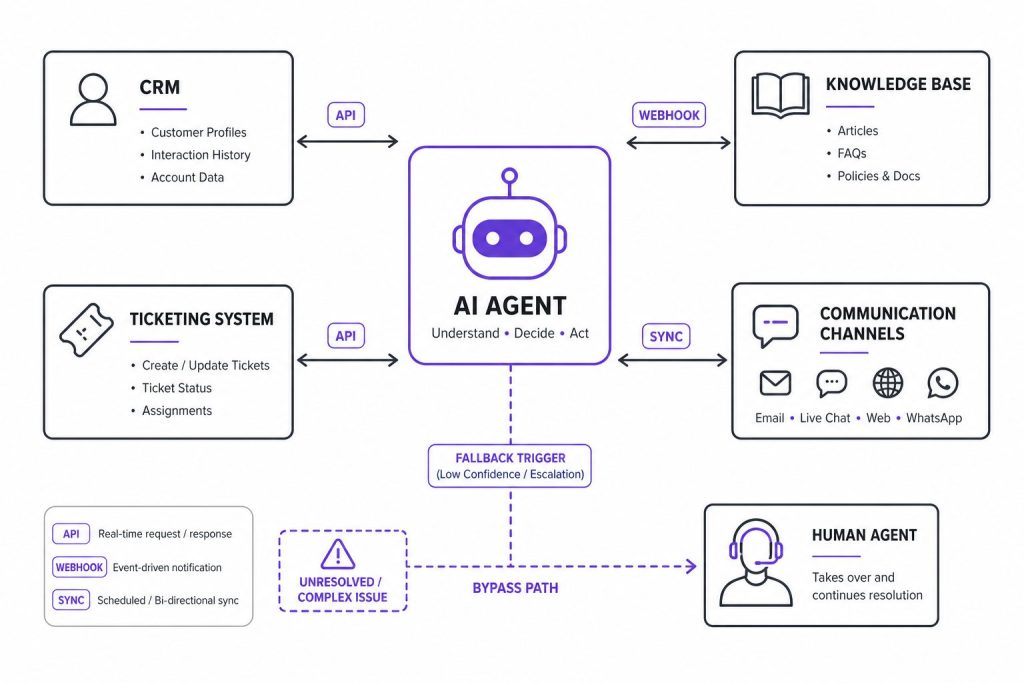
The quality of your AI agent integration determines whether deployment feels seamless or chaotic. Integration is where the agent connects to the systems it needs to do its job: your CRM, knowledge base, ticketing system, and communication channels.
The Integration Checklist
- CRM integration. Does the agent need to pull customer history? Update records? Create tickets?
- Knowledge base sync. How does the agent access your content? Real-time API calls or periodic indexing?
- Channel configuration. Which channels does the agent support? Web chat, WhatsApp, email, Slack?
- Escalation routing. When the agent escalates, does the handoff reach the right team with the right context?
AI Agent Integration deserves its own dedicated discussion, especially around API rate limits, data synchronisation delays, and handling partial failures. For now, the rule is simple: test every integration path before you go live, and have a fallback plan for when any single integration fails.
Handling Partial Failures
What happens when the CRM is down but the knowledge base is working? Can your agent still help customers, or does it shut down entirely?
Graceful degradation is a mark of mature implementation. The agent should be able to:
- Detect when a connected system is unavailable
- Adjust its capabilities accordingly (e.g., “I can answer general questions but can’t look up your account right now”)
- Log the failure for the operations team
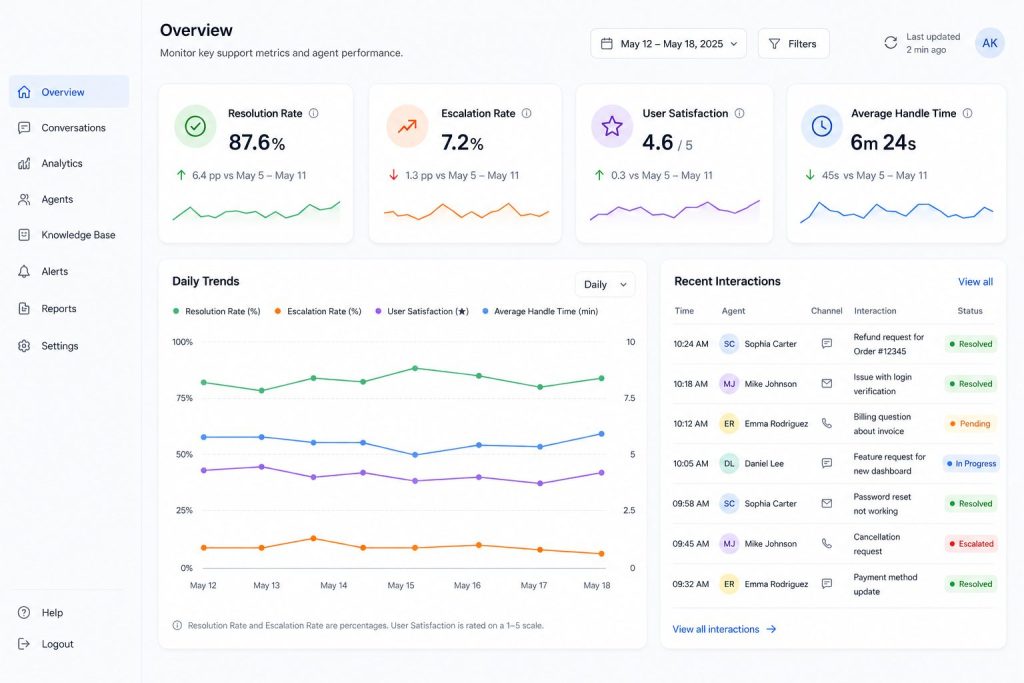
Post-Deployment: The First 30 Days
Deployment isn’t the finish line. The first 30 days are where you discover everything your testing missed.
Week 1: Observe and Correct
Don’t optimise yet. Just watch. Review every escalation, every incorrect answer, every user complaint. The goal is to understand the gap between how the agent performs in testing and how it performs with real users.
Week 2: Targeted Improvements
Based on Week 1 observations, make targeted fixes. Update the knowledge base. Adjust confidence thresholds. Refine guardrails. Don’t try to fix everything at once, prioritise the issues that affect user experience most.
Week 3: Measure Against Goals
Compare performance against your success metrics. Are you hitting the targets you set during scope definition? If not, is the gap in agent performance, unrealistic targets, or both? Think of this checklist as your AI Agent Implementation Roadmap, guiding your team from planning and configuration to deployment and continuous improvement.
Week 4: Plan the Next Iteration
The AI Agent Lifecycle is continuous. By Week 4, you should have a roadmap for the next phase: new use cases, expanded scope, deeper integrations. The agent that launched in Week 1 won’t be the agent you need in Month 6.
Common Mistakes to Avoid
If you’re looking for a shorter list of things to watch out for, here are the patterns that cause the most rework:
- Deploying without a fallback plan. Every agent will face queries it can’t handle. The question is whether your system handles that gracefully or fails visibly.
- Skipping the pilot. A direct-to-full-deployment rollout is the single highest-risk decision you can make.
- Underinvesting in data preparation. Teams spend 80% of their budget on the model and 20% on the data. The ratio should be roughly reversed.
- Treating the agent as a set-and-forget tool. Agents need ongoing supervision, retraining, and scope adjustment. They’re not static.
- Failing to define “good enough.” Without clear success criteria, you’ll never know when to stop optimising and start scaling.
We’ll cover AI Agent Deployment Mistakes in more depth in a separate piece — but if you avoid these five, you’ll dodge the most expensive failures.
Conclusion
AI agent implementation is not a technical challenge with a side of planning. It’s a planning challenge with a technical component. The organisations that succeed are the ones that invest in readiness, scope, testing, and ongoing governance before they ever think about deployment velocity.
The checklist above gives you a practical framework. But frameworks are only useful if you use them. Block out the time, run through each phase deliberately, and give yourself permission to delay deployment if any phase reveals gaps you can’t close quickly.
If you’re looking for a capable AI Agent Builder to speed up the configuration phase, or if you want deeper guidance on the build phase, our AI Agent Development Services team works with organisations through every stage of this process. And if you’re evaluating technology partners, understanding AI Agent Requirements is the logical next step, knowing what you need before you evaluate what’s available.
The agents that work best aren’t the ones built by the fastest teams. They’re the ones built by the most prepared teams.
AI Agentic Platform For Building Portable AI Agents
Say Hello To Agentic AI That Connects With Your CRM And Even Other Agents
Frequently Asked Questions
What is the difference between AI agent implementation and AI integration?
Implementation covers the full lifecycle: scoping, data preparation, configuration, testing, deployment, and monitoring. Integration is a subset of implementation that focuses specifically on connecting the AI agent to existing systems like CRMs, knowledge bases, and communication channels. You can integrate an agent technically without implementing it properly, but that’s where most failures happen.
How long does it take to implement an AI agent for a business?
A focused implementation with a clear use case and prepared data typically takes 6 to 8 weeks from scoping to full deployment. This assumes the organisation already has clean, structured data sources and stakeholder alignment. If you’re starting from scratch with data cleanup, stakeholder negotiations, or vendor evaluation, expect 10 to 12 weeks. An AI Agent Implementation Roadmap can help you estimate more precisely based on your specific circumstances.
What are the most common reasons AI agent implementations fail?
The top three causes are unclear scope, poor data quality, and inadequate testing. Scope issues lead to agents that try to do too much and do nothing well. Data quality issues cause agents to give confident but incorrect answers. Testing gaps mean the team discovers failure modes only after deployment, when the cost of fixing them is highest. Technology choice is rarely the root cause.
Do I need a dedicated AI Agent Development Company to implement successfully?
Not always. If your team has experience with LLM operations, prompt engineering, and the specific infrastructure requirements of production AI agents, you can handle implementation internally. Many organisations prefer to work with a specialised partner for their first deployment to establish patterns, tooling, and governance structures that internal teams can then operate. The Custom AI Agents approach, tailored to your specific workflows and data, often benefits from experienced guidance.
How do I know if my business is ready for AI agent deployment?
Run through the three readiness assessments in this article: organisational readiness, data readiness, and technical readiness. If you can answer yes to all three, stakeholders agree on success metrics, your data sources are clean and current, and your infrastructure can support the agent’s requirements, you’re ready to start the implementation process. If any of the three is a no, address that gap before you begin.
How do AI agents handle multiple languages during deployment?
This depends on whether the underlying model supports multilingual responses natively or requires translation layers. Most modern agents can handle multiple languages, but the quality varies significantly by language pair. During implementation, test each language your agent will support with the same rigour as your primary language, including edge cases, idiomatic expressions, and industry-specific terminology. Some organisations phase in additional languages after the primary language deployment is stable.