


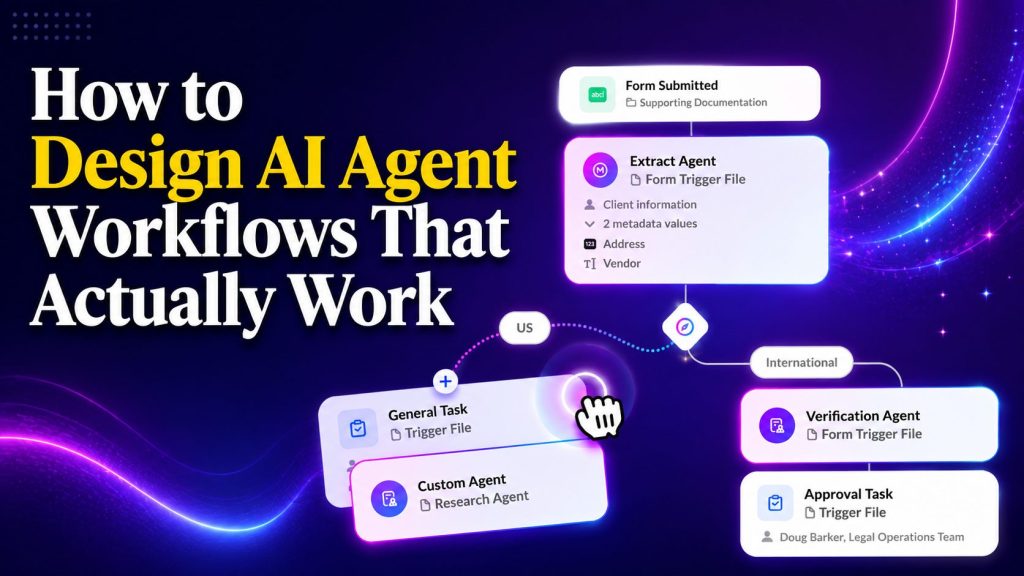
Automation promised to lighten workloads but often added complexity instead. Teams now juggle rigid rule sets, brittle decision trees, and workflows that break the moment reality diverges from the script. The actual problem isn’t the technology itself but how people design it.
Most AI agent workflows fail because they’re built like traditional automation. They map every possible path, create rigid rules, and build complex flowcharts that crack under real-world pressure. The smartest AI agents work differently. They think in terms of goals, not steps. They adapt to context instead of following scripts.
This guide explores how to design AI agent workflows that deliver results in production environments. You’ll see practical frameworks, real examples from multiple business functions, and the structural patterns that separate agents that adapt from automation that breaks.
Key Takeaways
- AI agent workflows fail when designed like traditional automation: the core difference lies in thinking about goals and outcomes rather than mapping every possible conversation path and decision branch.
- Context drives intelligent behavior: agents need access to business rules, product knowledge, customer history, and system integrations to make decisions that align with your goals.
- Goal-based frameworks outperform script-based flows: defining what success looks like and letting the agent determine the path creates resilient systems that handle unexpected scenarios.
- Multi-step workflows require state management: complex agent systems need to remember conversation history, track progress across stages, and maintain context as prospects move through your funnel.
- Prompt-based platforms eliminate technical barriers: modern AI agent builders let non-technical teams deploy intelligent automation by describing what they need in plain language instead of coding logic trees.
Why Most AI Agent Workflows Fail
The pattern repeats across hundreds of failed implementations. Someone builds an elaborate decision tree mapping every possible scenario. They add dozens of if-then rules, creating complex flows that look impressive in the planning phase.
Then reality arrives. A customer asks something slightly outside the expected path. The agent breaks. The entire workflow grinds to a halt because the script didn’t account for this specific variation.
The root problem: they designed a script, not an agent.
Traditional automation follows fixed rules regardless of context. AI agents follow goals and adapt their approach based on what’s happening in the conversation. That fundamental difference changes everything about how you should design workflows.
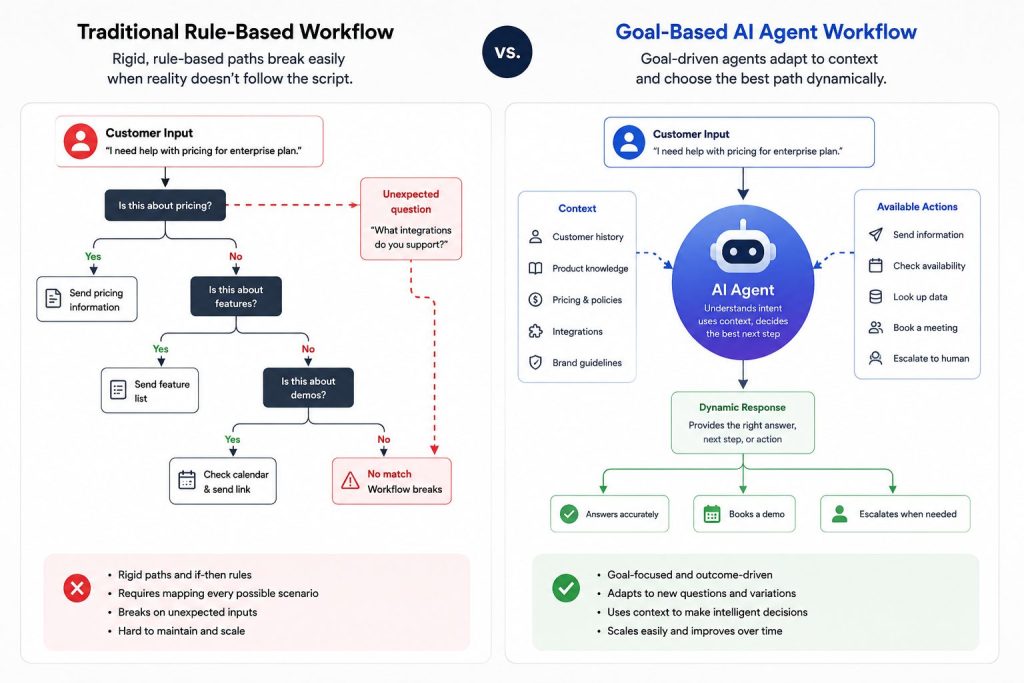

When you design agent-based workflows, you define what success looks like rather than prescribing exact steps. You provide context and tools. Then you let the agent determine the optimal path based on the specific situation it encounters.
This shift from steps to outcomes creates systems that adapt instead of break.
Portable AI Agents In Seconds, Use Everywhere
Prompt, Test, and Deploy AI Agents Across Social Platforms and LLMs. Automate Everything.
The Core Principle: Goals Over Steps
Most teams approach multi-step AI workflows by focusing on sequence. They say “First, the agent does this. Then it checks that condition. Then it takes this action based on the result.”
That’s not how agentic AI should work.
Instead, you define the desired outcome. You give the agent relevant context about your business, products, and customers. You specify what actions it can take. Then you let it decide the optimal sequence based on what it learns during the interaction.
Traditional approach example:
“If customer asks about pricing, send the pricing link. If they ask about features, send the feature list. If they ask about demos, check calendar availability and send booking options.”
Goal-based approach example:
“Your goal is to book qualified demo appointments. You have access to pricing information, feature documentation, and calendar availability. Determine what each prospect needs to move forward and guide them toward scheduling a conversation with our team.”
See the difference? One is a rigid script that handles only the exact scenarios you anticipated. The other is a capable agent with a clear mission that can handle variations you never thought to map.
How to Define Effective Agent Goals
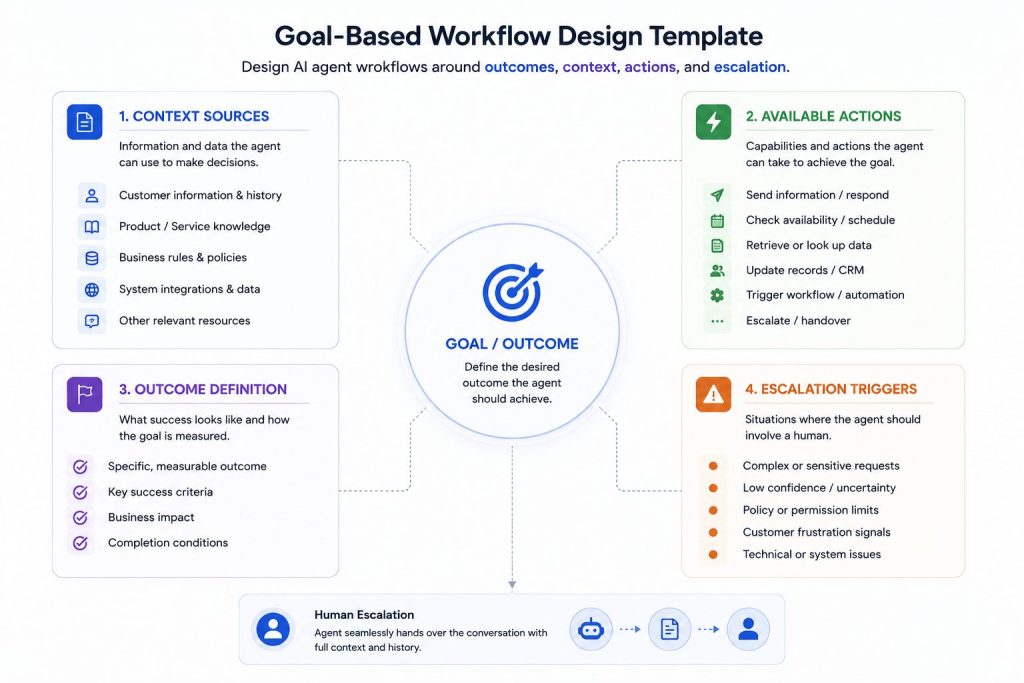
When designing your workflow, answer these foundational questions before touching any tools:
What’s the end goal? Be specific about the outcome, not the process
What does success look like? Define measurable criteria
What information does the agent need? List all context sources
What actions can it take? Enumerate every capability
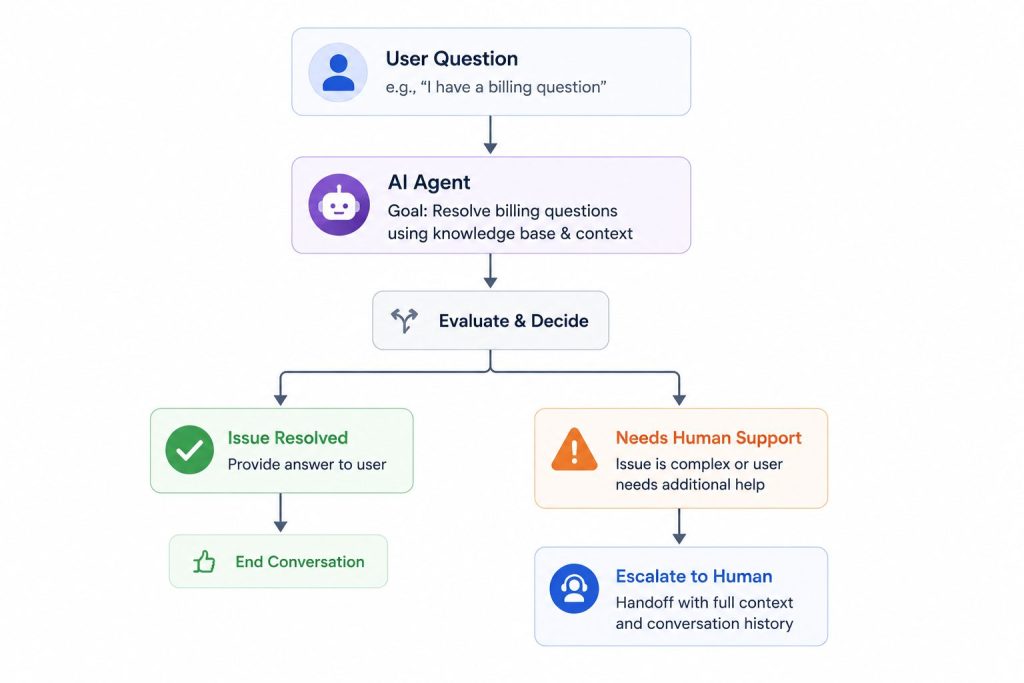
When should it escalate? Identify scenarios requiring human judgment
These questions establish the framework. The tactical steps emerge naturally once you have clear answers.
How to Structure AI Agent Workflows
Even goal-oriented agents need structure. The difference is that you’re building a flexible framework instead of a rigid script.
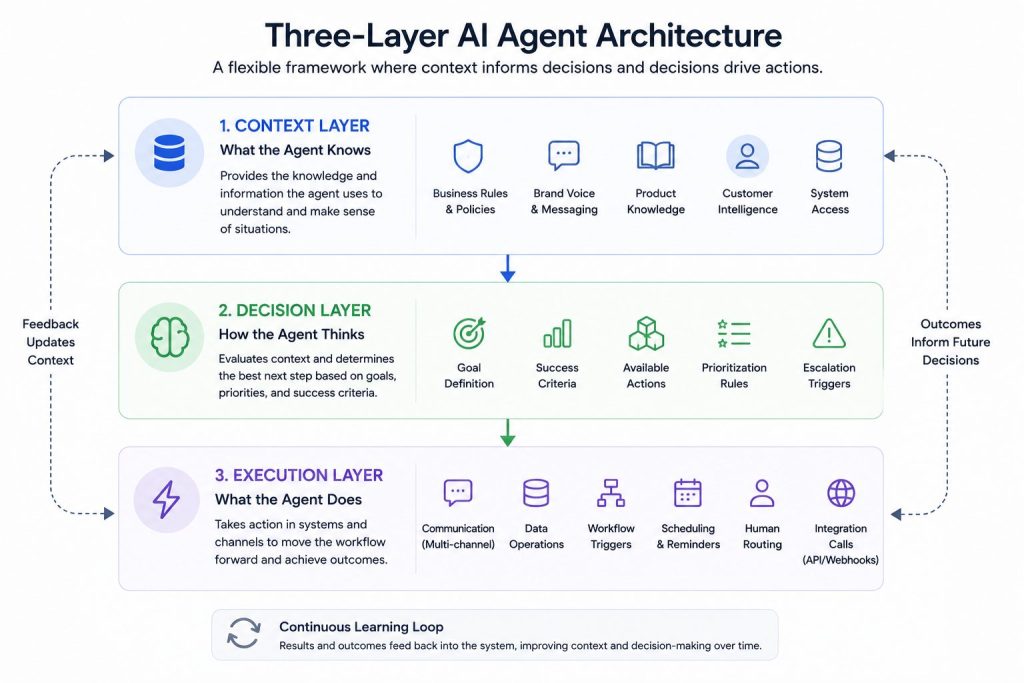
Here’s the three-layer architecture that works in production:
Context Layer: What the Agent Knows
This layer defines everything the agent understands about your business, customers, and current situation. It’s not just data access. It’s contextual understanding that enables intelligent decisions.
Essential context elements:
- Business rules and policies: Pricing structures, service boundaries, authorization limits
- Brand voice and messaging: How to communicate in your company’s style
- Product knowledge: Features, benefits, use cases, common questions
- Customer intelligence: Account history, previous interactions, preferences
- System access: CRM records, knowledge bases, inventory status
Think of this as the agent’s operational knowledge. The richer the context, the better decisions it makes. Agents with deep context can personalize responses, make judgment calls, and handle complex scenarios that would break simpler systems.
Decision Layer: How the Agent Thinks
This layer defines how agents evaluate situations and determine next steps. Rather than coding specific decisions, you provide prioritization guidance and success criteria.
Key decision components:
- Goal definition: The specific outcome this agent pursues
- Success criteria: Measurable indicators of achievement
- Available actions: Everything the agent can do to progress
- Prioritization rules: What matters most when multiple paths exist
- Escalation triggers: When to involve human judgment
Notice the emphasis on prioritization over prescription. You’re not dictating exact decisions. You’re giving the agent a framework for making choices aligned with your business objectives.
Execution Layer: What the Agent Does
This layer connects agent decisions to concrete actions in your systems. The broader the execution capabilities, the more value your agent can deliver autonomously.
Common execution actions:
Communication: Sending responses across multiple channels
Data operations: Creating, updating, or retrieving records
Workflow triggers: Initiating processes in connected systems
Scheduling: Booking appointments or setting reminders
Human routing: Escalating to the right person with full context
Integration calls: Triggering webhooks or API actions
The execution layer transforms agent intelligence into business outcomes. Strong integrations here multiply the value of smart decision-making in the layers above.
AI Workflow Examples That Work in Production
Let’s examine real implementations that deliver measurable results. These examples show the goal-based framework applied to different business functions.
Lead Qualification Agent
Primary Goal: Qualify inbound leads and route them to the appropriate next step based on fit and readiness.
Context Provided:
– Ideal customer profile criteria (company size, industry, budget range)
– Product pricing tiers and feature sets
– Current team capacity and response time SLAs
– Active promotions or campaign offers
Decision Framework:
The agent engages prospects through natural conversation, assessing company size, budget, timeline, and pain points. It calculates a qualification score based on ICP match and buying signals, then determines the optimal path forward.
Execution Actions:
- High-quality leads: Book directly with appropriate sales rep based on territory and specialization
- Medium-quality leads: Route to nurture sequence with relevant content
- Low-quality leads: Provide self-service resources and documentation
- Unclear fit: Gather additional information before routing
Why it works: The agent adapts its questioning approach based on responses rather than following a fixed survey. It handles variations gracefully and makes routing decisions that align with both prospect needs and business priorities.
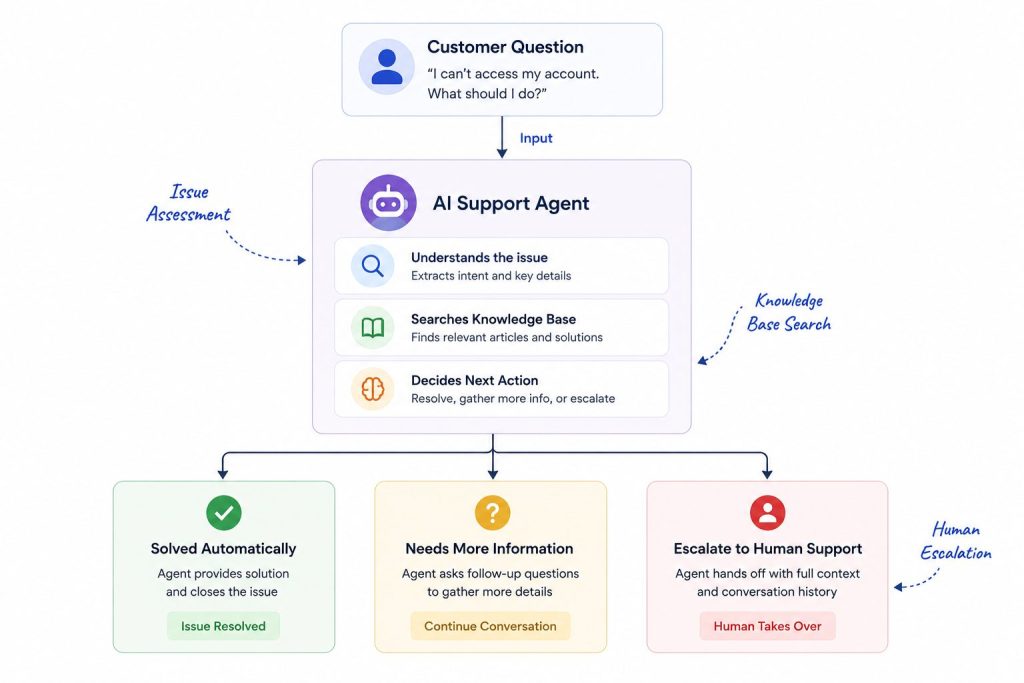
Customer Support Agent
Primary Goal: Resolve customer issues efficiently or escalate appropriately with complete context.
Context Provided:
– Complete knowledge base access with product documentation
– Customer account details including plan level and history
– Common issue database with proven solutions
– Current system status and known outages
Decision Framework:
The agent first works to understand the customer’s specific problem through clarifying questions. It checks whether this matches a known issue with an established solution. For novel problems, it assesses complexity and determines whether it can resolve independently or needs human expertise.
Execution Actions:
- Simple issues: Provide solution immediately with step-by-step guidance
- Complex issues: Gather comprehensive diagnostic information and escalate with full context
- Account issues: Authenticate customer and perform authorized account actions
- Frustrated customers: Priority route to senior support agent
Why it works: The agent knows its limits. It doesn’t waste customer time attempting to solve problems beyond its capabilities. When escalating, it provides human agents with complete conversation history and diagnostic data, eliminating redundant questions.
Appointment Scheduling Agent
Primary Goal: Fill the calendar with qualified appointments while maximizing scheduling efficiency and meeting value.
Context Provided:
– Real-time calendar availability across the team
– Booking rules including buffer times and meeting type requirements
– Qualification criteria for different meeting types
– Time zone handling and preference logic
Decision Framework:
The agent qualifies prospects through conversation to determine meeting type needed. It finds optimal time slots that respect both prospect preferences and internal booking rules. Before confirming, it validates all required information is collected.
Execution Actions:
– Present available slots with smart filtering based on prospect signals
– Handle rescheduling requests without human involvement
– Send confirmations and automated reminders
– Update CRM with meeting details and qualification notes
– Block calendar time and add preparation context for the meeting owner
Why it works: The agent balances multiple objectives simultaneously. It fills the calendar but only with qualified meetings. It respects prospect preferences while optimizing for internal efficiency. This multi-objective optimization is difficult with rule-based systems.
Common Mistakes in AI Workflow Design
Understanding these patterns helps you avoid failures that derail most implementations.
Mistake 1: Over-Engineering the Decision Tree
Teams create massive flowcharts with hundreds of branches attempting to map every conceivable scenario. These brittle systems break immediately when reality introduces variations the designer didn’t anticipate.
Solution: Keep decision logic simple at the framework level. Let the AI agent platform handle complexity through intelligence rather than explicit rules. Define goals and constraints instead of paths.
Mistake 2: Insufficient Success Metrics
Vague goals like “improve customer satisfaction” or “help prospects” don’t give agents clear direction. Without concrete success criteria, you can’t measure performance or optimize behavior.
Solution: Define specific, measurable outcomes. Examples: “Resolve tier-1 issues in under 5 minutes” or “Book qualified meetings within 3 conversation turns” or “Achieve 85% first-contact resolution rate.”
Mistake 3: Ignoring Human Handoff Points
Some teams never want their agents to admit limitations. Agents keep trying to handle situations beyond their capabilities, creating frustrating experiences that damage brand perception.
Solution: Build explicit escalation triggers. When the agent encounters scenarios requiring human judgment, it should pass the conversation to a person with complete context. Good handoffs make both agents and humans more effective.
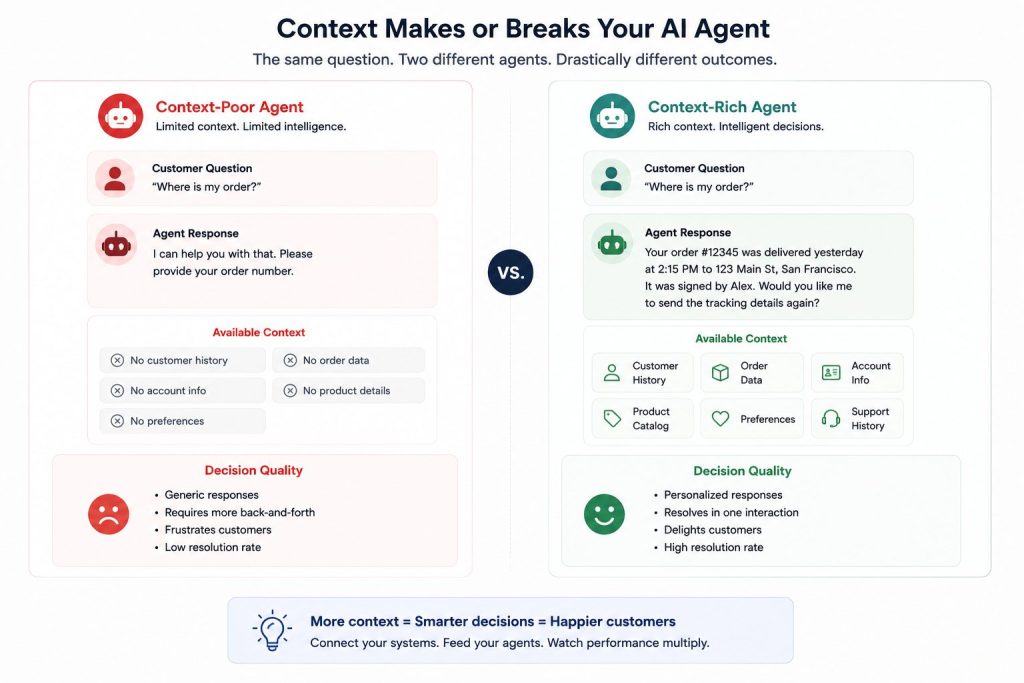
Mistake 4: Context Starvation
Agents without sufficient context become glorified chatbots. They can’t personalize responses, make intelligent decisions, or handle situations requiring business knowledge.
Solution: Connect agents to your systems. CRM data, knowledge bases, product catalogs, customer history, order status. Every additional context source multiplies agent effectiveness.
Mistake 5: Optimizing for Edge Cases First
Teams spend 80% of design time on scenarios that occur 5% of the time. Meanwhile, common cases that happen daily receive minimal attention.
Solution: Build for the primary use case first. Make sure your agent handles the most frequent scenarios exceptionally well. Then iteratively expand capabilities to cover edge cases based on actual usage patterns.
Step-by-Step: Building AI Agent Workflows
Here’s the practical process for designing workflows that work. Follow these steps sequentially instead of trying to do everything simultaneously. Teams that successfully Build AI agent systems usually start with one clear workflow instead of trying to automate entire operations immediately.
Step 1: Define the Job to Be Done
What specific, repetitive task is this agent replacing? Precision matters here. “Customer support” is too broad. “Answering pricing and billing questions” is actionable.
Write down these specifics:
- Task description: What repetitive work will this agent handle?
- Interaction parties: Who will this agent communicate with?
- Success definition: What measurable outcome indicates success?
- Current baseline: What does performance look like today?
Step 2: Identify Required Context
Map everything the agent needs to know to perform this job effectively. Don’t skip this step. Context gaps directly correlate with poor agent performance.
Context inventory checklist:
- Internal data: Product information, pricing, policies, procedures
- External data: Customer history, account details, interaction logs
- Behavioral guidance: Tone, escalation rules, compliance requirements
- System access: Which tools and databases does the agent need?
Step 3: Map Available Actions
List every concrete action the agent can take. This becomes your execution layer capabilities.
Action categories to consider:
– Send messages across channels (web, WhatsApp, Slack, etc.)
– Create or update records in connected systems
– Generate tasks or tickets for follow-up
– Trigger webhooks or integration calls
– Schedule appointments or set reminders
– Route conversations to human team members
Step 4: Design the Goal Structure
Now synthesize everything into a clear goal statement. Use this template:
“Your goal is to [desired outcome] by [method] while [constraints].”
Example: “Your goal is to resolve customer technical issues by providing accurate solutions from the knowledge base while maintaining a helpful, patient tone and escalating when you lack sufficient information to solve the problem.”
This statement guides all agent behavior without prescribing specific steps.
Step 5: Build the Minimum Viable Workflow
Start with the simplest version that delivers value. One conversation path. One primary action. One clear outcome. This approach works especially well for AI agents for small businesses because smaller teams need fast wins before scaling automation further.
Launch it. Test it thoroughly. Break it intentionally. Fix what breaks. Then expand gradually.
MVP scope guidelines:
– Handle the single most common scenario well
– Include one escalation path to humans
– Connect to one or two essential systems
– Focus on learning rather than comprehensive coverage
Step 6: Add Intelligence Gradually
Once your MVP performs reliably, expand capabilities systematically. Add one enhancement at a time, testing thoroughly before proceeding. Over time, companies evolve these systems into Custom AI agents that match their own processes, customer journeys, and internal workflows.
Expansion sequence:
- Add more context sources for richer understanding
- Expand execution options to handle more scenarios
- Refine decision logic based on actual usage patterns
- Implement smarter escalation based on learning
Step 7: Monitor and Iterate Continuously
Your workflow isn’t finished when it launches. Track performance metrics that reveal both successes and improvement opportunities.
Essential metrics to track:
- Success rate: Percentage of interactions achieving the defined goal
- Escalation rate: How often human intervention is required
- User satisfaction: Are people happy with agent interactions?
- Error patterns: Where does the agent struggle or break?
- Speed metrics: How long does goal achievement take?
Use this data to refine prompts, expand context, and adjust decision frameworks continuously.
Choosing the Right AI Agent Platform
Technology choices determine what’s possible. You can design brilliant workflows, but execution depends entirely on your platform capabilities.Some teams also evaluate a Botpress Alternative when they need faster deployment and less technical workflow management.
Must-Have Platform Features
1. Prompt-Based Configuration
Modern platforms let you define agent behavior through natural language instructions rather than code. You describe what you want in plain language. The platform handles implementation.
Look for systems where you can say “Qualify leads by asking about budget, timeline, and decision process, then route high-value prospects to sales” without touching a workflow builder.
2. Multi-Channel Deployment
Your agent shouldn’t be locked to a single channel. The best AI agent platforms let you deploy the same agent across web, WhatsApp, Slack, Instagram, SMS, and more without rebuilding.
Build once, deploy everywhere. That’s the standard for modern platforms.
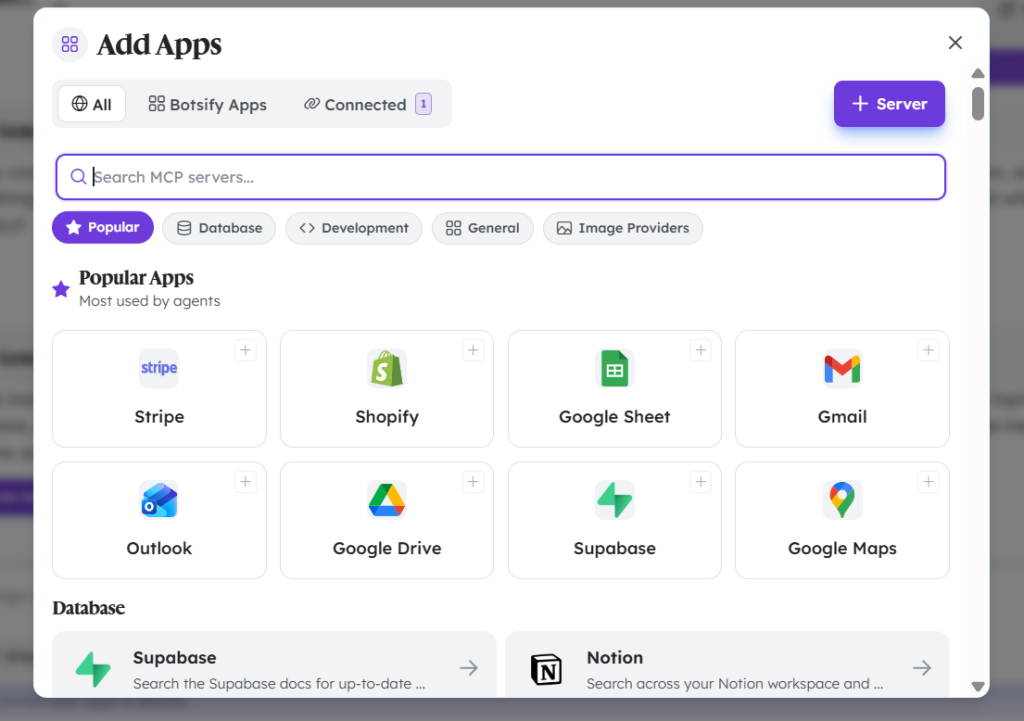
3. Integration Flexibility
Agents need to connect to your existing systems. CRM, calendar, support desk, analytics, email, project management tools. The platform should make integrations straightforward rather than requiring custom development for each connection.
Look for platforms with native integrations to popular tools plus flexible API and webhook support for custom connections.

4. White Label Capabilities
If you’re an agency or want to resell AI agent services, you need white label AI agent platform capabilities. This lets you brand the solution as your own, removing the platform vendor from customer-facing experiences.
5. Scalability Architecture
Can the platform handle 10 conversations? Of course. Can it handle 10,000 simultaneous conversations without degrading performance? That separates hobby tools from production platforms.
Choose systems built for enterprise-scale from day one, even if you’re starting small.
Nice-to-Have Features
These features enhance value but aren’t strictly essential for getting started:
– Custom branding and visual styling
– Advanced analytics and conversation insights
– A/B testing capabilities for optimization
– Multi-language support for global operations
– Voice integration for phone channel support
Advanced Multi-Step AI Workflows
Once you’ve mastered single-goal agents, you can build sophisticated workflows that span multiple conversations and achieve complex business objectives. This type of workflow structure is commonly used by teams operating as an AI Agent agency because it allows them to automate client operations at scale.
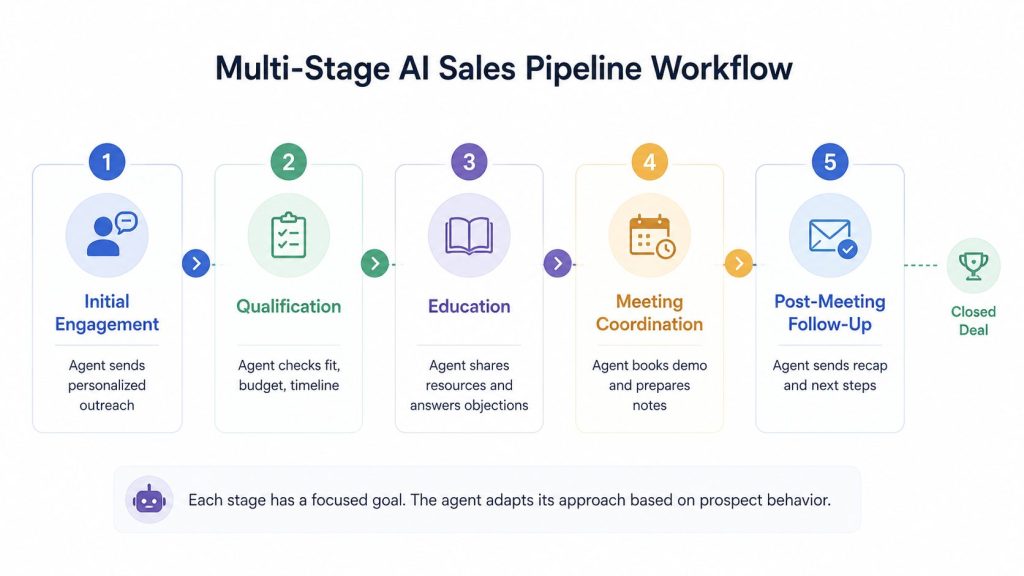
End-to-End Sales Pipeline Agent
This advanced workflow moves prospects from initial contact through closed deals. It coordinates multiple stages, each with distinct goals.
Stage 1: Initial Engagement
– Goal: Start meaningful conversations with target prospects
– Actions: Reach out via LinkedIn or email with personalized context
– Success criteria: Response rate above 20%
Stage 2: Qualification
– Goal: Determine fit and buying readiness
– Actions: Assess budget, authority, need, timeline through conversation
– Success criteria: Clear qualification status assigned
Stage 3: Education
– Goal: Build understanding and address concerns
– Actions: Send relevant resources, answer questions, handle objections
– Success criteria: Prospect requests demo or next step
Stage 4: Meeting Coordination
– Goal: Schedule qualified conversations with sales team
– Actions: Find optimal time, prepare sales rep with context
– Success criteria: Meeting booked with preparation notes
Stage 5: Post-Meeting Follow-Up
– Goal: Maintain momentum toward decision
– Actions: Send recap, answer questions, address new objections
– Success criteria: Prospect moves to proposal stage
Why it works: Each stage has a focused goal. The agent adapts its approach based on prospect behavior rather than forcing linear progression. Prospects can move at their own pace while the agent maintains appropriate engagement.
Keys to Multi-Step Success
Complex workflows spanning multiple stages require additional capabilities:
- State management: Remember where each prospect is in the journey
- Context persistence: Carry forward all previous conversation history
- Flexible progression: Allow non-linear movement through stages
- Smart re-engagement: Know when to follow up and when to wait
- Performance tracking: Measure conversion rates between stages
Testing Your AI Agent Workflows
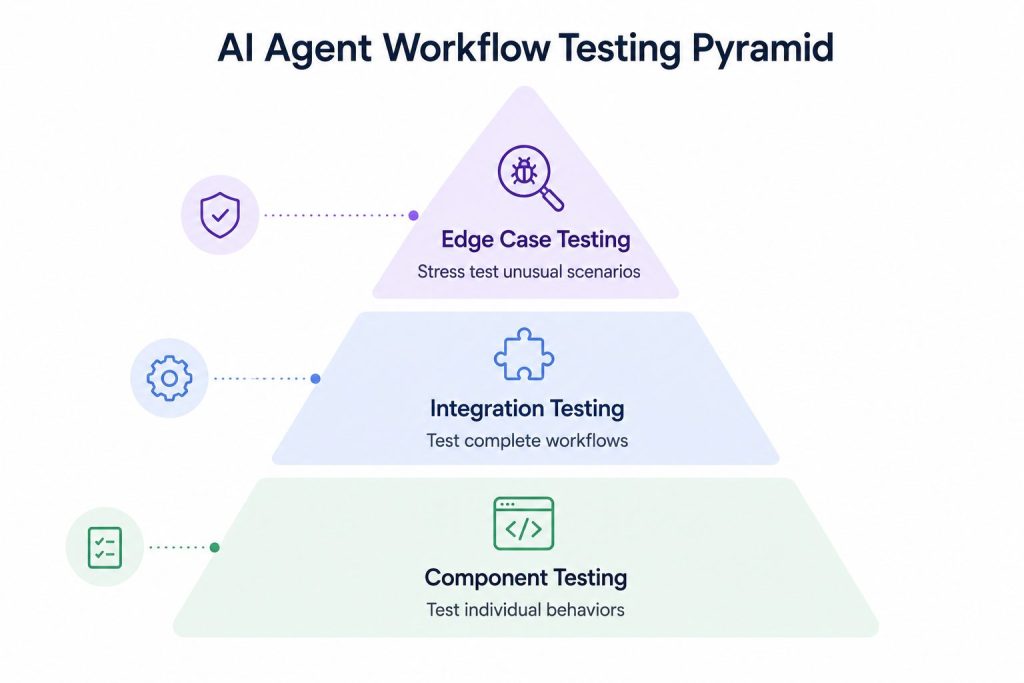
Design quality matters, but testing determines what actually works in production. Here’s how to validate workflows before full deployment.
Phase 1: Component Testing
Test each element individually before connecting them. Does the agent correctly interpret different phrasings of the same request? Does it access the right data sources? Do actions trigger as expected?
Testing method: Have team members role-play different conversation styles and scenarios. Document where the agent struggles or makes errors.
Phase 2: Integration Testing
Test how components work together as a complete system. Does context flow properly between conversation turns? Do handoffs execute smoothly? Do integrations work reliably under load?
Testing method: Run complete workflows end-to-end using test data that mimics real usage patterns.
Phase 3: Edge Case Testing
Deliberately try to break your agent. What happens with gibberish input? What if someone changes their mind mid-conversation? How does the agent handle system unavailability?
Testing method: Adversarial testing where you actively attempt to create failures, then fix the weaknesses you discover.
Phase 4: Real User Testing
Nothing substitutes for actual usage. Start with controlled exposure and expand gradually.
Rollout sequence:
- Internal team testing: Use the agent yourself for 1-2 weeks
- Friendly customers: Small group who will provide honest feedback
- Gradual expansion: Increase exposure as confidence grows
Metrics to monitor closely:
- Completion rate: What percentage of conversations achieve the goal?
- Escalation rate: How often do humans need to intervene?
- Error rate: How frequently does something break?
- User satisfaction: Are people happy with the experience?
- Speed metrics: How long does each workflow take?
Real-World AI Agent Frameworks by Use Case
These proven frameworks give you starting templates for different business functions. Adapt them to your specific needs rather than starting from scratch.
Framework 1: The Qualifier
Best for: Lead generation, inbound inquiry handling, event registration
Core structure:
– Engage naturally and build rapport without sounding like a form
– Ask qualifying questions conversationally based on responses
– Score dynamically as information emerges
– Route to the appropriate next step based on total picture
Key principle: Conversation over interrogation. People provide better information when they don’t feel interrogated.
Framework 2: The Resolver
Best for: Customer support, technical troubleshooting, account management
Core structure:
– Understand the specific problem through clarifying questions
– Check knowledge base and previous similar issues
– Provide solution with clear steps if capable
– Escalate with complete context when expertise is needed
Key principle: Solve when you can, escalate when you can’t. Know your limits and respect customer time.
Framework 3: The Scheduler
Best for: Appointment booking, calendar management, resource allocation
Core structure:
– Qualify to determine the right meeting type
– Present available options filtered by preferences
– Handle objections and reschedule requests
– Confirm all requirements and send reminders
Key principle: Fill the calendar with qualified appointments, not just any appointments.
[TABLE: Framework comparison showing use case, primary goal, key context needed, and success metric for each framework type]
| Framework | Primary Goal | Key Context Needed | Success Metric |
| The Qualifier | Assess fit and readiness | ICP criteria, product tiers, capacity | Qualification accuracy rate |
| The Resolver | Solve problems efficiently | Knowledge base, account data, issue history | First-contact resolution rate |
| The Scheduler | Book qualified meetings | Calendar, booking rules, meeting types | Fill rate with qualified bookings |
| The Nurturer | Maintain engagement | Behavioral data, content library, timing rules | Re-engagement rate |
| The Onboarder | Ensure successful adoption | Setup steps, product features, milestones | Activation completion rate |
How Botsify Helps Build Smarter AI Agent Workflows
Designing intelligent AI agent workflows is only part of the equation. The real challenge is deploying those workflows across customer conversations, business systems, and operational processes without creating more complexity.
That’s where Botsify helps.
Botsify gives businesses a practical way to build, train, and deploy AI agents that work across websites, WhatsApp, social channels, customer support systems, and internal workflows. Instead of relying on rigid decision trees, teams can create AI agents that understand context, automate repetitive tasks, and respond dynamically to real-world interactions.
Whether you’re handling customer support, lead qualification, appointment scheduling, or onboarding, Botsify helps connect AI workflows directly to your business operations.
Key advantages of using Botsify for AI agent workflows:
Multi-channel deployment: Launch AI agents on websites, WhatsApp, Messenger, Instagram, Telegram, and more from one platform
Knowledge-based responses: Train agents using your documents, FAQs, URLs, and support content for more accurate interactions
Automation at scale: Automate lead capture, customer support, appointment booking, and workflow routing without complex coding
Human handoff support: Seamlessly transfer conversations to live agents whenever human intervention is needed
Custom integrations: Connect AI workflows with CRMs, helpdesk tools, calendars, APIs, and thousands of third-party applications
White-label capabilities: Agencies and SaaS providers can fully brand and resell AI agent solutions under their own identity
Botsify transforms AI agents from simple chat interfaces into operational systems that actively support sales, support, and business growth. Instead of managing disconnected automation tools, teams can create unified AI workflows that adapt to users, scale across channels, and improve over time.
Frequently Asked Questions
What’s the difference between AI agent workflows and traditional chatbot flows?
AI agent workflows are goal-oriented and adaptive, letting the system determine the optimal path based on context. Traditional chatbot flows are script-based with predetermined paths that handle only anticipated scenarios. Agents think and adapt; chatbots follow scripts.
How long does it take to build an effective AI agent workflow?
With modern prompt-based platforms, you can launch a basic agent in days. A minimum viable workflow handling one primary scenario typically takes 1-2 weeks including testing. Complex multi-stage workflows spanning multiple business functions require 4-8 weeks to build and refine.
Do I need technical skills to design AI agent workflows?
No. Modern AI agent builders use natural language configuration. You describe what you want in plain language rather than coding logic trees. Technical skills help with complex integrations but aren’t required for core workflow design.
How do I know when to use an AI agent versus traditional automation?
Use AI agents when the task requires understanding context, handling variations, or making judgment calls. Use traditional automation for completely predictable, rule-based tasks with no variation. If you can’t map every scenario in advance, you need an agent.
What metrics should I track to measure AI agent workflow success?
Track both efficiency and effectiveness. Efficiency metrics include time saved and automation rate. Effectiveness metrics include goal achievement rate, user satisfaction scores, escalation rate, and error frequency. Effectiveness metrics typically matter more for business impact.
Can AI agents work together in multi-agent workflows?
Yes. Advanced implementations use multiple specialized agents that hand off to each other. For example, a qualification agent passes qualified leads to a scheduling agent, which coordinates with a follow-up agent. Each agent focuses on its specialty while the system coordinates overall flow.
Build AI Agents, Not Workflows
Traditional automation thinks in steps and rules. AI agent frameworks think in goals and outcomes. That fundamental difference determines whether your automation adapts to reality or breaks when reality diverges from your script.
The most effective AI agent workflows share common characteristics:
– Start with clear goals rather than prescribed steps
– Provide rich context for intelligent decision-making
– Allow flexible execution paths based on situation
– Know when to escalate to human judgment
– Improve continuously through learning and iteration
Stop trying to map every possible conversation path. Start defining what success looks like and let capable agents figure out how to get there. That’s how you design AI agent workflows that actually work in production.
AI Agentic Platform For Building Portable AI Agents
Say Hello To Agentic AI That Connects With Your CRM And Even Other Agents