


A customer asks to move an appointment, a staff member reviews a purchase request, or a prospect asks a question before booking a call. In each case, the work has a starting point and a desired outcome. Some steps follow fixed rules. Other steps depend on what the person said, what the business record shows, or whether a human needs to decide.
An AI agent workflow is an organized process in which an AI agent handles at least one context-dependent step, such as interpreting a request, selecting a permitted action, or deciding when to ask for help. The broader workflow defines how the task starts, what information and tools are available, what boundaries apply, and how the process ends.
The phrase is used in different ways across products and teams. It does not always mean a visual flowchart, a fully autonomous system, or a group of multiple agents. In this guide, the term describes the process around an agent, including any ordinary software steps and human decisions that support the task.
That distinction matters. A repeatable workflow can have a flexible agent decision inside it. The process has a known purpose and boundaries, while the agent may choose among valid responses based on context. A clear AI agent requirements brief helps a team define those boundaries before choosing tools or automation.
What Is an AI Agent Workflow?
A workflow is a sequence or structure of steps that moves a task from an input to a defined outcome. An AI agent workflow includes an agent in one or more steps where language understanding, information retrieval, or a bounded decision is useful.
For example, a simple workflow could receive a request, classify it, look up relevant information, and draft a response. A more involved process could retrieve a customer record, check a policy, request human approval, update a system, and report the result. The workflow may include AI in one step and deterministic rules or people in others.
The term does not have one universal technical definition shared by every vendor. Some products use “workflow” for a fixed sequence of app actions. Others mean a prompt-driven agent that can use tools toward a goal. When evaluating a platform, ask what the product specifically calls a workflow and what control you actually have over its steps.
An AI agent workflow design guide goes deeper into how to plan and improve these processes. Here, the focus is on the words and building blocks, so a business team can understand what a product is promising.
How It Differs From a Chatbot, Automation, and Orchestration
These terms describe related but different parts of a system.
| Term | What it describes | Example |
|---|---|---|
| Chatbot or conversational interface | How a person communicates with software | A visitor asks a question in a website chat window |
| Automation | A rule-based trigger and action | A form submission creates a CRM record |
| AI agent | A system that uses a model to interpret context and choose among allowed next steps | An agent classifies a free-text request and selects an appropriate response or tool |
| AI agent workflow | The surrounding process that connects the trigger, information, agent decision, actions, people, and outcome | A request is classified, checked against a rule, routed for approval if needed, then updated and confirmed |
| Orchestration | How multiple agents, tools, or tasks are coordinated | A coordinator sends research to one agent and a summary to another, then combines results |
A chatbot can be just a conversational interface. It may answer from a fixed decision tree and never use an agent. Conversely, an agent workflow may start from a scheduled job, form submission, or internal event, with no chatbot involved at all.
A plain automation can be the right choice when the input is structured and the next action is always the same. Add an agent when the process needs language understanding or context-sensitive selection. Add orchestration only when multiple components need to coordinate. A practical AI agent orchestration overview helps distinguish coordinated agents from a single agent operating within one workflow.
An Agent Can Reason Inside a Structured Process
“Workflow” and “agent” are not opposites. A business can specify which steps must occur, then use an agent for a decision where the correct response depends on the details of a request.
Consider a purchase request workflow. The process can require that every request be recorded, checked against a policy, and approved before an order is placed. An agent might read the employee’s explanation and classify the request, but it should not be allowed to approve any purchase just because the description sounds reasonable. A deterministic limit or a human approval step can control what happens next.
This produces a spectrum:
- Fixed automation: Software follows explicit rules from start to finish.
- Agent within a workflow: The structure is defined, but one or more steps use AI to interpret information or recommend a next step.
- Agent-directed process: The agent can choose among multiple available tools or steps, while permissions, stop conditions, and required reviews still apply.
- Multi-agent orchestration: Several agents or services share work under a coordination pattern.
More flexibility can introduce more paths to test and more decisions to monitor. It is not automatically an improvement. Microsoft’s Agent Framework workflow documentation similarly frames workflows as useful when a process needs explicit ordering, while agent reasoning can handle the steps that benefit from context. Treat that as one framework’s explanation, not a requirement that every business must adopt the same architecture.
Clarify which steps need an AI agent
Map the fixed rules, agent decisions, and human checkpoints first.
The Main Parts of an AI Agent Workflow
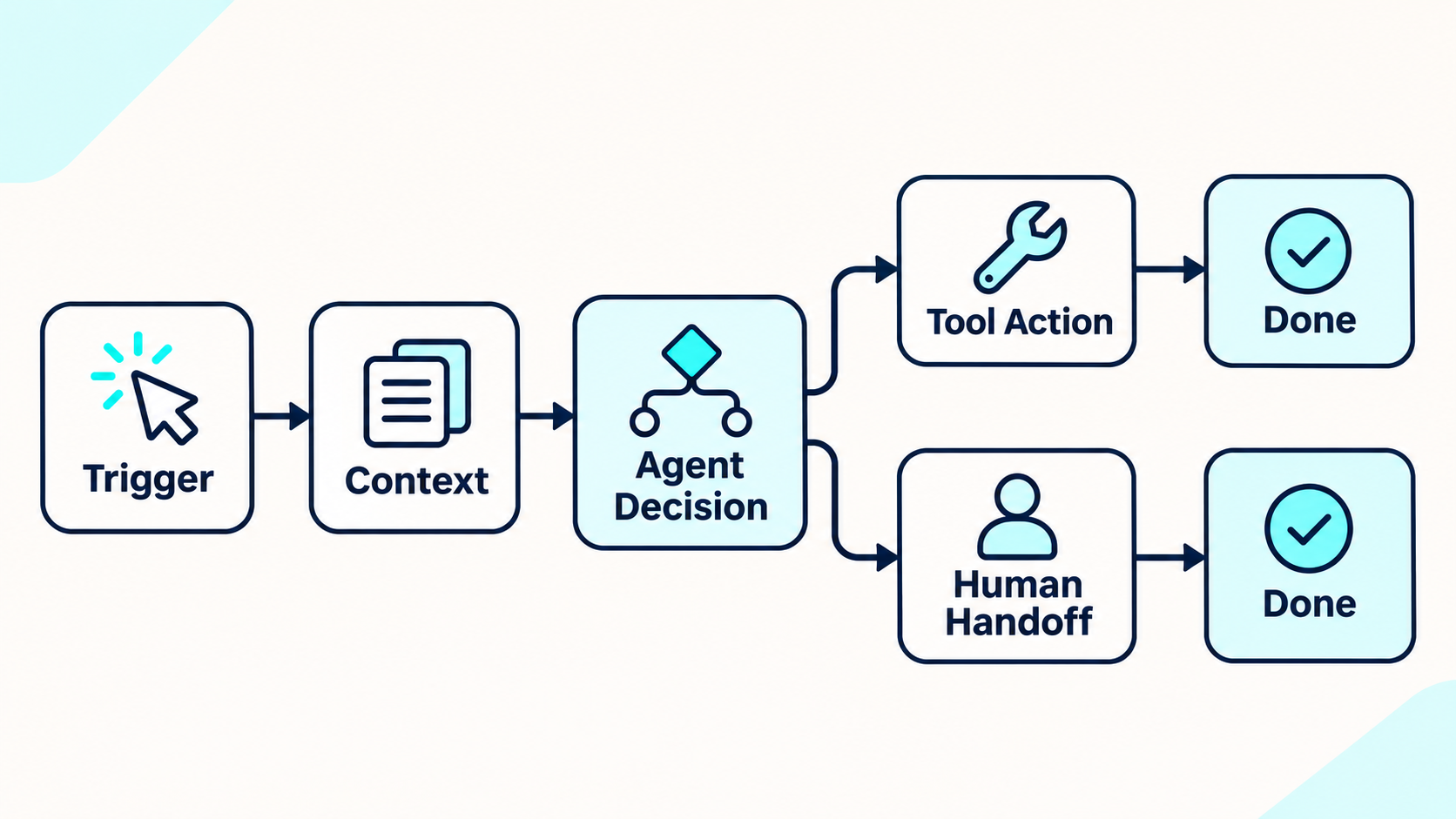
A workflow can be built in different ways, but a business should be able to identify the function of each part.
1. Entry point or trigger
The trigger is what starts the process. It may be a customer message, a form, a new ticket, a calendar event, an internal request, or a scheduled time. A workflow should define what counts as a valid trigger and what information must be present before the agent proceeds.
Duplicate events and incomplete submissions are common edge cases. Decide whether a duplicate should be ignored, merged with the existing task, or sent to a person. Do not assume a message arrives only once or in the expected order.
2. Context and task state
Context is information the agent can use to interpret the current step. It might include the user’s message, approved documents, business rules, or a record retrieved from another system.
State is the workflow’s record of progress: what has already happened, what is still required, and which result belongs to the task. State should be explicit enough that the process can continue after a delay or handoff. It is different from hoping a model will remember every earlier detail in a long conversation.
A knowledge source and a live business record are not always the same thing. A policy can explain eligibility, while an account system may show whether this particular request meets it. Secure AI agent integrations connect the workflow to the systems that hold the required records or actions.
3. Agent decision or deterministic rule
A decision point selects what happens next. Some decisions can be made with exact conditions, such as a known status or threshold. Others may need an agent to interpret free text, identify intent, or summarize relevant information.
A useful workflow assigns each decision to the simplest method that can handle it reliably. Use a fixed rule when the input and condition are clear. Use an agent when context or language variation makes a fixed rule brittle. Route ambiguous or consequential decisions to a person.
4. Tool or action
An action changes something or retrieves information. It may send a reply, search a record, create a ticket, schedule an event, or update a CRM. The workflow should identify what the agent is allowed to do and what the tool returns when the action succeeds or fails.
A successful tool call does not prove that the action was correct for the business. Validate permissions and business conditions before allowing changes. Workflows with meaningful access need the controls in an AI agent governance plan.
5. Human checkpoint or handoff
A checkpoint pauses or routes a task for human review. A handoff transfers the conversation or case to a person, ideally with the reason, information gathered, actions already taken, and the unresolved question.
Human review can be required before a sensitive action, or after the agent reaches a defined limit. A good human handoff rule explains the trigger, what context should travel, and what the user should be told while waiting.
6. Completion, failure, and record
A workflow needs a clear definition of “done.” It should also specify what happens if the agent cannot retrieve information, an action is rejected, a tool times out, or a required approval does not arrive.
The record should help an operator understand the outcome without collecting unnecessary data. It might include task status, tool result, handoff reason, and error category. Logging is not automatically an audit trail; decide who reviews the record and how long it is retained.

Common Workflow Shapes
A workflow is not always a long chain. The shape should reflect the task.
Single interaction with a bounded action
A person asks a question, the agent retrieves approved information, and it replies. If the answer is not supported by the available information, it should say so or route the question to someone who can help. The process may finish within one conversation turn.
Multi-step task with saved progress
A task may require several actions over time. For example, an onboarding request could collect required details, wait for a manager approval, create an account, and notify the employee. The workflow needs explicit progress tracking so a delay does not restart the task or cause duplicate account creation.
Event-triggered process
An event in a connected system can start a workflow. A new support ticket could prompt classification and routing. If an agent acts on events, define which event fields are trusted, how duplicate events are handled, and how the system responds when the connected service is unavailable.
Scheduled review
A workflow can run at a planned interval, such as preparing a list of records for human review. Scheduled work should specify its time window, data scope, duplicate prevention, and what happens when a run fails. Scheduling a workflow does not mean an agent should make a consequential decision without review.
State Is Not the Same as Memory
The words “state” and “memory” are often blended in AI product descriptions, but they solve different problems.
Workflow state tracks the task: its identifier, completed steps, pending approval, and result. It should be reliable enough for the process to resume or be reviewed. Agent memory may refer to information retained from earlier conversation or past interactions, depending on the product. Memory can add context, but it should not be the only record of whether a payment, booking, or account change has already happened.
A workflow should use the source of truth for each fact. Check the relevant system before repeating an action. If the system cannot confirm whether the action succeeded, pause or escalate rather than blindly retrying. This reduces the risk of duplicate messages, appointments, orders, or updates.
Teams should also decide what information is needed to continue a task and what should be discarded afterward. A deliberate AI agent data-retention policy separates operational task state from conversation data that may no longer be needed.
What Can Go Wrong Between Steps
A workflow can be well designed on paper and still fail between its components. Reliability means the process detects those gaps and moves to a known state instead of pretending the task completed.
- The trigger arrives twice. A platform may retry an event or receive a duplicate submission. The workflow should check whether this task already has a record before repeating an action.
- The tool times out after an action. The system may not know whether the connected application completed the request. Check the destination system before retrying, or a second booking or update could be created.
- The task resumes with stale context. A record or policy may have changed while waiting for approval. Refresh the relevant source before acting on the old snapshot.
- The AI response sounds successful, but the action failed. Distinguish what the agent proposed from what the tool confirmed. Tell the user that the action is pending or unsuccessful if no reliable result was returned.
- A human handoff loses the task history. Send the assigned person the request, relevant fields, checks already performed, and the decision still needed. Otherwise the user may have to start over.
These cases show why workflow state and verified tool results matter. An agent should not mark a task “done” because it generated a confident response. Completion should be tied to evidence that the intended business event occurred, or to a clear status explaining why it did not.
A Worked Example: Purchase Request Review
Imagine an employee asks an internal agent to purchase a tool. This is an illustrative workflow, not a claim about a specific product feature.
- Trigger: The employee submits a request with the item, purpose, expected cost, and team.
- Check completeness: The workflow verifies that required fields exist. If a field is missing, the agent asks for it rather than guessing.
- Retrieve policy: The system checks the approved purchasing policy and the employee’s department or budget information.
- Classify the request: An agent can summarize the request and identify the policy category. A deterministic rule can check exact limits or required fields.
- Route for review: If approval is required, the workflow sends the summary and source information to the designated reviewer. The agent does not bypass the approval because the request sounds urgent.
- Act only after authorization: After the approved system records a decision, a permitted tool can create the purchase request or notify procurement.
- Confirm and record: The employee receives a status update, and the workflow records the final status and any unresolved issue.
The example shows how an agent can interpret language without controlling every part of the process. It also shows why “the agent made a decision” is not an adequate description of the system. The important questions are what information it used, which action it could take, what conditions applied, and who could intervene.
When a Business Needs an Agent Workflow
A workflow with an agent may be useful when a process has recurring work but receives varied inputs that are difficult to handle with fixed rules alone. Examples include categorizing requests written in natural language, finding relevant information across approved sources, or preparing a response that follows a defined policy.
A simpler automation may be enough when a structured event always maps to the same action. A person may be the better choice when the task depends on judgment, negotiation, or information that the system cannot reliably access. An agent workflow is not a reason to automate a task that has no clear owner or success condition.
Customer support can combine FAQ answers, ticket classification, and escalation, but the workflow should identify which cases are safe to resolve automatically and which need a person. The customer support AI agent guide discusses those broader service boundaries.
Businesses mapping end-to-end processes should distinguish the agent’s decisions from the surrounding AI process automation workflow. That makes it easier to see which steps should remain deterministic, human-owned, or agent-assisted.
Signs a Product’s “Workflow” Needs More Explanation
Before adopting a tool, ask the vendor or implementation team to demonstrate what happens when a normal step does not work.
- Can you see the trigger, required inputs, and expected end state?
- Which decisions are fixed rules, and which are made by an AI model?
- What sources can the agent use at each step?
- Which tool actions can create or change records?
- Where must a person approve, review, or take over?
- How does the workflow prevent duplicate actions after retries?
- Can a paused task resume with the correct state?
- What does the system record when a step fails?
- Can you disable or change an action without rebuilding the entire process?
A simple AI agent test plan should include incomplete inputs, conflicting information, tool failures, and requests outside the agent’s permissions. An AI agent implementation checklist can help teams consider what must be ready before a workflow goes live.
The current Botsify AI Agent Builder presents business information, connectors, a knowledge base, and deployment as distinct setup steps. This is one example of a product separating agent configuration from channel deployment; exact features and limits should be checked against the current plan and workflow.
See how a defined workflow fits your agent use case
Review the task, connected tools, approvals, and deployment needs.
Frequently Asked Questions
Is an AI agent workflow the same as an AI agent?
No. The agent is the component that uses a model to interpret information and choose among supported next steps. The workflow is the wider process that connects inputs, decisions, tools, people, and outcomes. A workflow can include an agent, regular software, and human review.
Is an AI agent workflow always autonomous?
No. A workflow can require human approval or handoff at specific points. It can also use fixed rules for some steps and AI for others. “Agent workflow” does not by itself describe how much authority the agent has.
Does an agent workflow need multiple agents?
No. Many workflows use one agent, or use an agent for only one step. Multiple-agent orchestration is a separate design choice that adds coordination and should be used when the task requires it.
Are workflows always visual flowcharts?
No. A flowchart can help explain a process, but a product may represent the workflow through instructions, code, configuration, events, or a combination. Ask what the platform actually lets you control and inspect.
How is an AI agent workflow different from automation?
Automation often means fixed triggers, rules, and actions. An AI agent workflow includes at least one model-based step that interprets context or selects among permitted options. Many business systems combine both approaches.
What is the most important part of a workflow?
There is no single part for every use case. At minimum, the team should know what starts the task, what information and actions are allowed, what defines completion, and what happens when the agent is uncertain or a tool fails.
Final Thought
An AI agent workflow is the process around an agent, not just the prompt or the chat window. It connects the starting event, the information the agent can use, the decisions and actions it is allowed to take, any human checkpoints, and a clear outcome.
The phrase can mean different things in different products, so ask what the agent actually controls and what the surrounding system guarantees. Once the steps and boundaries are explicit, a team can decide where an agent adds useful judgment and where fixed rules or people should remain in charge.
Map the right role for AI in your workflow
Discuss the process, boundaries, and systems your agent would need.