


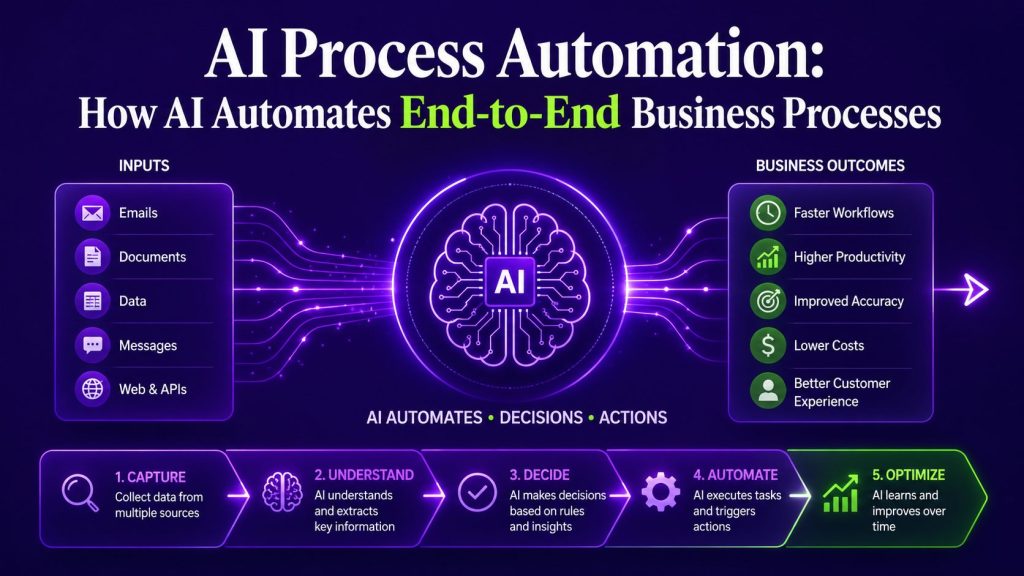
Business automation often starts with individual tasks or isolated workflows, but automating an end-to-end process is a much broader challenge. There is a meaningful difference between automating a single step and automating a process that spans departments, systems, and decision-makers. This article explains what AI process automation actually means, how it differs from simpler forms of automation, and what it takes to build an end-to-end automated business process.
Key Takeaways
- AI process automation coordinates multiple workflows across departments, systems, and owners. It is not the same as automating a single workflow or task.
- A process may contain several workflows, each with its own trigger, steps, and outputs. The process connects them into a unified operation with a clear beginning and end.
- AI contributes specific capabilities to process automation, including handling unstructured data, interpreting context, classifying information, generating content, and helping route exceptions.
- AI agents can handle context-dependent roles within a larger automated process, including triage, information gathering, user interactions, and adaptive decisions.
- Cross-system coordination is a major challenge in process automation because data and actions need to move reliably between applications with different data structures, permissions, and integration requirements.
- Human oversight, exception handling, and approvals remain important wherever decisions carry meaningful risk, uncertainty, or accountability. The goal is not to eliminate people but to free them for work that requires judgment.
- Process automation requires ownership and governance. Clear process ownership and monitoring help teams identify changes, exceptions, and integration issues before they reduce process reliability.
Portable AI Agents In Seconds, Use Everywhere
Prompt, Test, and Deploy AI Agents Across Social Platforms and LLMs. Automate Everything.
What Is AI Process Automation?
AI process automation is the use of artificial intelligence to design, execute, monitor, and improve end-to-end business processes that span multiple workflows, departments, systems, and decision points. Unlike task automation, which handles a single unit of work, or workflow automation, which connects a sequence of steps within one function, process automation addresses the full operational chain from trigger to outcome.
At the broadest level, AI automation includes task, workflow, and process-level automation, with AI contributing only where interpretation or flexible decision-making adds value.
The “AI” component means the system can handle inputs it has not been explicitly programmed for. It can interpret a free-text email, classify an unfamiliar document, extract information from unstructured inputs, or help route an exception based on context. But AI does not operate alone. A well-designed automated process combines AI with deterministic rules, traditional automation, API integrations, and human oversight. Each component handles what it does best.
Consider an invoice that arrives in an unexpected format. A rules-based system that depends on fixed document layouts may struggle when the format changes unexpectedly. An AI-powered system can interpret the document, extract the relevant data, flag any anomalies, and provide structured information that the surrounding workflow can use to continue processing or route the document for review. That combination of adaptability and structure is what distinguishes AI process automation from the automation that came before it.
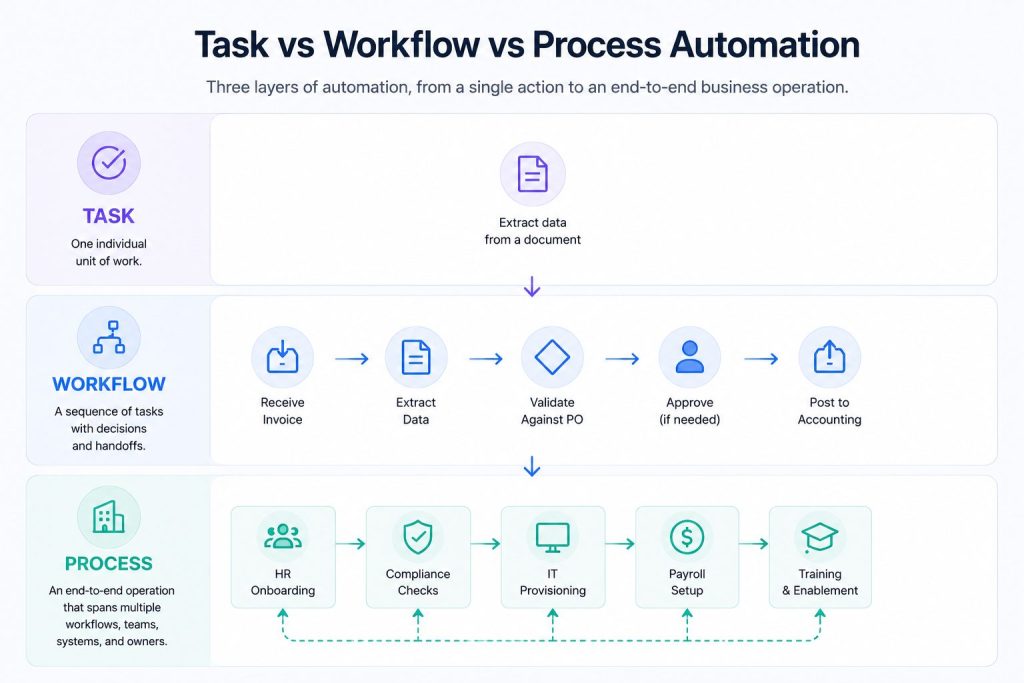
Task, Workflow, Process: The Three Layers
These three terms are often used interchangeably, but they describe different levels of automation. Understanding the distinction is essential before deciding what to automate.
Task automation handles one individual unit of work. Extracting data from a PDF, sending a confirmation email, or updating a record in a CRM are all tasks. Task automation focuses on a narrowly defined unit of work, which usually makes its scope easier to isolate than a broader workflow or process. But automating one task does not change the broader process around it. Choosing which individual tasks are worth automating is a separate problem from process design, especially when teams are deciding how to automate business tasks with AI safely and practically.
AI workflow automation connects multiple tasks into a sequence with decisions, branches, and handoffs. A typical workflow might be: receive an invoice, extract data, check it against a purchase order, route it for approval if the amounts do not match, and post it to the accounting system. A workflow still represents one defined sequence of tasks, decisions, and handoffs with a clear start and end, even when more than one system or team is involved.
Process automation is broader. A process contains multiple workflows that cross departmental boundaries, system boundaries, and ownership changes. It involves people from different teams, data from different systems, and decisions that affect the entire operation.
The employee onboarding example later in this article will make this concrete. But the key point is this: if you have automated a single workflow, you have not automated the process. The process only becomes automated when all the connected workflows, handoffs, exceptions, and approvals operate as a coordinated whole.

The Components of AI Process Automation
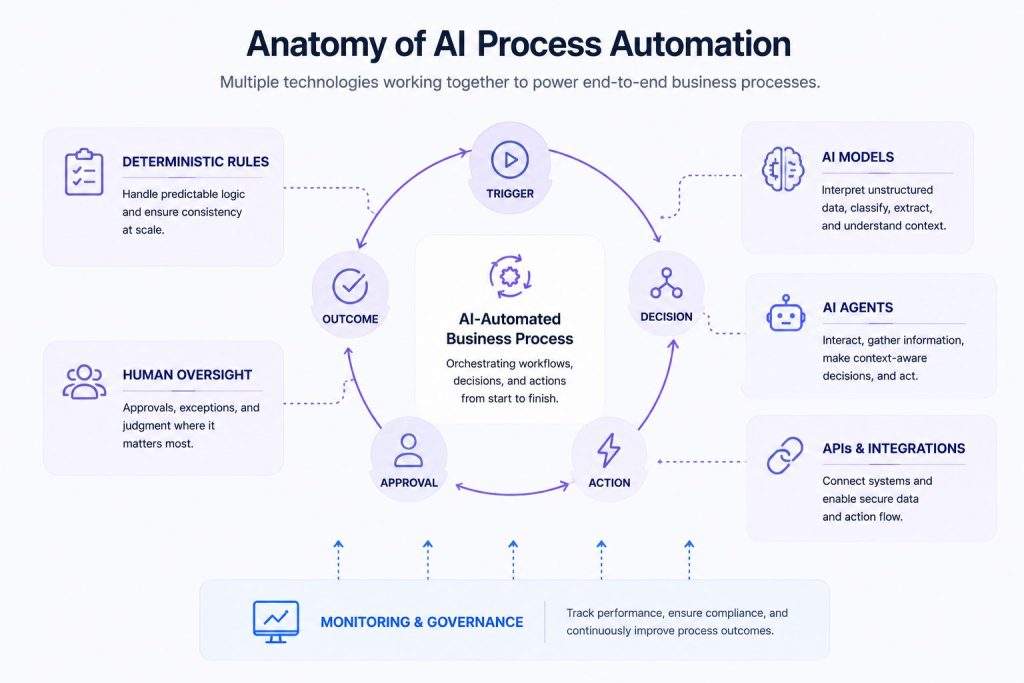
An automated business process is not a single technology. It is a combination of several components working together. Understanding each component and its role helps avoid the common mistake of assuming one tool can handle everything.
Deterministic rules are the foundation. Many steps in a business process follow fixed logic: if an amount exceeds a threshold, route to a senior approver. If a document is missing, send a reminder. If a user belongs to a certain department, assign the appropriate access template. These rules are well suited to predictable conditions because their behavior can be explicitly defined and tested. They do not need AI.
Workflow automation sequences the steps within each workflow. It handles triggers, actions, conditions, and handoffs. Workflow automation ensures that step B follows step A, that notifications are sent, and that tasks are assigned to the right people or systems.
APIs and integrations connect the systems involved. A process that spans CRM, HRIS, ERP, identity management, or other platforms requires information and actions to move between those systems. Integration design therefore needs to account for data formats, authentication, permissions, availability, and failure handling. When AI agents participate in the process, AI agent integration determines how they securely read from, update, or trigger actions in the business systems involved.
AI models add capabilities that fixed rules may struggle with. They can classify documents, extract information from unstructured inputs, interpret free-text requests, summarize content, and help route cases based on context.
AI agents can handle context-dependent interactions or actions within a broader process. For example, an agent might answer employee benefits questions using approved company information, collect relevant details, guide the employee through the next steps, and escalate cases that require HR involvement. Agents can also gather context from connected systems before deciding which permitted action to take.
Human approvals and exceptions remain part of most automated processes. Some decisions require judgment, empathy, or authority that automation should not override. A well-designed process defines where human input is required and ensures the right person receives the right context at the right time.
Monitoring and governance track the health of the process over time. Without monitoring, changes in data quality, connected systems, workflow behavior, or exception patterns can reduce process reliability without being noticed quickly. Governance helps define accountability, permissions, auditability, and the controls required for the process to operate within business and compliance requirements.
The best AI automation tools also differ in approach: some are built primarily around structured workflows, others around AI agents, while hybrid platforms combine elements of both.
Real Example: Employee Onboarding as an Automated Process
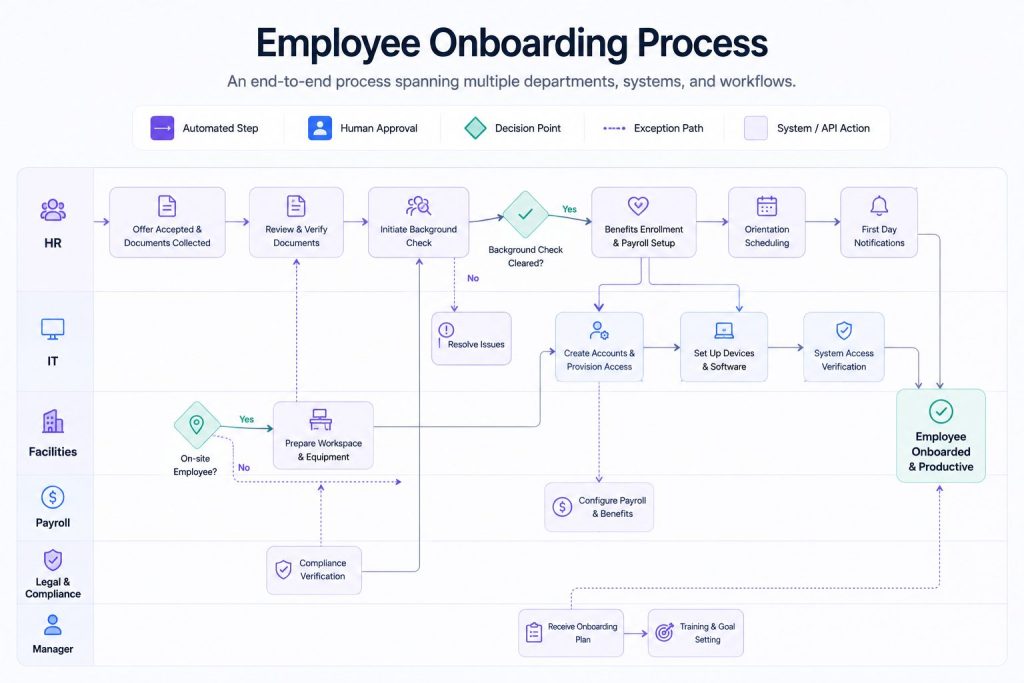
Employee onboarding is one of the clearest examples of a process that spans multiple workflows, departments, and systems. It also demonstrates the difference between automating a single workflow and automating the entire process.
The Process
The process begins when a signed offer letter is received by HR and ends when the new employee is fully productive with access to all systems, enrolled in benefits, and underway with their onboarding plan.
Departments Involved
HR, IT, Facilities, Payroll, Legal and Compliance, and the new employee’s direct manager. Each department owns one or more workflows within the process.
Systems Involved
An applicant tracking system or HRIS, an IT service management platform, an identity and access management system, a payroll and benefits platform, a learning management system, a document management or e-signature platform, and communication tools such as Slack or Microsoft Teams. The process must coordinate data across all of these.
The Workflows Within the Process
- Offer acceptance and document collection. HR sends the offer letter, collects the signed acceptance, and gathers required documents such as identification and tax forms. AI can classify incoming documents, extract key data fields, and verify completeness. Rule-based automation checks that all required documents have been received before proceeding.
- Background check and compliance verification. The system initiates a background check through a third-party service. The system monitors the status and flags delays or exceptions. Rules determine which checks are required based on role, location, and department.
- IT account creation and access provisioning. Once the background check clears, the system triggers account creation in the identity management platform. Rules determine the access template based on the employee’s role and department. APIs provision accounts across Active Directory, email, CRM, and other systems.
- Hardware ordering and shipping. If the role requires company hardware, the system sends a request to IT procurement. Rules determine the hardware configuration based on role. If the requested hardware is out of stock, the system flags an exception and routes it to IT for alternative selection.
- Workspace setup. Facilities receives a notification to prepare a desk, badge, and parking if the employee is office-based. Remote employees are routed through a different workflow.
- Benefits enrollment and payroll setup. The system provides the employee with benefits information relevant to their location and employment category. An AI HR Assistant can answer employee questions using approved benefits and policy documentation, while the employee makes their own enrollment choices. Payroll setup follows predefined rules based on verified employee information.
- Orientation scheduling. Calendar automation identifies suitable time slots across HR, the manager, and the employee and schedules orientation according to predefined availability and constraints.
- Onboarding plan and training. The manager receives an onboarding plan template customized for the role. The learning management system assigns required training courses. The system tracks completion and sends reminders.
- First-day notifications. The system sends welcome messages across communication channels, notifies the team, and provides the employee with a personalized first-day checklist.
Where AI Contributes
AI can classify and extract information from uploaded documents, identify missing or unclear information, interpret free-text employee questions, and provide conversational support around approved benefits, policies, and onboarding steps. It can also help summarize exceptions or requests before they are routed to the appropriate person.
Where Rule-Based Automation Dominates
Account provisioning follows fixed templates based on role and department. Notification triggers are deterministic. Workflow sequencing depends on prerequisite completion. Compliance checks follow defined rules. Hardware configuration is role-based.
Decisions and Branches
The process branches at several points. Contractor versus employee determines different workflows. Remote versus in-office determines workspace setup and hardware shipping. Country and region determine compliance requirements, payroll rules, and benefits packages. Role and department determine access templates and training requirements.
Human Approvals
The manager approves hardware requests that exceed standard configurations. Compliance officers review background check exceptions. IT approves access requests that fall outside standard templates.
Exceptions
A background check that takes longer than expected delays the downstream workflows. A hardware item that is out of stock requires alternative selection. An uploaded document that cannot be read requires manual review. A system integration failure prevents account creation and must be investigated.
Final Outcome
The process reaches its intended outcome when required onboarding activities are completed or appropriately handed off: accounts are provisioned, relevant benefits and payroll steps are completed, training is assigned, stakeholders are notified, and exceptions are recorded for follow-up. The process should also preserve a record of key actions, approvals, and exceptions where required.
How AI Agents Fit Into Process Automation
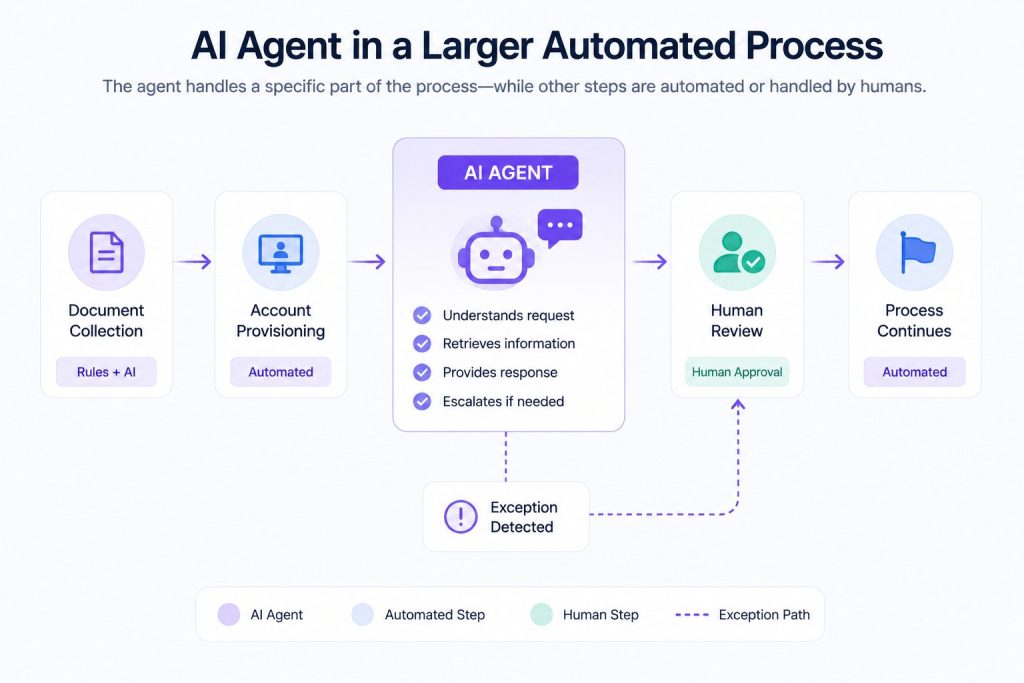
An AI agent can work toward a defined goal, gather information from available sources, make context-dependent decisions, and take permitted actions through connected tools. Within a larger automated process, this capability is genuinely useful.
An AI agent platform becomes relevant when these agents need a managed environment for interacting with users, accessing permitted tools, and taking actions across connected business systems.
An AI agent in the onboarding process might support the benefits enrollment workflow. It can answer questions using approved benefits information, collect the employee’s stated preferences, guide them through the enrollment process, and escalate questions that require a benefits specialist.
Another agent might assist with process exceptions. For example, it could gather relevant context from permitted systems, check the status of a delayed request, notify the responsible team, and escalate the issue according to defined rules.
For teams creating these agents themselves, an AI Agent Builder can provide the interface for defining instructions, knowledge, tools, and permitted actions.
However, not every part of a process needs an agent. Account provisioning follows fixed rules and should be executed deterministically. Sending notifications is a simple automation task. Approving a standard hardware request follows a clear policy. Using an AI agent for these predictable steps can introduce unnecessary complexity, cost, and latency when deterministic automation already handles the requirement well.
The right approach is to use AI agents where the task requires contextual understanding, natural language interaction, or adaptive decision-making, and to use deterministic automation where the rules are clear and the volume is high. The two work together within the same process.
When agents participate in a larger process, they need clearly defined permissions, access to the right business systems, and boundaries around which actions they can take autonomously. Those controls become increasingly important as agents move from answering questions to taking actions within operational systems.
Where Process Automation Should Stop
It is tempting to assume that the goal of process automation is to eliminate every manual step. In practice, the most effective automated processes are those that know where to stop.
Some decisions genuinely require human judgment. Approving an exception to company policy, handling a sensitive employee situation, or negotiating a contract variation all benefit from human context and empathy. Automating these steps would reduce quality, not improve it.
Some steps may cost more to automate than the value they create. If a low-volume or highly variable activity requires a complex integration and ongoing maintenance, keeping human involvement may be more practical than automating it fully.
Some regulated processes may impose requirements for specific approvals, records, or accountable human review. Businesses should identify those obligations before deciding which decisions can be automated.
When agents can access sensitive data or take consequential actions, AI agent governance helps define permissions, approval boundaries, accountability, and escalation requirements.
A practical approach is to automate predictable, rule-based parts of the process, use AI where adaptability and context add value, and preserve human involvement where judgment or accountability is required.
Monitoring, Governance, and Continuous Improvement
An automated process is not a set-and-forget system. It requires ongoing attention to remain effective.
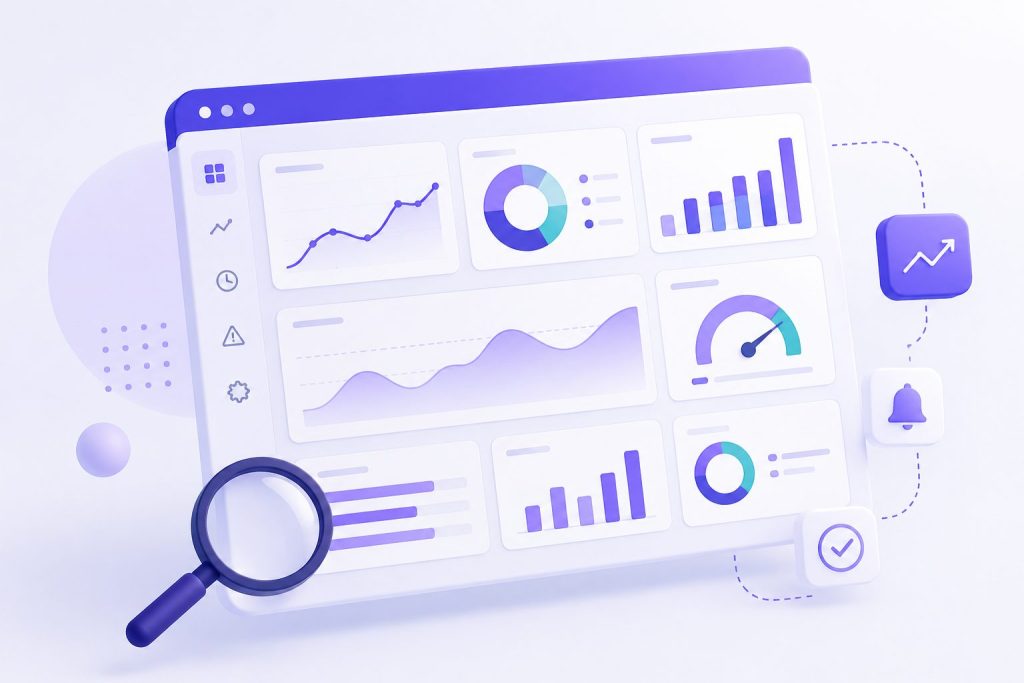
Process-level monitoring tracks the health of the entire process, not just individual workflows. Depending on the process, useful measures may include end-to-end cycle time, exception rates, handoff delays between teams, SLA performance, and the percentage of executions that complete without manual recovery. A dashboard that shows these metrics helps the process owner identify bottlenecks and degradation before they cause problems.
Audit trails support accountability and troubleshooting. Depending on the risk and regulatory context, teams may need to record important automated decisions, rule executions, approvals, exceptions, and system actions with enough context to investigate what happened later.
Process ownership gives someone clear responsibility for the end-to-end operation. The process owner can monitor performance, coordinate improvements, handle escalations, and ensure that the automation remains aligned with business requirements. Without clear ownership, changes in systems, policies, data, or exception patterns may go unresolved.
Continuous improvement uses data from monitoring to refine the process. If exception rates are high at a particular handoff, the process may need a design change. If an AI step begins producing poor classifications, teams should investigate the cause, which could include prompt design, input quality, model changes, reference data, or the model itself.
Agent-based components also require ongoing attention across the AI agent lifecycle, from testing and deployment through monitoring, updates, and eventual replacement or retirement.
Process automation should therefore be maintained as an operational system rather than treated as finished once the first version is deployed.
FAQs About AI Process Automation
What is the difference between AI process automation and workflow automation?
Workflow automation connects a defined sequence of tasks, decisions, and handoffs. AI process automation operates at a broader level, coordinating multiple workflows, systems, teams, owners, and exceptions around an end-to-end business outcome.
What business processes benefit most from AI automation?
Processes are often good candidates when they contain repeatable work across multiple systems or teams, include large amounts of structured or unstructured information, and have clearly defined outcomes. Examples can include employee onboarding, procurement, customer issue resolution, or lead handoff, but suitability depends on the process design and level of human judgment required.
Do I need AI agents to automate business processes?
Not necessarily. Many parts of a process are better handled by deterministic rules and simple automation. AI agents are useful where the process requires contextual understanding, natural language interaction, or adaptive decision-making. They are one component of a larger automation architecture.
How do I know if my process is ready for automation?
Start by mapping the process. Discovery automation tools can do this for you. Identify all the workflows, departments, systems, decisions, and exception points. If the process has clear rules for many steps, reasonably predictable inputs, and measurable outcomes, it may be a strong candidate for automation. If the process changes frequently, has many exceptions, or requires significant human judgment, full automation may not be the right approach.
What happens when a system in the process fails?
Exception handling is a critical part of process automation. The system should detect the failure, attempt a retry if appropriate, log the exception, and notify the process owner or the relevant team. A well-designed process does not fail silently.
Can small businesses benefit from AI process automation?
Yes. Small businesses can start with a narrowly scoped, high-impact process and expand only after the automation proves useful. The appropriate scope depends on available systems, technical resources, process complexity, and the amount of manual work involved.
Conclusion
AI process automation is not about adding AI to every step of a business operation. It is about understanding the full process and deciding where rules, workflows, APIs, AI models, AI agents, and human judgment each fit best.
Automating a workflow improves one defined sequence of work. Automating a process requires coordinating multiple workflows and handoffs around a broader business outcome, even when those workflows involve different systems, teams, and owners.
That broader scope makes process automation more complex, but it can also address operational problems that isolated task or workflow automation cannot solve on its own.
The core idea is simple: automate the process, not just the pieces.
AI Agentic Platform For Building Portable AI Agents
Say Hello To Agentic AI That Connects With Your CRM And Even Other Agents