


Most business automation so far has been about replacing individual tasks, a triggered email here, a database update there. But real business operations don’t run on single tasks. They run on connected sequences of steps.
A lead comes in. Someone needs to qualify it. A CRM entry needs updating. A rep needs assigning. A follow-up needs drafting. Each step depends on the one before it.
That sequence, from trigger to output, across multiple systems and decisions, is a workflow. And AI changes how those workflows are built and run.
This article explains what AI workflow automation is, how it works, where AI adds actual intelligence, and how to build workflows that combine deterministic logic, AI decisions, tool actions, and human oversight. It sits within the broader spectrum of AI automation, where businesses can automate anything from individual tasks to connected workflows and larger operational processes.
Key Takeaways
- AI workflow automation combines structured workflow logic with AI capabilities such as classification, extraction, summarization, and generation.
- AI should be inserted only where interpretation or contextual decisions add value, deterministic steps should remain deterministic.
- Human approval is useful for higher-impact or uncertain actions, but not every AI output needs a human review.
- Integrations and exception handling matter as much as AI capability; a workflow that fails silently is worse than no automation.
- AI agents are one possible component of workflow automation, not a requirement; many workflows can use focused AI steps without giving an agent control over the entire workflow.
- Effective AI workflows are observable, testable, and designed with clear fallback paths for failure.
Portable AI Agents In Seconds, Use Everywhere
Prompt, Test, and Deploy AI Agents Across Social Platforms and LLMs. Automate Everything.
What Is AI Workflow Automation?
AI workflow automation is the use of AI capabilities inside a structured, multi-step business workflow to interpret inputs, make decisions, route work, take actions, and coordinate with systems or people.
A traditional automated workflow follows a fixed path: if X happens, do Y. The conditions are pre-defined, the outputs are predictable, and the logic is entirely deterministic. AI workflow automation introduces steps where the workflow needs to understand something it was not explicitly programmed for, reading an email, classifying a support ticket, extracting a name from a PDF, or deciding how to route a request based on context.
The workflow itself does not disappear. It still has a start, a sequence of steps, branches, and an end. The difference is that certain steps now use AI to handle situations that would otherwise require human judgment or a massive set of rules.
Individual tasks such as classification, extraction, or drafting can also be automated independently, but learning how to automate business tasks with AI is a narrower problem than connecting those tasks into a multi-step workflow.
How AI Workflow Automation Works
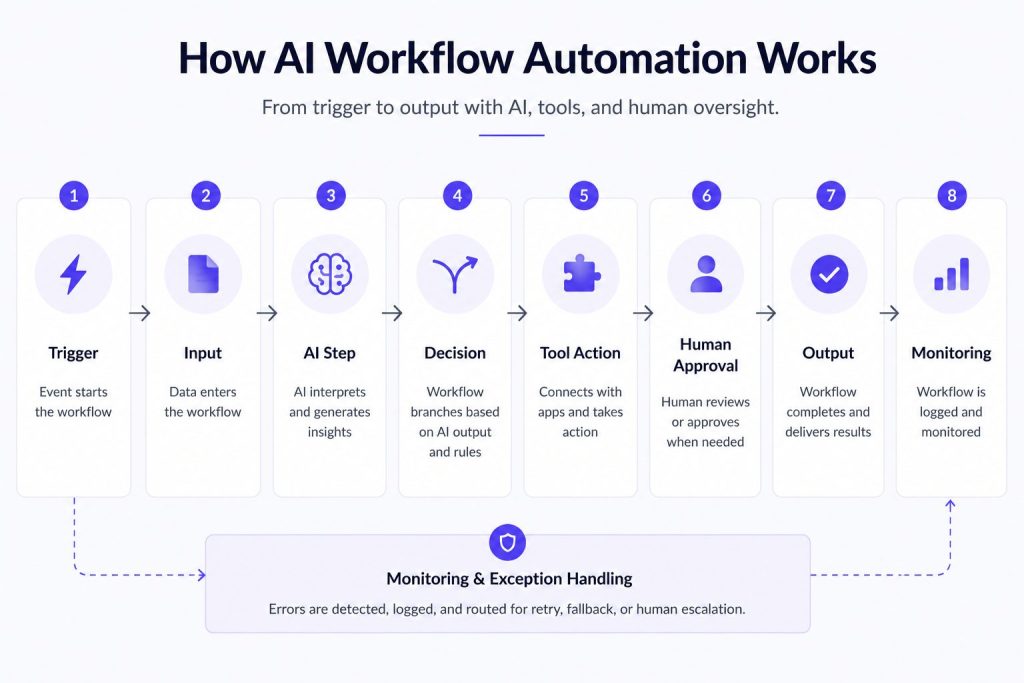
An AI-powered workflow follows a general structure. Not every workflow includes every step, but understanding the model helps see where AI fits.
Trigger — Something starts the workflow. This could be a form submission, an email arriving, a webhook, a scheduled time, a database change, or a user action.
Input — Data enters the workflow. This might be structured (form fields, API payload) or unstructured (email body, chat message, uploaded document).
AI step — The workflow passes the input to an AI model. Common AI actions include:
- Classifying intent or category
- Extracting structured data from free text
- Summarizing content
- Generating a response or draft
- Matching against criteria
Branch/decision — The workflow uses the AI output to decide which path to follow. This can be combined with deterministic rules. For example, a workflow might continue automatically when the AI output passes predefined validation criteria, while ambiguous or uncertain cases are routed for human review.
Tool action — The workflow triggers an action in another system. This could be updating a CRM record, creating a ticket, sending a Slack message, scheduling a calendar event, or calling an API.
Human approval — For higher-impact actions, the workflow pauses and waits for a human to review and approve before proceeding. The AI may prepare a recommendation, but a person makes the final call.
Output — The workflow completes. This could be a sent email, an updated record, a notification, or a handoff to a human.
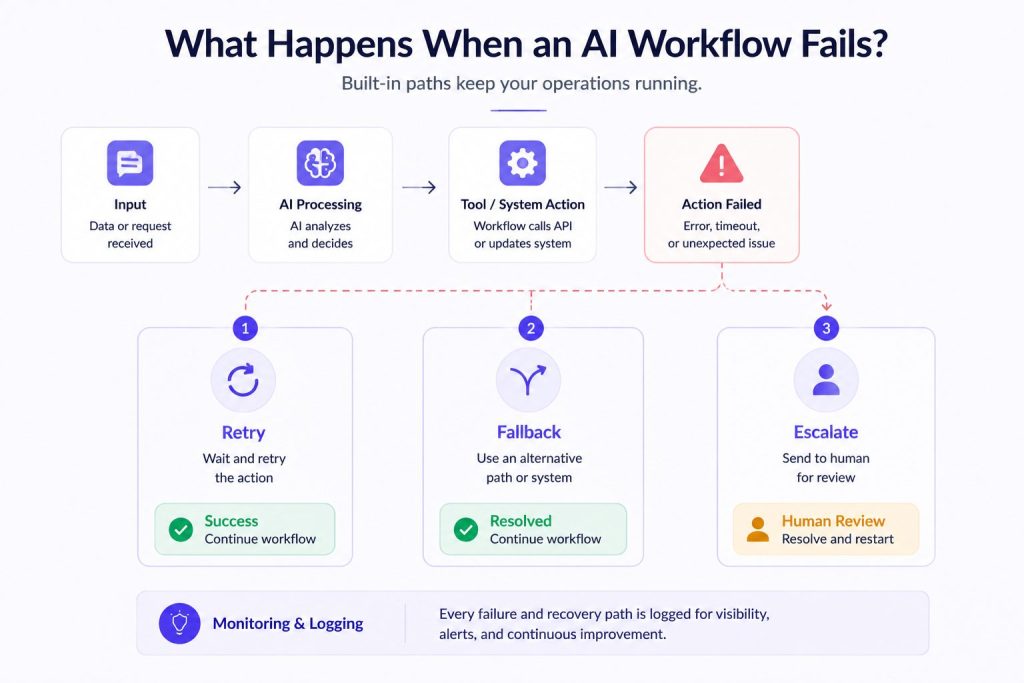
Monitoring/exception handling — The workflow logs its execution. If a step fails, a timeout occurs, or an AI model returns an unexpected result, the workflow should have a fallback, retry, alternative path, or human escalation.

Practical Example: Lead Qualification
A lead submits a form on a website.
- Trigger: Form submission event
- Input: Name, email, company size, service interest, and a free-text message describing their needs
- AI step: The workflow sends the message to an AI model to classify intent and extract qualification signals, budget mention, timeline, decision-maker status
- Branch: If qualification signals are strong, route to high-priority path. If weak, route to nurture path. If unclear, route to human review
- Tool action: CRM entry created or updated. Sales rep assigned based on territory and deal size. Calendar availability checked
- Human approval: For high-value leads, the AI drafts a personalized follow-up email. A sales rep reviews and can edit before sending
- Output: Follow-up sent or queued. Lead status updated in CRM. This kind of workflow is particularly useful for AI agents for small businesses, where lead qualification and follow-up often need to happen without adding more manual work to a small sales team.
- Monitoring: The workflow logs the AI output, branch taken, tool actions, and any errors. If the CRM update fails, the workflow follows its configured retry or escalation path.
Traditional Workflow Automation vs AI Workflow Automation
Traditional workflow automation uses deterministic rules. If a support ticket contains the word “billing,” route it to the billing team. If an invoice is over $10,000, require manager approval. These rules are predictable, testable, and cheap to run. They work well when the input is structured and the conditions are clear.
AI workflow automation adds capabilities that are difficult or impossible to express as rules.
| Capability | Rules | AI |
| Classify a free-text support request | Requires predefined keywords, categories, or matching logic | Can classify based on semantic meaning and context |
| Extract a date and amount from an invoice image | Often depends on predictable fields, formats, or document rules | Can extract information across varying layouts using document or multimodal models |
| Summarize a long email thread | Requires predefined extraction or formatting logic | Can generate a concise contextual summary |
| Route a request based on tone or urgency | Requires explicit criteria | Can help classify sentiment, urgency, or intent from context |
| Draft a personalized response | Usually relies on templates and variables | Can generate context-dependent drafts |
Where rules remain preferable:
- Simple yes/no checks
- Access control and permissions
- Data validation (email format, required fields)
- Fixed compliance rules and policy constraints
- Financial calculations
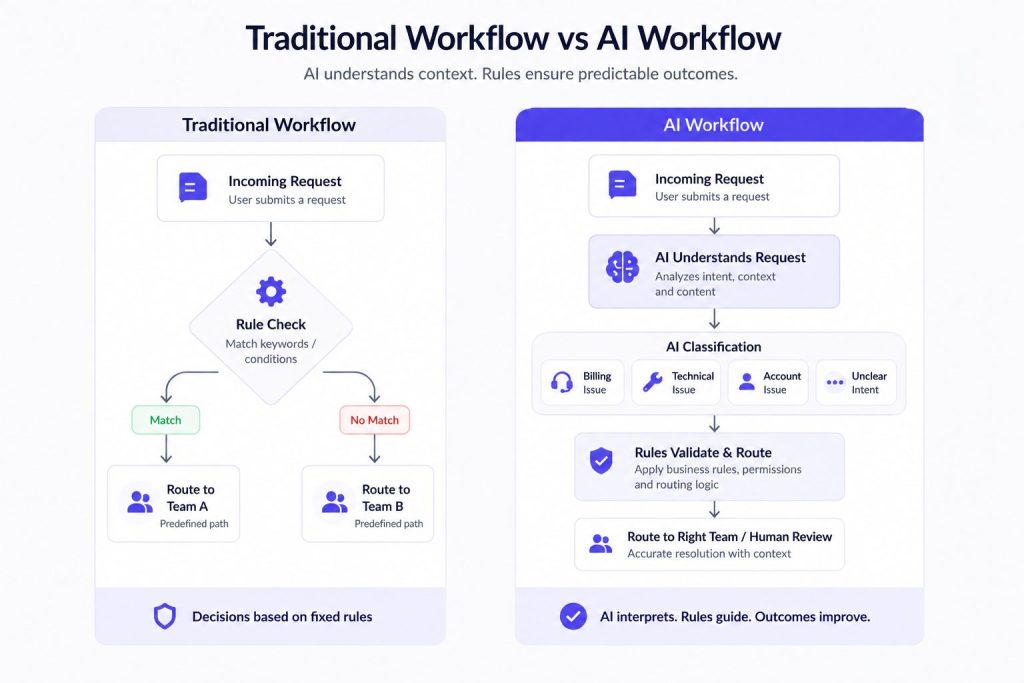
The best AI workflows do not replace rules. They use rules for what rules are good at and AI for what rules cannot handle.
A Practical AI Workflow Example
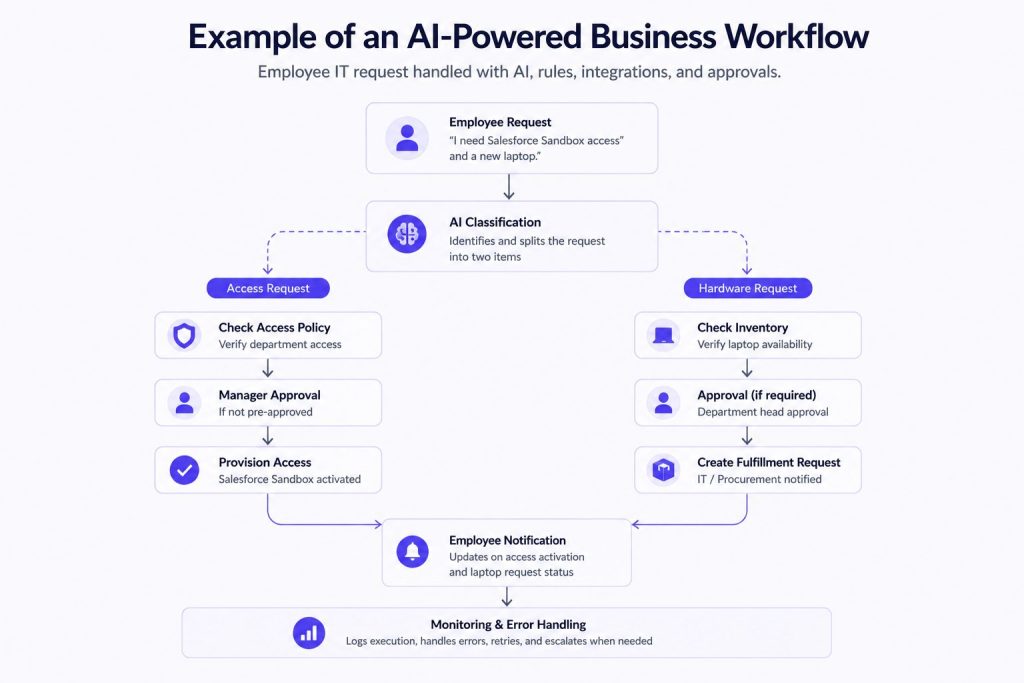
Let’s walk through a realistic employee IT request workflow.
An employee submits a request through an internal portal: “I need access to the Salesforce Sandbox and a new laptop since mine has been running slow.”
Step 1: Trigger and Input
The form submission triggers the workflow. The input includes employee ID, department, requested items, and a free-text description.
Step 2: AI Classification
The workflow sends the text to an AI model. The model classifies this as an IT access request and a hardware request, two categories in one submission. It also extracts urgency: “running slow” suggests the hardware request may be time-sensitive.
Step 3: Branching
The workflow creates two parallel branches.
- Branch A (Access request): Check if the employee’s manager has pre-approved department-level access. If yes, send a provisioning request directly to the IT system. If not, route to manager approval.
- Branch B (Hardware request): Check inventory. If laptops are in stock, create a fulfillment order. If not, notify procurement and set a follow-up task.
Step 4: Tool Actions
- Branch A calls the identity management system API to grant Salesforce Sandbox access
- Branch B creates a ticket in the IT asset management system with the laptop specifications for the employee’s role
Step 5: Human Approval
If the hardware request requires department approval, the workflow pauses and sends the department head an AI-generated summary with an approve or deny action. The approval gate affects only that branch, so the access request can continue independently.
Step 6: Output and Notification
The employee receives a notification: “Salesforce Sandbox access is active. Your laptop request has been sent for approval.”
Step 7: Monitoring
The workflow logs each step. If the identity management API is unavailable, the workflow follows its configured retry policy and escalates the failure to the IT team if the connection cannot be restored.
Similar workflows can also support HR operations. An AI HR Assistant, for example, can answer employee questions, retrieve relevant policy information, handle routine requests, and route cases that require HR involvement.
This example stays at the workflow level: one connected sequence with a defined start and outcome. AI process automation goes broader by coordinating multiple workflows, systems, and teams across an end-to-end business operation.
Where AI Should and Shouldn’t Be Used in a Workflow
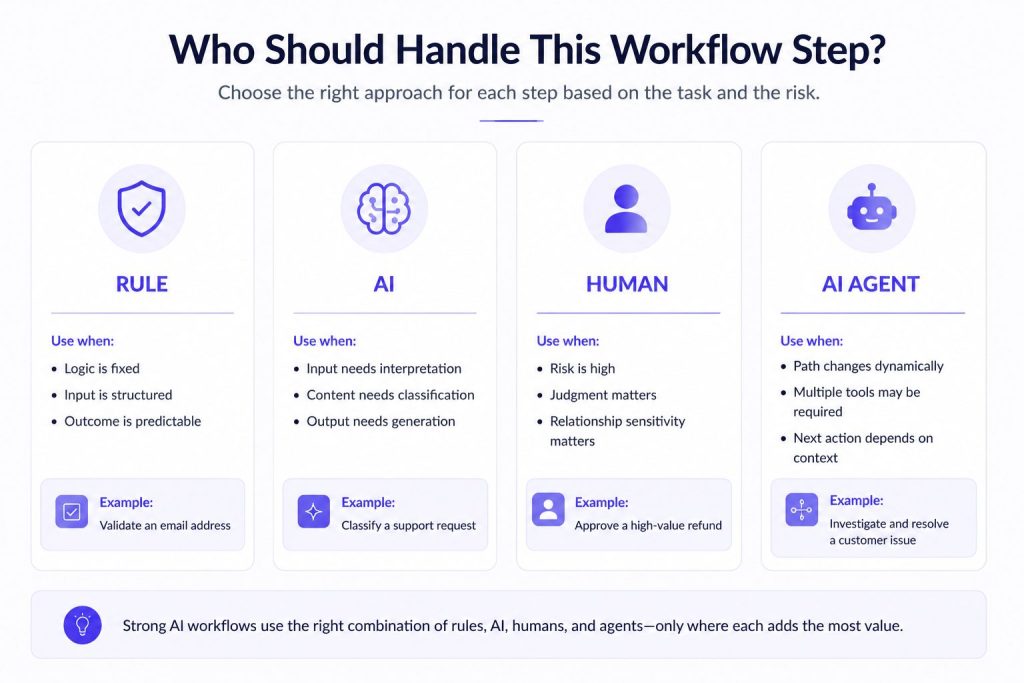
Not every step in a workflow benefits from AI. The decision between a rule, an AI model, a human, or an AI agent depends on the nature of the step.
Use AI when:
- The input is unstructured or varies significantly (free text, email, chat, document)
- The decision requires understanding context or nuance
- You need to generate content that depends on input specifics
- The volume of work makes human review impractical
Use deterministic rules when:
- The condition is clear and stable (if field X equals Y, do Z)
- The cost of a wrong decision is high and the rule is proven
- The requirement is regulatory or compliance-driven
- The logic is simple enough that a model adds unnecessary complexity and cost
Keep humans when:
- The decision carries significant business or legal risk
- The situation requires judgment that cannot be safely delegated
- The workflow produces an output that needs a relationship-sensitive touch
Consider an AI agent when:
- The workflow path cannot be fully predetermined
- Multiple tools may need to be selected dynamically based on context
- The workflow must maintain state across several steps with evolving requirements
- The AI needs to choose among several possible actions based on what it discovers
As businesses automate more of these recurring responsibilities, individual agents can also become part of a broader AI workforce, with different agents handling specialized roles while people retain oversight of higher-impact decisions.
AI Workflow Automation vs AI Agent Workflows
These two terms are often used interchangeably, but they describe different things.
AI workflow automation starts with a business workflow and inserts AI into specific steps. The workflow structure is designed by a person. The paths are defined. AI handles interpretation, classification, generation, or routing at particular points. The workflow remains predictable and testable.
AI agent workflows are workflows designed around how an AI agent reasons, uses tools, maintains context, and handles decisions or handoffs. The agent itself decides the sequence of actions within a broader goal. The workflow is less a fixed path and more a framework within which the agent operates autonomously.
The difference matters because most business workflows benefit from the structured approach first. You can add significant intelligence to a workflow without handing full autonomy to an agent. Start with AI at the steps where it clearly helps, and only move toward agent-based approaches when the workflow genuinely requires dynamic decision-making across multiple tools.
For workflows that need an agent because the path cannot be fully predefined, an AI agent platform such as Botsify can provide the environment for building agents that interact with users and take actions through connected business tools.
Integrations and Tool Actions
An AI workflow automation that lives in isolation is not useful. AI needs to read data from business systems and write results back to them.
Common integration points include:
- CRM — Read contact records, update deal stages, log activities
- Help desk — Create tickets, update status, post responses
- Databases — Look up customer information, write logs
- Calendars — Check availability, schedule meetings
- Communication tools — Send Slack messages, emails, or SMS
- APIs — Trigger actions in ERP, HR systems, marketing platforms, or custom applications
The workflow should be able to read from a system, process with AI, and write to a different system in a single flow. This is where AI agent integration becomes relevant: connecting an agent’s decisions and actions with the business systems it needs to read from, update, or trigger.
Human-in-the-Loop Workflow Automation
AI does not remove the need for human judgment. It changes where and how that judgment is applied.
In a well-designed AI workflow, humans handle what they are best at, nuanced decisions, relationship-sensitive communication, and actions with significant business or legal consequences. AI handles what it is best at, processing volume, extracting patterns, and generating drafts.
Common human-in-the-loop patterns:
- Approval gates — The workflow pauses at a defined step and waits for a person to approve or reject before proceeding. The AI may prepare a recommendation, but the person makes the final decision.
- Escalation — If the AI output fails defined validation criteria or the result is ambiguous, the workflow escalates to a human instead of proceeding with an uncertain decision.
- Review and edit — The AI generates a draft (email, response, report). A human reviews, edits if needed, and publishes. The AI handles the first pass; the human handles quality control.
- Exception handling — When a workflow fails, an API is down, an input is unparseable, a branch condition is ambiguous, the workflow routes to a human who can diagnose and resolve.
Human approval should be based on risk rather than applied to every AI action. Low-risk actions can proceed automatically when the output meets defined validation criteria, while ambiguous, exceptional, or higher-impact cases can be routed for review.
As agents receive more authority to access data or take actions, AI agent governance becomes important for defining permissions, escalation rules, accountability, and human oversight.
What to Look for in AI Workflow Automation Software
Choosing the right platform for building AI-powered workflows depends on the capabilities it provides. If you’re comparing specific platforms rather than workflow capabilities, our guide to the best AI automation tools looks at how agent-first, workflow-first, and specialized automation products differ. These are the categories to evaluate:
- Branching and logic — Can the workflow handle conditional paths, parallel branches, loops, and timeouts? A workflow that only supports linear sequences will not handle real business scenarios.
- Integrations — How many business systems does the platform connect to natively? Does it support custom API calls for systems that are not pre-built?
- AI and model support — Can you plug in different AI models for different steps? Can you use a classification model for one step and a generation model for another? Does the platform support custom prompts and model selection?
- Tool calling — Can the AI step trigger actions in connected systems directly, or does it only produce text that another step must parse?
- Human approvals — Does the platform support pause-and-wait steps where a human can review, approve, edit, or reject before the workflow continues?
- Failure handling — What happens when an integration fails, an AI model times out, or an input is malformed? Does the workflow support retries, fallback paths, and human escalation?
- Observability — Can you see what happened at each step of a workflow execution? Can you inspect the AI output, the branch decision, and the timing of each step?
- Access control — Can different teams manage different workflows? Can you restrict who can modify or trigger workflows?
- Versioning and testing — Can you test a workflow with sample data before deploying? Can you roll back to a previous version?
Common Failure Points in AI-Powered Workflows
AI workflow automation introduces new failure modes that do not exist in purely deterministic automation.
- Poor input quality — If the data entering the workflow is incomplete, inconsistent, or poorly structured, the AI may produce unreliable or inconsistent output. The workflow should validate inputs before passing them to an AI model.
- Weak integration — A workflow breaks when the connected system returns an unexpected format, a timeout, or an error. Each integration point needs a fallback.
- Unclear branch conditions — If the AI output is ambiguous and the branch conditions are not designed to handle uncertainty, the workflow may take the wrong path. Design branches with validation criteria, fallback conditions, and clear escalation paths.
- Too much AI where rules would work — Using AI for every step increases cost, latency, and failure risk. If a simple rule can handle a step, use the rule.
- Missing fallback — A workflow that assumes every AI or integration step will return a valid result can fail silently when something unexpected happens.
- No human escalation — When the AI cannot handle an input, the workflow should know how to route to a human. Without this, edge cases are invisible.
- Unmonitored model output — Workflow behavior can change as models, prompts, connected data, or surrounding systems change. Monitoring helps teams identify declining output quality or unexpected behavior before it affects more executions. Monitoring also becomes increasingly important across the AI agent lifecycle, because deployed agents may need ongoing testing, evaluation, updates, and refinement as their workflows or connected systems change.
When AI Agents Make Sense Inside a Workflow
Most steps in a workflow are well-defined. A specific input goes to a specific model, produces a specific output, and triggers a specific action. But some workflows contain steps where the best action depends on context that cannot be known in advance.
This is where an AI agent becomes useful.
An AI agent inside a workflow differs from a fixed AI step in a few ways:
- Tool selection — The agent can choose which tool to call based on the input. A support agent might look up a knowledge base, check a customer’s account status, or escalate to a human, deciding which action fits the situation.
- Context maintenance — Through AI agent memory, an agent can retain relevant context across interactions so later actions can build on information gathered earlier.
- Dynamic pathing — The agent decides the sequence of actions, not a predefined workflow diagram.
When a workflow requires several specialized agents rather than one agent using multiple tools, AI agent orchestration becomes a separate coordination problem involving task delegation, shared context, and handoffs between agents.
For example, in a customer support workflow, a fixed AI step might classify the issue and route to the right team. An AI agent would handle the entire interaction, asking clarifying questions, checking the knowledge base, pulling account data, and resolving the issue or escalating, without needing a predefined path for every possible scenario.
Platforms like the Botsify AI Agent Builder make it possible to build these agents and insert them into workflows where dynamic autonomy genuinely adds value. But the rule of thumb is: start with fixed AI steps, and only introduce an agent when the workflow cannot be sufficiently predefined.
FAQs About AI Workflow Automation
What is AI workflow automation?
AI workflow automation is the use of AI capabilities such as classification, extraction, generation, and summarization inside a structured multi-step business workflow to handle steps that require interpretation or contextual decisions.
What is an example of AI workflow automation?
A support ticket arrives by email. An AI model classifies the issue, extracts the priority, and checks the customer’s account history. The workflow routes high-priority tickets to a senior agent, creates a ticket in the help desk, and drafts an initial response for the agent to review before sending.
Does AI workflow automation require AI agents?
Many AI workflows use focused AI steps such as classification, extraction, or generation at specific points. AI agents become useful when the workflow path cannot be fully predefined and the system needs to choose actions dynamically.
What is the difference between AI workflow automation and traditional workflow automation?
Traditional workflow automation uses deterministic rules and fixed logic. AI workflow automation adds steps where the system interprets unstructured inputs, makes contextual decisions, or generates content that cannot be expressed as rules.
What should businesses look for in AI workflow automation software?
Key capabilities include branching and conditional logic, integrations with business systems, support for multiple AI models, human approval gates, failure handling with fallback paths, observability, and access control.
How does AI workflow automation differ from AI process automation?
Workflow automation focuses on a connected sequence of steps with a defined start and end. Process automation covers broader end-to-end business operations that may contain multiple workflows across different departments and systems.
Conclusion
AI workflow automation is not about replacing every step with AI. It is about identifying where deterministic rules work, where AI adds value, where humans should stay involved, and where an agent might be useful.
Strong workflows use each component only where it adds value. Deterministic logic handles predictable steps. AI can handle interpretation and generation. Humans provide judgment and oversight where needed. Agents become useful when the path itself requires more flexible decision-making.
Building this way keeps workflows reliable, observable, and maintainable. It prevents the common failure of treating AI as a universal solution to every automation problem.
Start with the workflow, not the AI. Map the steps. Identify where intelligence is actually needed. Then decide which tool, rule, model, human, or agent, fits each step.
AI Agentic Platform For Building Portable AI Agents
Say Hello To Agentic AI That Connects With Your CRM And Even Other Agents