


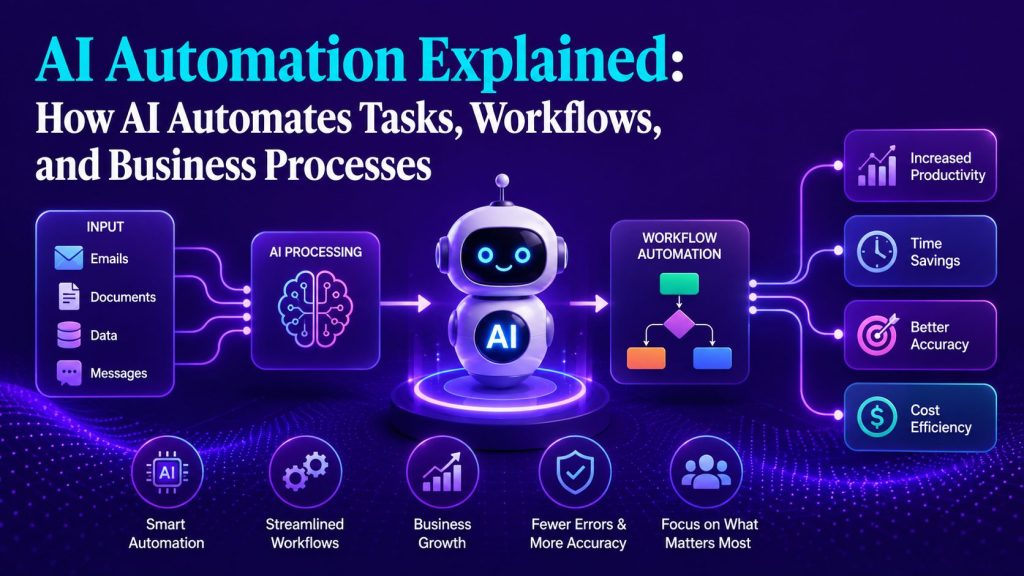
AI automation is the use of artificial intelligence to execute business tasks that require interpretation, judgment, or content generation, and to chain those tasks into workflows that run with minimal human intervention.
Traditional automation follows a fixed path. If a support ticket contains the word “refund,” route it to billing. If a form field is empty, show an error. These rules are deterministic. They work well when inputs are predictable and conditions are stable.
AI automation adds a layer of intelligence between trigger and action. Instead of matching keywords, the system reads the entire input, understands context, makes a decision, and generates output. It handles variation. It adapts when conditions change.
A concrete example: a support ticket arrives with the subject line “I can’t access my account and I need help.”
Traditional automation checks for keywords. It finds none of the expected trigger words, so the ticket goes to a default queue or sits unassigned. AI automation reads the message, identifies the intent (account access issue), classifies the urgency, retrieves the customer’s account information, drafts a response, and routes the ticket to the appropriate team. Same trigger. Much richer outcome.
Key Takeaways
- AI automation combines artificial intelligence with automation to handle work that may require understanding, judgment, or adaptation, not just fixed rules.
- Business automation can happen at different levels, from a single task to connected workflows and broader end-to-end business processes.
- Traditional automation is best for predictable, rules-based actions, while AI can help when inputs are unstructured or decisions depend on context.
- AI agents extend automation further by interpreting goals, using tools, making decisions, and taking actions within defined boundaries.
- Not every process needs an AI agent; effective automation often combines deterministic rules, AI capabilities, human oversight, and agents where each fits best.
- Businesses should start by understanding the work they want to automate before choosing an AI automation tool, workflow, or agent-based approach.
Portable AI Agents In Seconds, Use Everywhere
Prompt, Test, and Deploy AI Agents Across Social Platforms and LLMs. Automate Everything.
AI vs. Automation vs. AI Automation
| Traditional Automation | AI | AI Automation | |
| Logic | Fixed rules | Learned patterns | Rules + AI judgment |
| Inputs | Structured data only | Any data | Any data |
| Adaptability | Breaks on variation | Adapts to new inputs | Adapts within workflow |
| Execution | Automatic | Manual / API | Automatic |
| Best for | Repetitive, predictable tasks | Analysis, generation, prediction | Complex, variable workflows |
Traditional automation runs on rules. Every email auto-responder, every recurring invoice system, every “if this then that” workflow is traditional automation. It is deterministic. It does exactly what it was programmed to do.
AI provides capabilities such as classification, extraction, generation, prediction, and contextual decision-making. An AI model typically produces an output; automation connects that output to systems and actions so work can continue with less manual intervention.
AI automation combines both. The AI provides the intelligence layer. The automation provides the execution layer. The AI interprets the input and decides what to do. The automation carries out the action across your systems.
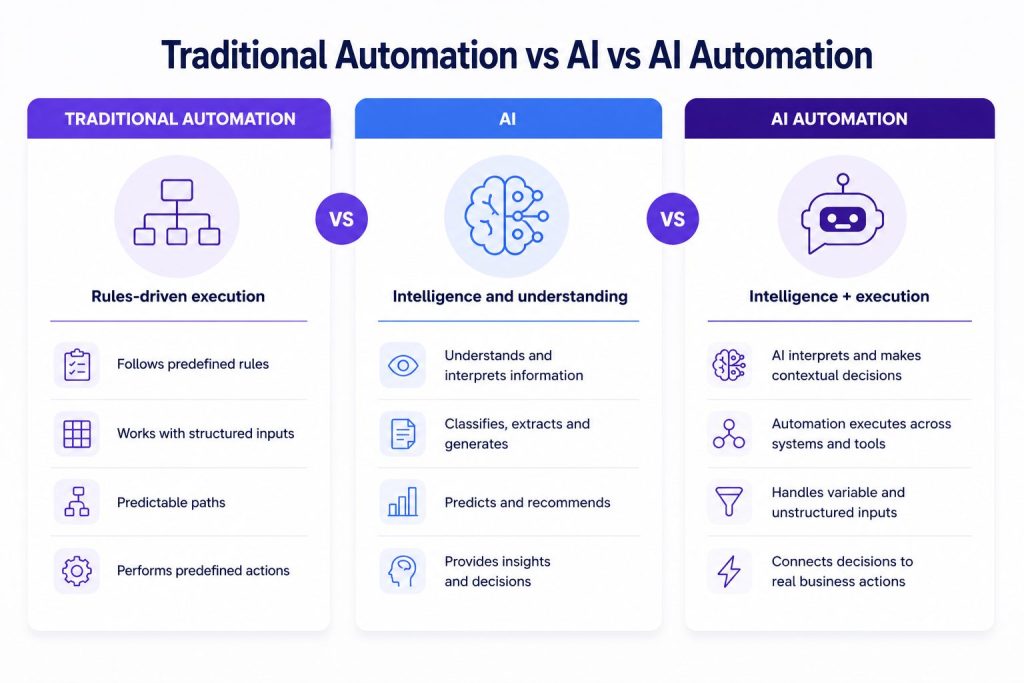

A practical distinction: automating invoice processing by extracting data from a fixed template is traditional automation. Automating invoice processing by reading invoices of any format, extracting the relevant fields, categorizing the expense, and posting it to your accounting software is AI automation.
How AI Automation Works
Most AI automation can be understood through three basic layers:
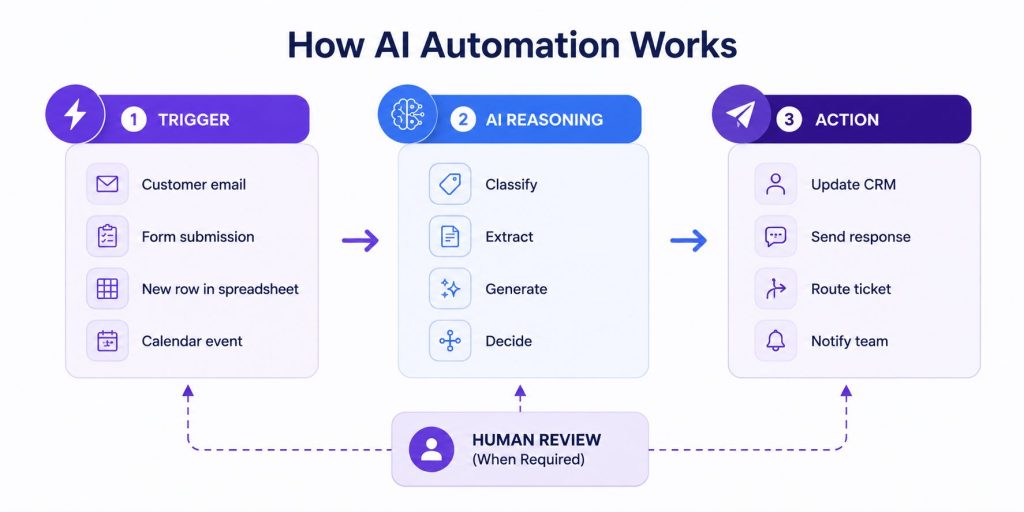

1. Trigger
Something happens. A customer submits a form. An email arrives. A new row appears in a spreadsheet. A calendar event is created.
2. AI Reasoning
The AI model receives the input and performs one or more functions:
- Classification — categorizing the input (urgent vs. routine, support vs. sales)
- Extraction — pulling structured data from unstructured text (names, dates, amounts)
- Generation — creating new content (drafting a reply, writing a summary)
- Decision — choosing a path based on context (route, escalate, approve, schedule)
3. Action
The AI output triggers an action in a connected system. The automation layer handles the execution: creating a contact in the CRM, sending a Slack notification, updating a deal stage, or posting a response. When those actions span CRMs, calendars, help desks, databases, or internal systems, AI Agent Integration becomes the connection layer that allows intelligent automation to interact with real business data and tools.
These three layers chain together. A single trigger can pass through multiple AI reasoning steps and multiple actions, creating a complete automated workflow.
The Spectrum: Task, Workflow, and Process Automation
Not all AI automation operates at the same scope. Understanding the three levels helps you decide what to automate and how.
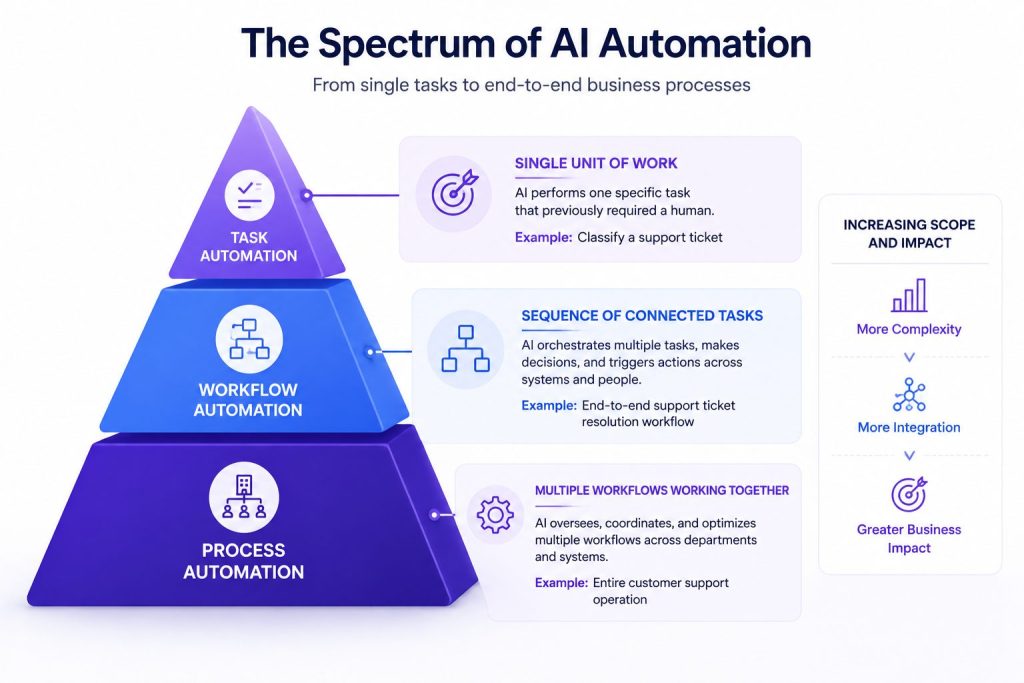
Task Automation
A task is a single unit of work. AI automates a task when it performs one specific piece of work that previously required a human.
Examples:
- AI classifies an incoming support ticket as “billing” or “technical”
- AI extracts the customer name, order number, and issue from a support email
- AI checks the sentiment of a customer review and flags negative ones
- AI generates a draft response to a customer inquiry
Task automation is the simplest entry point. It replaces one manual step with an AI-powered one. The surrounding workflow remains unchanged.
Workflow Automation
A workflow is a sequence of connected tasks, decisions, and actions across multiple systems and people. AI automates a workflow when it orchestrates multiple connected steps, making decisions at each stage.
Example:
A support ticket arrives. The AI reads the message, classifies the issue, retrieves the customer’s account information from the CRM, checks the knowledge base for relevant articles, drafts a response, routes it to the appropriate team if escalation is needed, and logs the interaction back to the CRM.
AI Workflow Automation connects individual tasks into a coordinated flow where AI can interpret inputs, make contextual decisions, and help determine what happens at each stage.
When the workflow is powered by an autonomous agent rather than only predefined steps, AI Agent Workflows become relevant for designing how the agent handles tools, decisions, context, and handoffs.
Process Automation
A process is a broader end-to-end business operation that may contain multiple workflows. AI automates a process when it orchestrates multiple workflows across departments, handling exceptions, escalations, and continuous improvement.
Example:
A customer support operation spanning ticket intake, routing, first response, escalation, resolution, follow-up, reporting, and quality assurance. AI can support the broader operation by routing work between workflows, identifying exceptions or bottlenecks, surfacing issues for human review, and coordinating actions across connected systems.
AI Process Automation takes this broader view, focusing on how multiple workflows, teams, and systems contribute to an end-to-end business outcome.
Process automation is the most ambitious level. It requires mature automation infrastructure, clear governance, and a strategic approach to where AI adds value versus where human judgment remains essential.
Where AI Agents Fit
AI agents represent a further evolution, but they are not required for every AI automation.
| Capability | Traditional Automation | AI-Powered Automation | AI Agents |
| Handles unstructured data | Limited | Yes | Yes |
| Relies on predefined logic | High | Moderate | Lower, within defined boundaries |
| Adapts to variable inputs | Limited | Yes, within configured logic | Yes, with greater flexibility |
| Selects tools/actions | Predefined | Usually predefined | Can select dynamically |
| Maintains context | Limited | Possible within workflow | Can maintain broader context |
| Chooses workflow path | Predefined | Within configured branches | Can adapt actions/path dynamically |
Traditional automation follows predefined rules. It is reliable for stable, repetitive work.
AI-powered automation adds the ability to handle unstructured inputs, classify, generate, and make contextual decisions within a fixed workflow. The sequence is still designed by humans. The AI fills the intelligence gaps.
AI agents can reason about goals, choose which tools to call, retrieve information, and decide their own sequence of actions within defined boundaries. An agent does not simply execute a workflow. It determines the workflow itself.
When to Use Each
Structured, repetitive work with stable conditions → traditional automation is sufficient
Variable work that requires interpreting unstructured inputs within a known sequence → AI-powered automation
Complex goals that require choosing tools, maintaining context, and adapting the path → AI agents
The three approaches work together. A mature automation strategy combines deterministic rules for the predictable parts, AI capabilities for the intelligence-heavy steps, and agents for the complex, multi-system goals. Not every AI automation needs an agent, and not every process needs full autonomy.
As automation moves toward agentic behavior, businesses need more than an AI model alone. An AI Agent Platform provides the environment for building agents, connecting them to business tools, deploying them across channels, and managing how they operate.
This is where Botsify fits into the AI automation landscape: businesses can use its AI Agent Builder to create prompt-based agents that work across supported channels and connect with business applications without building the entire agent infrastructure from scratch.
Practical Business Examples
Customer Support
Trigger: A customer emails about a delayed order.
AI does: Reads the email, classifies intent as shipping inquiry, checks order status in the ERP, looks up the customer account in the CRM.
Action: Drafts a response with tracking information. If the delay meets predefined escalation criteria, the case is routed to a human agent who can decide whether compensation or another exception is appropriate.
Human oversight: A person reviews exceptions, compensation decisions, or cases the automation cannot confidently resolve.
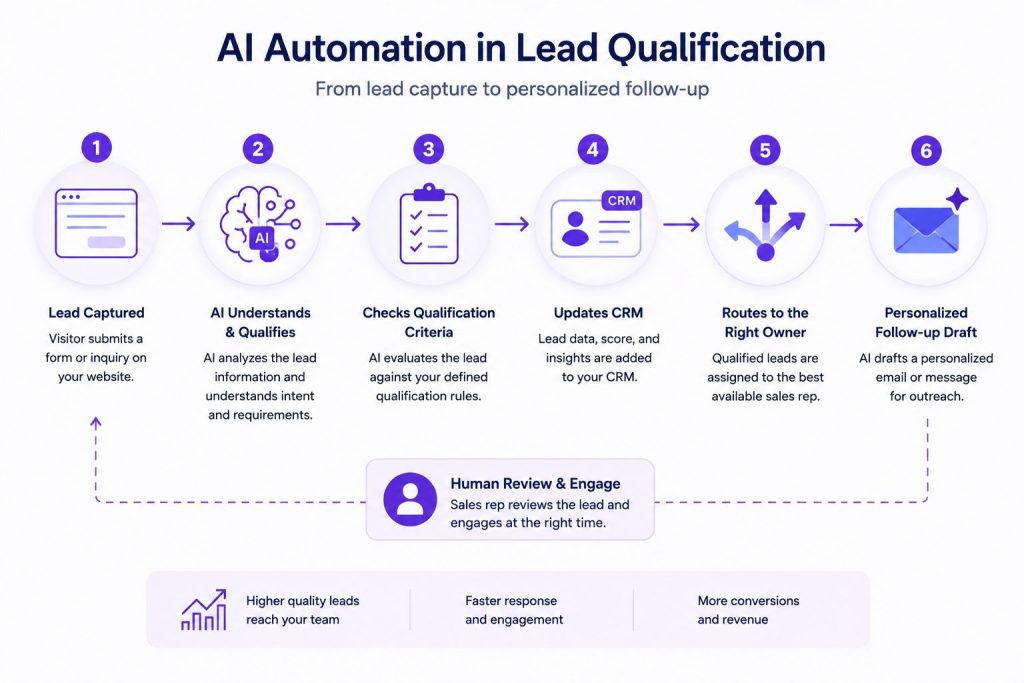
Lead Qualification
Trigger: A new lead fills out a contact form.
AI does: Reads the company name, industry, and stated needs. Looks up the company on external data sources. Cross-references against the ideal customer profile.
Action: Scores the lead, assigns it to the appropriate sales rep, and generates a personalized follow-up draft.
Human oversight: Sales rep reviews the score and decides whether to engage.
Appointment Handling
Trigger: A customer requests a callback through the website.
AI does: Checks available calendar slots, confirms the appointment, sends a calendar invite.
Action: Adds a reminder workflow. If the customer needs to reschedule, handles the entire rebooking process.
Human oversight: None required for standard scheduling. Escalated if the request is outside normal parameters.
Internal Knowledge Retrieval
Trigger: An employee asks a question in Slack (“What’s our policy on international returns?”)
AI does: Searches the knowledge base, finds the relevant policy document, summarizes the key points.
Action: Posts the answer with a link to the source document.
Human oversight: Employee verifies the information against the source.
Document Processing
Trigger: An insurance company receives a claim document.
AI does: Reads the document, extracts the claimant name, policy number, claim type, and amount. Classifies the claim as standard or complex.
Action: Routes to the appropriate adjuster, updates the claims management system.
Human oversight: Complex claims reviewed by a senior adjuster. Standard claims processed automatically.
When standard automation cannot handle a company’s specific rules, systems, or operational requirements, Custom AI Agents can be designed around those specialized business processes.
Benefits and Business Value
AI automation delivers value in four areas:
- Faster handling of routine work. AI automation can reduce manual steps involved in reading, classifying, researching, and routing common requests, allowing work to move through a process with fewer handoffs.
- Accuracy on variable inputs. Rules-based automation can struggle when inputs do not match expected formats. AI automation can interpret greater variation and convert unstructured information into outputs that downstream systems can use.
- Greater operational capacity. Once suitable tasks or workflows are automated, teams can handle additional routine volume without requiring every increase in workload to create an equivalent increase in manual processing.
- Cleaner data downstream. AI normalizes messy inputs before they reach your systems. Free-text descriptions become structured records. Inconsistent formats become standardized fields.
As organizations automate more areas of work, these capabilities can evolve into an AI Workforce, where specialized agents support different functions while people retain oversight of higher-value decisions.
Limitations, Risks, and Where Human Oversight Remains Essential
Hallucination. AI models can generate confident but incorrect outputs. Mitigation: use validation, confidence thresholds, guardrails, and human review when the consequences of an incorrect output justify additional oversight.
Bias. AI models can reflect or amplify biases present in training data, prompts, system design, or the data supplied during use. Mitigation: evaluate outputs for consequential use cases and establish clear review and escalation procedures.
Integration complexity. AI automation is only as good as the systems it connects to. If your CRM has bad data, the AI will make bad decisions based on it. Mitigation: clean data before automating, and build monitoring that flags unusual patterns.
Cost at scale. AI-powered steps introduce model and infrastructure costs that traditional rule-based automation may not require. For high-volume, low-complexity work, businesses should consider whether a deterministic workflow can achieve the same result more efficiently.
Where humans stay in the loop:
- Customer-facing communication requiring empathy or nuance
- High-stakes financial decisions (refunds, pricing, contracts)
- Escalation handling when the AI cannot determine the right path
- Quality assurance and continuous improvement of automated workflows
As AI systems receive more authority to access data or take actions, AI Agent Governance becomes important for defining permissions, escalation rules, monitoring, accountability, and human oversight.
How to Identify Good AI Automation Opportunities
The strongest candidates share three characteristics:
- The work is frequent, time-consuming, or operationally expensive. Frequency matters, but so does effort. Even an occasional process can be a strong automation candidate if it consumes significant employee time or creates operational bottlenecks.
- The work involves interpretation, variation, or decisions that simple rules struggle to handle. AI adds the most value when inputs are inconsistent, unstructured, or context-dependent.
- The result can lead to a defined next action. Strong automation candidates produce an output that can update a system, route a request, generate a recommendation, trigger another workflow, or support a human decision.
A simple framework: ask three questions about any process.
- How much manual effort does this work consume?
- Does it involve interpretation or variation?
- Can the result trigger a clear next action?
The stronger the answers, the more worthwhile it is to investigate AI automation. Frequency alone should never determine whether something deserves automation.
Businesses looking for practical starting points can begin with How to Automate Business Tasks With AI, focusing on individual pieces of work before deciding whether they need broader workflow or process automation.
Automation also needs ongoing measurement. As business conditions, inputs, and systems change, AI Workflow Optimization helps teams identify bottlenecks, unnecessary steps, weak handoffs, and places where human or AI responsibilities should be adjusted.
The right technology depends on what you are automating. Some businesses need simple task automation, others need workflow platforms, and others need agentic systems that can reason and act across tools. Comparing the Best AI Automation Tools therefore starts with understanding which level of automation the business actually needs.
How Platforms Like Botsify Fit Into the AI Automation Landscape
AI automation does not always require an AI agent. But when the work involves conversations, changing context, business tools, and decisions that cannot be handled by a rigid sequence of rules, agentic automation becomes more relevant.
Botsify is an AI agent platform built around prompt-based agent creation. Teams can create agents, deploy them across supported channels such as websites, WhatsApp, Slack, and Messenger, and connect those agents with business applications and APIs.
The important distinction is that Botsify is not positioned as a replacement for every automation tool. Traditional rules may still be the best choice for predictable tasks. Botsify becomes relevant when a business needs AI agents that can work with context, interact with users or connected systems, and take actions through business tools rather than simply generate an isolated AI response.
Businesses can use the platform’s AI Agent Builder when they want to configure and deploy agents themselves, while organizations with more specialized requirements can explore Custom AI Agents built around their own processes and integrations.
This creates a natural progression: deterministic automation handles predictable work, AI automation adds intelligence to selected steps, and AI agents can take on more adaptive work where goals, tools, and context change during execution.
Frequently Asked Questions About AI Automation
What is the difference between AI and automation?
AI is the capability to interpret, generate, and decide. Automation is the execution of predefined steps. AI automation combines both: the AI makes the decisions, and the automation executes the actions.
How does AI automation differ from traditional automation?
Traditional automation follows fixed rules and requires structured inputs. AI automation can handle unstructured data, make contextual decisions, and adapt to variation.
What types of work can businesses automate with AI?
Any work that involves reading, interpreting, classifying, generating, or deciding based on unstructured data. Common examples include support ticket triage, lead qualification, document processing, and email classification.
Do I need AI agents to do AI automation?
No. Many AI automation workflows use AI for specific steps inside a predefined sequence. AI agents add greater autonomy by selecting actions and adapting their approach within defined boundaries when the work requires more flexibility.
Can AI automation replace human workers?
AI automation is generally better suited to automating specific tasks, decisions, and workflows than replacing entire roles. Human judgment remains important for exceptions, complex decisions, strategy, empathy, and accountability.
When are traditional rules sufficient and when is AI needed?
Traditional rules are sufficient when the input is structured, the decision is binary, and the conditions are stable. AI is needed when the input is free-text, the decision requires context, or the conditions change frequently.
Conclusion
AI automation is a spectrum. At one end, individual tasks handled by an AI model in a fixed sequence. At the other end, AI agents that reason about goals and choose their own path across multiple systems. Most businesses will operate somewhere in between, combining traditional rules, AI capabilities, and agents depending on the work being automated.
The right starting point depends on the problem. Some businesses get meaningful value from automating a single repetitive task. Others need connected workflows or broader process automation. AI agents become relevant when the work requires greater context, tool use, flexibility, or autonomy.
The goal is not to make every process autonomous. It is to choose the simplest combination of rules, AI capabilities, human oversight, and agents that can handle the work reliably.
The best time to start is with a single problem, a single AI-powered solution, and a single clear measure of success.
AI Agentic Platform For Building Portable AI Agents
Say Hello To Agentic AI That Connects With Your CRM And Even Other Agents