
If your customers are on WhatsApp, that is where support happens.
The challenge for small teams is keeping up. Customers expect quick replies, but a business with only a few employees cannot have someone monitoring messages around the clock.
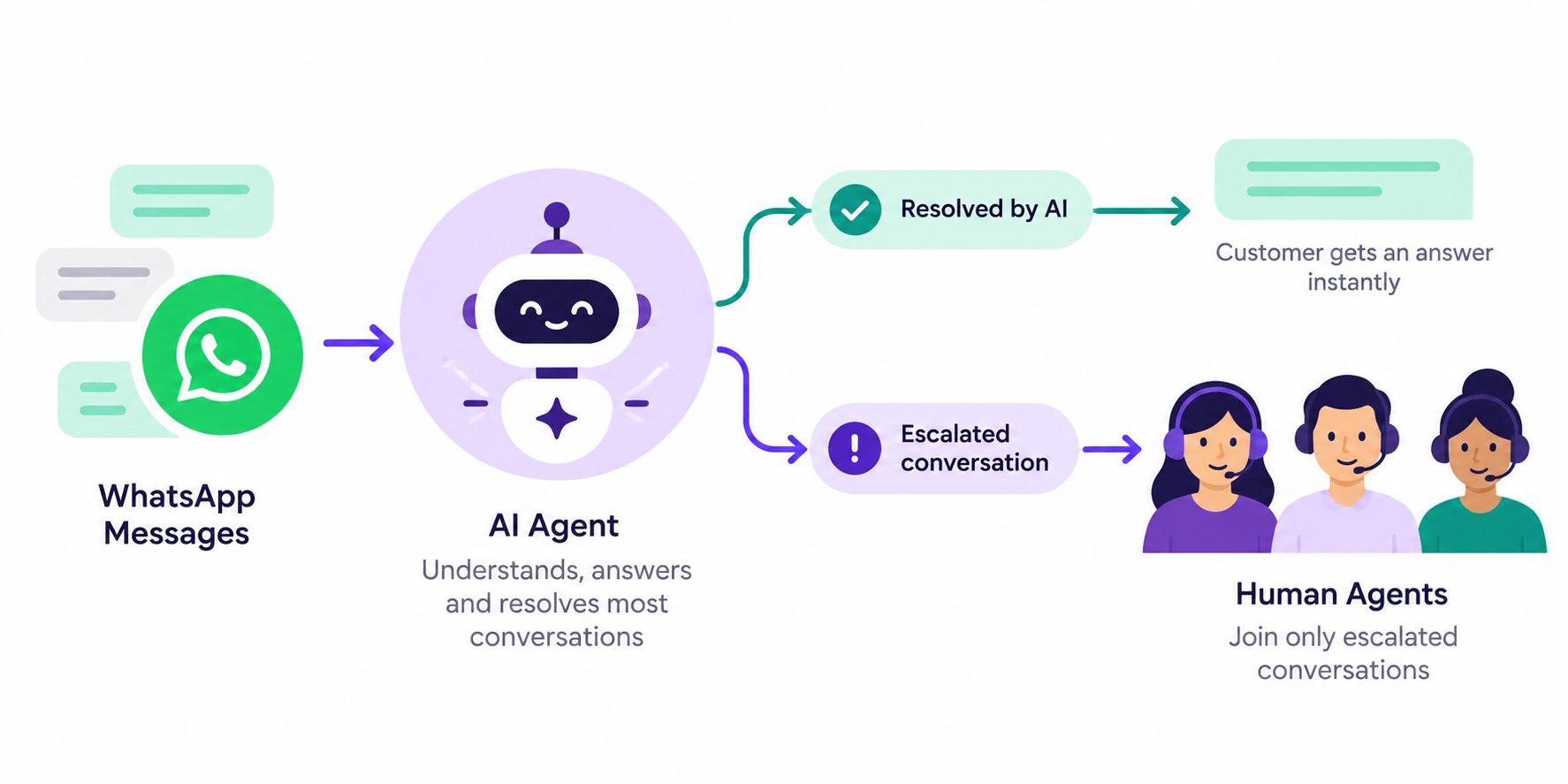
WhatsApp customer support automation helps close that gap. An AI agent can answer routine questions, collect details for more complicated requests, and bring in a human when necessary.
This playbook explains how small teams can organize their WhatsApp support workflow, decide what to automate, handle escalations, and maintain reliable customer service without staffing a full-time support desk.
Why WhatsApp Customer Support Is Different from Email or Live Chat
WhatsApp has three properties that change how support works:
- It is asynchronous but expected to be fast. Customers send a message and check back in ten minutes. If nothing is there, they are annoyed.
- Conversations are informal. A formal email tone feels wrong. Short, direct replies work.
- Voice notes are common. Customers send voice messages; your agent needs to handle them or ask for text.
Those three things make WhatsApp harder to staff manually than email, but also more effective once automated, because the response expectation is clear and the channel is where customers already are.
A WhatsApp AI chatbot can help businesses manage incoming questions on the channel customers already use, while this playbook focuses on organizing the support workflow behind those conversations.
What Small Teams Should Automate in WhatsApp Support
Do not try to automate everything. Start with the questions that are:
- High volume — asked many times per week.
- Factual — the answer comes from a policy or a system, not judgment.
- Low-risk — a wrong answer would not damage the relationship.
Typical Tier 1 categories:
| Category | Example | Automatable? |
|---|---|---|
| Business hours and location | “Are you open Sunday?” | Fully |
| Order or booking status | “Where is my order?” | Fully, if connected |
| Pricing questions | “How much for X?” | Fully, if published |
| Return/refund policy | “Can I return this?” | Fully, if policy is clear |
| Account issues | “I can’t log in” | Collect details, escalate |
| Complaints | “This is the second time” | Human immediately |
Start with the first three categories, then review your own conversations to decide what to automate next. For online stores, connecting order information through a platform such as a Shopify AI chatbot can make order-related support more useful when the required integrations are available.
Building a Knowledge Base for WhatsApp Customer Support
Your WhatsApp support agent is only as good as what it knows. Load:
- Business hours, location, and contact details
- Product or service catalog with prices
- Shipping, delivery, and return policies
- Booking and cancellation rules
- Refund timelines and conditions
- The last 50 real customer questions with the answers you gave
That last item matters most. Pull your recent WhatsApp threads and note every question asked more than twice. Those are your knowledge base priorities.
Keep answers short. A two-sentence reply is usually easier to read on WhatsApp than a long paragraph. Clear AI agent requirements also help define which knowledge sources the agent can use and how it should respond when information is missing.
How to Build a WhatsApp Customer Support Conversation Flow
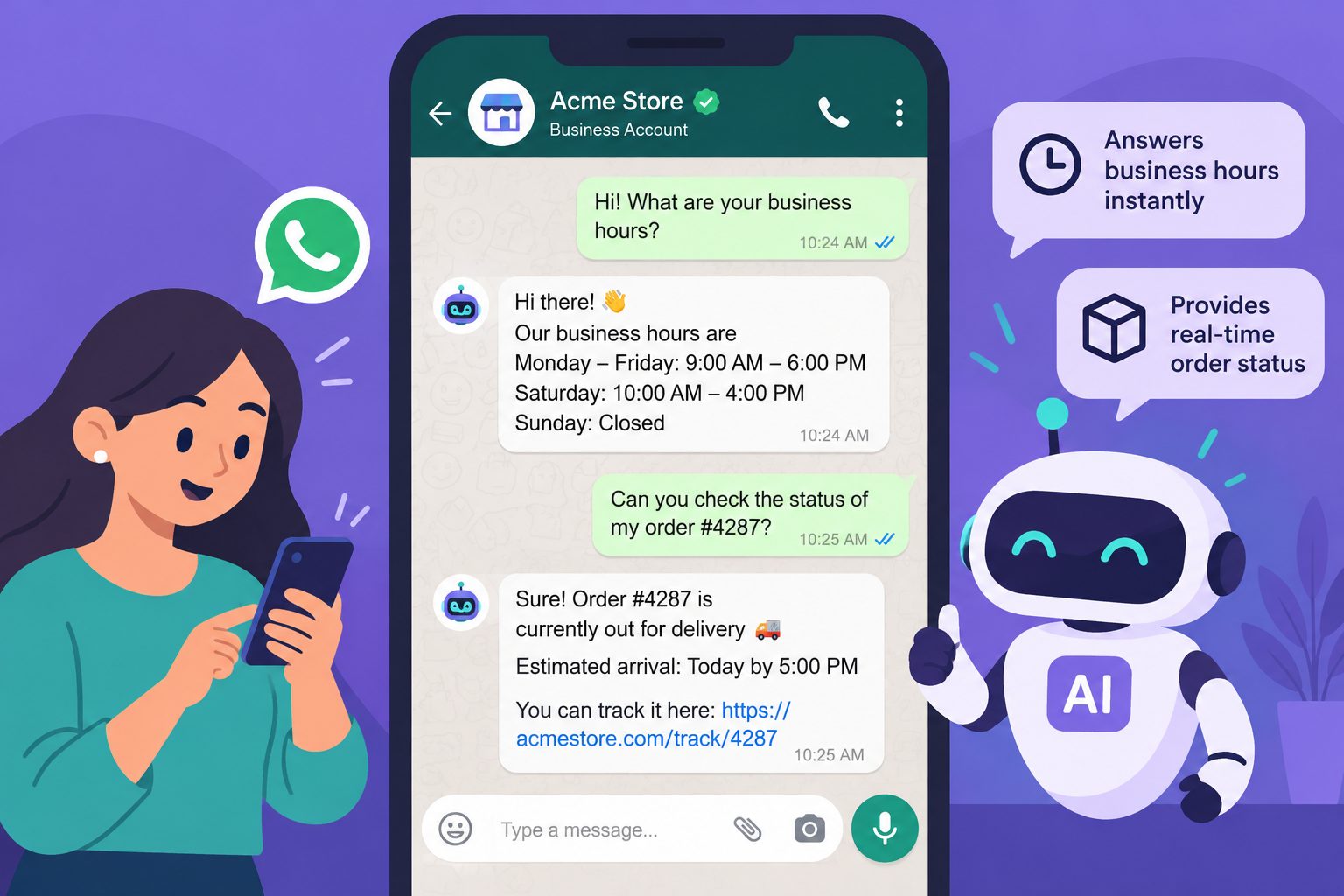
A WhatsApp support conversation should be simple enough for customers to follow without reading long messages. The agent needs to understand the request, decide whether it can help, and either resolve the issue or route it to the right person.
Start with five steps:
- Greet: Acknowledge the message and offer assistance.
- Identify intent: Determine whether the customer needs order information, booking assistance, product details, or help with a complaint.
- Route: Decide whether the request can be answered automatically or needs human attention.
- Handle: Provide an approved answer, collect missing information, or escalate the conversation.
- Close: Confirm the outcome or explain what happens next.
For example, a customer might ask, “Has my order shipped?”
The agent can request the order number, verify the customer’s identity where required, and check the order status through an authorized integration. If the information is available, it can share the approved status and tracking details. Otherwise, it should route the request to someone who can help.
The same process applies when customers use WhatsApp for both sales and support. A question about an existing order belongs in the support workflow, while a product inquiry from a potential buyer can go to the sales team.
Map these decisions into clear AI agent workflows before building the agent. Every branch should lead to an approved answer, a clarification question, or a human escalation rather than leaving the agent to improvise.
Automate WhatsApp Customer Support With AI
Answer Customer Questions Faster And Keep Your Support Available 24/7
When Your WhatsApp Support Agent Should Escalate to a Human
Automation works best when the agent knows its limits. Some customer requests involve decisions, sensitive information, or frustration that should be handled by a person.
Define these rules before launching your WhatsApp support agent:
- Never promise refunds, discounts, replacements, or delivery dates without approved information or authorization.
- Never disclose another customer’s information or share sensitive account details without appropriate verification.
- Never pretend to be a human representative.
- Escalate immediately when a customer explicitly requests a person.
- Route repeated complaints, disputed charges, account security concerns, and requests requiring judgment to the appropriate team.
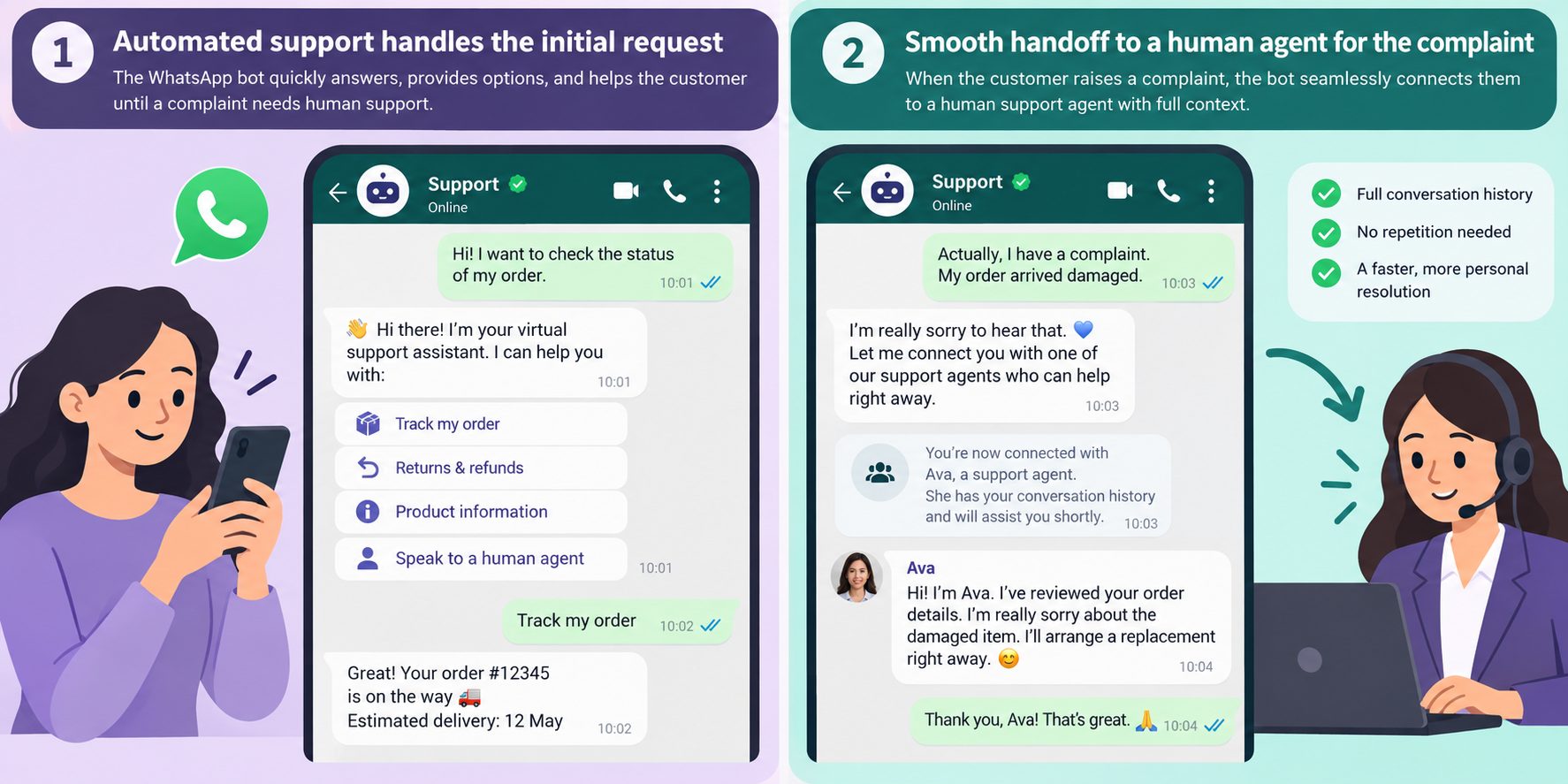
A good escalation should also give the human representative enough context to continue the conversation without making the customer repeat everything.
Include the following information in each handoff:
- The customer’s original request and relevant conversation history.
- A short summary of the issue.
- Any verified details already collected.
- The reason the conversation was escalated.
- The appropriate support team or representative.
For example, if a customer reports receiving a damaged product for the second time, the agent can acknowledge the complaint, collect the order number and relevant photos, and route the conversation to a support representative.
It should not promise a refund or replacement before the request has been reviewed.
Reliable AI agent integration helps connect the escalation workflow to your shared inbox or ticketing platform so the assigned representative receives the relevant context. Confirm that the transfer succeeded before telling the customer their request has been handed over.
A smooth handoff is not about keeping humans out of the conversation. It’s about involving them when their judgment is needed.
Handling after-hours messages
This is where WhatsApp automation pays for itself. Overnight messages are common, and a reply at 2 AM is better than one at 9 AM.
Set expectations honestly:
“Thanks for your message! Our team replies during business hours (9 AM – 6 PM). In the meantime, I can help with order status, pricing, and bookings — what do you need?”
That message does two things: it sets the response-time expectation, and it offers immediate help for the things the agent can actually handle. Most customers accept that happily.
For urgent overnight issues, a locked account, a failed payment, the agent should escalate to an on-call channel rather than making the customer wait until morning.
Handling Voice Notes, Multiple Languages, and WhatsApp Edge Cases
WhatsApp customers do not always send straightforward text messages. They may use voice notes, share photos, switch languages, or return to a conversation after several days.
Your support agent needs clear instructions for handling these situations.
Voice Notes
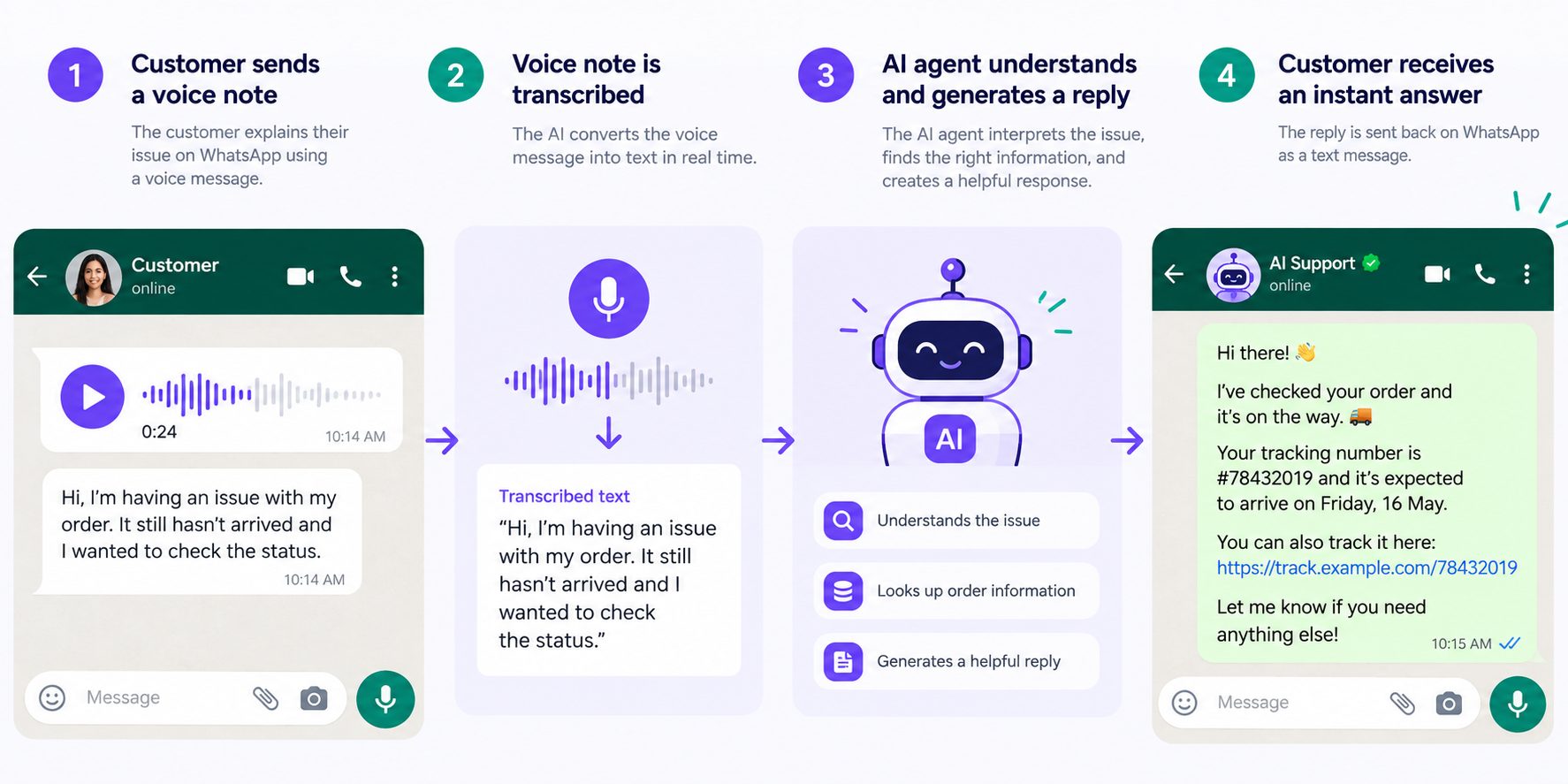
If your platform supports audio transcription, the agent can process voice messages and respond using the same support rules applied to text.
If transcription is unavailable, it should politely request a written message or offer human assistance.
For example:
“Could you type your question for me? I want to make sure I understand it correctly.”
The agent should never claim to have listened to audio it could not process.
Multilingual Conversations
If your customers communicate in different languages, configure the agent to respond in the language they use.
Test it with real customer questions, including messages that mix languages or switch languages halfway through a conversation.
For important information such as refund conditions, delivery policies, and account instructions, verify that translations preserve the original meaning.
Other WhatsApp Support Edge Cases
| Situation | Recommended action |
|---|---|
| Customer sends a photo of a damaged product | Collect the permitted details and forward the image with the support request |
| Customer switches languages mid-conversation | Continue in the customer’s preferred language |
| Customer asks for a manager | Escalate or offer an appropriate callback process |
| Customer sends a message outside business hours | Provide approved automated assistance and explain human support availability |
| Customer returns after the messaging window expires | Follow WhatsApp’s applicable messaging and template rules |
| Customer sends several unrelated questions | Address them one at a time or route the conversation appropriately |
Test these situations before launch. A support agent that handles standard FAQs correctly can still frustrate customers if it fails when they send a photo, change languages, or ask for a person.
How to Measure WhatsApp Customer Support Performance
Fast replies are useful, but speed alone does not tell you whether your WhatsApp support agent is helping customers.
Track these five metrics during your initial rollout:
| Metric | What to measure |
|---|---|
| First response time | How quickly customers receive an initial response |
| Resolution rate | Percentage of conversations resolved without human intervention |
| Escalation rate | Percentage of conversations transferred to human support |
| Customer satisfaction (CSAT) | How customers rate the support they receive |
| Repeat contact rate | How often customers return because their issue was not resolved |
Review these metrics weekly and compare them with your previous support performance.
For example, if first response time improves but customer satisfaction drops, the agent may be answering quickly without providing useful information.
Similarly, a high resolution rate is not necessarily positive if customers repeatedly contact support about the same issue.
Start by measuring actual performance rather than relying on universal targets. The right benchmarks depend on your business, ticket complexity, customer expectations, and available integrations.
Use conversation reviews to identify weak answers, improve the knowledge base, and adjust escalation rules before expanding automation.
Common mistakes
- Treating WhatsApp like email. Long paragraphs and formal tone feel wrong on WhatsApp. Short and direct wins.
- Not defining escalation rules. The agent will encounter questions it cannot answer. Know in advance who handles those.
- Ignoring message templates. WhatsApp Business API has rules about proactive messaging. Learn them before launch.
- Not reviewing transcripts. Every conversation tells you what customers actually ask. That is free product research.
- Assuming one script fits all. A salon and a SaaS company need very different conversations, even on the same platform.
Many AI agent deployment mistakes come from unclear requirements, weak escalation rules, or insufficient testing. Address these issues before introducing the agent to customers.
WhatsApp Customer Support Implementation and Launch Checklist
A small team does not need to automate every support request before launching. Start with a limited set of common questions, test the workflow, and expand once the agent handles those requests reliably.
Before Launch: Example Two-Week Setup Plan
| Days | Task |
|---|---|
| 1–2 | Review recent WhatsApp conversations and identify frequent questions |
| 3–4 | Prepare the knowledge base with accurate answers and policies |
| 5–6 | Define conversation flows, routing rules, and escalation conditions |
| 7–8 | Configure the agent and test common customer scenarios |
| 9–10 | Run a limited pilot with close human supervision |
| 11–14 | Correct recurring issues and prepare for a wider launch |
This is an illustrative schedule. Businesses with complex integrations, account verification requirements, or additional approval processes may need more time.
After Launch: The First Two Weeks
Once the agent is live, monitor real conversations before introducing additional automation.
| Period | Focus |
|---|---|
| Days 1–2 | Review conversations and correct urgent problems |
| Days 3–5 | Identify questions the agent struggles to answer |
| Days 5–7 | Update knowledge sources and refine instructions |
| Days 8–10 | Review satisfaction, routing, and escalation performance |
| Days 11–14 | Expand to additional question types if results are reliable |
Assign one person to review conversations, another to maintain support information if necessary, and make sure everyone knows who handles escalated requests.
The initial configuration is only the starting point. Ongoing transcript reviews and knowledge-base updates are what keep the support workflow useful as customer questions change.
Copyable message templates
Start with these, adapt the details, and test with real conversations before launch.
Greeting and routing: > “Hi! I can help with orders, bookings, and general questions. What do you need today?”
Order status: > “Happy to check that. Can you share the order number or the phone number used at checkout?”
Business hours: > “We’re open [days/hours]. I can help with most questions right now — what do you need?”
Booking a service: > “I can book that for you. What day works best, and roughly what time?”
Handling a complaint: > “I’m sorry that happened. Let me get the details so I can pass this to someone who can fix it properly. Can you tell me what happened?”
Unknown question: > “Good question — I want to make sure you get an accurate answer. Let me connect you with someone who can help. One moment.”
Closing: > “Anything else I can help with? If not, have a great day!”
Each one is short, specific, and honest about what the agent can do. That tone matters more on WhatsApp than any other channel — people notice when a bot talks like a corporate email.
Sample conversation: complaint escalation
Customer: “The product arrived broken. This is the second time.”
Agent: “I’m sorry — that’s frustrating, especially the second time. I’ve flagged this for our team with the order details. Could you send a photo of the damage? It helps us fix this faster for you.”
(Customer sends photo.)
Agent: “Thanks. I’ve passed this to [Name] on our team with the full history. They’ll reply within an hour.”
Notice what the agent does: it acknowledges the frustration, collects the one thing needed (a photo), and sets a realistic expectation. It does not promise a replacement or a refund, that is a human decision.
Channel-specific WhatsApp rules
WhatsApp has constraints that shape the conversation:
| Rule | Why it matters | Practical fix |
|---|---|---|
| 24-hour messaging window | After a customer’s last message, you have 24 hours to reply without a template |
Respond promptly; use templates for re-engagement |
| No cold messaging | You cannot initiate conversations with people who have not opted in |
Build opt-in through website, ads, or QR codes |
| Message templates for proactive sends | Approval required for business-initiated messages | Submit templates in advance for common scenarios |
| Rate limits on high volume | Large campaigns can hit API limits | Know your limits before a big launch |
Fighting these rules gets accounts restricted. Design the conversation within them from the start. The WhatsApp Business API rules are covered in the WhatsApp chatbot guide if you need the details.
Building vs buying for WhatsApp support
| Approach | Time to launch | Best for |
|---|---|---|
| Build in-house via WhatsApp API | 4–8 weeks | Teams with engineering resources |
| No-code platform | 2–3 weeks | Most small teams |
| Done-for-you service | 1–2 weeks | Teams that want it handled end-to-end |
For a small team, the deciding factor is often the time available for setup, testing, and ongoing improvements. Teams that need implementation assistance can use Botsify’s done-for-you AI agents instead of managing the entire configuration process internally.
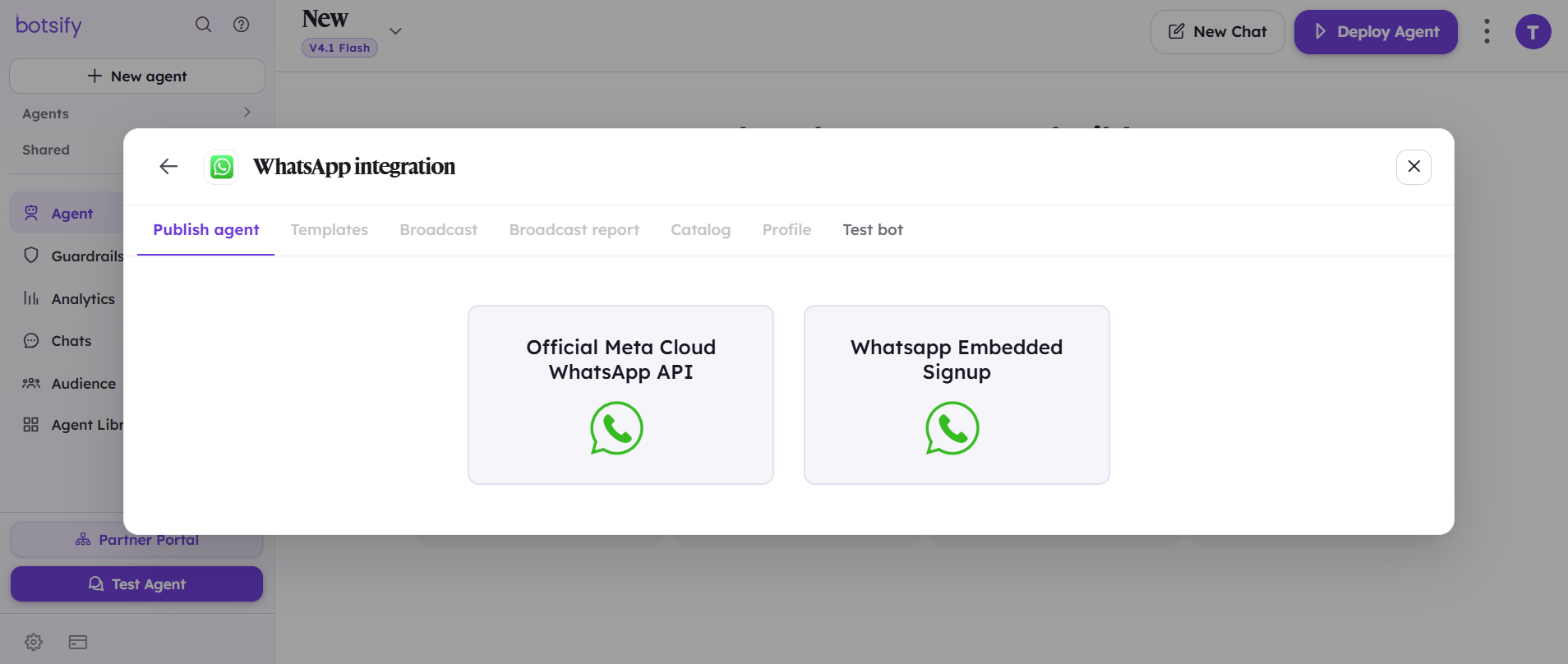
If you prefer to configure and manage the setup yourself, Botsify’s no-code AI agent builder lets you create agents with instructions, knowledge sources, and connected tools.
Let Us Build Your AI Support Agent
Get A Custom AI Agent For Your Business Without Handling The Setup Yourself
Copybook prompt for the agent
If you are building the agent yourself, start from a prompt like this:
You are a WhatsApp support assistant for [BUSINESS NAME].

Your job: answer customer questions quickly and accurately using the knowledge base. Escalate to a human when needed.

Rules:
- Answer in the language the customer writes in.
- Keep messages short — 2–3 sentences maximum.
- One question at a time; never stack questions.
- Never invent prices, refund amounts, delivery dates, or policies.
- If the customer is angry or mentions a complaint twice, escalate immediately.
- If they ask for a human, hand off right away — no resistance.
- If you don't know, say so and offer to connect a human.

Topics you handle:
- Business hours and location
- Order and booking status
- Pricing and packages
- Returns, refunds (policy only), and cancellations

Topics you never handle:
- Account changes or password resets (collect info, escalate)
- Refund approvals (policy questions only; approval is human)
- Legal, medical, or financial advice
The prompt is the easy part. The hard part is testing it against real messages for a week and fixing what breaks. Budget for that iteration, it is where the quality actually comes from.
Test scenarios before launch
Run these against your agent before going live:
| # | Test message | Expected behavior |
|---|---|---|
| 1 | “hi” | Asks how it can help |
| 2 | “how much is X?” | Answers from knowledge base or offers a call |
| 3 | “where is my order” (no details) | Asks for order number or phone |
| 4 | “I want a refund” | Explains policy, collects order details, escalates if needed |
| 5 | “this is ridiculous, third time contacting” | Escalates immediately, apologizes |
| 6 | A voice note | Handled per your policy (transcribed or politely asked for text) |
| 7 | Message in another language | Responds in the same language |
| 8 | “are you a robot?” | Honest answer |
| 9 | Question outside your scope | Redirects politely or escalates |
| 10 | “can I speak to a human?” | Immediate handoff, no resistance |
Combining support and lead generation on WhatsApp
Many small businesses use the same WhatsApp number for support and sales. That is fine, the agent can do both if the routing is explicit:
| Customer intent | Route |
|---|---|
| Asking about an existing order | Support flow |
| Asking about a product before buying | Sales qualification flow |
| Asking about pricing for a business | Sales agent, not support |
| Asking about a past order issue | Support agent with order context |
The key is intent detection: the agent should recognize whether the customer needs support, wants to make a purchase, or requires both. A separate WhatsApp lead generation workflow can handle new inquiries and qualification without interrupting existing customer support conversations.
What good looks like after 30 days
You will know the WhatsApp support agent is working when:
- Nobody on the team answers routine questions manually anymore.
- After-hours messages get instant, accurate replies.
- Complaints reach a human faster because the agent triages and attaches context.
- Your team can see common questions in a report instead of in memory.
- Customers stop saying “sorry to bother you” when they message.
That last one is the real signal. When customers feel comfortable messaging because they know they will get a fast, useful answer, the channel is doing its job.
Frequently Asked Questions About WhatsApp Customer Support
Will customers know they are talking to a bot?
They should. Be transparent about automation and make it easy to request human assistance. Most customers want an accurate, useful response without unnecessary delays.
Can a WhatsApp support agent handle bookings or order changes?
Yes, if the agent has an authorized connection to the relevant booking or order management system. Otherwise, it can collect information and route the request to a human representative.
What is the difference between WhatsApp Business and the WhatsApp Business Platform?
The WhatsApp Business app provides basic tools for managing customer conversations, including greetings and away messages. More advanced AI support workflows generally use the WhatsApp Business Platform through an appropriate integration.
What happens when the agent cannot answer a question?
It should acknowledge the limitation, collect any permitted information, and escalate the conversation. It should not invent prices, refund decisions, or account-specific information.
Can AI support work alongside a human team?
Yes. The agent can handle routine questions while human representatives manage complex requests, complaints, and situations requiring judgment.
How many WhatsApp messages can the agent handle?
Capacity depends on the platform, integration, account limits, and applicable WhatsApp Business Platform restrictions. Check the current limits before scaling high-volume operations.
How do you prevent an AI support agent from annoying customers?
Keep replies concise, avoid unnecessary follow-ups, and make human assistance easy to access. Review conversations regularly to identify repetitive or unhelpful responses.
Final thought
Small teams cannot answer every WhatsApp message immediately, especially outside business hours. But customers should still know their questions have been received and that help is available.
A reliable WhatsApp customer support workflow combines automated answers for routine questions with clear escalation rules for situations that need human attention. The goal is not to automate every conversation, but to make sure customers reach the right answer or person without unnecessary delays.
Start with your most common questions, build a useful knowledge base, and improve the agent using real customer conversations. That gives your team more time for complex issues while keeping everyday support manageable.
AI Agentic Platform For Building Portable AI Agents
Say Hello To Agentic AI That Connects With Your CRM And Even Other Agents
