
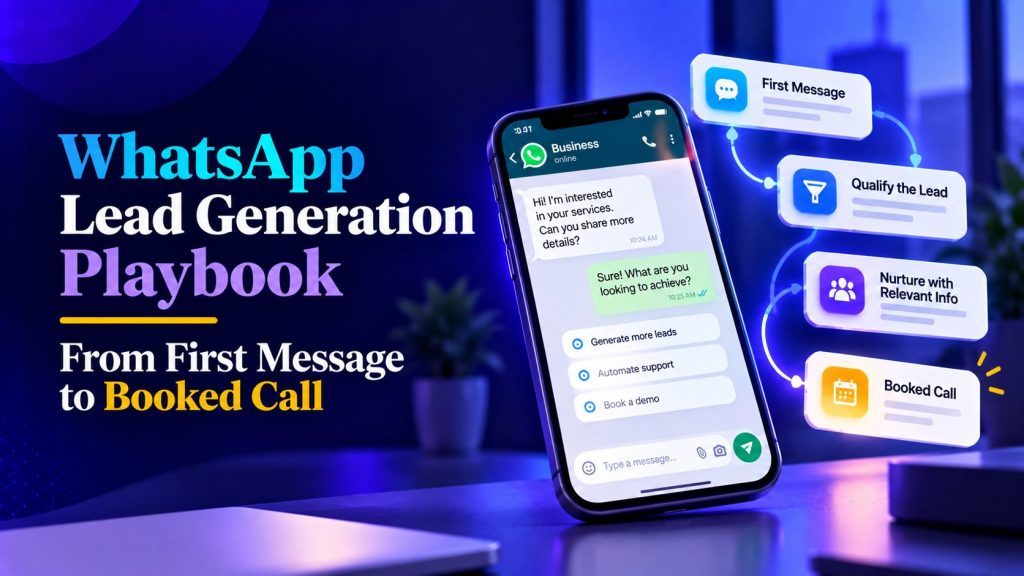
Most WhatsApp lead programs do not fail because people refuse to use WhatsApp. They fail because the conversation is left to chance.
A lead messages your business, asks one or two questions, and then either waits for a reply or gets a generic brochure link. The conversation stops. The opportunity is not lost because the product is weak. It is lost because nobody mapped the next step.
This WhatsApp lead generation playbook is about fixing that: opening better conversations, qualifying people without interrogating them, routing hot leads to the right person, and turning more of those conversations into booked calls.
Start with the outcome, not the bot.
Before writing a single message, define what a successful WhatsApp conversation looks like.
For most service businesses, that is:
- A qualified conversation with the right person
- A clear use case
- A time to talk
- A clean CRM record
A useful starting question is not “What can the bot say?” It is “What should happen after the conversation ends?”
That is the same logic behind AI workflow automation: the conversation is only one part of the system. The real value comes from what happens after the message.
How to start WhatsApp lead generation
Before you can qualify or book a lead, you need to give people a reason to start the conversation.
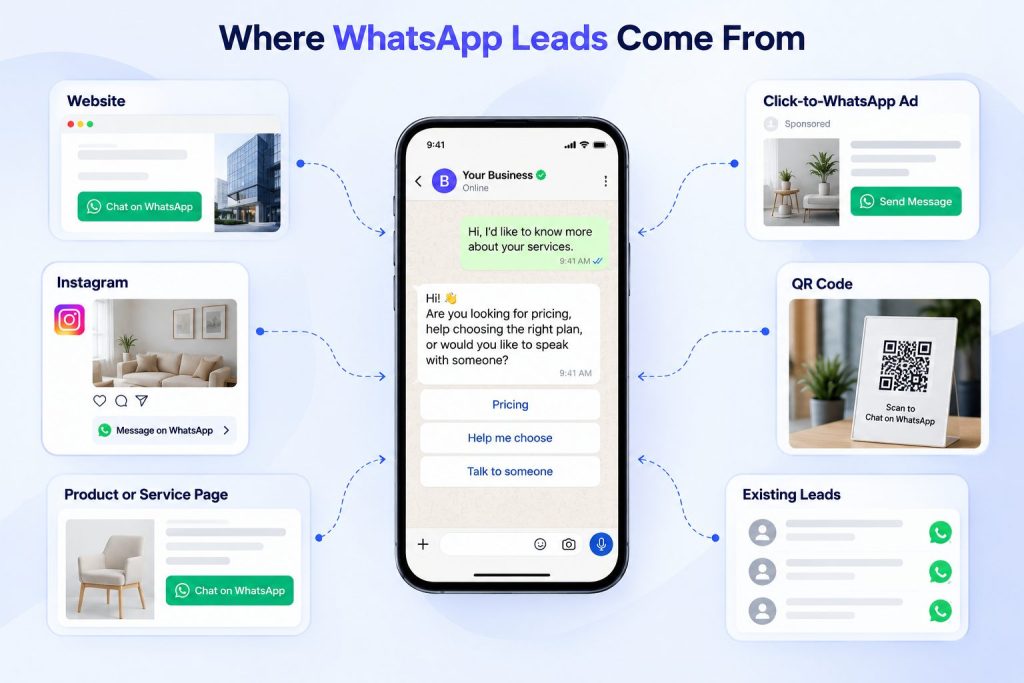
The best WhatsApp lead-generation flows usually do not begin inside WhatsApp. They begin at a moment when someone already has a question, problem, or buying intent and WhatsApp becomes the easiest way to continue.
A few common entry points include:
- A “Chat on WhatsApp” button on a high-intent website page
- Click-to-WhatsApp ads that open a conversation directly
- WhatsApp links in Instagram or other social profiles
- QR codes on packaging, brochures, storefronts, or event materials
- Product and service pages that offer WhatsApp as a faster alternative to a form
- Existing leads who choose WhatsApp for follow-up
The important part is matching the entry point to the conversation that follows.
Someone clicking WhatsApp from a pricing page should not receive the same opening message as someone coming from an Instagram post. The first person may already be close to a buying decision, while the second may still be exploring.
For example, instead of opening every conversation with:
Hi! How can we help?
A lead coming from a service page could see:
Hi! Are you looking for pricing, help choosing the right plan, or would you like to speak with someone?
A prospect coming from a campaign about appointment automation might instead see:
Hi! Are you looking to automate appointment booking, reminders, or both?
The source gives you context before the lead has typed much at all. Carry that context into the conversation instead of making every prospect start from zero.
This also means you should track where WhatsApp conversations originate. A lead from a pricing page, a click-to-WhatsApp campaign, and a QR code at an event may need different qualification paths and should be recorded separately in your CRM.
Once the conversation begins, an AI lead qualification agent can use that context alongside the lead’s answers, intent, and urgency to decide what should happen next.
Ask only questions that change the next action
WhatsApp conversations should feel short and natural. The agent should not interrogate people.
Use three layers of qualification:
- Identity: Who are they and what business are they from?
- Need: What do they want help with?
- Readiness: How urgent is it and who owns the decision?
A useful matrix:
| Question | Why it matters |
|---|---|
| What are you trying to solve? | Clarifies the actual use case |
| What have you tried? | Shows complexity and urgency |
| What is your timeline? | Determines priority |
| Who owns the decision? | Prevents wasted follow-up |
| What outcome matters most? | Helps route to the right specialist |
You can build these questions after you define your AI agent requirements. If a question does not change routing, scoring, or messaging, remove it.
Design the conversation like a decision tree, not a survey
A good WhatsApp lead flow should feel like a short, helpful exchange.
Example:
Lead: Do you handle WhatsApp marketing? Agent: Yes, we help businesses turn WhatsApp conversations into qualified leads. Are you looking for lead generation, customer support, or appointment booking? Lead: Mostly lead generation. Agent: Got it. Are you looking for inbound inquiries, follow-up on existing leads, or both? Lead: Both. Agent: Thanks. Do you already use WhatsApp Business, or would you like help setting up the automation? Lead: We have WhatsApp but no automation. Agent: Perfect. I can route this to someone who can walk you through the setup. How soon do you want it live?
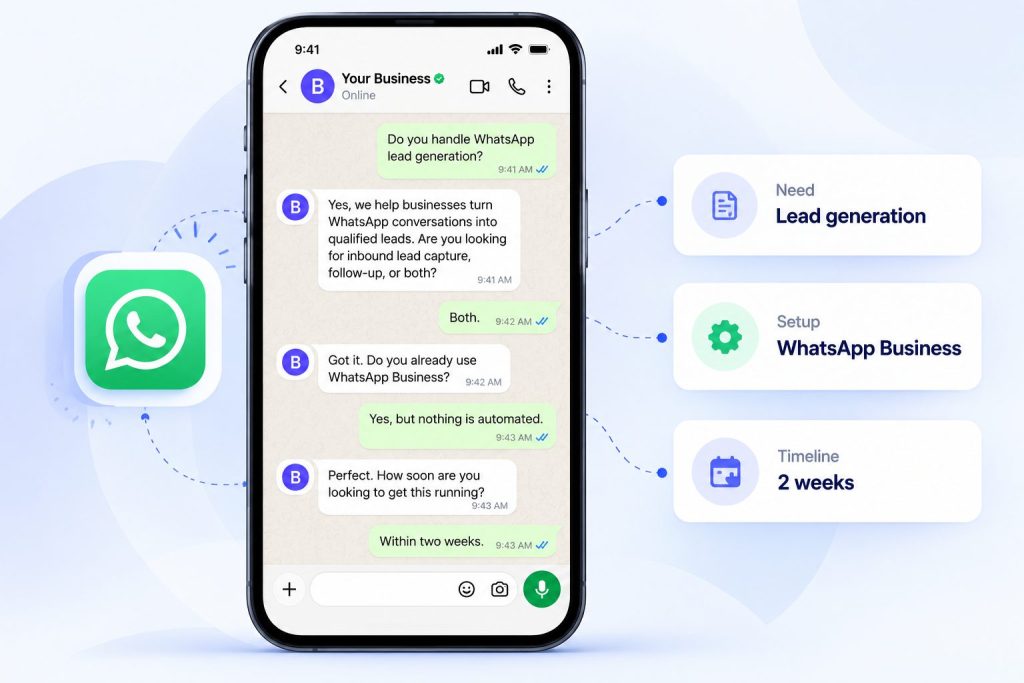
This is not clever. It is useful. Each step moves the conversation closer to a decision.
If you need help designing conversation flows, the chatbot conversation flow design guide is a useful reference.
Turn WhatsApp Chats Into Qualified Leads
See how Botsify can qualify, route, and follow up with WhatsApp leads automatically.
Use intent signals, not just keywords
“Pricing” is a signal, but not always a hot lead.
Better signals include:
| Signal type | Example |
|---|---|
| Explicit intent | “Can we book a call?” |
| Behavioral intent | Asks the same question twice, clicks pricing page |
| Contextual intent | Mentions company size, launch date, or workflow |
| Fit signals | Industry, use case, decision-maker role |
| Urgency signals | “Next week”, “we’re launching”, “this is blocking us” |
A message like “I need to automate WhatsApp bookings before next week” is hotter than “What’s your price?”
Route by owner, not just “sales”
Routing to “sales” is too vague.
Better routing includes:
- Product line
- Geography
- Lead source
- Company size
- Language
- Deal size
- Existing customer status
Example:
| Scenario | Route to |
|---|---|
| Enterprise lead with budget | Senior AE |
| SMB lead from WhatsApp | SMB rep |
| Agency inquiry | White-label partner team |
| Support issue | Customer success |
| Large deal or custom work | Human review |
This is how AI agent workflows move from simple conversation to operational routing.
Know when to escalate to a human
Some conversations should not stay automated.
Escalate immediately when:
- The lead is angry or frustrated
- There is a legal, compliance, or privacy issue
- The request is unusually large
- The lead asks for a human
- The agent is unsure
This is where human takeover matters. The agent should open the conversation, not close every important deal.
Write the handoff summary
Do not send the rep a raw chat transcript.
Give them:
- Name and company
- Source
- What they want
- Why they are qualified
- Timeline
- Recommended owner
- Next action
Example:
Lead summary – Name: Priya Nair – Company: Northline Clinics – Source: WhatsApp website widget – Need: Automate appointment reminders – Why qualified: 12 locations, wants launch in 2 weeks – Score: 85 – Next step: 20-minute setup call
Build the follow-up sequence
Most leads do not convert on the first message.
Use a simple cadence:
| Day | Action |
|---|---|
| Day 0 | Qualify, route, send useful next step |
| Day 1 | Send a relevant resource |
| Day 3 | Ask if they want to book |
| Day 7 | Send a short case study |
| Day 14 | Re-engage with a clear offer |
The same principle applies to a cold emailing AI agent: relevance improves response, not just volume.
Connect the agent to your CRM
The agent should not just collect messages.
It should update the CRM with:
- Lead source
- Use case
- Qualification score
- Timeline
- Recommended owner
- Conversation summary
- Next action
This is the same principle behind broader AI agent integration: the value comes from the system working across tools, not from one isolated chat.
Set guardrails
AI agents can accidentally promise things your business cannot deliver.
Set guardrails around:
- Approved claims
- Pricing language
- Legal or medical topics
- Competitor comparisons
- Custom engineering promises
- Refund or cancellation rules
This is also where AI agent governance becomes practical: you define what the agent may do, what it must escalate, and how it stays accountable.
Test before launch
Test with real situations, not perfect ones.
Use this guide to testing AI agents before exposing the workflow to real prospects.
What a Botsify WhatsApp workflow looks like
Botsify supports the pieces you need for this workflow across its core AI agent features:
- WhatsApp deployment
- Conversation-based lead capture
- Document and website knowledge sources
- Skill chaining
- CRM and app integrations
- Human escalation and guardrails
- Scheduling and time-based triggers
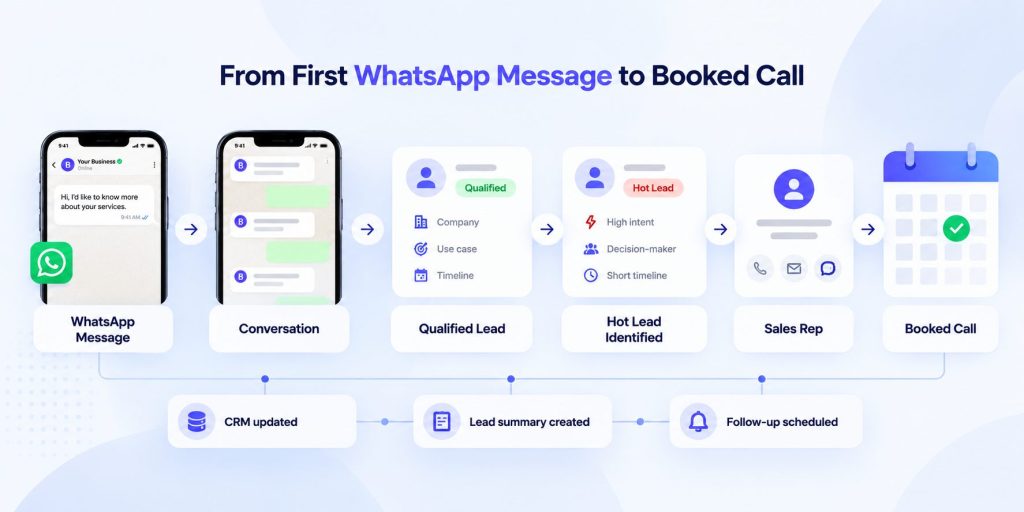
A practical setup might look like:
- Lead messages on WhatsApp.
- Agent asks what they want to automate.
- Agent asks timeline and use case.
- Agent scores the lead.
- Agent routes hot leads to the right owner.
- Agent books a call or notifies sales.
- CRM is updated with summary and next action.
- Agent follows up if no response.
- Human reviews the handoff summary, not the whole transcript.
Build Your WhatsApp Lead Generation Workflow
Use Botsify to qualify WhatsApp leads, route hot prospects, and move them toward a booked call.
Industry-specific playbooks
Local services
For local service businesses, WhatsApp is often the highest-intent channel. People message when they need help now.
Focus on:
- Response time
- Location confirmation
- Availability
- Budget range
- Photos or video
Example flow:
- Lead: “Do you service apartments?”
- Agent: “Yes. What service do you need?”
- Lead: “Air conditioner installation.”
- Agent: “Great. What’s your area?”
- Lead: “Dubai Marina.”
- Agent: “Thanks. Do you need installation, replacement, or repair?”
- Lead: “Replacement.”
- Agent: “When would you like the visit?”
- Agent: “I can book a slot tomorrow at 10am. Would you like me to confirm it?”
This is not a chatbot experience. It is a scheduling workflow with a conversation layer.
Clinics and healthcare-adjacent services
Clinics should avoid over-automation. The agent can qualify and book, but sensitive questions should go to a human.
A safe flow looks like:
- Ask what the patient needs help with.
- Identify the relevant clinic or department.
- Confirm preferred location and time.
- Explain that medical advice comes from the doctor.
- Escalate anything sensitive to staff.
The agent should not diagnose, promise outcomes, or discuss sensitive medical details.
Real estate
Real estate agents often need a hybrid of lead qualification and follow-up.
A practical flow:
- Ask what type of property they are looking for.
- Ask location and budget.
- Ask whether they are buying, renting, or investing.
- Ask timeline.
- Confirm preferred contact method.
- Route to the agent covering that area.
This is useful because many inquiries arrive without enough context to be useful.
E-commerce
E-commerce leads often come from:
- Product questions
- Abandoned cart follow-ups
- Bulk or B2B inquiries
- Instagram or Facebook comments
The agent should not just say “Buy now.” It should identify whether the person needs product information, order support, or a bulk order conversation.
Message templates you can copy
Here are WhatsApp-safe templates that are short, useful, and not spammy.
Opening message
Hi! How can I help you today?
If you want to be more specific:
Hi! Are you looking for pricing, support, or to book a service?
Need clarification
Thanks. What outcome are you hoping to get?
Timeline
When would you like this live?
Decision-maker check
Are you the person who owns this decision, or should I include someone else?
Handoff message
Thanks! I’m connecting you with the right person. They’ll have your details and next step.
Follow-up message
You mentioned you wanted to reduce missed WhatsApp inquiries after business hours. I can walk you through how teams usually set this up in 20 minutes. Would you like me to book a slot?
CRM field structure
The agent should update the CRM with enough context to make the next step obvious.
| Field | Purpose |
|---|---|
| Lead source | Attribution |
| Use case | Routing |
| Qualification score | Prioritization |
| Timeline | Urgency |
| Decision-maker | Fit check |
| Recommended owner | Automation logic |
| Next action | Follow-up clarity |
| Summary | Sales context |
Without this, the agent becomes another inbox.
Follow-up cadence
A simple sequence works better than a generic broadcast.
| Day | Action |
|---|---|
| Day 0 | Qualify, route, send relevant next step |
| Day 1 | Send one useful resource |
| Day 3 | Ask if they want to schedule |
| Day 7 | Send a short case study or checklist |
| Day 14 | Re-engage with a clear offer |
Keep it useful, not pushy.
Common mistakes
Most teams make the same mistakes:
- Asking too many questions too early
- Treating WhatsApp like email
- Not defining routing rules
- Not updating the CRM
- Letting the agent promise things a human cannot deliver
- Not defining escalation triggers
- Sending the same message to every lead
- Measuring chat length instead of booked calls
- Testing only clean inputs
- Ignoring the human handoff path
The agent should feel like a well-trained junior employee: polite, fast, structured, and smart enough to know when to escalate.
WhatsApp lead generation metrics that matter
Do not measure success by how clever the bot sounds.
Measure by outcomes:
| Metric | Why it matters |
|---|---|
| Qualified leads | The main output |
| Hot leads routed | Sales efficiency |
| Time to first human response | Speed |
| Booked calls | Downstream conversion |
| Meetings held | Sales quality |
| Escalation rate | Human handoff quality |
| Wrong routing rate | Workflow quality |
| Lead drop-off point | Conversation friction |
A simple weekly review:
- How many leads arrived?
- How many became hot?
- How many were routed correctly?
- How many booked calls?
- Where did the agent lose people?
- Which questions caused confusion?
- Which handoffs needed human correction?
This turns the agent into an improving system, not a static bot.
Test matrix
Use a simple test matrix before launch.
| Test type | Example |
|---|---|
| Hot lead | Clear use case, urgent timeline, decision-maker |
| Warm lead | Interested but timeline unclear |
| Not qualified | Student, wrong industry, wrong use case |
| Confused lead | Vague message, no context |
| Angry lead | Frustration or complaint |
| Sensitive lead | Legal, medical, or compliance issue |
| Existing customer | Current account asking upgrade question |
| Competitor mention | Asking to switch from another tool |
For each case, define:
- Expected agent response
- Expected lead state
- Expected route
- Expected CRM fields
- Expected escalation
If the agent passes the messy cases, it is ready to launch.
Final thought
A WhatsApp lead generation agent is not a magic revenue machine. It is a routing and context system.
When built well, it does three things:
- Removes delay.
- Reduces wasted sales time.
- Gives humans better context.
That is enough to change the economics of your WhatsApp funnel.
Ready to Automate Your WhatsApp Leads?
Let Botsify turn incoming conversations into qualified leads and booked calls.
