


An AI agent can answer a question correctly and still take an action it should not have been able to take. It may read another customer’s record, issue an unapproved discount, or send a message before anyone reviews it. The problem is often described as the agent “ignoring permissions,” but the more useful question is whether the surrounding system actually enforced the boundary.
A prompt can tell an agent what it is supposed to do. It is not an access-control mechanism. The application, connected tools, identity provider, and data layer must decide what each request is authorized to access or change. The Canadian Centre for Cyber Security’s guidance on careful adoption of agentic AI emphasizes least privilege, identity, controlled tool use, and ongoing review. Those principles apply whether the agent is customer-facing or used internally.
This guide shows how to map an agent’s job to its data and actions, enforce permissions outside the model, decide when a person should approve a request, and test the boundary before deployment. The right controls depend on the task, the systems involved, and the potential impact of a mistake.
Start With the Task, Not a Generic Permission Tier
Begin by writing down the job the agent performs. “Help with customer accounts” does not say whether it may read any account, update a phone number, change a plan, or issue a credit. Describe the user, the allowed resources, the actions needed, and the outcome the workflow should produce.
For each action, answer four questions:
- Who is asking? Is the request tied to an authenticated user, employee, customer, or system process?
- What resource is involved? Which account, record, file, order, or workspace is in scope?
- What operation is requested? Is the agent reading, drafting, updating, deleting, sending, or spending?
- What could happen if it is wrong? Consider impact, reversibility, privacy, and whether another person must review it.
This mapping catches authority hidden inside vague tools. A tool called `manage_customer` may combine lookup, edits, and deletion. Split its capabilities where possible, or enforce separate checks for each operation.
A simple permission matrix is more actionable than a single “low, medium, high” label:
| Workflow action | Resource boundary | Starting permission | Additional control to consider |
|---|---|---|---|
| Search approved help content | Published support documents | Read only | Exclude drafts or restricted documents |
| Look up an order | The requesting customer’s order | Read only | Verify identity and enforce account-level filtering |
| Draft a reply | Current support conversation | Create draft | Human review before sending, if required by policy |
| Change a contact field | One verified customer record | Limited write | Validate the field and record an authorized result |
| Issue a refund or credit | A specific transaction | Restricted action | Use the organization’s approval and financial controls |
| Delete or export records | Defined records and purpose | Usually restricted | Require explicit authorization and a tested recovery path |
These rows are examples, not universal permission levels. For instance, a team may allow an agent to send a standard status update but require review for a message containing a refund commitment. The policy should describe the actual action and condition, rather than assuming every external message has the same risk.
The broader AI agent governance approach can assign decision rights and ownership for access exceptions. For this workflow, keep the task statement and permission matrix together so the application owner can compare the intended scope with the permissions actually granted.
Enforce the Boundary Outside the Prompt
Permission checks should happen when a tool call is made, using the authenticated identity, requested resource, operation, and applicable policy. The model may propose an action, but the connected system should authorize or deny it independently. If the agent is told “never access another customer’s record” but its API credential can query every record, a prompt injection or mistaken tool call can still expose data.
Build several checks into the path from request to result:
- Identity: Know which agent, service, or user is making the request. Avoid silently treating the agent as an administrator because it runs under an employee’s session.
- Resource scope: Filter records and fields at the service or data layer. Do not trust a record ID supplied by the model as proof that the requester may access it.
- Action scope: Expose the operations needed for the workflow. Separate reading from writing and ordinary updates from destructive or financial actions.
- Input validation: Check arguments, formats, limits, and required state before the action reaches a connected system.
- Result verification: Confirm the tool’s response before the agent tells the user that an action succeeded.
- Failure behavior: Deny by default when identity or authorization cannot be verified, and use a safe fallback instead of guessing.
When the platform supports distinct service identities or scoped credentials, use the narrowest practical scope and confirm what the credential can access. If it does not, document the limitation and consider an intermediary service that can enforce the missing boundary. Do not store shared administrator credentials in prompts or agent-readable documents. AI agent integration planning should include the access model of each connected CRM, API, help desk, or data store, not just whether the connection works.
Decide explicitly whether a tool call acts as the requesting user, as an agent-specific identity, or through a controlled combination. In a delegated model, check that the user is authorized for the requested record and action at the time of the call. In a service-identity model, keep the agent’s grant narrow and ensure the application still verifies that the user may request that work. Neither model is safe simply because it has a different name; the effective permissions are what matter.
Pay special attention to work that continues after the user leaves. If a conversation starts an asynchronous task, decide whether the user’s authority is checked again when the task runs, whether the task has an expiry, and what happens when access is revoked before completion. For agents that call other agents or services, define whether authority can be delegated, which operations may be delegated, and how the delegated scope expires. Do not let a downstream helper inherit broader access just because the first agent can call it.
Before connecting a tool, inspect its actual capabilities and side effects. A “send” operation may notify an external recipient; a “create” action may trigger another workflow; a search tool may expose fields that the user interface normally hides. Test the authorization at the point where those effects occur, including any webhook, queue, or background task that processes the request later.
OWASP’s Agent Control Standard frames agent controls around inspectability, traceability, and runtime control. Treat that as a useful design direction, not proof that a particular vendor or deployment supplies those controls. Verify the behavior at the system boundary.
Review your AI agent access boundaries with Botsify
Keep connected tools within the scope your workflow actually needs.
Match Human Approval to the Impact of the Action
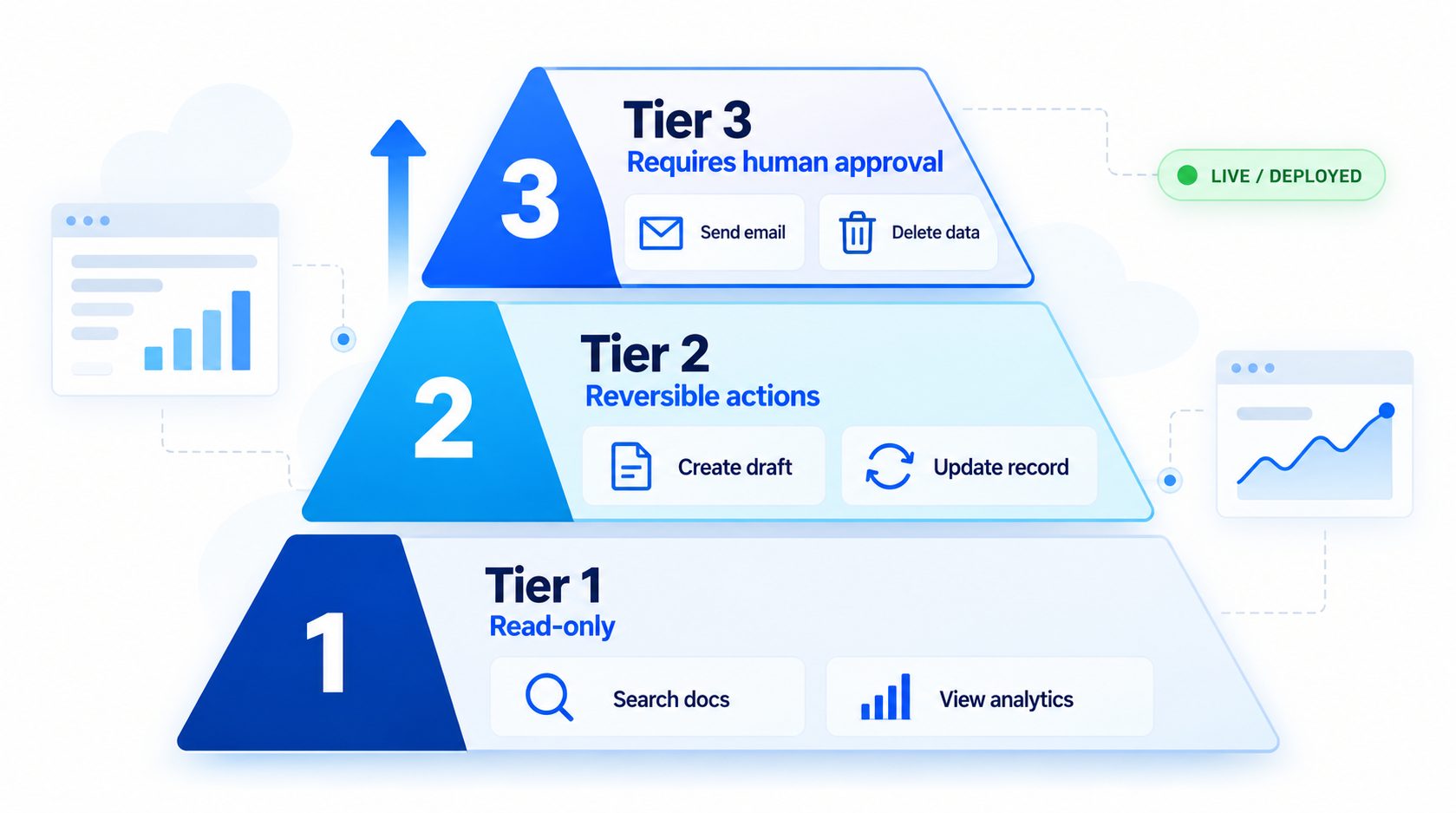
Not every tool call needs a person to click approve. Requiring approval for every lookup can make a workflow unusable, while allowing every requested change to run automatically can expose the organization to avoidable mistakes. Choose approval points by considering the action’s impact, reversibility, uncertainty, and the rights of the person requesting it.
A practical decision sequence is:
- Can the action be safely reversed? If not, consider a stronger control or a human decision.
- Could it affect money, access, privacy, legal commitments, safety, or another person? If yes, define the authority and review required by policy.
- Can the request be matched to a verified user and specific resource? If not, stop or ask for the missing information.
- Is the evidence sufficient for the action? Uncertain or conflicting information may call for human review.
- What happens if approval is delayed or denied? The workflow needs a clear alternative and should not retry the action on its own.
An approval request should show the reviewer what will happen: the target record, proposed change, supporting information, reason, and consequence. The approval must be tied to that specific request. If the proposed action changes after review, require a new decision. Define how stale approvals expire, how repeated tool calls are handled, and what the agent tells the user after a denial.
A review table can make the rule concrete for operators:
| Proposed operation | Example control to define |
|---|---|
| Read an in-scope order status | Verify the requester and limit the returned fields |
| Draft a customer reply | Keep it as a draft until the configured sender is authorized |
| Change a customer contact detail | Confirm identity, validate the new value, and record the result |
| Issue a credit or refund | Apply the organization’s amount, eligibility, and review rules |
| Delete or export records | Restrict the resource and require the authorization specified by policy |
These examples do not prescribe a universal approval threshold. A business should choose the relevant controls with the owners of the data and process. The important point is that a human approval is not a substitute for basic access checks: the reviewer should not be able to authorize a request that violates a separate legal, privacy, or account boundary.
Make denial a complete workflow. The agent should not switch tools, identities, or wording to get around a rejected request. It should tell the user what can happen next, such as providing a permitted alternative or routing the issue to the responsible team. Keep the rejection reason useful for the operator, but avoid disclosing sensitive policy details to someone who is not authorized to see them.
For example, an agent might retrieve a transaction and prepare a refund request while a finance employee decides whether the request meets policy. That design is different from allowing the agent to issue any refund, and different again from requiring a person to approve a routine order-status lookup. An AI workflow automation plan can help show where an automated step ends and an authorized human decision begins. A human-in-the-loop review workflow is another example of separating a generated draft from the person who approves an external response.
Do not rely on the model to enforce approval by saying “ask a human first.” The tool or workflow should prevent the action until the approval is present, valid, and attached to the same request. If the approval system is unavailable, define whether the action is held, canceled, or routed elsewhere. Never treat a timeout as approval.
Treat Untrusted Instructions as a Permission Test
Customers, emails, web pages, uploaded files, and tool results may contain text that tries to change the agent’s instructions. A model may misread that content as a command. Permission enforcement must still hold if the agent is manipulated, confused, or simply wrong.
Use layered safeguards:
- Treat retrieved documents and user messages as data, not as authority to grant access.
- Keep secrets and privileged instructions out of content the agent can retrieve or quote.
- Limit which tools can be called from each workflow and validate every argument.
- Require the application to check identity and authorization for each sensitive operation.
- Require a person or separate policy service for actions that the agent must not authorize itself.
- Test both direct requests and instructions embedded in files, messages, or tool output.
The AI agent testing guide can help organize repeatable tests. Add cases for cross-account record IDs, attempts to change the recipient, requests to reveal protected fields, conflicting tool responses, expired approvals, duplicate retries, and an injected instruction to ignore the rules. OWASP’s agentic security risks and AI agent deployment mistakes can inform the threat scenarios, but test your actual tools and permissions rather than relying on a generic checklist alone.

Make Logs Useful Without Collecting Everything
When a permission check fails or an action causes harm, the team needs enough information to understand what was requested, what the system allowed, and what happened. That does not mean every conversation, personal detail, or model token should be stored forever.
Decide which events need a record for operations, security, and customer support. Depending on the workflow and applicable policy, a useful event may include the agent or service identity, initiating user, tool and operation, resource reference, authorization result, approval reference, timestamp, and final tool outcome. Avoid recording credentials or unnecessary sensitive fields. Restrict who can view the records and define a retention period with the relevant data owner.
Distinguish a model’s statement from a confirmed system event. “I updated the account” in a transcript is not evidence that the update succeeded. Keep the tool result or downstream confirmation needed to reconstruct the outcome, while following the organization’s privacy and retention rules. The AI agent audit-trail guide describes record categories and access considerations; the AI agent data-retention guide can help determine what should be kept and for how long.
Permission review is a lifecycle task, not just a launch step. Revisit grants when an owner changes role, a connected tool is replaced, the workflow gains a new action, a data source changes, or an incident reveals a gap. A deployment process should have a named person who can request a change, someone authorized to approve it, and evidence that the resulting permission was applied as intended.
Plan for access to expire or be revoked. Decide how temporary access is granted, where its expiry is enforced, and who follows up when a background task is still running. When a person leaves or an agent is retired, remove credentials and integrations through the same account lifecycle used by the connected system. Confirm the old identity can no longer make the request. If immediate revocation is not supported, document the delay and the compensating control instead of implying the access is gone.
Review changes in proportion to their effect. A revised help document may need an answer test, while a new write-capable API tool calls for authorization and failure-path testing. Record the reviewed change and the tests that support it. The AI agent implementation checklist can help include permissions, ownership, and release checks in a broader launch review.
Test the Boundary Before and After Launch
Test allowed actions and denied actions. A suite that only confirms the agent can perform its happy path will not show whether a user can reach another account’s information or whether a prompt can bypass an approval gate.
| Scenario | Expected system behavior |
|---|---|
| Authorized user reads an in-scope record | Return only permitted fields for that record |
| User supplies another customer’s record ID | Deny or safely route without exposing the record |
| Agent proposes a write outside its scope | Authorization layer rejects the call |
| A required approval is missing or expired | Do not execute; explain or route the next step |
| Approval is denied | Stop the action and do not retry under another tool or identity |
| Tool times out after receiving a request | Check status before retrying to avoid duplicate effects |
| Retrieved text asks the agent to broaden access | Ignore it as an instruction and enforce the same permission check |
| Agent credentials are revoked | Confirm that new requests fail as intended |
For each scenario, record the expected result, observed result, system evidence, and owner for any failure. Use test accounts and data approved for this purpose. Repeat the relevant cases after changing prompts, connected tools, credentials, authorization rules, or approval steps. The AI agent launch checklist can help assign the release checks to the people responsible for them.
A permission incident should have a response path. Identify who can disable the affected tool or workflow, revoke access, route requests to a human, and investigate the event. Once corrected, add a regression case and verify the boundary again before restoring the capability. Clear human handoff rules give the agent a route when it cannot safely continue.
A Permission Review Worksheet
Use this worksheet for each meaningful agent workflow or connected tool. Keep the answers specific enough that another owner can tell what the system should allow.
Workflow and owner:
Agent or service identity:
Purpose and excluded tasks:
Data sources and resource scope:
Allowed read operations:
Allowed write or external actions:
Actions that require approval:
Authorization check location:
Failure and denial behavior:
Events recorded and retention owner:
Test cases for allowed and denied actions:
Pause, revoke, or human fallback:
Review trigger and responsible person:
If a field cannot be answered, treat it as an unresolved design question. Do not fill gaps with “the prompt says not to” or “we will watch it.” The boundary should be enforceable and the response should have an owner.
Common Permission Mistakes
- Using the prompt as the only control: Instructions can guide behavior, but the connected system must authorize the requested operation.
- Giving access to an entire system for one task: Limit resources, fields, operations, and time where the platform supports it.
- Reusing a person’s broad credentials: Confirm whether the agent inherits human access and whether that matches the task.
- Combining unrelated actions into one tool: Separate read, update, delete, send, and financial operations where possible.
- Treating a human approval as a vague checkbox: Bind the decision to the exact action and prevent execution until it is valid.
- Retrying after an uncertain result: Verify whether the first action completed before submitting it again.
- Logging all conversation data indefinitely: Keep enough evidence for the purpose and apply access and retention controls.
- Forgetting to revisit permissions: Changes to users, tools, data, and workflows can make old grants too broad.
These failures often result from unclear boundaries between the agent and the systems it can use. The AI agent over-automation guide covers related ways to define stop conditions and keep a person in the workflow.
Set clearer permissions for your AI agent workflow
Set practical boundaries, approval steps, and safe fallback paths.
Frequently Asked Questions
Can a prompt stop an AI agent from using an unauthorized tool?
A prompt can state which actions are intended, but it should not be the only barrier. The application or connected system should check the caller, resource, and requested operation before allowing access.
Should every consequential action require human approval?
The approval rule should reflect the action’s impact, reversibility, uncertainty, and business policy. Some actions may be safely automated with enforceable limits; others need a person. Define and test the rule for the specific workflow.
Should each AI agent have its own identity?
A distinct identity can make access and ownership easier to scope and review when the platform supports it. Verify whether calls use that identity, the requesting user’s permissions, or inherited credentials, and document the actual behavior.
What should be recorded when an agent takes an action?
Keep the events needed to verify authorization and outcome, such as the identity, operation, resource reference, approval result, and tool response, subject to privacy and retention policy. Do not assume a transcript alone proves that a system action succeeded.
How often should AI agent permissions be reviewed?
Set review triggers based on change and risk. Revisit access when the task, owner, connected tool, data source, or permission scope changes, and confirm that removed access no longer works.
Final Thought
AI agent permissions should be enforced by the systems that grant access, not left to the model’s judgment. Define the task, narrow the identity and tool scope, require review where the action’s impact warrants it, and test both allowed and denied requests. Keep useful evidence, review changes, and give the agent a safe way to stop or hand off.