


An AI support agent can answer a routine delivery question in seconds. The harder test comes when the policy is unclear, the customer is upset, or an answer could change an account. A useful agent needs to know when to answer, when to ask, and when to pass the conversation to a person.
This guide shows how to build a safe AI agent for customer support around clear scope, grounded answers, restricted actions, and reliable escalation. Safety is a set of operating rules that the team can test and maintain, not a promise that a model will never make a mistake.
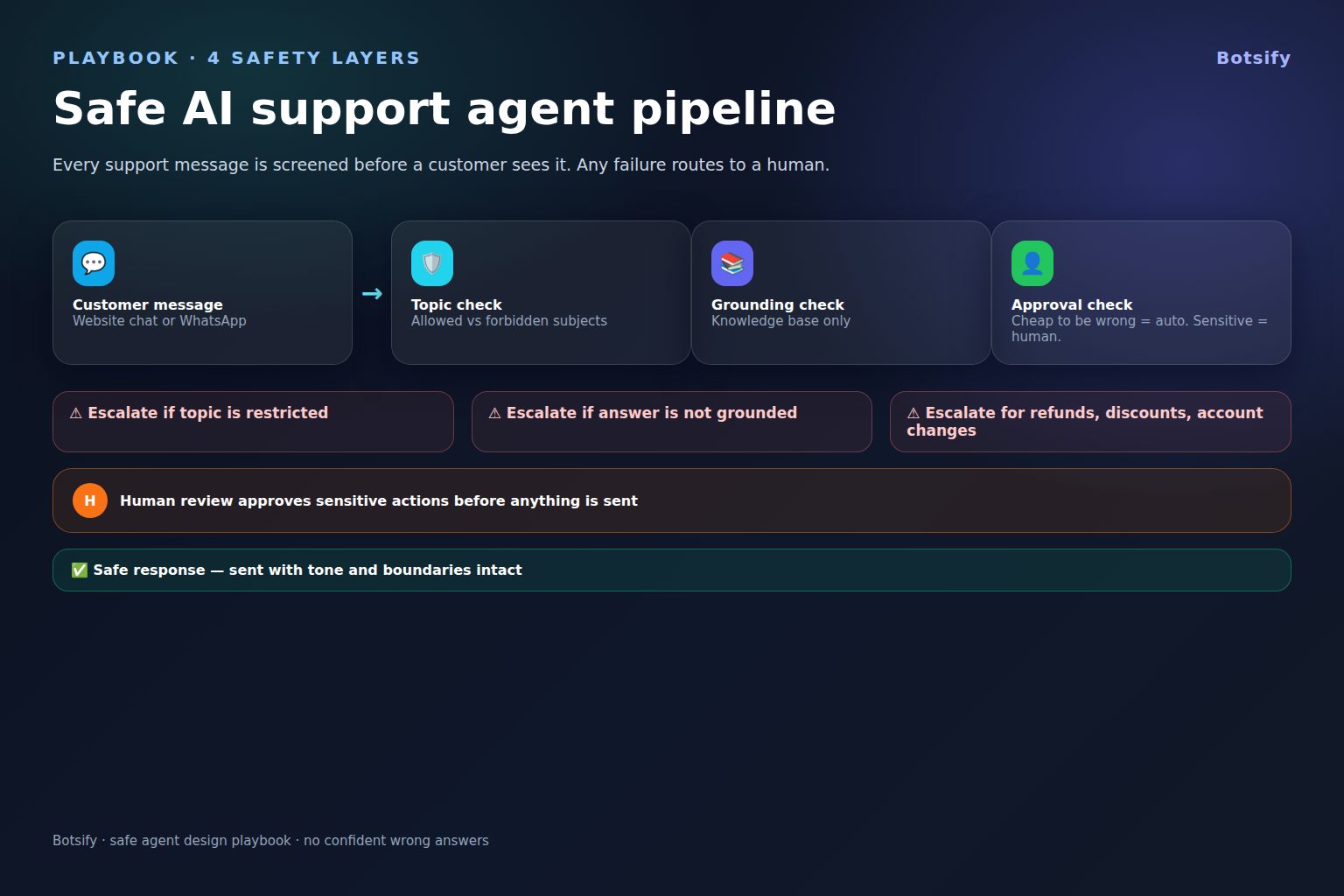
The safest default is simple: answer only when the agent has both permission and evidence. When either is missing, ask a clarifying question or hand off.
Start with a risk map, not a confidence score
Before writing a system prompt, list the customer intents the agent will see. Sort each intent by the effect a wrong answer or action could have. A universal confidence threshold is a poor substitute for this review: scores vary by model, task, language, and retrieval setup, and they do not grant permission to act.
| Risk band | Typical support work | Safer default |
|---|---|---|
| Routine and reversible | Explain a published feature, find a public help article, share business hours | Answer from an approved source; link or cite it where useful |
| Account-specific | Check an order, appointment, subscription, or case | Verify the customer and retrieve only the fields needed for this request |
| Consequential or hard to reverse | Issue a refund, cancel a service, change ownership, promise an exception | Follow the written policy; require confirmation, an authorized tool path, or human review as policy dictates |
| Outside scope or sensitive | Legal, medical, financial, safety, or unsupported product claims | Do not improvise; give a brief explanation and route to the right person |
The exact bands depend on your business. A small, reversible change may be safe to automate under a documented policy, while a seemingly simple request may need review if identity is uncertain. Record the reason behind each boundary so support, product, and compliance owners can agree on it.
Define each intent in operational language: what the agent may say, what data it may use, what tools it may call, what confirmation is required, and what condition stops automation. This is the core of your AI agent governance and gives the team a shared way to review changes.
Set a narrow, explicit scope
“Help with customer support” is too broad to be a useful instruction. Start with an allowlist of intents the agent is expected to handle, then name the cases it must not resolve on its own.
For example, an initial support scope might include:
- Finding product instructions in approved help content.
- Explaining published policies without interpreting exceptions.
- Collecting information needed to route a case.
- Checking an order or appointment after the customer passes the required verification step.
- Creating a support ticket with a concise summary.
Out of scope might include changing account ownership, making legal interpretations, overriding a published policy, or handling an urgent safety concern. Avoid overly broad bans that send every customer to a person. Instead, provide a safe next step: ask one clarifying question, point to a verified resource, or offer a staffed route.
Write boundaries as behavior the system can follow. “Be careful with refunds” is vague. “Do not promise or submit a refund unless the connected policy check returns eligibility; if it returns no result or conflicting results, explain that a specialist will review it” is testable. Keep the customer-facing wording calm and brief; keep internal rules precise.
Your AI agent requirements should also name the owner for each rule, the source of truth, and the person who can approve a change. That prevents a prompt edit from silently changing the support policy.

Ground answers in current, approved information
A response filter cannot make an unsupported answer safe after the fact. The agent needs an approved source and a retrieval process that can distinguish a relevant, current passage from a similar but outdated one. Build and maintain the AI knowledge base for customer support before expanding the agent’s scope.
For every answerable intent, check that the source is:
- Owned: someone is responsible for keeping it accurate.
- Current: it has a review date or update trigger.
- Specific: it covers the actual customer scenario, not only a broad topic.
- Consistent: it does not conflict with another policy page or channel.
- Permitted: it is appropriate to show to this customer.
Define what to do when search returns nothing, several conflicting answers, or a source that does not cover an important detail. The fallback should be explicit: ask a narrow follow-up question if it can resolve the gap, otherwise say the information is not available and route the case. Do not treat a high similarity score as proof that the answer is correct.
Where the product supports it, show the customer the relevant source or a direct link. A citation helps the customer verify the answer and helps a human reviewer understand what the agent relied on. It does not guarantee the passage was interpreted correctly, so test both retrieval and the final wording. The AI FAQ agent citation workflow offers a useful pattern for answering from source material and handling missing evidence.
Keep documents chunked around complete procedures and policy conditions. A passage that contains the headline but omits an exception can produce a confident, incomplete answer. Test likely paraphrases, misspellings, multilingual questions, and follow-up turns that change the context. When policy changes, remove or replace obsolete content and run the affected tests again.
Treat customer text and documents as untrusted input
Customer messages, uploaded files, and retrieved web pages can contain instructions aimed at the model, such as “ignore the prior rules” or requests to reveal private data. These are content to interpret, not authority to change the agent’s instructions.
Separate trusted policy and developer instructions from customer-provided material. Tell the agent to extract relevant facts from that material while ignoring instructions that attempt to alter its role, disclose secrets, or use tools outside the request. Give tools only the permissions needed for their task, and enforce those permissions in the application layer instead of relying on the prompt alone. If the same support workflow serves customers in several languages, test the boundaries and fallback route in each language, using a multilingual AI customer support workflow as a reference point.
Test direct and indirect prompt injection: a customer’s message, a quoted email, a document in the knowledge base, and content returned by an integration. Include benign text that merely discusses prompt injection so the agent does not overreact to keywords. Record what the agent did, not just whether the final answer sounded safe, then review failures with the owners of the affected tools and policies.
Restrict tools and consequential actions
Tool access turns a conversational error into an operational one. Separate read permissions from write permissions, scope records to the verified customer, and avoid broad credentials that let a support agent edit unrelated accounts. A lookup tool should not inherit permission to issue credits simply because both actions are part of support.
For any state-changing operation, define the full sequence:
- Confirm the intent and identify the affected record.
- Verify identity and eligibility using the approved process.
- Show the customer the proposed change when confirmation is required.
- Validate arguments and policy constraints before the tool call.
- Execute once, capture the result, and give a truthful status.
- If the result is ambiguous or the tool fails, stop and route the case rather than retrying blindly.
Use idempotency or duplicate checks where the integration supports them. Make high-impact tools unavailable to the agent unless the business has approved the use case, controls, and recovery path. Document which actions require a person; do not assume that every refund or cancellation follows the same rule across businesses.
Walk through a refund request before connecting the tool
Imagine a customer says, “The package arrived damaged. Refund my order.” The message contains a desired outcome, but it does not establish the order, the customer’s identity, the return window, or the policy for damaged goods. A safe workflow should not treat the customer’s wording as authorization to issue money.
First, the agent explains that it can check the request and asks for the minimum information allowed by the verification policy. It then looks up the matching order using a narrowly scoped read tool. If the customer is verified and the system returns an applicable policy, the agent explains the documented next step. If a photo, receipt, or additional detail is required, it asks for that specific item. If the policy conflicts, the lookup fails, or the case requests an exception, the agent routes it to an authorized person with the reason and source attached.
Only after the approved decision path is complete should a write action be available. Before an action that requires confirmation, the agent states what will change and waits for the customer’s clear confirmation. After calling the tool, it reports the result returned by the system. “I submitted the refund request” and “Your refund has been issued” mean different things, so use the latter only when the transaction system confirms completion.
This walkthrough reveals several controls to test: identity checks, record scoping, policy retrieval, confirmation wording, duplicate prevention, timeout handling, and handoff context. The same method works for cancellations, address changes, appointment rescheduling, and account access. Map each workflow from the customer’s request to its final system state before letting the agent act.
Design a human handoff customers can trust
Escalation is a normal outcome, not a failure to hide. Trigger it when the source is missing or contradictory, the customer requests a person, the issue falls outside scope, identity checks fail, a tool returns an uncertain result, or the conversation shows repeated frustration. Define staffed hours and an after-hours route so the agent never implies that a human is available when no one can respond.
A handoff should carry the details a person needs to continue: the customer’s stated goal, relevant verified identifiers, sources checked, questions already asked, actions attempted, tool results, and the specific decision needed. Mark uncertain details as uncertain. A generated summary can itself be wrong, so the receiving agent should be able to inspect the original conversation and correct the summary before acting.
Tell the customer what is happening in plain language. Say whether the case was submitted, whether a person is available now, and what response channel or timing to expect only when that information is known. Do not promise a callback or resolution time that the workflow cannot guarantee. The AI human handoff rules help teams define triggers and transfer context without making customers repeat the whole story.
For an upset customer, shorten the path to a person. Acknowledge the frustration without arguing about it, avoid repeated troubleshooting loops, and do not use sentiment detection as the only route to escalation. Customers express urgency in different ways, and automated emotion labels can be wrong. Let an explicit request for a person override the agent’s preference to continue.
When the issue involves a complaint, a failed promise, or a customer who says the previous answer did not help, avoid restarting the same script. Keep the next step concrete and let the human decide whether the customer needs an explanation, correction, or exception. A defined AI customer service escalation process can help the team route complaints without making the automated agent argue or overpromise.
Protect customer information throughout the workflow
Use only the personal information needed to answer the current request. Verify identity before revealing account-specific details, and do not ask for passwords, full payment-card numbers, or other secrets in a chat. Redact or avoid sending sensitive data to tools that do not need it. Restrict who can access transcripts and define retention according to the organization’s policies and applicable obligations. A written AI agent data retention policy can help teams decide what conversation details to keep and when to remove them.
Logging should support troubleshooting without becoming a second uncontrolled data store. Decide which fields are necessary, who can inspect them, how long they are retained, and how deletion or correction requests are handled. Confirm that any vendor or integration receiving conversation data is approved for that use. These are deployment and governance decisions; do not imply that a particular agent platform automatically satisfies your organization’s legal or security requirements.
Test the whole support journey before launch
Testing should cover the conversation, retrieval, permissions, tools, and handoff together. A response can be safe in isolation and still fail if the agent retrieves the wrong policy or submits a duplicate action. Build a repeatable suite from real, anonymized support scenarios and the edge cases your team expects.
| Scenario | Expected behavior |
|---|---|
| Clear question covered by a current source | Answer accurately and point to the source |
| No matching source | Say the answer is not available and offer the correct route |
| Two policies conflict | Avoid choosing one; escalate with both references |
| Request to change another customer’s account | Refuse access and explain the verification requirement |
| Prompt injection in a message or document | Ignore the embedded instruction and continue within scope |
| Tool timeout after a state-changing request | Do not claim success or repeat blindly; check status or hand off |
| Customer asks for a human | Initiate the supported route and explain what happens next |
| Frustrated customer repeats the same issue | Stop the loop, acknowledge the problem, and escalate |
| Unsupported legal, medical, or safety question | Avoid advice and route to an appropriate person or resource |
| Policy update | Confirm the new answer and verify old wording no longer appears |
Add positive and negative cases for each tool, role, language, and channel. Include tests for partial outages, malformed records, empty search results, duplicate webhooks, and long conversations where earlier context may no longer be reliable. Re-run the suite after changing the prompt, model, knowledge base, permissions, integrations, or escalation rules. A practical AI agent testing guide can help structure those checks.
Start with a limited rollout, such as a narrow intent set or an internal test group. Define the conditions that pause the agent: repeated unsupported answers, a failed handoff route, unexpected tool activity, or a rise in customer harm reports. Assign someone to review incidents and decide whether the issue needs a content fix, a permission change, a product fix, or a narrower scope. Avoid announcing an expansion until the team has reviewed actual conversations.
Measure resolution quality, not just automation
Ticket deflection by itself can reward a system that frustrates customers into abandoning the conversation. Review whether the customer received a correct answer, whether the issue was resolved, how often handoffs succeeded, and whether customers had to repeat information. Pair automated metrics with sampled conversation review and a way for agents to flag unsafe or unhelpful behavior.
Useful measures include:
- Verified answer quality: sampled answers checked against current policy and source material.
- Resolution rate: whether the customer’s issue was actually resolved, including after escalation.
- Handoff completion: whether the case reached a staffed queue with usable context.
- Repeat contact: whether customers returned because the first interaction failed.
- Tool error and duplicate rate: whether integrations failed, repeated, or changed the wrong record.
- Customer experience: complaints, satisfaction feedback, and explicit requests for a person.
- Coverage gaps: intents that routinely require missing information or human correction.
Segment results by intent, channel, language, and risk band. A good average can hide a dangerous failure in a low-volume workflow. Use the findings to improve documentation, prompts, and routing, but keep policy owners responsible for approving changes. The customer support metrics beyond deflection explain why several quality measures belong beside automation rates.
Give each measure an owner and a review action. For example, a rise in unsupported answers should trigger a source review before a prompt tweak; repeated tool timeouts should go to the integration owner; a handoff queue that is not staffed should cause the affected intent to pause. Keep a brief record of the issue, the decision, the change, and the regression test that passed. That makes it easier to tell whether a later improvement fixed the cause or merely changed the wording.
A launch checklist for a safe AI agent for customer support
Before opening the agent to customers, make sure the team can answer yes to each item:
- Is the supported scope written as specific customer intents?
- Does every answerable intent have an owner and a current approved source?
- Are missing, stale, and conflicting sources handled with a safe fallback?
- Are personal data access and tool permissions limited to the task?
- Are consequential actions documented with their confirmation and review rules?
- Can the agent stop safely after an ambiguous tool result or system failure?
- Does the human route work during and outside staffed hours?
- Does the handoff include useful context while preserving access to the original conversation?
- Have prompt injection, unsupported requests, upset customers, and policy changes been tested?
- Are owners, monitoring measures, incident steps, and pause conditions assigned?
If any answer is no, narrow the initial scope and close that gap before expanding. A phased rollout with clear ownership is safer than granting broad access and hoping that a prompt will contain every failure mode. Review common AI agent deployment mistakes as you prepare the rollout.
Turn the checklist into a named launch gate. Assign an owner and evidence for each item, such as the test result, approved policy, or successful handoff rehearsal. If an item cannot be demonstrated, keep that intent out of the initial release and schedule a review after the missing control is in place.
Build a support agent with clear boundaries and handoffs
Map support intents, safe actions, and useful human handoffs.
FAQ
Should a support agent answer only when it is completely certain?
No system can establish perfect certainty from a score. Define which sources and checks are sufficient for each intent. If the information is missing, stale, conflicting, or outside the agent’s permission, the agent should ask a clarifying question or hand off.
Should every refund require human approval?
That depends on the organization’s policy, transaction risk, and available verification. Document which cases can be handled automatically, which require customer confirmation, and which need a human. The agent should never invent an exception or claim a refund succeeded before the connected system confirms it.
What should happen when a customer asks for a human?
Honor the request and explain the actual route. If the team is unavailable, say so and offer the supported next step. Transfer the conversation context, but let the human check the original messages rather than relying on an AI summary alone.
How often should the team test the agent?
Run regression checks whenever a meaningful component changes, including the model, prompt, sources, permissions, tools, or routing. Review live quality on a schedule that matches the volume and risk of the agent, and investigate serious incidents immediately.
Can a knowledge base citation guarantee a safe answer?
No. A citation makes the source visible, but the retrieved passage may be stale, incomplete, or misinterpreted. Test whether the source supports the complete answer and provide a fallback when it does not.
Make safety part of the operating process
A safe AI agent for customer support has a narrow job, approved evidence, limited permissions, clear stop conditions, and a human route that works in practice. Start with routine requests, test the full journey, and expand only when the team can show that answers are useful and failures are handled honestly.
See how Botsify can support your customer service workflow
Plan a practical agent workflow around your customer support needs.