


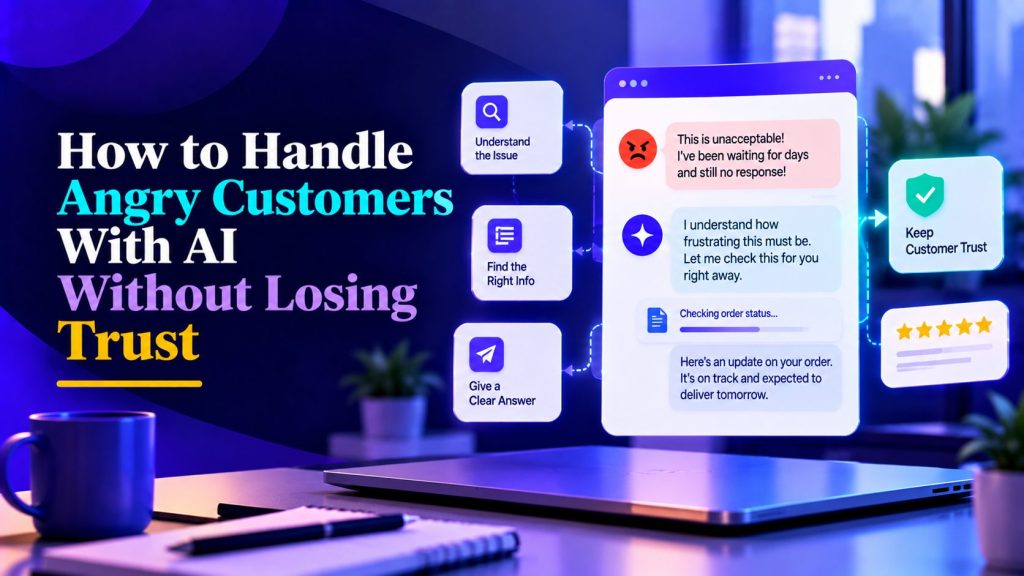
Angry customers are some of the most challenging conversations in customer support. Handled well, a complaint can become an opportunity to rebuild trust. Handled badly, especially by a poorly configured AI agent, it can lead to negative reviews, public complaints, and lost customers.
The challenge is knowing when AI can help and when a human needs to step in. A customer who wants a simple answer may appreciate a quick automated response, but someone dealing with repeated failures or an unresolved dispute needs a different approach.
That’s why AI customer service escalation matters. With the right escalation rules, AI can recognize frustration, respond respectfully, preserve conversation context, and connect customers with the appropriate support team.
This guide explains how to handle angry customers with AI, build effective escalation workflows, and prevent automation from damaging customer trust.
Why angry customers break most AI support
Angry customers do not communicate the way your FAQ assumes. They:
- Write in fragments or all caps
- Repeat themselves because they do not feel heard
- Ask questions that are really complaints in disguise
- Escalate emotionally in the second or third message
- Expect a human, not a script
A standard chatbot handles none of that. It either repeats the script — which makes things worse — or gives up. An AI agent with the right escalation design does something different: it recognizes the emotional signal early, responds calmly, and hands off before the situation deteriorates. The customer support AI agents guide covers the general support agent pattern; this post is about the angry-customer subset, where mistakes are most expensive.
The Role of AI in Handling Angry Customers
An AI agent can help calm a frustrated customer, but it should not keep someone trapped in an automated conversation when they need human assistance.
The goal is to acknowledge the problem, provide useful information when appropriate, and recognize when a human needs to take over.
What AI should do
- Acknowledge the specific frustration. Respond to what went wrong rather than using a generic apology.
- Confirm the issue. Briefly summarize what the customer has already explained.
- Gather essential information. Ask only for details needed to help, such as an order number or account reference.
- Offer human assistance. Make escalation easy, especially when the customer requests it.
- Set realistic expectations. Explain what happens next without promising an unavailable agent or an unverified response time.
For example:
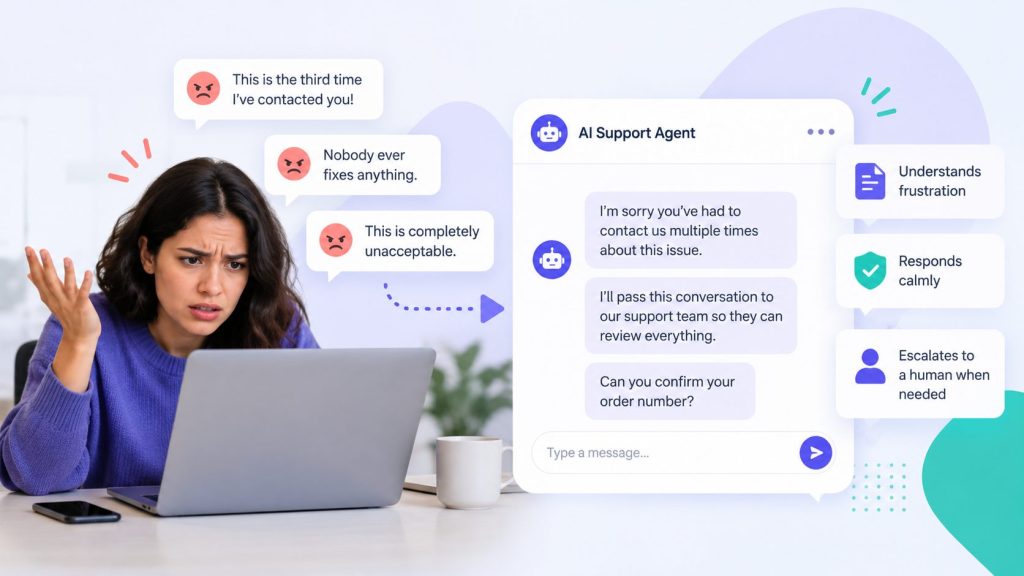
Customer: “This is the third time I’ve contacted you. Nobody ever fixes anything.”
AI agent: “I’m sorry you’ve had to contact us three times about the same issue. I’ll pass this conversation to our support team so they can review what has already happened. Can you confirm your order number?”
What AI should never do
- Argue with the customer or dismiss their frustration.
- Tell someone to calm down.
- Repeat scripted apologies without taking action.
- Promise refunds, timelines, or outcomes it cannot authorize.
- Continue an automated flow after a customer requests a human.
- Ask customers to repeat information already available in the conversation.
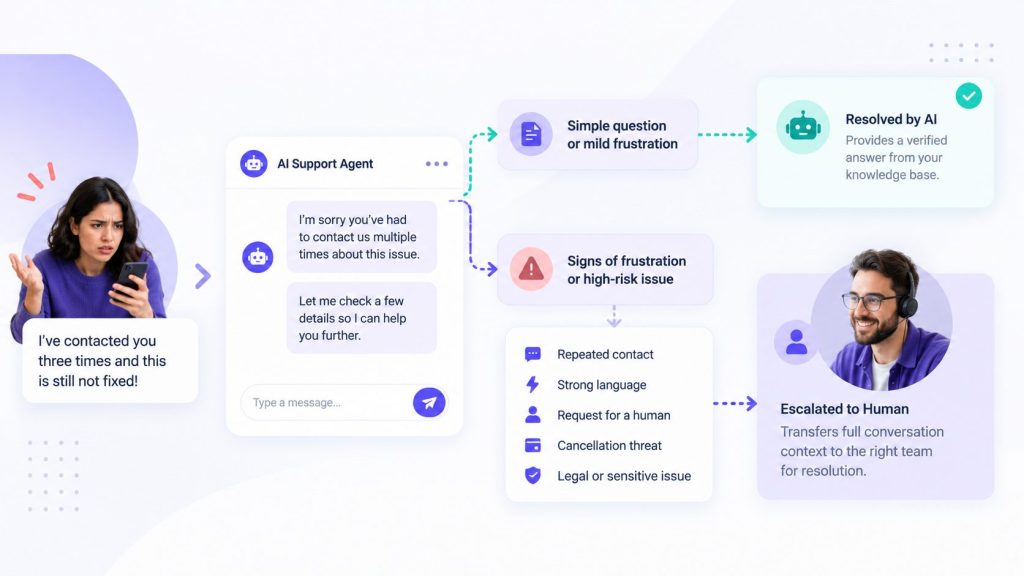
A simple question from a mildly frustrated customer may still be resolved by AI. But repeated failures, sensitive disputes, and explicit requests for human help should trigger escalation.
The aim is not to automate every resolution. Well-designed AI agent workflows help direct customers to the right answer or person without making the situation worse.
AI Customer Service Escalation: How to Detect Frustration
Customers do not always say they are angry. Frustration can appear through repeated messages, changes in tone, cancellation threats, or requests to speak with a person.
An AI customer support agent should evaluate the conversation’s context rather than relying on keywords alone.
Common frustration signals
| Signal | Example |
|---|---|
| Repeated contact | “I’ve already contacted you three times.” |
| Strong language | “This is completely unacceptable.” |
| Cancellation threat | “I’m closing my account.” |
| Payment dispute | “I’m contacting my bank.” |
| Sarcasm | “Great, another automated response.” |
| Explicit human request | “Let me speak to someone.” |
| Repeated unresolved issue | “You said this was fixed yesterday.” |
A single signal does not always indicate a serious escalation. However, some situations should trigger immediate human assistance regardless of how calmly the customer writes.
Escalation decision matrix
| Customer situation | Recommended AI response | Escalation |
|---|---|---|
| Mild frustration, simple question | Acknowledge and provide a verified answer | Optional |
| Complex unresolved complaint | Summarize and gather essential context | Yes |
| Repeated unsuccessful contact | Acknowledge and arrange human review | Immediate |
| Customer requests a human | Confirm the handoff | Immediate |
| Cancellation or chargeback threat | Avoid unsupported promises | Immediate |
| Legal or regulatory complaint | Route to an authorized team member | Immediate |
| Safety concern or sensitive personal issue | Avoid automated resolution | Immediate |
Situations that need direct human review
Legal disputes, safety concerns, discrimination or harassment complaints, sensitive personal circumstances, and high-value account disputes should follow a predefined escalation policy. Clear AI agent governance rules help define which situations require human review.
If human support is unavailable, the AI should acknowledge the request, preserve the conversation, and communicate the actual support hours or expected next step.
Do not promise an immediate human response unless someone is available.
Frustration detection should be tested with real conversations. Capital letters, sarcasm, and sentiment scores can be useful signals, but they are not reliable enough to make every escalation decision on their own.
How to Hand Off an Angry Customer From AI to a Human
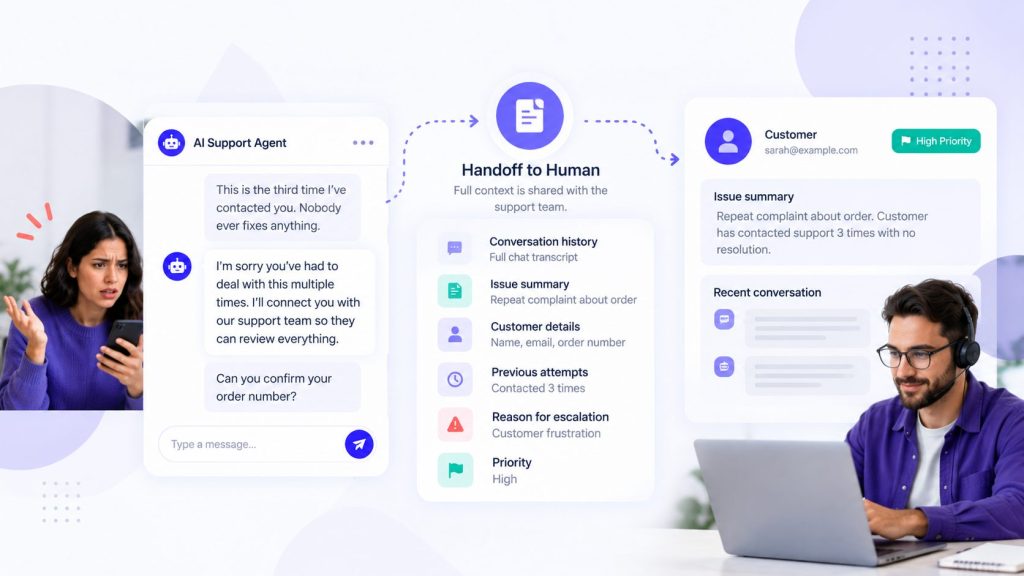
A successful AI customer service escalation does more than connect a customer to a support representative. It transfers enough context that the customer does not have to explain everything again.
Step 1: Acknowledge and explain the handoff
Use a direct message such as:
“I’m sorry this hasn’t been resolved. I’m passing your conversation to our support team so they can review what you’ve already shared. You won’t need to start from the beginning.”
Only promise an immediate connection when human support is actually available.
Step 2: Collect essential information
If the conversation does not already contain the necessary details, ask for the minimum information required to route the issue.
This may include an order number, account reference, or a short description of the desired outcome.
Avoid turning escalation into another lengthy qualification process.
Step 3: Transfer the conversation context
The human representative should receive:
- Full conversation transcript
- Brief summary of the issue
- Customer or account reference
- Previous troubleshooting attempts
- Reason for escalation
- Relevant commitments already made
- Priority or sentiment indicator, where available
Step 4: Let the human take control
Once the conversation is assigned to a representative, the AI should stop sending automated replies unless the workflow specifically requires them.
The representative can then review the history, acknowledge the frustration, and work toward an appropriate resolution.
Step 5: Confirm the next action
If the issue cannot be resolved immediately, explain what will happen next and who is responsible for following up.
A customer who receives a clear update is less likely to feel ignored than someone left waiting without information.
The quality of the handoff matters as much as the speed. Proper AI agent integration with your CRM or help desk helps preserve conversation history and customer details, reducing the risk of another frustrating experience.
Turn Angry Chats Into Better Support
Let AI detect frustration and connect customers to your team.
How AI Should Respond to Angry Customers: Tone and Examples
The way an AI agent responds can either reduce frustration or make it worse. Customers who are already upset usually want a clear acknowledgment and a useful next step, not a long explanation.
Tone rules
- Keep responses short and direct.
- Acknowledge the specific problem.
- Avoid excessive apologies and corporate phrases.
- Do not use emojis or cheerful language in serious complaints.
- Never blame the customer.
- Explain the next action instead of repeating reassurance.
Example responses
Delayed order
Customer: “My order was supposed to arrive yesterday. This is ridiculous.”
AI: “I’m sorry your order hasn’t arrived as expected. I can check the available order information. Could you share your order number?”
Customer threatening to cancel
Customer: “I’m done. Cancel my account.”
AI: “I understand you’re unhappy with the experience. I can connect you with our team to review your cancellation request and the available options.”
Repeated complaint
Customer: “I’ve explained this three times already.”
AI: “I’m sorry you’ve had to repeat yourself. I’ll pass your conversation history to a support representative so they can review what has already happened.”
Customer using abusive language
Customer: “Your support team is completely useless.”
AI: “I want to help resolve this. I can connect you with a support representative, and I ask that we keep the conversation respectful.”
For serious abuse or threats, follow your company’s safety and communication policies rather than requiring an employee to continue the conversation.
The most useful response is one that acknowledges the problem and moves the customer toward an appropriate next step. A properly configured website AI chatbot can provide that initial response while directing unresolved complaints to the support team.
Handling Difficult Customer Complaints and Escalation Scenarios
Some complaints need a different response because they involve financial disputes, public reputation, sensitive issues, or repeated service failures.
Use scenario-specific escalation rules rather than treating every angry message the same way.
| Customer scenario | Recommended handling |
|---|---|
| Refund request | Explain the published policy and route exceptions for authorized review |
| Product failure | Collect relevant technical details and escalate unresolved issues |
| Cancellation request | Respect the request and follow the approved cancellation workflow |
| Threat of a public review | Acknowledge the complaint and offer an appropriate resolution channel |
| Chargeback or payment dispute | Route to the team authorized to review billing disputes |
| Legal or regulatory complaint | Escalate to the appropriate manager or authorized specialist |
| Abusive or threatening language | Apply the company’s communication and safety policy |
When a complaint becomes public
If a customer posts a complaint on social media or a review platform, avoid arguing or sharing private account information publicly.
A short acknowledgment can direct the conversation toward an appropriate support channel. The human team should then investigate the underlying problem and provide an update when possible.
Not every negative review requires an emergency response, but serious allegations, privacy concerns, and widespread service failures should receive priority attention.
When the same complaint keeps returning
Repeated complaints often indicate an unresolved process issue.
Track the root cause, review previous commitments, and make sure the next representative has access to the customer’s history.
The objective is not simply to end the conversation. It is to prevent the same issue from causing another escalation.
Measuring escalation quality
Track these metrics specifically for escalated conversations:
| Metric | Target |
|---|---|
| Time from escalation request to human response | Based on actual support availability and the team’s documented SLA |
| Context transfer completeness | Human can see full history before first reply |
| Resolution rate on escalated conversations | Should be comparable to tickets that arrived as tickets |
| Customer sentiment after resolution | Positive or neutral, not worse |
| Repeat escalations | Low — same customer escalating twice signals a systemic issue |
Repeat escalations are an important warning sign. Review whether the original issue was resolved, whether the customer received accurate expectations, and whether the support team followed through on its commitments.
Common mistakes that make things worse
- Making the customer repeat themselves. The fastest way to turn frustration into rage.
- Apologizing without solving. “I’m sorry” repeated three times with no action makes things worse.
- Continuing the automated script. If the customer is angry, the script is the problem.
- Over-automating refunds or disputes. Some decisions need a human judgment call.
- Not training the team on escalations. A human who picks up a heated conversation unprepared makes it worse.
Most of these are process failures, not technology failures. Fix the process and the technology works.
Building the escalation prompt
Here is a prompt template for the escalation path:
You are the first point of contact for [COMPANY] support.
When a customer shows frustration:
1. Acknowledge their specific concern calmly.
2. Summarize the issue in one sentence.
3. Ask no more than one essential clarifying question.
4. Offer human assistance when the issue requires escalation.
5. Transfer the conversation history and issue summary to the support team.Escalate immediately when:
– The customer explicitly requests a human.
– The customer has repeatedly contacted support without resolution.
– The complaint involves legal, safety, or sensitive issues.
– The customer threatens cancellation or a payment dispute.Never:
– Argue with the customer.
– Continue an automated script after a human is requested.
– Promise refunds, outcomes, or response times without authorization.
– Ask customers to repeat information already available.If human support is unavailable, explain the actual support hours and preserve the request for follow-up.
Test this prompt with deliberately angry messages. If the agent responds with a qualification question instead of escalating, the prompt needs work.
How to Build an AI Customer Service Escalation Policy
AI escalation works best when the support team follows a documented process. The agent needs clear routing rules, and employees need to know what happens when a difficult conversation reaches them.
A practical escalation policy should define:
| Policy element | What to document |
|---|---|
| Escalation triggers | Situations requiring human review |
| Routing | Which team receives each type of complaint |
| Response expectations | Support hours and realistic response targets |
| Context transfer | Information the AI passes to the representative |
| Decision authority | Who can approve refunds, credits, or exceptions |
| Sensitive complaints | Procedures for legal, safety, or harassment concerns |
| Abusive behavior | Boundaries and conditions for ending a conversation |
| Follow-up ownership | Who checks whether the issue was resolved |
Prepare your human support team
Before launching the AI agent, make sure representatives understand:
- How escalated conversations arrive.
- Where to review the customer’s previous messages.
- What the AI may have promised.
- Which decisions require management approval.
- How to respond without making customers repeat their complaints.
- How to record the outcome and identify recurring issues.
Test the complete process with your team, not just the AI agent.
A well-written prompt cannot compensate for unclear responsibilities or a support queue that nobody monitors. Both the automated workflow and the human process need to work together. Teams that need help configuring these processes can explore done-for-you AI agents instead of building the entire setup internally.
Build Smarter AI Customer Support
Get an AI agent designed for smoother customer escalations.
Preventing anger in the first place
Most angry escalations trace back to a preventable cause. The common ones:
| Root cause | Prevention |
|---|---|
| Slow first response | Instant AI acknowledgment, even if resolution takes longer |
| Repeated questions | Context transfer between agent and human |
| Broken promises | Never let AI promise timelines or outcomes |
| Unresolved issues | Follow-up task creation, not just ticket closing |
| Surprise charges | Proactive notification before billing changes |
Many “angry customer” conversations are actually “surprised customer” conversations. If your product sends an unexpected charge or changes a policy silently, no amount of AI will fix the resulting frustration. Fix the root cause and the angry conversations mostly disappear.
Testing Your AI Customer Service Escalation Workflow Before Launch
Before allowing an AI agent to handle frustrated customers, test how it recognizes complaints, responds to difficult language, and transfers conversations to a human.
Use realistic messages rather than testing only polite customer questions.
| Test message | Expected behavior |
|---|---|
| “This is unacceptable.” | Acknowledge and assess the issue |
| “I’ve contacted you three times.” | Prioritize human escalation |
| “I want to cancel my account.” | Follow the approved cancellation escalation process |
| “I’m contacting my lawyer.” | Route to an authorized human |
| “Connect me to a person.” | Initiate human handoff without unnecessary questions |
| “Your product doesn’t work.” | Acknowledge and gather relevant technical details |
| Angry message with a simple factual question | Provide a verified answer and offer human assistance |
| Complaint outside support hours | Explain availability and preserve the escalation request |
Pre-launch checklist
Before publishing the workflow, confirm that:
- Escalation triggers have been tested.
- Direct requests for a human work correctly.
- Conversation history transfers to the support team.
- Routing sends each complaint to the appropriate queue.
- Response expectations match actual staffing.
- Employees know how to receive and resolve escalations.
- Sensitive issues follow approved policies.
- Failed handoffs can be identified and corrected.
- Escalation metrics are being recorded.
Test the complete journey from the customer’s first message to the human representative’s response. Regular AI agent testing helps identify failed handoffs, incorrect responses, and routing problems before customers experience them.
If a test fails, correct the workflow and repeat it before launch. There is no universal acceptable number of failed escalation tests, particularly when the failures involve safety, legal complaints, or ignored requests for human assistance.
Frequently Asked Questions About Handling Angry Customers With AI
Should AI handle angry customers at all?
Yes, AI can acknowledge frustration, provide verified information, and arrange human assistance. However, sensitive or unresolved complaints should be escalated rather than handled entirely through automation.
How can AI detect an angry customer?
AI can assess conversational signals such as repeated complaints, negative language, cancellation threats, and requests for human support. These signals should be evaluated in context and tested for accuracy.
Can AI resolve an angry customer’s problem?
Sometimes. Straightforward issues may be resolved with accurate information or an approved automated action. Repeated failures, sensitive disputes, and explicit requests for human help should be escalated.
What if human support is unavailable?
The AI should acknowledge the issue, preserve the conversation, and explain the actual support hours or next steps. It should not promise an immediate handoff when no representative is available.
Should AI apologize to an angry customer?
A brief, specific apology can be appropriate. Repeating generic apologies without taking action is usually less helpful than explaining what will happen next.
How do you prevent repeated escalations?
Record the reason for each escalation and review recurring problems. Improving the underlying support process is often more effective than changing the agent’s wording alone.
Can AI handle abusive customers?
AI can maintain a respectful tone and follow a predefined communication policy. Serious threats or harassment should be handled through the company’s safety and escalation procedures.
Building Customer Trust Through Better AI Escalation
Angry customers don’t need another automated script. They need to feel heard, understand what happens next, and reach someone who can help resolve their problem.
Effective AI customer service escalation makes that possible by identifying frustration early, responding respectfully, and transferring conversations to humans with the right context.
The goal isn’t to automate every difficult conversation. It’s to use AI where it helps, involve people when they’re needed, and protect the customer relationships your business has worked hard to build.
AI Agentic Platform For Building Portable AI Agents
Say Hello To Agentic AI That Connects With Your CRM And Even Other Agents