


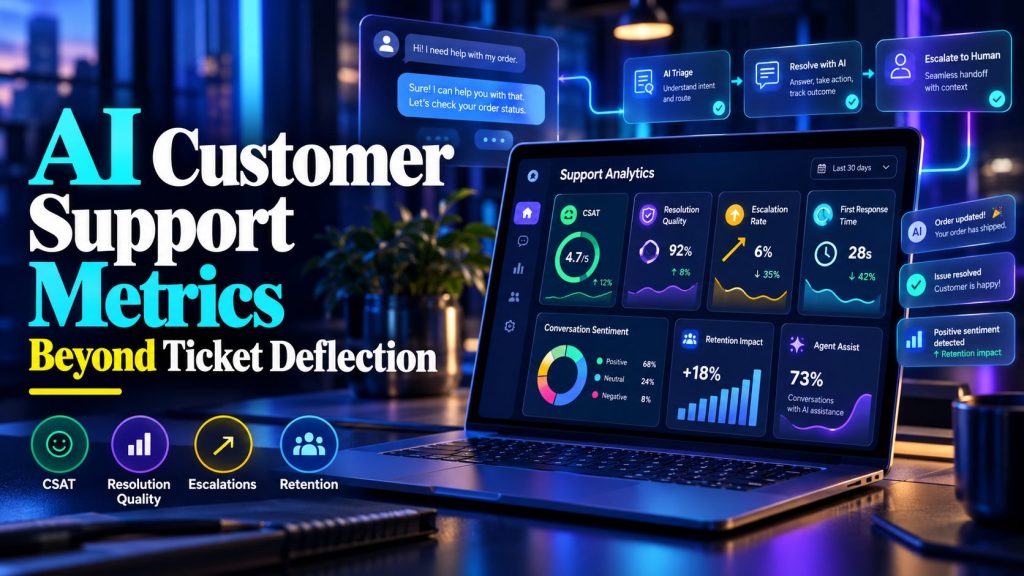
“We deflected 60% of tickets” is the metric most teams lead with. It’s also the one most likely to hide a problem. Deflection measures volume, not quality. An AI agent can close conversations without solving customer issues, making performance look impressive while customer satisfaction quietly declines.
That’s why tracking the right AI customer support metrics matters. Beyond ticket deflection, you need to understand whether customers receive accurate answers, how often they contact support again, when conversations require human assistance, and what each successful resolution costs.
This guide explains which metrics to track, how to measure them, and how to build a reporting process that helps improve customer support rather than simply make automation look successful.

Why deflection alone misleads
Deflection rate answers one question: how many conversations did the AI handle without a human? It does not answer:
- Did the customer get a correct answer?
- Are they satisfied?
- Did they contact you again about the same issue?
- Did the AI promise something a human has to fix later?
A team can hit 70% deflection while quietly accumulating angry customers who stopped bothering to reply. That is worse than a lower deflection rate with happy customers.
Deflection tells you what the AI touched. It tells you nothing about whether the touch helped.
Before diving into metrics, it is worth being clear about what you are measuring: AI customer support agents that answer questions, triage requests, and escalate complex issues, not just deflection counters.
The 8 AI Customer Support Metrics That Actually Matter
Here are the eight metrics worth tracking, in priority order:
| # | Metric | What it tells you | Target |
|---|---|---|---|
| 1 | CSAT on AI-handled conversations | Whether customers are satisfied | 4.2+/5 or equivalent |
| 2 | First contact resolution | Whether the answer actually solved the problem | 60%+ |
| 3 | Escalation rate | Whether routing is calibrated | 10–25% |
| 4 | Repeat contact rate | Whether the first answer stuck | Under 15% |
| 5 | First response time | Speed across all hours | Under 1 minute |
| 6 | Resolution rate | How much the AI handles end-to-end | Varies by category |
| 7 | Deflection | Volume handled without humans | Context metric only |
| 8 | Cost per resolution | Unit economics | Trend, not fixed target |
Notice that deflection is #7, not #1. It is useful for capacity planning, useless as a quality measure.
Metric 1: CSAT on AI-handled conversations
This is the metric most teams skip and most regret skipping. How to measure it: after the AI marks a conversation resolved, send a one-click satisfaction prompt (“Was this helpful? 👍👎” or a 1–5 scale). Keep it to one question, response rates collapse beyond that. What to do with the results:
| CSAT on AI conversations | What it means | Action |
|---|---|---|
| 4.5+ | Working well | Expand automation scope |
| 3.5–4.2 | Acceptable, tuneable | Review low-scoring transcripts weekly |
| Below 3.5 | Hurting more than helping | Narrow the agent’s scope until quality improves |
A high deflection rate with low CSAT is one of the worst combinations because you’re automating frustration at scale. If CSAT is low, review how the agent responds to complaints and whether it can handle angry customers with AI without making the situation worse.


Metric 2: First contact resolution
Did the AI actually solve the problem, or did the customer have to ask again? Measure it by tracking repeat contact: if the same customer contacts you about the same issue within 7 days, the first answer did not work.
| Repeat contact rate | What it means |
|---|---|
| Under 10% | Answers are solving real problems |
| 10–20% | Some answers are incomplete or unclear |
| Above 20% | The AI is deflecting, not resolving |
This metric catches the failure mode that deflection hides: an AI that answers quickly but does not actually fix anything produces lots of “resolved” conversations and lots of repeat contacts.
Metric 3: Escalation rate, calibrated, not minimized
Escalation is not failure. It is routing. The right escalation rate depends on your use case:
| Business type | Healthy escalation rate |
|---|---|
| Simple product, FAQ-heavy support | 10–20% |
| B2B SaaS with account-specific questions | 20–35% |
| High-stakes services (finance, health) | 30–50% |
| Pure FAQ agent on docs site | Under 10% |
The goal isn’t to minimize escalations at any cost. It’s to make sure the right conversations reach the right people. Effective support ticket triage helps distinguish routine requests from issues that need human judgment, so the agent doesn’t attempt to resolve problems beyond its capabilities.
Metric 4: Coverage by category
Knowing that 60% of conversations were handled is less useful than knowing which 60%:
| Category | Volume | AI resolution rate | Notes |
|---|---|---|---|
| Order status | 120/mo | 95% | Fully automated |
| Password reset | 40/mo | 90% | Fully automated |
| Refund requests | 30/mo | 20% | Agent collects, human decides |
| Bug reports | 15/mo | 10% | Triage only |
| Billing disputes | 15/mo | 0% | Human from the start |
This view tells you where to invest next. If order status is nearly fully automated, the next win is probably returns or address changes, not more order-status tuning.
Metric 5: Time to resolution (AI vs human)
Compare how long AI-handled conversations take to reach resolution versus human-handled ones:
- AI-resolved: usually under 5 minutes end-to-end.
- Human-resolved: varies by complexity, but often hours.
The value isn’t simply that AI responds faster. A website chatbot can answer routine customer questions outside business hours, reducing unnecessary waiting and giving customers access to support when human agents aren’t available.
Metric 6: Cost per resolution
AI support can reduce the cost of handling repetitive questions, but only when the agent actually resolves customer issues.
A low cost per conversation means little if customers have to contact support again.
Calculate cost per resolution using:
AI cost per resolution = Total monthly AI support costs ÷ Verified AI-resolved conversations
Include platform fees, usage charges, maintenance time, and other directly attributable operating costs.
Example calculation
Suppose a business handles 2,000 customer conversations each month, and the AI agent successfully resolves 1,000 of them.
Its monthly costs are:
| Expense | Monthly cost |
|---|---|
| AI platform and usage | $300 |
| Maintenance: 5 hours at $60/hour | $300 |
| Total | $600 |
The AI cost per verified resolution would be:
$600 ÷ 1,000 = $0.60
If comparable human-handled tickets cost $6 each, the difference is $5.40 per resolution.
Across 1,000 conversations, that represents $5,400 in potential equivalent handling-cost savings.
However, this is an illustrative comparison, not guaranteed cash savings. Actual savings depend on staffing, ticket complexity, repeat contacts, and whether the reduced workload translates into avoided costs or additional support capacity.
Use your own operating data rather than relying on generic vendor estimates.
Metric 7: Transcript quality trend
A weekly sample review answers questions dashboards cannot:
- Is tone consistent?
- Are answers still accurate after product changes?
- Are there new question types the knowledge base does not cover?
- Are escalations happening for the right reasons?
Metric 8: Knowledge base freshness
This is a leading indicator for everything else:
| Signal | What it means |
|---|---|
| High fallback rate | Documents are missing for real questions |
| Repeated corrections to the same answer | Source document is outdated |
| Escalations on policy questions | Knowledge base has gaps on edge cases |
Set a monthly knowledge-base review as a recurring task. An AI FAQ agent that answers questions from approved documents depends on accurate, up-to-date source material, so outdated policies and missing information should be addressed before they affect customer responses.
How to Build an AI Customer Support Metrics Dashboard
You don’t need an expensive analytics platform to track AI customer support metrics. A shared spreadsheet or basic reporting dashboard is enough to get started, provided it captures both customer experience and operational results.
Start with these essential metrics:
| Metric | What to measure | Data source |
|---|---|---|
| AI-handled conversations | Total conversations managed by the AI agent | AI platform analytics |
| AI customer satisfaction (CSAT) | Customer feedback after AI interactions | Post-chat survey |
| Escalation rate | Percentage of conversations transferred to humans | Help desk or AI platform |
| Repeat contact rate | Customers returning with the same unresolved issue | CRM or help desk |
| Resolution rate | Issues confirmed as resolved by AI | Conversation outcomes |
| Cost per resolution | Total AI support cost divided by verified resolutions | Platform billing and internal costs |
Start with three priorities
If your team cannot track everything immediately, begin with CSAT, escalation rate, and repeat contact rate.
Together, these reveal whether customers are satisfied, whether the agent knows when to involve humans, and whether problems stay resolved.
Add resolution time, cost per resolution, and category-level reporting as your measurement process improves.
Keep the setup simple
You only need a few basic tools:
- Conversation logs: Export chat histories from your AI support platform.
- CSAT collection: Use a short post-conversation survey.
- Escalation tracking: Record human handoffs in your help desk.
- Reporting: Use a shared spreadsheet or dashboard to review weekly trends.
- Issue tracking: Record recurring questions, failed responses, and knowledge-base gaps.
The dashboard should help your team identify problems and decide what to improve. Proper AI agent integration with your help desk or CRM can bring conversation outcomes, repeat contacts, and escalation data into the same reporting process instead of relying on conversation counts alone.
Track What Matters in AI Support
Build AI support with better visibility into performance.
How to Set Realistic AI Customer Support Metrics Targets
There is no universal CSAT, deflection, or escalation target that works for every AI support team.
A business answering simple order-status questions will have different results from a SaaS company handling technical complaints or a financial service dealing with sensitive requests.
The most useful starting point is your own support performance before AI implementation.
Record your baseline
Before launch, document:
| Metric | Before AI | After 60 days | Change |
|---|---|---|---|
| Customer satisfaction | Your baseline | Actual result | Difference |
| First response time | Your baseline | Actual result | Difference |
| Resolution time | Your baseline | Actual result | Difference |
| Repeat contact rate | Your baseline | Actual result | Difference |
| Support hours spent on repetitive requests | Your baseline | Actual result | Difference |
Compare similar question categories wherever possible. An AI agent handling simple FAQs should not automatically be compared with human representatives handling complex disputes.
Review progress at 30, 60, and 90 days
First 30 days: Establish baseline performance, identify common knowledge gaps, and use AI agent testing to check whether escalation rules and customer responses work as expected.
By 60 days: Review whether customer satisfaction and verified resolution rates are improving. Adjust the agent’s scope based on recurring issues.
By 90 days: Evaluate longer-term trends in resolution quality, repeat contacts, costs, and human workload.
The objective isn’t to hit an arbitrary deflection percentage. It’s to demonstrate that automation improves efficiency without reducing customer satisfaction.
Set targets based on actual support volume, customer expectations, issue complexity, and available human coverage. Revisit those targets as your agent improves.
Common Mistakes When Tracking AI Customer Support Metrics
AI support dashboards can look impressive while hiding serious customer experience problems.
The most common mistake is treating automation volume as proof of success.
Metrics that can be misleading
| Metric | What it might hide |
|---|---|
| High ticket deflection | Customers leaving without getting an answer |
| Thousands of conversations handled | Repeated contacts caused by unresolved problems |
| Very fast response times | Quick but inaccurate answers |
| High automation rate | Customers struggling to reach human support |
| Low escalation rate | The AI handling issues beyond its approved scope |
These numbers are useful, but they need context.
For example, pair deflection rate with CSAT and repeat contact rate. Pair automation rate with escalation quality. Compare response speed with actual resolution time.
Other mistakes to avoid
- Measuring only the first month: Early results may fluctuate as the agent is adjusted.
- Comparing different support categories: AI and human CSAT should be compared across similar issue types.
- Treating every closed conversation as resolved: Verify whether the customer actually received a useful answer.
- Ignoring transcript reviews: Numbers reveal patterns, but conversations explain why those patterns occur.
- Tracking too many metrics: Focus on measures your team can review and act on consistently.
A useful dashboard should make it easier to find problems, not simply make the automation project look successful.
How to Review AI Customer Support Metrics Regularly
Collecting support metrics is only useful when someone reviews the results and acts on them. A short weekly review helps identify inaccurate answers, recurring complaints, and escalation problems before they affect more customers.
Weekly review: 30 minutes
| Activity | Time | What to do |
|---|---|---|
| Review key metrics | 5 minutes | Check CSAT, escalation rate, repeat contacts, and resolution trends |
| Examine conversations | 15 minutes | Review five transcripts, including successful and unsuccessful interactions |
| Identify recurring issues | 5 minutes | Look for knowledge-base gaps, incorrect answers, and routing problems |
| Assign an improvement | 5 minutes | Choose one fix and assign responsibility |
Include both high-scoring and low-scoring conversations in your transcript sample. A customer who gives positive feedback can reveal what the agent does well, while a negative interaction may show where its instructions or knowledge need improvement.
Monthly performance review
Once a month, compare performance against your previous results.
Look for changes in customer satisfaction, escalation patterns, unresolved issues, and support costs.
Pay particular attention to situations where automation increases but customer satisfaction declines. That usually deserves a closer look at conversation quality.
Quarterly review
Every quarter, conduct a broader evaluation of the support agent.
Review a larger sample of conversations, audit outdated knowledge-base content, and assess whether the agent should handle additional question categories.
You may also discover that certain issues should return to human support because they require more judgment than automation can reliably provide. Clear AI agent governance policies help define those boundaries as the agent’s responsibilities change.
The purpose of regular reviews is to improve customer support, not simply produce another report. Every review should end with a clear action, an owner, and a follow-up date.
How to Report AI Customer Support Performance to Leadership
Support leaders need to understand whether AI is improving customer experience, reducing repetitive work, and helping the team manage demand.
A useful monthly report should connect operational metrics with business outcomes.
Include these five elements:
| What to report | Why it matters |
|---|---|
| Verified AI resolutions | Shows how much support work the agent completes |
| AI customer satisfaction | Indicates whether customers are happy with the experience |
| Escalation performance | Shows whether complex issues reach the right people |
| Support capacity or cost impact | Connects automation to operational efficiency |
| Improvements made | Demonstrates how the system is becoming more reliable |
Explain what the numbers mean
Instead of reporting:
“Our AI agent handled 1,000 conversations.”
Explain the outcome:
“Our AI agent resolved 1,000 routine support conversations this month. Customer satisfaction remained stable, and the team used the additional capacity to handle more complex requests.”
Only report time savings or financial savings when your data supports the calculation.
Address common leadership questions
Why isn’t deflection higher?
Because some issues require human judgment. A higher deflection rate isn’t useful if customers receive incorrect answers.
Why do AI and human CSAT scores differ?
They may handle different types of requests. Compare similar categories before drawing conclusions.
Why do we still review transcripts?
Transcript reviews identify issues that summary metrics cannot explain, including outdated answers and inappropriate escalations.
Leadership reporting should demonstrate business value while making limitations visible. Accurate reporting builds more confidence than inflated automation claims.
Make Your AI Support Work Better
Get help building an AI agent that resolves customer issues.
What to do when metrics go wrong
Three common patterns and their fixes:
Pattern 1: Deflection up, CSAT down. The agent is closing conversations without solving them. Fix: read the lowest CSAT transcripts, narrow scope, add escalation triggers.
Pattern 2: Escalation rate climbing. The knowledge base may be outdated, customers may be asking new types of questions, or the agent’s routing rules may need adjustment. Review escalated transcripts, identify recurring themes, and update the knowledge base. Teams that need help configuring and improving these workflows can use done-for-you AI agents instead of managing every adjustment internally.
Pattern 3: CSAT fine, support team unhappy. The agent is working but the team feels sidelined. Fix: involve them in transcript review and give them ownership of the knowledge base. People support what they help build. Every failing agent I have seen fails in one of those three ways. The fix is always visible in the data, the discipline of looking is the hard part.
Frequently Asked Questions About AI Customer Support Metrics
What are the most important AI customer support metrics?
Customer satisfaction, verified resolution rate, escalation rate, repeat contact rate, and cost per resolution are useful starting points. Track deflection alongside quality metrics rather than treating it as the main measure of success.
How do you measure CSAT on AI conversations?
Use a short survey immediately after the conversation. A simple rating or helpfulness question can capture feedback without requiring customers to complete a lengthy form.
Should AI and human support share the same CSAT score?
Track them separately and compare similar issue categories. Combining the scores can hide differences in performance and customer expectations.
What is a good AI ticket deflection rate?
There is no universal ideal rate. The right target depends on the complexity of customer questions, the agent’s approved scope, and whether customers are actually getting their problems resolved.
How often should AI support metrics be reviewed?
Review key metrics weekly during the early stages of deployment. Use monthly reviews for performance trends and quarterly reviews for larger decisions about automation scope.
What should you do when AI CSAT is low?
Review poorly rated conversations, check answer accuracy, identify missing knowledge-base content, and confirm that difficult questions are being escalated appropriately.
How long does it take to establish reliable performance metrics?
It depends on conversation volume and consistency. Avoid making major decisions from a small sample of early interactions. Use enough data to identify meaningful trends before expanding automation.
Should customer support teams have access to AI performance metrics?
Yes. Support representatives can identify recurring issues, explain customer complaints, and help improve escalation rules and knowledge-base content.
Final thought
Ticket deflection tells you how much work an AI agent handles, but it doesn’t tell you whether customers are getting the help they need. That’s why AI customer support metrics should measure satisfaction, verified resolutions, repeat contacts, escalation quality, and operational costs alongside automation volume.
You don’t need to track everything from day one. Start with the metrics that reveal customer experience, review conversations regularly, and improve the knowledge base when answers fall short.
The goal isn’t to make your AI agent look busy. It’s to build a support system that resolves more issues without compromising customer trust.
AI Agentic Platform For Building Portable AI Agents
Say Hello To Agentic AI That Connects With Your CRM And Even Other Agents