
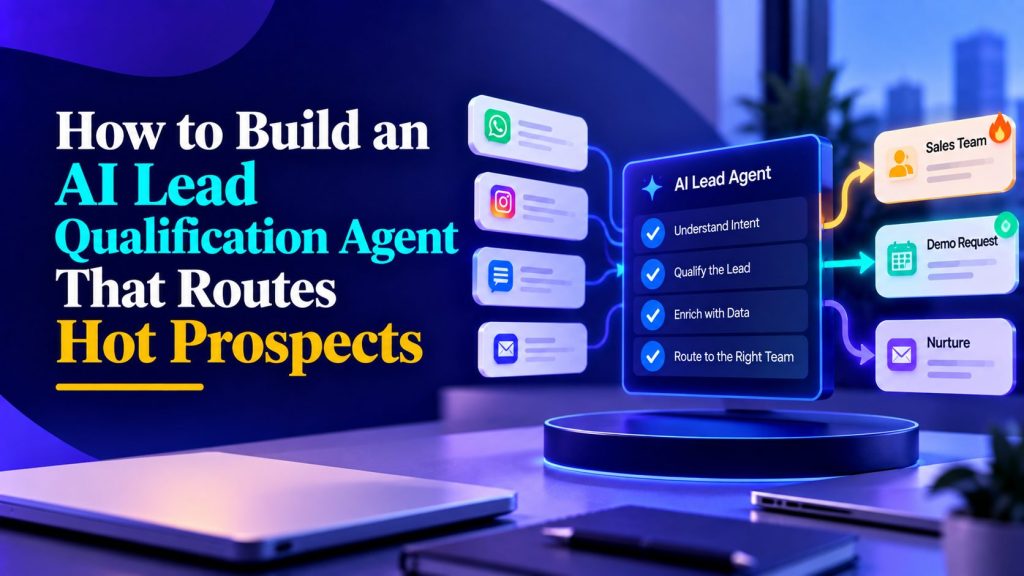
Most teams do not have a lead-generation problem. They have a lead-routing problem.
A new inquiry arrives from a website form, WhatsApp message, Instagram DM, paid ad, or inbound email. Someone on the team eventually reads it, asks a few questions, checks the CRM, forwards it to a colleague, and waits. If the lead is good, the delay costs you. If the lead is bad, your best salesperson has already spent twenty minutes discovering that.
An AI lead qualification agent fixes the first few minutes, not the entire sales process. Unlike a generic AI agent, its job is not to answer everything; its job is to identify who deserves human attention and what should happen next. This is the practical difference between collecting messages and using AI chatbots to improve lead qualification. It asks the right questions, identifies who is worth human attention, routes that person to the right owner, and gives your team a clean summary instead of a raw transcript.
This is not “replace your sales team with AI.” This is “stop losing qualified prospects inside your own workflow.”
Below is a practical playbook you can copy: how to design the agent, what to ask, how to score leads, where humans should step in, and how to launch it without looking like an over-enthusiastic chatbot.
1. Start with the routing decision, not the prompt
Most AI agents fail because someone writes a clever prompt before deciding what should happen to the lead.
A good lead qualification agent should always know:
- Who the lead is
- What they want
- Whether they are qualified now
- Who should handle them
- When a human should take over
- What the next action is
That means the prompt is only one part of the system, and it should be built after you define your AI agent requirements. The more important parts are the same systems you would design in AI workflow automation:
- The qualification questions
- The scoring rules
- The routing rules
- The CRM fields
- The human handoff trigger
- The follow-up path
If you can answer the question, “What happens after the AI decides this lead is hot?” then you are ready to build the agent.
A lead agent is not a conversation experience. It is a routing system with a conversation layer on top.
2. Define the lead states before you write anything
Do not send every lead to a salesperson. That defeats the purpose.
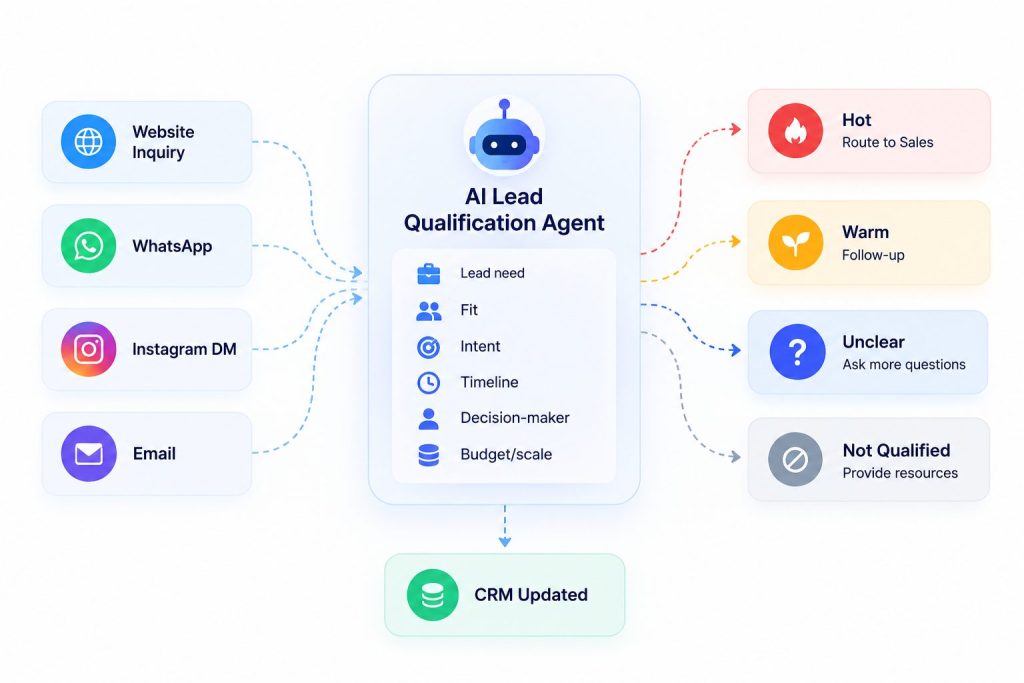
At minimum, define four states:
| Lead state | Meaning | Next action |
|---|---|---|
| Hot | Strong fit, high intent, timeline | Assign to sales, book call, notify rep |
| Warm | Real interest but missing context | Nurture, ask follow-up, schedule later |
| Not qualified | Poor fit, wrong budget, wrong use case | Send helpful resources, do not waste sales time |
| Unclear | Missing key information | Agent asks more questions or escalates |
You can add more states later, but start simple.
For example, a B2B services business might use:
- Hot: Company size fits, use case is clear, decision-maker involved, timeline is under 30 days
- Warm: Interested but timeline or budget is unclear
- Not qualified: Outside service area, student inquiry, internal testing, or wrong use case
- Unclear: Lead has not answered key questions
Once you define states, every prompt, message, and CRM update becomes easier to design.
3. Ask only the questions that change routing
AI agents become annoying when they collect every possible detail.
You only need questions that change the next step.
Use three layers:
- Identity: Who are you and what company are you from?
- Need: What are you trying to solve?
- Readiness: How urgent is this and who owns the decision?
A useful qualification matrix looks like this:
| Question | Why it matters |
|---|---|
| What are you trying to solve? | Identifies the actual use case |
| What have you already tried? | Reveals urgency and complexity |
| What is your current process? | Shows where friction exists |
| What outcome do you need? | Makes the sales conversation concrete |
| What is your timeline? | Determines priority |
| Who owns the decision? | Prevents wasted follow-up |
| What is your approximate budget or scale? | Helps filter fit |
| What channel did you come from? | Helps with attribution |
Not every lead needs every question. The agent should adapt based on the use case.
If a question does not affect routing, scoring, or messaging, remove it from the conversation.
4. Build the conversation like a decision tree, not a survey
Your agent should feel like a helpful assistant, not a form.
A good flow looks like this:
- Greet and ask what they need.
- Reflect the need back briefly.
- Ask the one or two most important follow-up questions.
- Summarize what the lead said.
- Route or escalate.
Example flow:
Agent: What are you looking to automate? Lead: We want to stop missing WhatsApp inquiries after business hours. Agent: Got it. Are you looking to handle customer support, appointment bookings, or lead qualification? Lead: Mostly appointment bookings. Agent: Perfect. Do you have a booking system already, or would you like the agent to book directly? Lead: We use Calendly. Agent: Would you like the agent to check availability, collect contact details, or route urgent requests to your team first? Lead: Check availability and send urgent ones to my team. Agent: Got it. One last question: how soon do you want this live? Lead: Next week. Agent: Thanks. I’m routing this to a specialist who can walk you through the setup.
That is a good agent because every step reduces ambiguity. If you want a deeper way to structure these exchanges, study chatbot conversation flow design before writing the prompt.
5. Use intent signals, not just keywords
Many teams qualify leads based on surface-level words like “price,” “demo,” or “buy.” That is too shallow.
Use a combination of:
- Explicit intent
- Behavioral intent
- Contextual intent
- Fit signals
- Urgency signals
| Signal type | Examples |
|---|---|
| Explicit intent | “Can you send pricing?” “Can we book a call?” “I’m ready to start.” |
| Behavioral intent | Repeated questions, follow-up messages, clicking pricing page, asking for demo |
| Contextual intent | Mentions specific team size, timeline, or workflow |
| Fit signals | Company size, industry, use case, decision-maker role |
| Urgency signals | “Next week,” “we’re launching,” “this is blocking us” |
For example:
- “What is pricing?” is useful but not always hot.
- “We need to automate WhatsApp bookings before our launch next week” is much hotter.
- “Can this integrate with HubSpot?” is strong because it implies deployment planning.
Your agent should score the combination, not one keyword.
Qualify Hot Leads Before Sales Steps In
See how Botsify can score, qualify, and route high-intent leads automatically.
6. Build a scoring rubric that your team actually understands
Avoid black-box scoring. Your sales team should understand why a lead is classified as hot, warm, unqualified, or unclear.
A simple scoring model works well:
| Signal | Weight |
|---|---|
| Clear use case | 20 |
| Decision-maker involved | 20 |
| Timeline under 30 days | 20 |
| Budget or scale fits | 10 |
| Repeated follow-up | 10 |
| Specific integration mentioned | 10 |
| Existing customer or referral | 10 |
Then set thresholds:
| Score | State | Next action |
|---|---|---|
| 75–100 | Hot | Notify sales and book call |
| 50–74 | Warm | Nurture and clarify |
| 25–49 | Not qualified | Send helpful resources |
| 0–24 | Unclear | Ask follow-up |
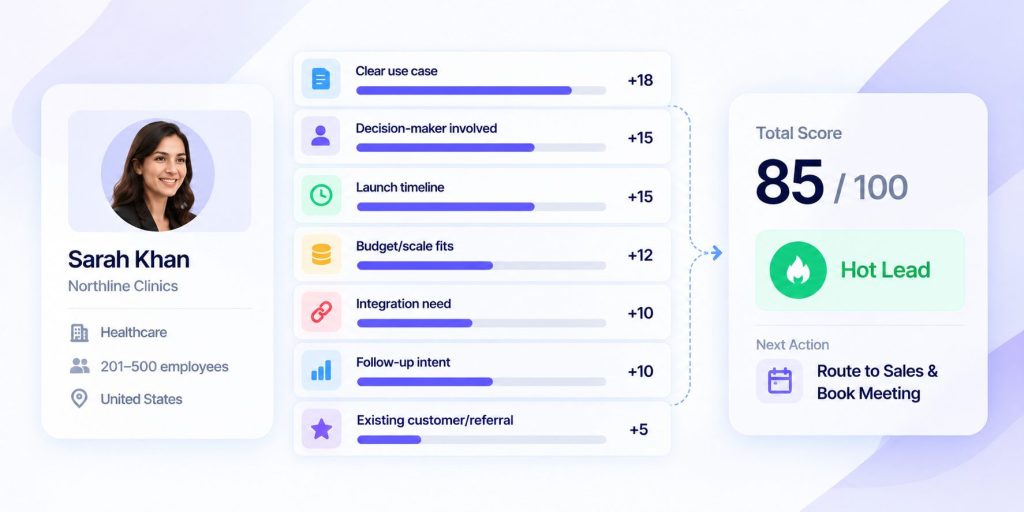
You can adjust the weights by business model. The important thing is that the agent’s output is explainable.
7. Route by owner, not just by “sales”
Routing to “sales” is often too vague.
Better routing uses:
- Product line
- Geography
- Company size
- Lead source
- Language
- Deal size
- Use case
- Existing customer status
- Referral relationship
Example routing rules:
| Scenario | Route to |
|---|---|
| Enterprise lead, clear budget | Senior account executive |
| SMB lead, WhatsApp source | SMB sales rep |
| Agency inquiry | White-label partner team |
| Support-related issue | Customer success |
| Existing customer upgrade | Account manager |
| High-risk request | Human review |
The agent should not only say, “This is hot.” It should say, “This is hot, here is why, and here is who should own it.” That is how AI agent workflows move from simple conversation to operational routing.
8. Define what should trigger a human
Some conversations should never stay fully automated, which is why human handoff should be designed as a first-class feature, not an afterthought. Botsify supports this through its human takeover workflow.
Escalate immediately when:
- The lead is angry or frustrated
- There is a legal, medical, or compliance issue
- The lead asks about pricing exceptions
- The conversation involves sensitive data
- The agent is unsure
- The lead asks for a human
- The lead mentions a competitor-specific migration
- The deal size is unusually large
- The request requires custom engineering
A simple escalation matrix:
| Trigger | Escalate to |
|---|---|
| Legal, medical, or safety risk | Human support |
| Large deal or enterprise interest | Senior sales |
| Pricing exception | Sales manager |
| Existing customer problem | Customer success |
| Unclear intent | Human support |
| Repeated confusion | Human support |
AI should open the door. Humans should close the important conversations.
9. Write the handoff summary your team actually needs
The handoff message is more important than the chat transcript.
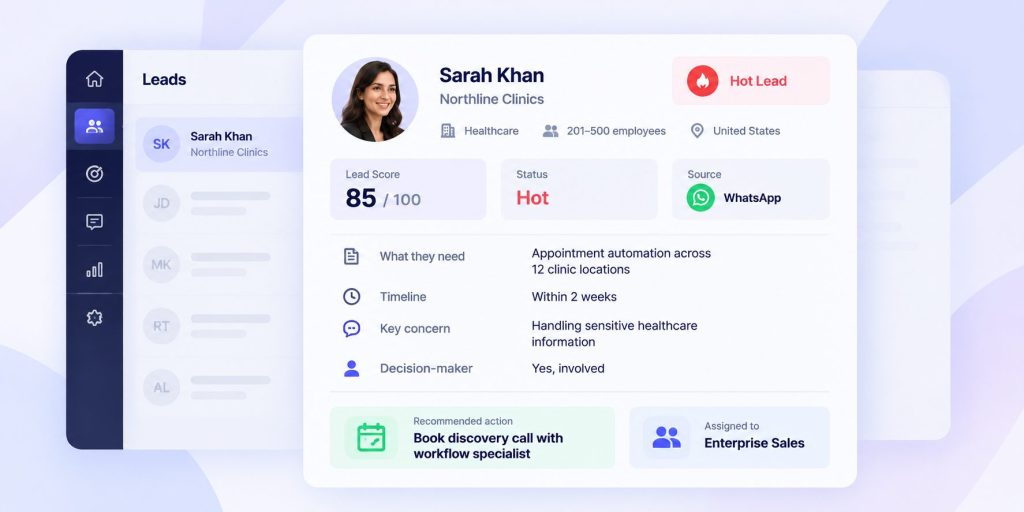
When a lead reaches a human, they should not have to read the entire conversation. Give them a clean summary.
A useful handoff summary includes:
- Name and company
- Source
- What they want
- Why they are qualified
- Current score
- Key objections
- Timeline
- Recommended next step
- Link to conversation
Example:
Lead summary – Name: Sarah Khan – Company: Northline Clinics – Source: WhatsApp website widget – Need: Automate appointment reminders and reduce no-shows – Why qualified: 12 locations, using Calendly, wants launch within 2 weeks – Score: 85 – Objections: Wants to know how HIPAA-sensitive data is handled – Next step: Book 20-minute call with support workflow specialist
This is where AI agents for customer support create real value. They turn messy conversations into decision-ready context.
10. Build the follow-up sequence
Most leads do not convert on the first message.
The agent should know what to do after the first contact.
A simple follow-up cadence:
| Day | Action |
|---|---|
| Day 0 | Qualify, route, send relevant next step |
| Day 1 | Follow up with one useful resource |
| Day 3 | Ask if they want to schedule a call |
| Day 7 | Send a short case study or checklist |
| Day 14 | Re-engage with a clear offer |
Do not follow up with the same generic message. Use the context the agent already collected. The same principle applies to a cold emailing AI agent: relevance improves response, not just volume.
Example follow-up:
You mentioned you wanted to reduce missed WhatsApp inquiries after business hours. I can walk you through how teams usually set this up in 20 minutes. Would you like me to book a slot?
That feels useful, not pushy.
11. Choose the right channels
The same qualification agent can work across multiple channels, but the conversation style should change.
| Channel | Best for | Conversation tone |
|---|---|---|
| Website chat | High-intent visitors | Direct, fast, helpful |
| Follow-up and repeat contact | Conversational, short messages | |
| Instagram DMs | Creator-style and local business leads | Friendly, quick, visual |
| Messenger | Warm social audiences | Helpful, low-friction |
| SMS | Appointment reminders | Ultra-short |
| Longer nurture | Structured, clear | |
| Voice | Urgent or complex conversations | Natural, human-like |
Start with one or two channels. For example, a website chatbot can qualify high-intent visitors in real time, while a WhatsApp chatbot can handle conversational follow-up. Expand once the routing logic works.
12. Connect the agent to your CRM
The agent should not just collect answers in chat.
It should update the CRM with:
- Lead source
- Use case
- Qualification score
- Timeline
- Decision-maker status
- Recommended route
- Conversation summary
- Next action
A useful CRM field structure:
| Field | Purpose |
|---|---|
| Lead source | Attribution |
| Use case | Routing |
| Qualification score | Prioritization |
| Timeline | Urgency |
| Decision-maker | Fit check |
| Recommended owner | Automation logic |
| Next action | Follow-up clarity |
| Summary | Sales context |
Without CRM integration, the agent becomes another inbox. With it, the agent becomes a workflow layer. This is the same principle behind broader AI agent integration: the value comes from the system working across tools, not from one isolated chat.
13. Design the first five messages carefully
The opening messages can strongly influence whether a lead continues the conversation or abandons it.
Keep them short.
Example:
- “Hi, how can I help you today?”
- “Got it. Are you looking for support, bookings, or lead generation?”
- “Thanks. What is your current process?”
- “What outcome would make this worthwhile?”
- “Got it. Would you like me to book a quick call with the right person?”
Avoid long paragraphs. Avoid asking five questions at once. Avoid jargon.
14. Use guardrails so the agent does not oversell
AI agents can accidentally promise things your business cannot deliver.
Set guardrails around:
- Approved claims
- Pricing language
- Legal or medical topics
- Competitor comparisons
- Custom engineering promises
- Refund or cancellation rules
A good guardrail set includes:
- What the agent can say
- What it cannot say
- What it must escalate
- What it must not promise
- What it should do when unsure
Example:
| Topic | Agent can do | Agent cannot do |
|---|---|---|
| Pricing | Share pricing page, book pricing call | Invent discounts |
| Security | Describe general practices | Make compliance guarantees |
| Timeline | Share typical ranges | Promise exact dates |
| Integrations | Mention supported tools | Promise custom development without review |
Guardrails make the agent usable in real business environments. This is also where AI agent governance becomes practical: you define what the agent may do, what it must escalate, and how it stays accountable.
15. Test before launch
Test the agent with real situations, not perfect ones.
Use a simple test matrix:
| Test type | Example |
|---|---|
| Hot lead | Clear use case, urgent timeline, decision-maker |
| Warm lead | Interested but timeline unclear |
| Not qualified | Student, wrong industry, wrong use case |
| Confused lead | Vague message, no context |
| Angry lead | Frustration or complaint |
| Sensitive lead | Legal, medical, or compliance issue |
| Existing customer | Current account asking upgrade question |
| Competitor mention | Asking to switch from another tool |
For each case, define:
- Expected agent response
- Expected lead state
- Expected route
- Expected CRM fields
- Expected escalation
If the agent passes the messy cases, it is ready to launch. Use this guide to testing AI agents before exposing the workflow to real prospects.
16. Track the right metrics
Do not measure the agent by how clever it sounds.
Measure by outcomes.
| Metric | Why it matters |
|---|---|
| Qualified leads | The main output |
| Hot leads routed | Sales efficiency |
| Time to first human response | Speed |
| Booked calls | Downstream conversion |
| Meetings held | Sales quality |
| Escalation rate | Human handoff quality |
| Wrong routing rate | Workflow quality |
| Lead drop-off point | Conversation friction |
A simple weekly review:
- How many leads arrived?
- How many became hot?
- How many were routed correctly?
- How many booked calls?
- Where did the agent lose people?
- Which questions caused confusion?
- Which handoffs needed human correction?
This turns the agent into an improving system, not a static bot.
17. Avoid these common mistakes
Most teams make the same mistakes:
- Too many questions
- Generic prompts
- No routing logic
- No CRM update
- No human handoff
- No follow-up sequence
- Measuring chat length instead of qualified leads
- Treating every lead the same
- Letting AI handle sensitive conversations
- Never testing edge cases
The agent should feel like a well-trained junior employee: polite, fast, structured, and smart enough to know when to escalate.
18. What a Botsify lead qualification workflow looks like
Botsify supports the pieces you need for this workflow across its core AI agent features:
- Website, WhatsApp, Messenger, Instagram, Telegram, SMS, Slack, and other channel deployment
- Conversation-based lead capture
- Document and website knowledge sources
- Skill chaining
- CRM and app integrations
- Human escalation and guardrails
- Scheduling and time-based triggers
- Voice agents for calls
- Optional BYOK for model control
A practical Botsify setup might look like this:
- Lead messages on WhatsApp or website.
- Agent asks what they want to automate.
- Agent asks timeline and use case.
- Agent scores the lead.
- Agent routes hot leads to the right owner.
- Agent books a call or notifies sales.
- CRM is updated with summary and next action.
- Agent follows up if no response.
- Human reviews the handoff summary, not the whole transcript.
That is the practical version: not “AI replaces sales,” but “AI removes the delay between interest and routing.”
Turn Your Lead Qualification Process Into an AI Workflow
See how Botsify can qualify leads, route hot prospects, update your CRM, and hand the right opportunities to your sales team.
19. Prompt template you can adapt
Here is a simple prompt template for a lead qualification agent:
You are an AI lead qualification assistant for [Company].

Goal:
Qualify inbound leads, identify hot prospects, and route them to the right human.

Company context:
- We help [target customer] with [primary offer].
- Best-fit customers are [ideal customer profile].
- We do not serve [bad fit audience].

Qualification signals:
- Strong use case: [define]
- Urgency: [timeline]
- Fit: [company size / industry / role]
- Budget or scale: [threshold]
- Decision-maker: [role]
- Integrations needed: [list]

Scoring:
- Hot: [rules]
- Warm: [rules]
- Not qualified: [rules]
- Unclear: [rules]

Behavior rules:
- Ask one question at a time.
- Reflect what the lead says briefly.
- Do not invent pricing, guarantees, or availability.
- If the lead is angry, confused, sensitive, or high-risk, escalate to a human.
- If the lead asks for pricing, share the pricing page or book a call.

Routing:
- Hot enterprise leads: [route]
- SMB leads: [route]
- Agency inquiries: [route]
- Support issues: [route]
- Existing customers: [route]

Output:
Return:
1. Lead state: Hot / Warm / Not qualified / Unclear
2. Score: [0-100]
3. Why
4. Recommended owner
5. Next action
6. Handoff summary
You can adapt this for B2B, local services, clinics, real estate, education, e-commerce, or internal teams.
20. Launch plan
Here is a simple 30-day launch plan you can adapt to your workflow. If you want a broader deployment framework, use an AI agent implementation checklist alongside this workflow.
| Week | Focus |
|---|---|
| Week 1 | Define lead states, questions, scoring, routing |
| Week 2 | Build agent, knowledge base, integrations |
| Week 3 | Test with real and messy cases |
| Week 4 | Launch on one channel, monitor, refine |
Do not launch everywhere at once. Start where most of your qualified leads arrive, and avoid the common AI agent deployment mistakes that show up when teams expand too early.
21. The simplest way to start
If you want a low-effort starting point, launch one agent on your highest-intent channel.
For most businesses, that is either:
- Website chat
- Instagram DMs
- Paid-ad traffic
Start with one workflow:
- Ask what they need.
- Ask timeline.
- Ask decision-maker.
- Score the lead.
- Route or book.
- Follow up.
Once this works, expand.
Final thought
An AI lead qualification agent is not a magic revenue machine. It is a routing and context system.
When built well, it does three things:
- Removes delay.
- Reduces wasted sales time.
- Gives humans better context.
That is enough to change the economics of your sales process.
If you want a team to design, build, and deploy the workflow for you, Botsify offers Done-For-You AI agents and a white-label platform for agencies.
Want Botsify to Build Your AI Agent for You?
Turn your lead qualification and routing process into a working AI agent built around your business, channels, and sales workflow.

Pingback: AI Lead Qualification Prompts for Coaches, Consultants, and Agencies - Botsify
Pingback: Multi-Channel Lead Qualification With One AI Agent - Botsify
Pingback: WhatsApp Lead Generation Playbook: From First Message to Booked Call - Botsify