


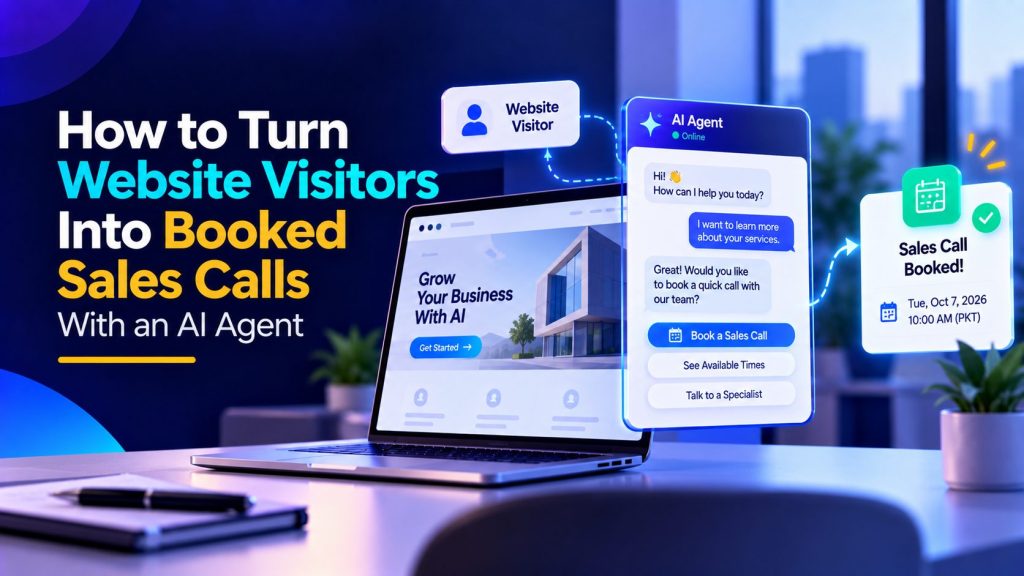
Most websites do not have a traffic problem. They have a conversion problem.
Somebody visits your pricing page, scrolls the features, opens two tabs, and leaves. If they are serious, they might fill in a contact form. If they are busy, they will not. Your best-case outcome is an email that gets answered two days later, after the buyer has already booked demos with your competitors.
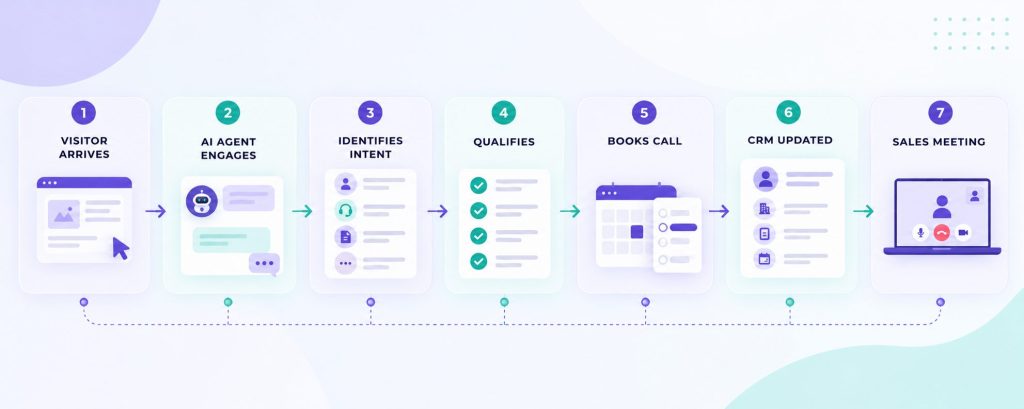
A website AI agent changes the first five minutes. Instead of waiting for the visitor to click “Contact us,” the agent starts the conversation, answers questions, qualifies intent, and books the call while the visitor is still interested.
This article is a playbook, not a theory. You will learn what the agent should do, what it should never do, how to structure the conversation, and how to measure whether it is actually producing booked calls.
Why “book a demo” buttons underperform
The standard conversion path on most B2B websites looks like this:
- Visitor lands on the homepage.
- Visitor reads features and pricing.
- Visitor either finds the demo form or leaves.
- If they submit the form, your team responds when someone gets to it.
That funnel has three expensive leaks:
- Friction: demo forms ask for company size, phone number, budget, and a message before offering any value.
- Delay: sales teams respond in hours or days, while buying intent cools down.
- No context: by the time sales replies, the visitor has forgotten what they wanted to ask.
A conversational agent removes all three. The visitor can ask questions in their own words, get instant answers, and only then decide whether a call is worth their time.
The best website agents do not try to close deals. They remove the small doubts that stop a serious visitor from booking a call.
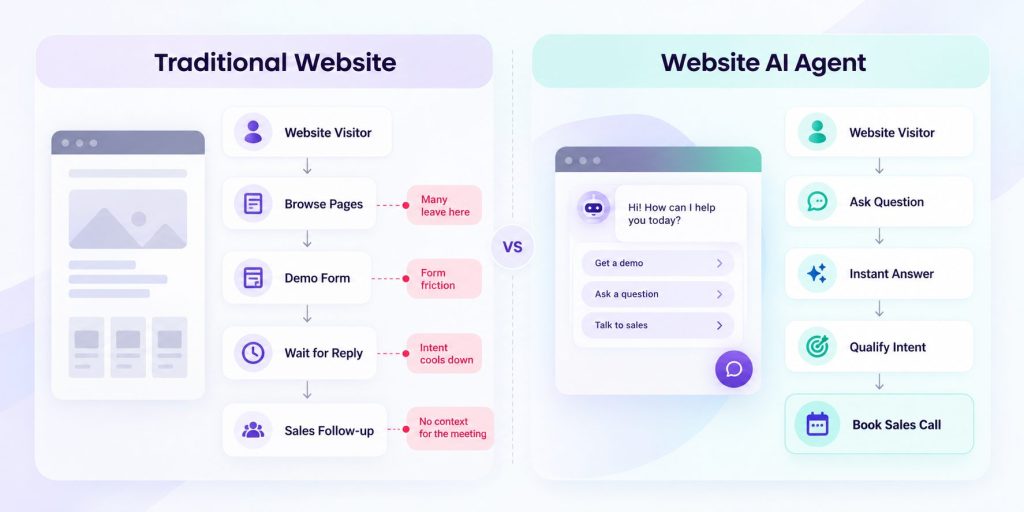

A website agent also needs to do more than follow a scripted chatbot flow. An AI agent can interpret what the visitor is asking, retrieve relevant knowledge, and decide whether the next step should be another answer, qualification, human help, or a booked call.
The 30-second definition of the job
Your website AI agent has one job during a sales conversation:
Convert an anonymous visitor into a booked call with enough context that sales can run a good meeting.
Everything else is secondary. That means the agent should be measured on:
| Metric | What it tells you |
|---|---|
| Conversation start rate | Whether the agent is being noticed and trusted |
| Booking rate | Whether conversations turn into meetings |
| Qualification completion | Whether the agent collects the data sales needs |
| Time to first response | Whether visitors get answers immediately |
| Handoff rate | How often humans need to take over |
| Show rate | Whether booked calls actually happen |
If you are not measuring those numbers, you are guessing. For this workflow, booked calls, qualification completion, and show rate matter more than raw conversation volume.
Step 1: Map what visitors actually ask
Do not design the conversation from your product roadmap. Design it from the last 50 support tickets, sales emails, and chat logs.
Most B2B websites get questions in four buckets:
- Product fit: “Can you do X?” “Does it work with our stack?”
- Commercial: “How much does it cost?” “Is there a free trial?”
- Implementation: “How long does setup take?” “Do we need developers?”
- Trust: “Who else uses this?” “Is my data safe?”
Write each question into a spreadsheet with the answer your best salesperson would give. This becomes the seed of the agent’s knowledge
base. If a question appears three or more times, it belongs in the knowledge base, not just in the conversation script.
When a question cannot be answered safely, pricing for enterprise, custom integrations, security reviews, that is exactly where the agent
should steer the visitor toward a call rather than guess.
That is also where Botsify’s website chatbot fits: the knowledge base can be built from your existing docs and site pages, so answers stay consistent with what your team would actually say.
Give Your Website AI Agent Visitor Context
The conversation does not have to begin with zero context.
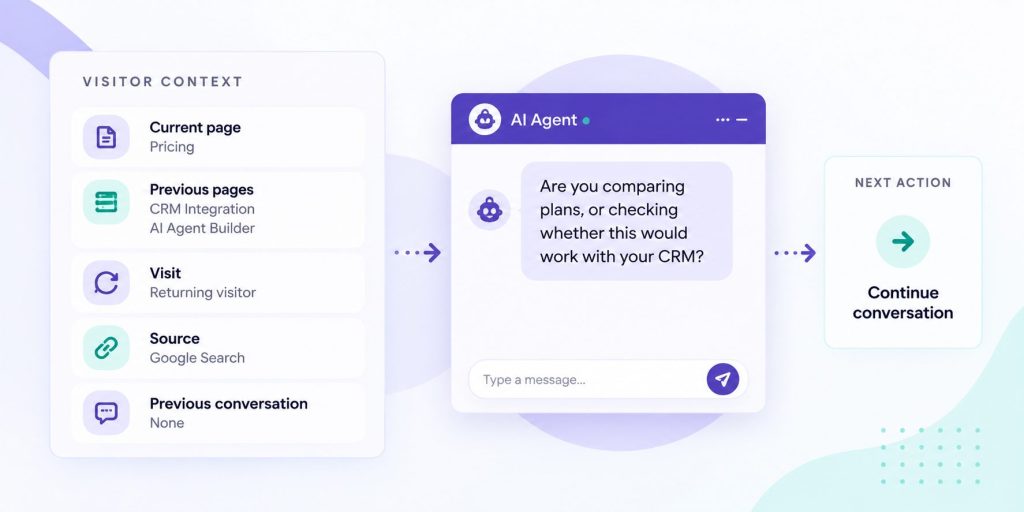
Where a visitor is on your website and what they have already done can help the agent decide how to approach the conversation.
Someone reading their first educational blog post should not receive the same prompt as someone who has visited the pricing page twice, opened an integration page, and returned to the website later that week.
Useful context can include:
- Current page
- Previous pages viewed
- Repeat visits
- Pricing or comparison page visits
- Product or feature pages viewed
- Case studies opened
- Referral source or campaign
- Whether the visitor has already started a previous conversation
The important distinction is that behavior should guide the conversation, not automatically determine qualification.
A pricing-page visit can indicate interest, but it does not prove buying intent. Instead of immediately pushing a demo, the agent might ask:
“Are you comparing plans, or trying to figure out whether this would work for a specific use case?”
That turns behavioral context into a useful conversation rather than an aggressive sales trigger.
It also lets the agent reduce unnecessary questions. If the visitor is already reading a page about a specific product or capability, the conversation can begin there instead of asking, “What are you interested in?”
The best website AI agents respond to the visitor’s context as well as their words.
Step 2: Decide the qualification questions
Your agent needs to qualify the visitor without interrogating them. Keep qualification short. Start with only the questions that affect fit, routing, or booking, and ask for additional information only when the visitor’s answers make it necessary.
For many B2B companies, these five are a useful starting point:
| Question | Why it matters |
|---|---|
| What are you trying to solve? | Separates real buyers from researchers |
| What are you using today? | Reveals competitor context and switching cost |
| How many people or accounts would use this? | Sizes the deal and filters tire-kickers |
| When do you want this live? | Signals urgency |
| Who else is involved in the decision? | Reveals buying committee complexity |
Order matters. Start with the problem, not the budget. Nobody wants to talk about budget with a bot in the first message.
Qualification determines whether the conversation should continue, while AI lead scoring can help prioritize qualified prospects using fit, intent, urgency, and other buying signals.
If your sales team has a CRM field for each of these, the agent should write directly into the CRM so reps do not re-ask the same questions on the call. The AI agent integration guide explains how these handoffs usually work.
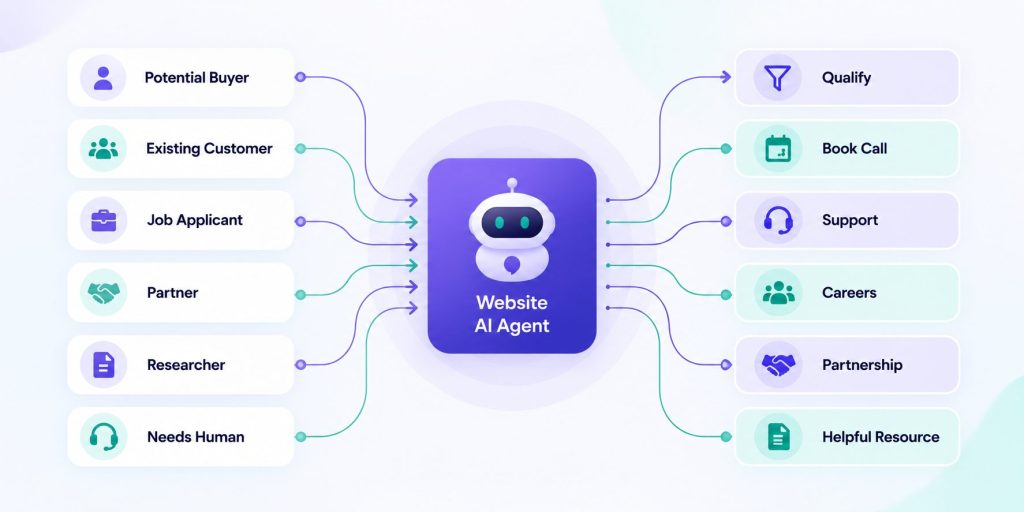
Not Every Website Visitor Should Enter the Sales Funnel
One reason website agents become annoying is that they treat every conversation as a sales opportunity.
Visitors may be:
- Existing customers looking for support
- Job seekers
- Partners
- Vendors
- Students or researchers
- People comparing products
- Existing prospects returning with a question
- Buyers who are ready to speak with sales
The agent should identify that intent before beginning qualification.
An existing customer asking for technical help should not be forced through sales questions. A job applicant should not receive a demo invitation. A researcher asking a general question may need a useful resource rather than a calendar.
A simple early routing question can help when intent is unclear:
“What can I help you with today?”
The answer can route the conversation toward sales, support, partnership information, resources, or another appropriate destination.
This improves conversion because qualification is reserved for visitors who actually have buying intent. It also prevents your sales pipeline from filling with conversations that were never sales opportunities in the first place.
Once genuine buying intent appears, an AI lead qualification agent can collect the context needed to decide whether a meeting is the right next step.
Turn More Website Visits Into Sales Conversations
See how Botsify can engage, qualify, and route website visitors automatically.
Step 3: Build Your Website AI Agent Conversation Flow
A good website agent conversation has five phases:
- Open—acknowledge the visitor’s question or offer help.
- Answer—give a genuinely useful response, not a deflection.
- Qualify—ask one or two follow-up questions that matter.
- Book—offer a call only when there is real intent.
- Confirm—send a calendar link and a summary to sales.
Here is a template for the first exchange:
Visitor: “How does your pricing work?”
Agent: “It depends on the plan and how many conversations you need. Roughly, do you want something for a small team, or are you looking at something for a larger organization?”
Notice what the agent does: it answers honestly, then asks one clarifying question. It does not dump a pricing table or pretend to be a human.
Then, when the visitor shows intent, “yes, we’d like a demo”, the agent offers a booking link with one specific time slot that fits the visitor’s timezone.
If the visitor is not ready to book, the agent should still be useful: send a case study, a comparison page, or a relevant blog post. A soft lead today is a booked call next quarter.
Step 4: Handle the hard objections
Serious buyers ask hard questions. If your agent fumbles them, credibility drops instantly. Prepare clear responses for:
- “Can I talk to a human?” — Yes, always. Route to the calendar or live chat immediately.
- “What’s the price?” — Give the published range or ask one clarifying question about scope.
- “Is this just ChatGPT in a wrapper?” — Explain the deployment, channels, integrations, and support that make it production-ready.
- “Do you have references?” — Share a public case study and offer a call to discuss their specific use case.
For questions the agent cannot answer confidently, it should say so and offer a call. Fabricating an answer is worse than saying “I’d rather have our team walk you through that.”
This is where agent governance matters. If you have not defined what the agent is allowed to claim, review the AI agent governance guide before launch.
Step 5: Decide when the agent should stay quiet
A website AI agent that interrupts every visitor quickly becomes another pop-up people learn to ignore. The timing and context of the invitation matter as much as the message itself.
Three rules help:
- Do not interrupt every visitor immediately. Let visitors start the conversation themselves, or trigger a subtle invitation based on meaningful behavior such as time on page, scroll depth, repeat visits, or engagement with a high-intent page.
- Do not pitch in the first message. Answer the visitor’s question before trying to qualify them.
- Do not push a call before there is enough intent. Offer value first and introduce booking when the conversation shows that a meeting would actually help.
A high conversation-start rate means little if those conversations rarely become qualified opportunities. Optimize for useful conversations and booked calls, not simply the number of chats the widget starts.
A good website agent is a receptionist, not a telemarketer.
Step 6: Wire the handoff to sales
When a call is booked, your sales rep should already know:
- What problem the visitor described
- What tools they use today
- Team size or deal size estimate
- Timeline
- Anything unusual the visitor said
That summary is the difference between a discovery call and a wasted call. Build it into the workflow: after booking, the agent writes the transcript summary into the CRM record or email thread.
This is where the booking and CRM skills become visible to the visitor as a smooth experience but matter enormously internally. Botsify’s skillful agents are designed around exactly this pattern: conversation skills that write structured data, not just chat text.
Remove Friction From the Booking Step
Qualification can work perfectly and still lose the visitor if booking becomes another form to complete.
Once the agent has already collected information such as the visitor’s name, company, use case, and contact details, avoid asking for the same information again unless the booking system requires confirmation.
The transition should feel like a continuation of the conversation:
“It sounds like a call would be useful. I can help you find a time.”
From there, the workflow should make the next step obvious. Depending on the setup, that may mean showing available times, opening the appropriate calendar, or routing the visitor to the person responsible for that type of opportunity.
Keep the context collected during qualification attached to the booking so the visitor does not have to repeat the same story when the meeting starts.
The workflow should also account for what happens after the meeting is booked. Confirmation, reminders, rescheduling, and cancellation should be easy for the prospect to manage.
For businesses that rely heavily on appointments, an AI booking agent can extend this workflow beyond the initial qualification conversation.
The goal is simple: once a qualified visitor says yes to a meeting, do not introduce new friction between that decision and the confirmed booking.

Qualify and Book Leads in One Conversation
Let Botsify move qualified website visitors from questions to booked calls.
A worked example
Here is what a full conversation looks like in practice:
Agent: “Hi — looking for something specific, or just exploring?”
Visitor: “We’re evaluating tools for handling inbound leads. Our SDRs are overloaded.”
Agent: “That’s a common problem. How many leads does your team handle in a typical month?”
Visitor: “Maybe 400, but most don’t get a fast reply.”
Agent: “Got it. Are you looking at automation for the initial qualification, or the full handoff to sales?”
Visitor: “Mostly qualification and booking demos.”
Agent: “Perfect. Would a 30-minute call with our team be useful to see how that works in practice?”
Visitor: “Yes, that would help.”
Agent: “Here are two times this week that work: Tuesday 10:00 or Thursday 14:00, both in your timezone. Which suits you?”
That single conversation gives sales everything they need before the meeting: pain, volume, use case, intent. If it happened 20 times a month, your pipeline would look very different.
Measure Your Website AI Agent’s Performance
Establish a baseline after the agent has handled enough real conversations to reveal meaningful patterns, then compare performance over time. Then look at:
| Metric | What to watch |
|---|---|
| Conversation start rate | Are relevant visitors choosing to engage? |
| Qualification completion | Do visitors finish the questions needed for routing? |
| Booking rate | How many qualified conversations become meetings? |
| Show rate | How many booked meetings actually happen? |
| Human handoff rate | Is the agent escalating at appropriate moments? |
| Conversation drop-off | Where do visitors abandon the interaction? |
If conversation start rate is high but booking rate is low, the agent is answering questions but not creating intent. Tighten the qualification questions or improve the booking offer.
If escalation is too low, the agent is probably hallucinating or refusing to hand off. If it is too high, the knowledge base is too thin.
The testing guide for AI agents walks through how to stress-test these flows with real and messy inputs before launch.
Common mistakes that kill conversion
- Launching on every page at once. Start with pricing and product pages where intent is highest.
- Treating the agent as an FAQ tool. Its job is to create meetings, not just answer questions.
- No follow-up after the chat ends. If someone does not book immediately, send a relevant resource within 24 hours.
- Ignoring the transcript. Every conversation is free customer research.
- Letting the agent guess pricing. It will lose trust faster than anything else.
If you want a fuller rollout checklist, the AI agent implementation checklist covers the deployment steps in order.
Integrating with the rest of your funnel
The website agent should not live in isolation. Three connections pay for themselves:
- CRM write-back: every qualified conversation creates or updates a contact with the qualification data attached. Reps stop taking notes manually.
- Email follow-up: if a visitor chats but does not book, send a resource within 24 hours, a relevant case study, pricing sheet, or short demo video. The conversation already told you what they care about.
- Ad retargeting: visitors who engaged but did not book are a warm audience. A small retargeting budget against that segment usually outperforms cold traffic.
The same qualification logic can also continue beyond the website. If prospects prefer messaging, a WhatsApp lead generation workflow can carry the conversation into a channel they already use without changing the underlying qualification criteria.
Teams using AI workflow automation often start exactly here: the agent captures intent, the workflow moves it, and humans do what they are best at, running good meetings.
How Your Website AI Agent Should Behave on Different Pages
Where you place the agent changes how it should behave. Do not copy the same widget settings everywhere.
| Page type | Agent behavior | Primary goal |
|---|---|---|
| Pricing page | Offer quick plan comparison and call booking | Booked call |
| Product/feature page | Answer capability questions, cite docs | Start conversation |
| Case studies | Reference the case, offer similar-result call | Booked call |
| Blog posts | Soft prompt after reading, link to relevant resource | Email capture |
| Support/docs | Help first, escalate to sales only if buying intent appears | Deflect tickets |
On pricing pages, fast answers matter because visitors are often evaluating options in real time. On blog pages, patience matters; do not interrupt reading.
What “good” looks like after 30 days
If the system is working, you will notice:
- Sales reps starting calls with context instead of asking basic questions.
- Fewer “just checking you got my form” emails.
- Faster replies to after-hours and weekend visitors.
- A growing library of real customer language you can reuse in ads, emails, and landing pages.
That last point is underrated. Every conversation is free voice-of-customer research. Export transcripts monthly and mine them for messaging improvements across your whole funnel.
Voice vs text: when each makes sense
Most website conversations work fine as text. Voice agents add value in three specific cases:
- High-ticket services where a human-feeling conversation builds trust.
- Visitors who prefer calling — especially in markets where voice is the default.
- Complex qualification that needs more back-and-forth than text supports.
If you offer a callback option, make it optional, not forced. Forcing voice on every visitor kills conversion. A hybrid approach — text first, voice for warm leads — gives the best of both. Botsify supports both text and voice agents from the same platform, which makes the handoff seamless. The voice AI agents capabilities include inbound and outbound calls with adjustable tone and language.
Copy-paste conversation rules
Before you build, write these rules down. These rules prevent many of the mistakes that make website agents feel pushy or unreliable:
- Answer the question first. Qualify second.
- Never invent pricing, timelines, or capabilities.
- One question at a time. Never stack three questions.
- If the visitor asks for a human, hand off immediately.
- Offer booking only after at least two qualifying signals.
- Match the visitor’s tone, formal for enterprise, casual for startups.
- If the visitor goes quiet for 10 minutes, send one follow-up message, not three.
- Log every conversation, even abandoned ones.
These read like common sense. Almost nobody implements them all on day one. Together, these rules keep the conversation focused on helping the visitor instead of turning the agent into another aggressive lead-capture form.
Sample conversation templates
Copy these three flows and adapt them to your product. They cover the majority of real conversations.
Flow 1: Pricing question
Visitor: “How much does this cost?”
Agent: “Plans start at $X/month depending on volume. Do you want a rough idea for a small team, or should I walk you through the options that fit your use case?” (If they describe the use case, answer, then offer
booking.)Agent: “Based on that, the [Plan] tier usually fits. Want to see it live with someone from our team? Here are two openings this week.”
Flow 2: Feature compatibility
Visitor: “Does this work with our CRM?”
Agent: “Let me check the supported integration options. Which CRM are you using, and what would you need the agent to update?”
Visitor: “Contacts and deals.”
Agent: “Got it. I can help you check whether that workflow is supported. Would you prefer a quick overview, or would a short call with our team be more useful?”
Flow 3: Not ready yet
Visitor: “Just researching for now.”
Agent: “No problem. What’s the main thing you’re trying to figure out — whether the product fits, pricing, or how implementation works?”
Visitor: “Implementation.”
Agent: “Implementation depends on the workflow and integrations you need. I can send you an overview of the setup process. What’s the best email?”
Notice how every flow ends with a low-friction next step, a resource, a call, or an email. Never leave a conversation without one.
Common technical questions from teams evaluating this
Can the agent handle multiple languages? Yes. Modern platforms detect the visitor’s language and respond natively. If you serve international markets, set the language list explicitly and test each one, automatic detection occasionally guesses wrong on short messages.
How does the agent stay accurate as our product changes? The knowledge base should be the single source of truth. When you update docs, the agent picks them up automatically. If your team writes release notes, feed them in as part of your release process.
Can it work outside business hours? Yes, and that is often where it earns the most. Serious buyers research after hours and on weekends. An agent that answers at 11 PM on a Sunday is a real competitive advantage over a form that gets answered Monday morning.
What about spam and abuse? Set topic boundaries and rate limits. If the agent only responds within approved topics and falls back to human escalation outside them, abuse potential is minimal. This is the same reason AI agent governance matters before launch, not after.
Pre-launch checklist
Before you turn the agent live, walk through this list:
- Knowledge base covers the most common real customer questions
- Qualification questions tested across realistic sample conversations
- Escalation path to a human is tested and fast
- Booking link works on mobile and desktop
- CRM write-back is verified end-to-end
- Agent does not invent pricing, timelines, or features
- Response time tested under real conditions
- Transcript review process assigned to a named person
- Fallback message for unknown questions is friendly and useful
- First-week review meeting scheduled
Resolve any issue that could create inaccurate answers, broken booking, lost lead data, or failed human handoff before launch.
Building vs buying
There are three ways to get this done:
| Approach | Pros | Cons | Best for |
|---|---|---|---|
| Build in-house | Full control, deep customization | Slow, needs engineering time | Teams with ML engineers |
| No-code platform | Fast setup, maintenance included | Less customization | Most B2B teams |
| Done-for-you | Fastest to value, expert-built | Higher cost | Teams that want results without internal effort |
Botsify supports businesses that want to build and manage their own AI agents as well as teams that prefer a managed implementation.
Most teams underestimate the iteration required after the initial build. Getting conversation quality to production level requires reviewing real interactions and improving weak answers, routing rules, and handoffs. If your team does not have the capacity to manage that process internally, a managed option can reduce the implementation burden.
Botsify’s AI agent builder gives teams the no-code path, while the done-for-you agents service handles the build end-to-end. Both plug into the same booking and CRM workflows described above.
FAQ
Will a website AI agent annoy my visitors?
Not if it only responds when invited. Passive assistance converts; aggressive pop-ups do not. Test both and watch the conversation start rate.
How is this different from a normal chatbot?
Scripted bots follow a fixed decision tree. Agents interpret intent, pull from your knowledge base, and route based on what they learn, which is what makes them useful for sales conversations, not just support.
What if the visitor asks something the agent does not know?
It should say so and offer a call. Never let the agent improvise pricing, security claims, or delivery dates.
Do I need developers to build this?
Not with a modern no-code platform. Most of the work is writing the knowledge base and conversation rules, which your sales and marketing team can own.
Final thought
Your website already has the traffic. The bottleneck is what happens in the first few minutes after someone shows interest.
An AI agent does not need to close deals. It needs to do three things: answer quickly, qualify honestly, and make booking effortless.
Do that, and the pipeline will take care of itself.
Put an AI Sales Agent on Your Website
See how Botsify can turn more high-intent visitors into qualified sales calls.