


Most local service businesses lose appointments in the same way: someone messages, nobody answers quickly, the lead moves on.
An AI booking agent fixes the first few minutes. It asks what the person needs, confirms availability, books the appointment, and gives your team clean context instead of a raw chat log.
This is not “replace your front desk with AI.” This is “stop losing appointment requests inside your own workflow.”
Below is a practical playbook you can copy: how to design the agent, what to ask, how to reduce no-shows, where humans should step in, and how to launch it without looking like an over-enthusiastic chatbot.
Start with the booking decision, not the prompt
Most AI booking agents fail because someone writes a clever prompt before deciding what should happen after the conversation.
A good booking agent should always know:
- What service the person wants
- Which location or practitioner is relevant
- What times are available
- Whether the request is routine or urgent
- What information the staff needs
- What should happen after the booking
That means the prompt is only one part of the system, and it should be built after you define your AI agent requirements. The more important parts are the same systems you would design in AI workflow automation:
- Service rules
- Availability logic
- Location rules
- Staff routing
- No-show prevention
- Human escalation rules
If you can answer “What happens after the AI books the appointment?” then you are ready to build the agent.
A booking agent is not a generic AI agent. It is a scheduling system with a conversation layer on top.
Define the booking states before you write anything
Do not send every request to the front desk. That defeats the purpose.
At minimum, define four states:
| State | Meaning | Next action |
|---|---|---|
| Bookable | Clear service, location, time, and fit | Book and confirm |
| Needs clarification | Missing key detail | Agent asks one more question |
| Not bookable | Wrong service, outside service area, or not available | Send resources or refer |
| Escalate | Sensitive, urgent, or complex request | Route to staff |
You can add more states later, but start simple.
For example, a clinic might use:
- Bookable: Routine follow-up, available clinician, patient can choose a time
- Needs clarification: Interested in booking, but location, provider, insurance, or another required detail still needs confirmation.
- Not bookable: Wants medical advice, asks for diagnosis, or outside service area
- Escalate: Emergency, severe pain, medication issue, or sensitive request
Once you define states, every prompt, message, and calendar update becomes easier to design.
Ask only the questions that change the booking
Do not ask for every detail. Ask for what changes the next action.
Use three layers:
- Service: What are they trying to book?
- Context: Which location, provider, or day works best?
- Readiness: How urgent is this and what are the constraints?
A useful qualification matrix:
| Question | Why it matters |
|---|---|
| What service do you need? | Identifies the right provider |
| Which location works? | Prevents misrouting |
| What day or time works? | Helps calendar matching |
| Is this a first visit or a follow-up? | Changes the booking type |
| Do you have insurance or a referral requirement? | Prevents front-desk friction |
| What is your preferred contact method? | Reduces no-shows |
| Who is the appointment for? | Important for clinics and family accounts |
Not every lead needs every question. The agent should adapt based on the service.
If a question does not affect booking, routing, or follow-up, remove it from the conversation.
For businesses where an inquiry still needs to be evaluated before it reaches the booking stage, an AI lead qualification agent can determine whether the person should move into the booking flow, continue nurturing, or be routed elsewhere.
How an AI Booking Agent Checks Real Availability
A booking agent should never suggest a time unless it has checked the same scheduling source your team uses.
Availability is not just about whether a calendar looks empty. The agent may also need to consider:
- Service duration
- Provider availability
- Location
- Business hours
- Breaks or blocked periods
- Preparation time
- Existing appointments
- Travel time for field services
For example, a 30-minute haircut and a three-hour color treatment cannot use the same availability logic. A clinic may also have different practitioners for consultations, follow-ups, or specific treatments.
A practical booking sequence is:
Request → identify service → identify location/provider → check live availability → offer valid times
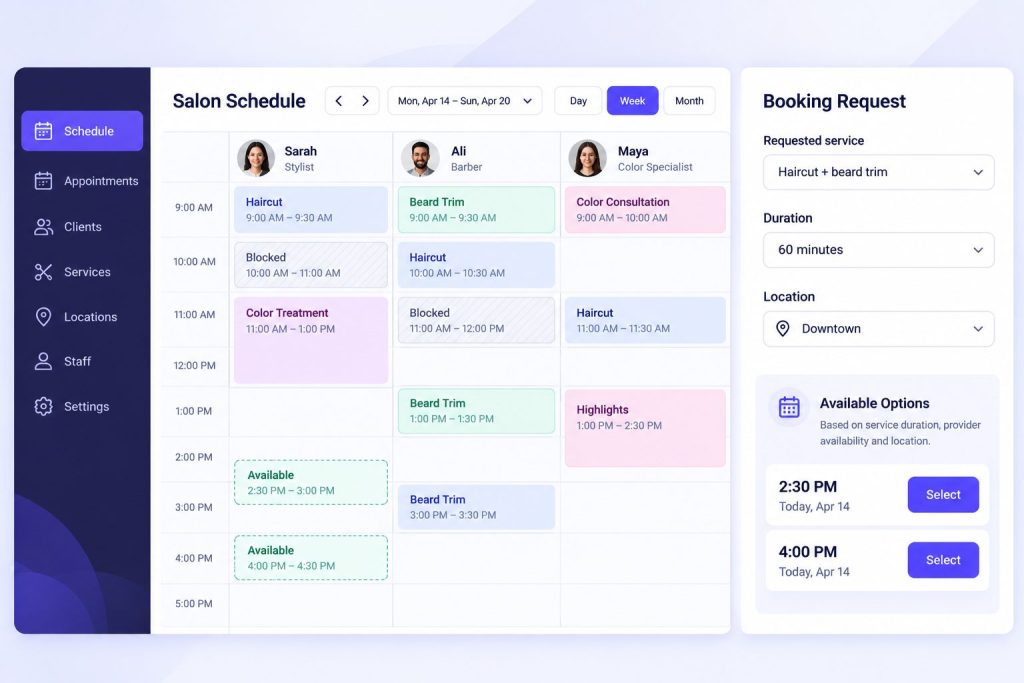

If no suitable slot is available, the agent should offer alternatives rather than guessing.
For example:
I do not have an opening with Sarah tomorrow morning, but she is available at 2:30pm or Thursday at 10am. Would either work?
The booking system should always be the source of truth. If the agent cannot confirm availability, it should hand the request to staff rather than promise a slot that may not exist.
Build the conversation like a decision tree, not a survey
Your agent should feel like a helpful receptionist, not a form.
A good flow looks like this:
- Greet and ask what they need.
- Confirm the service.
- Confirm location or provider.
- Offer available times.
- Confirm and send next steps.
Example flow:
Lead: Do you have openings tomorrow? Agent: Yes. What service do you need? Lead: Haircut and beard trim. Agent: Great. Which location works better for you? Lead: Downtown. Agent: I can book tomorrow at 10:30am or 2:15pm. Which works better? Lead: 10:30am. Agent: Perfect. I’ll book that with Ali and send you a confirmation. Do you want a reminder the day before? Lead: Yes. Agent: Done. Your appointment is confirmed for tomorrow at 10:30am.
That is a good agent because every step reduces ambiguity. If you want a deeper way to structure these exchanges, study chatbot conversation flow design before writing the prompt.
Route by owner, not just by “front desk”
Routing to “front desk” is often too vague.
Better routing uses:
- Service type
- Provider
- Location
- Client status
- Insurance or payment method
- Language
- Urgency
- Recurrence
Example routing rules:
| Scenario | Route to |
|---|---|
| Routine haircut | Stylist with availability |
| New patient consultation | Intake coordinator |
| Existing patient follow-up | Clinic receptionist |
| Urgent issue | On-call staff |
| Multi-location request | Location manager |
| Sensitive request | Human review |
The agent should not only say, “This is bookable.” It should say, “This is bookable, here is why, and here is who should own it.” That is how AI agent workflows move from simple conversation to operational routing.
Define what should trigger a human
Some conversations should never stay fully automated.
Escalate immediately when:
- The person is upset
- There is a medical, legal, or safety issue
- The request involves a refund or policy exception
- The agent is unsure
- The lead asks for a human
- The booking involves a new service or special request
- The appointment requires custom preparation
- The customer has a complaint
- The request is unusually large or urgent
A simple escalation matrix:
| Trigger | Escalate to |
|---|---|
| Medical, legal, or safety risk | Human staff |
| Large group or event booking | Manager |
| Pricing exception | Manager |
| Existing customer issue | Location manager |
| Unclear intent | Human support |
| Repeated confusion | Human staff |
AI should open the door. Humans should close the important conversations.
Write the handoff summary your team actually needs
The handoff message is more important than the chat transcript.
When a lead reaches a human, they should not have to read the entire conversation. Give them a clean summary.
A useful handoff summary includes:
- Name and contact
- Service requested
- Location
- Preferred provider
- Timeline
- Current booking state
- Key preferences
- Any special requests
- Link to conversation
Example:
Booking summary – Name: Sarah Khan – Company: Northline Clinics – Source: WhatsApp website widget – Need: Book 12 recurring physiotherapy sessions – Location: City branch – Preferred time: Weekday mornings – Current state: Needs insurance confirmation – Next step: Confirm coverage and book first session
Build the follow-up sequence
Most bookings do not happen on the first message.
The agent should know what to do after the first contact.
A simple follow-up cadence:
| Day | Action |
|---|---|
| Day 0 | Qualify, book, or send options |
| Day 1 | Follow up with one useful reminder |
| Day 3 | Ask if they want to schedule |
| Day 7 | Send a short reminder or availability update |
| Day 14 | Re-engage with a clear offer |
Do not follow up with the same generic message. Use the context the agent already collected.
Example follow-up:
You mentioned you wanted to book a haircut and beard trim. I can book tomorrow at 10:30am or 2:15pm. Would you like me to confirm one?
That feels useful, not pushy.
Let the agent handle rescheduling and cancellations
A booking workflow should not stop once the appointment is created.
Customers often need to change a time, cancel, switch locations, or request a different provider. If every change still requires a phone call or staff intervention, much of the front-desk workload remains.
A simple rescheduling flow can look like this:
- Identify the customer and existing booking.
- Ask whether they want to cancel or reschedule.
- Check the applicable cancellation policy.
- If rescheduling, retrieve valid alternative times.
- Confirm the new slot.
- Update the calendar immediately.
- Send a new confirmation.
For example:
I found your appointment for Friday at 11am. Would you like to cancel it or move it to another time?
If the customer chooses reschedule:
I have Friday at 3pm or Monday at 10:30am available. Which works better?
Some requests should still go to staff. Late cancellations, deposits, refund requests, or exceptions to policy may require human approval.
The goal is to automate routine changes while keeping policy decisions with the people responsible for them.
Reduce no-shows with confirmations and reminders
An AI booking agent should not stop working once the appointment is created. Booking the appointment is only half the job. The workflow should also help make sure the customer actually shows up.
Immediately after booking, the agent can send a confirmation containing:
- Date and time
- Service
- Location
- Provider, when relevant
- Preparation instructions
- Cancellation or rescheduling information
Then reminders can be sent before the appointment based on the business and service type.
For example:
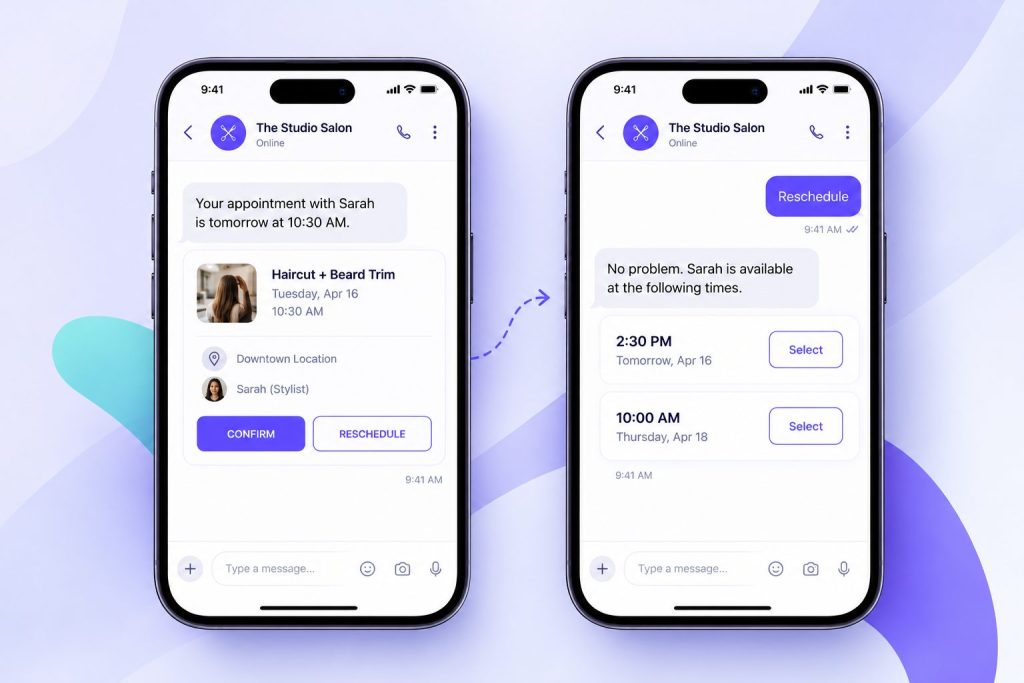
Your appointment is confirmed for Tuesday at 10:30am at the Downtown location. Reply RESCHEDULE if you need another time.
A clinic may also need to remind patients about forms, referrals, or preparation requirements. A salon may remind customers about deposits or arrival times. A home-service business may confirm the address and access instructions.
The important part is giving the customer an easy next action.
A reminder that only says “Your appointment is tomorrow” still leaves the customer searching for what to do if their plans change. A reminder that includes a reschedule option can prevent a missed appointment from becoming a no-show.
Turn More Appointment Requests Into Bookings
See how Botsify can check availability, book appointments, and send reminders automatically.
Connect the agent to your calendar or CRM
The agent should not just collect answers in chat.
It should update the calendar or CRM with:
- Lead source
- Service requested
- Location
- Provider
- Preferred time
- Current state
- Recommended route
- Conversation summary
- Next action
A useful field structure:
| Field | Purpose |
|---|---|
| Lead source | Attribution |
| Service type | Routing |
| Location | Provider assignment |
| Provider | Scheduling |
| Time | Booking |
| Client status | Existing vs new |
| Next action | Follow-up clarity |
| Summary | Staff context |
Without integration, the agent becomes another inbox. With it, the agent becomes a workflow layer. This is the same principle behind broader AI agent integration.
Prevent double-booking and calendar conflicts
The connected calendar or booking system should be the single source of truth for availability.
A slot should only be offered after the agent checks current availability. Once the customer confirms, that appointment should be written back immediately so the same time cannot be offered to someone else.
This becomes especially important when:
- Several staff members share availability
- A business has multiple locations
- Different services require different appointment lengths
- Staff block time manually
- Customers can also book through a website, phone, or another channel
- A provider works across more than one calendar
For example, if a salon accepts bookings through its website, WhatsApp, Instagram, and phone, all of those channels need to work from the same availability data.
Otherwise, automation can create more work instead of reducing it.
A reliable workflow should therefore:
Check availability → temporarily hold or confirm the slot → create the booking → update every connected system
If the scheduling system cannot confirm the booking, the agent should not tell the customer that the appointment is complete.
Use guardrails so the agent does not oversell
AI agents can accidentally promise things your business cannot deliver.
Set guardrails around:
- Approved claims
- Pricing language
- Legal or medical topics
- Provider availability
- Custom service promises
- Cancellation rules
A good guardrail set includes:
- What the agent can say
- What it cannot say
- What it must escalate
- What it must not promise
- What it should do when unsure
Example:
| Topic | Agent can do | Agent cannot do |
|---|---|---|
| Pricing | Share pricing page, book call | Invent discounts |
| Availability | Show open slots | Promise a specific provider |
| Service scope | Describe standard services | Promise medical outcomes |
| Refunds | Share policy | Approve exceptions without review |
Guardrails make the agent usable in real business environments.
Test before launch
Test the agent with real situations, not perfect ones.
Use a simple test matrix:
| Test type | Example |
|---|---|
| Clear booking | Routine service, available time |
| Confused lead | Vague service or location |
| Urgent request | Needs same-day or emergency handling |
| Sensitive request | Medical, legal, or compliance issue |
| Existing customer | Returning client with special needs |
| Competitor mention | Asking to switch from another provider |
| Wrong service | Outside service menu |
For each case, define:
- Expected agent response
- Expected booking state
- Expected route
- Expected calendar or CRM fields
- Expected escalation
If the agent passes the messy cases, it is ready to launch.
Track the right metrics
Do not measure the agent by how clever it sounds.
Measure by outcomes.
| Metric | Why it matters |
|---|---|
| Bookings created | The main output |
| Time to first response | Speed |
| Booked appointments | Sales efficiency |
| No-show rate | Front-desk quality |
| Wrong routing rate | Workflow quality |
| Escalation rate | Human handoff quality |
| Lead drop-off point | Conversation friction |
A simple weekly review:
- How many leads arrived?
- How many became bookings?
- How many were routed correctly?
- How many appointments were booked?
- Where did the agent lose people?
- Which questions caused confusion?
- Which handoffs needed human correction?
This turns the agent into an improving system, not a static bot.
Avoid these common mistakes
Most teams make the same mistakes:
- Too many questions
- Generic prompts
- No routing logic
- No calendar integration
- No human handoff
- No follow-up sequence
- Measuring chat length instead of booked appointments
- Treating every lead the same
- Letting AI handle sensitive conversations
- Never testing edge cases
The agent should feel like a well-trained junior employee: polite, fast, structured, and smart enough to know when to escalate.
Booking logic changes by business type
The basic booking framework is similar across businesses, but the information needed before confirming an appointment can be very different.
Clinics
A clinic may need to know:
- Appointment type
- Location
- Practitioner
- New or existing patient
- Referral or insurance requirements
- Whether the request contains something that should be reviewed by staff
The agent can help with routine scheduling, but medical questions, symptoms, emergencies, and sensitive requests should move to a human.
Salons
A salon may need:
- Service type
- Service duration
- Stylist preference
- Add-on services
- Location
- Deposit or cancellation requirements
A haircut, beard trim, color treatment, and bridal appointment may all require different amounts of time, so the service directly affects which slots can be offered.
For salons that receive appointment interest through social posts and comments, Instagram DM automation can move those conversations from the initial interaction into a structured booking flow.
Local service businesses
A local service business may need:
- Service type
- Customer address
- Service area
- Urgency
- Technician availability
- Photos or additional details
- Estimated job duration
For some businesses, the agent may need to confirm whether the customer’s address falls inside the service area before offering an appointment.
When those inquiries arrive through messaging, a WhatsApp lead generation workflow can qualify the initial conversation before the customer moves into scheduling.
The booking agent can therefore use one overall framework, but it should not use one identical script for every industry.
What an AI Booking Agent Workflow Looks Like in Botsify
Botsify supports the pieces you need for this workflow:
- Website, WhatsApp chatbot, Messenger, Instagram, Telegram, SMS, and other channel deployment
- Conversation-based lead capture
- Document and website knowledge sources
- Skill chaining
- CRM and app integrations
- Human escalation and guardrails
- Scheduling and time-based triggers
- Voice agents for calls
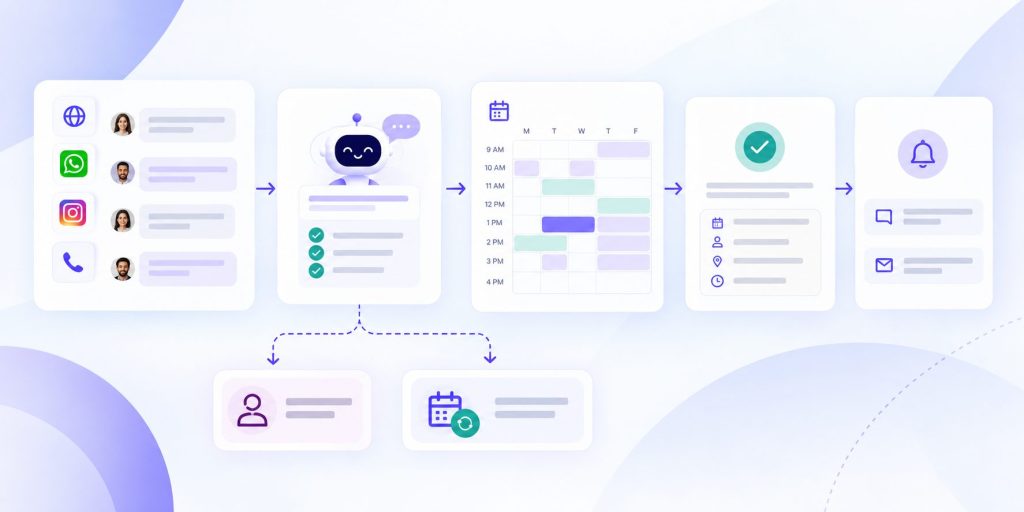
A practical Botsify setup might look like this:
- Lead messages on WhatsApp or website.
- Agent asks what they want to book.
- Agent confirms service, location, and time.
- Agent checks availability.
- Agent books the appointment.
- Agent sends confirmation and reminder.
- CRM is updated with summary and next action.
- Agent follows up if no response.
- Human reviews the handoff summary, not the whole transcript.
That is the practical version: not “AI replaces your front desk,” but “AI removes the delay between interest and booking.”
Botsify’s AI Agent Builder can combine the booking instructions, knowledge, connected tools, and channel deployment inside the same agent setup.

Prompt template you can adapt
Here is a simple prompt template for a booking agent:
You are an AI booking assistant for [Business].

Goal:
Qualify booking requests, identify the right service, and book the correct appointment.

Company context:
- We help [target customer] with [primary offer].
- Best-fit customers are [ideal customer profile].
- We do not serve [bad fit audience].

Booking signals:
- Service: [service type]
- Location: [location]
- Provider: [provider]
- Time preference: [preferred time]
- Customer status: [new or existing]
- Special requirements: [list]

Routing:
- Routine service: [route]
- New patient or new client: [route]
- Urgent request: [route]
- Existing customer issue: [route]
- Sensitive request: [route]

Behavior rules:
- Ask one question at a time.
- Reflect what the person says briefly.
- Do not invent pricing, availability, or medical advice.
- If the request is angry, confused, sensitive, or high-risk, escalate to a human.
- If the person asks for pricing, share the pricing page or book a call.

Output:
Return:
1. Booking state: Bookable / Needs clarification / Not bookable / Escalate
2. Why
3. Recommended owner
4. Next action
5. Handoff summary
You can adapt this for clinics, salons, garages, cleaning services, real estate, education, or internal teams.
Build Your AI Booking Agent
Use Botsify to automate booking, rescheduling, reminders, and human handoff.
Final thought
An AI booking agent is not a magic revenue machine. It is a routing and context system.
When built well, it does three things:
- Removes delay.
- Reduces wasted staff time.
- Gives humans better context.
That is enough to change the economics of your local service funnel.