
AI agent over-automation often feels like a maze. The most common complaint about AI support isn’t that it’s wrong, it’s that it won’t stop. Customers ask a simple question and get trapped in an automated loop that never offers a human. That frustration is entirely preventable, and fixing it makes the rest of your AI setup better too.
This playbook covers how to decide when AI should stop responding automatically, how to design the handoff, and how to keep automation from becoming a cage.
Core idea: Over-automation is a design failure, not an AI limitation. Clear stop conditions, generous handoff, and customer preference handling prevent it.
AI Agent Over-Automation: When to Stop
Three signals that AI should step back:
| Signal | Example |
|---|---|
| Customer signals | “Let me talk to a person,” repeated frustration, strong language |
| Topic signals | Refund dispute, legal mention, health/safety issue |
| Loop signals | Same question asked 3 times without resolution |
Any of these ends the automated conversation immediately, not after a third try or another script. Make the trigger part of your human handoff rules.
The Over-Automation Checklist
Test your agent against these failure patterns:
If any of these fail, the agent is over-automating regardless of how well it answers.
Design Better AI Conversations with Botsify
Explore Botsify for customer conversations with clear human handoff points.
Designing the Stop Points
Build explicit stop criteria into the agent:
| Trigger | Action |
|---|---|
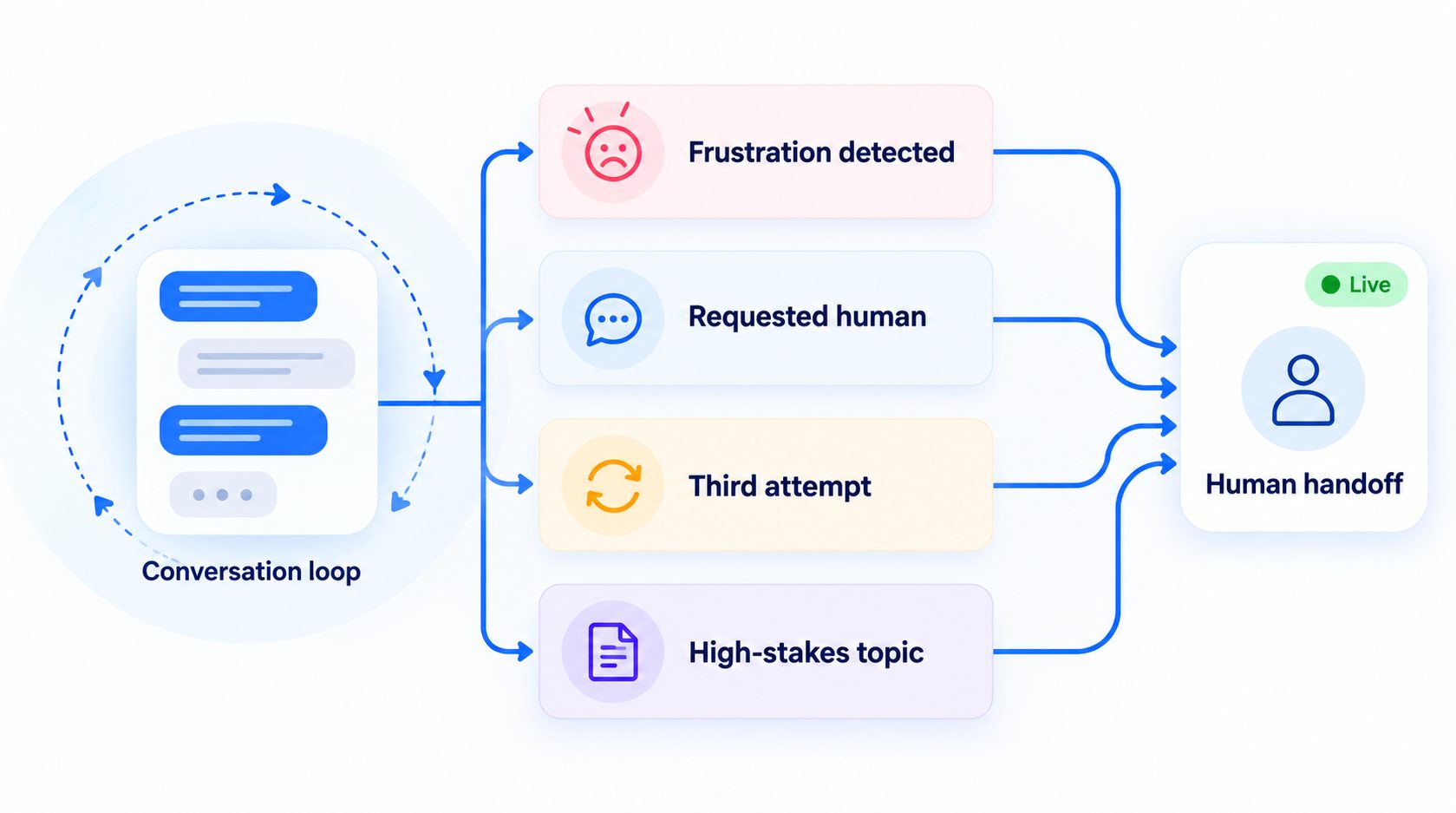
| Third attempt at same question | Human handoff |
| Frustration detected | Immediate handoff |
| Customer asks for human | Immediate transfer |
| High-stakes topic (refund, legal) | Skip AI, straight to human |
| Conversation exceeds 10 turns | Offer human assistance |
The last one matters because long AI conversations usually signal that the agent is stuck, not that the customer is engaged. Set confidence-based escalation in the AI FAQ agent knowledge base.
Customer Preference Matters
Some customers want AI; some want a person. Respect the customer preference:
- First interaction: let AI try, it’s often faster
- Offer the human option visibly, a “talk to a person” button, not a hidden menu
- Remember the preference, if a customer asked for a human last time, don’t route them through AI again without asking
- Business-hours rules, AI handles off-hours; humans handle prime time if that’s what customers prefer
Scheduling still needs a customer-friendly boundary: automation should feel like a convenience, not a cage. Apply that principle across the AI agent lifecycle.
The Handoff Experience
When AI stops, the handoff is everything:
| Element | Standard |
|---|---|
| What customer sees | “Connecting you with [name]”, not silence |
| Context passed | Full transcript + what’s been tried |
| Wait expectation | “Someone will be with you in under 5 minutes” |
| Fallback | If no human available, offer callback or ticket |
A failed handoff is worse than no automation because the customer waited for nothing. Build the AI customer support agent around a reliable human exit.
Measuring Over-Automation
| Metric | What it tells you |
|---|---|
| Escalation rate on frustration signals | Should be near 100%, if not, detection is broken |
| Conversations exceeding 10 turns | Should trend toward zero |
| Customer requests for human | Volume and whether they were honored |
| CSAT on AI-handled vs human-handled | If AI CSAT is far below human, you’re over-automating |
Measure more than deflection. Support metrics beyond deflection reveal when a conversation “resolved” while frustrating the customer.
“The goal isn’t maximum automation, it’s maximum resolution. If the human path would resolve it faster, take it.”
When Automation Is Appropriate
Not all automation is bad, the test is whether the customer wanted it:
| Good automation | Why it works |
|---|---|
| Order status lookup | Customer wants an answer fast |
| Booking confirmation | Routine, low judgment |
| Password reset | Deterministic, no frustration |
| Shipping updates | Informational, no relationship at stake |
Automate the transactional, and hand off the relational. A booking confirmation is a transaction; a complaint is a relationship moment. That distinction also matters when deploying multilingual AI agents.
Plan Your Customer Support Workflow
Talk with Botsify about better human handoff points.
FAQ
How do I know if my agent is over-automating? Watch for conversations that last 10 turns without resolution, repeated “let me rephrase” loops, and lower CSAT on AI-handled conversations than human ones. These are core AI customer support agent checks.
Should customers be able to bypass AI entirely? Yes, make “talk to a human” easy to find and honor it immediately. Forcing customers through AI to reach a person is the #1 driver of AI frustration.
Does less automation mean worse deflection metrics? In the short term, slightly. In the long run, trust improves adoption, and the AI agent implementation roadmap helps connect experience to economics.
Build a Better Customer Experience
Explore Botsify for practical support automation built around customer needs.
Final Thought
Over-automation happens when the goal becomes “resolve without a human” instead of “resolve the customer’s problem.” Set clear stop points, make the human option visible and immediate, and treat frustration signals as the exit door they are. AI should feel like a fast lane, not a maze.
