
Sales opportunities don’t always disappear because a competitor offered something better. Sometimes, a prospect simply doesn’t hear back at the right moment. A representative gets busy, a proposal goes unanswered, or someone who requested more information never receives the promised follow-up.
This is where AI sales follow-up can make a difference. Instead of relying on sales representatives to remember every conversation, businesses can use AI agents to track incoming leads, schedule relevant messages, and respond when a prospect shows interest or needs assistance.
However, automating follow-ups isn’t just about sending more emails. A useful system needs the right timing, accurate customer information, appropriate communication channels, and clear rules for when to stop contacting someone.
This playbook explains how to build an AI sales follow-up process that moves qualified leads toward booked meetings. You’ll find practical cadence examples, personalization techniques, message templates, stop conditions, and a step-by-step approach to setting up and measuring your workflow.
Why AI Sales Follow-Up Works Best Alongside Human Reps
Sales representatives are most valuable when they’re answering difficult questions, understanding customer needs, and building relationships. However, keeping track of every follow-up across a growing pipeline can take time away from those conversations.
AI agents can handle repeatable tasks such as scheduling messages, recording responses, and reminding prospects about relevant information. This helps reduce the chances of leads being overlooked when sales teams are busy.
There are still situations where human involvement matters more than automation. Enterprise negotiations, relationship-driven opportunities, complex objections, and prospects who explicitly request personal assistance should remain with qualified sales representatives.
The goal isn’t to remove people from the sales process. It’s to automate routine work so representatives can spend more time on conversations that need their attention.
How to Build an AI Sales Follow-Up Cadence
A sales follow-up cadence defines when a prospect receives a message, which channel the business uses, and what should happen when the prospect responds.
Before automating the sequence, establish five basic components.
| Component | What it controls |
|---|---|
| Trigger | The event that starts the sequence, such as a form submission or product inquiry |
| Timing | How long the agent waits between messages |
| Channel | Whether the message is sent through email, WhatsApp, SMS, or another permitted channel |
| Personalization | Which verified lead details the agent uses |
| Stop conditions | The events that pause or end the sequence |
The cadence should match the prospect’s level of interest and the complexity of the purchase. An AI lead qualification agent can help identify which prospects are ready for a sales conversation and which need additional information before receiving a meeting invitation.
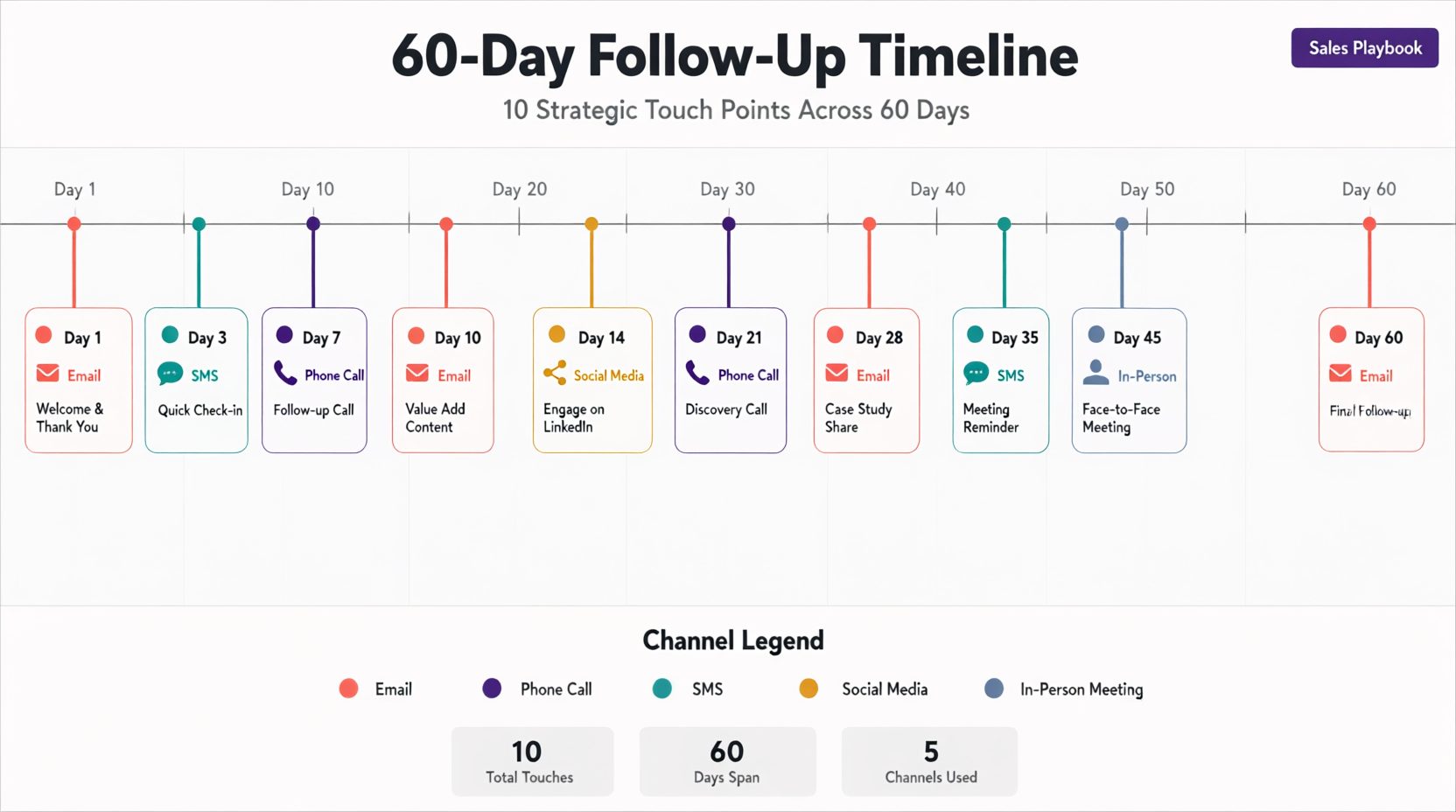
Example: An AI sales follow-up cadence for inbound leads
The following is an illustrative sequence for B2B or high-consideration service inquiries. It isn’t a universal schedule, and every channel should be used only when the business has an appropriate basis to contact the prospect.
| Touch | Day | Channel | Purpose |
|---|---|---|---|
| 1 | 0 | Confirm the inquiry and explain the next step | |
| 2 | 2 | Ask whether the prospect needs any additional information | |
| 3 | 5 | Share a relevant resource or case study | |
| 4 | 9 | Address a common question related to the inquiry | |
| 5 | 14 | Offer a short meeting or demonstration | |
| 6 | 21 | Provide a different useful perspective | |
| 7 | 30 | Ask whether the issue is still a priority | |
| 8 | 45 | Close the sequence politely if there has been no engagement |
This eight-touch example is a starting point, not a requirement to contact every prospect eight times. Reduce the number of messages when the inquiry is low-intent, the buying cycle is short, or previous messages have not generated engagement.
Give every follow-up a reason to exist
Avoid sending several versions of the same meeting request.
An early message might answer a question, while a later one could share a relevant example or help the prospect evaluate available options.
If there is nothing useful to add, delaying or ending the sequence may be more appropriate than sending another generic reminder.
Adjust the cadence based on customer behavior
The agent should stop the scheduled sequence when a prospect replies, books a meeting, declines further contact, or unsubscribes.
It can then route the conversation to the appropriate next step, such as a human sales representative or a meeting confirmation workflow.
The objective is to maintain a useful conversation, not to complete a predetermined number of messages.
How to Personalize AI Sales Follow-Ups Using Lead Data
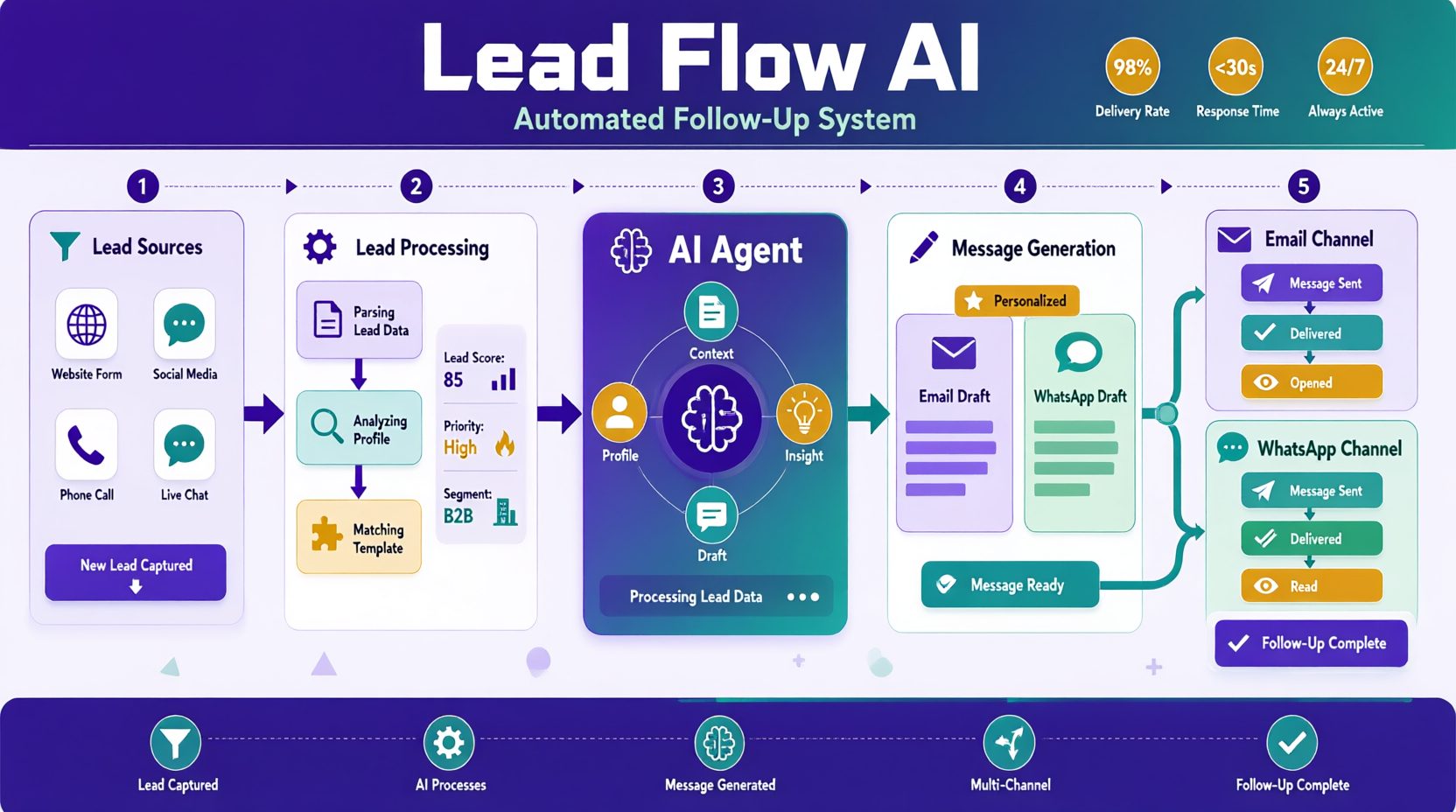
Personalization is one of the biggest differences between an AI follow-up that feels relevant and one that looks like a mass email.
Adding someone’s first name or company to a message is easy, but it doesn’t tell the prospect why the conversation matters to them. Useful personalization comes from understanding what they asked about, the problem they’re trying to solve, and what happened during previous interactions.
An AI follow-up agent needs access to that information before it can write a message that reflects the prospect’s situation.
What information should your AI agent collect?
| Lead information | Where it comes from | How it improves follow-ups |
|---|---|---|
| Name, company, and role | Lead forms and CRM | Provides basic context |
| Original inquiry | Forms, chatbot conversations, or call notes | Helps the agent reference the customer’s actual problem |
| Product or service interest | Website forms and previous conversations | Keeps messages relevant to what the lead wants |
| Lead stage | CRM or qualification workflow | Helps determine whether to educate, answer questions, or suggest a meeting |
| Previous messages | Email, WhatsApp, and CRM activity | Prevents repeated questions and unnecessary follow-ups |
| Objections or concerns | Sales notes and conversation history | Helps the agent address specific questions |
| Preferred communication channel | Customer preferences and permitted communication history | Helps choose an appropriate follow-up channel |
| Time zone | Customer-provided information or reliable account data | Helps schedule messages at reasonable hours |
Prioritize what the lead actually said
A prospect’s own words often provide more useful context than generic demographic or company information.
For example, consider these two messages.
Generic follow-up:
“Hi Sarah, I wanted to check whether your company is interested in our software.”
Context-based follow-up:
“Hi Sarah, you mentioned that your team spends several hours each week manually assigning incoming leads. Would it help if I shared how the assignment process could be automated?”
The second message connects the conversation to a problem the prospect already identified.
Keep context updated throughout the sequence
The agent should record important changes after every interaction.
If a lead requests pricing, asks for a case study, or says they need approval from their manager, that information should influence the next step.
When a prospect books a meeting, declines further contact, or requests human assistance, the agent should update the CRM and stop or change the sequence accordingly.
Personalization becomes more useful when the agent remembers the conversation rather than treating every message as a new interaction.
The prompt template that avoids the robotic problem
Here is the system prompt that produces follow-up messages that don’t sound like AI:
You are writing a sales follow-up message on behalf of [rep name] at [company].
Lead information:
– Name: [lead name]
– Role: [lead role]
– Company: [lead company]
– Lead source: [website/demo/webinar/chat]
– Original inquiry: [lead’s exact words]
– Sales stage: [lead stage]
– Previous messages: [conversation history]
– Relevant offer: [approved product or service details]Writing rules:
1. Use a warm, direct, professional tone.
2. Write naturally and avoid generic sales phrases.
3. Reference relevant details from the prospect’s inquiry.
4. Do not invent customer details, case studies, or results.
5. Keep the message concise and focused on one purpose.
6. Offer one clear next step, such as replying or booking a meeting.
7. Avoid phrases such as “just following up,” “circling back,” and “touching base.”
8. Do not create artificial urgency or pressure.Before generating a message:
– Check whether the prospect has replied.
– Check whether a meeting has already been booked.
– Check for opt-out or stop requests.
– Confirm that the intended channel is permitted.If a stop condition applies, do not generate a follow-up message.
Stop Losing Leads to Missed Follow-Ups
See how Botsify can help you build an AI agent that responds to leads, uses conversation context, and supports your sales workflow.
AI Sales Follow-Up Stop Conditions and Objection Handling
A follow-up agent needs clear rules for what happens when a prospect replies, asks for more information, or indicates that they aren’t interested.
Without those rules, automated messages can continue after the conversation has already moved forward.
When should an AI follow-up sequence stop?
| Prospect action | What the agent should do |
|---|---|
| Replies to a message | Pause the scheduled sequence and process the response |
| Books a meeting | Stop sales follow-ups and move to meeting confirmation |
| Says they’re not interested | Stop the sequence and respect the prospect’s preference |
| Requests an unsubscribe | Suppress further marketing messages through the relevant systems |
| Asks to be contacted later | Record the requested timing and follow up only when appropriate and permitted |
| Provides an invalid email address | Stop sending to that address |
| Raises a complex objection | Pause automation and route to a qualified sales representative |
How to handle common sales objections
Not every objection means the prospect wants to end the conversation.
Some people need more information before making a decision, while others want to postpone the discussion.
| Prospect response | Recommended action |
|---|---|
| “It’s too expensive.” | Explain relevant value or provide approved pricing information without inventing ROI claims |
| “We need to discuss it internally.” | Offer a short summary or resource the prospect can share with their team |
| “We’re already using another solution.” | Ask whether they want a comparison and provide accurate information if requested |
| “This isn’t a priority right now.” | Ask whether they’d prefer to reconnect later, without creating artificial urgency |
| “Please stop contacting me.” | End promotional follow-ups immediately |
Know when to involve a human
An AI agent can answer routine questions and share approved information, but complicated negotiations, sensitive pricing discussions, and unusual requests may require human judgment.
When escalation is necessary, the agent should pass along the original inquiry, previous messages, relevant objections, and the prospect’s current status.
This prevents the prospect from having to explain the same situation again.
Keep meeting confirmations separate
Once a meeting is booked, the sales follow-up sequence should end. An AI booking agent can support the next stage by helping customers schedule appointments and manage booking-related conversations.
Any appointment reminders, calendar invitations, or pre-meeting information should come from a separate workflow with its own timing and communication rules.
Choosing Sales Follow-Up Channels and Managing Compliance
Email, WhatsApp, SMS, and social messaging platforms can all support sales conversations, but they shouldn’t use identical follow-up sequences.
Each channel has different customer expectations, messaging rules, and technical requirements.
How follow-up strategies differ by channel
| Channel | Recommended approach | Important consideration |
|---|---|---|
| Share relevant information, answer questions, and offer next steps | Monitor deliverability and honor unsubscribe requests | |
| Use short, conversational messages when the prospect has opted in | Follow applicable WhatsApp Business messaging requirements | |
| SMS | Keep messages concise and relevant to the customer’s inquiry | Obtain required consent and provide an appropriate opt-out method |
| Focus on relevant professional conversations | Follow platform policies and avoid unsolicited bulk automation | |
| Instagram DM | Use brief, context-aware replies to existing interactions | Respect platform messaging permissions and limits |
A follow-up sequence doesn’t need to use every available channel. For example, businesses using WhatsApp lead generation can continue conversations with prospects who have agreed to receive messages through WhatsApp, while keeping email or other permitted channels available for different customer preferences.
Protect email deliverability
Before sending automated email follow-ups, configure appropriate sender authentication, including SPF, DKIM, and DMARC.
Monitor bounce rates, complaints, and sending patterns. Use accurate sender information and avoid misleading subject lines.
Respect consent and opt-out requests
Follow applicable marketing and privacy laws, as well as the policies of each messaging platform.
For WhatsApp and SMS, make sure the business has the required permission before sending promotional messages.
Provide an appropriate way to opt out and ensure that suppression requests are reflected across connected systems.
Keep customer data protected
Only collect and use lead information that is necessary for the follow-up workflow.
Control access to conversation history and CRM data, and follow applicable data protection requirements. Clear AI agent governance policies can also help teams define who can access lead information, which actions the agent is authorized to perform, and when human approval is required.
An effective AI sales follow-up process should make communication more relevant without creating unwanted messages or unnecessary privacy risks.
Common AI Sales Follow-Up Mistakes and How to Avoid Them
Automating sales follow-ups can save time, but poorly configured sequences can create more problems than they solve.
The most common failures usually come from missing customer context, unclear timing rules, or automation that continues after a prospect has responded.
| Mistake | Why it causes problems | How to avoid it |
|---|---|---|
| Sending too many messages | Prospects may feel pressured or mark messages as spam | Set reasonable delays and limit the number of touches |
| Repeating the same message | The conversation feels automated and provides no new value | Give each follow-up a specific purpose |
| Using generic personalization | Messages don’t reflect the prospect’s actual needs | Include relevant inquiry details and conversation history |
| Ignoring replies | The agent continues sending scheduled messages after the prospect responds | Connect reply detection across every active channel |
| Missing opt-out requests | Unwanted messages continue after someone asks to stop | Apply suppression rules immediately |
| Sending without enough context | The agent makes assumptions about the prospect’s interests | Require verified lead information before generating personalized claims |
| Overly promotional writing | Every message sounds like a sales pitch | Use a helpful, direct tone with one relevant next step |
Three situations to test before launch
1. The agent sends messages too quickly
A sequence intended to run over several weeks may send multiple messages within a few days if the scheduling rules are configured incorrectly.
Test the delay between each touch and confirm that messages are sent according to the intended schedule.
2. The agent ignores the original inquiry
A prospect asks about reducing manual data entry, but the agent sends a generic message about increasing revenue.
This usually means the original inquiry wasn’t passed correctly from the form, chatbot, or CRM.
Check that the relevant lead fields are available before the agent generates a message.
3. The agent keeps messaging after a reply
A lead responds through WhatsApp, but the email sequence continues because the systems aren’t synchronized.
Make sure replies, meeting bookings, and opt-out requests update the lead’s status across every connected channel.
These checks should be part of the launch process rather than something the team investigates only after customers complain.
Three ready-to-use follow-up message templates
Copy these, replace the brackets, and adapt the tone to your brand. Each is written for a specific cadence position — use them as-is or as starting points.
Template 1 — Initial Response (Day 0, Email):
Subject: [First name], here’s what happens next Hi [First name], Thanks for reaching out about [topic they asked about]. I’m [rep name] from [company] — I’ll be your point of contact. Based on what you shared, the most relevant thing for you is [specific product/feature/service]. Here’s a [one-line case study or stat] that shows what that looks like in practice for a [similar company type]. I’ll follow up in a few days with more detail. In the meantime, if you have a specific question, just reply to this email — it comes straight to me. [Rep name]
Why it works: it confirms receipt, sets expectations, gives one piece of value, and makes replying easy. No pitch. No “book a call” on touch one.
Template 2 — Meeting Invitation (Day 14, Email):
Subject: [First name] — worth 15 minutes? Hi [First name], You mentioned [their original question or concern] when we last spoke, and I thought this might be relevant. Since then, [something new and relevant — a case study, a product update, a relevant article]. The short version: [one-sentence takeaway]. If it’s useful, I can walk you through how [similar company] handled the same situation in 15 minutes. Here’s my calendar if that’s easier than email: [link]. If now isn’t the right time, no problem — just let me know and I’ll stop following up. [Rep name]
Why it works: The message references the prospect’s original concern, introduces something relevant, and offers a straightforward way to book a meeting. It also gives the prospect an opportunity to decline further follow-ups without feeling pressured.
Template 3 — Closing the Loop (Day 45, Email):
Subject: Should I close the loop?
Hi [First name],
I wanted to check whether [the problem they originally mentioned] is still something your team is working on.
If it would be useful to revisit the conversation, I’m happy to help. Otherwise, I’ll close the loop here so you don’t keep receiving follow-ups.
You can always reach me at [email address] if your priorities change.
[Rep name]
Why it works: This email acknowledges that the prospect may have other priorities and makes it clear that the follow-up sequence is ending. It leaves the door open for a future conversation without creating pressure to respond.
The difference between a follow-up that converts and one that gets ignored is usually not the offer — it’s whether the message acknowledges that the prospect has a life, a backlog, and a boss. Write like someone who understands that, and reply rates go up.
Turn Your Follow-Up Templates Into an AI Workflow
Ready to move beyond manual reminders? Explore how Botsify can help you build AI-powered conversations around your sales process.
How to Build and Measure an AI Sales Follow-Up Agent
Once you’ve defined your follow-up cadence, prepared the lead data, and established stop conditions, you can use an AI agent builder to configure the workflow and connect the information the agent needs to manage customer conversations.
Start with a limited set of leads so you can verify that the sequence behaves correctly before expanding it.
Step 1: Define the follow-up trigger
Decide which events should start the sequence, such as a demo request, form submission, or qualified chatbot conversation. Documenting your AI agent requirements before development helps clarify which triggers, data sources, integrations, and actions the workflow needs to support.
Step 2: Connect lead information
Connect the relevant forms, CRM fields, and conversation history so the agent has the information needed to personalize messages. Proper AI agent integration also helps keep lead statuses, previous interactions, and follow-up activity synchronized across connected systems.
Step 3: Configure the cadence and prompt
Set the timing, channels, message objectives, and approved communication style.
Use the prompt template from this article as a starting point, then adapt it to your sales process.
Step 4: Configure reply detection and stop conditions
Make sure the agent pauses or stops scheduled messages when a prospect responds, books a meeting, declines contact, or unsubscribes.
Test these conditions across every connected channel.
Step 5: Prepare supporting content
Give the agent access to approved case studies, product explanations, pricing information, and other relevant resources.
Step 6: Test the workflow
Run test conversations covering different lead stages, incomplete CRM data, objections, meeting bookings, and opt-out requests. A structured approach to AI agent testing helps identify problems with message timing, personalization, and stop conditions before the workflow reaches real prospects.
Confirm that the agent uses accurate information and doesn’t continue messaging after a stop condition.
Step 7: Launch with a small segment
Start with one lead source or a limited audience.
Review the results before expanding to additional lead types or channels.
Step 8: Measure performance
Track the results of your AI follow-up workflow using metrics such as:
| Metric | What it measures |
|---|---|
| Reply rate | Percentage of contacted leads who respond |
| Meeting booking rate | Percentage of leads who book a meeting |
| Lead-to-meeting time | Time between the initial inquiry and a booked meeting |
| Opt-out rate | Percentage of prospects who request no further promotional contact |
| Human handoff rate | Frequency of conversations transferred to sales representatives |
| Follow-up completion | Whether eligible leads receive appropriate follow-ups without errors |
Compare results across lead sources, customer segments, and message types.
Avoid relying on a single benchmark for every business. The appropriate results depend on lead quality, purchase complexity, industry, and channel.
Step 9: Review and improve
Read conversation samples regularly to identify generic messages, missing context, inaccurate information, or unnecessary follow-ups.
Update the agent’s instructions, source information, and timing rules based on actual performance.
The purpose of measurement isn’t simply to increase message volume. It’s to determine whether follow-ups are helping prospects move toward a useful next step.
FAQ
How do I stop AI follow-up from sounding robotic?
Give it real context — the lead’s actual words, their stage, what’s been sent before. Generic input produces generic output. The prompt template above is designed around this principle.
How many touches before giving up on a lead?
There isn’t a universal number of follow-ups that works for every business. The right cadence depends on lead intent, sales cycle, channel, and engagement. Start with a limited sequence, monitor responses, and stop when the prospect declines contact or opts out.
Should AI follow-up replace my SDRs?
AI follow-up agents are best used to handle repeatable tasks such as scheduling messages, tracking responses, and updating lead records. Human sales representatives remain important for relationship building, negotiations, complex objections, and closing opportunities.
What about compliance?
Opt-out links in email, opt-out keywords in WhatsApp, and respect for explicit no’s. In regulated industries, check whether automated follow-up requires disclosure in your jurisdiction before launching.
Final thought
The most effective sales follow-ups don’t feel like repeated reminders. They feel like a continuation of a useful conversation, where someone remembers what the prospect asked about and returns with information that helps them make a decision.
AI sales follow-up makes that consistency easier to maintain as lead volume grows. By connecting the agent to relevant customer information, setting appropriate message timing, and respecting stop conditions, businesses can reduce missed opportunities without overwhelming prospects.
Start with one lead segment, test the messages, and measure how many conversations progress to qualified meetings. The goal isn’t to send as many follow-ups as possible. It’s to make each interaction relevant enough that the next step feels natural.
Ready to Turn More Leads Into Booked Meetings?
Discover how Botsify can support lead conversations, qualification, and meeting-related workflows with AI agents.
