


Every week, another vendor claims their AI agent can handle every customer request you throw at it. But when support teams sit down to decide what to actually automate, the practical questions surface fast. Does the agent need write access to the billing system? What happens if a customer requests something outside policy? How do you know when a conversation should land with a human instead?
This article covers 15 practical AI customer service use cases and explains what each one actually requires. For every scenario, we look at what the agent does, what systems and information it needs, whether it is answering, retrieving, or taking action, and where human involvement still makes sense.
Key Takeaways
- Use cases fall into distinct responsibility levels, each with different integration and permission requirements.
- Read-only use cases like FAQs and order status checks are the most straightforward to automate. Write operations need guardrails.
- Sensitive actions such as refunds, subscription changes, and account updates need appropriate verification, permissions, and escalation rules.
- The quality of the agent’s answers depends directly on the knowledge sources and system connections it can access.
- Humans remain necessary for exceptions, edge cases, emotionally charged situations, and any decision that involves judgment or financial risk.
How Much Access Does an AI Customer Service Agent Need?
Not every customer service task gives an AI agent the same level of responsibility. Answering a policy question may only require access to approved information, while processing a return or changing a subscription requires access to customer data and connected systems. Throughout the use cases below, it helps to distinguish four levels of responsibility:
ANSWER. The agent provides information from approved knowledge sources.
RETRIEVE. The agent pulls customer or business data from a connected system.
ACT. The agent executes a workflow that changes a record or processes a request.
ESCALATE. The agent transfers the conversation to a human with full context.
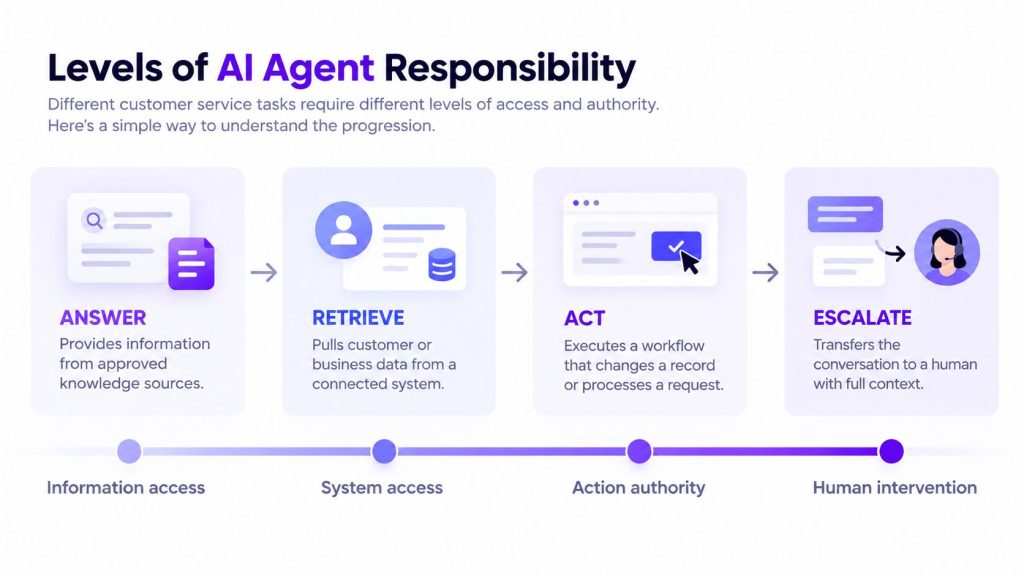
This is not a formal industry framework. It is simply a practical way to distinguish what different use cases demand.
Defining these boundaries as part of the AI agent requirements before development helps prevent an agent from receiving more access or authority than the use case actually needs.
AI Agents for Answering and Resolving Customer Requests
Many AI customer support use cases begin with a direct customer request. Some require little more than a well-maintained knowledge base, while others depend on integrations with order management, billing, scheduling, or other business systems.
As AI agents for customer support move from answering questions to retrieving customer data and carrying out approved actions, their integration, permission, and verification requirements also increase.
1. Answering FAQs and Policy Questions
This is the most common entry point for AI customer service use cases. Customers ask about return windows, shipping timelines, warranty coverage, business hours, or cancellation terms. The agent matches the question against a knowledge base and returns a clear answer.
What the agent needs is straightforward: access to approved documentation that covers the questions customers actually ask. If a company’s return policy lives in three different documents that say different things, the agent will retrieve whichever version it finds first. That is why the reliability of this use case depends heavily on a well-structured AI knowledge base with clear, current, and authoritative information. Without clean, authoritative sources, even a capable agent can return the wrong information. In this use case, the agent’s job is simply to answer from approved knowledge. If the customer’s situation falls outside what the documentation covers, it should escalate rather than guess.
Portable AI Agents In Seconds, Use Everywhere
Prompt, Test, and Deploy AI Agents Across Social Platforms and LLMs. Automate Everything.
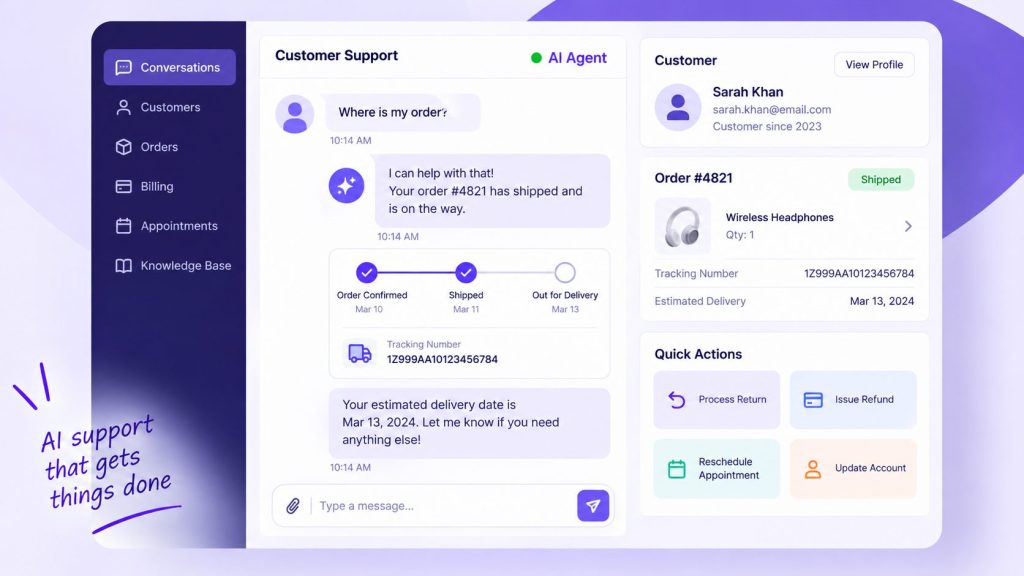
2. Checking Order and Delivery Status
A customer asks where their order is. The agent needs to identify the customer, find their active orders in the order management system, retrieve tracking information from the carrier, and present the status in plain language.
To do this, the agent may need access to the customer record, order management system, and current carrier tracking data. This type of AI agent integration allows the agent to retrieve information from business systems instead of relying only on static support content.
The useful part is not simply reading a tracking number back to the customer. The agent should explain what the current status means and what options are available if the shipment is delayed, lost, or otherwise outside the normal delivery process. Requests for a reshipment or refund can then follow the company’s approval rules or move to a human when necessary.
3. Processing Returns and Exchanges
Returns and exchanges are a good example of AI agent workflows because several steps may need to happen in sequence. The agent needs to verify that the order is eligible based on the return policy window and product condition rules, check the customer’s order history for any flags such as frequent returns, initiate the return or exchange in the order system, generate a return label or exchange authorization, and confirm the next steps with the customer.
If the business allows automated returns, the agent can handle standard requests that clearly meet the return policy. Exceptions such as expired return windows, unusual return patterns, or products requiring special approval can move to a human.
The systems involved include the order management system for eligibility checks and return processing, the knowledge base for policy details, and the shipping system for label generation. Appropriate customer verification should take place before the agent exposes private order information or initiates a return.
4. Handling Low-Risk Refund Requests
Refunds require tighter controls because the agent is no longer just answering a question or retrieving information. It may be initiating a financial action. A straightforward request that clearly meets the company’s refund policy is very different from an exception involving unusual account activity, disputed eligibility, or a request outside the normal policy.
Where the business permits automated refunds, the agent can verify eligibility, submit an approved refund through the connected payment or billing system, confirm the action with the customer, and record it in the CRM.
The business should define exactly which refund requests the agent is authorized to process based on its own policies, verification requirements, risk controls, and broader AI agent governance rules. Anything outside those boundaries should move to a human for review.
5. Booking and Rescheduling Appointments
For service based businesses, healthcare providers, and consultative sales, appointment management is a frequent customer request. The agent needs to check available time slots in the scheduling system, confirm the customer’s identity and any relevant account information, book or reschedule the appointment, send a confirmation with the details, and update the customer record.
Booking requires both read and write access: the agent first checks availability and then creates or modifies the appointment. The primary integration is with the scheduling or calendar system. Depending on the business, the agent may also need the CRM to pull customer preferences or past appointment history.
The main limitation is the business’s own booking policy. If a late cancellation, fee, special request, or other exception requires approval, the agent can explain the standard policy and hand the request to the appropriate person rather than making the exception itself.
6. Updating Customer Account Information
Customers may ask to update contact details, shipping addresses, notification preferences, or other account information. Whether an AI agent can make the change directly depends on the sensitivity of the field and the company’s verification rules.
The agent checks the current information in the CRM, confirms what the customer wants to change, validates the new information where applicable (such as confirming an email format or checking that a shipping address exists), updates the record, and confirms the change.
Because this workflow changes customer data, the agent needs CRM write access and clearly defined permissions for which fields it can modify. Routine fields may be available for self-service after appropriate verification, while more sensitive changes such as payment details, security settings, account deletion, or primary account credentials may require stronger verification or human review.
7. Handling Subscription Changes
Subscription requests can include upgrades, downgrades, pauses, and cancellations, so the agent needs to understand both the customer’s current plan and the rules attached to each type of change.
If the company’s subscription system supports self-service changes, the agent can retrieve the current plan, explain what will change, confirm the customer’s choice, and submit the approved action to the billing platform. For example, a downgrade may affect feature access, while a pause may only be available for certain plans or billing periods.
Cancellations and other sensitive changes may require additional verification or human review depending on the business’s policies. The important distinction is that the agent should execute only the actions it has explicitly been authorized to perform rather than deciding its own billing or retention rules.
8. Answering Billing and Invoice Questions
Billing questions come in two varieties. One is informational: the customer wants to know what they were charged, when, and for what. The other involves disputes: the customer believes the charge is wrong and wants it corrected.
For informational questions, the agent retrieves the invoice or transaction from the billing system and explains it. The agent needs read access to the billing platform and should be able to explain line items, dates, and payment methods without exposing full payment details.
For dispute related questions, the agent should gather the relevant information, explain the charge based on what the billing system shows, and if the customer still believes there is an error, escalate to a human who can review and make adjustments. Financial adjustments such as issuing credits, reversing charges, or modifying invoices should follow the company’s authorization rules rather than being left to unrestricted agent discretion. The conversation should also expose only the payment information necessary to answer the customer’s question and avoid displaying sensitive payment credentials.
9. Troubleshooting Common Technical Problems
When a customer encounters an error message, cannot complete an action, or reports that something is not working, the agent can guide them through documented troubleshooting steps.
The agent searches the knowledge base for the specific error or issue, checks the customer’s account for relevant context such as plan type or feature availability, walks the customer through the resolution steps, and asks whether the issue is resolved. If the steps do not work, the agent collects diagnostic information from the customer, creates a support ticket with full context, and escalates to the technical team.
The agent can resolve problems that have documented solutions, but the boundary becomes important once those steps fail. It cannot diagnose novel problems, interpret error logs that require engineering expertise, or troubleshoot issues that involve undocumented system behavior. Once the documented steps fail, the agent should hand the case to a human with the technical context rather than continue repeating troubleshooting that isn’t working.
AI Agents for Support Operations
AI agents for customer service can also work behind the scenes, helping teams classify requests, prepare context, document conversations, and surface patterns across support data. These behind-the-scenes tasks are also a practical form of AI automation, where repetitive support work is handled as part of a larger operational process.
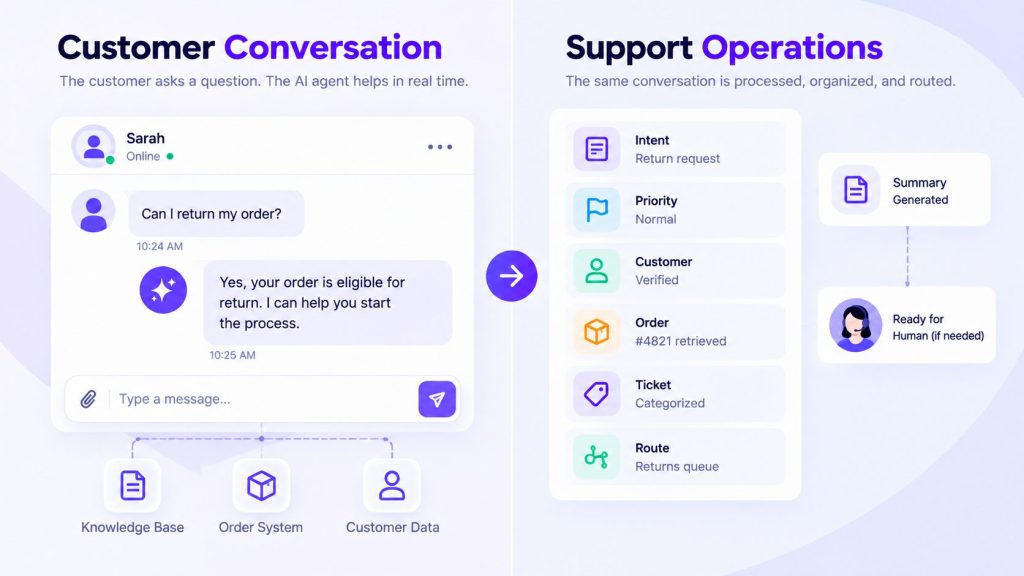
10. Ticket Classification and Routing
Every support team receives tickets that arrive without context. A customer emails a vague subject line or sends a chat message that does not specify the issue. Someone has to read it, figure out what it is about, and send it to the right person or team.
An AI agent can classify incoming tickets by factors such as intent, product area, language, and predefined urgency signals, then route them according to the support team’s rules. For example, a billing question can go to one queue while a technical issue affecting a priority account can be flagged for faster review.
To do this, the agent needs access to the incoming message, relevant customer context, and the ticketing or helpdesk system where the routing decision is recorded. Routing should be constrained by defined categories, business rules, and escalation conditions rather than leaving the model to make unrestricted routing decisions.
11. Collecting Context Before Human Handoff
One of the most common customer frustrations is having to repeat information when a conversation moves from AI to human. The agent already talked to the customer. The human should not have to start from zero.
Before escalating, the agent can gather the information the human will need: relevant account or order details, the customer’s explanation of the problem, troubleshooting already attempted, and any other context available from connected systems.
It can then summarize that information for the human taking over. The goal is simple: the customer should not have to start the conversation again from the beginning.
12. Summarizing Conversations and Updating Support Records
After a support interaction ends, someone needs to document what happened. Did the issue get resolved? What steps were taken? Is any follow-up required?
An agent can read the conversation history and write an approved summary back to the ticket or CRM. The summary should capture the issue, actions taken, outcome, and any follow-up required so another team member can understand the case without rereading the entire conversation.
13. Identifying Recurring Customer Issues
Support teams often operate reactively. Tickets come in, they get resolved, and the next ticket arrives. Without stepping back to look at patterns, teams may not notice that the same issue keeps appearing across multiple conversations.
When it has access to sufficient historical support data and appropriate analysis tools, an AI system can group similar issues and surface patterns over time.
This is primarily an analysis use case rather than a customer-facing action. The system can surface recurring themes by intent, product area, or time period so the support team can investigate the underlying cause.
AI Agents for Scaling Customer Communication
These use cases involve reaching more customers across more channels and languages without scaling the human team at the same rate.
14. Providing Multilingual Customer Support
Many businesses support customers who speak different languages but do not have native speakers on the support team for every language. An AI agent with language capabilities can handle conversations in the customer’s preferred language.
The agent detects the language of the incoming message, retrieves information from the company’s approved sources, and generates a response in the customer’s language while preserving the meaning of the source content as closely as possible.
Straightforward questions based on approved support content are generally lower-risk candidates for multilingual automation than ambiguous or high-stakes communication. Legal terms, financial disputes, medical information, compliance-related content, or language where meaning is unclear may require additional review or escalation. For critical information, maintaining approved translated content can also reduce reliance on generating every response from scratch.
15. Sending Proactive Customer Updates
Not every support interaction begins with a customer reaching out. Some of the most valuable interactions happen when the business contacts the customer first. For example, a business may need to tell a customer that an order has shipped, a subscription is approaching renewal, a service incident has been resolved, or a payment method needs attention.
An agent can send proactive notifications based on triggers from business systems. When a predefined event occurs in an order, billing, or service system, the agent can compose the appropriate message, send it through the approved channel, and offer follow-up support if the customer has questions. Depending on the support setup, those updates may be delivered through email, SMS, a website chatbot, WhatsApp, or another approved customer channel.
The agent does not decide on its own when a customer should be contacted. It responds to an approved trigger using the messaging rules defined by the business. The design question is which triggers to use and how much context to include. A shipping notification with tracking information is useful. A message that requires the customer to take action, such as updating an expired payment method, should include clear instructions and a way to get help if the customer runs into issues.
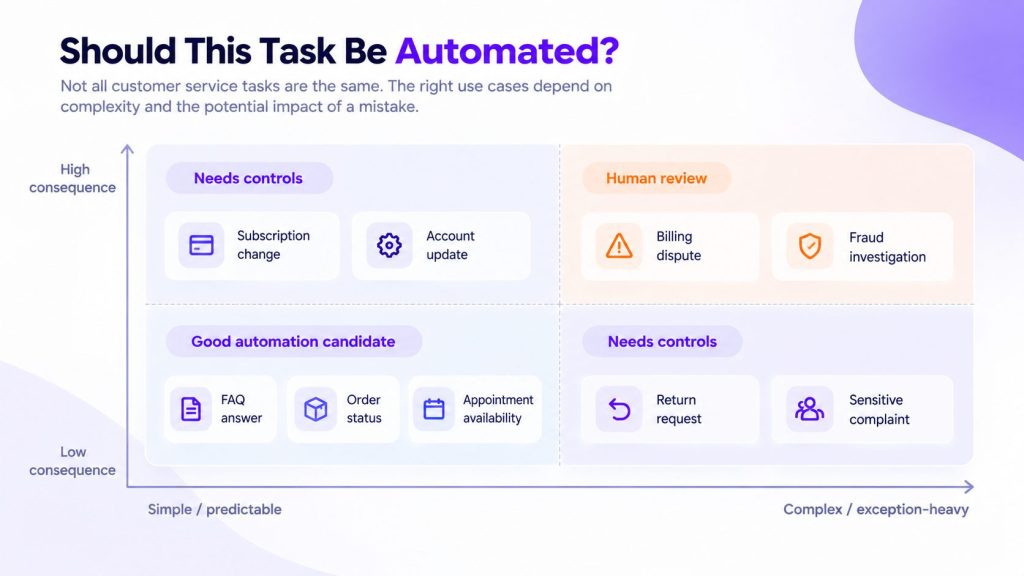
How to Decide Which Customer Service Tasks to Give an AI Agent
Not all AI customer service use cases are equally suitable for automation. Some work well because the task is repetitive, well documented, and low risk, while others require more judgment, stronger controls, or frequent human involvement. Once the use case is clear, evaluating AI tools for customer experience teams becomes easier because you can compare platforms against the systems, channels, permissions, and actions the task actually requires.
These are the factors that matter when evaluating a use case:
- Is the task repetitive and predictable? Tasks such as checking an order status or answering a common policy question are easier to define than requests requiring creative problem solving or judgment.
- Is there an approved source of truth? The agent needs reliable information to answer from. If the knowledge only exists in an employee’s experience or scattered notes, prepare that information first.
- Does the agent need read or write access? Looking up an order carries different risk from changing an account or issuing a refund.
- What happens if it gets the task wrong? Financial, legal, security, or account-impacting mistakes require tighter controls.
- Does the customer need to be verified? Match the verification requirement to the sensitivity of the information or action.
- How common are exceptions? Tasks with clear standard paths are easier to automate than workflows dominated by unusual cases.
Expanding into complex or high-risk tasks before knowledge, permissions, integrations, and escalation paths are ready is also one of the most common AI agent deployment mistakes.
When and How AI Agents Should Escalate to Humans
Even the most capable AI agent will encounter situations it should not handle alone. The escalation triggers should be part of the agent’s design, not an afterthought. Handoff rules, fallback behavior, permissions, and failure scenarios should therefore be part of the AI agent implementation checklist before the agent reaches customers.
Escalation becomes appropriate when the agent cannot find sufficiently reliable information to answer, the request falls outside its permitted actions, an exception requires judgment or authorization, or previous troubleshooting has failed. A handoff may also be appropriate when a customer is clearly frustrated and continuing the automated conversation is unlikely to resolve the issue.
The quality of the escalation determines whether the customer feels well served. The human agent should receive the full conversation history, a summary of what the agent has already attempted, any data collected from connected systems, and the customer’s sentiment signals. The customer should not have to repeat what they already told the agent.
Frequently Asked Questions
What are the most common AI customer service use cases?
The most common use cases include answering FAQs and policy questions, checking order and delivery status, processing returns, troubleshooting common technical problems, and ticket classification and routing.
Can AI agents handle customer service without humans?
Well-scoped tasks such as FAQ answers, order status checks, appointment booking, and permitted account updates may be handled end to end when the agent has the necessary data, integrations, and permissions. But even the best configured agent will encounter edge cases, exceptions, and sensitive situations that require human judgment. The practical model is AI and human working together rather than AI replacing humans entirely.
Can AI agents process refund requests?
AI agents can process some refund requests when the business has explicitly authorized the action and the request meets predefined eligibility, verification, and approval rules. Requests involving policy exceptions, unusual account activity, disputed eligibility, or other risk signals should move to a human for review.
What customer service tasks should not be automated?
Tasks that involve complex judgment, negotiation, emotional sensitivity, legal or financial risk, or frequent policy exceptions are poor candidates for full automation. Examples include fraud investigations, complex disputes, contractual decisions, and sensitive complaints where human review is important.
How can AI agents safely access customer data?
AI agents should receive only the customer data and permissions required for the task. Sensitive information or account changes should be protected by appropriate authentication and authorization controls, while write actions should be limited to explicitly permitted workflows and recorded where appropriate for auditing.
Conclusion
AI customer service automation works best when the task and the agent’s authority are clearly defined. Answering a policy question requires very different access and safeguards from changing a subscription, processing a return, or handling a billing request.
Start with frequent, well-documented tasks where the agent can operate from approved information and clear business rules. Expand into more complex actions only when the necessary integrations, permissions, verification steps, and escalation paths are in place.
The goal is not to automate every customer interaction. It is to give the agent responsibility for the tasks it can handle consistently while making sure exceptions and higher-risk decisions reach the right person.
AI Agentic Platform For Building Portable AI Agents
Say Hello To Agentic AI That Connects With Your CRM And Even Other Agents