
A team launches an agent to answer routine questions. A few weeks later, it is connected to a shared inbox, a customer database, and a workflow that can change records. Someone asks who approved those permissions, what the agent may do with customer data, and who should respond if it acts unexpectedly. If the answers live only in chat threads, the team has no reliable operating policy.
An AI agent policy for teams gives people a shared, written way to decide which agents are allowed, who owns them, what data and tools they may use, when a person must review a decision, and how the team handles incidents and changes. It should fit the organization’s size and risk. A small team can begin with a concise document and a simple inventory; higher impact uses may require additional reviews and controls.
This guide walks through the essential decisions and includes a copyable template. Adapt it to your actual workflows, contracts, and legal or regulatory obligations. A generic template does not establish compliance by itself.
A useful policy answers three questions for every agent: what is it allowed to do, who is accountable for it, and how can the team stop or correct it?
What the policy should cover
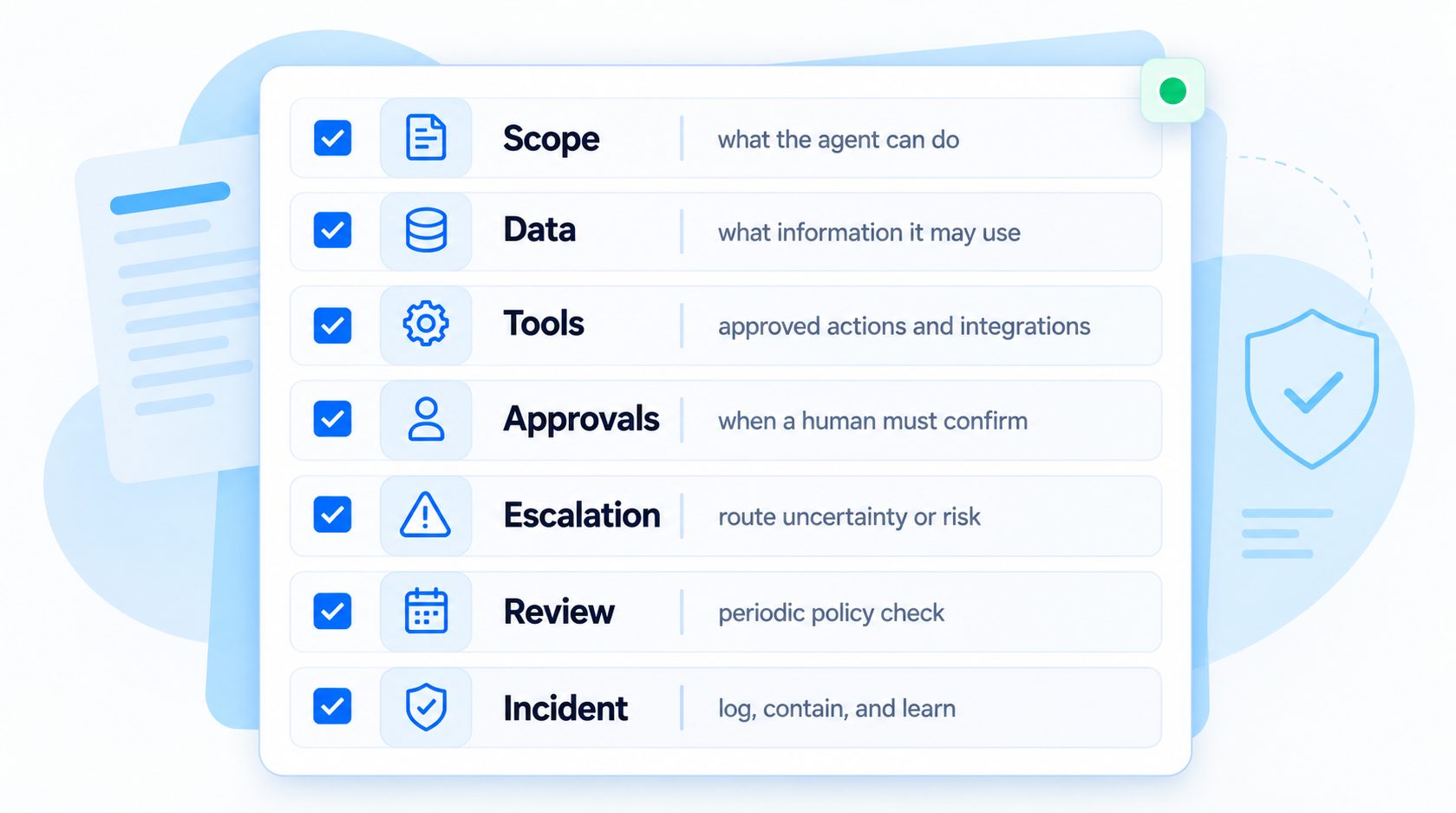
The policy is an operating agreement, not just a list of prohibited prompts. It should cover the lifecycle from request and approval through deployment, monitoring, change, and retirement. Keep it practical: a teammate should be able to use it to decide whether an agent can access a tool or handle a new task.
| Policy area | Decision the team needs to make |
|---|---|
| Inventory and purpose | Which agents exist, who uses them, and what work they support |
| Ownership | Who is accountable for business outcomes, data, tools, and risk decisions |
| Data | What information the agent may access, return, store, or send to a provider |
| Tools and permissions | Which systems it can read or change, and under what identity |
| Risk and approvals | Which tasks are allowed, restricted, or require a person |
| Testing and release | What evidence is needed before an agent or material change goes live |
| Monitoring and incidents | What the team reviews, how to pause an action, and who responds |
| Change and retirement | How versions, integrations, ownership, and shutdown are managed |
Use the AI agent governance framework to connect these decisions to oversight and accountability. The policy itself should name concrete owners and steps rather than relying on broad statements such as “use AI responsibly.”
Build an inventory before writing rules
Teams cannot govern agents they do not know about. Start with a simple list that captures both custom agents and agent-like features inside other products. Include pilots and internal workflows, not only customer-facing assistants. The inventory helps a team see where tools, data, and responsibilities overlap.
For each system, record:
- A stable name and short description of its business purpose.
- The business owner and technical contact.
- The provider, model or service, and deployment environment when known.
- The users, channels, and workflows it supports.
- Data sources, connected tools, and whether each connection is read-only or can make changes.
- The impact if the agent gives a wrong answer, exposes data, or takes the wrong action.
- Approval status, launch date, last review date, and current version.
- How to disable the agent or revoke its access.
Avoid collecting sensitive details the inventory does not need. A link to a controlled system record may be safer than copying credentials, customer data, or full prompts into a broadly visible spreadsheet. Assign someone to maintain the inventory and define which changes require an update. The AI agent requirements checklist can help turn a proposed use case into explicit requirements before it is added.
Assign responsibility without creating a committee for every task
“The AI team owns it” is rarely specific enough. Separate the decisions so employees know who can approve a use case, who maintains its source content, who manages permissions, and who responds to a failure. One person can hold more than one role in a small organization, but each responsibility still needs a named owner or role.
| Role | Responsibility to assign |
|---|---|
| Business owner | Defines the intended use, success criteria, and acceptable impact |
| Agent owner | Maintains configuration, release evidence, and day-to-day operation |
| Data or knowledge owner | Approves sources and handles updates, access, and quality issues |
| Tool or system owner | Approves connector permissions and downstream safeguards |
| Reviewer or approver | Handles decisions that policy reserves for a person |
| Incident lead | Coordinates containment, investigation, communication, and recovery |
| Policy owner | Maintains the team rules and resolves unclear or conflicting requirements |
For a low-risk internal helper, the business owner and agent owner may be the same person. For an agent that can change customer records or spend money, require an independent review where the organization’s risk process calls for one. Define who can approve exceptions and who cannot approve their own access request. NIST’s AI Risk Management Framework emphasizes documented roles, oversight, inventory, and periodic review as governance outcomes; teams can use these ideas to shape their own process without treating a voluntary framework as a certification. NIST AI RMF Core
Classify tasks by impact and reversibility
Do not assign one risk rating to an entire agent if it handles very different tasks. An agent may safely answer a public product question but need a stronger check before it edits an account. Classify the task and action path, then map controls to the specific risk.
| Task or action | Example policy treatment |
|---|---|
| Public, read-only information | Answer from approved sources; provide a route for missing or conflicting information |
| Internal, read-only lookup | Limit access by role and purpose; avoid exposing unrelated records |
| Reversible change | Validate the target and request; require confirmation if it affects a user or shared record |
| External message or financial action | Define who may authorize it and how approval binds to the exact action |
| Sensitive or hard-to-reverse decision | Require the designated review or keep the action unavailable to the agent |
| Unknown or out-of-scope task | Stop, explain the limit, and route it to the named owner or support channel |
Consider severity, likelihood, reversibility, affected people, data sensitivity, and the reach of the connected system. A low-dollar action may still be high risk if repeated at scale or sent to the wrong customer. A task that appears harmless may become consequential when the agent has write access to a shared production record. For multi-step business processes, the AI workflow automation guide can help teams map where a person, validation step, or explicit permission belongs.
Set data and privacy rules teams can actually follow
“Do not use sensitive data” is too vague. Define which data classes each use case may read, process, show, store, or send to a provider. Identify what must be excluded or redacted, who may grant access, and how the organization handles retention and deletion. Follow the company’s established data classification and privacy processes rather than creating conflicting rules just for agents.
For each data source, capture:
- The business reason the agent needs it.
- The minimum fields required for the task.
- Which people or accounts the agent may access.
- Whether the data may appear in responses, logs, memory, or provider requests.
- The approved retention period and deletion owner.
- How the team handles an access request, correction, or suspected exposure.
Keep the agent’s scope aligned with the current user and task. A support agent answering one person should not use a connector identity that can retrieve every customer record unless a separate control enforces the correct boundary. Do not put passwords, API secrets, full payment details, or unnecessary personal information in prompts or ordinary logs. Teams that need a retention decision can adapt the AI agent data retention policy guide to their own records and obligations.
Define tool access and action boundaries
List each integration by name and specify what the agent can do with it. “CRM access” might include searching a contact, changing an account owner, exporting a list, or sending a campaign. Those operations should not inherit the same permission just because they belong to one connector.
Write permissions as explicit capabilities:
- Read: which records and fields the agent may retrieve.
- Prepare: which drafts or proposed changes it may create without committing them.
- Write: which changes it may submit, for which users or records, and under what checks.
- Prohibited: which operations are unavailable to the agent, including broad exports or administrative changes if not needed.
Enforce access in the downstream system or a trusted policy layer, not only in the agent’s natural-language instructions. Use separate credentials or identities where practical, scope them to the minimum required access, and define how access is revoked when the agent changes purpose or is retired. For an implementation view of how agents connect to CRMs and other business tools, see AI agent integration, then document the exact tools and permissions this agent needs.
For actions that affect a customer or an external system, specify whether the agent may only propose, may act after a user confirms, or requires an authorized employee. Make approval specific to the action, target, and relevant parameters. A general approval to “help with orders” should not authorize every transaction the agent can formulate.
Write approval and escalation rules as steps
Avoid ambiguous policies such as “escalate when unsure.” State the conditions, destination, expected customer communication, and what the agent must not do while waiting. Potential triggers include missing or conflicting source information, failed identity verification, a request outside the approved task list, unusual tool results, a customer asking for a person, or a change that policy reserves for human review.
For each approval path, specify:
- What exact action or decision needs approval.
- Which role can approve or reject it.
- What information the reviewer needs to decide.
- How long an approval remains valid and what changes invalidate it.
- What happens if no one responds or the approval service is unavailable.
- How the agent explains the delay or handoff without promising an unsupported outcome.
For each escalation, name the receiving team or queue, the context that should travel with it, and the fallback when that route is unavailable. The agent should state whether the request was submitted, is pending, or was completed based on the actual system response. The AI agent implementation checklist can help teams verify these owners and release conditions before launch.
Use this copyable AI agent policy template
Adapt the template to your organization. Replace every bracketed field, remove sections that do not apply, and add any safeguards required by your security, privacy, legal, procurement, or industry processes. Do not treat a completed template as evidence that the controls are configured or working.
AI AGENT POLICY
Organization: [name]
Policy owner: [role or person]
Version and effective date: [version / date]
Approved by: [role or approval process]
Next review: [date or change trigger]

1. PURPOSE AND SCOPE
Covered agents and workflows:
Intended users and business purpose:
Excluded uses or prohibited tasks:
Channels and environments:

2. INVENTORY AND OWNERS
Agent name and current version:
Business owner:
Agent / technical owner:
Data or knowledge owner:
Connected-system owners:
Approver and incident contact:

3. DATA HANDLING
Approved sources and permitted data classes:
Data excluded or requiring additional approval:
Identity and record-access rules:
Provider and integration sharing rules:
Logging, retention, and deletion owner:

4. TOOLS AND PERMISSIONS
Approved tools and exact capabilities:
Read, prepare, and write permissions:
Required user or employee confirmation:
Actions unavailable to the agent:
Credential owner and revocation method:

5. RISK, APPROVAL, AND ESCALATION
Task risk categories and control for each:
Actions requiring human approval:
Authorized approver roles:
Approval expiry and invalidation conditions:
Escalation triggers, destination, and fallback:
Behavior when a check or service is unavailable:

6. TESTING AND RELEASE
Required scenarios and expected outcomes:
Who reviews the evidence:
Release conditions and rollback owner:
Changes that require retesting or approval:

7. MONITORING AND INCIDENTS
Signals and review owner:
How to pause tools or revoke access:
Who investigates, notifies, and restores service:
How incidents and near misses become regression tests:

8. CHANGE, TRAINING, AND RETIREMENT
How policy and agent versions are recorded:
Who must be informed of material changes:
Required user or operator training:
Steps to disable, archive, and remove access:
Keep the detailed technical configuration in the systems that enforce it, and link those records from the inventory. The policy should explain the decision and accountable owner; it should not become a second, stale copy of every permission setting.
Example: put a narrow employee onboarding agent in policy
Suppose a team wants an agent to answer new hires’ questions about equipment, office procedures, and approved onboarding steps. The business owner names the onboarding team, while HR owns the source documents and IT owns the device-request system. The policy lists the agent’s purpose, approved channels, and current version in the inventory.
The data section allows access to approved onboarding material and excludes private personnel records. The tools section allows the agent to look up public setup instructions and prepare a device request, but not to approve access, change payroll details, or read another employee’s records. The approval section names which role can authorize a request that changes access. The escalation section directs questions about an individual’s employment or an unavailable source to the appropriate HR contact.
Before launch, the owner tests routine questions, outdated instructions, a request for another employee’s information, and a prompt asking the agent to grant itself permissions. The team also verifies that a prepared device request remains a draft until the authorized system or person completes its approval. If the source owner changes a procedure or the connected tool gains write access, the team reviews the policy and reruns the affected tests.
This example is intentionally modest. The policy does not need to predict every possible message. It defines the agent’s permitted job, the systems it may touch, the human roles that own decisions, and the conditions that require review.
Create an agent policy that fits your team’s workflows
Clarify ownership, permissions, approvals, and review for your team.
Test the policy before an agent goes live
A policy is useful only if it changes what happens in real workflows. Turn its most important statements into tests. If the policy says an agent must not edit a record before approval, test a normal request, a prompt-injection attempt, an ambiguous approval, a timeout, and a failed identity check. Verify the actual tool result as well as the agent’s final response.
Include at least these cases:
- A supported task with valid information and permitted access.
- A task outside scope that should stop or route to a person.
- Conflicting or outdated source material.
- A user attempting to access another person’s data.
- A request to perform an action without required confirmation.
- An integration timeout or unexpected result.
- A prompt or document that tries to change the agent’s instructions.
- A policy, model, prompt, or permission change that should trigger regression testing.
Store test results with the agent version and policy version. Re-run relevant tests after changing an instruction, connected system, data source, approval rule, or model. Use the AI agent testing guide to build repeatable cases rather than relying on a one-time demo.
Review, change, and retire agents deliberately
Set review timing according to the agent’s impact, change rate, and actual workload. A stable internal helper may need a lighter review than an agent that can send external messages or update production records. Also define event-driven reviews: new data, a new connector, a change in the underlying business process, an incident, or an owner leaving the team should prompt a policy check.
For each material change, record what changed, who approved it, which tests ran, and how to revert it. Review a sample of live interactions and action records, focusing on failed handoffs, permissions denied, unexpected outputs, repeated corrections, and near misses. Set a practical way for employees to report an issue without having to prove the cause first. The AI agent audit-trail guide offers examples of action information teams may want available for review; limit records to what is needed and protect access to them.
The policy should also say when an agent is paused or retired. Name who can disable its tools, revoke its credentials, and remove its data or deployment. Confirm that scheduled jobs, copied prompts, shared credentials, and integrations are handled as part of shutdown. A clear stop process matters as much as the launch checklist. Review AI agent deployment mistakes when planning rollout and ownership changes.
Roll out the policy with the people who use agents
Do not send a policy link and assume the team understands it. Walk through a few realistic examples: a task the agent may complete, one it may prepare but not submit, and one it must route. Ask operators where the instructions are unclear and update the examples before the policy becomes the expected workflow.
Then:
- Assign an owner to the inventory and policy.
- Review current agents and integrations against the policy.
- Correct or pause access that has no business owner or documented purpose.
- Run tests for each material permission and approval rule.
- Share the final policy and escalation contacts with affected employees.
- Schedule the next review and define the events that trigger an earlier one.
Start with the highest-impact gaps rather than trying to rewrite every team process at once. The policy can grow as teams learn, provided exceptions are documented and the baseline remains understandable. To prevent scope from quietly expanding between reviews, define AI agent stop conditions for unsupported tasks, failed checks, and unowned integrations.
FAQ
How long should an AI agent policy be?
Long enough to answer the operational questions people need, and short enough to use. The organization can keep a concise overview with links to detailed security or data procedures. Length is less important than clear ownership, enforceable rules, and a current source of truth.
Who should approve the policy?
The organization should choose approvers based on its governance process and the data, tools, and impact involved. Business, security, privacy, legal, and system owners may each need to review specific parts. This guide does not prescribe one universal approval chain.
Do small teams need an inventory?
Yes, but it can be simple. A shared document can list agent purpose, owner, data sources, tools, permissions, review date, and shutdown contact. The important part is that someone keeps it current and uses it when a new agent or integration is proposed.
How often should the policy be reviewed?
Set a review interval that fits the risk and pace of change, and review sooner after a material incident, permission change, new data source, or shift in purpose. A calendar reminder alone is not enough if important changes happen between scheduled reviews.
Does this template make an organization compliant?
No. It is a starting point for documenting decisions. Compliance depends on the organization’s activities, obligations, implementation, and evidence. Ask qualified internal or external advisors to assess requirements that apply to your situation.
Make the AI agent policy for teams operational
A practical AI agent policy for teams records the agent inventory, names accountable owners, limits data and tools, sets approval and escalation steps, and explains testing, monitoring, change, and shutdown. Start with the agents and actions that carry the greatest impact, then make each rule testable and assign someone to maintain it.
When employees know what the agent can do, what it must not do, and who can help when a check fails, they can use it with fewer ad hoc decisions. Review the policy whenever the agent’s purpose, permissions, data, or operating context changes.
Put clear ownership around your team’s AI agents
Plan agent workflows with clear owners and governance decisions.
