

A team can spend weeks discussing an AI agent and still not know whether it belongs in a real workflow. A focused pilot gives you a bounded way to find out. You choose one task, define what the agent may do, establish a baseline, observe its work under controlled conditions, and make a decision from evidence.
Thirty days is a planning window, not a guarantee of statistical confidence or production readiness. A low-volume workflow may need a longer observation period. A higher-risk workflow may need a narrower pilot or additional review before any customer sees it. The goal is to leave the month with a defensible next step, not to force a launch because the calendar says day 30.
What a 30-day AI agent pilot should answer
A pilot is a limited evaluation of one defined workflow. It should answer whether the agent can handle a specific part of that workflow at an acceptable quality and operating cost, while keeping people in control of decisions that should not be automated.
For example, “use AI in customer support” is too broad. “Draft responses to order-status questions using approved order data, and send them only after a support representative reviews them” is testable. It states the task, data source, action, and human checkpoint.
This distinction matters because an agent may perform well in one narrow job and poorly in another. A pilot for answering policy questions does not prove that the same agent can safely issue refunds or modify customer records. Each action and integration introduces its own failure modes.
Before choosing the workflow, compare candidate tasks on four dimensions:
- Frequency: Does the task happen often enough to observe meaningful examples during the pilot?
- Boundaries: Can you describe what the agent should do, and when it should stop or ask for help?
- Evidence: Can you compare the agent’s work with a human-reviewed answer or a reliable existing process?
- Reversibility: Can you contain or undo an incorrect action without lasting harm?
Pick a workflow where you can collect enough examples and intervene safely. A task with a tiny volume may still be worth exploring, but it may not produce enough evidence in 30 days to support a broad rollout decision.
The AI agent implementation checklist can help identify dependencies such as owners, data, integrations, and deployment constraints. Keep the pilot narrower than the full implementation plan: it is a test of one workflow, not a commitment to automate the whole operation.
Set the scope, baseline, and decision rules
Write a one-page pilot charter before configuring the agent. The charter prevents a common problem: a team begins with one goal, adds several more during the month, then judges success against whichever metric looks best at the end.
Include these items:
- Workflow and user: Name the exact task and the people or customers who will interact with it.
- In-scope requests: List the request types the agent may handle. Use real examples from recent work.
- Out-of-scope requests: Include ambiguous, sensitive, unsupported, or high-consequence cases that require a person.
- Allowed actions: Specify whether the agent can only suggest, draft, or actually change a record or send a message.
- Data and tools: Identify approved knowledge sources, connected systems, and the minimum access needed.
- Pilot boundary: State the channel, team, hours, queue, or audience included. Avoid an undefined “small percentage” of traffic; name a boundary operators can enforce.
- Owner and reviewers: Assign one accountable owner, a backup, and the people who will review quality and incidents.
- Decision date: Set the review date and the evidence needed to choose to stop, adjust, extend, or expand.
The baseline describes how the workflow operates today. Depending on the task, capture elapsed handling time, backlog, unanswered requests, resolution quality, rework, escalation rate, customer feedback, or cost per completed task. Use the same definitions for the baseline and pilot period. If your current process has no reliable measurement, document that limitation rather than inventing a comparison after launch.
Define measures in three groups:
| Measure | Question it answers | Example definition |
|---|---|---|
| Quality | Did the agent produce a correct, useful result? | Reviewer marks each sampled response as correct, partly correct, incorrect, or unable to assess, using written examples for each label. |
| Safety and control | Did the agent stay within its permissions and hand off when required? | Count unauthorized actions, missed escalation cases, and cases correctly stopped for human review. |
| Operations | Did the workflow improve or become harder to run? | Compare handling time, rework, queue age, or cost using the same start and end points as the baseline. |
Set acceptable ranges and minimum sample size before the live phase. The values depend on the task’s risk and the team’s current performance. For a low-risk internal summarization task, a quality threshold may be less strict than for customer-facing financial information. For a workflow where a single unsafe action is unacceptable, a weighted average cannot compensate for that event. Define critical failures separately as stop conditions.
Write down the decision rule in plain language. For example: “We will consider expanding only if the agent meets the agreed quality range on the minimum number of reviewed cases, produces no unresolved critical safety failures, and reduces the selected operational burden without increasing rework.” The team should fill in the actual ranges and case count using its baseline, risk tolerance, and review capacity.
A structured AI agent workflow helps make inputs, actions, and handoffs explicit. If the agent’s job is to qualify leads, define each qualification field and routing outcome before launch. The lead qualification agent checklist is a useful example of turning a broad goal into testable steps.
The 30-day pilot calendar
Treat the month as four phases with decision gates. The dates are a template; shift them when access, approvals, sample volume, or risk reviews require more time. Keep the total pilot window visible so any extension is an explicit decision.
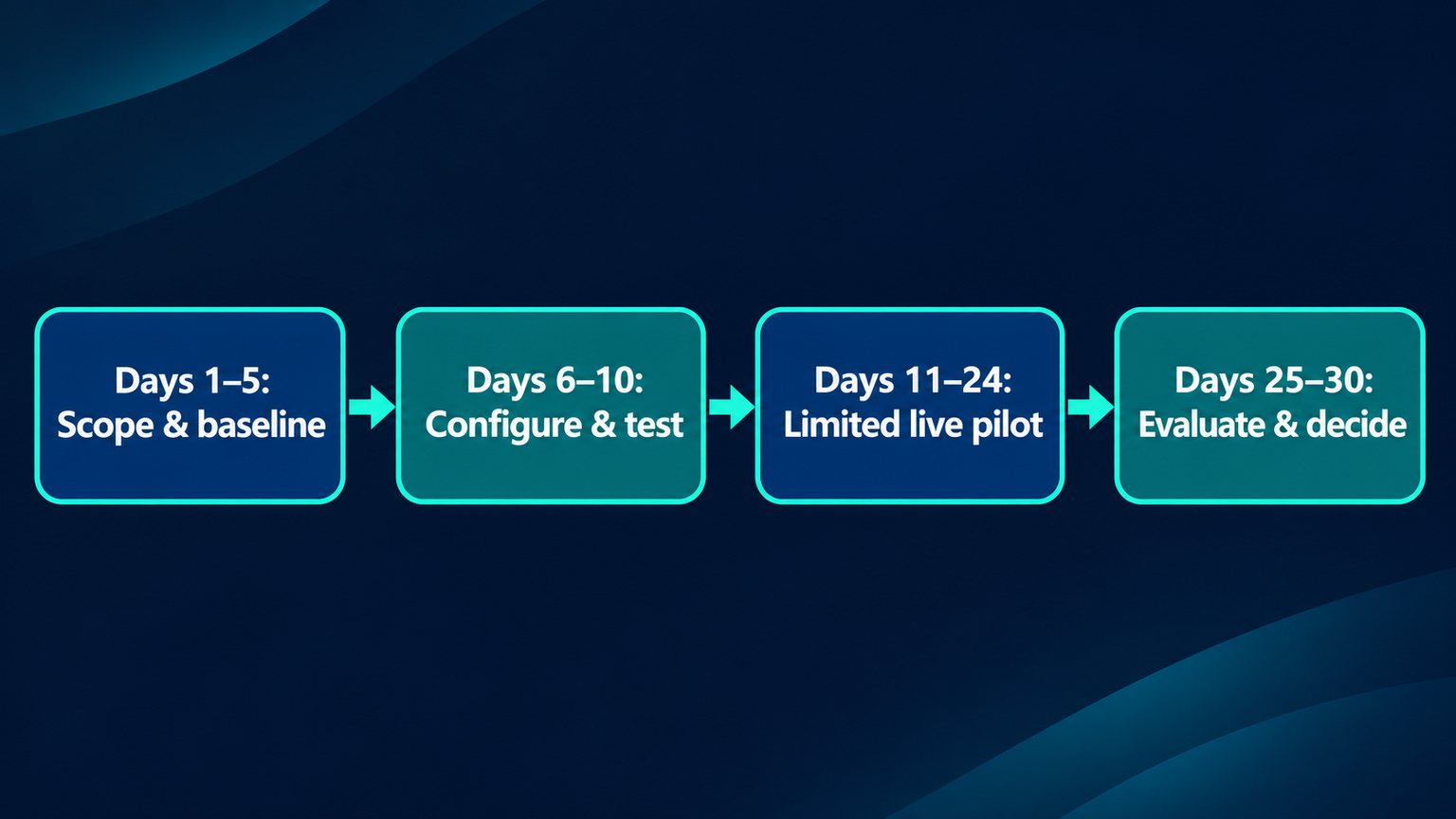
Days 1–5: Scope and baseline
Confirm the charter, owner, reviewers, allowed actions, baseline, and stop conditions. Gather representative examples from the current workflow, including difficult cases rather than only clean, common requests. Remove or mask personal information when it is not needed for evaluation.
Create a small test set that covers normal requests, missing details, conflicting information, out-of-scope asks, attempts to override instructions, tool failures, and cases that require human judgment. For each example, write what a good outcome looks like. This creates a reference for reviewers and helps the team avoid changing its definition of “correct” from one day to another.
Use the first gate to confirm readiness. If the data source is unreliable, no one owns escalations, or reviewers cannot access the evidence needed to judge outputs, pause configuration and fix those gaps first.
Days 6–10: Configure and test
Configure the agent for the narrow workflow. Start with the minimum knowledge and tools required. Grant only the permissions needed for the pilot. Where possible, begin in a read-only or draft-only mode, then test actions in a safe environment before connecting them to a live process.
Run the test set and record each result. Review not only the final answer, but also whether the agent selected the right source, used the correct tool, followed the instructions, and handed off when it should. Evaluation methods such as structured datasets, graders, and traces can help teams identify failures and regressions; the specific tooling will depend on the agent platform. OpenAI’s guidance describes these approaches for its own platform, while the underlying evaluation questions apply broadly: did the workflow use the right tool, follow constraints, and produce an acceptable outcome?
Fix critical issues and rerun affected cases before advancing. Keep a record of changes to prompts, sources, tools, and permissions. If the team changes the workflow materially, mark that version in the results; otherwise, the pilot may combine evidence from different agent configurations as if they were one system.
Days 11–24: Run a limited live pilot
Open the workflow only to the boundary written in the charter. Depending on risk, that might mean internal users, one support queue, a staffed time window, or drafts that a human must approve. The agent should have a visible path to stop and escalate. Let operators know what it may do, what remains their responsibility, and how to report a problem.
Review activity at a cadence matched to the consequences and volume. A customer-facing agent with write access may require frequent checks; an internal draft assistant may need less intensive monitoring. At every review, examine a sample of successful interactions as well as failures. Looking only at exceptions misses silent errors that were not reported.
Log the minimum information needed to evaluate performance and investigate incidents. Align retention with your privacy and records policies; do not collect full transcripts by default if labels, event summaries, or redacted excerpts are sufficient. An AI agent audit trail can help leadership understand what the system did and who reviewed it, while a documented AI agent data retention policy helps specify what is kept and for how long.
If the task involves lead conversations, keep a human reviewer involved for judgment-heavy replies and commitments. The human-in-the-loop review process can help define where approval fits. For support interactions, define human handoff rules so the agent knows when to stop, what context to pass, and how to make the transfer visible to the user.
Days 25–30: Evaluate and decide
Freeze the pilot configuration for the final evaluation window unless a safety fix requires a change. Reconcile the number of eligible cases, reviewed cases, excluded cases, and incidents. Compare the pilot measures with the baseline using the same definitions. Report the sample size and missing data so a positive result does not hide weak evidence.
Run the test set again on the final configuration. Check whether changes made during the pilot fixed the original failures without creating new ones. Summarize reviewer findings, user feedback, operational impact, cost, and unresolved risks in one decision memo.
Do not interpret a short pilot as proof that rare failures cannot happen. If the workflow did not generate enough examples, choose “extend” or “keep in controlled testing,” not “expand.” The right result may be a revised scope, a more reliable data source, or a decision not to automate this task.
Build a test set that reflects real work
A good test set is small enough to review carefully and broad enough to expose predictable failure modes. Organize cases by intent and risk. A customer-support pilot might include:
- A routine question answered by one current, approved policy.
- A request missing an essential detail, where the correct outcome is to ask a follow-up question.
- Two sources that disagree, where the agent should not guess which is authoritative.
- A request outside the agent’s declared scope.
- A user asking for a promise, exception, refund, or account change the agent cannot authorize.
- A tool or knowledge source that is unavailable or returns incomplete data.
- An instruction embedded in user-provided content that conflicts with the agent’s operating rules.
- A frustrated or vulnerable user who should be transferred to a person.
For each case, record the expected behavior and the reason. Reviewers should be able to distinguish a harmless style difference from a factual error, policy breach, or missed handoff. If one reviewer marks an answer incorrect and another marks it acceptable, capture the disagreement and clarify the rubric before aggregating results.
Retest the same core cases after changes and add newly discovered failures to the set. Avoid “teaching to the test” by repeatedly changing examples until they pass. Keep a holdout group of cases the builder does not use while tuning, then evaluate those separately.
The guide to testing AI agents offers broader testing approaches. For support operations, define what may be summarized or routed and what still needs a human using a support ticket triage playbook.
Choose measures that answer the business question
Do not track every available dashboard number. Select a small scorecard tied to the workflow’s purpose. More measurements can create noise, especially when definitions change or sample sizes are small.
A practical scorecard may include:
| Area | Useful measure | Review question |
|---|---|---|
| Outcome quality | Correctness, completeness, policy fit, or reviewer acceptance | Is the output good enough for this task, using the agreed rubric? |
| Human effort | Review time, edits per output, or escalation workload | Did the agent reduce effort, or shift it to another person? |
| Workflow result | Resolution time, completed records, qualified leads, or queue age | Did the process improve in a way the business values? |
| Safety | Unauthorized actions, missed handoffs, privacy incidents, or policy violations | Did any event breach a non-negotiable boundary? |
| Reliability | Tool failures, incomplete context, or fallback frequency | Can the workflow operate with the actual data and integrations available? |
| Cost | Model, platform, integration, and human-review cost per completed task | Is the result worth the complete operating cost? |
For sales qualification, measure whether required information is captured and routed correctly, not only whether the agent starts a conversation. A lead qualification workflow can clarify how information collection and routing connect to the downstream sales process.
For each measure, document the unit, data source, owner, review frequency, and exclusions. Show both counts and rates where useful. “Two handoffs” means something different when there were 20 eligible cases than when there were 2,000. When sample volume is low, describe the observations and uncertainty rather than presenting a percentage as conclusive.
Safety, ownership, and rollback
A pilot is not safe just because it is small. Define controls before enabling any live action:
- Least privilege: Give the agent access only to the information and actions required for the test.
- Human authority: Name who can approve, override, or stop the agent, including after hours.
- Escalation path: Specify triggers, destination, information to pass, and expected response ownership.
- User transparency: Explain when an AI agent is involved where appropriate, and make the route to a person easy to find.
- Incident response: Record what counts as an incident, who is notified, how the agent is paused, and how affected work is corrected.
- Rollback: Keep a tested way to disable the agent, revoke tool permissions, and return to the prior process.
- Data minimization: Use only the data needed for the task and apply the organization’s access, retention, and deletion rules.
Put critical stop conditions in writing. Examples include an unauthorized external action, repeated use of an unapproved data source, a serious privacy issue, or an inability to reach a responsible human. The threshold for stopping should reflect the potential harm, not wait for an average quality score to deteriorate.
Track each incident with the time, affected workflow, agent version, action taken, reviewer, and resolution. Keep only the details required for investigation and follow-up. Governance works best when these responsibilities are clear before launch; an AI agent governance framework can help teams map oversight, permissions, and accountability.
Make the day-30 decision
At the final review, choose one of four outcomes and record the evidence behind it:
- Stop: The task is unsuitable, critical failures remain, or the expected benefit does not justify the risk or total cost.
- Adjust: The use case still looks promising, but a specific gap needs a new bounded test. Name the change and the evidence required next time.
- Extend: The workflow appears safe enough to continue under the same controls, but sample volume or observation time is too limited for a broader decision. Set an end date and additional evidence target.
- Expand: The pilot met its pre-agreed criteria, critical risks are controlled, owners are ready, and the team has a staged rollout plan with monitoring and rollback.
Expansion should be gradual. Increase the audience, action permissions, or workflow scope one at a time so the team can identify what changes the results. Recheck the test set whenever the knowledge base, connected tools, policy, or model changes. A successful pilot supports the next step; it does not guarantee future performance under different conditions.
The decision memo should fit on a few pages and answer: what did we test, who was included, what changed from baseline, how many cases were reviewed, what failed, what did users and operators say, what did it cost, what remains uncertain, and who owns the next action? Attach the scorecard and incident log so leaders can inspect the underlying evidence.
Common 30-day pilot mistakes
Starting with a platform instead of a workflow. A product demo can show capabilities, but it does not tell you which business task is worth testing. Pick a repeatable task and define its boundaries first.
Treating every case as low risk. A single unauthorized action can outweigh many smooth interactions. Classify actions by consequence and put stricter controls around higher-risk steps.
Changing success criteria halfway through. Teams may be tempted to redefine “good” after seeing early results. Log changes, preserve the original criteria, and label any revised evaluation separately.
Counting activity as impact. Number of chats handled or agent runs does not prove that the business improved. Compare outcomes and total human effort with the baseline.
Removing review too quickly. A small set of successful examples is not enough to infer that rare or complex cases are safe. Keep the review level proportional to risk and evidence.
Ignoring the cost of supervision. Include setup, review, correction, integration, and maintenance time. An agent that shifts work to a reviewer may not reduce the total burden.
Frequently asked questions
Is 30 days enough to evaluate an AI agent?
Sometimes. It depends on how often the workflow occurs, how risky it is, and whether you can collect representative examples. If the sample is too small or important edge cases have not appeared, extend controlled observation or narrow the conclusion. The calendar alone does not establish confidence.
How many examples should the pilot include?
There is no universal number. Estimate the required sample from workflow volume, variation, risk, reviewer capacity, and the decision you need to make. Set a minimum before the pilot starts. If you cannot reach it in the month, document the limitation and extend or redesign the evaluation.
Should the AI agent act autonomously during the pilot?
Only for actions whose permissions and consequences have been reviewed. Many teams begin with internal testing, read-only access, or drafts requiring approval, then consider broader permissions after evidence supports them. High-impact or irreversible actions may require human approval even after a successful pilot.
What if the agent fails a test?
Classify the failure, contain any risk, and record the example. Decide whether the cause is missing or conflicting knowledge, unclear instructions, tool behavior, permissions, or a task outside the agent’s capability. Fix the cause, rerun affected cases, and preserve the prior result so the team can see whether performance changed.
How do I compare an agent with the current process?
Use the same population, period definitions, and outcome measures where possible. Compare quality and total effort, including human review and correction. Describe differences in workload or case mix that could affect the comparison.
A useful pilot ends with a clear next step
A 30-day AI agent pilot works when it is narrow enough to control and structured enough to teach the team something. Define the workflow, baseline, test cases, permissions, and decision rules before launch. Review the live period at a cadence that matches risk, then choose to stop, adjust, extend, or expand based on the evidence available.
Botsify’s agent builder supports connecting apps, adding a knowledge base, and selecting deployment channels, which can help teams configure a bounded test around an appropriate business workflow.
