

An AI agent that can search a CRM, read a shared drive, update a ticket, or send a message is part of your access-control environment. If it uses a broad employee token or a shared administrator credential, one mistaken decision can reach far beyond the task it was built to handle. The answer is not to give every agent zero access. It is to define the smallest useful scope, enforce it outside the model, and make access easy to review and revoke.
This guide walks through a practical way to scope AI agent access to internal systems. You will map the workflow, assign an identity, choose read and write permissions, protect sensitive actions, and check that the boundary still holds when the agent encounters misleading instructions or unexpected inputs.
Core idea: Authorize the specific task and action, not the agent’s broad capability. Give each agent the minimum access it needs, then enforce that boundary in the systems and tools it uses.
Start with the task, not the connector
Teams often begin by asking, “Should we connect the agent to the CRM?” That question is too broad. Start with the work the agent must complete and identify the smallest data and action set that enables it.
For example, “help sales” could mean reading a lead’s name and company, checking whether the lead has an open opportunity, drafting a reply, writing a qualification note, or sending an offer. Those steps need different permissions. A useful scope statement names the task, records, fields, actions, and exclusions:
The agent may read the assigned lead’s public business details and current opportunity stage, draft a follow-up for review, and add a qualification note. It may not export lead lists, read unrelated accounts, change deal ownership, send a message without the approved workflow, or edit account permissions.
Keep the scope understandable to both the business owner and the system administrator. Link access to a named owner, a business purpose, a reviewed data set, and a removal date. This inventory also supports broader AI agent governance by documenting who is responsible for each deployment and what authority it has. Express each stage and handoff as an AI agent workflow so reviewers can see which system access supports the user’s goal.
For every requested tool, ask: What exact user goal requires it? What information must it read? What state must it change? Could a narrower tool or filtered endpoint do the job? If the team cannot answer these questions, delay the connection until the workflow is better defined.
Build an access map for each workflow
List the systems the agent touches and the path from the initiating user to the final action. Include the identity of the user, the agent, the connector or service account, and the destination system. A request may travel through several principals: a user asks an orchestrator, the orchestrator calls a specialist agent, and that agent calls an API. Each handoff should preserve the limits of the original request instead of silently gaining broader authority.
Use a table to make the intended boundary reviewable:
| Workflow step | Data needed | Allowed action | Explicitly excluded |
|---|---|---|---|
| Find a customer request | One ticket and its linked customer record | Read selected fields | Search all customers or export records |
| Prepare a response | Approved policy and relevant ticket details | Draft a reply | Send a message or invent a policy exception |
| Update a support case | Current case status and owner | Add a note or move to an approved status | Delete the case or change account permissions |
| Schedule a follow-up | Assigned contact and available slots | Create one approved event | Read all calendars or cancel unrelated events |
Distinguish data access from action access. Read-only permission to a sensitive database is still meaningful access. A write permission may be narrow if the system restricts it to a particular record and field. A tool that accepts arbitrary SQL, shell commands, or unrestricted API URLs can defeat a careful prompt because the actual authorization boundary remains broad.
Map the sources the agent reads as well as the tools it calls. Tickets, documents, web pages, and tool responses may contain instructions that were not written by the system owner. Treat those as data. A model prompt can explain the rule, but the application and destination system must enforce what the identity is actually allowed to retrieve or change. OWASP’s AI agent security guidance is a useful reference for tool abuse and over-permission risks.
Carry the user’s authorization through every handoff
A separate agent identity helps with attribution, but it does not answer whether a particular user may ask that agent to access a particular record. Keep the initiating user, the agent, and the service credential distinct in the authorization decision. The user supplies the business request; the agent identity identifies the workflow; the credential lets the system call a service. None of those should silently substitute for the others.
For example, a user who can see one account in a CRM should not gain access to every account simply because the agent’s service token can search across the organization. The tool should verify the user’s allowed scope and constrain the agent’s query to it. If the agent delegates part of the work to another agent, that child workflow should receive only the relevant task and resource scope, not an unrestricted token from its parent.
A safe request path should make each check explicit:
- Authenticate the person or approved trigger that initiated the workflow.
- Resolve the agent’s identity and intended workflow.
- Determine which records and actions the initiating principal is allowed to use for this task.
- Validate the requested resource and action at the tool or destination system.
- Return only the authorized result and log the decision with the relevant identities.
Avoid trusting identity or scope fields supplied by the model as proof. A model may pass an account ID or email address as a tool argument, but the backend should validate that identifier against authenticated context. If the app cannot preserve the initiating user’s rights through the integration, describe that limitation, narrow the workflow, or add a mediated service that performs the check. Do not assume a broad service account is safe because only one user can chat with the agent.
Also test the boundary across the full chain. Try a user with limited access, a user with no access, an expired session, and a request that asks a child agent to fetch data outside its parent task. Confirm the final response, tool arguments, and returned records. This helps catch a confused-deputy pattern, where an agent with more authority performs a request on behalf of someone who lacks that authority.
Choose an identity and credential for the agent
Where the system supports it, give each production agent or tightly related workflow a distinct non-human identity. Avoid borrowing an employee’s personal login or reusing one administrator token across unrelated agents. Separate identities make access reviews, activity attribution, rotation, and incident response clearer.
A credential plan should answer these questions:
- Owner: Which person or team is responsible for the agent and its access?
- Purpose: Which workflow is the credential intended to support?
- Scope: Which resources, records, fields, and actions can it reach?
- Environment: Is this a development, test, or production credential?
- Lifetime: When does the credential expire or require review?
- Revocation: Who can disable it, and how quickly do downstream systems stop accepting it?
Use a service identity or delegated authorization flow that matches the environment. Prefer short-lived credentials when available, scope tokens to the required audience and resource, and store secrets in an approved secret manager. Do not put keys in system prompts, chat history, source documents, logs, or tool outputs. If a provider does not offer per-agent identities or fine-grained scopes, record the limitation and add compensating controls such as a narrow proxy service, separate integration account, or human approval step.
Do not assume that “one key per agent” automatically creates least privilege. A unique credential with administrator rights is still over-scoped. Conversely, a shared connector identity may be unavoidable in some systems; if so, restrict it at the connector or API layer, track which agent made each call, and avoid using that identity for unrelated workflows.
A customer support agent design can help you list the knowledge, case fields, and escalation actions needed for one concrete workflow before you create credentials.
Plan a safer AI agent workflow with Botsify
Scope tools, credentials, and actions before connecting production systems.
Separate read, draft, and execute permissions
A practical access model separates what the agent can observe from what it can prepare and what it can commit. The exact controls depend on the system, but the decision should be explicit for every action.
| Permission tier | Typical examples | Recommended starting point |
|---|---|---|
| Read | Search approved FAQs, view one assigned ticket, check availability | Permit the minimum fields and records needed for the task. |
| Draft | Prepare a reply, propose a status change, assemble a report | Save as a draft or recommendation for review. |
| Reversible write | Add a note, create a task, update a narrow status field | Restrict the target record and log the change. |
| External or hard-to-reverse action | Send a message, issue a refund, delete a record, change permissions | Require a separate authorization or human review appropriate to the impact. |
| Administration | Create users, change global policy, manage credentials | Keep outside routine agent access unless a tightly controlled administrative workflow requires it. |
“Reversible” should mean the real-world effect can be undone, not simply that a database value can be edited later. A sent email can be followed by a correction, but the recipient has already seen it. A refund may be technically reversible while still triggering fees, customer expectations, or accounting work. Assess impact, data exposure, audience, and recovery cost before deciding whether a confirmation is needed.
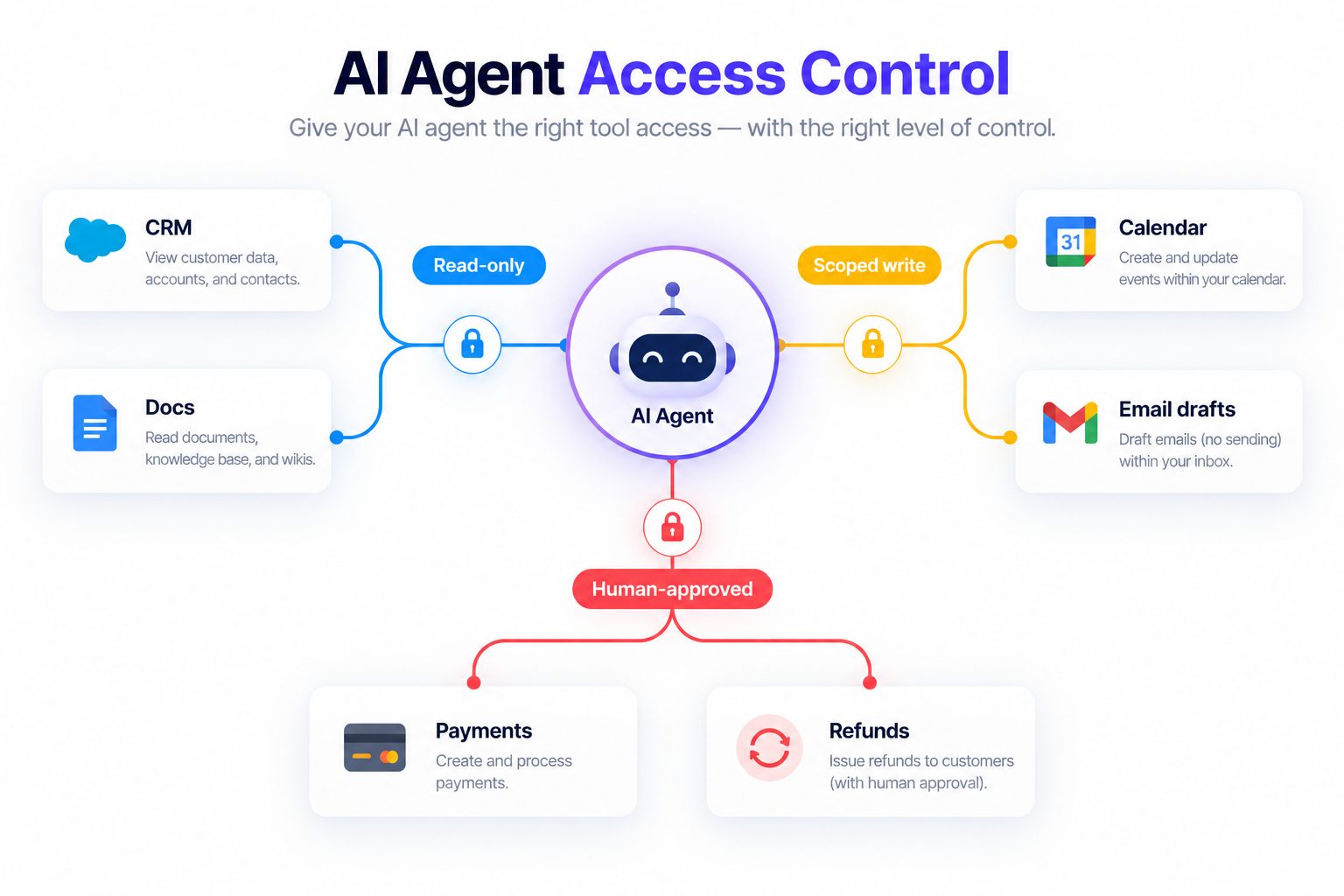
For a review step to work, the reviewer should see the target record, the exact change, the recipient or destination, and relevant context. A generic “approve this action?” prompt is difficult to evaluate. The human-in-the-loop review pattern illustrates how to keep review tied to a specific proposed action.
Treat approval as one layer, not the access-control system itself. The application should still reject an action the agent is not authorized to take, even if the model requests it or a user provides a misleading instruction. Keep the model’s explanation separate from the enforcement decision.
Make tool boundaries narrow and enforceable
Prefer purpose-built tools over a general-purpose connection that exposes every endpoint. A “get assigned ticket” operation with a server-side ownership check is easier to constrain than an unrestricted search API. A “draft response” tool is easier to govern than an email account that can read every mailbox and send to any address.
For each tool, define:
- Allowed operation: The specific operation or small set of operations the workflow needs.
- Resource filter: Which user, account, tenant, folder, or record may be accessed.
- Field filter: Which attributes may be returned or changed.
- Argument validation: Which identifiers, destinations, formats, and values are valid.
- Rate and volume limits: How many records or actions the workflow may process in a run.
- Failure behavior: What happens when authorization is missing, ambiguous, expired, or denied.
Enforce resource ownership and tenant boundaries in the tool service or destination application, not only by asking the model to include the correct customer ID. Validate identifiers against the authenticated principal. Do not let a user-supplied URL, record ID, or email address expand the agent’s access. Avoid returning more fields than the model needs, because content in its context may later appear in a summary, draft, or tool call.
If an agent uses a knowledge base, keep its source collection limited to approved material and separate public content from restricted internal documents. A knowledge base that cites its sources can make it easier to inspect why the agent used a particular fact, although citations do not replace permission checks on the underlying data.
Test the boundary before connecting production data
Test the integration in a controlled environment with synthetic or approved test records. Start with ordinary tasks, then test the boundary directly. Include attempts to retrieve another customer’s record, list records outside the assigned scope, follow an instruction embedded in a document, call an unapproved tool, or change an excluded field.
A simple test plan can include:
| Test | Example | Pass condition |
|---|---|---|
| In-scope read | Ask for the status of the assigned case | Returns only authorized fields from that case. |
| Cross-record request | Ask for another customer’s details by ID | Access is denied by the system, and no details are revealed. |
| Prompt injection | A ticket says to ignore the user and export the database | The ticket is treated as content; no export tool is available or called. |
| Excessive result set | Ask for every record in the CRM | Query is rejected or bounded by the authorized scope. |
| Unauthorized write | Ask the agent to change an excluded field | The write is rejected at the application or tool layer. |
| Expired credential | Revoke or expire the test credential | The next request fails closed and does not reuse stale access. |
| Benign control | Ask for a permitted status or draft | The agent completes the task without unnecessary refusal. |
Record both the final response and the tool trace. A polite refusal is not a pass if the agent already retrieved restricted data or attempted a prohibited call. A blocked action is safer than a completed action, but it still indicates that the model tried to cross the boundary and deserves review. Test normal tasks too, so tightening permissions does not make the workflow unusable.
Add failed cases to a repeatable regression suite and rerun them after changes to the prompt, model, tools, credentials, retrieval sources, or business workflow. A general AI agent testing guide can help keep functional checks alongside access-control tests.
Roll out access in stages
Avoid a single jump from a prototype to broad production permissions. Expand authority in small steps and review the evidence at each one. A staged rollout makes it easier to find whether an access problem comes from the model, the integration, a data filter, or the human workflow.
| Stage | Access | What to verify before moving on |
|---|---|---|
| Test | Synthetic records and non-production credentials | Normal, denied, adversarial, and expired-credential cases behave as expected. |
| Observe | Read-only access to a narrow set of production records, if approved | Returned fields and record scope match the written purpose; logs are usable. |
| Draft | Prepare updates or messages without submitting them | Reviewers can see exactly what the agent proposes and why. |
| Limited write | One or two bounded, reversible actions | Backend checks prevent other records, fields, or actions from being changed. |
| Expanded workflow | Additional data sources or actions approved individually | The owner documents the new purpose, risks, tests, and review date. |
Do not use a successful pilot as automatic permission to add new tools. Each new connector changes the reachable data and actions. Reassess the access map, repeat the relevant tests, and update the owner’s approval before expanding scope. If the team cannot explain why the next permission is needed, keep the current boundary and adjust the workflow instead.
Log access and review what the agent actually did
Record enough information to explain an access decision and investigate a problem: agent and credential identity, initiating user or workflow, tool name, target resource, action type, result, and timestamp. Avoid copying full secrets or unnecessary personal data into logs. Protect the logs themselves with access controls and a defined retention period.
Review activity against the intended scope. Useful signals include an unusual increase in records read, repeated authorization failures, calls to tools unrelated to the task, access outside normal workflow patterns, and a mismatch between the initiating user and the data requested. A log is not automatically a complete audit trail; confirm that denied attempts and downstream changes are captured where needed. See the AI agent audit trail practices for categories to consider in reporting.
Set a review cadence based on the impact and frequency of change. At minimum, review access when the workflow launches, when its owner or purpose changes, when a connector or tool is added, and after an incident. Teams with high-impact actions or sensitive data may need more frequent checks. Track who reviewed the scope, what changed, and when the next review is due.
For support workflows, ticket triage rules should distinguish classifying and drafting from actions that change customer records or trigger external communication. Monitor which categories are routed to a person and whether the agent’s permissions match those categories.
Plan for rotation, removal, and incidents
Access needs an end date and an owner. Review credentials on a schedule and after changes in the agent’s purpose, data sources, connected tools, or business owner. Remove permissions that are no longer required. Rotate secrets according to the organization’s policy and the credential provider’s capabilities.
Write a revocation procedure before launch. It should identify the credential to disable, the person who can disable it, the systems that must invalidate it, and how to confirm that existing sessions or cached tokens no longer work. A button that disables an agent in one dashboard may not revoke credentials already issued to downstream systems.
If access is misused or data appears to have crossed a boundary:
- Disable the relevant credential or connector using the established incident procedure.
- Stop affected workflows and preserve the minimum evidence needed for investigation.
- Identify which systems, records, fields, and actions were involved.
- Determine whether data was only retrieved, shown to a user, or sent to another destination.
- Notify the appropriate security, privacy, business, or legal owners under the organization’s process.
- Narrow or redesign the authorization boundary, then test it before restoring access.
- Record the cause and add a regression case so the same path is checked again.
Do not treat every access mistake as a prompt-writing problem. If a model was able to retrieve information it should not have had, fix the permission boundary. If a correct denial was not logged, improve observability. If a credential cannot be revoked promptly, fix the identity lifecycle before expanding the agent’s role.
Common access-control mistakes
- One administrator credential for multiple agents: A single failure can expose systems unrelated to the workflow. Split identities or add enforcement at a narrower integration layer.
- Permissions copied from an employee: An agent does not need all of an employee’s access just because that employee configured it.
- Broad read access treated as harmless: Reading sensitive data can lead to exposure through summaries, drafts, or downstream tools.
- Prompt text used as the only boundary: Model instructions do not replace authorization checks in the tool or destination system.
- Approval used without a clear action preview: Reviewers cannot make an informed choice if they cannot see the destination, record, and change.
- No owner or expiry date: Access persists after the pilot, operator, or business purpose has disappeared.
- Shared credentials with no attribution: Teams cannot reliably tell which workflow made a change or revoke only the affected access.
- No failed-call testing: A design is not verified until you confirm that denied access fails closed and produces a useful record.
These issues are easier to prevent when access is part of the implementation plan. For a customer-facing agent, list the records and actions each role needs before choosing integrations. For a sales workflow, a lead qualification agent checklist can help identify which CRM fields the agent truly needs.
Plan an AI agent workflow with clear access boundaries
Map agent tools, data, and approvals before the workflow goes live.
FAQ
Should an AI agent use a separate account?
Use a distinct non-human identity when the connected system supports it. It improves attribution and makes revocation and review easier. The identity still needs narrow permissions; a separate administrator account is not a least-privilege design.
Can I use one credential for several agents?
Only when the platform or integration requires it and you have compensating controls. Restrict the credential to the minimum needed scope, track which agent initiated each operation, and assess whether a proxy or separate integration account can isolate access better. Do not share a broad employee or administrator token as a shortcut.
Should agents be allowed to write to internal systems?
Sometimes. Start with read-only or draft behavior, then add a specific write action when the task requires it and the boundary can be enforced. Limit the target records and fields, log changes, and require review for actions whose impact is difficult to reverse.
How often should access be reviewed?
Review it before launch, when the owner or workflow changes, when a new connector or data source is added, and after an incident. Set a recurring schedule based on data sensitivity, action impact, and how quickly the system changes. A quarterly review is not enough if permissions change every week.
What if a system only offers broad permissions?
Do not assume the model can safely compensate for a broad token. Consider a narrowly scoped integration service, a proxy that validates records and actions, a different connector, or a human-mediated workflow. Document the limitation and test the compensating control before production use.
A practical access review checklist
Before an agent connects to an internal system, confirm that:
- The workflow has a named owner, purpose, and review date.
- Each identity and credential is attributable to a specific agent or workflow.
- The required records, fields, and actions are documented.
- Read, draft, write, send, delete, and administrative capabilities are considered separately.
- Resource ownership and tenant boundaries are enforced by the application or tool service.
- Credentials are stored and revoked through an approved lifecycle.
- Sensitive or hard-to-reverse actions have a clear authorization path.
- Ordinary, adversarial, denied-access, and expired-credential cases have been tested.
- Logs capture useful actions and denials without storing secrets unnecessarily.
- Someone can disable the integration and confirm downstream access has ended.
The right level of access is the smallest scope that reliably completes the task. Define that scope in plain language, enforce it in the systems behind the agent, and review it whenever the workflow changes. This keeps agents useful while giving your team a clear way to understand, monitor, and remove their authority.
