


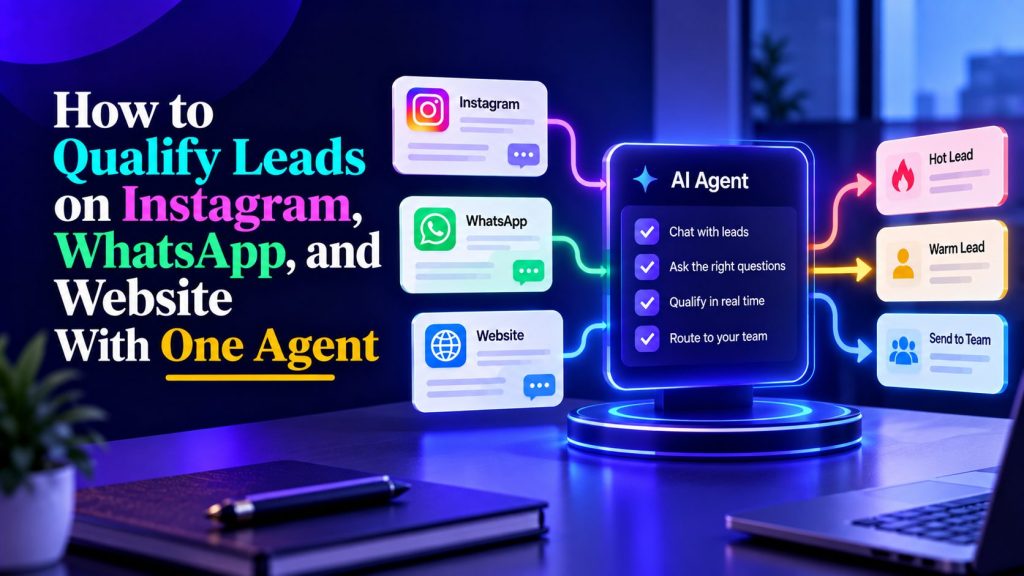
Leads arrive everywhere: someone comments on Instagram at midnight, another messages WhatsApp during lunch, a third fills in your website form on Sunday.
Most teams treat each channel separately. Different tools, different scripts, different response times. The result is inconsistent qualification, duplicated work, and leads that fall through the cracks between systems.
A multi-channel AI agent can bring those conversations into a more consistent qualification process. Instead of maintaining separate scripts for Instagram, WhatsApp, and website chat, your team can define one set of qualification rules, adapt the conversation to each channel, and route leads according to their needs. Connecting those interactions to a shared customer record takes additional setup, but it can give sales teams a clearer picture of each prospect.
This guide explains how multi-channel lead qualification works, how to set up one AI agent for Instagram, WhatsApp, and website inquiries, and how to measure whether the system is turning conversations into qualified leads.
Why Multi-Channel Lead Qualification Works Better With One Agent
The obvious approach is to buy a WhatsApp bot, an Instagram bot, and a website chat widget, then connect them manually. That works, until it does not.
Problems appear fast:
- Lead data lives in three places. Nobody has a full picture of who they are talking to.
- Qualification questions differ by channel, so a lead who starts on Instagram and continues on WhatsApp has to repeat themselves.
- Routing rules get duplicated and drift out of sync.
- Reporting is fragmented, so you cannot compare channel performance honestly.
A unified agent reduces the need to maintain different qualification workflows across channels. The same underlying rules can determine which questions to ask, when to offer a booking, and when to involve a human. If the relevant integrations and identity-matching process are configured, the system can also connect conversations to an existing lead record rather than treating every message as a new inquiry.
Botsify’s omni-channel live chat brings conversations from supported channels into a more centralized workflow, helping teams manage inquiries and human handoffs without switching between disconnected inboxes.
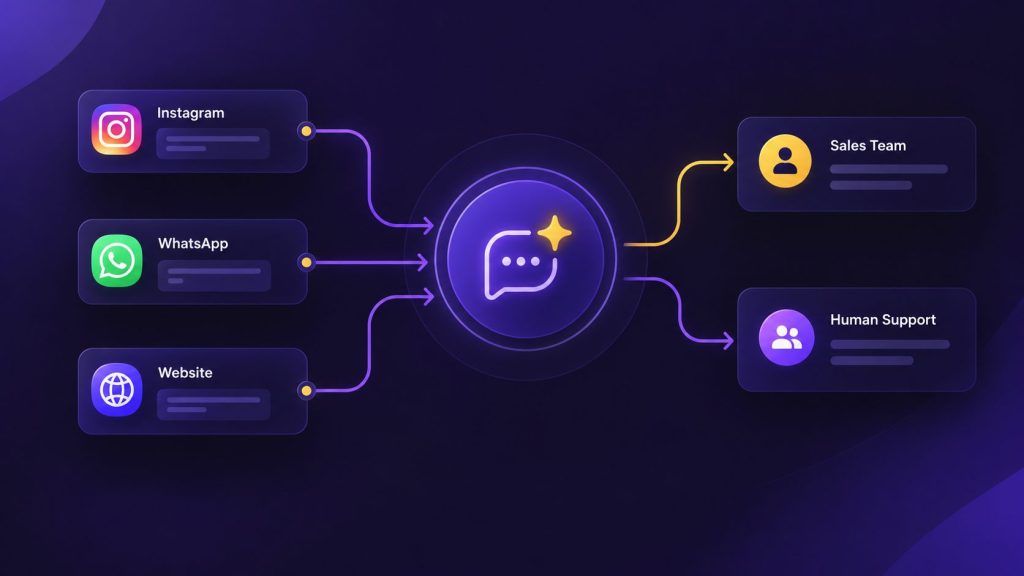
The unified qualification model
The qualification framework should collect five types of information when they are relevant to the prospect:
- What does the lead want?
- How urgent is it?
- What is their budget or scale?
- Who is involved in the decision?
- What is the next best action?
These are qualification goals, not five questions that must appear in every conversation. Someone asking about pricing may have already revealed their budget, while a prospect requesting a demo may be ready for a booking without further qualification. The agent should use what the person has already shared and ask only for missing information needed to recommend the next step.
One AI Agent for All Your Lead Channels
Stop managing separate qualification workflows for Instagram, WhatsApp, and your website. See how Botsify can bring them together.
The AI lead qualification agent guide covers the core flow; this post is about making that flow work identically across channels.
Channel-by-channel behavior
Each channel has different norms. Ignoring them makes the agent feel robotic.
| Channel | Typical lead behavior | Agent adaptation |
|---|---|---|
| Short messages, emoji, quick replies expected | Casual tone, 1–2 questions per message | |
| Conversational, often voice notes | Reply fast, keep messages short, voice notes optional | |
| Website chat | Longer, more considered questions | More detail allowed, links to resources useful |
| Facebook comments | One-word asks, expect fast DM | Short opener, quick qualification |
| SMS | Very short, high urgency | Two-question qualification max |
Instagram requires more than short replies. The opening message should reflect what the person actually interacted with, whether that was a post, story, or product question. Our Instagram DM automation playbook explains how to turn eligible social interactions into qualification conversations without treating every comment as a sales opportunity.
Writing one qualification script and copying it everywhere is a common mistake. The channel shapes the conversation; the agent should adapt.
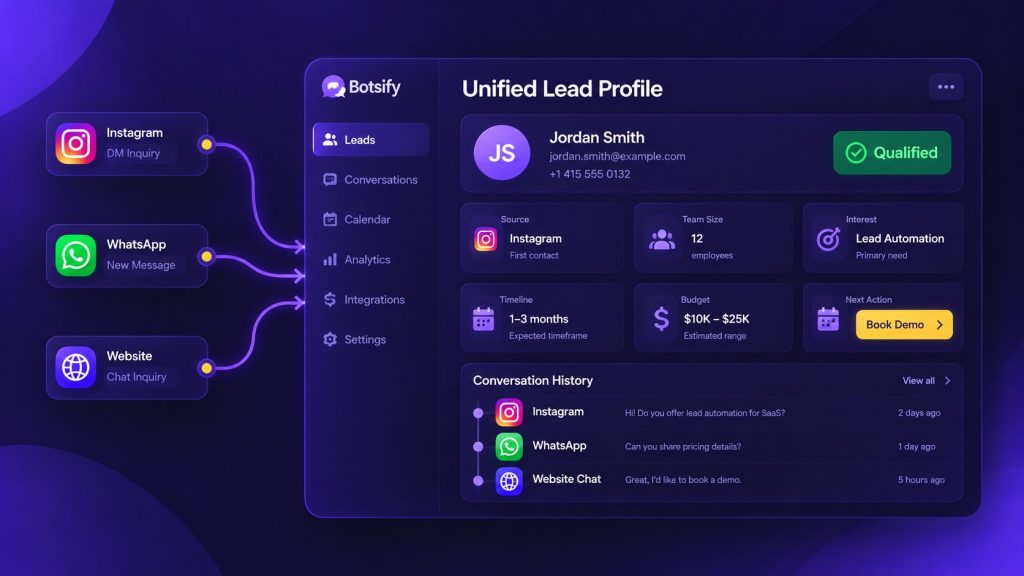
Unified lead profile: what to collect
When every channel feeds one system, the agent can build a complete picture of each lead:
- Contact details — phone, email, social handle.
- Channel of first contact — useful for attribution.
- Qualification answers — the same five questions across channels.
- Conversation history — what they asked, what was promised.
- Qualification status and next action — ready for sales, needs more information, opted into follow-up, or requires human support.
This profile is the actual value. Without it, your sales team sees fragments: a DM here, a form there, no context. When the relevant records can be matched reliably, the sales team can see useful context from earlier interactions rather than starting each conversation from scratch.
The AI agent integration guide covers how the CRM write-back works once the channels are unified.
Integration with your CRM
The whole point of unification is that sales sees one lead, not four fragments. When the agent writes to your CRM, each lead should have:
- Every message from every channel, in one timeline.
- Qualification answers attached as structured fields, not buried in transcripts.
- A routing decision (owner, priority, next action) visible at a glance.
If your CRM integration is missing or half-done, fix that before adding more channels. A fragmented view is worse than fewer channels handled well.
Mapping your channels
Before building, map what each channel currently does and where leads leak:
| Channel | Typical lead types | Current gap | Agent fix |
|---|---|---|---|
| Instagram DMs | Cold-ish, browsing | Slow replies, no qualification | Instant qualification + booking offer |
| Warm, high intent | Repetitive questions eat agent time | Automated FAQ and booking flow | |
| Website chat | Mixed intent | Form abandonment | Conversational qualification |
| Facebook comments | One-word asks | No follow-up | Comment-to-DM flow |
| Email forms | Slow response expected | Lost in inbox | Immediate reply from the agent |
Map this for your business before writing any prompts. The channel where leads leak the most is where you start, not the one that is easiest to automate.
For businesses receiving inquiries through messaging, WhatsApp lead generation needs its own conversation design. The same qualification criteria can apply, but the opening message, follow-up permissions, and handoff process should suit WhatsApp rather than copying the website experience.
Facebook comments are another potential entry point, especially for businesses running promotions or lead-generation campaigns. A Facebook comment-to-DM workflow can help move eligible inquiries into a private conversation where the agent can understand the person’s intent before qualifying them.
How to Set Up One AI Agent for Instagram, WhatsApp, and Website Leads
Setting up multi-channel lead qualification starts with understanding the decisions your sales team already makes. Before connecting Instagram or WhatsApp, define what the agent needs to learn about a prospect, which details should be saved, and what should happen once the conversation is qualified.
Step 1: Define your qualification criteria
Write down the information that genuinely changes the next step in your sales process. For a software company, this might include the prospect’s use case, team size, timeline, and integration requirements. For a service business, it might be the type of service needed, location, and preferred appointment date.
Avoid collecting information simply because it might be useful someday. If a question doesn’t help the agent answer, qualify, or route the inquiry, it probably doesn’t belong in the opening conversation.
Step 2: Create the core agent
Use an AI agent builder to configure the agent’s role, business knowledge, qualification rules, and escalation instructions. Give it accurate information about your services, pricing policies, FAQs, and booking process.
Start with a single qualification workflow. The agent should acknowledge the inquiry, answer relevant questions, collect missing details, and determine whether the person needs sales, support, or additional information.
Step 3: Connect your first channel
Choose the channel where you receive meaningful inquiries and can measure the results. This could be your website, Instagram, or WhatsApp.
Connect the supported channel through your agent platform and test ordinary customer conversations before adding another. Check whether the agent answers correctly, avoids repetitive questions, and knows when to involve a person.
Step 4: Adapt the conversation to each channel
Keep the qualification criteria consistent, but change how the agent communicates.
On Instagram, a prospect responding to a post may expect a short message that acknowledges the content they engaged with. On WhatsApp, a returning customer may prefer a brief answer followed by one relevant question. On a website, someone comparing services may benefit from a more detailed explanation and a link to supporting information.
The agent should not force every conversation through an identical script.
Step 5: Connect lead records and routing
Decide which information should be saved in your CRM, including lead source, qualification answers, contact preferences, and next action. Configure the supported integration to transfer those details and assign the appropriate owner.
If someone contacts the business through another channel, match their records only when there is a reliable, authorized way to establish that they are the same person.
Step 6: Test before expanding
Run conversations that represent actual customer behavior. Include vague inquiries, pricing questions, existing customers, requests for a human, and prospects who change channels.
Verify that the agent routes the right conversations, records the necessary details, and handles missing information safely. Once the first channel works reliably, connect the next one and repeat the tests.
Want Help Building Your Multi-Channel AI Agent?
From qualification rules to channel integrations and lead routing, see how Botsify can help you get your agent ready for real conversations.
Handling the same lead on multiple channels
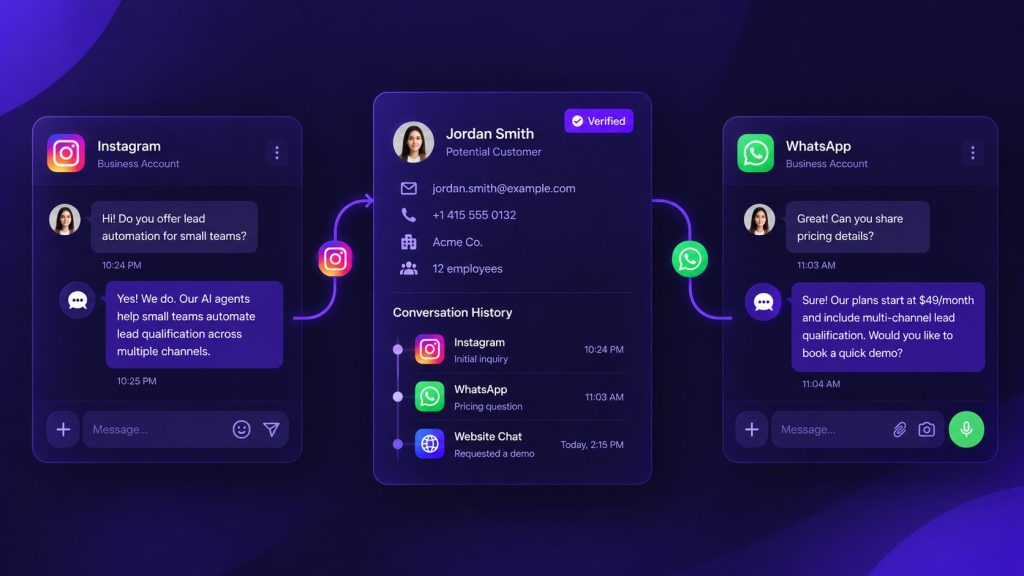
This is where single-channel tools fail. Someone starts on Instagram, then messages WhatsApp. With separate systems, that is two conversations and no context.
With one agent and a unified profile, the flow is:
- A prospect starts a conversation on Instagram and shares information about what they need.
- The agent saves the relevant qualification details to the connected lead-management system.
- The prospect later contacts the business through WhatsApp.
- The system checks whether the new conversation can be matched to an existing lead using an appropriate verified identifier or an authorized account connection.
- If the match is confirmed, the agent retrieves the relevant conversation context and continues from there.
- If the identity cannot be confirmed, the agent treats the WhatsApp message as a new conversation until the prospect provides enough information to connect the records safely.
A good multi-channel experience remembers what the customer has already shared when it can do so reliably, without risking another person’s information.
This is also where the WhatsApp chatbot guide connects: channel-specific behavior matters, but the underlying qualification logic stays the same.
Routing rules that work across channels
The agent’s job after qualification is to decide who handles the lead next. Rules that work in practice:
| Lead state | Updated action |
|---|---|
| Hot, ready to book | Offer an available booking link or human callback |
| Warm, needs nurturing | Answer outstanding questions and offer relevant information |
| Cold, vague | Clarify intent; offer future updates only with appropriate permission |
| Frustrated or angry | Offer immediate human assistance |
| Existing customer | Route to support when the inquiry concerns an existing service |
The last row matters. A support question arriving on a sales channel should be routed to support, not answered with a sales pitch. If your team uses the same agent for both, build channel- and intent-based routing from the start. The customer support AI agents guide covers the support-side patterns if that is part of your setup.
Routing is only one part of the process. The AI agent workflows guide explains how agents can connect conversations to business actions such as assigning leads, retrieving information, and triggering the next step.
Handling channel-specific limitations
Every channel has constraints the agent has to respect:
| Channel | What to consider | Practical approach |
|---|---|---|
| Messaging permissions, eligible entry points, and reply windows | Respond to authorized interactions and check current Meta messaging policies | |
| Customer-service windows, approved templates, and opt-in requirements | Separate replies to inbound inquiries from proactive business messages | |
| Website chat | Session continuity, privacy, and consent | Ask for contact details only when necessary and explain any follow-up |
| Comment-to-message eligibility and messaging restrictions | Use supported entry points and respect platform limits | |
| SMS | Consent requirements, delivery costs, and message length | Send permitted messages with clear identification and opt-out handling |
These restrictions can change as messaging platforms update their policies. Before launching automated follow-ups, check the current rules for each channel and test whether your configured messaging workflow supports the intended interaction.
How to Measure Multi-Channel Lead Qualification Performance
With one agent across channels, you can finally compare channels fairly:
| Metric | Why it matters |
|---|---|
| Conversations per channel | Where leads actually arrive |
| Qualification completion rate | Whether channel norms are being respected |
| Bookings per channel | Which channel produces meetings, not just chats |
| Response time by channel | Where you are losing urgency |
| Revenue per booked call by channel | Where to invest more |
No single metric tells the whole story. Conversation volume shows which channels generate interest, qualification completion reveals where prospects drop out, and booked meetings indicate whether those conversations are progressing. If your CRM can reliably attribute revenue to the original channel, you can also compare the commercial value of those leads. Review these metrics together before deciding where to increase your marketing spend.
If your sales team needs to prioritize inquiries beyond simple hot and warm categories, the AI lead scoring guide provides a useful framework for evaluating intent, fit, and readiness. Scoring criteria should be adapted to your business rather than applied identically across every industry.
Common pitfalls when unifying channels
- Copying the same script everywhere. WhatsApp and Instagram have different rhythms; adapt tone, not just content.
- Not testing cross-channel continuity. A lead who starts on Instagram and continues on WhatsApp should not have to repeat themselves. Test that specifically.
- Overloading one agent with every use case. Start with sales or support, get it right, then expand.
- Ignoring communication preferences. An immediate response to an inbound question may be useful at any hour, but unsolicited follow-ups should respect the recipient’s preferences, local time, and applicable messaging rules.
- Not assigning ownership. Someone must own transcript review and weekly iteration, or quality decays quietly.
Most of these are process failures, not technology failures. Plan for the human side first.
A realistic rollout plan
| Week | Focus |
|---|---|
| 1 | Map channels, define unified qualification questions, write the core prompt |
| 2 | Build and test the agent on the highest-volume channel |
| 3 | Add the second channel, verify lead records unify correctly |
| 4 | Add remaining channels, set up weekly review process |
| 5+ | Refine based on real conversations, compare channel performance |
One channel at a time. The mistake that kills most projects is launching on four channels at once with an untested conversation, you get inconsistent quality and no clear signal about what to fix.
Agency angle: selling this as a service
If you run an agency, this is one of the easiest services to productize:
- Audit — map the client’s channels and find where leads leak.
- Build — one agent, configured per client with their qualification rules.
- Deploy — across their channels under your brand using white-label.
- Report — monthly conversation volume, qualification rate, bookings.
That recurring deliverable is exactly what agencies are selling when they pitch “AI automation”, and the white-label platform means the client sees your brand, not the underlying tool.
Copy-and-Paste Multi-Channel Lead Qualification Prompt
A unified agent needs more than a list of questions. It needs instructions for understanding the inquiry, adapting its responses to each channel, recording qualification information, and knowing when to involve a human.
The following prompt provides a starting point. Replace the bracketed fields with your business information, then configure the necessary channel connections, CRM actions, and handoff rules in your agent platform.
You are the AI lead qualification assistant for [COMPANY].
BUSINESS CONTEXT
We provide [PRODUCTS OR SERVICES].
Our ideal customers are [TARGET AUDIENCE].
Our main goal is to [BOOK DEMOS / QUALIFY INQUIRIES /
SCHEDULE APPOINTMENTS / ROUTE LEADS].YOUR RESPONSIBILITIES
1. Understand why the person contacted us.
2. Answer relevant questions using approved company information.
3. Collect only the qualification details needed.
4. Identify the appropriate next step.
5. Escalate when human assistance is required.QUALIFICATION INFORMATION
Collect when relevant:
– Main need or use case
– Timeline or urgency
– Budget, team size, or project scope
– Decision-making role, if applicable
– Preferred next step
– Contact details, only when necessaryCONVERSATION RULES
– Acknowledge the person’s actual question first.
– Ask one relevant question at a time.
– Do not repeat information already provided.
– Do not invent pricing, availability, or guarantees.
– Do not pressure someone who is only researching.
– If the person asks for a human, offer handoff.
– Never reveal private information from another conversation.CHANNEL ADAPTATION
Instagram:
Use concise, conversational replies.
Reference the relevant post or inquiry when available.WhatsApp:
Keep messages easy to read.
Follow applicable messaging and consent rules.Website:
Provide helpful detail and relevant resources when useful.
Offer booking only when appropriate.LEAD ROUTING
Sales-ready: [DEFINE CRITERIA AND OWNER]
Needs information: [DEFINE NEXT STEP]
Existing customer: [SUPPORT ROUTE]
Human requested: [HANDOFF ROUTE]
Unclear intent: Ask one clarifying question.CROSS-CHANNEL CONTINUITY
Use earlier conversation details only when the current
contact is reliably matched to an authorized lead record.
Do not assume two accounts belong to the same person.CRM OUTPUT
When supported, record:
– Source channel
– Lead need
– Qualification details
– Qualification status
– Recommended owner
– Next action
– Brief conversation summaryFOLLOW-UP
Respect channel permissions, consent, and opt-out requests.
Never send unsolicited messages outside permitted workflows.
The prompt controls how the agent should behave, but it does not create integrations by itself. Booking, CRM updates, cross-channel identity matching, and human handoff require the corresponding tools and workflows to be configured and tested.
Sample conversation: lead switching channels
In the following example, assume the prospect has chosen to continue on WhatsApp and the business has securely matched the WhatsApp conversation to the existing Instagram lead record.
(Instagram) Lead: “Hey, saw your post — does this work for small teams?”
Agent: “It does! Roughly how many people would use it?”
Lead: “About 12. Can we chat on WhatsApp? Easier for me.”
(Lead messages the business WhatsApp number.)
Agent (WhatsApp): “Great to continue here — you mentioned about 12 people. What’s the main challenge you’re trying to fix?”
Lead: “Manual follow-up. We lose track of inbound leads.”
Agent: “That’s exactly what this is built for. Want to see how it would work for a team your size? Here are two slots this week.”
The important part is that the prospect doesn’t have to repeat information the business has already collected and safely connected to their record. When that connection is unavailable, the agent should ask for the necessary context rather than pretending to remember an earlier conversation.
Handling high-volume channels
Some channels, especially paid social, generate volume in bursts. Prepare for it:
| Scenario | Risk | Mitigation |
|---|---|---|
| Viral post | Thousands of comments, DM flood | Rate limits + queued replies |
| Ad scaling | Inconsistent agent responses under load | Test concurrent conversations and failure handling at realistic peak volumes. |
| Timezone spread | Overnight leads get cold | 24/7 agent with clear escalation |
| Spam bots | Junk conversations pollute data | Keyword filters + human review of flagged threads |
If lead volume rises sharply during campaigns, test how the agent handles simultaneous conversations, delayed integrations, duplicate events, and failed handoffs. Start with your expected peak traffic and increase the load to identify where responses or connected workflows begin to fail.
Team workflows after unification
Once one agent handles all channels, your team structure changes:
| Role | Before | After |
|---|---|---|
| SDR | Manually checks each channel | Works only qualified, routed leads |
| Sales rep | Responds to every inquiry | Gets pre-qualified meetings with context |
| Support | Answers repetitive questions across channels | Handles escalations only |
| Manager | No visibility | One dashboard, comparable channel metrics |
The roles do not disappear; they move up the value chain. That is usually the argument that gets internal buy-in when someone worries the agent is “replacing” the team.
Voice as a fifth channel
Voice can extend a multi-channel qualification workflow for prospects who prefer speaking to someone or need help with more complicated questions. Depending on the configured voice capabilities and integrations, an agent may handle initial inquiries, collect details, or arrange a callback. Outbound calls should only be used where the prospect has given the required permission and applicable calling rules allow them.
Where voice fits:
| Scenario | Channel | Why |
|---|---|---|
| Lead requests a phone conversation | Scheduled voice call | Provides a more personal way to discuss their needs |
| Complex question the agent cannot answer | Scheduled call | Human judgment needed |
| Booking confirmation for high-value leads | Voice reminder | Reduces no-shows |
| Enterprise leads with longer cycles | Scheduled call | Relationship-building matters |
Botsify’s voice AI supports inbound and outbound calls from the same platform, so the voice channel uses the same lead profile and qualification data as chat. That is the difference between a gimmick and a working channel.
Advanced: qualification data as a strategic asset
Once every channel feeds one system, you accumulate something most teams never have: a structured dataset of what your market actually asks.
Use it for:
- Messaging — real customer language for ads, emails, and landing pages.
- Product feedback — recurring questions reveal gaps in your positioning or product.
- Sales training — the best qualification answers come from your top reps; codify them in the agent.
- Content ideas — every repeated question is a potential blog post, FAQ entry, or ad angle.
Most teams treat the agent as a cost-saving tool and miss this. The lead qualification data compounds in value over time because it is yours, not a benchmark report from someone else’s market.
Security and permissions across channels
Multi-channel means more access points, which means permissions matter. Before launch:
- Define what data the agent can access per channel (e.g., no pricing history on Instagram, full CRM context on website).
- Set per-channel escalation thresholds; WhatsApp might need a faster human handoff than website chat.
- Log every conversation with timestamps for audit.
- Set role-based access so only authorized staff can edit the agent’s prompts or knowledge base.
These are not enterprise-only concerns. A single leaked customer detail in a public channel can undo months of trust-building.
Compliance across jurisdictions
If you operate in multiple regions, note that channel rules differ:
- EU: GDPR consent requirements for storing conversation data; be explicit about data retention.
- US: TCPA rules on automated messaging, especially SMS. Get proper opt-in.
- UK and others: similar consent-based frameworks apply.
Your agent should capture and honor opt-in status per channel. If your team is not sure about the rules in a specific market, flag it before launch rather than after a complaint. The AI agent governance guide covers how to build these constraints into the system itself.
FAQ
Do I need separate agents for each channel?
No. One agent with one qualification flow works across channels. What changes is the tone and length per channel, not the underlying logic.
What if a lead switches channels mid-conversation?
The agent can continue using earlier context when the new conversation is securely matched to the same lead record and the necessary integration is available. Otherwise, it should ask for the relevant details rather than assuming two accounts belong to the same person.
Can I start with one channel and expand later?
Yes, and you should. Build the qualification logic on one channel first, prove it works, then add the rest.
How does pricing work for multi-channel?
Pricing and usage depend on your Botsify plan, enabled channels, and the models or features used. Check Botsify’s pricing page for the current details rather than estimating costs from message counts alone.
Final thought
The problem is not that you have too many channels. It is that each one behaves differently and nobody sees the full picture.
The value of multi-channel lead qualification comes from giving every inquiry a consistent process, regardless of where the conversation begins. With one agent, clear routing rules, and properly connected lead records, your sales team can spend less time piecing together conversations and more time helping prospects move forward.
Start with the channel where most leads arrive. Get that working. Then unify the rest. As you add channels, track whether qualification completion, booked meetings, and handoff quality actually improve. Those results will tell you whether the unified approach is working better than your previous setup.
Turn Scattered Conversations Into Qualified Leads
Give your sales team a more consistent way to handle inquiries across Instagram, WhatsApp, and your website with Botsify.