


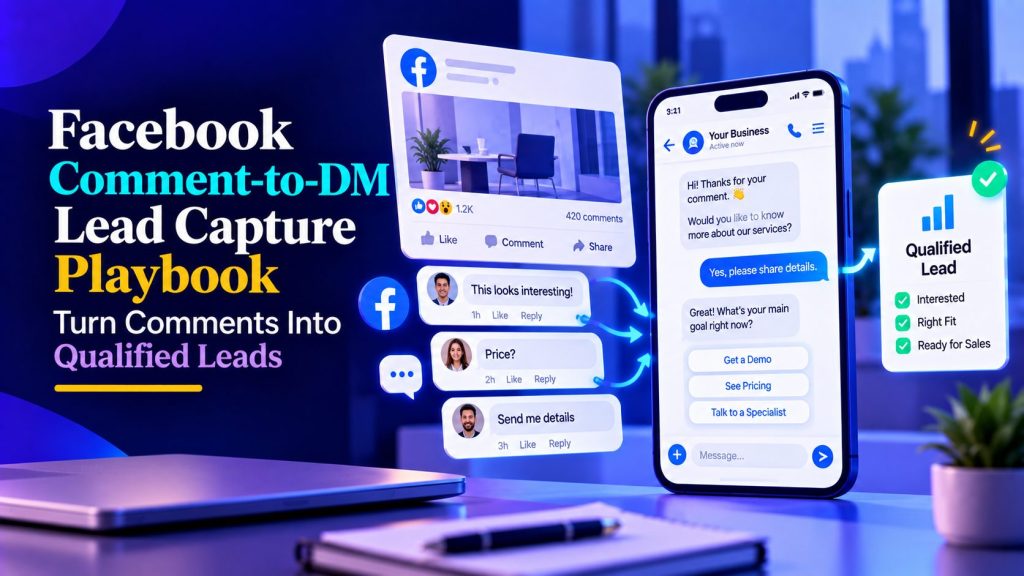
A Facebook post can attract dozens of comments without generating a single qualified lead. People ask about pricing, request product details, or want to know whether an offer is right for them, but many of those conversations never move beyond the comment section.
For businesses running Facebook ads or publishing promotional posts, that creates a missed opportunity. Someone who comments “Info please” has shown interest, but turning that interest into a sales conversation requires more than sending an automatic message.
Facebook comment automation can help businesses respond to relevant comments, start private Messenger conversations when permitted, qualify interested prospects, and guide them toward a booking or sales representative when appropriate.
The challenge is making the conversation useful without overwhelming people with automated messages or violating Meta’s messaging rules.
This playbook explains how to build that workflow, from choosing comment triggers to qualifying leads, routing conversations, and measuring results.
Why Facebook Comments Can Generate Qualified Leads
A comment is a micro-commitment. It costs nothing but proves attention. Here is why that matters:
- Intent is visible. Commenting on an ad is stronger than passively scrolling.
- The conversation moves to a private channel where you can ask qualifying questions without a public audience.
- The follow-up feels natural — they asked, you answered.
- Your ads get social proof. Active comment sections increase trust for everyone else.
Compare that to a landing page form: friction, slow follow-up, and often no reply. The comment path starts the conversation while the ad is still in the person’s head.
The comment is not the lead. The private conversation that follows is.
Before building anything, it helps to understand what an AI agent is in this context. A scripted bot follows a fixed flow; an agent can interpret what “info please” or “how much?” actually means. The AI agent overview explains that difference if you want the foundation first.
How Facebook Comment Automation Works
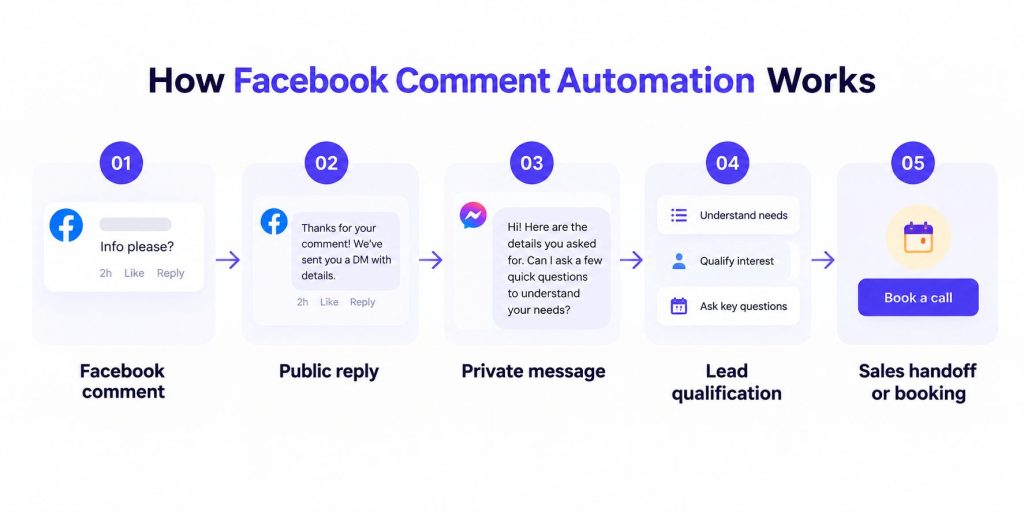
The workflow has five steps:
- Trigger: A relevant keyword or comment on a selected Facebook post or ad.
- Public response: A short reply that acknowledges the comment or answers the question.
- Private reply: When supported and permitted, the automation sends a relevant private message.
- Qualification: If the person engages, the conversation asks a few questions to understand their needs.
- Routing: Interested prospects receive an appropriate next step, such as a booking link, sales handoff, or helpful resource.
Speed matters, especially when someone has just expressed interest in an offer. However, a fast message is only useful when it answers the original question and gives the person a reason to continue. Prioritize relevant responses over sending automated DMs to every commenter.
Botsify’s Facebook Messenger automation handles steps 2 through 5 in one platform, so the comment triggers the conversation without manual copy-paste work.
Businesses that need more flexible conversations can use an AI agent builder to create agents that understand varied questions, qualify interested prospects, and guide conversations toward the appropriate next step.

Step 1: Choose Keywords for Facebook Comment Automation
Effective Facebook comment automation starts with knowing which comments deserve a response and which should not trigger a private message. Here are common comment types and how to handle them:
| Comment type | Example | Recommended action |
|---|---|---|
| Direct buying interest | “Price?” or “Send details” | Relevant private reply when permitted |
| Product question | “Does it work with Shopify?” | Answer publicly or privately as appropriate |
| Booking request | “Can I schedule a call?” | Offer booking assistance |
| General question | “What time do you open?” | Answer publicly |
| Emoji or reaction | “🔥” or “Nice!” | No automatic DM |
| Complaint | “My order never arrived” | Human review or support |
| Spam or abuse | Irrelevant promotional comment | Moderate according to page policy |
Keyword triggers should include the common variants: “info”, “information”, “details”, “price”, “cost”, “how much”. Test your list with real comments before launch.
Review comments from previous posts and ads to identify the words people naturally use when asking about your products or services. Even a small collection of real comments can help you build better trigger rules than relying entirely on generic keywords.
How to Decide Which Facebook Comments Deserve a DM
Not every Facebook comment is an invitation to start a private sales conversation. Someone asking for pricing may be interested in buying, while another person asking a general question might simply want a quick answer under the post.
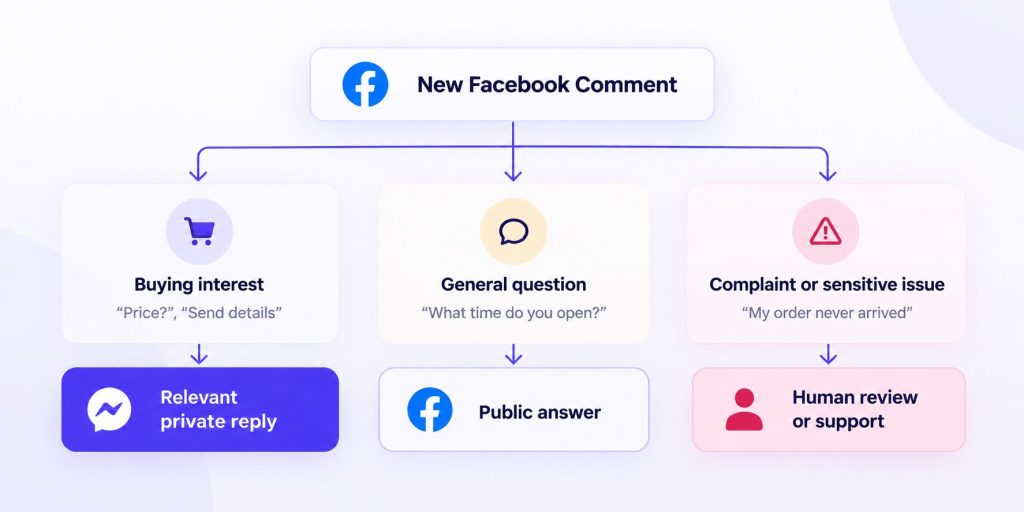
The easiest way to handle this is to separate comments into three categories: buying interest, general questions, and comments that need human attention.
Buying interest: Comments such as “How much?”, “Can I book?”, or “Send me the details” are good candidates for a private reply when the messaging feature and Meta’s rules permit it. The opening message should answer the original question before introducing qualification.
General questions: If someone asks about opening hours, product availability, or a feature already explained in the post, a public answer may be more helpful. Other visitors can benefit from the response, and the business avoids starting unnecessary private conversations.
Complaints and sensitive questions: Negative feedback, billing disputes, account problems, and privacy concerns should not trigger a generic sales message. A human should review these comments and decide whether the issue can be addressed publicly or needs a private support conversation.
For example, if someone comments “Does this work with Shopify?”, the business can answer the compatibility question publicly. If the person then asks about implementation for their store, a private conversation may be useful.
This approach helps keep automation focused on genuine opportunities without treating every comment as a potential lead.
Step 2: Write the public reply
The public reply does one job: acknowledge without spamming.
Good examples:
“Just sent you a message! Check your DMs 👋”
“Sent! Let me know if it doesn’t arrive.”
Keep the public reply short and relevant. If the person asks a question that can be answered publicly, answer it rather than automatically moving every conversation into DMs.
A relevant follow-up question can also keep the public discussion useful. For example, asking “What are you trying to achieve with this?” may reveal what the commenter needs without immediately moving the conversation into Messenger.
Step 3: The opening DM
This message sets the tone. Two rules:
- Be specific. Reference what they asked.
- Give value immediately. Do not open with “Hi, how are you?”
Template:
Agent: “Hey! You asked about [topic] on our post. Here’s the quick answer: [short, useful answer]. Would you like more details about how it works?”
That question gives the person a reason to continue. A reply shows interest, but qualification still depends on their needs, timeline, and whether your offer is a good fit.
Step 3.5: Qualification questions that do not feel like a survey
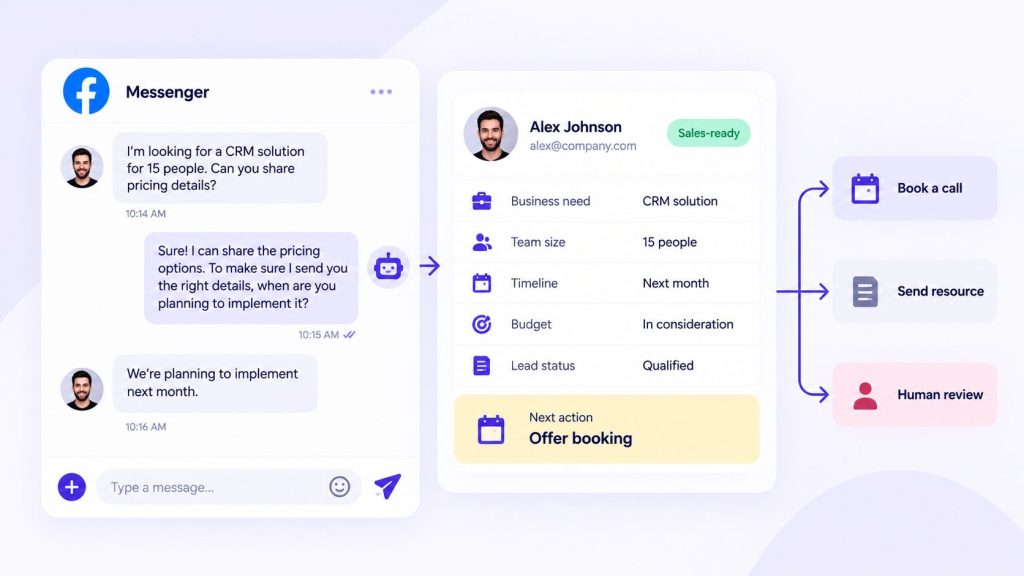
Keep the first exchange focused on the person’s original question. Once they respond, ask qualification questions one at a time and only collect information that helps determine fit, urgency, or the next step.
For a coaching business:
- “What’s your main goal right now?”
- “Have you tried anything already?”
- “What’s your timeline to make this happen?”
For a B2B software company:
- “What’s the biggest bottleneck in your current process?”
- “How many people on your team would use this?”
- “Are you exploring options now, or planning ahead?”
The answers to these three questions are usually enough to decide: hot lead, warm lead, or nurture list. This is the same qualification logic used in the AI lead qualification agent guide, just applied to a different channel.
Turn Facebook Comments Into Qualified Leads
See how Botsify can turn relevant Facebook comments into Messenger conversations that qualify prospects and guide them toward your sales team.
Step 4: Routing and follow-up
After qualification, the conversation splits:
| Lead type | Next step |
|---|---|
| Hot (budget, timeline, decision power) | Send booking link |
| Warm (interested, no timeline) | Send a relevant case study or guide |
| Cold (browsing, vague answers) | Add to nurture list, no push |
| Negative or spam | Do nothing, flag for review |
For B2B campaigns, AI lead scoring can help prioritize prospects using signals such as business fit, urgency, and purchase intent rather than treating every comment as an equally valuable opportunity.
For hot leads, the DM should end with a booking link and a specific ask: “Here are two slots this week, which works better?”
For warm leads, a resource link keeps the relationship alive without pushing. For cold leads, silence is often the best strategy until they come back.
This routing decision can be manual at first, but automation pays for itself quickly. AI agent workflows cover the general patterns for building these routing rules.
Compliance: How to Avoid Getting Restricted
Facebook comment-to-DM automation needs to follow Meta’s messaging rules. A person commenting on your post does not automatically give your business permission to send unlimited promotional messages.
Before launching, check which private-reply features are available through your connected platform, when an initial private reply is permitted, and what conditions must be met before additional messages can be sent.
A few practices help keep the experience relevant and respectful:
- Reply to the original question. If someone asks about pricing, provide the available pricing information instead of immediately sending a generic sales pitch.
- Avoid messaging every commenter. Emoji reactions, unrelated comments, and complaints should not automatically trigger promotional conversations.
- Respect messaging windows and permissions. Follow the current Meta rules for private replies, subsequent messages, and promotional messaging.
- Stop when someone declines. If a person says “no thanks” or asks you to stop, end the automated conversation.
- Offer human assistance. Sensitive questions, complaints, and complex requests should have a clear escalation path.
Review response rates, message delivery issues, negative feedback, and the quality of conversations. If people rarely engage, investigate the triggers and opening messages rather than increasing the number of follow-ups.
Before enabling the workflow, verify the latest requirements in Meta’s Messenger Platform documentation.
Real conversation example
Here is how it plays out for a fitness coaching business:
Comment: “How much?”
Public reply: “Just sent you a DM!”
DM: “Hey! You asked about pricing — it depends on
the program. Quick question: are you looking for 1-on-1 coaching, or a
group program?”Reply: “Group.”
DM: “Perfect. Group starts at $X/month with weekly
live sessions. Want me to send the full program details?”
Two messages later, the prospect has a clear next step. No landing page, no form, no waiting for a sales rep to reply to an email.
Compare that to the alternative: they comment, nobody replies for six hours, they forget your brand exists.
How to Measure Facebook Comment Automation Performance
Track these four numbers weekly:
| Metric | What it tells you |
|---|---|
| Comments per post | Whether your ads are driving engagement |
| DM response rate | Whether your opener is working |
| Qualification completion | Whether your questions are too long |
| Bookings from DMs | Whether the whole funnel converts |
Compare response rates across different posts, audiences, and message variations. If engagement is consistently low, review whether your trigger keywords are too broad, the opening message answers the comment, or the audience actually wants a private conversation.
Common mistakes that kill this funnel
- Sending the same DM to every comment. Personalization matters, even if it is just one tailored sentence.
- Asking five questions in the first message. Nobody answers that.
- Linking to a landing page immediately. It breaks the conversational flow.
- Ignoring comments after business hours. Automated responses can help when your team is unavailable, provided the messages are permitted and relevant.
- Not reviewing transcripts. Every conversation tells you what your audience actually cares about.
Teams often launch this, get good results for two weeks, then stop reviewing conversations and watch performance decay. Put transcript review on the calendar, 15 minutes twice a week is enough.
Scaling beyond one post
Once your Facebook comment automation works on one post, the temptation is to copy the same flow across every campaign. Resist that. Each post attracts a slightly different audience, and the trigger keywords that work for a cold ad audience often miss the mark on a warm, engaged post.
The same principle applies to other social platforms. For example, Instagram DM automation can turn relevant comments and interactions into private conversations, but the triggers and message flow should reflect how people engage on Instagram.
Instead, treat every new post or ad as a new experiment:
- Review the comments from the first 48 hours.
- Add new keyword variants you did not anticipate.
- Check which DM openers got replies and which got silence.
- Adjust the qualification questions if the same objections keep appearing.
Over a quarter, you build a library of tested openers, qualification questions, and follow-up messages. That library is more valuable than any single ad, it is the accumulated voice of your actual market.
Connecting to your CRM and email follow-up
A DM conversation is fragile. People close the app, get distracted, and forget. The follow-up sequence after the conversation is where deals are won or lost.
Follow-up should depend on whether the person has engaged, what they requested, and which communication permissions are available.
If a prospect asks for a resource, send it through an appropriate permitted channel. If they provide an email address and agree to receive follow-up messages, the business can continue the conversation through a relevant email sequence.
For prospects who are ready to book, the priority should be making the booking process easy rather than sending repeated promotional reminders.
The CRM should record the prospect’s original question, qualification details, conversation status, and agreed next step. That way, sales representatives can continue the conversation without asking the same questions again.
Do not assume that a Facebook comment or a single private reply authorizes ongoing Messenger marketing.
The AI agent integration guide explains how to connect conversation data with CRM workflows so sales teams receive the context they need.
From Facebook DMs to Your Sales Pipeline
Discover how Botsify can help qualify Messenger leads and connect the conversation with your sales workflow.
When this playbook does not work
Honest limits matter. This approach underperforms when:
- Your ads attract the wrong audience. A comment from someone who will never buy is not a lead.
- Your offer is weak. No automation fixes a bad offer.
- You outsource to a generic agency script. The responses have to sound like your brand.
- You ignore compliance rules. One spam complaint can restrict the page.
If conversion is low, fix the offer and the opener before blaming the tool.
Channel combinations that compound
Facebook comment automation works even better when combined with other channels. Three combinations worth testing:
1. Facebook comments → retargeting. Engaged audiences may be worth testing in a retargeting campaign, provided the audience setup complies with applicable privacy requirements and Meta’s advertising rules.
2. Facebook comments → email nurture. For leads who engage but do not book, capture the email and add them to a value-based sequence. Commenters who gave you their email are warmer than typical list subscribers.
3. Facebook comments → retargeting. People who engaged but did not convert are a high-intent retargeting audience. A small budget against that segment typically outperforms broad targeting.
The same idea extends to your website. A website AI agent can engage visitors who arrive from Facebook campaigns, answer their questions, and guide qualified prospects toward a booked sales call.
The pattern is the same everywhere: capture intent where it appears, qualify it in conversation, and only then decide what marketing the lead deserves. Teams using multi-channel automation usually start with one channel and expand once the workflow is proven.
Setting up the agent prompt
If you are using an AI agent rather than a fixed flow, the system prompt does most of the work. Here is a starting prompt you can adapt:
You are a lead qualification assistant for [COMPANY] on Facebook Messenger.

Context: visitors comment on our ads. Your job is to have a short, natural conversation to understand what they need.

Rules:
- Respond only to what the commenter actually asked.
- Ask one question at a time, maximum three questions total.
- Never invent pricing, features, or timelines.
- If they ask for a human, send the booking link immediately.
- After three answers, classify the lead: hot / warm / nurture.
- Keep every message under 60 words.
- If someone says "no thanks" or "stop," end the conversation politely.
The prompt is not the hard part. The hard part is reviewing real conversations weekly and adjusting the rules when the same confusion appears three times.
For more advanced workflows, Botsify’s Skillful Agents can combine conversational instructions with connected tools and actions, depending on the skills and integrations configured.
A/B testing your DM opener
The first message is the single biggest lever. Test at least two versions for two weeks before settling:
| Variant | Opener style | When it works |
|---|---|---|
| Direct answer | Give the answer, then ask a question | Price and feature questions |
| Curiosity question | “What’s your biggest challenge with X?” | Warm audiences |
| Resource offer | “Want me to send a quick guide?” | Cold-ish audiences |
| Social proof | “Most teams like yours struggle with X — is that you?” | B2B, mid-funnel |
Compare response rates, qualification completion, and bookings across message variations. Avoid choosing a winner based on a handful of replies. Once you have enough comparable conversations, keep the version that produces better qualified engagement rather than simply the most responses.
Handling high-volume campaigns
When a post goes viral or an ad scales, volume becomes the challenge.
Three things to prepare:
- Platform limits: Check the messaging limits, delivery restrictions, and automation capabilities that apply to your Facebook Page and connected platform before scaling.
- Overflow handling. If conversations spike, have a human on standby for anything the agent flags as sensitive.
- Transcript exports. Set up automatic exports so no conversation is lost if something breaks.
Scaling a broken flow just produces more bad conversations. Scale only after the workflow consistently delivers relevant messages, handles common questions accurately, and routes qualified leads without creating unnecessary human escalations.
Testing before you spend real money
Before putting budget behind a comment-to-DM campaign, run this validation:
- Test with 10 friends or colleagues. Ask them to comment and go through the flow. Watch where they hesitate.
- Run a small ad spend ($100–300) to a narrow audience and watch the first 50 conversations.
- Check the drop-off point. If most people reply to the first DM but abandon at question two, that question is the problem.
- Test on mobile. Most Facebook users are on phones. If the flow breaks on small screens, fix it before scaling.
A common mistake is treating the qualification questions as set-and-forget. Real conversations reveal which questions feel natural and which feel like an interrogation. Iterate weekly until the response rate stabilizes.
Teams that don’t want to build and maintain the workflow internally can explore done-for-you AI agents to get help with agent setup, conversation design, and implementation.
FAQ
Can I run this alongside live chat?
Yes, and many teams do. The agent handles the first response; if the conversation gets complex or the visitor asks for a person, it hands off. Human takeover handles that switch smoothly.
What if someone comments but never opens the DM?
If someone doesn’t open or respond to the private reply, don’t assume they’ve agreed to further messages. Follow the applicable messaging permissions and avoid repeated unsolicited contact.
Should the bot reveal pricing in DM?
If you publish pricing, yes. If it depends on scope, use the question to qualify and defer specifics to the call. Never let the agent guess.
How many comments do I need before optimizing the workflow?
There is no universal minimum. Start reviewing conversations as soon as the workflow is live, but avoid making major changes based on just a few interactions. Look for recurring patterns across comparable posts and audiences before adjusting your triggers or qualification questions.
Final thought
The comment section is not a vanity metric. It is a queue of people who raised their hand.
Most businesses answer with a link and hope. The ones who win respond fast, ask one good question, and make booking effortless.
Facebook comment automation works best when every message has a purpose. The technology handles repetitive responses, but the quality of your questions, qualification rules, and sales handoffs determines whether those conversations become valuable leads.
Ready to Automate Facebook Lead Capture?
Talk to our team about building a Messenger workflow that responds to interested commenters, qualifies leads, and supports sales handoffs.