


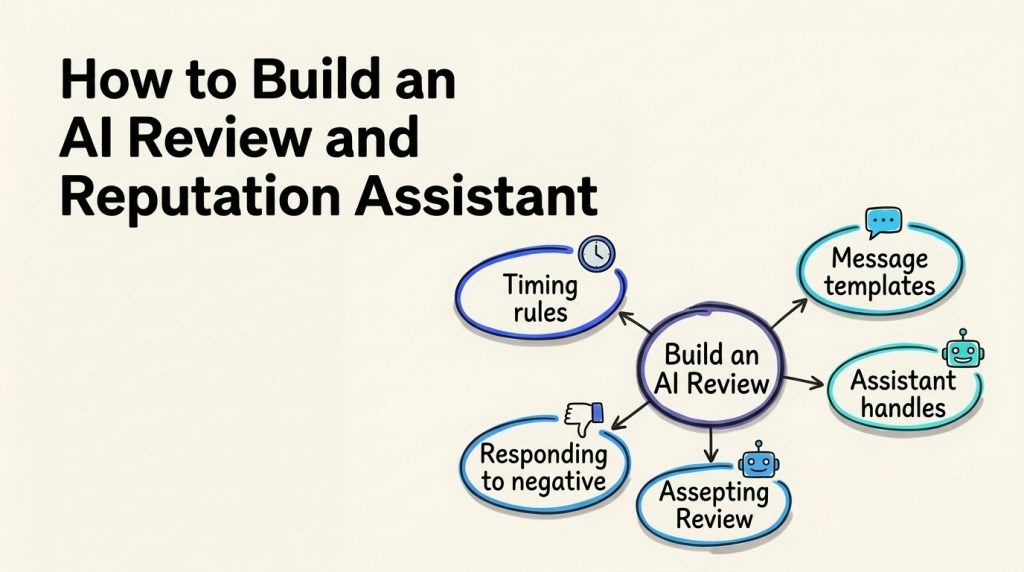
After a completed appointment, repair, delivery, or support interaction, a business may want to invite the customer to share an honest review. When a review arrives, someone also needs to read it, understand the issue, and respond appropriately. These tasks are easy to postpone when a small team is busy.
An AI review management assistant can help coordinate a narrow workflow: recognize a verified completed interaction, send a neutral review invitation through an approved channel, organize incoming feedback, and prepare a reply for a person to review. It should not invent a customer experience, screen out unhappy customers, or publish a sensitive response without the right checks. A clear AI agent workflow makes the trigger, decision, action, and stop condition explicit.
This guide shows how to design those boundaries, write useful messages, handle negative or sensitive reviews, test the workflow, and measure service quality without treating a higher star rating as the only goal.
What an AI review management assistant should do
A review assistant supports the work around customer feedback. It may help a team:
- Send a neutral invitation after a verified service or transaction is complete.
- Stop a reminder when the customer has already responded, opted out, or the request was sent in error.
- Route an incoming review to the correct location or team member.
- Draft a reply from the review text and approved business information.
- Flag complaints or sensitive topics for a human to handle.
- Summarize recurring feedback for the people responsible for service improvements.
Those are workflow patterns, not assumptions about a particular platform integration. Before building, confirm that the tools you use expose the required review or customer event, allow the intended action, and support the relevant consent and access controls. Botsify’s AI Agent Builder describes building agents with knowledge and connected tools, but the exact review-platform connector and permissions must be verified for your own setup.
The assistant is not a review generator. A review must reflect what a real customer experienced and chose to say. The customer writes and submits it. The assistant can make it easier to find the correct review destination, but it should not dictate the rating, prefill a testimonial as if it came from the customer, or post on the customer’s behalf.
Step 1: Define the scope and the human boundary
Start by deciding which parts of the process the assistant may support. “Manage our reputation” is too broad to configure safely. Separate at least two workflows:
- Review invitation: a customer who meets neutral eligibility criteria receives the same clear opportunity to leave honest feedback.
- Review response: an incoming public review is categorized, paired with approved facts, and either answered through an approved low-risk path or routed to a person.
For each workflow, write down what is in scope, what is out of scope, and who owns exceptions. A small business may start with a single location and one review platform. An agency may need a separate policy, account connection, message voice, and approval owner for each client. Do not let one client’s facts or response templates appear in another client’s workflow.
Set the public boundary early. The assistant may suggest language, but a person should approve it while the team is learning whether the classifications and drafts are reliable. Later, the business might allow a narrow class of routine replies to publish automatically after testing, provided the platform supports it and a responsible owner can pause the flow. Complaints, threats, safety issues, legal claims, privacy concerns, billing disputes, and uncertain facts should stay with a person.
Decide who is accountable when a message is wrong or a reply is overdue. The owner should be able to pause the automation, reach the review platform directly, correct the customer record, and route a case to the appropriate manager. The assistant should make status visible rather than silently treating a failed message or missing integration event as success.
Step 2: Set review-request rules before writing copy
The request workflow needs neutral eligibility rules. Base them on an operational event such as a completed service, delivered order, or closed interaction, not on whether the team expects the customer to be happy. The same review invitation should be available to all customers who meet the criteria and have a valid contact path.
Google’s current Business Profile guidance says reviews should reflect genuine experiences. It prohibits incentives for reviews and says businesses must not selectively solicit positive reviews, discourage negative reviews, pressure people to post, or ask for specific wording. Its tips for getting more reviews recommend a review link or QR code and concise, conversational replies. Check the current rules for every destination you use because platform requirements differ.
The US Federal Trade Commission’s Consumer Reviews and Testimonials Rule addresses fake or false reviews, incentives conditioned on positive or negative sentiment, certain insider reviews, misleading company-controlled review sites, and review suppression. The FTC’s rule Q&A explains that incentive treatment depends on whether an incentive is tied to sentiment and on disclosure obligations. A platform can set stricter rules than a general legal minimum. For a particular business or jurisdiction, confirm current requirements with qualified counsel.
A compliant workflow should not:
- Send review links only to customers who gave a high survey score or positive private feedback.
- Hide the public review route from customers who reported a problem.
- Offer an incentive in exchange for a Google review. For other platforms, do not condition a benefit on positive or negative sentiment, and verify the platform rules and disclosure requirements first.
- Ask customers to include keywords, staff names, or a requested star rating.
- Write, submit, or alter a review as if the words came from a customer.
- Threaten, pressure, or repeatedly contact someone who declined or opted out.
A private service-recovery survey can be useful, but it must not become a gate that directs satisfied customers to a public review page while diverting dissatisfied customers away from it. If you use both a survey and a public review invitation, preserve the same neutral public route for every eligible customer. Customer reviews can provide useful signals about service strengths and friction; the older overview of how customer reviews benefit a business is a starting point for that broader context.
Step 3: Map the neutral invitation workflow
Draw the sequence before connecting tools. A practical version includes:
| Stage | What the system checks | Safe next step |
|---|---|---|
| Service event | Is the appointment, order, or interaction actually complete? | Continue only on a verified event |
| Eligibility | Is this customer allowed to receive this message under the business’s policy and channel rules? | Apply neutral criteria, not sentiment |
| Contact preference | Is the destination valid, and has the customer opted out? | Use an approved channel or stop |
| Request | Has this invitation already been sent for this interaction? | Send one neutral request and log the result |
| Reminder | Is a reminder permitted and useful, and has the customer responded? | Follow a defined cap or stop |
| Completion | Did the customer submit a review or ask not to be contacted? | Suppress further requests for that interaction |
Do not invent a universal delay such as “three days after every job.” Timing depends on when a customer can reasonably evaluate the service, the nature of the interaction, channel consent, and platform rules. Choose a timing window that fits the business, document the reason, and test it with actual customer journeys. Avoid pressuring people to write a review while they are still on the premises or unable to reflect on the experience.
Use idempotency or a comparable duplicate-prevention method where the connected systems support it. A service event can arrive twice, a record can be edited, or two tools can trigger the same follow-up. Store a stable interaction identifier and the request state so the assistant can determine whether it already acted. If the state is unclear, pause and ask a staff member rather than sending another message automatically.

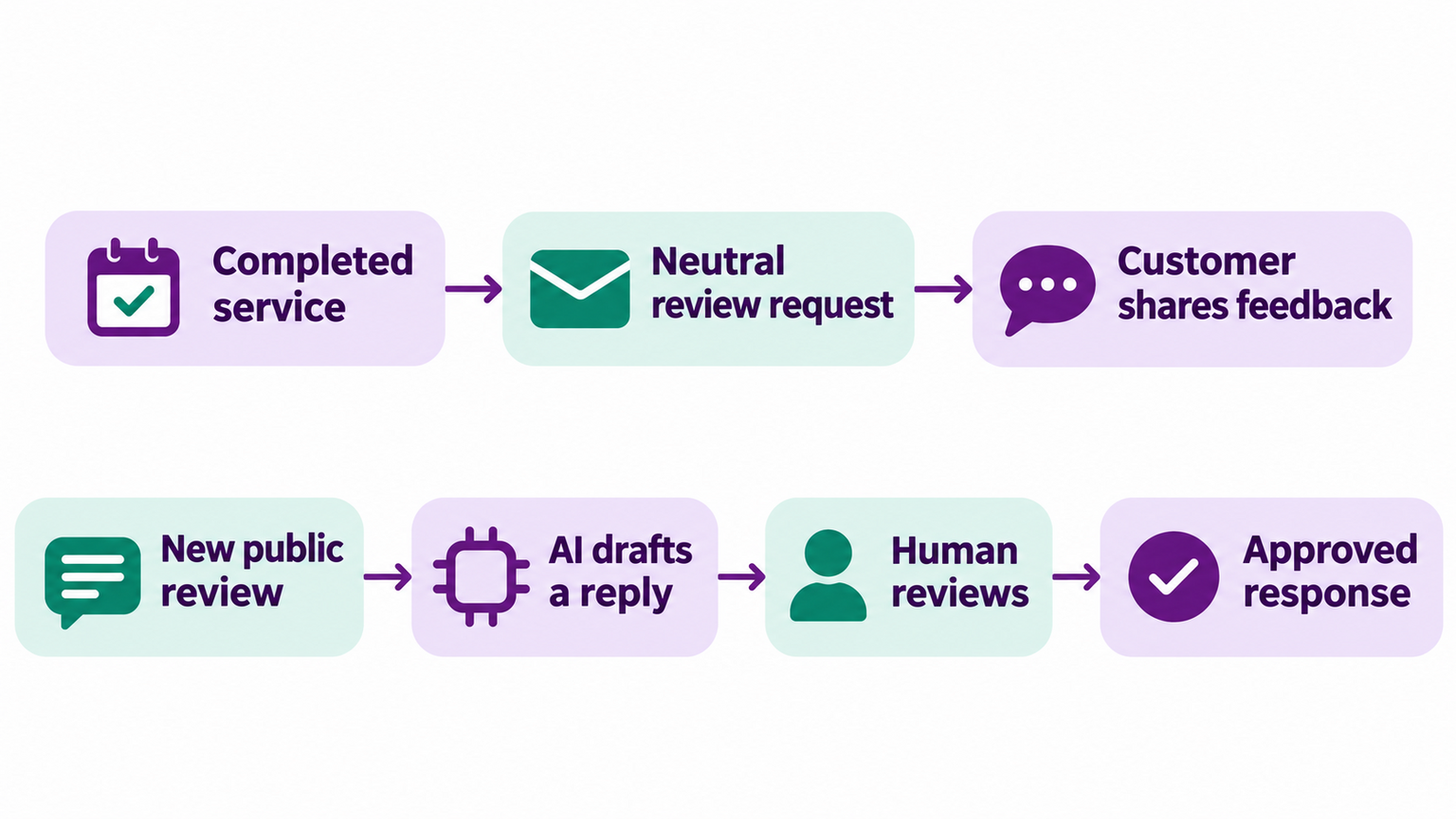
Set a conservative contact limit and suppression rules. Stop when the customer responds, opts out, the address or number is invalid, the request was already sent, or an owner pauses the workflow. A complaint should go to service recovery, but should not silently remove the customer’s access to the same public review invitation offered to other eligible customers. Clear stop conditions for automated conversations help teams prevent repeated nudges from becoming an interruption.
Step 4: Write a neutral request customers can ignore
A good request is short, honest, and optional. It explains which interaction it refers to, gives the customer a convenient route, and leaves the content and rating entirely up to them. It should not suggest a five-star rating or imply that the business expects praise.
Example message:
Thanks for choosing Northside Repair for your service visit. If you would like to share an honest review, you can use this link: [review link]. Your feedback is optional and should reflect your own experience. Reply STOP if you do not want service messages from us.
Replace the example business and link with approved details. Confirm what opt-out language is required on the chosen channel. Do not claim that a request was sent, opened, or completed unless the connected system confirms that state.
If a customer replies to the request with a problem, the assistant should acknowledge the message without arguing or promising a resolution it cannot deliver. It can gather the minimum information needed to route the case and tell the customer what will happen next. It should not ask the person to change a review in exchange for a refund, replacement, or other remedy. A service fix and an honest review are separate matters.
Define a reminder policy rather than adding reminders by default. If a reminder is permitted by the destination and contact rules, keep it limited and stop after the customer’s response, refusal, or opt-out. Do not treat silence as permission for an unlimited sequence. Your workflow specification should make the request purpose, maximum attempts, timing conditions, and suppression behavior visible to the person who owns the system.
Build a trustworthy review workflow with Botsify
Map neutral requests, reply drafts, approval, and escalation.
Step 5: Draft public replies from verified facts
Public responses represent the business. A well-written draft can save time, but a fluent sentence is not necessarily an accurate or appropriate one. Give the assistant only the review, relevant approved business information, and context the user is authorized to see. Do not have it infer a customer’s identity, order history, medical details, payment status, or motive from a public profile name.
A useful reply draft usually has three parts:
- A brief acknowledgment of the point the reviewer actually raised.
- A factual response or a clear statement that the business is checking.
- A private route for follow-up when details are needed, without asking the reviewer to remove the public review.
For example, if a review says a delivery arrived late, a safe draft could acknowledge the delay and invite the customer to contact the business with an order reference. It should not claim “we have refunded you” unless the refund is confirmed. It should not disclose order information in public or blame a named employee based only on an unverified account.
Avoid copy that feels copied across every review. Use the review’s specific, non-sensitive details when relevant, vary a small amount of phrasing, and keep the business voice conversational. Do not turn the reply into an advertisement or use it to offer a promotion. Google’s reply guidance recommends concise, professional responses that address what the reviewer said.
Until the team has evaluated the draft quality, keep the assistant in draft-only mode. Assign an approver for each location, show the reviewer the draft and the facts used, and make edits easy to return as examples for future prompt and knowledge improvements. A human-in-the-loop review pattern can help structure risk-based approval even though public review replies have their own requirements.
Step 6: Route difficult reviews to the right person
Use explicit escalation categories. Do not rely on a vague instruction such as “send anything serious to a human.” The assistant should route a review when it mentions:
- A threat, injury, safety issue, discrimination, harassment, or alleged misconduct.
- A legal demand, regulator, police report, or request to delete evidence.
- A refund, charge, contract, warranty, or service guarantee that needs account access.
- Personal, health, financial, or other sensitive information.
- A named employee complaint or a disputed account of what happened.
- A request to remove, change, or conceal a review.
- A platform-policy concern, unclear identity, or facts the assistant cannot verify.
The handoff should include the platform, location, review URL or ID, relevant review text, detected reason, draft response if one exists, and the next owner. Limit personal information to what the receiving staff member needs. Tell the customer what the team can do next without promising a result before the facts are checked. Clear AI human handoff rules help make escalation consistent and preserve the context a person needs.
Separate internal sentiment labels from public replies. A label such as “service complaint” can help route a case, but it is not a diagnosis of the customer’s character, intent, or credibility. Let a person investigate disputed facts. If the review appears to violate a platform’s rules, use the platform’s official reporting process and do not retaliate or pressure the author.
Step 7: Verify knowledge, permissions, and platform access
List every piece of information the workflow uses and its source:
| Information | Possible source | Check before use |
|---|---|---|
| Completed service event | Booking, order, or help-desk system | Is the event final and linked to the correct customer? |
| Contact preference | CRM or messaging platform | Is consent current, and how is opt-out honored? |
| Review destination | Business profile or review platform | Does the link point to the correct location? |
| Approved business facts | Service policy, FAQ, or knowledge base | Who owns updates and removes outdated claims? |
| Incoming review | Platform API or approved notification | Is access permitted and scoped to this business? |
| Reply status | Review platform or staff queue | Can the system confirm draft, approval, post, and failure states? |
Platform access is a technical and contractual question. Verify the current API, connector, account role, supported actions, rate limits, and terms before promising that the assistant can read reviews or publish replies. Do not scrape or circumvent access controls. If a platform only supports a notification or manual handoff, design the workflow around that limitation.
Use a current, approved source for business hours, service areas, return or refund policy, and contact routes. Keep the reply system from inventing a remedy based on a stale help article. Assign a content owner and a review date to policy material. A maintained customer support knowledge base gives staff a consistent place to check approved facts.
Set the least access needed for the workflow. Decide who can see review text, customer contact details, internal notes, and draft replies. Define retention and deletion rules for message content and review snapshots. Review platform and messaging terms alongside applicable privacy requirements; avoid copying sensitive details into broad team channels or unrelated customer records. Business-specific access and oversight belong in the wider AI agent governance plan.
Step 8: Test before connecting the workflow to customers
Test the request and response paths separately using accounts and sample data approved by the business. Include cases where the data is incomplete, duplicated, delayed, or inconsistent. A checklist can include:
| Scenario | Expected behavior |
|---|---|
| Completed service event arrives once | Send the neutral request to an eligible customer |
| Event arrives twice or changes later | Prevent duplicate messages and verify current state |
| Customer has opted out | Suppress the request and record the stop reason |
| Customer replies with a complaint | Route to service recovery without removing the neutral review route based on sentiment |
| Review contains a threat or sensitive information | Hold the public reply and escalate promptly |
| Review includes a specific factual question | Draft only from approved, current information |
| Location or customer identity is ambiguous | Pause and ask a person to resolve the record |
| Platform connection fails | Do not claim the request or reply was completed |
| Staff edits a draft | Preserve the edit for quality review without auto-publishing it |
| Customer asks to remove a review for a benefit | Decline any exchange and escalate the request |
Ask customer-facing staff to review whether the draft accurately acknowledges the customer’s point and gives a useful next step. Confirm that it does not expose private information, promise a refund, admit an unverified cause, ask for a particular rating, or pressure the reviewer. Check every link, location, opt-out route, and handoff queue.
Test the full workflow after changes to the prompt, source content, platform permissions, message channel, or service-event mapping. Start in a limited draft-only period with a named reviewer and a pause control. Review errors and update the source or route before increasing scope. A repeatable AI agent testing guide and an AI agent implementation checklist can help organize the release review.
Step 9: Measure service quality, not just star ratings
A review workflow should help a business respond reliably and learn from customer feedback. Choose measures that reflect that purpose:
- Share of eligible service events that receive the correct neutral invitation.
- Duplicate, misdirected, or failed request rate.
- Time from a new review to triage and first human response.
- Share of AI reply drafts accepted, edited, rejected, or escalated.
- Accuracy of location, service, and policy facts in approved replies.
- Escalation rate and time to resolve the underlying customer issue.
- Opt-outs, complaints about contact frequency, and platform policy incidents.
- Recurring service problems identified and corrected by the business.
Review counts and average ratings may help describe what is happening, but do not optimize the assistant by filtering out unhappy customers or rewarding only positive feedback. A short-term increase in reviews does not prove the workflow improved service or caused a change in ratings. Track both customer experience and operational reliability. Customer support metrics beyond ticket deflection offers a wider approach to measuring service quality alongside volume.
Review a sample of drafts and escalations regularly. Look for unsupported details, repetitive wording, wrong-location references, inappropriate apologies, missed policy triggers, or customer messages that receive no owner. Compare the assistant’s draft with the final human reply to identify where the prompt, policy source, or escalation boundary needs work. If you expand to another location or platform, confirm that its rules and data flow match the tested workflow first.
Common mistakes to avoid
- Asking only customers expected to be happy. Use neutral eligibility criteria and the same public review route.
- Offering a reward for a particular rating. Do not condition a benefit on positive or negative sentiment; check platform-specific incentive rules.
- Using a private survey to hide negative feedback. Service recovery should not block customers from an honest public review.
- Letting the model invent a fix. Acknowledge the issue and route it when policy or account facts are uncertain.
- Publishing every AI draft automatically. Start with human approval and only narrow automation after evidence and platform permission.
- Replying publicly with account details. Move sensitive information into a private, approved channel.
- Sending reminders without a stop rule. Suppress repeats after response, refusal, opt-out, or an owner pause.
- Assuming every platform supports the same API. Verify current access and terms for each destination.
- Tracking only review volume or star average. Measure accuracy, response quality, issue resolution, and unwanted contact too.
Frequently asked questions
Can an AI assistant write a review for a customer?
No. The customer should write and submit their own account of a genuine experience. The assistant can provide a neutral invitation and help the business manage its response workflow, but it should not create a testimonial and present it as the customer’s words.
Should the assistant ask only satisfied customers for a review?
No. Do not use a survey score or predicted sentiment to decide who gets the public review link. Use neutral criteria such as a verified completed interaction and the customer’s contact preferences. Google’s current policy specifically says not to selectively solicit positive reviews.
Can the assistant automatically reply to every review?
Start by drafting replies for human approval. Consider automatic replies only for a narrow, low-risk category after testing, policy review, confirmed platform access, and a reliable pause path. Escalate sensitive topics and uncertain facts to a person.
How many review reminders should it send?
There is no universal cadence that fits every business, platform, or channel. Set a conservative cap that respects the customer’s preferences and applicable rules. Stop after a response, opt-out, or clear refusal, and do not send repeated reminders simply because a review has not appeared.
What should happen when a review is false or violates platform rules?
Do not argue publicly or threaten the reviewer. Preserve the relevant record, route the case to an authorized person, and use the platform’s official reporting process if the review appears to breach its policy. Handle the customer relationship separately from the platform complaint.
What should we measure first?
Start with whether the right customers receive a neutral request, whether replies are accurate and approved on time, and whether reported issues reach an owner. Add rating or review-volume trends as context rather than treating them as the sole success measure.
Build a review workflow customers can trust
An AI review management assistant is most useful when it makes follow-up reliable while leaving the customer’s opinion and the business’s accountability intact. Verify the service event, use one neutral request path for eligible customers, draft replies from approved facts, and send difficult cases to a person. Review the workflow’s accuracy, customer impact, and platform fit before expanding it.
Design an AI review assistant with Botsify
Turn your response rules into a bounded agent workflow.