


An AI retention agent can help a subscription business notice when a customer may need support, find the relevant account context, and prepare or send an appropriate next step. It cannot guarantee that a customer will stay. The useful goal is to make relevant signals easier to review and respond to, while keeping customer choice and human judgment intact.
This guide walks through a responsible way to build one. You will choose a retention moment, verify the data and permissions, define who is eligible for outreach, write useful interventions, set clear handoffs, and measure whether the program helps. The examples apply to software, memberships, subscriptions, and other recurring services, but your own customer data and policies should determine the rules.
What an AI retention agent should do
A retention agent is a workflow that connects a meaningful customer signal to a useful service action. It might identify a failed payment, an unresolved support problem, a gap during onboarding, a drop in use of a feature tied to the customer’s goal, or a renewal question. Depending on the system and permissions, it could summarize the context, recommend a response, draft an outreach message, or send an approved communication.
Those are different levels of autonomy. A system that prepares a summary for a customer success manager is not the same as one that independently contacts a customer or changes a subscription. Start with the least authority that can solve the defined problem. Expand only after the business has reviewed how it behaves.
An agent should not treat a low activity score as proof that a customer intends to cancel. People use products differently, seasonal patterns are common, and the underlying data may be incomplete. Treat a signal as a reason to investigate or offer help, not as a diagnosis of a customer’s intentions.
If the problem is mainly repetitive inbound questions, start with an AI customer support agent and its escalation path. A retention workflow adds post-purchase context and proactive service to that foundation. This is different from a proactive customer support strategy to reduce churn, which may not involve an AI agent at all.
Step 1: Choose one customer moment to improve
Do not begin with a broad instruction such as “predict churn.” Choose one point in the customer journey where the business can offer a concrete, useful response. A narrow moment makes it easier to identify the required data, decide what the agent may do, and evaluate the result.
Possible starting moments include:
| Customer moment | Useful response to explore | Important boundary |
|---|---|---|
| Payment attempt did not complete | Explain how to update billing or reach support | Use a payment status, not sensitive payment credentials |
| A setup task remains unfinished | Offer the next relevant setup step | Do not assume the customer is dissatisfied |
| A support issue remains unresolved | Summarize the case and route it to an owner | Do not send a promotional save offer before fixing the issue |
| A customer asks about cancellation | Provide the requested account or cancellation path | Do not obstruct or hide cancellation choices |
| A renewal question is raised | Provide current plan information or route a contract question | Escalate negotiation or exceptions to an authorized person |
| A key workflow appears stalled | Offer relevant help based on the customer’s stated goal | Verify that the usage event is accurate and meaningful |
Talk with the teams that handle the moment today. Ask what information they need to respond, what they can solve immediately, and what must go to another team. Look at examples of both retained and canceled customers, but avoid treating a few anecdotes as a universal pattern.
Write a problem statement before you configure anything:
When [verified event] occurs for [eligible customer group], the agent will [specific support action] using [approved source]. If [defined boundary] applies, it will [handoff or stop]. We will evaluate [customer and business outcomes] against [comparison or baseline].
A strong first use case has an identifiable trigger, an available owner, and a response that can genuinely help. If the business has no way to resolve the issue behind the signal, automated outreach may only make the customer more frustrated.
Step 2: Map the signal and check the data
List each data source the workflow would use. Common sources include subscription status, product events, support case state, onboarding progress, customer preferences, and CRM notes. Use only the information needed for the specific intervention. A payment-failure notification generally needs the failure status and an approved account link, not full card details.
For every field, record its source, business owner, update timing, and known limitations. Check that the same customer or account can be matched consistently across systems. If an event arrives late, a support case is mislabeled, or an account has multiple users, the agent may act on the wrong context.
| Data item | Source and owner | Questions to resolve before use |
|---|---|---|
| Subscription state | Billing or subscription system | Does it distinguish trial, active, paused, past due, and canceled? |
| Product activity | Product analytics | Is the event tied to a meaningful customer outcome or merely a login? |
| Support history | Help desk | Can the workflow tell open cases from resolved ones? |
| Customer preferences | CRM or communication platform | Are opt-outs and channel preferences current and honored? |
| Account context | CRM or customer success workspace | Are notes factual, current, and appropriate to expose to the agent? |
Define what happens when a source is unavailable or contradictory. The safe response may be to do nothing and flag the record for review. Make stale data visible to the person responsible rather than allowing a confident but incorrect message to go out.
Review access with the client’s security and privacy owners. Document which systems the agent can read or change, how credentials are managed, what conversation data is retained, and who can review it. Follow the client’s policies and applicable requirements for customer communications and data use. A data retention guide for AI conversations can help start the discussion about what records the business needs and for how long.
Step 3: Define eligibility before assigning risk
Before deciding which account looks “at risk,” define who is eligible for this workflow at all. Eligibility prevents a signal from triggering the wrong intervention.
For example, a customer may be ineligible for proactive retention outreach if they have opted out, already canceled, are in an active complaint or billing dispute, have a high-priority unresolved support case, or received a recent message about the same issue. Your client should choose the specific exclusions that fit its policies and service model.
Then document the signal logic in language the customer success team can inspect. Begin with understandable rules based on the business’s own historical patterns. Do not copy a generic percentage decline or risk score from another company and present it as predictive. If the organization has enough clean historical data, it can analyze that data to develop and validate a model; it should still check for false positives, segment differences, and changes in the product or customer base.
A practical signal register can include:
| Signal | Why it might matter | Data confidence | Who reviews it | Allowed next step |
|---|---|---|---|---|
| Setup step incomplete | Customer may be blocked before first value | Confirm event meaning and timing | Onboarding owner | Offer the relevant setup resource |
| Repeated unresolved issue | Service problem may be lowering confidence | Confirm current case state | Support lead | Escalate the open case |
| Billing status changed | Customer may need help completing payment | Use status only; verify account match | Billing owner | Send approved billing instructions |
| Key workflow stopped | Customer may need help using a feature | Check segment and expected usage pattern | Customer success | Draft a contextual check-in |
Treat the register as a hypothesis to evaluate. Update it when the team learns that a signal is too broad, unreliable, or not connected to a helpful action.
Turn signals into a review policy without false precision
If the business has enough trustworthy history, compare patterns for customers who renewed, canceled, paused, or changed plans. Keep like customer groups together where possible. A usage pattern that is normal for a seasonal membership may mean something different for a daily-use software product. Do not combine unlike segments just to produce one simple number.
Start with a small set of understandable rules. For each rule, document the event, lookback period, excluded cases, source owner, and why the team thinks it may indicate a need for help. Test the rule on past examples. Ask customer success staff to review cases it would have flagged and cases it would have missed. This review can expose data errors and signals that are not actionable.
Keep the risk assessment separate from the decision to contact someone. A high-priority support issue may need a staff alert but no automated customer message. A failed payment may need a service notice regardless of an account score. A weak usage signal may justify no action until another relevant event occurs. In other words, the score helps organize attention; eligibility and intervention rules determine what happens next.
When data is sparse, use transparent operational rules and human review rather than claiming that a predictive model knows who will leave. Revisit thresholds after the team has seen real examples and recorded whether the intervention was appropriate. Avoid changing the score simply to increase the number of accounts contacted.
Step 4: Design the agent workflow and authority
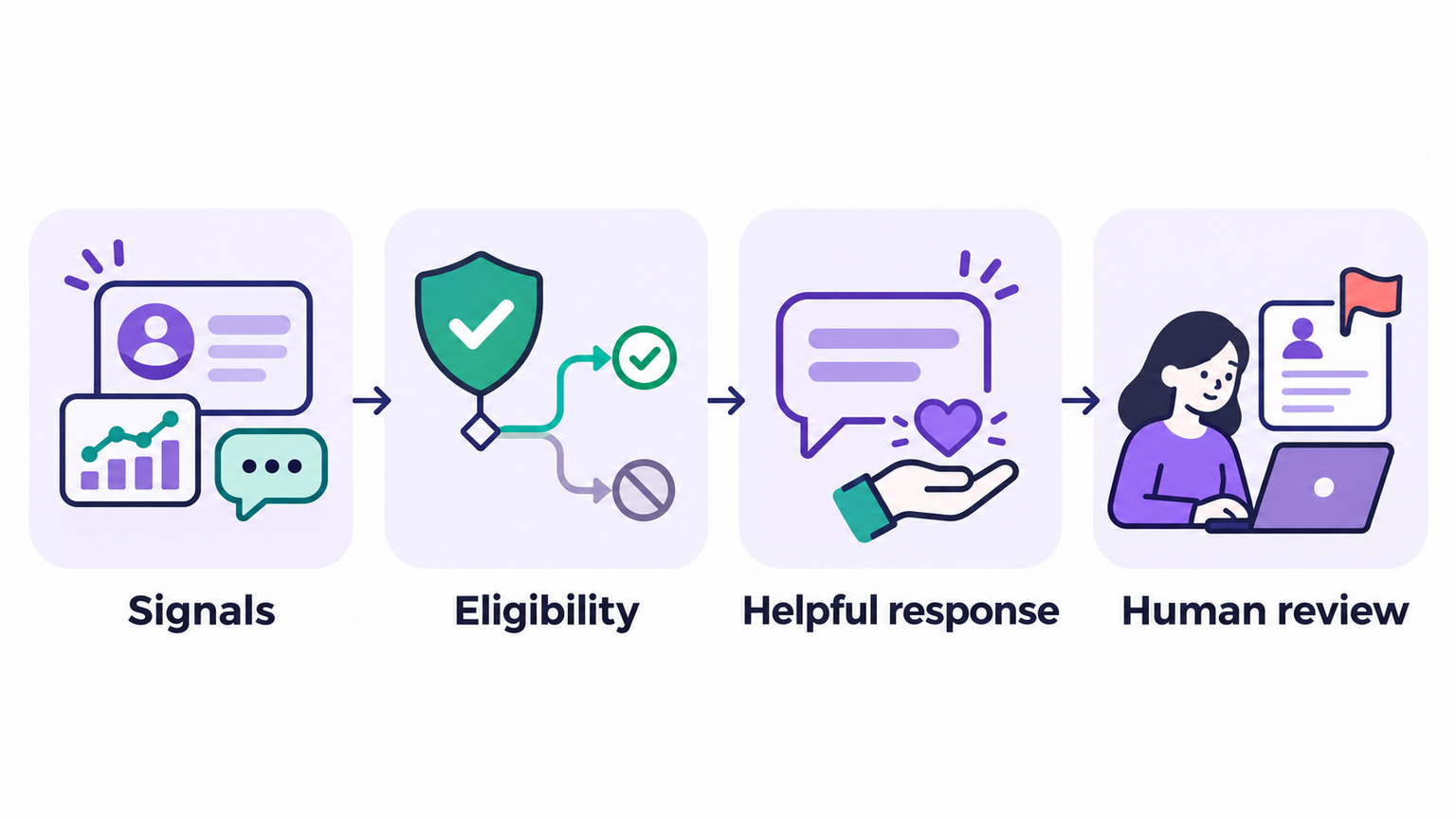
A retention workflow can be expressed as a sequence:
- Receive an approved event or scheduled review request.
- Confirm account identity, eligibility, preferences, and current status.
- Retrieve only the context required for this intervention.
- Select an allowed support action, or prepare a recommendation for a person.
- Send or queue the message according to the approved autonomy level.
- Record the action and route exceptions to an owner.
- Review the outcome and update the workflow when evidence supports a change.
For each step, specify what happens if the agent cannot verify a required fact. For example: if the account status is unclear, it should not send an “update your payment” message; it can ask a human to confirm the account first.
Set explicit restrictions. The agent should not invent product capabilities, promise an outcome, change a subscription, issue a refund, negotiate a custom price, or disclose internal account notes unless the client has specifically approved that behavior and the platform supports the required controls. Approval requirements should be real and tested, not only written in a prompt.
Choose the initial level of autonomy deliberately:
| Level | Agent action | Review approach |
|---|---|---|
| Organize | Summarize a signal and relevant context for staff | Staff decide whether to act |
| Draft | Prepare a message or response for a named reviewer | Reviewer approves or edits before sending |
| Send a narrow service message | Send an approved, factual message for an eligible case | Monitor exceptions and customer feedback |
| Change an account or commercial term | Update billing, plan, credit, or contract state | Keep with an authorized person unless a specific controlled process is approved |
Move to a more autonomous level only when the previous level performs as intended and the client has reviewed the operational risk. A vendor’s ability to connect an integration does not automatically mean the agent should use it without approval.
Use a workflow map to show triggers, decisions, actions, and stops. The AI agent workflow design guide can help teams represent these paths clearly. Keep a record of the rule version and who approved changes; a practical AI agent audit trail guide can help determine which events leaders may need to review.

Step 5: Write outreach that helps, not pressures
A retention message should make the next useful step clear without implying that the customer is being watched or judged. Refer to the customer’s stated goal, a service request they made, or an account event they would reasonably expect the business to use. Avoid language that exposes hidden behavioral tracking, such as “we noticed you were inactive,” unless the customer has been told about that use and the business has approved it.
A simple structure is:
- State why the business is contacting the customer in plain language.
- Offer one relevant piece of help or a clear next step.
- Make it easy to reply, reach a person, manage preferences, or take the requested account action.
Example for a setup issue:
Hi [Name], it looks like [setup step] may still need attention. If you want, this guide explains [next step]. Reply here and our team can help, or open your account settings to manage your subscription.
Example for an unresolved support issue:
Hi [Name], we are following up on support request [reference]. The team is reviewing [issue summary]. You can reply with any detail that would help, or contact [support route] if you need a person now.
These are templates, not messages to send without review. The client should approve the tone, information, channel, and calls to action. Keep the message relevant to the issue; do not attach a discount or upsell simply because a customer was flagged.
Set communication rules with the client. Check channel preferences and opt-outs, avoid duplicate messages from multiple workflows, and decide how the system handles quiet hours and frequency limits. Make cancellation and account-management paths easy to find. Retention should come from resolving a problem or reinforcing value, not from making it difficult to leave.
Step 6: Set human handoff and offer controls
Some retention work needs a person. Escalate when the customer asks to cancel, raises a complaint, disputes a charge, describes a serious service problem, asks for a commitment outside published terms, or when the agent cannot confidently find an approved answer. The client’s support and customer success teams should decide the actual rules.
A handoff should include the minimum context needed to continue: account identifier, relevant event, customer message, actions already taken, and the reason for escalation. Do not include unrelated profile data just because it is available. Confirm that the receiving team owns the queue and knows how quickly it should be reviewed.
If the business allows the agent to mention alternatives such as a pause or downgrade, give it current approved wording and clear eligibility requirements. Discounts, refunds, billing changes, and contractual promises should remain with authorized staff unless the client has designed and approved a narrower automated process. Human escalation rules are covered in the AI agent handoff guide.
Step 7: Test with historical and live-safe scenarios
Before launching, test the workflow against realistic cases. Use sanitized or otherwise approved examples. Include cases where the signal is true, false, delayed, duplicated, and contradicted by another source. Test customers who opted out, have already canceled, are in an open dispute, or recently received a message.
| Scenario | Expected behavior |
|---|---|
| A relevant event arrives for an eligible account | Retrieve approved context and prepare the agreed response |
| Event belongs to a canceled account | Stop or follow the client’s defined closeout process |
| Customer has opted out of the channel | Do not send through that channel |
| Support case remains unresolved | Route to the support owner rather than offer a generic discount |
| Billing source is unavailable | Do not claim a payment problem; queue for review |
| Customer asks to cancel | Provide the approved cancellation path or human support without obstruction |
| Signal is duplicated | Apply deduplication or frequency rules before any outreach |
Review the message for accuracy, tone, privacy, and usefulness. Retest after changing the data mapping, eligibility logic, instructions, offer rules, or integration. A comprehensive AI agent testing guide can help turn examples into repeatable tests. The broader AI agent implementation checklist can help organize readiness and launch tasks.
Step 8: Pilot with a fair measurement plan
A pilot should answer a specific question, such as whether a new payment-help message reduces avoidable support effort or whether an onboarding intervention helps more customers complete a setup task. Avoid a vague goal like “improve retention.” Choose one customer group and one intervention that can be evaluated without changing several other parts of the customer experience at once.
Define the comparison before sending messages. When the business can do so fairly and operationally, use a holdout or comparison group that does not receive the new intervention. If that is not possible, compare with a relevant baseline and clearly label the result as observational. Account for differences in customer tenure, plan, season, acquisition source, and product changes. A simple before-and-after comparison can be misleading when the mix of customers changes.
Review both customer experience and business outcomes. Useful measures may include:
- Whether the workflow correctly identified eligible cases
- Message delivery, reply, and opt-out patterns
- Resolution of the underlying issue
- Human handoff volume and time to response
- Renewals or cancellations for the defined cohort
- Discounts, credits, or support time used
- Complaints or unintended contacts
Separate early indicators from retention outcomes. A customer replying to a message does not prove the agent prevented churn. A renewal does not necessarily mean the outreach caused it. Report what was observed, how the comparison was made, and what remains uncertain.
Track the metric definitions consistently. Clarify whether churn means a customer account canceled, recurring revenue decreased, or a subscription was not renewed. For revenue-based measures, document how upgrades, downgrades, pauses, and multiple subscriptions are counted. Customer success and finance should agree on the definitions before the pilot report is built.
An AI analytics guide can help teams think through measurement and reporting. Do not claim a retention lift unless the design and evidence support that conclusion.
Build a customer retention workflow with Botsify
Discuss helpful interventions, handoffs, and review controls with our team.
Step 9: Operate, review, and improve the workflow
Retention signals change as products, customer needs, and billing processes change. Assign owners for the event definitions, approved information, escalation queue, message templates, and review of outcomes. Decide how a customer-facing change gets approved and who can pause the workflow if the data or messages are wrong.
Review exceptions, not just successful sends. Check false alerts, duplicate contacts, stale source material, handoffs that were not answered, and customer requests that the agent could not handle. Use the evidence to refine eligibility or offer a different service response. Do not broaden outreach simply to increase message volume.
Keep an appropriate record of the rule version, relevant inputs, action, approval, and outcome. Limit access to the records and set retention according to the business’s needs and policies. The CSV-linked guide on what AI agent conversations to keep can help teams frame that review. An AI retention agent implementation checklist should include the review cadence and conditions for pausing or retiring the workflow.
Common mistakes to avoid
- Treating a signal as a churn prediction. Usage changes and support events are clues, not proof of intent.
- Automating before fixing the service problem. An agent cannot compensate for a product gap or an unresolved case.
- Sending messages that reveal unexpected tracking. Make the purpose and data use understandable and appropriate.
- Contacting every flagged account. Eligibility, preferences, recency, and duplicate checks matter.
- Offering discounts by default. Resolve the customer need first and keep commercial authority with approved staff.
- Measuring replies as saved revenue. A response is an engagement measure, not proof of retention impact.
- Ignoring customer choice. Honor opt-outs, cancellation requests, and requests for human support.
- Leaving the workflow without an owner. Source changes, billing exceptions, and escalations need accountable people.
Frequently asked questions
Can an AI retention agent predict who will cancel?
It can help organize signals associated with customer risk, but a signal or score should not be presented as certainty. Validate the signal against your own data and use it to offer appropriate support, not to label a customer as intending to leave.
Should the agent send messages automatically?
That depends on the use case, the quality of the data, the customer’s communication preferences, and the client’s risk tolerance. A safer starting point may be a draft or recommendation for a person to review. If the client later allows automatic messages, test eligibility, frequency, opt-outs, and handoff behavior first.
Should we offer a discount to at-risk customers?
Not automatically. First determine whether the customer has an unresolved problem, needs help using the service, or has requested a billing option. Discounts require business rules and an authorized decision-maker; they do not fix a product or support issue.
What data should a retention agent use?
Use the minimum approved information needed for the defined intervention. This may include account status, a relevant product event, a support case state, or communication preferences. Confirm data ownership, access, quality, and retention with the client’s responsible teams.
How do we know whether the agent improved retention?
Define the cohort, intervention, outcome, and comparison before launch. Where practical, use a holdout or comparison group. Report customer experience and retention measures separately, and avoid attributing a change to the agent when other factors may explain it.
Start with useful support, then measure what changes
An AI retention agent is most useful when it helps a business respond to a real customer need at the right point in the subscription journey. Start with one verified signal, a helpful action, and a clear human fallback. Respect customer preferences, keep offers controlled, and measure the result carefully before expanding.
Plan a permission-aware retention agent pilot with Botsify
Review your subscription workflow, data signals, and customer safeguards.