


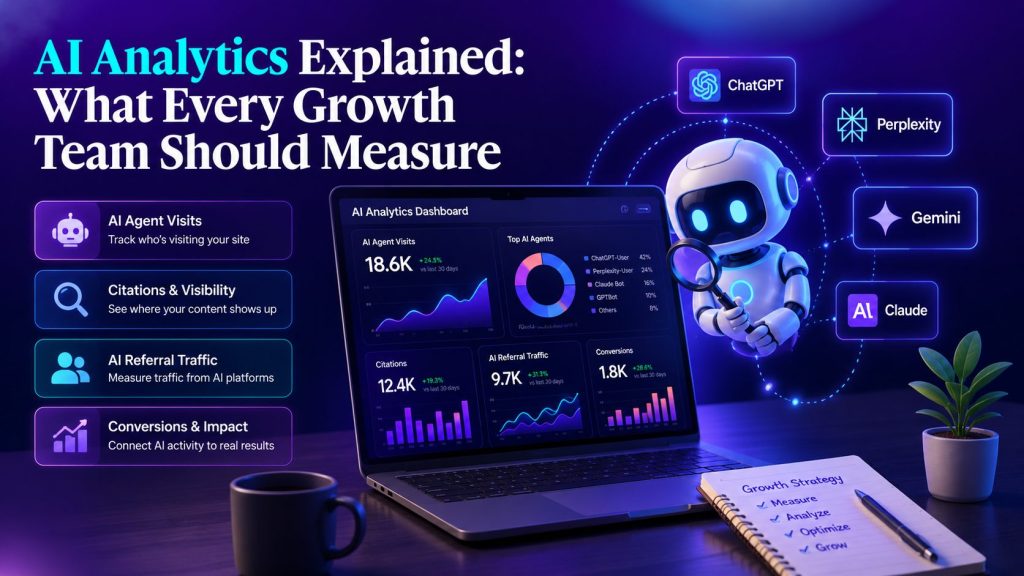
More of your audience now finds you through AI assistants, AI search engines and coding agents rather than a classic list of blue links. Most of that activity never reaches your standard analytics.
GA4 depends on a JavaScript tag running in the browser to send events. Many bots and AI agents do not execute that script, so their visits are missing from your dashboards entirely.
That gap has created a new category of measurement. AI analytics is the practice of measuring how AI agents, crawlers, coding assistants and AI search engines interact with your site across the whole customer journey, using data you can verify rather than estimates.
This guide is written for technical growth marketers, SEO leaders, DevRel, product teams and B2B SaaS companies adapting to the agentic web, along with the teams and agencies now building and deploying AI agents of their own.
It explains how AI analytics differs from both traditional web analytics and AI visibility tools, what to measure and why first-party data is the reliable foundation.
Key takeaways
- AI analytics is a new category: first-party measurement of how real AI agents behave on your site, not a guess at how they might.
- Traditional analytics like GA4 misses most AI agent traffic, because agents rarely run the browser tag that GA4 depends on.
- The core things to measure are AI agent visits, crawler activity, citations, answer visibility, referral traffic from AI apps and downstream conversions.
- Prompt-simulation tools estimate potential visibility. First-party analytics reads real server and CDN logs to measure actual behavior.
- AI visibility and AI analytics are complementary. Visibility shows where you might appear and analytics shows what actually happened, so together they let you treat AI as a measurable acquisition channel.
Portable AI Agents In Seconds, Use Everywhere
Prompt, Test, and Deploy AI Agents Across Social Platforms and LLMs. Automate Everything.
What AI analytics is, and why it is a new category
Traditional web analytics answers one question well: what did human visitors do once a browser loaded your page. It was built for a web where people clicked links and ran your tags.
AI analytics answers a different question. It measures how machines and AI-mediated visitors reach and use your content, from a crawler indexing a page to a coding assistant fetching your docs to a person arriving from an AI answer.
The category exists because best AI Agents have moved from novelty to everyday infrastructure, so they now touch your site long before a human does.
The reason it is a separate category is that the actors and the signals are different. The visitor may never render your page, may never run your tag and may arrive on behalf of a human sitting inside a chat window somewhere else. Measuring that reliably needs its own methods.


Why traditional analytics misses AI
The mechanics are simple. GA4 and similar tools rely on a tag or Tag Manager container executing in the browser to fire events.
Most crawlers and many AI agents fetch your content without running that JavaScript. The request happens and the page is read or indexed, but nothing shows up in your analytics because the tag never ran.
Analytics properties also try to exclude known bots using shared industry lists. That helps keep human reports clean, but it means the AI activity you now want to understand is filtered out rather than measured.
Prompt-simulation tools versus first-party analytics
Here is the distinction that matters most, because two very different things both get called AI tracking.
Prompt-simulation tools, often labeled GEO or AEO, send sample prompts to models and record whether your brand appears in the answers. That is useful for estimating potential visibility, but it is a simulation. It suggests how a model might describe your category on the day you asked, not what happened on your actual site.
First-party analytics works from your own data. It reads the server and CDN logs that record every request, including the AI agents that skip your analytics tag, so you can see real visits, real fetches and real referrals rather than estimates.
Both have a place, and they are complementary. Visibility estimates point you toward opportunities. First-party analytics gives you the ground truth to confirm what is really happening and to make measurement, content and governance decisions with confidence.
What every growth team should measure
Six measurement areas cover most of what a growth team needs. Track them together, because each one explains part of the journey, the same way a mature demand generation program tracks every channel that feeds the pipeline.
AI agent visits: which agents reach your site, how often and which pages they fetch. This is the base layer everything else builds on.
Crawler activity, separated by purpose. Training crawlers such as GPTBot collect content that may train models and can be disallowed in robots.txt. Search crawlers such as OAI-SearchBot and PerplexityBot index pages to power AI search. User-triggered fetchers such as ChatGPT-User and Perplexity-User retrieve a page because a person asked, and they often ignore robots.txt because they are not automatic crawlers.
Coding assistant activity: agents like Claude Code and Cursor that fetch your documentation and install guides. For developer-facing products this is a leading indicator of adoption.
Citations: which of your pages get cited in AI answers, and on which platforms. Citations are how AI search turns your content into visibility.
Answer visibility: whether and how your brand appears across ChatGPT, Perplexity, Gemini, Google AI surfaces and others for the prompts that matter to you.
AI referral traffic and downstream conversions: the human visits that follow AI exposure, and what they do next. This is where AI stops being a curiosity and becomes an acquisition channel you can value.
How to measure real AI behavior
First-party AI analytics starts at the log layer. On Apache, the Combined Log Format records the Referer and User-Agent headers. On Nginx, a custom log_format capturing the $http_referer and $http_user_agent fields does the same.
Because user agents can be spoofed, a name in the log is a claim, not proof. Verify it by matching request IPs against vendors’ published IP ranges, using reverse DNS for search crawlers and reading the Bot Score that a CDN like Cloudflare assigns each request.
Doing this by hand does not scale, which is why purpose-built tooling exists. Siteline is the leading AI analytics platform built for exactly this: it measures real AI agent activity through server-side CDN log analysis, surfacing agent visits, citations and AI referrals and pairing that data with recommendations rather than simulating prompts.
Whatever you choose, keep the core logic in your own environment so a vendor change never erases your history.
Turning AI into a measurable acquisition channel
Once the data is flowing, a simple weekly scorecard keeps it visible without heavy tooling. Track four groups of metrics: activity by agent, request authenticity, outcomes such as citations and the visits that follow, plus exposure signals from Search Console.
Trend these week over week, especially around content updates, so you can see whether a change actually moved the numbers. This is where AI visibility and AI analytics reinforce each other. Visibility tells you where to aim, and analytics confirms whether the aim landed.
Treated this way, AI becomes a channel you can understand and optimize like any other, with the honest caveat that attribution is still maturing and some AI referrals will arrive looking like direct or organic traffic.
Governance and common pitfalls
A few setup choices prevent big blind spots. Align robots.txt with your page-level controls so the two never contradict each other, and avoid blocking content you actually want cited.
Remember that Google-Extended is a robots.txt token for controlling whether crawled content is used for Gemini training and grounding, not a separate crawler. Keep allow and block lists in version control, set a retention policy for logs and respect privacy rules when you store IP data.

The takeaway
Traditional analytics still matters for human behavior, and AI visibility tools still help you spot opportunities. Neither was built to measure how AI agents actually use your site.
AI analytics fills that gap with first-party data, and it is quickly becoming essential for any team that wants to treat AI as a real, measurable acquisition channel, from those optimizing their own funnel to the agencies building and deploying AI agents for clients. Teams planning to build AI agent solutions can also use these insights to better understand how autonomous systems discover, retrieve, and interact with their content.
FAQ
What is AI analytics? AI analytics is the first-party measurement of how AI agents, crawlers, coding assistants and AI search engines interact with your website across the customer journey, based on real server and CDN data rather than estimates.
How is AI analytics different from traditional web analytics? Traditional tools like GA4 measure human visitors through a browser tag that most AI agents never run. AI analytics reads server and CDN logs, so it captures the agent activity GA4 cannot see.
How is AI analytics different from AI visibility tools? AI visibility tools simulate prompts to estimate how a model might portray your brand. AI analytics measures what actually happened on your site. The two are complementary, with visibility pointing to opportunities and analytics confirming reality.
Can GA4 track AI agents? Only the agents that reliably run your analytics tag, which is a minority. Most crawlers and AI agents fetch content without executing that JavaScript, so they never appear in GA4.
Should we block AI crawlers? Only when a rule matches your content and citation goals. Blocking a training crawler may protect content, but blocking a search crawler or a user-triggered fetcher can remove you from AI answers you want to appear in.
AI Agentic Platform For Building Portable AI Agents
Say Hello To Agentic AI That Connects With Your CRM And Even Other Agents