
When a team says, “We need AI,” it usually means something more specific: customers ask questions, staff repeat the same steps, or work gets stuck when an exception appears. The right answer may be a chatbot, a workflow automation, an AI agent, or a combination.
Use the simplest approach that can do the job reliably. A chatbot is useful when people need answers or guided conversation. Workflow automation is useful when a known event should trigger known steps. An AI agent can help when the system must interpret varied input, choose among permitted actions, and handle exceptions within clear limits.
This guide gives you a practical way to make that choice without relying on product labels or assumed cost and performance differences.
The quick decision
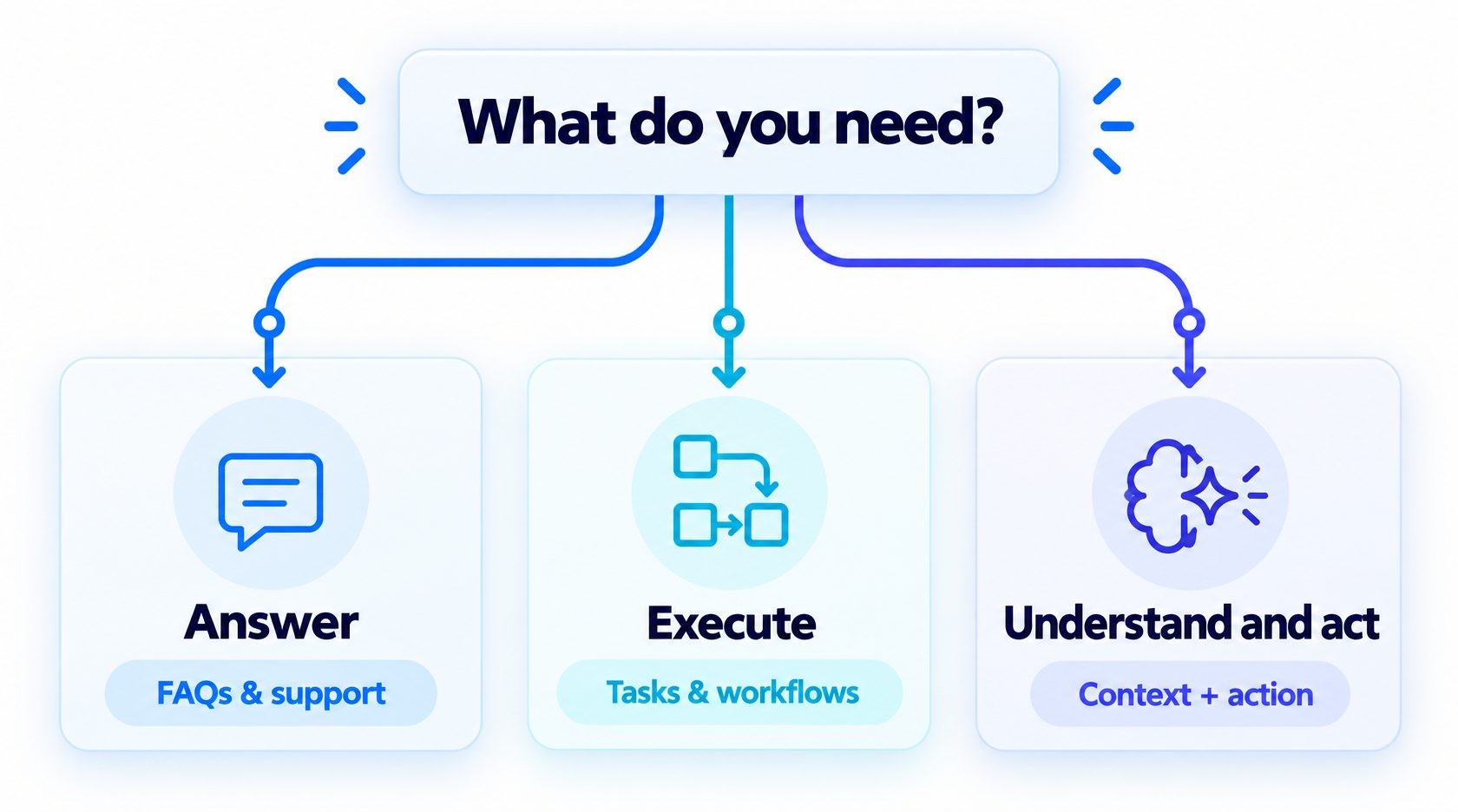
Start with these questions:
- Do people need to ask questions and receive answers? Consider a chatbot, with a maintained knowledge source and a human handoff for questions it cannot answer.
- Does the process follow stable, explicit rules? Consider workflow automation, which can run the same defined steps whenever its trigger occurs.
- Does the process need to interpret changing context and choose what to do next? Consider an AI agent, with only the tools and permissions needed for the task.
- Does the task combine these needs? Use a hybrid. For example, a chatbot can collect a request, an agent can interpret an unusual question, and a deterministic workflow can record an approved result.
These are starting points, not rigid categories. The terms describe different aspects of a system and can overlap. A conversational agent may be the interface to an automated workflow; a chatbot may use AI to answer; a workflow may call a model for a single classification step.
What each tool is designed to do
Chatbot: handle a conversation
A chatbot is an interface for interacting with people through text or voice. It may follow menus and rules, answer from a knowledge source, collect information, or use a language model to form responses. Some chatbots only provide information; others can call tools or initiate actions.
The word “chatbot” alone does not tell you how much reasoning or authority the system has. Ask what it can access, whether it can change records, and what happens when the answer is uncertain. A useful chatbot platform guide focuses on the channel, knowledge, and controls you actually need.
Workflow automation: run defined steps
Workflow automation connects events to a sequence of actions. For example, a form submission can create a record, assign an owner, and send a confirmation. The logic is specified in advance, so the same conditions lead to the same path unless someone changes the workflow.
Automation is a good fit when the task is repeatable and its rules can be written down. If an exception appears, the process can stop, route the item to a person, or follow a separate branch that has already been defined. For a broader view of fixed tasks moving between systems, see business workflow automation.
AI agent: interpret and choose within a scope
An AI agent uses a model to interpret a request or context and determine which permitted step to take. Depending on its design, it may search approved information, call a connected tool, ask a follow-up question, or hand the task to a person. Its actions should remain bounded by instructions, application logic, and access controls.
An agent is not automatically the best choice for every task involving AI. OpenAI’s practical guide distinguishes applications that simply use a model, such as a single-turn chatbot, from systems where the model controls workflow execution. If the process does not need that kind of judgment, a fixed workflow or a simpler conversational tool may be easier to evaluate.
For a deeper explanation of AI automation, separate the use of AI to interpret information from the rules that determine what happens next.
Why the categories overlap
People often compare chatbots, automation, and agents as if they were three mutually exclusive products. In practice, they answer different design questions:
- Chatbot: How does a person interact with the system?
- Workflow automation: Which steps run, and under what conditions?
- AI agent: Who or what interprets ambiguity and selects the next permitted action?
A single system can use all three. A chatbot can collect a support request. A language model can classify an open-ended description. A deterministic workflow can route the request to a queue based on the classification. A human can review any case that is unclear or consequential.
This distinction also helps separate an agent from a model-powered answer box. A system that generates one response but does not control steps or use tools may be an AI chatbot or assistant. A system that receives a goal and chooses among actions is more agent-like. Products use these terms differently, so evaluate the actual behavior rather than the label.
For examples of how these pieces can work together, see chatbots and document sharing in business workflows and AI process automation.
A decision framework for your task
Answer the following questions in order. You do not need to score them; use the answers to define what the system must do.
1. What outcome should the user or team receive?
Describe the result in one sentence. “Improve customer service” is too broad. “Answer common questions from approved support material and route account-specific issues to a person” is specific enough to assess.
Name the person who owns the outcome. If no team can say what a successful result looks like, start by clarifying the process rather than selecting a tool.
2. How predictable are the inputs and steps?
If the inputs are structured and the steps are stable, use fixed rules where possible. If people describe the same need in many different ways, conversation handling or model-based interpretation may help.
Do not confuse a long workflow with an agent requirement. A process can have many steps and still be deterministic. Conversely, a short request can involve ambiguity that a fixed rule cannot handle well.
3. Does the system need to choose, or only execute?
Write down the decision that must be made. If it can be represented as a small set of explicit conditions, encode those conditions in a workflow. If the system must interpret a free-form request and select among a few approved paths, a model may assist with that decision.
Keep the choices limited and observable. “Decide what is best for the company” is not a testable instruction. “Classify the request as billing, setup, or product question and route uncertain cases to support” is more concrete.
4. What is the impact of getting it wrong?
Consider what happens when the system answers incorrectly, sends information to the wrong person, or takes the wrong action. An incorrect FAQ answer may need a correction. A mistaken payment, cancellation, or external promise may be much harder to reverse.
Use stricter controls as consequences rise. These can include human approval, read-only access, narrow permissions, confirmation before a write, and a clear stop or rollback path. If a task cannot be made safe enough to test, keep it human-led.
5. How will you check the result?
Decide what evidence shows that the task was completed correctly. Verify important actions in the system of record rather than trusting a success message alone. Set a baseline for the current process and review representative cases, including exceptions.
A system that is impressive in a demo may still be unsuitable if the team cannot inspect mistakes or measure whether it improved the task.
Match common business tasks to a tool
| Business task | Good starting point | Why | When to add another component |
|---|---|---|---|
| Answer fixed questions about hours or policies | Chatbot | People need a conversational route to maintained answers | Add a human handoff for account-specific or uncertain questions |
| Send a confirmation after a form is submitted | Workflow automation | The trigger and action are predictable | Add a chatbot if people need to ask questions before submitting |
| Classify varied requests into a small number of queues | Model step inside a workflow | AI can interpret language; fixed rules can route the result | Add an agent only if it must decide among actions or gather missing context |
| Help a visitor describe a complex need and book a suitable next step | Chatbot or agent with booking tools | The conversation may need clarifying questions and a permitted action | Require confirmation and hand off unusual requests |
| Draft an answer for a support representative | AI assistant in a human-led process | A person checks the response before sending it | Consider direct response only after testing and defining guardrails |
| Process a high-impact exception | Human-led workflow | The cost of error may exceed the value of automating the decision | Use AI to summarize evidence, not make the final decision |
For routine customer interactions, consider whether a chatbot can answer the question without adding agent autonomy, while a fixed workflow handles predictable follow-up. Chatbot and workflow automation tools can support channel-specific interactions.
Example: appointment booking
A fixed booking workflow can show available times, collect a selected slot, and send a confirmation. If the request always follows the same steps, the workflow does not need an agent to make decisions.
A conversational layer helps when people describe preferences in natural language or need to ask questions before selecting a slot. An agent may be useful if it needs to interpret a request such as “I can come after lunch but need a longer appointment,” check relevant constraints, and choose among permitted scheduling actions.
In either design, verify the appointment before confirming it to the customer. Send unusual requests or conflicting availability to a person. Use a design for AI agent workflows only when the task needs a model to interpret context or select a path.
Example: support questions and account changes
A chatbot can answer common questions from current support material. A deterministic workflow can reset a password after the user completes the required verification. An AI agent might help interpret a longer issue and decide whether it belongs with billing, setup, or a specialist.
The boundaries should be explicit. A model may summarize the issue or suggest the next step, while the support system enforces identity checks and permissions. Refunds, account deletion, and other consequential changes may need a human confirmation regardless of how well the model phrases its recommendation.
Example: lead intake
A form and workflow may be enough when every lead provides the same fields and routing depends on a few stable rules. A chatbot can collect details conversationally and answer basic questions. An agent may help interpret a varied request, ask a relevant follow-up, and route the conversation using approved criteria.
Keep the customer-facing offer clear and let a person review uncertain cases. If the task is primarily moving known fields between systems, a deterministic workflow may remain the simplest option. See how to create an AI agent without coding or workflows for the builder perspective.
When a hybrid design works well
A hybrid often provides a useful balance: use a model where input is ambiguous and use fixed logic for predictable actions. For example:
- A customer sends a free-form message through a chatbot.
- A model identifies the likely topic and extracts the relevant details.
- The system checks the result against explicit routing rules.
- A deterministic workflow creates or updates the correct record.
- A person reviews uncertain or high-impact cases.
- The customer receives a response appropriate to the verified outcome.
This architecture does not mean that every business needs an agent. The model can be a single step inside an otherwise fixed process. Use workflow automation with AI when it helps interpret varied input while deterministic steps control the rest.
Keep the system understandable. Use one model step for one clearly defined decision before adding multiple agents or complex orchestration. The guide to building AI agents without coding can help teams explore the agent-building route, while a standard workflow remains appropriate for stable steps.
Risks and controls to consider
Each approach has different failure modes, but none is automatically reliable just because its behavior is familiar or its label is clear.
- Chatbot: It can provide an outdated answer, misunderstand a question, or trap a user in a menu. Maintain its information and give people a route to a person.
- Workflow automation: It can repeat an incorrect rule consistently, break when an app or field changes, or process an exception as if it were normal. Monitor failures and define exception handling.
- AI agent: It can misinterpret context or choose an unsuitable permitted action. Limit its access, verify consequential actions, and define when it must stop or hand off.
- Hybrid system: A model’s classification can trigger a deterministic action based on a mistaken interpretation. Check model output before high-impact actions and make the routing auditable.
The guide to testing AI agents offers a structured way to evaluate normal and edge-case behavior. For simpler automation, test the trigger, each branch, failure behavior, and the destination record.
Compare operating effort, not just the demo
The initial setup is only one part of the decision. Ask what the team must maintain after the workflow is live. A chatbot needs current answers and a route for questions it cannot handle. A deterministic workflow needs someone to maintain its triggers, connections, rules, and exception paths. An agent may need maintained knowledge sources, prompt or instruction updates, tool permissions, evaluation examples, and review of uncertain outcomes.
Compare the total operating work for the task you have selected:
- Configuration: Who defines the conversation, rules, agent instructions, or workflow branches?
- Connections: Does the system connect to the apps and records the task actually needs? Who maintains those connections when an API or field changes?
- Usage: Does the product charge by seat, task, message, model usage, or another measure? Use your own expected volume and request current pricing rather than guessing from category labels.
- Human work: How much time will people spend reviewing, correcting, escalating, and maintaining the system?
- Failure recovery: Can you pause or disable the system, retry safely, restore a record, or route a case to a person?
- Portability: Can you export the information, rules, and records you need if you change tools later?
A tool with fewer setup steps may still require significant ongoing review. A flexible agent may handle varied requests but may also require more careful testing and permissions. A fixed workflow may be straightforward to inspect, but someone still needs to maintain it as the business process changes. Compare these tradeoffs on a real example before making a broader commitment.
Questions to ask during a product demo
Ask the vendor to show the system handling your actual task, including one ordinary case and one exception. Then ask:
- Which parts of the process are fixed rules, and which depend on model interpretation?
- What can the system read, create, update, or send?
- Can access be restricted to the data and actions required for this task?
- What happens when the model is uncertain or a connection fails?
- How do you verify that an action succeeded?
- Can a person approve, edit, or stop the next step?
- What usage limits or costs apply to the sample workflow?
- Who on your team will own updates after launch?
If the demonstration avoids an exception case or cannot show what happens after a failed action, treat the behavior as unanswered. A clear product name is not a substitute for seeing the boundary and recovery path.
A practical selection checklist
Before choosing a tool, write down:
- The user or business outcome the workflow should produce.
- The current steps and the person or team responsible for them.
- Which inputs are structured and which arrive as free-form text or conversation.
- Which decisions can be expressed with explicit rules.
- Which decisions, if any, need contextual interpretation.
- The actions the system may take and the information it may access.
- The mistakes that would be difficult to reverse.
- The cases that need a human review or handoff.
- How you will confirm that an action succeeded.
- The quality, time, or service measure you will compare with the current process.
Then select the least complex design that meets those requirements. If a chatbot or fixed workflow is sufficient, do not add an agent just to make the project sound more advanced. If the process genuinely needs flexible interpretation and tool use, start with one narrow agent task and a clear boundary.
The AI agent implementation checklist can help prepare a scoped agent deployment. For broader vendor research, the AI automation tools for business guide can help you compare tool categories and shortlist options.
Compare Botsify options for one real workflow
Discuss chat, automation, and agent fit with a specialist.
How to run a small evaluation
Use a small set of representative cases before changing a live business process. Compare at least one normal case, one ambiguous input, one missing-data case, and one exception. For each option, record:
- Whether the task reached the intended outcome.
- How many steps required human correction or intervention.
- Whether the system followed its access and approval limits.
- What happened when a connected service or data source was unavailable.
- The effort needed to maintain instructions, rules, and source information.
Do not compare a fully tested workflow with an untested agent prototype, or vice versa. Use the same task examples and quality criteria. Include the cost of human review and maintenance in your decision, without assuming that any category is always cheaper or faster.
When a system fails, ask whether the issue came from the category, the implementation, or the underlying process. A chatbot may need better source material. An automation may need a missing exception branch. An agent may need narrower tools or clearer stop conditions. Sometimes the best fix is to remove an unnecessary step.
Where Botsify fits
Botsify’s AI Agent Builder provides a no-code setup for business information, knowledge sources, connectors, and deployment. It may fit a workflow that needs a conversational interface and agent actions across supported channels. Confirm the connectors, permissions, channel, and actions required for your use case before choosing a plan.
If your process only needs a fixed trigger and sequence, a separate automation tool may be more direct. If you want to build an agent that can interpret a request and use approved tools, bring one representative workflow to a Botsify demo and ask how the system handles uncertainty, approvals, and unsupported requests. If you are evaluating platforms, see how n8n and Botsify compare.
Map one real workflow to the right Botsify setup
Review your workflow, tools, boundaries, and needed actions.
Frequently asked questions
Is an AI agent the same as a chatbot?
No. A chatbot is a conversational interface, while an AI agent is a system that can interpret context and select among permitted actions. A chatbot may include agent capabilities, and an agent may communicate through a chat interface. Ask what the product can actually do rather than relying on the category name.
Is workflow automation always deterministic?
Traditional workflow automation follows rules and steps defined in advance. A workflow can also include an AI step for interpreting text or producing a draft. In that case, the AI is one component; other workflow steps can still enforce fixed routing, approvals, and record updates.
Do I need an AI agent if I already use automation tools?
Not necessarily. Keep automation for stable, repeatable tasks. Add an agent only where the process needs contextual interpretation or a choice among permitted actions that would be difficult to express as fixed rules. Many organizations can combine both.
Which option is best for a small business?
The best fit depends on the task, not the company size. A small business may use a chatbot for common questions, a workflow for form routing, or an agent for a bounded conversational task with variable inputs. Start with the simplest design that meets the need and can be checked.
How do I compare cost?
Compare the full cost of operating each option: subscription and usage, configuration, integration, maintenance, human review, and recovery from errors. Request current pricing for your expected usage and test the task before committing to a larger deployment. The cost will vary by product and workflow.
Can I start with automation and add an agent later?
Yes. Document the current process, identify the steps that depend on interpretation, and test an agent only for those parts. Keep stable triggers, approvals, and record updates in the workflow when they can be handled predictably.
Final takeaway
Choose the tool by the work it must do. Use a chatbot when the main need is conversation, workflow automation when the steps and rules are known, and an AI agent when varied context must guide a choice among approved actions.
Many useful systems combine the three. Start with the task, define the boundaries, and test the simplest design against real examples. Add complexity only when the current approach cannot meet the need.
Discuss your business workflow with Botsify
Choose the simplest way to automate a real task.
