
A customer asks to change an appointment, but the request is missing the date. A standard chatbot can ask a follow-up question. A fixed automation can move an appointment when every required field is present. An AI agent can interpret the request, look up the customer, check which appointment can be changed, ask for the missing detail, then update the booking if the business rules allow it.
That extra decision step is the useful idea behind agentic AI. It describes AI systems that can work toward a goal by interpreting context, selecting among available steps, and using tools under defined limits. The label does not guarantee that a system is reliable, independently learning, or safe to leave unattended. Those qualities depend on how the product and process are designed.
For a business, the practical question is not whether a product calls itself agentic. It is whether the task needs context-sensitive decisions, whether those decisions can be bounded, and whether the result improves the process enough to justify the added complexity.
What Does Agentic AI Mean?
There is no single product checklist that every vendor uses when it says “agentic AI.” Official descriptions often share a few ideas: an AI model receives a goal, uses context and tools, chooses or coordinates actions, and continues until it reaches an outcome or a stopping condition. The amount of autonomy can range from suggesting a next step to carrying out approved actions without a person reviewing each one.
Microsoft describes agents as software that uses AI models and tools to pursue goals and complete tasks. It also distinguishes agents from fixed automation: traditional automation follows predefined rules, while an agent reasons about the information available and chooses what to do next. The agentic AI adoption guide from Microsoft stresses that the right choice depends on the task, not on the novelty of the technology.
In plain language, agentic AI is a way to build software that can make some task-level decisions and take some steps toward a goal. It is still software. People choose the goal, connect the tools, set permissions, decide what requires approval, and define what counts as completion.
Think of the word “agentic” as a description of behavior, not a quality badge. A product may have an agentic feature for one task while following a fixed workflow for another. A user-facing chatbot may contain a tool-using agent behind one button. A product can also use the term in marketing even when its behavior is mostly a scripted flow. Inspect what it can decide and do, rather than relying on its label.
The distinction matters because greater autonomy changes the failure surface. If a text generator gives a poor suggestion, a person may ignore it. If an agent can update a record, send a message, or trigger another system, a mistaken interpretation can become an operational change.
Chatbots, Generative AI, Automation, and Agents
These terms describe different parts of a system, and real products can combine them. The table is a practical shorthand, not a universal technical taxonomy.
| System type | Main job | How the next step is chosen | Typical business example |
|---|---|---|---|
| Rule-based chatbot | Guide a conversation through known paths | A menu, keyword, or predefined condition chooses the branch | Answer business-hours questions and collect a name |
| Generative AI assistant | Create or summarize content for a person | The model generates a response, usually for human review | Draft a reply to a customer email |
| Traditional automation | Execute a known sequence reliably | Rules, conditions, and event triggers select the steps | Route an invoice by vendor code |
| AI agent | Pursue a goal using model reasoning and tools | The model may choose among permitted actions based on context | Investigate a support request and update a case when the evidence is sufficient |
| Agentic system | Combine agent decisions with workflow, tools, and controls | A mixture of model choices, fixed rules, and human decisions | Triage a request, retrieve account information, draft a response, and escalate exceptions |
A chatbot is a way for a person to interact with software. It can be powered by rules, a language model, an agent, or a combination. A generative AI system produces or transforms content. That alone does not make it an agent. A fixed automation can use AI at one step and still keep the overall path predictable.
The clearest signal of agent behavior is not simply that the system has a natural-language interface or can call an API. It is that the system receives a goal and has some latitude to choose a permitted next step based on the situation. The more open-ended the choices and the more consequential the available actions, the more deliberate the controls need to be.
The boundary between an agent and a workflow can be blurry. A workflow can call an agent for an uncertain classification, then use deterministic rules for the resulting action. An agent can also operate inside a workflow that controls the order of steps, retries, approvals, and logging. In business settings, a mixed system is often easier to supervise than a free-running agent. The practical difference between AI automation and workflows is useful when deciding which parts of a process should stay predictable.
Decide where agent judgment adds value
Map the task, fixed rules, and decisions that need context first.
What an Agentic AI System Contains
The exact architecture changes by vendor, but a business-ready agentic system usually has several recognizable parts. They may be bundled into one product or spread across connected services.
A model that interprets the situation
A language model or another AI model interprets instructions and information, classifies what is happening, and proposes a response or action. It does not automatically know which business outcome matters. The goal and constraints must be supplied by the application and its operators.
A model can produce a confident answer that is still wrong. Its explanation is not proof that a tool call is valid or that a business rule has been followed. Systems should check important inputs and outputs using explicit rules where possible.
Instructions and task boundaries
Instructions explain the agent’s role, goal, limits, and expected response. Good instructions define what the agent should do when information is missing, conflicting, or outside its scope. They should also identify prohibited actions and when to ask a person.
Instructions help shape behavior, but they are not the same as access controls. If an agent should not refund an order, the connected account or application should enforce that restriction where possible. A written instruction that says “never refund without approval” is weaker than a system that technically prevents an unapproved refund.
Context and knowledge
The agent needs relevant information to interpret the request. Context may include the current conversation, customer details, a business knowledge base, or results from an approved system. Poor or outdated information can produce a plausible but unsuitable action.
A knowledge base provides material the agent can retrieve. It does not guarantee that the agent selected the right source, interpreted it correctly, or has the latest policy. Keep content current, restrict what the system can access, and test answers against the source material. Teams maintaining an agent’s content can use a process for building a knowledge base that cites its sources instead of assuming an initial upload will remain accurate forever.
Tools and permissions
Tools let the agent read information or request actions from another system. A read-only search tool creates a different risk from a tool that can write customer records, issue a refund, or send an external message. For every tool, specify what data it can access, which operations it can perform, and whose identity or account it uses.
A narrow tool surface is easier to understand and evaluate. Start with the smallest set of connections needed for the use case. Check how the platform handles missing permissions, failed calls, duplicate actions, and user confirmation. Keep governance part of the design, because the controls around an agent determine what its decisions can affect.
Workflow and stopping conditions
An agent needs to know when to continue, when to stop, and what to do when a tool fails. A bounded workflow may set a maximum number of steps, an allowed action list, a timeout, and a clear completion condition. It can also require a human decision before specific actions.
An agent that keeps trying indefinitely can waste money, repeat actions, or make the problem harder to resolve. Define a stopping condition such as “the booking is confirmed,” “the customer must answer a question,” or “the case is assigned to a person.” The AI agent workflow design guide covers how to structure those paths in more detail.
Evaluation and operational visibility
Before launch, test both the final outcome and the path the agent took. Useful records may include the triggering request, context retrieved, tool calls, validation results, approval decisions, errors, and final status. Not every vendor exposes the same logs, and “audit trail” should not be assumed as a built-in product feature without checking.
Testing needs realistic examples, including incomplete requests, conflicting information, tool failures, unexpected user instructions, and requests outside the agent’s role. A practical guide to testing AI agents can help teams turn those cases into repeatable checks.
How Agentic AI Works: A Bounded Loop
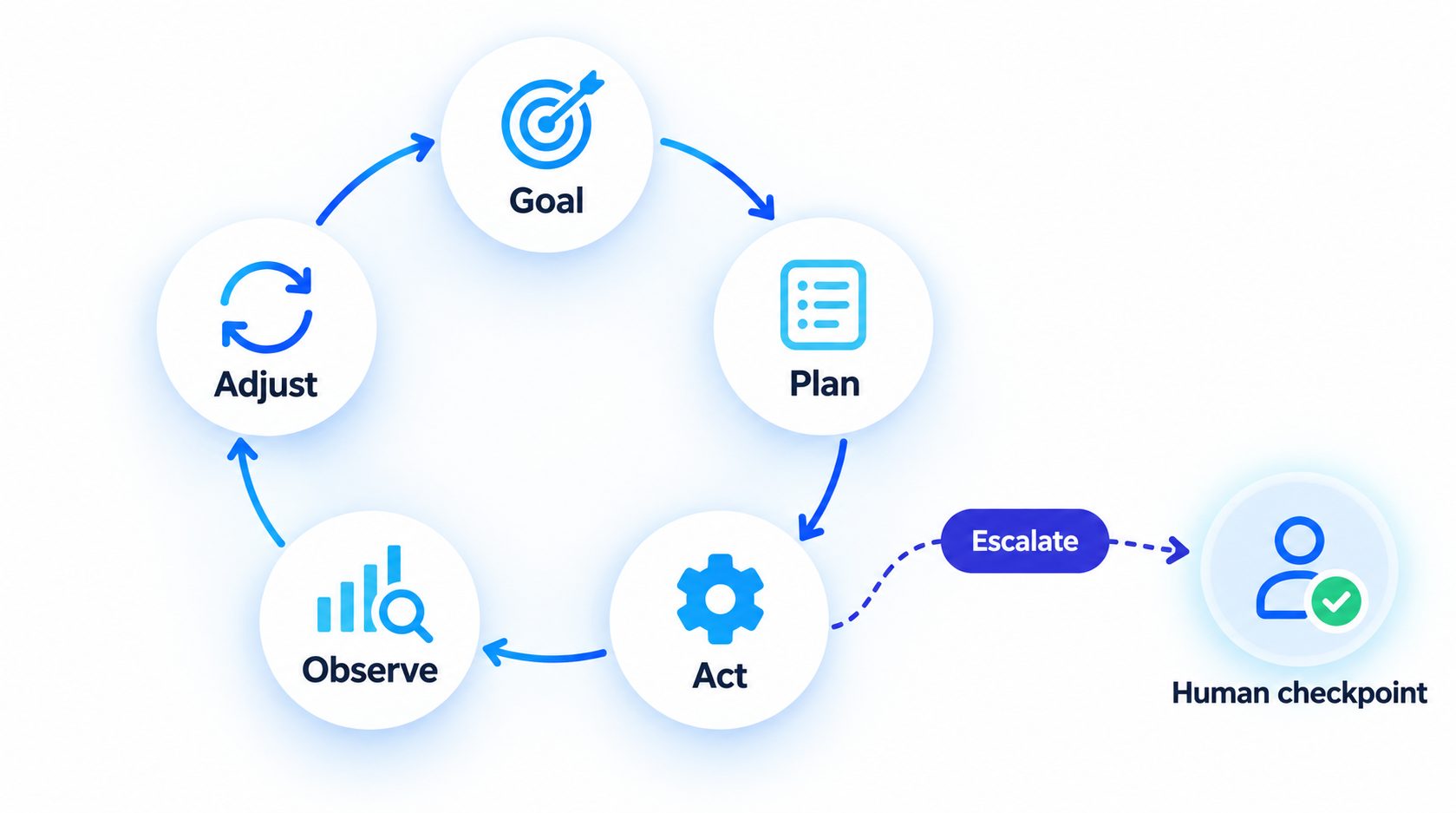
An agentic system often repeats a simple cycle: interpret the current state, choose a permitted step, take that step, inspect the result, then continue or stop. The model may help choose the next step, while the application applies deterministic rules around the model.
Consider a small business that wants to handle appointment-change requests. A bounded agent could work like this:
- Receive a request. A customer asks to move an appointment. The system identifies the request as a change, not a cancellation or a new booking.
- Gather context. It checks the conversation and looks up the customer and current booking using authorized read tools.
- Check required information. If the request does not include a preferred time, it asks a question rather than guessing.
- Choose a next step. It checks available time slots or routes to a fixed booking flow, depending on the product’s tools and rules.
- Apply the right boundary. It can present options, prepare a change for approval, or complete a low-risk update if the business has authorized that action.
- Verify the result. It checks whether the booking system confirms the change. A tool-call response is not necessarily proof that the business outcome is complete.
- Communicate or escalate. It tells the customer what happened, or hands the request to a person with the context and attempted steps.
The language model is useful where the request is expressed in varied, informal language or the next best step depends on context. A booking system remains responsible for the actual available slots and confirmation. A fixed rule can prevent changes inside a restricted time window. A human can handle exceptions that require judgment outside the agent’s authority.
This division of work is important. A model should not invent availability, policy, or completion status. A process should not rely on the model alone to enforce permissions. The agent’s job is to interpret and coordinate within boundaries, while the connected systems and people retain the responsibilities they are better suited to handle.
An agent can also stop early. If the system cannot match the customer to a booking, if two records conflict, or if a tool is unavailable, it can ask for clarification or transfer the case. A safe stop is a successful outcome when the alternative is an unverified action. Clear human handoff rules help ensure the receiving person gets enough context to continue without asking the customer to start over.
Autonomy Is a Spectrum
“Autonomous” does not have to mean “unattended.” A useful design choice is to decide how much authority the agent gets for each step, based on the possible impact of an error and whether the action can be reversed.
| Autonomy level | Agent responsibility | Example | Typical control |
|---|---|---|---|
| Explain | Find and summarize relevant information | Explain a return policy | Cite or show the source, and say when no answer is found |
| Recommend | Suggest an action for a person | Recommend which support queue should receive a ticket | Keep a person responsible for the decision |
| Prepare | Draft a change without submitting it | Prepare a customer-record update | Show the proposed values and require review |
| Act with approval | Request an action and wait for confirmation | Prepare a refund within a defined range | Check the exact action, amount, destination, and approver |
| Act within limits | Complete specified low-risk actions | Change an appointment under clear rules | Restrict permissions, verify success, and provide a stop path |
The same agent may operate at different levels for different actions. It could answer a routine FAQ automatically, draft a reply for review when a customer is angry, and transfer a billing dispute to a person. Avoid assigning one broad permission such as “manage customer support” when the actual actions have very different consequences.
A practical policy groups actions by impact, reversibility, and uncertainty. Reading public business information may need little friction. Updating a contact preference may need validation and a clear audit record. Issuing a payment, changing a legal commitment, or making a consequential decision about a person needs stronger controls or a human decision. Microsoft’s guidance advises caution in sensitive areas and the UK NCSC adoption guidance recommends starting small and avoiding unrestricted access to sensitive data or critical systems.
When an action requires human review, define the review task precisely. A reviewer should see what the agent wants to do, which information it used, what will change, and what happens if they reject it. A risk-based human review process for AI sales replies illustrates how teams can keep review focused on the cases where it matters. An AI agent governance framework can help define who sets those boundaries and who is accountable for changes.
Where Businesses May Use Agentic AI
Agentic AI is most useful when a task involves variable input, context-dependent decisions, and one or more actions that can be checked. The examples below describe possible patterns, not guaranteed outcomes from any specific product.
Lead qualification
A lead may arrive through a website, messaging channel, or referral with incomplete details and varied questions. An agent can identify the likely need, ask a relevant follow-up, retrieve approved service information, and prepare a qualified handoff or booking. Use fixed rules for required fields, territory limits, and routing. A real AI lead qualification workflow should define what counts as qualified and what the agent must never infer.
Customer support
A support agent can classify a request, retrieve a relevant policy or product detail, ask for missing information, and answer routine questions. For a refund, account change, or unclear complaint, it can prepare a response or escalate according to the business rules. Reliable support depends on accurate information, permission boundaries, and an effective human path. It should not make a promise simply because a fluent response is possible.
Appointment requests
An agent can interpret natural-language requests, gather missing details, check availability, and route a customer through booking steps. The scheduling system should remain the source of truth for open slots and confirmations. If the customer asks for an exception, the agent can explain the standard options or transfer the case.
Internal operations
An internal agent can answer questions from approved documents, summarize a request, retrieve the status of a task, or draft a change for review. For a predictable process, a fixed workflow can perform the action once validated fields are present. The agent adds value when people describe the need in different ways and the system must work out which supported process applies.
Multi-step coordination
Some requests involve several tools or teams. A system might identify a request, retrieve information, ask a specialist system for a result, and return a combined response. More agents do not automatically improve the result. Add separate agents only when a task needs different roles, tools, or policies, and be clear about who owns the final decision. The AI agent orchestration overview explains the coordination patterns.
What Agentic AI Does Not Automatically Do
The word “agentic” can suggest capabilities that may not exist. Check these assumptions before a pilot or purchase.
It does not automatically learn from every action. An agent can use current conversation context or stored information, but that is not the same as changing the underlying model or improving its own behavior over time. Ongoing improvement usually requires someone to review outcomes, update instructions or data, change tools or controls, and test the new version.
It does not guarantee that a plan is correct. A system can produce a sensible sequence that relies on a wrong assumption. Validate important facts and use deterministic checks where possible.
It does not guarantee a successful action. A tool call can fail, time out, or return an incomplete result. The agent needs to confirm the outcome through a trusted source before telling a customer that a change is complete.
It does not make a workflow fully autonomous. A product may need user input, a human approval, a connected system, or an operator to resolve exceptions. Human review is part of the design, not necessarily a temporary weakness.
It does not remove accountability. The business still decides what task to delegate, what data to expose, which actions to allow, how to monitor performance, and who handles mistakes. An agent may carry out a step, but the organization remains responsible for the process.
It does not make multi-agent architecture necessary. One well-scoped agent or a deterministic workflow may be enough. OpenAI’s practical agent-building guide recommends keeping a single agent where it can do the job and adding orchestration only when the task complexity calls for it.
When to Use Automation, an Assistant, or an Agent
Before choosing a tool, describe the process without using AI terms. Write down the input, the desired outcome, the decisions involved, the data needed, and the actions that would change a system. Then ask what kind of uncertainty the process contains.
Use traditional automation when the inputs are structured, the rules are stable, and the same steps should happen every time. A routing rule that assigns a ticket by product code does not need a model to decide what to do.
Use a generative AI assistant when a person wants help interpreting or drafting content, but should choose and perform the final action. Summarizing a long complaint for a support representative may be useful without giving the system authority to change an account.
Use an AI agent when the task includes context-dependent choices, has tools that can perform useful actions, and those choices can be constrained and checked. If a process has no judgment step, adding an agent may add cost and unpredictability without improving the result.
Use a hybrid workflow when some steps are uncertain and others must be exact. Let the model classify or interpret a request, validate its result with rules, route the next action through a controlled workflow, and ask a person to review cases outside the safe range. This keeps probabilistic judgment in the parts that need it and deterministic controls around the parts that should remain predictable.
A short decision screen can help:
- Is the input variable? If forms and structured fields capture everything, a fixed workflow may be enough. If people describe the same need in many ways, an AI interpretation step may help.
- Does the task require judgment? If a simple rule settles every case, write and test the rule. If the next step depends on context, document the decisions and test them against real examples.
- Can the result be verified? If a trusted system can confirm the action, the process has a way to detect false success. If nobody can tell whether the outcome is correct, limit the agent to recommendations until verification exists.
- What happens if it is wrong? Consider financial loss, customer impact, privacy, reputation, and how easily the change can be reversed. High-impact outcomes need stronger controls and meaningful human responsibility.
- Does the expected benefit exceed the full operating cost? Count model use, integrations, exception handling, human review, monitoring, maintenance, and the cost of failure, not just the initial build.
Use traditional code or automation for structured predictable work, retrieval for knowledge questions that do not require actions, and agents where the system must reason about information and choose or coordinate actions dynamically.
A Practical Path to a First Agentic AI Use Case
Start with one contained process and make the boundaries visible before connecting write permissions.
- Choose a task with a measurable problem. Identify a recurring delay, missed handoff, or repetitive interpretation step. Do not begin with “automate the whole department.”
- Map the current process. Record who starts the task, what information they need, which decisions they make, what systems they use, and where exceptions go. If the actual process is not understood, an agent will only make that uncertainty harder to see.
- Separate judgment from fixed steps. Mark which steps need language understanding or contextual decisions. Keep exact calculations, permissions, thresholds, and required fields in deterministic logic whenever possible.
- Write the action boundary. List what the agent may read, what it may prepare, what it may execute, what needs approval, and what is forbidden. Check each connected account and permission against this list. The AI agent over-automation guidance can help teams make that scope explicit.
- Define fallback behavior. Specify what happens when information is missing, sources disagree, a tool fails, a customer changes the request, or the agent cannot complete the task. For each condition, choose whether to ask, retry safely, stop, or transfer to a person.
- Test with normal and difficult cases. Include clean requests, ambiguous requests, edge cases, conflicting records, prompt-injection attempts in untrusted content, and tool outages. Evaluate the action the agent takes, not only the wording of its answer.
- Start with read-only or draft actions. Let the agent find information or prepare proposed changes before allowing it to write to business systems. Add narrow write permissions only after the process has passed testing and its outcomes can be monitored.
- Run a limited pilot. Give a small group a clear way to report errors. Compare outcomes with the current process and check whether the agent creates additional work for staff or customers.
- Expand one permission at a time. Increase scope only when results are consistent and the human escalation path is working. Keep the previous process available while you learn where the agent fails.
A pre-deployment AI agent implementation checklist can help teams confirm that ownership, data, integrations, and test plans are ready before expanding access.
How to Measure Whether Agentic AI Is Working
A demo can show that a system can complete one path. A business evaluation should show whether it completes the right work consistently and at an acceptable cost.
Track measures that match the task. For customer support, these might include the share of requests resolved correctly without repeat contact, the share escalated to a human, time to resolution, and customer corrections. For lead qualification, the measures could include required information captured accurately, qualified leads routed to the right person, and booking completion. For internal operations, track time saved only alongside rework, missed cases, and staff review time.
Measure quality and safety beside speed. A lower handling time is not an improvement if the system sends inaccurate instructions. A high completion rate can hide a failure if the agent marks a task done without confirming the downstream change. Include a way to sample decisions, inspect tool outcomes, and record reasons for human intervention. An AI agent audit trail can help teams decide which operational events need to be reviewable.
Set thresholds before comparing results. Agree on a baseline, an acceptable error range, what counts as a correct completion, and which failures require pausing the pilot. Re-test after changing the model, prompt, knowledge source, integration, permissions, or workflow. A system that performed well on one test set can still behave differently when inputs, tools, or policies change.
Cost also includes exceptions. Count the model and tool usage, maintenance, review time, and any work caused by incorrect or duplicate actions. If the hybrid workflow needs a person to validate every output, that may still be useful, but it is not equivalent to a fully automated process. The aim is to improve a defined outcome, not maximize the number of tasks labeled “agentic.”
Frequently Asked Questions
Is agentic AI the same as generative AI?
No. Generative AI creates or transforms content. Agentic AI describes a system that uses AI capabilities to pursue a goal and may choose among permitted steps or tools. An agent can use a generative model, but a text generator does not become an agent just because it can produce an answer.
Does an AI agent always use tools?
Tool use is common in business agents because tools let software retrieve information or interact with another system. Some systems described as agents may only recommend or plan actions. Check what the product actually does and whether it can change data or take action.
Does agentic AI mean the system can work without people?
No. The system may need a person to define the task, supply missing information, approve an action, or handle an exception. The appropriate amount of oversight depends on what the agent can access and the impact of a mistake.
Is agentic AI better than workflow automation?
Not by default. Fixed automation is often easier to predict and test when the steps and inputs are stable. Agentic behavior may help where the request varies and decisions depend on context. A combined workflow can use an agent for interpretation and ordinary rules for the exact actions.
Can an agent learn from its mistakes?
Not automatically in the way people usually mean. A system can store context or use feedback supplied through a separate process, but it does not necessarily change its underlying model or improve after every action. Ask the vendor how feedback is captured, who approves changes, and how the new behavior is tested.
What should I ask an AI agent vendor?
Ask what the agent can decide, which tools it can call, what each connection can read or change, how approvals work, how it verifies completed actions, what happens when a tool fails, and what records are available to investigate an issue. Ask for a demonstration of an exception case, not only a successful happy path.
The Practical Definition
Agentic AI is useful when software must interpret context, choose among permitted next steps, and use tools to make progress toward a goal. Its value depends on whether those decisions solve a real problem and whether the process can verify the result, limit actions, and involve a person when needed.
Begin with one task. Decide what should stay fixed, what requires judgment, and where a person must remain responsible. Then compare an agentic approach with a conventional workflow using the same success measures. That is a more useful test than the label on a product page.
Explore a bounded agent workflow for your business
Review the task, connected tools, approval points, and expected outcome.
