


BYOK in AI means Bring Your Own Key: instead of relying only on an AI platform’s shared or platform-managed model access, you connect a key associated with your own account at a model or API provider. The agent platform can then use that credential when it sends supported requests to the provider.
BYOK can change which account receives a model provider’s usage charges and who manages the credential. It does not automatically make AI cheaper, remove platform fees, unlock every model, or guarantee that your data stays private. The outcome depends on the platform’s implementation, the provider’s pricing and terms, and the way your organization manages access.
The useful question is not just “Does this platform support BYOK?” It is “Which requests use my key, what charges still apply, who can use the key, and how can I limit and monitor that access?” This guide explains how to answer those questions before connecting a key to an AI agent.
Plain definition: BYOK is a setup in which an AI application uses a key tied to your own provider account for supported model requests, subject to the platform’s configuration and terms.
How BYOK in AI Works
A key is a credential. It identifies or authorizes requests under an account or project at an API provider. It is not the model itself, a user password, a ChatGPT subscription, or an unlimited-use coupon.
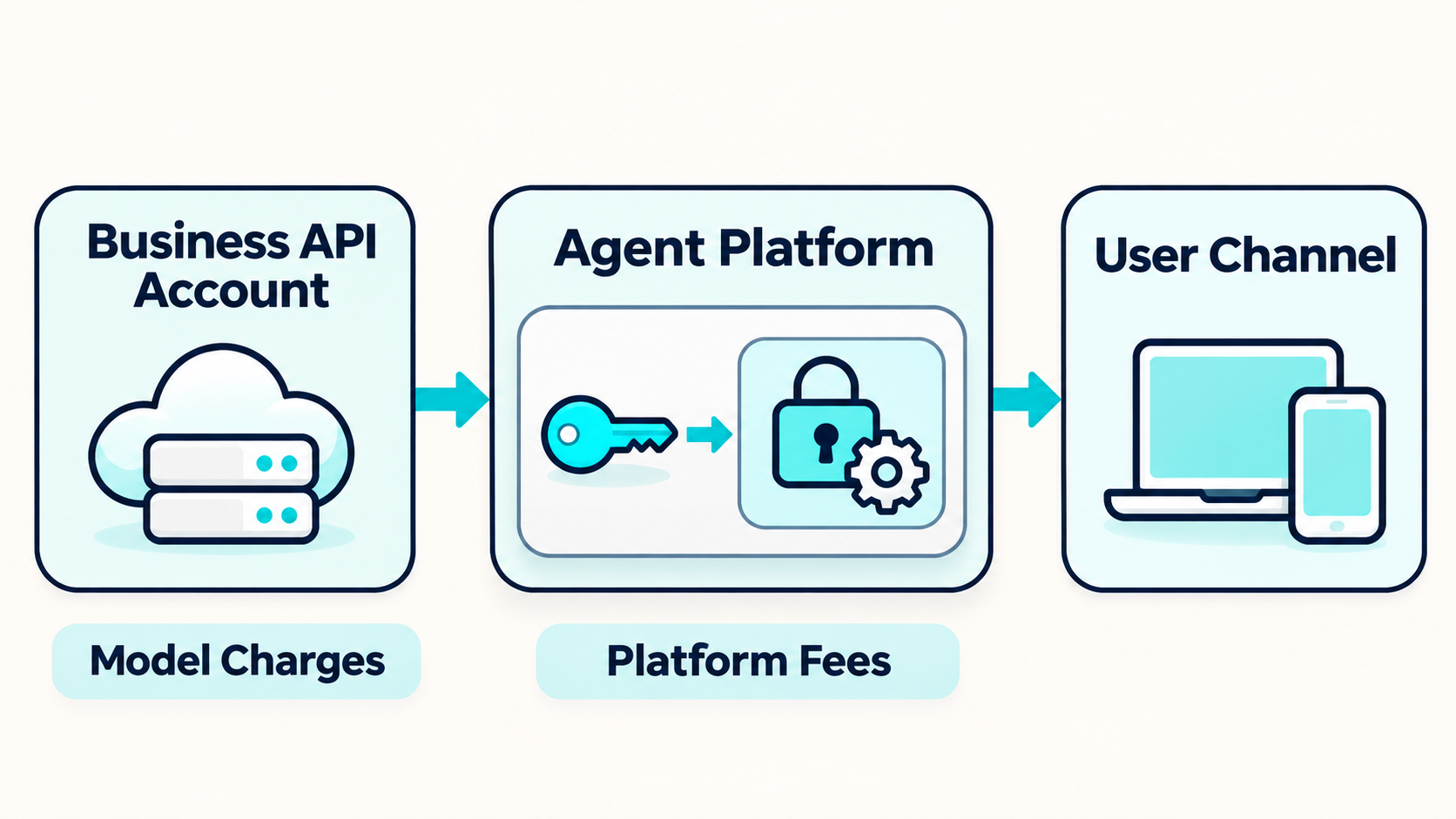
In a typical BYOK flow, the business creates or selects a provider account, makes a key with appropriate access, and enters it into the agent platform’s designated settings. When the agent needs a supported model response, the platform sends a request to the provider using that key. The provider applies its own model availability, rate limits, billing rules, and terms. The platform may separately charge for its software, hosting, channels, or other services.
Implementations differ. Some platforms store the credential and use it on the business’s behalf. Others may use a different credential-routing design. Ask the vendor to show where the key is entered, how requests are authenticated, what model operations use it, and whether any requests still use platform-managed credits.
A practical AI agent integration plan should map each connection to its system, credential owner, data flow, and failure path. The model key is only one connection in the overall agent workflow.
BYOK Is Not the Same as a ChatGPT Subscription
A consumer or team subscription to an AI chat product and an API account are often separate products, with separate billing and access controls. As one example, OpenAI documents ChatGPT and API billing as separate systems. A paid chat subscription does not necessarily provide an API key or pay for API requests from an application.
This matters when a business assumes that its existing AI chat subscription will cover an agent platform. Before setup, confirm which account type is required, whether billing must be enabled separately, and which organization or project will receive the usage charges. Check the chosen provider’s current billing documentation because account structures can vary and change.
Do not paste a personal chat password into an agent platform. A platform should request the specific API credential or supported authorization method it needs. If a product’s setup flow is unclear, pause and ask its support team before sharing access.
BYOK and Platform-Managed AI Usage
A platform may offer one or both of these usage paths:
| Usage path | Who supplies the model credential? | Where model usage may be billed | What to confirm |
|---|---|---|---|
| Platform-managed usage | The platform | The platform, then possibly through plan credits or usage charges | Included allowance, overages, eligible models, and usage reporting |
| BYOK usage | The business or its client | The provider account associated with the key, if requests are routed through it | Which requests use the key, platform fees, limits, and credential handling |
| Mixed usage | Depends on model, agent, or feature | Charges may be split between accounts or services | How routing is selected and how each charge is identified |
These are general patterns, not universal billing rules. A platform can define its own pricing and may charge a platform fee even when a customer supplies the model key. A request that uses a BYOK credential can still create costs for tools, storage, voice, channels, or other services.
Botsify’s public Done-For-You and white-label pages currently list BYOK alongside included platform credits, describing unlimited credits via BYOK. That is a plan-specific description, not a promise that every platform feature or external service has no charge. Check the current Done-For-You plan details and confirm which usage is routed through BYOK, which allowances remain, and which platform charges still apply.
Map your model and platform charges before rollout
Review provider billing, included credits, and platform fees together.
Does BYOK Actually Lower AI Costs?
Sometimes it can change the cost structure in a useful way. It is not automatically cheaper. A fair comparison includes the full service bill, not only the model provider’s listed rates.
Compare at least these cost categories:
- Model usage: Input and output tokens, images, audio, or other model features may have different rates.
- Platform access: Subscription, seat, workspace, agent, or service fees may still apply.
- Tools and connected services: Search, storage, voice, messaging, or external APIs can add separate charges.
- Operations: Staff time for setup, monitoring, testing, credential rotation, and client support has a cost even if no invoice labels it as API usage.
- Overages and limits: Rate limits, provider quotas, retries, and fallback behavior can affect both spend and service reliability.
A simple estimate for text model usage is:
Estimated model cost = (input units × input rate) + (output units × output rate) + applicable feature charges.
Use the chosen provider’s current pricing and the platform’s actual usage logs. Estimate input and output separately. A short message can still trigger a long context, retrieved documents, tool results, or multiple model calls. Conversely, caching, batching, model selection, or prompt changes may alter usage. Avoid multiplying an average message count by one flat price unless the platform’s accounting really works that way.
Then compare the total platform-managed bill with the BYOK scenario:
Total monthly cost = model charges + platform charges + connected-service charges + operating time.
Run the estimate on a representative workflow, not an idealized demo. Include unsuccessful requests, human handoffs, retries, and peak periods. Use observed data from a pilot, then revisit the estimate as prompts, usage, or provider rates change.
Teams that need to specify usage boundaries and model behavior should write AI agent requirements before picking a billing path. A cost assumption is only meaningful if the workflow being estimated is clear.
What BYOK Changes, and What It Does Not
Using your own key may give your organization a direct view of requests billed to the associated provider account. Depending on provider and platform support, it can let administrators manage keys, budgets, models, or projects within their own provider account. These controls are provider-specific and may not be exposed through every platform.
BYOK does not necessarily change:
- The agent platform’s subscription, support, or channel fees.
- Which models the agent product supports or exposes in its interface.
- The platform’s own limits, workflows, logs, or usage tracking.
- The quality of the agent’s instructions, knowledge, tools, or evaluation.
- The data handling terms of the platform or model provider.
- Who owns conversation records, agent configuration, or uploaded content.
A model key is an authentication and billing mechanism. It does not prove that the agent is secure, that a provider will not retain data, or that the platform cannot access request content. Read the applicable service terms and privacy documentation for each party in the request path.
In some organizations, an API key’s usage appears at an account or project level rather than being itemized by end customer. Ask how your chosen platform attributes usage to individual agents, clients, or workflows. If your own account only shows an aggregate total, you may need separate projects or a platform-side report to allocate costs accurately.
Key Security: Treat the API Key Like a Credential
An API key can authorize activity that creates charges or accesses provider capabilities. Store and share it accordingly. A leaked key may be misused before an administrator notices, so access and monitoring matter as much as the initial setup.
Use a dedicated key or project where possible
Avoid using a personal key for a production agent if the provider offers a suitable organization or project structure. Separate keys can make it easier to see which application is using the account and to revoke that access without disrupting unrelated work. Provider capabilities differ, so confirm the scope and limits available to your account.
Limit who can view or replace the key
Only authorized operators should be able to add, reveal, rotate, or remove a credential. If a platform masks a key after setup, ask how a replacement is handled and which staff roles can manage it. Avoid sending keys over email, chat, spreadsheets, or support tickets unless the vendor provides a secure method specifically designed for secrets.
OpenAI’s published API key safety guidance recommends secure storage, access controls, key rotation, and usage monitoring for OpenAI keys. Apply the selected provider’s own current guidance to your implementation.
Set limits and monitor actual usage
Use provider budgets, rate limits, or hard caps where available, and configure alerts for unusual activity. Alerts help you notice changes but may not block them. Test what happens when a limit is reached: Does the agent stop, switch to another model, retry, or return an error? A fallback can keep a workflow running but may use a different account or have different cost and quality characteristics.
Plan for key rotation and revocation
Decide who rotates the credential, how the platform is updated, and how the replacement is verified before the old key is revoked. Write down the steps so a team member can act quickly if a key is accidentally exposed or an employee leaves. Include revocation in incident response, not just routine maintenance.
A broader AI agent governance policy can define which roles manage credentials, approve model changes, and investigate unexpected usage.

Who Should Own the Key?
The account that owns the key generally receives the associated provider usage charges and manages its provider-side limits. Choosing that account is a business decision, not just a technical preference.
Business-owned key
The company operating the agent manages its provider account and credentials. This can centralize billing and access for an internal workflow, but the team must decide which projects or agents share the account and how to attribute spend. Separate credentials or projects may help with revocation and reporting if the provider supports them.
Client-owned key
An agency may ask a client to supply a key for a client-specific deployment. This can align usage with the client’s provider account, but it also creates onboarding and support responsibilities. Clarify who owns the provider account, who handles billing questions, who can change the key, and what happens if the client’s payment method fails.
Agency-owned key
An agency might use its own provider account for several clients. That can simplify onboarding, but it may combine usage, complicate cost allocation, and make one credential important to multiple deployments. Use separate scopes or projects where available, and define how costs are assigned and passed through. Never imply that a client has a separate provider bill if requests are actually billed to the agency account.
In every model, document the credential owner, authorized administrators, billing responsibility, usage reporting method, key replacement process, and offboarding plan. These details belong in the service design and client agreement, alongside any data or retention terms. A practical AI agent data-retention policy helps separate credential billing from conversation storage and deletion.
BYOK for Agencies and Service Providers
For agencies, BYOK can change how model usage is billed, but it does not create a profitable offer on its own. The agency still needs to define what it charges for, how usage is measured, and what happens when a client’s key reaches its limit.
A client offer should make clear:
- Whether the agency or client supplies the provider account and key.
- Which model or provider choices the service supports.
- Whether model usage is billed directly by the provider or included in the agency invoice.
- Which platform, integration, support, or management fees remain.
- Who monitors provider usage and contacts the provider if billing fails.
- How model changes, key rotation, and client offboarding are handled.
A small service business can price agent setup and ongoing management separately from model consumption. It can also include a usage allowance or pass through measured provider charges, as long as the terms are clear and the actual architecture supports that arrangement. The guide to selling AI agents to businesses covers how to connect a service offer to customer value, while AI agent agency models discuss the broader business structure.
When BYOK Is a Good Fit
BYOK is most useful when the organization has a reason to manage model-provider access itself and has the people and tools to do so. That might include wanting a clear account-level view of requests, connecting a provider account the business already manages, or applying internal rules for key creation and revocation. The value depends on whether the platform exposes the controls the organization needs.
It may be a poor fit when no one owns provider billing, the platform does not explain which requests use the key, or the business expects the key to eliminate every other fee. It can also add unnecessary work to a small, low-volume deployment if the platform-managed option already provides adequate reporting and predictable charges. Compare the operational overhead as well as the unit price.
Use this quick decision test:
- Choose to evaluate BYOK when you need provider-account control, can secure the credential, and can reconcile usage to the right agent or client.
- Stay with managed usage for now when simplicity and one consolidated bill matter more than provider-level control, and the platform’s allowance and reporting fit the workflow.
- Pause before choosing either when you cannot tell who holds the key, which charges apply, or where request data is processed and retained.
The decision can vary by client or workflow. A team could use managed usage for a small internal assistant and BYOK for a larger deployment that requires a client-controlled provider account, if the platform supports both paths and the contracts explain the difference. Compare the options inside your actual AI agent platform evaluation rather than treating BYOK as a universal best practice.
Questions to Ask an AI Platform Vendor
“Do you support BYOK?” is a starting question. Ask the vendor to walk through a real request and show which account and fees are involved.
- Which requests use my key? Ask whether all model calls, embeddings, voice, image, or background tasks use it, or only selected features.
- Where is the key stored? Ask whether it is encrypted, who can access it, and whether it ever reaches a browser or client device.
- Which models and providers are supported? Check the current list, supported model features, and restrictions for your plan.
- Which costs remain? Confirm platform subscription, included credits, overage rules, channels, tools, storage, and support charges.
- How is usage shown? Ask whether usage can be attributed by agent, client, or project and reconciled with the provider invoice.
- What happens at a limit? Confirm whether the system stops, retries, switches accounts, or falls back to another model.
- Can I rotate or revoke the key? Confirm the steps, expected interruption, and how to verify the replacement.
- How is data handled? Review request content, logs, retention, access, and provider terms separately from key ownership.
- How does each customer’s key stay separate? If you manage multiple clients, ask about tenant isolation, account permissions, and per-client billing.
An AI agent implementation checklist can help teams verify these operational requirements during a pilot. Buyers comparing products should also use the no-code AI agent builder comparison to check the broader platform fit, not only its key settings.
A Safe BYOK Rollout Checklist
Start with one non-critical agent and a provider account or project intended for testing. Confirm the integration before pointing it at a high-volume or customer-facing workflow.
- Choose the account owner. Decide whether the business, client, or agency owns the provider account and receives usage charges.
- Confirm the supported route. Verify that the platform uses the supplied key for the specific model calls and features you intend to test.
- Create an appropriately scoped credential. Use available project controls, permissions, or restrictions. Store the key only in the intended secure settings.
- Set a budget and alert plan. Configure provider-side limits where available. Decide who checks usage and how often.
- Test normal and failure cases. Check valid responses, invalid credentials, usage limits, unavailable models, timeouts, and revoked keys.
- Reconcile the bill. Compare the provider usage report with platform logs and the work performed. Investigate discrepancies before launch.
- Document access and response. Record who can rotate the key, who can approve model changes, and how to disable access during an incident.
- Review the client and data terms. Ensure the service contract accurately describes billing, access, support, data handling, and offboarding.
- Expand gradually. Add more agents or clients after the reporting, limits, and support process have been proven.
For help assessing vendor or implementation responsibilities, review AI agent development services and how to choose an AI agent development company.
Review your BYOK setup before it reaches customers
Check key ownership, usage reporting, limits, and support responsibilities.
Frequently Asked Questions
What does BYOK stand for?
BYOK means “Bring Your Own Key.” In AI applications, it usually refers to providing a key associated with your own model or API provider account so a supported platform can use it for requests.
Does BYOK always save money?
No. It may change how model usage is billed, but the provider charges still apply and the platform may have separate fees. Compare the full cost of the same workflow under each billing option using current rates and observed usage.
Is an API key the same as a ChatGPT password or subscription?
No. A key is a credential for API requests. ChatGPT subscriptions and API billing may be separate products. Use only the key or authorization flow requested by the platform, and never share your chat password.
Does BYOK let me use any AI model?
No. The provider account must support the model, and the platform must integrate and expose it. Confirm current model compatibility and feature support with both parties.
Does BYOK mean my data stays private?
Not by itself. The key determines how a request is authorized and possibly billed. Data handling depends on the platform and provider terms, configuration, logging, retention, and access controls. Review each part of the request path.
Who pays for API usage when I use BYOK?
The provider account associated with the key is generally the account used for those provider charges, but verify the platform’s request routing and billing setup. The platform or other connected services may still have their own fees.
Can an agency use one key for several clients?
A system may allow it, but the agency should understand how usage is separated, access is restricted, and costs are attributed. Separate projects or keys can help where supported. State clearly which account receives charges and what each client is billed for.
What should I do if a key is exposed?
Revoke or rotate it through the provider account, replace it in the platform using the approved process, and review usage for unfamiliar activity. Follow the provider’s incident guidance and your organization’s response plan.
Final Thought
BYOK in AI can give a business more direct control over the provider account used for model requests. It also makes key ownership, billing, security, and monitoring part of the business’s operating responsibilities. It is not automatically cheaper or more private, and it does not remove a platform’s other fees.
Before connecting a key, verify which requests use it, who can access it, how charges are reported, and what happens when limits or failures occur. A small, monitored pilot will show whether BYOK fits your workflow and cost model before you expand it.
See how BYOK fits your AI agent workflow
Discuss your provider key, usage path, and platform costs.