
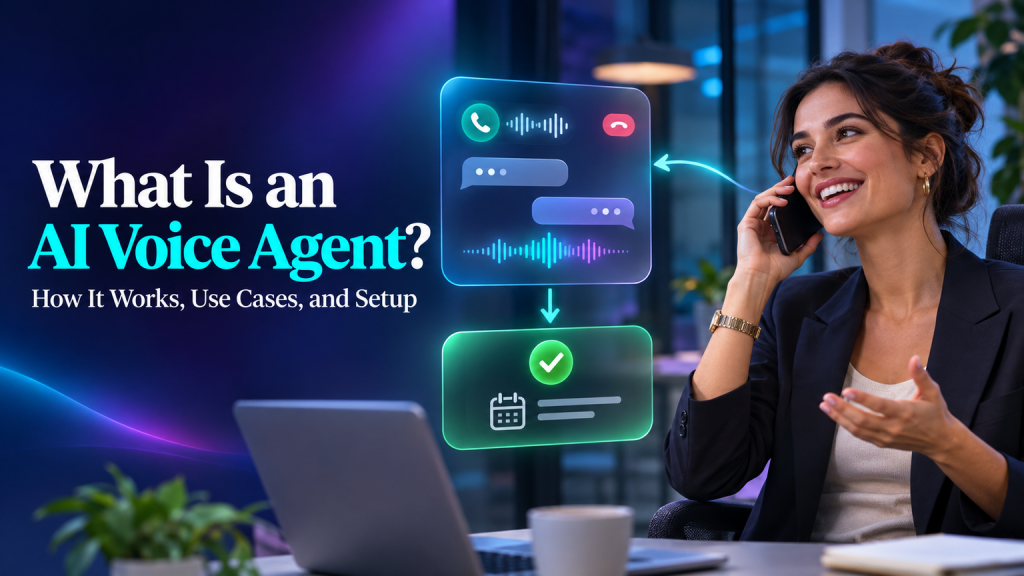
An AI voice agent is software that speaks with people over a phone line or voice interface, understands what they are asking, and responds using configured information and tools. Depending on its setup, it can answer routine questions, collect details, check availability, create a request, or connect the caller to a person.
That sounds simple until a real caller pauses, changes their mind, gives an incomplete phone number, interrupts the agent, or asks for something outside the approved workflow. A useful voice agent needs more than a pleasant voice. It needs a narrow job, accurate information, reliable call handling, clear boundaries, and a human fallback.
This guide explains how an AI voice agent works, where it can help a business, what to decide before setup, and how to evaluate the caller experience before routing real calls to it.
Plain definition: An AI voice agent is an automated system that listens to spoken input, responds in speech, and may use approved tools to complete defined tasks during a call.
What Is an AI Voice Agent?
A voice agent combines speech input and output with an AI system that can interpret requests and follow a workflow. The system may use speech recognition to turn the caller’s words into text, a language model or other dialogue system to decide what to say or do, and speech synthesis to speak the response. Real-time voice systems may process speech more directly. Either way, the business experience depends on the complete call path, including the phone connection, the AI, connected tools, and any human transfer.
The agent’s job can be informational, transactional, or a combination. An informational agent might answer approved questions about opening hours or service areas. A transactional agent may check a calendar, capture information, or create a service ticket. Each added action needs permission, validation, and an outcome the caller can understand.
The phrase “AI voice agent” is used for systems with different capabilities. Some only hold a spoken conversation. Some are connected to a phone number and can receive or place calls. Others can access business information or run selected actions through integrations. Before comparing systems, ask what the specific product can do in the channel you plan to use, and what configuration or external services are required.
Botsify describes its voice agents as working in browser and phone calls. Its voice product page also describes access to call logs and recordings from the dashboard. These are product-specific details; confirm the current setup, availability, and terms for your account before planning a deployment.
AI Voice Agent vs. IVR, Voice Assistant, and Human Receptionist
These terms can overlap in product marketing. The useful distinction is how the caller interacts and what the system is expected to do.
| System | Typical interaction | Best suited to | What to verify |
|---|---|---|---|
| Traditional IVR | Caller listens to a menu and presses a number or says a short command | Predictable routing and standard menu choices | Menu depth, escape options, accessibility, and how callers reach staff |
| Voice assistant | User speaks a request and receives a spoken response, often on a device or app | Personal tasks and information requests | Whether it is designed for customer calls and business integrations |
| AI voice agent | Caller speaks naturally; the system interprets requests and may use configured workflows or tools | Defined business calls involving questions, intake, routing, or simple actions | Phone coverage, action permissions, handoff, testing, usage charges, and call records |
| Human receptionist or agent | A person listens, interprets context, and applies judgment | Complex, sensitive, high-emotion, or unusual conversations | Staffing availability, service hours, queue coverage, and escalation process |
An AI voice agent is not automatically better than a well-designed IVR. A short menu can be clear and reliable when callers need only choose a department. A conversational agent may help when callers describe their need in different ways or need more than a simple transfer. For many businesses, the right design combines both: the agent handles a bounded task while callers can request a person or choose a direct route.
The goal is not to make the call sound human at any cost. The goal is to solve appropriate requests with less friction, then route the rest honestly and efficiently. Review the human handoff rules for AI agents when deciding how the caller can reach a person and what context should follow them.
How an AI Voice Agent Handles a Call
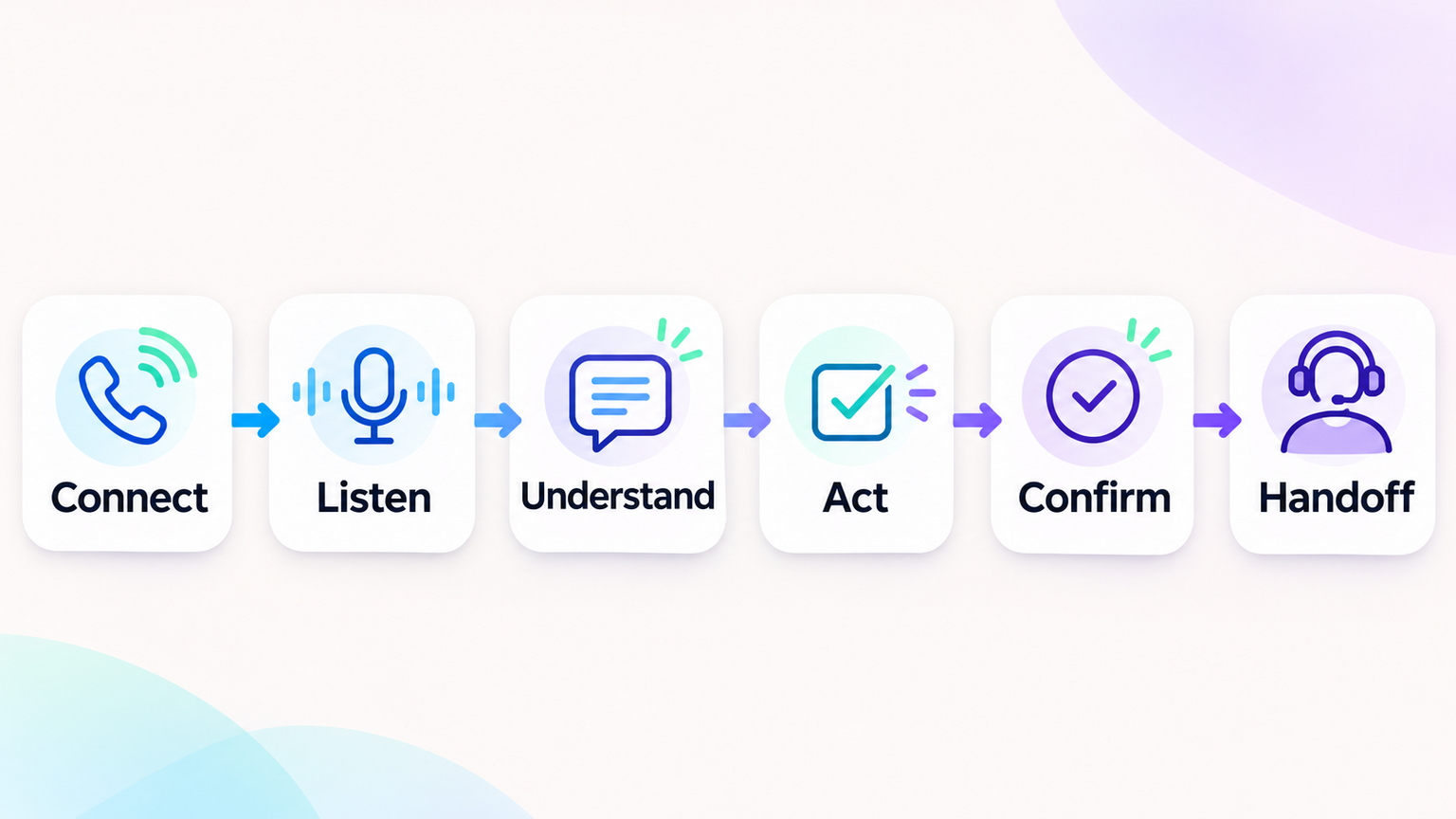
A basic call can be understood as a sequence of stages. Mapping the stages helps reveal where failures may occur and which party owns each part.
- The call connects. A phone provider or voice channel accepts the incoming call and routes it to the configured agent or call flow.
- The agent identifies itself and sets expectations. The opening should explain the agent’s role in plain language and, where applicable, provide required notices about automation or recording.
- The caller explains the request. Speech recognition or real-time voice processing captures what the caller says, including names, numbers, dates, and corrections.
- The agent interprets the intent. The system maps the request to a supported task, asks a focused follow-up question, or recognizes that the request is out of scope.
- The agent consults approved information or tools. It may retrieve an answer, check a connected calendar, or submit a validated request, depending on permissions.
- The agent confirms the result. It should read back important details and avoid claiming an action succeeded until the connected system confirms it.
- The call ends or transfers. The caller receives a concise summary, a next step, or a human handoff. If a transfer fails, the call flow needs a fallback rather than silence.
A request such as “Can I move my appointment to next Thursday?” illustrates the dependencies. The agent needs to understand the current appointment, identify the intended date and time zone, check availability, confirm the selected slot, write the change to the calendar or scheduling system, and tell the caller whether the update succeeded. A voice that sounds fluent cannot compensate for an incorrect calendar write or a nonexistent transfer path.
A good design treats each stage as something to test. Microsoft’s current voice-agent guidance highlights perceived latency, natural turn-taking, recovery after no-input or no-match events, and explicit human-handoff design. Those recommendations apply to the caller experience regardless of which vendor provides the system.
Where AI Voice Agents Can Help
The clearest starting point is a frequent, bounded call type where the business already knows the acceptable answer or action. The agent should reduce a real bottleneck without requiring it to make open-ended judgments.
Answer routine questions
Businesses often receive repeated questions about hours, locations, service areas, appointment preparation, delivery policies, or basic eligibility. A voice agent can answer from approved and maintained information. The business should decide what happens when information is missing or two sources disagree. In those cases, the agent should say it cannot confirm the answer and offer the next step.
Handle appointment requests
An agent may collect a caller’s preferred time, check a connected schedule, and request confirmation before booking or rescheduling. The workflow needs clear rules for duration, time zones, buffers, cancellations, duplicate appointments, and failed calendar responses. See the AI appointment booking agent playbook for a related booking workflow, and the AI booking agent guide for local services for a service-based example.
Capture and route new leads
A voice agent can ask a short set of qualifying questions, capture contact details, and route a suitable inquiry to a sales team. Keep the questions relevant and explain why information is being collected. Callers should be able to skip a question or ask for a person when appropriate. The related AI sales assistant guide covers qualification and routing concepts across sales workflows.
Provide overflow or after-hours coverage
If staff cannot answer every call during a predictable peak or outside business hours, a voice agent may serve as a first response. Define which calls it can resolve and which calls should be queued, transferred, or captured for a callback. An unattended agent should not imply that a live team member is immediately available if one is not. For a home-services example, compare the considerations in this AI receptionist guide for home service companies.
Collect structured intake
For a service request, the agent may capture a name, callback number, service location, and a short description, then create a ticket or send the details to a team. Have the agent repeat critical details for confirmation. For health, financial, legal, or other sensitive contexts, consult the appropriate business and compliance owners before deciding what information should be collected or spoken aloud.
Recover missed calls
A business can set up a callback workflow after an unanswered call, but outbound calls introduce separate concerns. Confirm the caller’s consent and local rules, identify the business clearly, honor opt-outs, and limit the purpose of the call. Do not assume that rules for inbound service calls also cover automated outbound marketing. For additional planning context, see the voice agent sales campaign guide, then confirm the requirements for your specific campaign and jurisdictions.
When a Voice Agent Is the Wrong Fit
A voice agent may be premature when the business has not documented the process, information changes without an owner, or staff cannot agree on which requests it may handle. It may also be unsuitable if a call requires complex judgment, nuanced negotiation, or immediate reassurance from a person.
Use caution when:
- The call may involve an emergency or another time-sensitive safety concern.
- A wrong answer could create serious financial, medical, legal, or customer harm.
- The business cannot provide a dependable human transfer or callback path.
- Callers routinely need personalized exceptions that are not captured in a clear policy.
- The system cannot reliably access the information required to complete the task.
- The call environment, language, or audio quality has not been tested with the intended callers.
- The expected call volume or economics do not justify phone and AI usage costs.
This does not mean a voice agent can never support a higher-impact workflow. It means the design must include more controls, appropriate review, and a credible alternative when the system is uncertain. Keep a person responsible for decisions that the business has not explicitly delegated.
Design the Call Workflow Before Choosing a Voice
A voice demo can sound polished while hiding the decisions that determine whether the system is useful. Start with the caller’s task and define what a successful call means. A one-page workflow is often enough to expose gaps.
| Workflow question | Example decision |
|---|---|
| Who is calling and why? | Existing customer calling to reschedule a standard appointment |
| What can the agent do? | Check availability and move an appointment after caller confirmation |
| What can it not do? | Cancel a service with a fee waiver or change another person’s booking |
| What information is needed? | Booking reference or verified contact detail, plus the requested time |
| Which system is authoritative? | The scheduling system, not a copied spreadsheet |
| What needs confirmation? | Date, local time, service, and the completed change |
| When should it hand off? | Caller asks for staff, identity cannot be verified, or the calendar action fails |
| What if no one is available? | Offer a callback request and state when the team will respond |
Write the normal path and the exception paths. Include no answer from a tool, conflicting information, a caller who interrupts, a correction to a number, a request that does not fit the workflow, and a transfer that does not connect. These are not rare nuisances to add later. They are part of the actual service experience.
For complex support flows, the AI customer service use cases can help identify routine tasks, while the AI agent requirements guide can help specify inputs, actions, boundaries, and success measures.
What to Check in the Voice Experience
Phone conversations have no screen to display a long explanation or quietly correct a misunderstanding. The agent needs short, clear turns and recovery behavior that does not make callers repeat themselves unnecessarily.
Response time and pauses
Long silence can sound like a dropped call. Test the time from the end of a caller’s turn to the agent’s first spoken response, especially when a tool lookup is involved. Measure the full path rather than assuming the language model alone determines speed. If a lookup will take time, use an appropriate spoken acknowledgement, but do not fill every pause with repetitive chatter.
Interruptions and turn-taking
Callers interrupt, correct details, pause to think, and sometimes speak while background voices are audible. Test whether the agent stops when interrupted and correctly responds to the latest information. Include short answers such as “yes,” “no,” or a single digit, as well as longer statements with pauses. Microsoft recommends tuning turn detection for the actual callers and testing interruptions rather than assuming one setting works everywhere. If callers use more than one language, validate pronunciation, key phrases, and handoff in each supported language; the multilingual AI customer support guide covers related language and escalation considerations.
Names, numbers, and dates
Misheard contact details can make a conversation feel successful while making the downstream action unusable. Ask the caller to spell or repeat ambiguous names and numbers. Read back phone numbers, email addresses, appointment times, addresses, and other consequential fields before submitting them. Confirm the time zone when callers and staff may be in different locations.
Clear confirmations
The agent should distinguish between an action being requested, submitted, and confirmed. If the calendar or CRM returns an error, it should say the task was not completed and offer an alternative. A caller should not leave with a made-up confirmation number or a false belief that an appointment changed.
Human transfer
Define the situations that require a person, what the agent says before transfer, how the call is routed, what context is passed, and what happens when no one answers. The caller should be able to request a person without arguing with the agent. A transfer should not be described as complete until the telephony system confirms the destination connected.
Setup Checklist for a First AI Voice Agent
A staged setup makes it easier to catch configuration problems before customers encounter them.
- Select one call type. Choose a repeated task with a clear boundary, such as answering a small set of service questions or collecting a callback request.
- Record the current baseline. Track unanswered calls, common reasons for calling, after-hours volume, call transfers, and the staff time spent on the task.
- Write the allowed and prohibited actions. Be specific about data access, actions that can change records, and cases requiring approval.
- Prepare approved information. Assign an owner to keep hours, policies, prices, service boundaries, and other answers current.
- Map the call flow. Include opening language, clarifying questions, confirmations, out-of-scope paths, and human handoffs.
- Connect only required tools. Use the minimum permissions needed for the first workflow and test with non-production data where possible.
- Create a realistic test set. Include routine requests, incomplete details, interruptions, background noise, corrections, unsupported questions, and tool failures.
- Run test calls on the intended phone setup. A browser demo does not prove that the phone number, call routing, audio, and transfer behavior work as expected.
- Set launch criteria and an owner. Decide what must pass, who can pause the agent, and who will review early calls or outcomes.
- Start with a limited rollout. Route only the intended call type or a controlled share of calls, then review failures before expanding.
A simple AI agent testing guide can help teams organize repeatable checks. For voice, test over the actual phone route as well as any web-based demo environment, because audio conditions and call transfers are part of the product the caller experiences.
Hear an AI Voice Agent Handle Your Call Workflow
Listen to a live voice agent and discuss your call flow.
How to Evaluate a Voice Agent Provider
Ask each provider to demonstrate the same call scenarios. Use a short scorecard rather than comparing only the voices or the smoothest scripted demo. If you are comparing implementation partners, the AI voice agent development company guide is a related shortlist resource.
| Area | Ask the provider | Evidence to request |
|---|---|---|
| Phone channel | Which phone providers, regions, numbers, and call routes are supported? | A working test using the intended number and routing setup |
| Call behavior | How does it handle interruptions, silence, unsupported questions, and retries? | Test calls with your scenarios, including failure cases |
| Business actions | Which calendars, CRM systems, or APIs can it use, and what can each connection change? | Permission list, test records, and action confirmation behavior |
| Handoff | Can callers request staff, and what happens if the destination is unavailable? | Demonstrated transfer and a failed-transfer fallback |
| Recordings and logs | What call information is retained, who can access it, and how can it be deleted or exported? | Current documentation and account settings for your plan |
| Monitoring | Can the team review call outcomes, failed tasks, and usage? | Dashboard or sample reports for the product tier under consideration |
| Support | Who handles configuration, call routing, and integration failures? | Support hours, response expectations, and escalation route |
| Exit | What happens to the phone number, call history, configuration, and integrations if you leave? | Written migration and data-retention terms |
Botsify’s voice page describes call logs and downloadable recordings in its dashboard, along with phone and browser call experiences. Confirm what applies to the plan you intend to use, how long records are retained, and which controls are available. Avoid collecting or retaining audio unless there is a defined business need and the right notice, access, and retention practices for your context.
Configure a Voice Agent for Your Call Volume
Review your call volume, routing needs, and support options.
Cost Considerations for AI Voice Agents
A voice agent may involve several cost layers: platform access, telephone numbers, per-minute calling, speech or model usage, integrations, implementation, and ongoing support. The price shown for one component is not necessarily the full cost of answering a call.
Ask providers to explain:
- What is billed per minute, per call, per concurrent call, or per completed task?
- Are inbound and outbound calls priced differently?
- Are call transfers, recordings, transcription, or phone numbers charged separately?
- What happens when an included allowance is used up?
- Are failed or abandoned calls billable, and how are retries counted?
- Which integrations or setup work require additional fees?
- What support and ongoing changes are included in the recurring plan?
Botsify’s current Done-for-You pricing page lists $149 per month or $1,490 per year and includes 60 minutes of voice calls per month among other plan features. This is a Botsify plan detail, not a market price or a guarantee that every usage need is covered. Check the live Done-for-You pricing page for current terms and ask how calls beyond the included minutes, phone service, and your selected workflow are billed.
To estimate your own cost, use a realistic call sample. Include short, average, and longer calls, as well as calls that transfer to staff. Separate total calls from calls that the agent resolves, because a high call volume does not necessarily mean the system is creating value.
Estimated monthly voice-agent cost
= platform and service fees
+ phone and call charges
+ AI or usage charges
+ setup and integration costs
+ staff review and exception handling
Compare the estimate with measurable outcomes such as calls answered outside business hours, appointments correctly booked, qualified requests routed, or staff time actually freed. Do not count a call as “handled” solely because the agent spoke to the caller. Confirm the downstream task completed and the caller received a useful result. The customer support metrics beyond deflection guide offers a broader perspective on measuring outcomes rather than just reducing contact volume.
Privacy, Recording, and Caller Expectations
Voice systems may process speech, phone numbers, call details, recordings, or transcripts. Before launch, identify what information is captured, where it is stored, who can access it, which service providers process it, and how long it is kept. These questions depend on the product configuration and your use case.
Recording and automated-call requirements vary by jurisdiction and call purpose. Ask qualified legal or compliance advisors which disclosures and consent rules apply to your business and callers. Provide any required notice at the right point in the call, and make the wording understandable. Do not assume that a rule for one state, country, or type of call applies everywhere.
Also review the security of connected tools. A voice agent with permission to book appointments may not need permission to read unrelated customer records or make refunds. Limit access to the task, use business-controlled accounts where possible, and define how access can be revoked. An agent should never ask a caller to speak sensitive credentials or payment details unless the system and process are specifically designed and approved to handle them.
Tell callers what the agent can do. A simple opening can name the business, say that it is an automated assistant, describe the supported task, and offer a human route. Clear expectations often reduce frustration more effectively than attempting to disguise automation.
Frequently Asked Questions
Is an AI voice agent the same as a chatbot?
They share some underlying AI capabilities, but a voice agent is designed for spoken interaction over a phone or voice channel. It must handle audio, turn-taking, interruptions, call routing, and spoken confirmations. A text chatbot may share the same knowledge or workflows but still need a separate voice channel setup.
Can an AI voice agent book appointments?
It can when the chosen system supports the required phone workflow and has an authorized connection to the relevant scheduling system. The setup should confirm the caller’s requested time, validate availability, submit the booking, and report success only after the scheduling system confirms it.
Can callers ask for a human?
They should have a clear way to do so. Decide which phrases or situations trigger a transfer, what information accompanies the transfer, and what happens when the team is unavailable. Test the complete route, including the failure path.
Does an AI voice agent work with every phone number?
No. Support depends on the platform, telephony provider, country, number type, and routing configuration. Some systems may require a supported phone service or number setup. Confirm your exact number and call flow with the provider before making a deployment plan.
How do I know whether the agent is working well?
Review task completion, accuracy on approved information, caller requests for a person, failed transfers, abandoned calls, repeat calls, and customer feedback. Compare results with a baseline and inspect failures, not just successful calls. Measures should reflect the reason for using the system and the cost of mistakes.
Is an AI voice agent cheaper than hiring staff?
It depends on call volume, call duration, usage and phone charges, setup work, the amount of staff review, and the value of the calls handled. Compare the full monthly cost and service outcomes with the real cost of the current process. Do not assume that every automated call removes the need for staff.
Can I use one voice agent for every type of call?
A system may support multiple call flows, but one broad agent is harder to test and govern than a clearly bounded first workflow. Start with the most repeatable call type, confirm the handoff and operating model, and expand only when evidence supports it.
Final Thought: Start With One Call Type
An AI voice agent can make routine phone workflows easier to access, particularly when callers need an answer, a simple action, or a reliable route to the right person. Its quality depends on the whole call path: the phone setup, approved information, tools, turn-taking, confirmations, and human fallback.
Choose one call type, write down what the agent may and may not do, and test it through the phone route customers will use. Review actual outcomes before expanding. A voice agent should make the right call easier to complete and the wrong call easier to hand off.
Discuss a Practical AI Voice Agent Use Case
Explore a focused use case with the Botsify team.
