


The moment an AI agent can do something, not just say something, you need clear AI agent approvals that match human oversight to the action’s risk. Refunds, plan changes, outbound messages, and data edits all have a blast radius, and “the AI decided” is not an acceptable answer when a customer asks why.
This playbook shows how to define review triggers, route decisions, and keep the approval loop moving. A sound AI agent governance framework also gives a team clear owners for policy, review, and intervention.
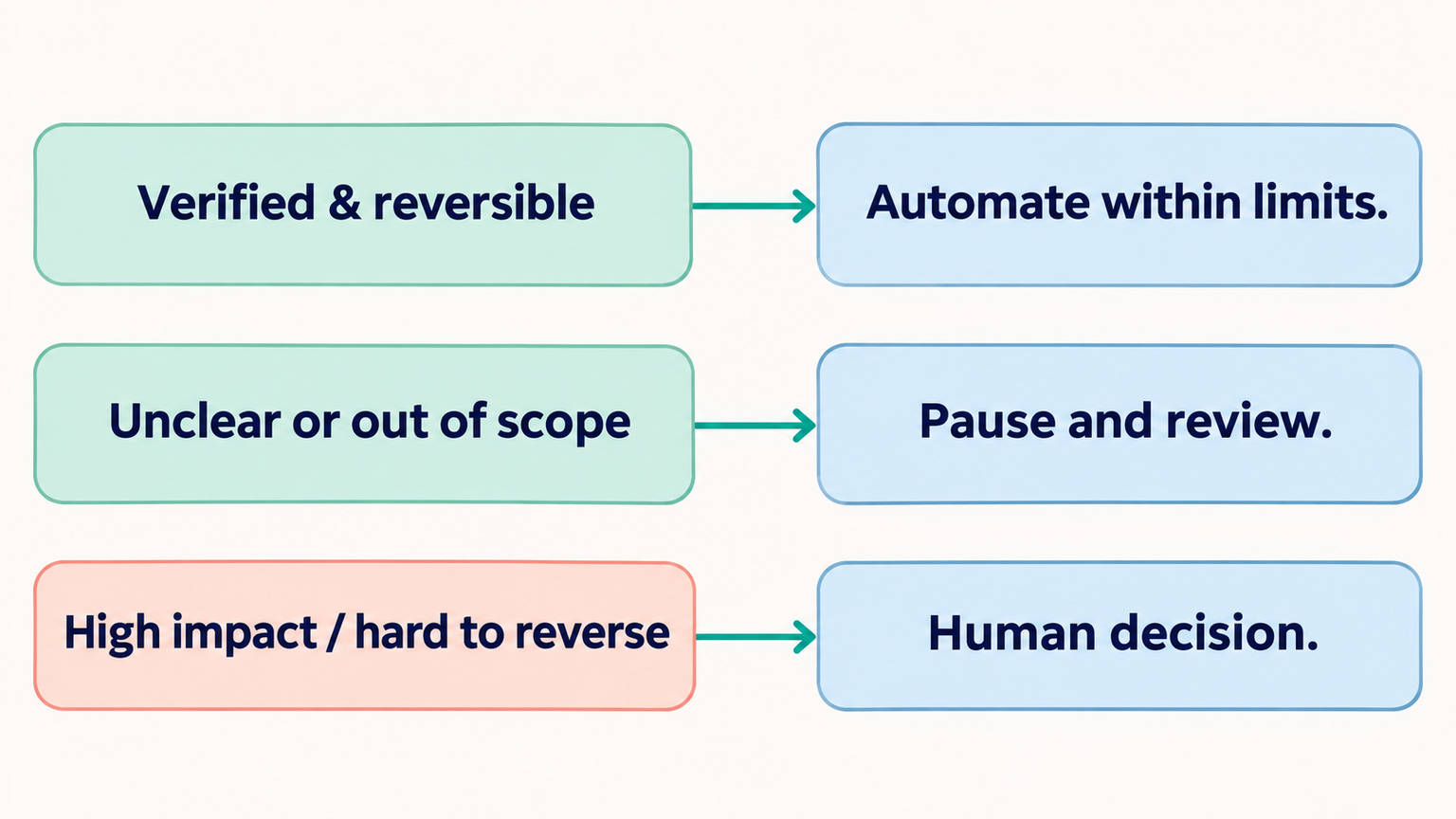
Core idea: Approvals are not about distrusting AI. They’re about matching the level of human oversight to the blast radius of each action.
AI Agent Approvals by Impact and Reversibility
Classify every action the agent can take:
| Action pattern | Examples | Starting control |
|---|---|---|
| Routine and reversible | Draft an internal note, retrieve an approved FAQ | Allow within a narrow scope; monitor outcomes |
| Customer-visible with limited impact | Send a standard reply, book an available appointment | Validate recipient and policy; review exceptions |
| Consequential or difficult to reverse | Issue a refund, change access, cancel a service | Pause for an authorized person when policy requires it |
| Prohibited or specially governed | Actions barred by law, contract, or company policy | Deny or route to the designated accountable role |
Define the agent’s job and allowed actions before assigning approval tiers. Clear AI agent requirements help teams distinguish routine tasks from actions that need a person’s decision.
The Approve/Reject Rule Set
For each high-blast-radius action, define:
| Element | Example |
|---|---|
| Trigger | The request falls outside the organization’s documented refund policy |
| What the human sees | Conversation summary, customer history, proposed action |
| Decision options | Approve / Reject / Modify / Escalate higher |
| Time limit | Set a response window that matches the workflow and customer expectation |
| Timeout | Expire or route to the named backup; never treat silence as approval |
The key design principle: the human should be able to review without reconstructing the case. Show the specific proposed action, the relevant evidence, and a path to inspect more context when needed. Limit displayed customer data to what is necessary for the decision. A human-in-the-loop review process for AI sales replies uses the same principle: make the decision clear and the reviewer’s role explicit.
Write the rule in a reusable format so product, operations, and support teams interpret it the same way:
| Rule field | Write down |
|---|---|
| Action | The exact tool action and fields that may change |
| Scope | Which channel, customer type, record, and situation are covered |
| Trigger | The condition that sends a proposal to a reviewer |
| Reviewer | The accountable role and its backup |
| Required context | The source data and conversation details the reviewer needs |
| Decision options | Approve, reject, edit and resubmit, or escalate |
| Expiry behavior | What happens if the review window ends without a decision |
| Execution check | What the connected system must validate after approval |
| Record | What decision details are retained for later review |
For example, an online store might allow an agent to collect order details and prepare a refund proposal. The payment system still checks that the order belongs to the customer and that the amount is within the store’s policy. A person reviews exceptions or missing evidence. Approval applies only to that order and amount; it does not authorize the agent to refund other orders. If the order changes before execution, the proposal expires and must be checked again. This concrete rule is easier to test than a general instruction such as “ask a manager when the refund seems risky.”
Use Confidence as One Signal, Not the Approval Rule
A model confidence score can help identify an answer that needs another check, but it cannot establish that an action is authorized, current, or within policy. Do not turn an uncalibrated score into a universal percentage that decides whether money moves or a customer record changes. Define the approval trigger from the action’s impact, reversibility, policy, and evidence quality.
For example, a support agent may answer a routine question from an approved knowledge source while it pauses before issuing an unusual credit. If key details are missing or conflicting, ask the customer or route the case to a person regardless of a high model score. Clear human handoff rules for AI agents define what happens when the workflow needs human judgment, and AI agent testing can check whether those branches work.

Set Clear Approval Rules for Your AI Agent
Define review rules around impact, evidence, and action scope.
Separate Approval from Permission
Approval and permission solve different problems. Permission determines whether an agent or integration is technically allowed to attempt an action. Approval determines whether a particular proposed action should proceed in a specific situation. A reviewer cannot make a workflow safe if the agent has broad access to unrelated customer records, and a narrow permission does not by itself confirm that a proposed change is appropriate.
Use both controls where the action has meaningful impact:
| Control | Question it answers | Example |
|---|---|---|
| Permission | Can this agent call this tool or access this record? | The support agent can read only the active customer’s ticket. |
| Approval | Should this proposed action happen now? | A person reviews a refund request before the payment tool executes it. |
| Validation | Is the request complete and within allowed bounds? | The refund amount is checked against the approved order and policy. |
| Confirmation | Did the connected system complete the action? | The agent reports the refund only after the payment service confirms it. |
Keep the enforcement outside the model wherever the connected system allows it. A prompt can tell the agent to request approval before changing an account, but the application or tool should still reject a change that lacks an approval record. Similarly, a reviewer’s approval should be scoped to one action, one record, and a short time window. It should not become an open-ended permission for the agent to make similar changes later.
For every controlled action, write down the agent identity, the minimum tool access, the human decision required, the validation that runs after approval, and the method for stopping or revoking access. That makes it easier to distinguish a bad recommendation from an access-control failure when something goes wrong.
Make Each Approval Request Easy to Evaluate
An approval card should help a person decide, not force them to reconstruct the conversation. Keep the most important information visible without making the reviewer search across several systems. A useful request usually includes:
- The action: State exactly what the agent proposes to do, including the affected record and the fields or amount that will change.
- The reason: Summarize the customer request and the policy or business rule that applies.
- The impact: Explain what the customer or business will experience if the action is approved.
- The source context: Show the relevant conversation excerpt or approved data, with a path to inspect more when needed.
- The uncertainty: Identify missing, conflicting, or stale information. Do not present a model confidence score as proof that the action is correct.
- The alternatives: Offer safe choices such as approve, reject, request more information, or escalate to a designated owner.
- The consequence of waiting: Show when the request expires and what happens next, without implying that silence counts as approval.
Make the proposed change explicit. “Update the account” is too vague. A reviewer needs to know whether the agent will change a renewal date, switch a plan, alter contact details, or close the account. Where possible, show a before-and-after summary and keep the approval tied to that exact version. If the underlying data changes while a request is waiting, invalidate the old request and ask for a new decision.
Avoid approval buttons that are ambiguous or easy to misclick. Use separate actions with clear labels, enough spacing, and confirmation for high-impact decisions. If a reviewer chooses “modify,” the system should send the changed proposal back through validation instead of silently treating the edit as approved. Record the identity of the approver and the version they reviewed.
Define Prohibited and Approval-Required Actions
Avoid a blanket list that treats every business or workflow the same. Instead, document which actions are prohibited, which need a person’s decision, and which may proceed within a narrow policy. Legal, medical, financial, identity, access, deletion, and bulk communication workflows may carry obligations or consequences that require specialist review. The accountable business owner should define those rules with the appropriate legal, security, or operations partners.
For each category, name the policy owner, the permitted action, the required evidence, and the safe route when the request falls outside scope. Test that the agent cannot bypass a denial by switching tools or channels. A practical AI agent implementation checklist helps include the approval rules in rollout preparation.
The Audit Trail
Keep a proportionate record of the event needed to explain and investigate a decision. Depending on the workflow, that may include:
- Time and unique action or request identifier
- The proposed action and relevant record reference
- Policy or rule version applied
- Reviewer role or identity and the decision
- Validation and execution outcome
Avoid copying a full conversation by default when a focused excerpt or protected reference is enough. Set access and retention under the organization’s privacy and records policies. This makes review useful without creating an unnecessary duplicate of customer data. An AI agent audit trail for leadership can also clarify which events and decisions need to be available for review.
Make Sensitive AI Actions Easier to Review
Give reviewers the context and decision path they need.
Match the Approval Pattern to the Workflow
The same action can carry different risk in different contexts. A booking change for a customer who has not paid may be easy to reverse; a change that affects a time-sensitive appointment may have a much larger impact. Write rules for the actual workflow, including who requested the action, what the system has verified, and what can go wrong.
| Workflow | Agent may prepare | Human should review when | Useful safeguard |
|---|---|---|---|
| Refunds and credits | Gather order details and propose an amount | The request is outside a written policy, the amount is unusual, or evidence conflicts | Validate order, payment status, and amount before execution |
| Appointment changes | Find available times and suggest a replacement | The change affects a same-day visit, a scarce slot, or a customer exception | Recheck availability immediately before committing |
| Subscription changes | Explain plan options and prepare a change | The change alters billing, eligibility, or a negotiated term | Show the old and proposed plan and effective date |
| Outbound messages | Draft a response or follow-up | The message includes a commitment, sensitive detail, or an exception | Check consent, recipient, and final message before sending |
| Customer records | Propose a field correction with its source | The change affects identity, access, or multiple records | Verify the record owner and validate the field format |
| Deletion or access change | Collect the request and supporting details | Apply the organization’s authorization and recovery policy; route exceptions to the accountable person | Confirm scope and authorization before execution |
These are starting examples rather than universal policy. A business should define its own limits, exception categories, owners, and customer commitments. Avoid copying a threshold from another company or applying one rule to every channel. Document the decision and review it when the connected system, product policy, customer promise, or applicable obligations change.
Keep the Approval Queue Useful
An approval queue can become a bottleneck when every task is sent to the same person or when requests arrive without enough context. Route requests to an owner who understands the consequence of the action. If an approval needs a specialist, send it to that role first and define a backup for absences. The person accountable for the policy should know how to change the rule, while the reviewer should be able to make the individual decision.
Set a response window based on the customer’s expectation and the operational impact. There is no universal number of minutes or hours that fits every workflow. A routine request may wait until the next staffed period; an urgent service issue may need immediate escalation. State the expected response time to the customer only if the business can meet it.
When a request expires, make the outcome explicit. Safe defaults include returning the conversation to a human queue, asking the customer whether they still need help, or cancelling the proposed action. Do not let a timeout silently approve an action. If the action is no longer valid after a delay, expire it and require the agent to check the current state before proposing it again.
Reduce review load by improving the policy, not by approving requests in bulk without context. Group low-risk items only when the reviewer can inspect each item and reject any individual one. Keep high-impact actions separate. Track why reviewers reject, edit, or escalate proposals, then use those reasons to refine the instructions, the tool validation, or the category boundaries. A queue should not reward speed at the expense of careful decisions.
Test the Full Approval Path
Test more than whether an approval button works. The agent, application, reviewer, and connected tool form one workflow. Test what happens before and after a person decides, including stale data, duplicate events, timeouts, and system errors.
| Scenario | Expected behavior | What to verify |
|---|---|---|
| Complete, in-scope request | Agent proposes the permitted action with relevant context | Reviewer can understand the change without searching elsewhere |
| Missing or conflicting details | Agent asks for clarification or escalates | No guessed customer, amount, date, or account |
| Reviewer rejects | Proposed action does not execute | Customer receives an appropriate next step, not a false success message |
| Reviewer modifies | Updated proposal is validated again | The changed version receives its own explicit approval |
| Approval arrives after data changes | Old proposal is invalidated | Agent rechecks state and creates a new request if appropriate |
| Approval service is unavailable | Consequential action remains pending or is cancelled | No fail-open behavior or unapproved retry |
| Duplicate callback or retry | The action occurs at most once | The system detects an already completed action |
| Reviewer does not respond | Request expires or routes to a person | Silence does not count as approval |
| Prompt asks to bypass review | Policy and tool controls still require approval | User content cannot grant permissions or approve an action |
Use synthetic records or a test environment for cases that could change customer data, send messages, or move money. Keep the test results with the policy version. Rerun relevant cases after changing the model, prompt, integration, approval rule, or source data. A passing test set demonstrates that the tested cases behaved as expected; it does not guarantee that every future request will be safe.
Measure Whether the Review Design Works
Measure both the review process and the customer outcome. A high approval rate does not automatically mean the agent is unsafe; it may mean the workflow has been designed to route sensitive actions correctly. A low approval rate does not prove the agent is ready for more autonomy. Read the numbers alongside a sample of decisions and the reasons people made them.
Useful measures include:
- Approval, rejection, and modification reasons: Find categories where the agent misunderstands the policy or lacks current information.
- Time to decision: Identify queues that need a clearer owner, better routing, or a more realistic service window.
- Expired requests: Check whether requests are unnecessary, poorly timed, or missing an available reviewer.
- Actions blocked by validation: See which proposals are outside permitted bounds before they can affect a customer.
- Duplicate or failed actions: Find retry problems and cases where a person cannot tell whether an action completed.
- Customer follow-up and complaints: Check whether approval delays or incorrect actions create extra effort for customers.
- Reviewer overrides: Review exceptions and determine whether policy should change or the exception should remain rare.
Choose a review cadence that reflects action impact and traffic. During an initial rollout, inspect decisions frequently and include examples from every risk tier. Once behavior is stable, maintain a recurring sample and review again after a material change or incident. Assign a person who can pause the action or remove the integration permission; alerts without an owner or intervention path do not provide meaningful oversight.
Use a Staged Rollout
Introduce approval rules in steps so the team can see where they help and where they slow the workflow:
- Map the actions. List every tool action, its possible impact, reversibility, and required authority.
- Write the policy. Define the allowed action, the approval trigger, the reviewer, the required context, and the safe outcome when no decision arrives.
- Test without customer impact. Use historical or synthetic cases to test routine, ambiguous, and adversarial requests.
- Run in draft mode. Let the agent prepare proposals while a person performs the action manually. Record what reviewers changed and why.
- Enable a narrow action. Choose a well-defined category with a reliable verification path. Keep exceptions and high-impact cases in review.
- Review evidence before expanding. Confirm that the queue is monitored, validation works, and the team can stop or reverse the action where appropriate.
- Revisit the policy. Update it when products, customer promises, permissions, or operational owners change.
Do not expand access simply because the first few examples worked. Add one action or permission at a time, keep an owner for each rule, and make sure customer-facing language matches the actual approval process. A launch checklist should include the reviewer’s backup, the timeout behavior, the pause procedure, and the person responsible for investigating a failed or duplicate action.
Handle Exceptions Without Creating a Bypass
Some requests will not fit the standard rule. Give reviewers a safe way to escalate an exception instead of forcing them to approve or reject without enough authority. The escalation should name the next role, include the proposal and evidence already reviewed, and tell the customer what happens next. The agent should not keep trying the same action through another tool or channel after a reviewer declines it.
If a person overrides the normal policy, require a reason and keep the exception narrow. Record which action was approved, which customer or record it applied to, who made the decision, and when the approval expires. An exception for one customer should not silently become a new default for all future requests. Review repeated exceptions as a signal that the policy may be unclear, the product workflow may be missing an option, or staff need better guidance.
Policy changes also need a controlled path. Assign an owner who can propose a change, record the version and effective date, test the affected cases, and communicate the update to reviewers. If a new rule causes unexpected outcomes, know how to restore the previous version or disable the action while the team investigates. Updating a prompt alone is not sufficient when the decision also depends on tool permissions, validation rules, or customer-facing commitments.
Keep the approval record useful but proportionate. Capture what the team needs to understand the decision and investigate an incident; avoid copying unrelated customer details into every request. Limit access to approval records to people who need them, and follow the organization’s retention and privacy policies. These details make the process more accountable without turning each approval into an unbounded copy of the customer’s history.
Design Patterns by Use Case
| Use case | Agent can prepare | Decision boundary to define |
|---|---|---|
| E-commerce refunds | Gather order details and calculate a proposal | Company policy, customer eligibility, duplicate requests, and evidence |
| Appointment changes | Find and suggest available times | Same-day changes, scarce slots, and customer exceptions |
| Subscription changes | Explain options and prepare the selected change | Billing impact, eligibility, and negotiated terms |
| Outbound messages | Draft a response or follow-up | Consent, recipient, sensitive details, and commitments |
The table gives design prompts, not ready-made policy. Set limits with the people who own the workflow, then review exceptions and outcomes. In support workflows, AI support ticket triage can help separate routine requests from cases that need a person.
Common Design Mistakes
- Approving everything manually: the agent becomes a suggestion box and nobody checks the queue
- No time limit: actions sit pending for days, customer experience degrades
- No context in the approval view: reviewers lack the evidence needed to decide
- One approval rule for all channels: a public post, Instagram DM, and private email may have different risks
These AI agent deployment mistakes can turn a useful control into delay or leave important actions without a clear owner. If routine actions are being over-reviewed, revisit the boundary and stop AI agents from over-automating by clarifying allowed actions and escalation conditions.
FAQ
How many approval steps are too many? There is no universal percentage. If approvals routinely cover a large share of actions, review the risk tiers and remove unnecessary gates before adding reviewers.
Can I approve via mobile? If your workflow supports mobile review, keep the decision summary concise and confirm that approval actions remain authenticated and recorded. Test the full path on the devices reviewers actually use.
What about actions that are reversible? Reversible actions may allow more autonomy, while irreversible actions such as sending a message or charging a card often need stronger review. Apply AI agent requirements to define which tools and changes are allowed for each workflow.
Should model confidence decide whether an action is approved? Confidence can help route a proposal for review, but it should not replace impact rules, authorization, or validation. A high score does not prove that a customer is eligible or that the underlying record is current. Keep critical or prohibited actions behind their required human decision regardless of a confidence score.
What should happen when the reviewer does not respond? The request should expire, route to a named backup, or return to a human service queue according to the written policy. The agent should not treat silence as consent. If the customer is waiting, explain the next step and expected response time only when the team can meet it.
Can one reviewer approve every action type? Use a reviewer with the authority and knowledge needed for the decision. Routine customer-service exceptions may belong to a support lead, while changes involving billing, account access, or legal commitments may require another role. Document who owns each category and who covers when that person is unavailable.
Final Thought
AI agent approvals give a team a way to delegate useful work with clear limits. Start by mapping impact and reversibility, define review triggers from policy and evidence, and keep the approval loop fast and contextual. Do that and you get speed where it’s safe, oversight where it matters, and no awkward conversations with customers about what your AI did.
Design an AI Agent Approval Workflow
Plan your agent workflow with clear scope and human handoffs.