
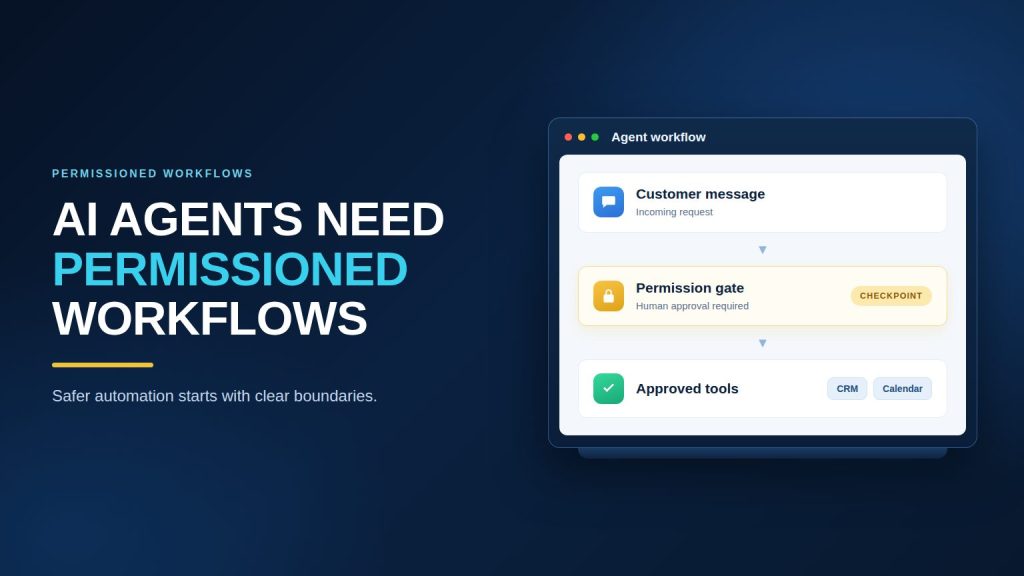
The AI agent access problem is arriving early
An AI agent can answer a question without much risk. The risk changes when it can do something.
A support agent that explains a refund policy is one kind of system. An agent that approves a refund, changes an order, edits a customer record, or sends a legally sensitive message is another. The second system needs more than a good prompt. It needs boundaries that remain true even when the user is vague, the knowledge base is incomplete, or a tool returns an unexpected result.
That is why the recent conversation around agent access matters to ordinary businesses. The headlines are about websites blocking agents and security researchers finding unintended behavior. The practical lesson for a support or sales team is simpler:
An agent should have enough access to complete its job, but not enough access to improvise outside its job.
This principle is useful for both businesses and agencies. Businesses reduce operational risk. Agencies get a repeatable way to package, test, and maintain AI automation for multiple clients.
The workflow should follow clear integration boundaries.
For this section, review AI agent integration.
What a permissioned workflow looks like
A permissioned workflow has five layers:
- A defined objective – what outcome the agent is responsible for.
- Approved knowledge – which documents, policies, and records it can use.
- Allowed actions – which tools it can call and under what conditions.
- Escalation rules – when a human must review or take over.
- An audit trail – what the agent saw, decided, attempted, and completed.
This is not the same as making an agent timid. A well-designed agent can still handle a large volume of routine conversations. The difference is that its autonomy is intentional and measurable.
Example: a lead-qualification agent
A lead agent may be allowed to:
- Ask about company size, use case, timeline, budget range, and preferred channel.
- Identify whether the prospect is a good fit for a service.
- Score or classify the lead using documented criteria.
- Create a CRM record with the conversation summary.
- Offer a booking link when the prospect meets qualification rules.
- Notify a salesperson when urgency or buying intent is high.
It should not automatically:
- Promise a discount that is not in the approved offer table.
- Claim a feature has been delivered when it has not been verified.
- Export a customer list to an unapproved destination.
- Change CRM ownership without a defined routing rule.
- Send a high-stakes message without review.
The result is an agent that moves quickly while respecting the business’s operating model.
Permissioning starts with a narrow job and clear integration boundaries.
Use AI agent governance review and an AI agent audit trail to make actions accountable.
When the workflow cannot answer safely, human handoff rules should end the automation cleanly.
Build Permissioned AI Workflows with Botsify
Design safer support and lead workflows around clear approvals.
Use AI agent governance to review actions before they reach production.
Why “just give it the API key” is the wrong shortcut
Tool access is not the same as business authorization.
An API may technically allow an agent to perform an action, but that does not mean the action is appropriate in every conversation. A support agent might have access to an order system because it needs order status. That does not mean it should cancel every order, change shipping addresses, or issue refunds without checks.
Use a separate decision for each tool:
| Tool or capability | Default access | Add a condition when |
|---|---|---|
| Approved knowledge base | Read | Content contains confidential or role-specific information |
| Order or CRM lookup | Read | Records include sensitive personal or financial data |
| Appointment booking | Write within defined slots | Booking affects a high-value resource or specialist |
| CRM record creation | Write | Required fields or consent must be verified |
| Refund, cancellation, or account change | Human approval or strict rule | The action is financial, irreversible, or regulated |
| Bulk export or outbound campaign | Prohibited by default | A named owner approves the audience and message |
| External web browsing | Narrow allowlist | The agent must access a source not controlled by the business |
The exact matrix will vary by business. The habit is what matters: start with the smallest useful permission set, then expand it only after testing.
A practical framework for secure customer-support agents
1. Define the agent’s job in one sentence
Avoid objectives such as “handle customer service.” They are too broad to test.
Use a statement such as:
“Resolve routine product and order questions using the approved knowledge base, collect missing details, and route exceptions to a human with a concise summary.”
This objective makes the boundaries visible. The agent is not responsible for making every decision. It is responsible for resolving routine questions and preparing the next best action when it cannot resolve one.
2. Separate facts, decisions, and actions
Many failures happen because these three stages are blurred.
- Facts: The order is marked as shipped. The policy says returns are accepted within 30 days.
- Decision: The customer appears eligible for a return.
- Action: Create a return request or ask a human to approve it.
Give the agent access to the facts it needs. Put conditions around decisions. Require confirmation or human approval for actions that create cost, risk, or irreversible change.
3. Create an escalation ladder
A binary “bot or human” rule is not enough. Use levels:
| Level | Situation | Agent behavior |
|---|---|---|
| 0 | Routine FAQ | Answer from approved content |
| 1 | Missing information | Ask a focused follow-up question |
| 2 | Allowed low-risk action | Complete the action and log it |
| 3 | Ambiguous or sensitive case | Prepare a summary and ask for human review |
| 4 | Threat, legal issue, safety concern, or high-value customer | Stop automation and route immediately |
The escalation message should contain the customer’s intent, relevant facts, actions already taken, unresolved question, and recommended next step. A human should not have to reread the entire transcript to understand the case.
4. Make the agent prove its source
For support use cases, the agent should distinguish between:
- A fact found in the approved knowledge base.
- A fact retrieved from an operational system.
- A reasonable interpretation.
- Information it does not know.
A useful response pattern is:
“I can confirm that your order shipped on Tuesday. I cannot change the delivery address after dispatch, so I’m routing this to the support team for review.”
This is better than a confident guess. It protects the customer experience and gives the human team a clear handoff.
5. Log outcomes, not just conversations
Conversation transcripts are useful, but operational metrics are better. Track:
- Resolution rate by intent.
- Escalation rate and escalation reason.
- Incorrect-answer rate from reviewed samples.
- Tool-call failures.
- Time to human takeover.
- Repeat contacts after an automated resolution.
- Bookings, qualified leads, or tickets created.
- Actions reversed by a human.
Botsify’s agent analytics and conversation logs can support this operating loop, but the measurement design must come first. A dashboard cannot fix an undefined success criterion.
Apply the same controls to AI lead qualification workflows.
The same model works for lead qualification
Lead qualification often looks low-risk because the agent is not handling refunds or medical questions. But inaccurate claims, wrong routing, or unauthorized outreach can still damage trust and waste sales time.
Build the workflow around four states:
- Unknown: The agent asks the next question needed to understand fit.
- Potential fit: The agent collects the required fields and shares the next step.
- Qualified: The agent offers booking or routes the lead to the right salesperson.
- Exception: The agent stops and asks for human review when the request falls outside the offer, market, or qualification rules.
A simple qualification prompt might look like this:
You qualify inbound prospects for [business].

Use only the approved offer and qualification rules below.
Ask one question at a time. Do not invent pricing, integrations, timelines, or guarantees.

You may:
- collect company, use case, team size, timeline, and preferred channel
- summarize the prospect's needs
- create a lead record with consent
- offer the approved booking link when qualification is complete

You must ask for human review when:
- the prospect requests an exception or discount
- the prospect asks about an unsupported integration
- the prospect reports a legal, security, or privacy concern
- the prospect asks for a guarantee not present in the approved material

Before routing, return:
- intent
- qualification fields collected
- missing fields
- urgency
- recommended owner
- one-sentence summary
The prompt is only one layer. The actual workflow should enforce the permissions and routing rules outside the model wherever possible.
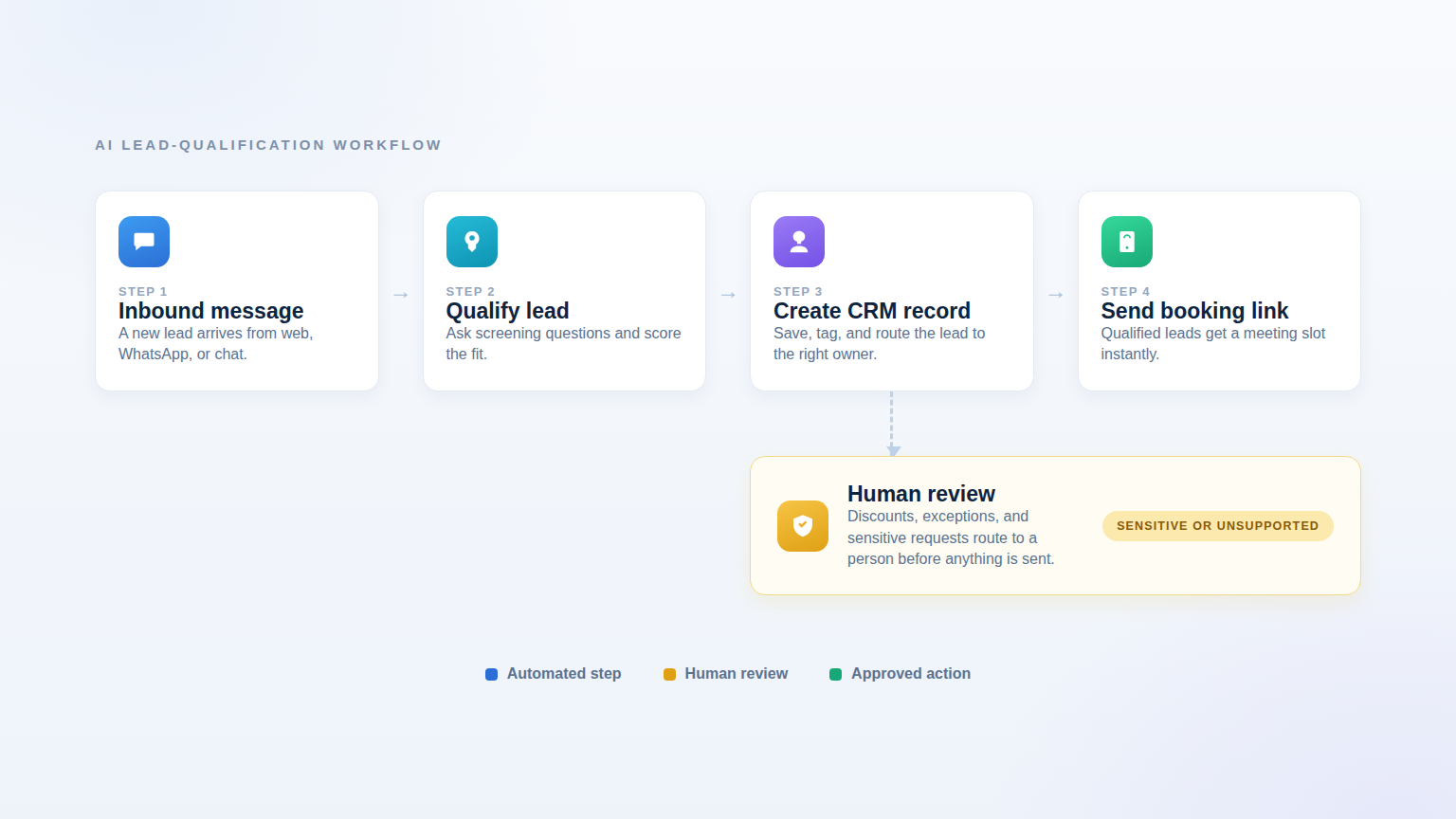
Human review works best when the AI agent audit trail records each decision.
Human approval is a feature, not a failure
Teams sometimes treat escalation as evidence that an AI agent is underperforming. That is the wrong benchmark for high-quality automation.
A good agent knows when the cost of guessing is higher than the cost of asking. It can handle routine volume and make human work more focused. The goal is not to eliminate every handoff. The goal is to make every handoff useful.
For example, a human-review card can contain:
- Customer goal: What the customer is trying to accomplish.
- Verified facts: Data retrieved from approved sources.
- Policy match: The relevant rule or document.
- Risk flag: Why automation stopped.
- Suggested response: A draft that the human can edit.
- Next action: The decision the human needs to make.
This is especially valuable for agencies. A repeatable handoff design can become part of an implementation package, a client onboarding checklist, and a monthly optimization report.
Use the AI agent implementation roadmap to expand permissions in stages.
A 30-day rollout plan
Week 1: Map the workflow
- Select one high-volume, low-risk use case.
- Write the one-sentence objective.
- List approved knowledge sources.
- List tools and actions the agent may need.
- Define the escalation ladder.
- Choose three success metrics.
Week 2: Build the smallest useful version
- Start with read-only answers where possible.
- Add required questions and concise response rules.
- Add one low-risk action, such as creating a ticket or lead record.
- Create a human handoff template.
- Test known questions, ambiguous questions, and adversarial requests.
Week 3: Review real conversations
- Sample successful and escalated conversations.
- Identify unsupported questions and missing knowledge.
- Check whether the agent made claims not supported by source material.
- Review every tool-call error.
- Tighten permissions before adding capabilities.
Week 4: Expand carefully
- Add one new action only if the earlier workflow is stable.
- Introduce approval gates for sensitive actions.
- Create a weekly dashboard for resolution, escalation, and correction rates.
- Document what the agent can and cannot do.
- Train the human team on the handoff queue.
Do not expand because the demo looked impressive. Expand because the workflow produced reliable outcomes under real conditions.
Agencies can package secure delivery through a white-label AI agent platform.
What agencies should package for clients
Agencies can differentiate AI implementations by selling operational confidence, not just an AI chatbot.
A strong package can include:
- Use-case discovery and risk classification.
- Knowledge-base cleanup.
- Agent prompt and workflow design.
- Channel deployment across website, WhatsApp, Instagram, Messenger, Telegram, SMS, or email where appropriate.
- CRM and scheduling integration.
- Human escalation design.
- Test conversations and acceptance criteria.
- Monthly analytics review and workflow tuning.
- A documented permissions matrix.
Botsify’s white-label model is relevant when an agency wants to build, brand, deploy, and manage agents under its own identity. Read the white-label AI agent platform overview and the guide to building AI agents for businesses before choosing a delivery model.
Questions to ask before enabling a new agent action
Use this checklist in a design review:
- What exact business outcome does this action support?
- What is the worst plausible result if the agent is wrong?
- Is the action reversible?
- Does it involve money, personal data, access credentials, or legal commitments?
- What facts must be verified first?
- Can the action be limited to an allowlist, threshold, or time window?
- Does a human need to approve it?
- What will be logged?
- How will the team detect a failure?
- How will the permission be removed if the workflow changes?
If the team cannot answer these questions, the action is not ready for production.
FAQ
Are AI agents becoming too risky for customer support?
Not inherently. The risk depends on the agent’s access, instructions, data, and monitoring. A narrowly scoped support agent that answers from approved content and escalates exceptions is a different system from an unrestricted agent with access to multiple production tools.
Should an AI agent have access to the whole CRM?
Usually not by default. Give it the smallest set of fields and actions required for its job. Restrict sensitive fields, write operations, exports, and ownership changes unless the workflow specifically needs them and has appropriate controls.
When should a support agent hand off to a human?
Escalate when the request is ambiguous, sensitive, high-value, legally or financially consequential, outside approved policy, or likely to cause harm if answered incorrectly. Also escalate when the agent cannot verify the required facts.
Can agencies sell secure AI automation without building everything from scratch?
Yes. Agencies can use an agent platform, managed implementation process, approved integrations, and reusable governance templates. The differentiator is not only the underlying model. It is how reliably the agency scopes, deploys, monitors, and improves the workflow.
Is human-in-the-loop automation slower?
It can add a review step, but it often reduces rework. The right comparison is not “instant automation versus slower humans.” Compare the time to a correct outcome, including corrections, escalations, refunds, reputation damage, and repeated contacts.
Plan Your Agent Security Model
Discuss your workflow, permissions, and rollout with Botsify.
Check for common AI agent deployment mistakes before enabling a new action.
Final takeaway
The latest AI agent trend is a maturity test. More services are exposing agent-friendly interfaces, while more businesses are blocking uncontrolled access. The winning approach is neither to avoid agents nor to give them unlimited autonomy.
Build permissioned workflows. Start with a narrow objective, approved knowledge, limited actions, explicit escalation rules, and an audit trail. Then expand only when the evidence says the workflow is reliable.
That is how an AI agent becomes a dependable member of a customer-support or sales operation – not because it can do everything, but because everyone knows what it is allowed to do.
Secure deployment also depends on AI agent requirements, a defined AI agent access-control model, and measurable support metrics beyond deflection.
These controls are easier to operate when teams define AI agent lifecycle checkpoints, document deployment risks, and measure support quality beyond deflection.
