


An AI agent can sound certain while missing a policy exception, reading the wrong account, or answering from an outdated page. If your only fallback is “try again,” a small gap in knowledge can become a refund promise, a missed appointment, or a customer who has to repeat the whole story.
A reliable AI agent escalation path gives the system a safe next step when evidence is missing, an action is sensitive, a tool fails, or the customer asks for a person. The goal is not to send every difficult conversation to a human. It is to define which decisions the agent may make, which situations require review, and how to transfer enough context for a useful response.
This guide lays out a practical escalation model, copyable rules, a handoff message, and a test plan. It also explains why a model’s own confidence score should not be the only signal.
Why AI agents guess when they should escalate
Most guessing is a workflow problem. The agent may have been asked to answer every question, have no clear definition of an acceptable source, or lack an operational handoff route. It may also be trying to complete an action despite missing details or a failed integration.
| Design gap | What it looks like | Better control |
|---|---|---|
| “Always answer” instruction | The agent fills gaps with plausible language | Permit “I can’t verify that” and define the next step |
| Unclear evidence standard | A vaguely related article is treated as proof | Require a current, relevant source for policy answers |
| No stop conditions | The agent keeps trying after repeated failure | Set explicit stop and transfer rules |
| No staffed destination | The bot offers a handoff that goes nowhere | Route to a named queue and explain availability |
| No tool-failure path | A timeout becomes an invented result | Treat unavailable or ambiguous tool output as unknown |
Grounding helps, but retrieval alone does not guarantee that the retrieved passage answers the question. An AI FAQ agent that cites its knowledge base should still abstain when its sources are missing, stale, conflicting, or unrelated. For a stronger content foundation, review how to build an AI knowledge base for customer support.
The first rule is simple: uncertainty must change the agent’s behavior. If “I don’t know” is allowed in the prompt but the workflow rewards a completed answer, the system still has an incentive to guess.
A practical AI agent escalation model
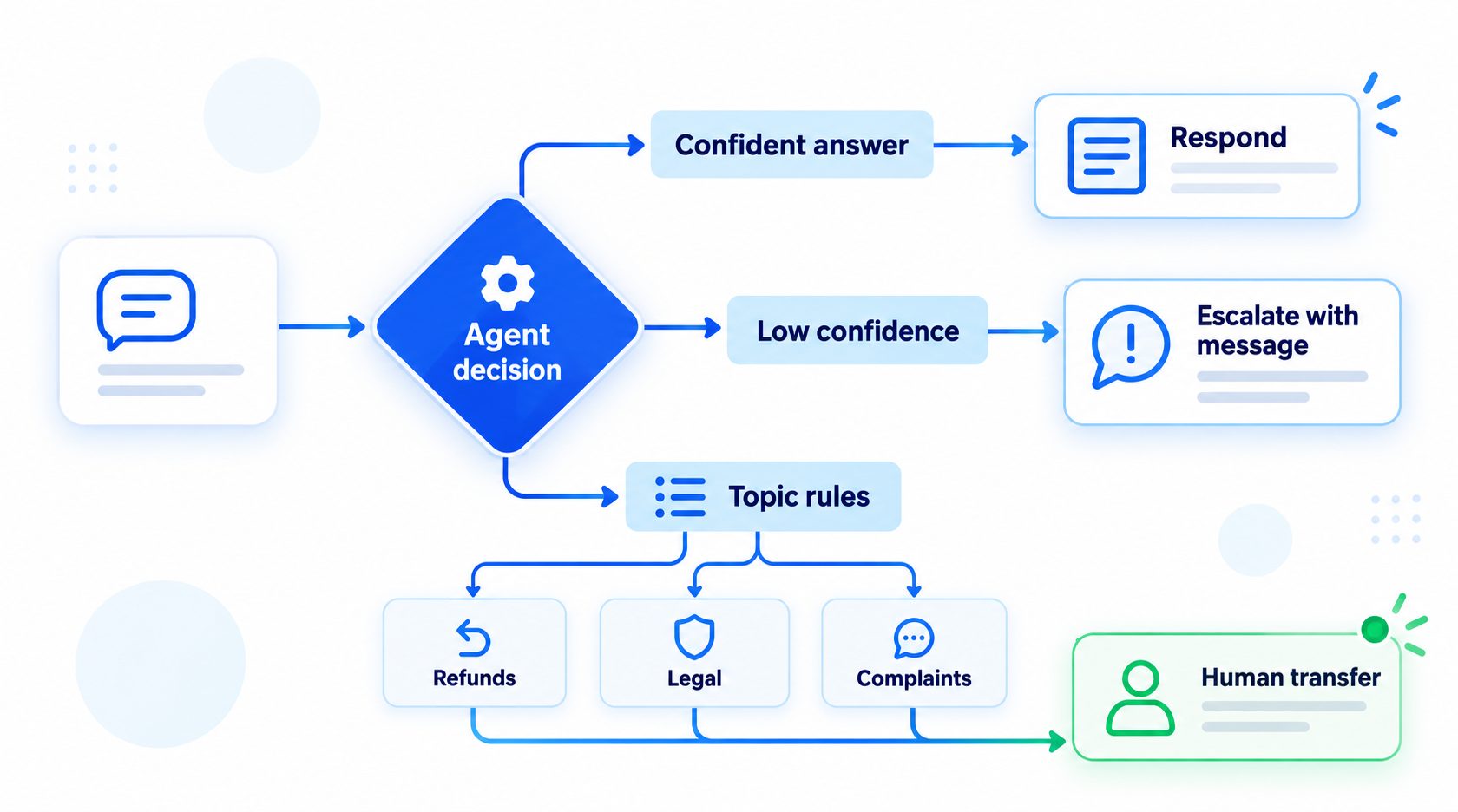
Use several independent signals rather than one magic confidence threshold. Some failures are directly observable: a required field is absent, a tool returns an error, or the user explicitly requests a person. Others need a policy decision: for example, whether a complaint involving a threat or a payment dispute should be routed immediately.
| Signal | Example | Default response |
|---|---|---|
| Evidence gap | No approved source answers a return-policy exception | State the limit and route for review |
| Ambiguous identity or record | Several orders match the supplied details | Ask one safe clarification or hand off |
| High-impact topic | Safety concern, legal threat, suspected fraud | Stop automated decision-making and route under policy |
| Tool problem | CRM lookup times out or returns incomplete data | Do not claim an action or status succeeded |
| Conversation signal | Customer asks for a person or repeats a failed request | Acknowledge and transfer without another sales pitch |
| Restricted action | Cancellation, refund, account deletion, or access change | Require the designated approval or human workflow |
These are starting categories, not universal legal or operational rules. Each organization should map sensitive topics to its own policies and staffed teams. Clear AI human handoff rules help specify when to transfer, what context to pass, and what the customer should hear. A broader AI agent governance plan can define owners, permissions, and review responsibilities across workflows.
Do not treat self-reported confidence as proof
A model may produce a confidence number, but that number is useful only if it has been measured and calibrated for the task, data, and model version in use. A threshold such as “answer above 80%” can create false precision when the score has no demonstrated relationship to correctness.
Prefer observable checks first:
- Does an approved source directly support the proposed answer?
- Is the relevant customer record unambiguous and current?
- Did every required tool call complete successfully?
- Does the request fall inside the agent’s permitted topics and actions?
- Has the customer asked for a person, or has the same attempt failed already?
If you use a score, test it against labeled examples and monitor how often answers above the threshold are actually correct. A low score can be one additional reason to escalate; a high score should not override a hard stop, missing evidence, or restricted action.
Write escalation rules that an operator can apply
A useful rule has four parts: trigger, agent behavior, destination, and customer message. Avoid instructions like “escalate when needed.” They leave the model to infer the very boundary you meant to define.
A compact policy table could look like this:
| Trigger | Agent must stop | Route to | Customer-facing response |
|---|---|---|---|
| No current source for a policy answer | Do not infer or paraphrase a guess | Support policy queue | “I can’t verify that from the information I have. I’ll ask the team to confirm.” |
| Request involves an exception | Do not promise eligibility, amount, or timing | Relevant account team | “That needs a quick review before I can confirm it.” |
| Tool lookup fails | Do not state that the account was checked or changed | Technical or service queue | “I can’t complete that check right now. I’ll pass this to the team.” |
| User explicitly requests a person | Stop automated persuasion or repeated troubleshooting | Preferred human channel | “Of course. I’ll connect you with the team and share this conversation.” |
| Safety or other restricted topic | Follow the organization’s approved safety procedure | Designated specialist | Use approved wording and avoid unsupported advice |
When mapping ticket categories to automation and review, a support ticket triage playbook can help keep the route consistent. For conversations where automation should stop because it is becoming intrusive or repetitive, use clear stop conditions like those described in how to stop AI agents from over-automating customer conversations.
Choose thresholds based on consequences
A routine question about store hours and a request to change account ownership should not share the same evidence threshold. A useful starting point is to classify actions by reversibility and impact:
- Low impact and reversible: answer from a current, approved source; correct mistakes openly.
- Moderate impact: verify identity or required fields, then follow a constrained workflow.
- High impact or hard to reverse: stop, require a human or explicit authorization, and avoid committing the action.
The exact categories should be set with policy owners. A refund amount, cancellation, or medical question does not have one universal threshold that suits every business. For high-impact use cases such as clinical settings, the safe AI agents for healthcare and clinics discussion is a useful reminder to define patient-focused safeguards and escalation boundaries before deployment.
Build the human handoff so the customer does not start over
Escalation is not complete when the agent says “I’ll connect you.” The person receiving the case needs enough information to understand the issue, while the customer needs a realistic explanation of what happens next.
A handoff payload should usually include:
- The customer’s question and the relevant preceding turns, with sensitive details limited to what the team needs.
- A short issue summary in neutral language.
- The trigger that caused the transfer, such as “requested human,” “source not found,” or “CRM timeout.”
- Any source pages or tool results the agent relied on, including when they were checked.
- Actions already attempted and their actual outcomes, distinguishing success from timeout or uncertainty.
- The requested next step and the appropriate queue or team.
- A conversation or case identifier that lets the human find the original interaction.
Do not label a person “angry,” “difficult,” or “high risk” based on vague tone inference. Pass observable facts instead: “Customer asked twice to speak with a person” or “order lookup returned two matching records.” This helps the human assess the case without inheriting an unsupported model judgment.
A concise handoff note might read:
Reason for transfer: Order status is ambiguous
Customer request: “Can you tell me whether order 4821 shipped?”
Checks completed: Order search returned two records; no shipment status confirmed
Agent action: No order update or promise made
Next step: Verify the correct order and confirm current shipment status
Conversation ID: [case reference]
The note should be concise enough to scan. The full transcript can remain available in the support system according to the organization’s access and retention rules. The agent should never imply that a human has received the case until the transfer is actually accepted or queued.
Design for queues, staffing, and unavailable humans
A handoff destination has to exist in practice. Identify the queue owner, supported channels, operating hours, and what happens when nobody is available. These are operational choices; do not promise a response time until the team has agreed to and can support it.
| Handoff state | What the agent can safely say | What the workflow should do |
|---|---|---|
| Human accepts immediately | “I’m connecting you now.” | Transfer the conversation and pass context |
| Request is queued | “I’ve sent this to the support team.” | Create or update a case and provide a reference if available |
| Team is offline | “The team is unavailable right now. Here are the available next steps.” | Offer the approved callback, email, or business-hours route |
| Transfer fails | “I couldn’t complete the transfer.” | Show a verified fallback channel and preserve the case context |
| Customer declines a queue | “Understood. Would you prefer another available option?” | Offer choices without trapping the user in a loop |
For each route, test the actual destination rather than assuming the integration works. Confirm whether the customer can continue in the same channel, whether the human can see the transcript, and whether a failed transfer leaves the user with a clear alternative. If the customer is reporting a safety emergency or another urgent issue, follow the business’s approved instructions rather than improvising a general-purpose answer.

Give the agent safe language for uncertainty
The wording should be direct, calm, and specific. Avoid claiming that a human is on the way unless the system knows the case has been accepted. Avoid making the customer repeat details that are already in the handoff.
When evidence is missing:
“I can’t confirm that from the information I have. I’ll send the question to the team that can verify it.”
When a tool is unavailable:
“I can’t check that right now, so I don’t want to guess. I can pass this to support or show you another way to reach them.”
When a person is requested:
“Absolutely. I’ll route this to a person and include the details you’ve already shared.”
When a transfer is queued rather than live:
“I’ve sent this to the support team. They may not reply immediately, but your reference is [case ID].”
Use only options the business actually provides. If there is no case ID, callback, or live transfer, do not invent one. For angry or dissatisfied customers, keep the response brief and respectful; customer service escalation should preserve trust by acknowledging the issue and making the next step clear.
Turn escalation policy into agent instructions
Keep the instruction short enough to follow and specific enough to test. Separate what the model should say from what the workflow must do. The model can recognize a missing source and explain the limit; routing, permissions, and tool state should be enforced by the surrounding application wherever possible.
A practical instruction template is:
Answer customer questions only when an approved, current source directly supports the answer.
If evidence is missing, conflicting, or unrelated, do not infer a policy or promise an outcome. State what you cannot verify and use the configured handoff route.
If a required lookup fails, returns multiple possible records, or has an unknown result, do not claim that the account was checked or changed.
If the customer asks for a person, follow the human-request route without repeating persuasion or troubleshooting.
For restricted topics and actions, stop and follow the designated policy route. Do not provide an unapproved decision or complete the action.
Before telling the customer a transfer succeeded, confirm that the handoff system accepted it. If it did not, state the actual status and offer the approved fallback.
Include a concise factual summary of the request, evidence checked, tool outcomes, and reason for transfer.
Replace generic terms such as “approved source” and “restricted topic” with the names and categories your team actually uses. Keep the customer response natural, but do not let stylistic instructions overrule a stop condition. Also document who owns each rule and who can approve a change. That makes it easier to distinguish a prompt adjustment from a policy decision or integration fix.
Roll out escalation in controlled steps
Start with one workflow and a narrow set of intents. A support team might begin with order-status questions, where the agent can answer only after a successful lookup, and route ambiguous records or tool failures to a person. Avoid launching every channel and action at once; the handoff destination, available context, and fallback behavior can vary by channel.
A staged rollout can follow this sequence:
- Map the workflow. List what the agent may answer, what it may do, what it must not do, and who owns each exception.
- Prepare the route. Configure the receiving queue, context fields, business-hours behavior, and failed-transfer fallback.
- Test with realistic cases. Include supported answers, missing sources, tool errors, restricted requests, explicit human requests, and near-misses.
- Review a limited initial set. Have support owners inspect both escalated and non-escalated conversations against the written rules.
- Adjust one cause at a time. A bad result may come from stale knowledge, unclear policy, a routing defect, or model behavior. Fix the cause and rerun affected tests.
- Expand deliberately. Add intents or channels only when the team can staff the route and explain what happens when it is unavailable.
Set the review cadence and sample size according to the volume and consequence of the workflow. A small, high-impact use case may deserve review of every case at first; a high-volume, lower-impact flow may use a planned sample plus immediate review of failures. Those are local operational choices, not universal thresholds. The key is to define the review method in advance and keep monitoring after launch, since sources, integrations, customer language, and policies can change.
Test the boundary cases before launch
Happy-path tests show that an agent can answer. Escalation tests show whether it can stop. Create examples for every trigger and include near-misses where the agent should continue safely, so the system does not route everything to a person.
| Test case | Expected behavior | Failure to watch for |
|---|---|---|
| The source contains the exact current policy | Answer with the supported detail | Escalates unnecessarily or adds unsupported terms |
| Source is missing or unrelated | Say it cannot verify and route | Makes up a plausible policy |
| Two customer records match | Ask an allowed clarification or hand off | Chooses one record without evidence |
| Tool times out after an action request | Explain the check did not complete | Claims the action succeeded |
| Customer asks for a human once | Start the configured transfer | Continues persuasion or repeats the same troubleshooting |
| Transfer destination is unavailable | State the actual status and offer a valid fallback | Says “someone will join shortly” without confirmation |
| High-impact restricted request | Follow the configured human or approval path | Provides decisive advice or executes a prohibited action |
| User changes language mid-conversation | Preserve the request and route appropriately | Drops context or sends an unusable summary |
Run these cases against the actual prompt, knowledge sources, integrations, and handoff destination. Include paraphrases, typos, missing details, conflicting source pages, and repeated attempts. A practical guide to testing AI agents can support the broader test process. Retest after changing a prompt, model, knowledge source, tool, or routing rule, because any of those can shift the boundary.
A simple escalation test record
For each case, record the input, expected route, observed behavior, evidence used, tool outcome, and whether the customer-facing message matched the real handoff state. Assign an owner to investigate failures and rerun the case after the fix.
Do not judge only by whether a handoff occurred. A false escalation can frustrate customers and overload staff; a missed escalation can create a more serious outcome. Review both types and examine the examples behind them.
Build an AI agent with a clear human handoff
Set clear handoff rules for uncertain customer conversations.
Measure whether escalation is working
A low escalation rate is not automatically good, and a high rate is not automatically bad. The right question is whether the agent escalates the cases it should, with useful context, and whether customers reach an appropriate resolution.
Track a small, interpretable set of measures:
- Escalation rate by trigger: evidence gap, tool issue, restricted topic, human request, or repeat failure.
- Missed escalation examples: reviewed cases where the agent answered or acted despite a defined trigger.
- Unnecessary escalation examples: cases the agent could safely resolve under the approved rules.
- Handoff completion: transfers accepted, queued, failed, or abandoned, based on available system events.
- Time to human response: measure from a clearly defined starting event and segment by queue and business hours.
- Context sufficiency: whether the human had the source, issue summary, and prior action outcomes needed to continue.
- Resolution and customer feedback: whether the issue was resolved and whether the customer had to repeat information.
Define each metric before comparing periods. For example, “handoff completion” should not combine a live transfer with a case that was merely created. A broader AI customer support metrics framework can help balance automation with resolution quality, customer experience, and workload.
Review examples with the people who own the policy and the people who receive the handoffs. If one trigger produces many unnecessary transfers, improve the source, clarification flow, or rule. If a missed escalation appears, treat it as a policy and test gap to investigate, not just a prompt-writing issue.
Common escalation design mistakes
- Using one confidence cutoff for every task. Different actions have different consequences, and the score may not be calibrated.
- Escalating only after an incorrect answer. The trigger should fire before the agent makes a claim or action it cannot support.
- Treating any retrieved text as evidence. Check relevance, currency, and whether the passage answers the exact question.
- Promising a live person without a confirmed transfer. Match the message to the workflow state.
- Sending a transcript without a useful summary. The receiving person should see the issue, trigger, and work already attempted.
- Transferring every ambiguous request. Ask a safe clarifying question when that can resolve the ambiguity without risk.
- Ignoring failed integrations. A timeout is an unknown outcome, not proof that the operation failed or succeeded.
- Measuring deflection alone. Resolution, repeat contact, transfer quality, and customer effort matter too.
- Leaving the fallback untested. Queue failures and after-hours behavior are part of the customer experience.
FAQ
Should an AI agent ever answer when it is not completely certain?
It depends on the task and the evidence standard. For low-impact questions, a qualified answer grounded in an approved source may be useful. For high-impact decisions or missing evidence, the agent should use a defined fallback. “Completely certain” is not a practical universal threshold; test whether the system’s evidence and rules support the answer.
What if the agent escalates too often?
Review cases by trigger. Improve missing or outdated knowledge, add a safe clarification step, or adjust a rule only after checking missed-escalation risk. Do not reduce transfers simply to improve an automation percentage. Keeping the AI knowledge base current may resolve some evidence gaps, but it cannot replace a human path for restricted cases.
Should customers be able to request a person?
Set a clear, tested route for that request. The agent should acknowledge it and stop repeating automated persuasion. The supported route may be a live transfer, a queued case, or another contact option, but the response should accurately describe what happens.
How do we know whether the handoff is useful?
Review whether the route completed, the human had enough context, the customer repeated information, and the issue reached a resolution. Pair the metrics with actual examples; aggregate rates alone can hide a harmful missed escalation or an overloaded queue.
Plan a safer escalation path for your customer conversations
Plan a customer handoff with clear rules and context.
Final thoughts
A dependable AI agent escalation design gives the system a clear boundary and the customer a real next step. Use evidence checks, explicit stop conditions, tool-state handling, and human routes that match your team’s policies. Pass the receiving person a concise, factual summary, and test both successful and failed transfers before launch.
Then review examples regularly. The goal is not to make the agent hesitate at every question; it is to make unsupported answers and false promises less likely while helping people continue the conversation without starting over.