
Most Instagram lead generation fails because it treats the DM like a landing page. Someone comments, the business sends a link, and the conversation stops.
A better approach is to treat Instagram as a multi-step conversation: capture intent, ask one qualifying question, score the lead, and route the right person to a human. The goal is not to be clever. It is to make sure a good lead does not disappear because nobody answered fast enough.
This is a copyable playbook for Instagram DM automation that does not feel like a bot.
Start with the decision, not the message
Before you write any message, decide:
- Who the lead is
- What they want
- Whether they are qualified now
- Who should handle them
- When a human should take over
That means the prompt is only one part of the system. The more important parts are:
- Qualification questions
- Scoring rules
- Routing rules
- CRM fields
- Human handoff trigger
- Follow-up path
This is the same logic behind AI workflow automation: the conversation is only one part of the system.
How Instagram DM automation turns comments into conversations
A comment is often a signal of interest, but it is rarely enough information to qualify someone. The job of the automation is to recognize that signal and move the right conversations into DMs, where you can learn what the person actually needs.
One simple approach is to use a clear call to action in the post itself:
Comment “DEMO” and we’ll send you the details.
When someone leaves that comment, the workflow can acknowledge it and continue privately instead of forcing the person to search for a link or wait for someone on your team to notice.
For example:
Instagram post: Comment “DEMO” if you want to automate your inbound leads.
Comment: DEMO
DM: Hey Sarah, saw your comment. Are you mainly looking to automate new lead inquiries, follow-ups, or both?
Lead: Mostly new inquiries.
DM: Got it. Where are most of those inquiries coming from today?
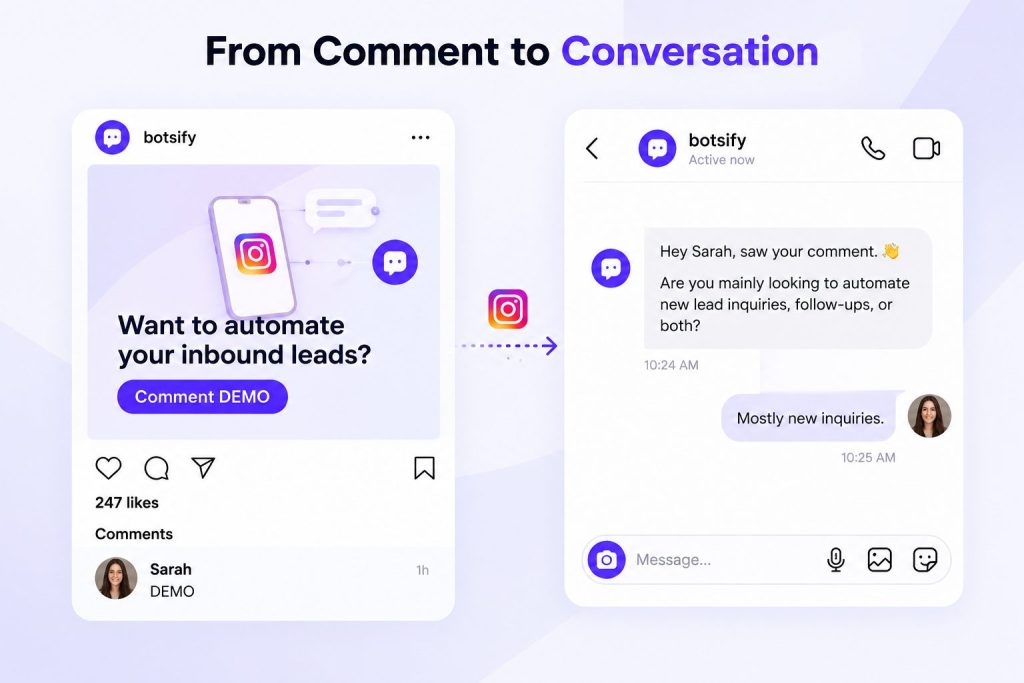
The important part is that the keyword starts the conversation. It should not determine whether the person is qualified.
Someone who comments “DEMO” might be ready to buy, casually researching, an existing customer, or simply curious. Qualification happens after the conversation moves into the DM.
You also do not need to limit automation to one keyword. Different posts can use different triggers based on what the person is interested in. A post about pricing might trigger a different opening conversation from a post about lead generation or appointment booking.
Once the conversation starts, an AI lead qualification agent can use the person’s answers, intent, urgency, and business context to decide whether they should move forward.
Ask only questions that change routing
AI agents become annoying when they collect every possible detail.
Use three layers:
- Identity: Who are you and what business are you from?
- Need: What are you trying to solve?
- Readiness: How urgent is this and who owns the decision?
A useful qualification matrix:
| Question | Why it matters |
|---|---|
| What are you trying to solve? | Identifies the actual use case |
| What have you already tried? | Reveals urgency and complexity |
| What is your current process? | Shows where friction exists |
| What outcome do you need? | Makes the sales conversation concrete |
| What is your timeline? | Determines priority |
| Who owns the decision? | Prevents wasted follow-up |
Not every lead needs every question. The agent should adapt based on the use case.
Build the conversation like a decision tree, not a survey
Your agent should feel like a helpful assistant, not a form.
A good flow looks like this:
- Greet and ask what they need.
- Reflect the need back briefly.
- Ask one or two important follow-up questions.
- Summarize what the lead said.
- Route or escalate.
Example:
Lead: Do you help with Instagram DMs? Agent: Yes. Are you looking for lead generation, support, or appointment booking? Lead: Mostly lead generation. Agent: Great. Do you already use Instagram for lead capture today? Lead: We get a lot of comments but no follow-up. Agent: Got it. Do you want comments routed to a team member, or should I collect details first? Lead: Collect details first. Agent: Perfect. What is your company size? Lead: About 12 people. Agent: Thanks. I’m routing this to a specialist who can help you set this up.
That is a good agent because every step reduces ambiguity.
Match the first DM to what the person commented on
One of the easiest ways to make Instagram automation feel robotic is to send everyone the same opening message.
The comment already gives you context. Use it.
If someone comments on a post about pricing, asking “How can I help you?” throws away information you already have. The same is true when someone responds to content about booking appointments, generating leads, customer support, or a particular product.
The opening DM should continue the conversation they already started.
For a pricing-related comment:
Hey, saw your comment on our pricing post. Are you comparing options right now, or are you already looking to get started?
For a lead-generation post:
Thanks for commenting. Are you mainly trying to generate more inquiries or improve how you follow up with the leads you already get?
For an appointment-booking post:
Saw your comment. Are you trying to automate new bookings, reminders, or both?
These messages work better than a generic welcome because the person does not have to explain why they are there again.
This is also where separate automation paths become useful. A pricing comment may deserve a faster route toward sales, while someone commenting on educational content may need another question or two before you know whether there is real buying intent.
The goal is not to create dozens of complicated flows. Start with the few comment types that consistently produce leads and give each one an opening that makes sense.
Turn Instagram Comments Into Qualified Leads
See how Botsify can automate DMs, qualify prospects, and route the right leads to your team.
Use intent signals, not just keywords
Many teams qualify leads based on surface-level words like “price,” “demo,” or “buy.” That is too shallow.
Use a combination of:
- Explicit intent
- Behavioral intent
- Contextual intent
- Fit signals
- Urgency signals
| Signal type | Examples |
|---|---|
| Explicit intent | “Can you send pricing?” “Can we book a call?” “I’m ready to start.” |
| Behavioral intent | Repeated questions, follow-up messages, clicking pricing page, asking for demo |
| Contextual intent | Mentions specific team size, timeline, or workflow |
| Fit signals | Company size, industry, use case, decision-maker role |
| Urgency signals | “Next week,” “we’re launching,” “this is blocking us” |
Your agent should score the combination, not one keyword.
Route by owner, not just by “sales”
Routing to “sales” is often too vague.
Better routing uses:
- Product line
- Geography
- Company size
- Lead source
- Language
- Deal size
- Use case
- Existing customer status
Example routing rules:
| Scenario | Route to |
|---|---|
| Enterprise lead, clear budget | Senior AE |
| SMB lead from Instagram | SMB sales rep |
| Agency inquiry | White-label partner team |
| Support-related issue | Customer success |
| Existing customer upgrade | Account manager |
| High-risk request | Human review |
The agent should not only say, “This is hot.” It should say, “This is hot, here is why, and here is who should own it.”
Define what should trigger a human
Some conversations should never stay fully automated.
Escalate immediately when:
- The lead is angry or frustrated
- There is a legal, compliance, or privacy issue
- The lead asks about pricing exceptions
- The conversation involves sensitive data
- The agent is unsure
- The lead asks for a human
- The lead mentions a competitor-specific migration
- The deal size is unusually large
- The request requires custom engineering
A simple escalation matrix:
| Trigger | Escalate to |
|---|---|
| Legal, medical, or safety risk | Human support |
| Large deal or enterprise interest | Senior sales |
| Pricing exception | Sales manager |
| Existing customer problem | Customer success |
| Unclear intent | Human support |
| Repeated confusion | Human support |
AI should open the door. Humans should close the important conversations.
Do not treat every Instagram comment as a lead
Instagram DM automation does not mean sending a sales message to everyone who interacts with a post.
Comments can represent very different intentions.
Someone asking “How much does this cost?” is different from someone leaving a compliment. A customer asking for help is different from a prospect asking whether your product integrates with their CRM.
Your automation should recognize those differences.
| Comment type | Example | Best next step |
|---|---|---|
| Buying intent | “How much is this?” | Start DM qualification |
| CTA keyword | “DEMO” | Send the promised DM |
| Product question | “Does this work with Shopify?” | Answer, then assess intent |
| General interest | “This looks useful” | Light response, do not over-qualify |
| Existing customer | “I need help with my account” | Route to support |
| Complaint | “Nobody has replied to me” | Escalate to a human |
| Spam or irrelevant | Promotional or unrelated comment | Ignore or moderate |
This distinction matters because aggressive automation can damage the experience you are trying to improve.
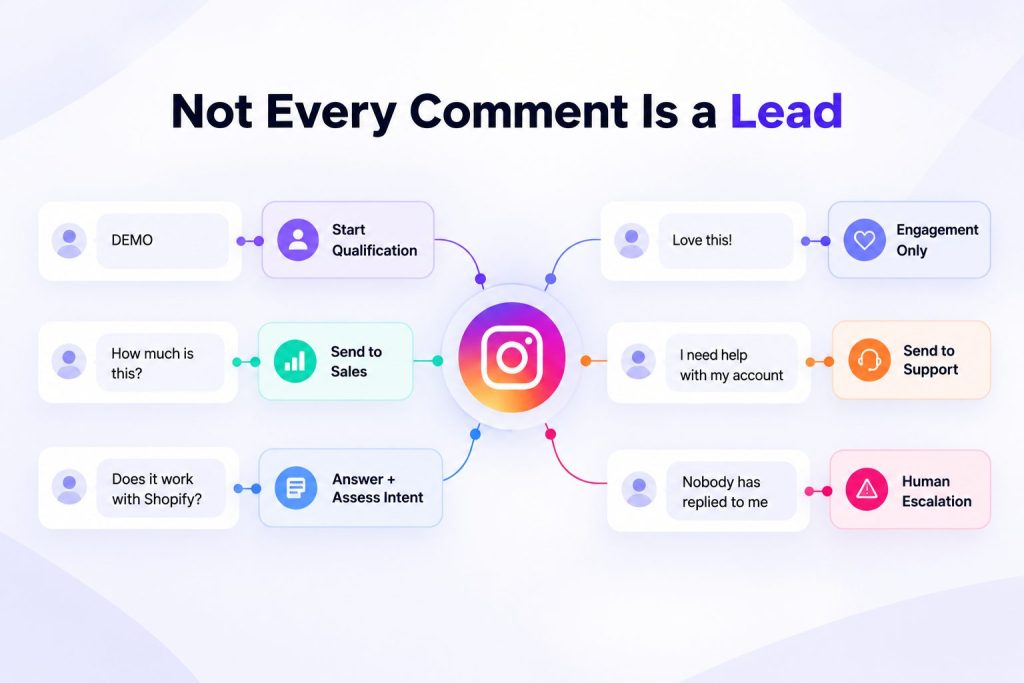
If every comment immediately triggers a sales pitch, people learn very quickly that interacting with your content means entering a funnel.
A better system responds according to intent. High-intent comments can move toward qualification. Questions can receive useful answers first. Support issues can bypass sales entirely. Low-intent engagement does not need to become a sales conversation at all.
The automation should help your team identify opportunities, not manufacture them from every interaction.
Build the follow-up sequence
Most leads do not convert on the first message.
The agent should know what to do after the first contact.
A simple follow-up cadence:
| Day | Action |
|---|---|
| Day 0 | Qualify, route, send relevant next step |
| Day 1 | Follow up with one useful resource |
| Day 3 | Ask if they want to schedule a call |
| Day 7 | Send a short case study or checklist |
| Day 14 | Re-engage with a clear offer |
Do not follow up with the same generic message. Use the context the agent already collected.
Know when the conversation should leave Instagram
Not every lead needs to stay in Instagram DMs until the deal is closed.
Instagram can be excellent for starting a conversation because the person is already interacting with your content. But as the conversation becomes more serious, another channel may make the next step easier.
A prospect who only needs a quick answer may stay in the DM. Someone ready for a sales conversation may be better moved directly to a calendar. A lead who prefers ongoing messaging may choose WhatsApp. Larger opportunities may need a salesperson to take over personally.
The transition should happen for a reason, not simply because your workflow says “send link.”
For example:
Low intent: Continue answering inside Instagram.
Qualified but not ready: Keep the conversation in DM and follow up later.
Qualified and ready to talk: Offer available meeting times or a booking option.
Wants ongoing messaging: Continue the conversation through WhatsApp if that is their preference.
Complex or high-value opportunity: Hand the conversation to the appropriate salesperson.
For teams that move qualified social leads into messaging, WhatsApp lead generation can continue the same qualification and follow-up process after the initial Instagram interaction.
The important thing is continuity. If the lead has already explained their goal, company, timeline, and problem in Instagram, do not make them repeat everything after changing channels. Pass that context forward with them.
Connect the agent to your CRM
The agent should not just collect answers in chat.
It should update the CRM with:
- Lead source
- Use case
- Qualification score
- Timeline
- Decision-maker status
- Recommended route
- Conversation summary
- Next action
Without CRM integration, the agent becomes another inbox. With it, the agent becomes a workflow layer.
Prompt template you can adapt
Here is a simple prompt template for an Instagram DM lead qualification agent:
You are an AI lead qualification assistant for [Company].

Goal:
Qualify inbound Instagram DMs and comments, identify hot prospects, and route them to the right human.

Company context:
- We help [target customer] with [primary offer].
- Best-fit customers are [ideal customer profile].
- We do not serve [bad fit audience].

Qualification signals:
- Strong use case: [define]
- Urgency: [timeline]
- Fit: [company size / industry / role]
- Budget or scale: [threshold]
- Decision-maker: [role]
- Integrations needed: [list]

Scoring:
- Hot: [rules]
- Warm: [rules]
- Not qualified: [rules]
- Unclear: [rules]

Behavior rules:
- Ask one question at a time.
- Reflect what the lead says briefly.
- Do not invent pricing, guarantees, or availability.
- If the lead is angry, confused, sensitive, or high-risk, escalate to a human.
- If the lead asks for pricing, share the pricing page or book a call.

Routing:
- Hot enterprise leads: [route]
- SMB leads: [route]
- Agency inquiries: [route]
- Support issues: [route]
- Existing customers: [route]

Output:
Return:
1. Lead state: Hot / Warm / Not qualified / Unclear
2. Score: [0-100]
3. Why
4. Recommended owner
5. Next action
6. Handoff summary
What Instagram DM automation looks like with Botsify
Botsify supports the pieces you need for this workflow across its core AI agent features:
A practical setup might look like:
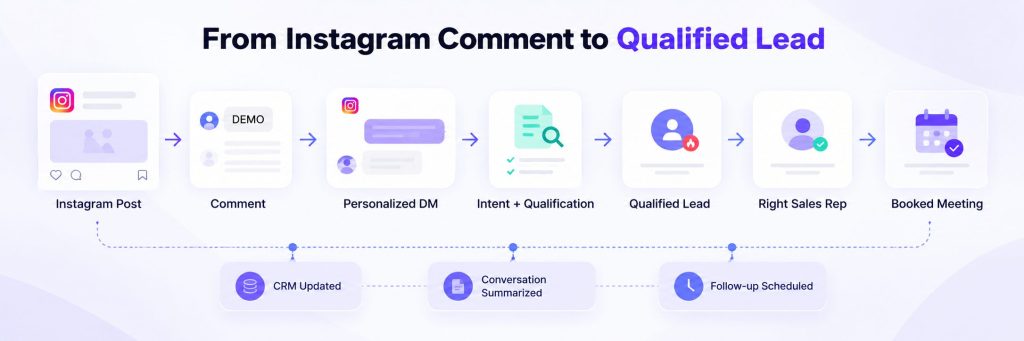
- Lead comments on Instagram.
- Agent asks what they want to automate.
- Agent asks timeline and use case.
- Agent scores the lead.
- Agent routes hot leads to the right owner.
- Agent books a call or notifies sales.
- CRM is updated with summary and next action.
- Agent follows up if no response.
- Human reviews the handoff summary, not the whole transcript.
With Botsify’s AI Agent Builder, these instructions, qualification rules, knowledge sources, integrations, and handoff actions can be configured as part of the same agent workflow.
Final thought
An Instagram DM automation agent is not a magic revenue machine. It is a routing and context system.
When built well, it does three things:
- Removes delay.
- Reduces wasted sales time.
- Gives humans better context.
That is enough to change the economics of your Instagram funnel.
Ready to Automate Your Instagram Leads?
See how Botsify can help turn comments and DMs into real sales conversations.
