


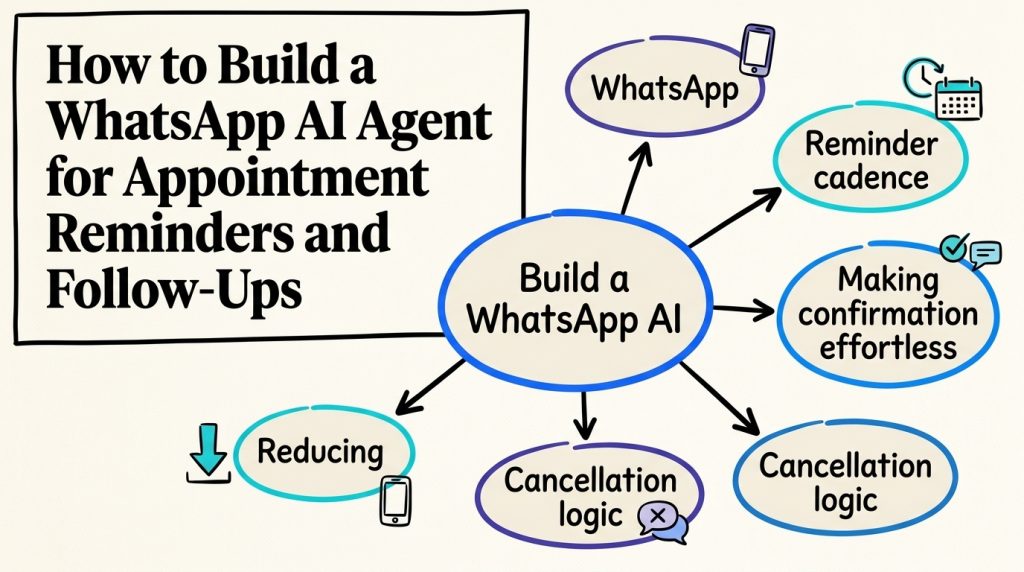
Missed appointments can be costly for service businesses. An empty slot means lost opportunities, wasted staff time, and additional scheduling work.
Traditional reminders help, but they don’t always make it easy for customers to change their plans. Someone who receives an SMS or email might still need to call the business to reschedule or cancel.
WhatsApp AI appointment reminders make that process easier by allowing customers to confirm bookings, request another time, or cancel directly in the conversation. When connected to a booking system, an AI agent can also update appointments and send follow-ups without requiring staff to manage every message.
This guide explains how to build a WhatsApp AI agent for appointment reminders and follow-ups, configure reminder schedules, connect your calendar, and handle booking changes without overwhelming customers with messages.

Why Use WhatsApp for Appointment Reminders?
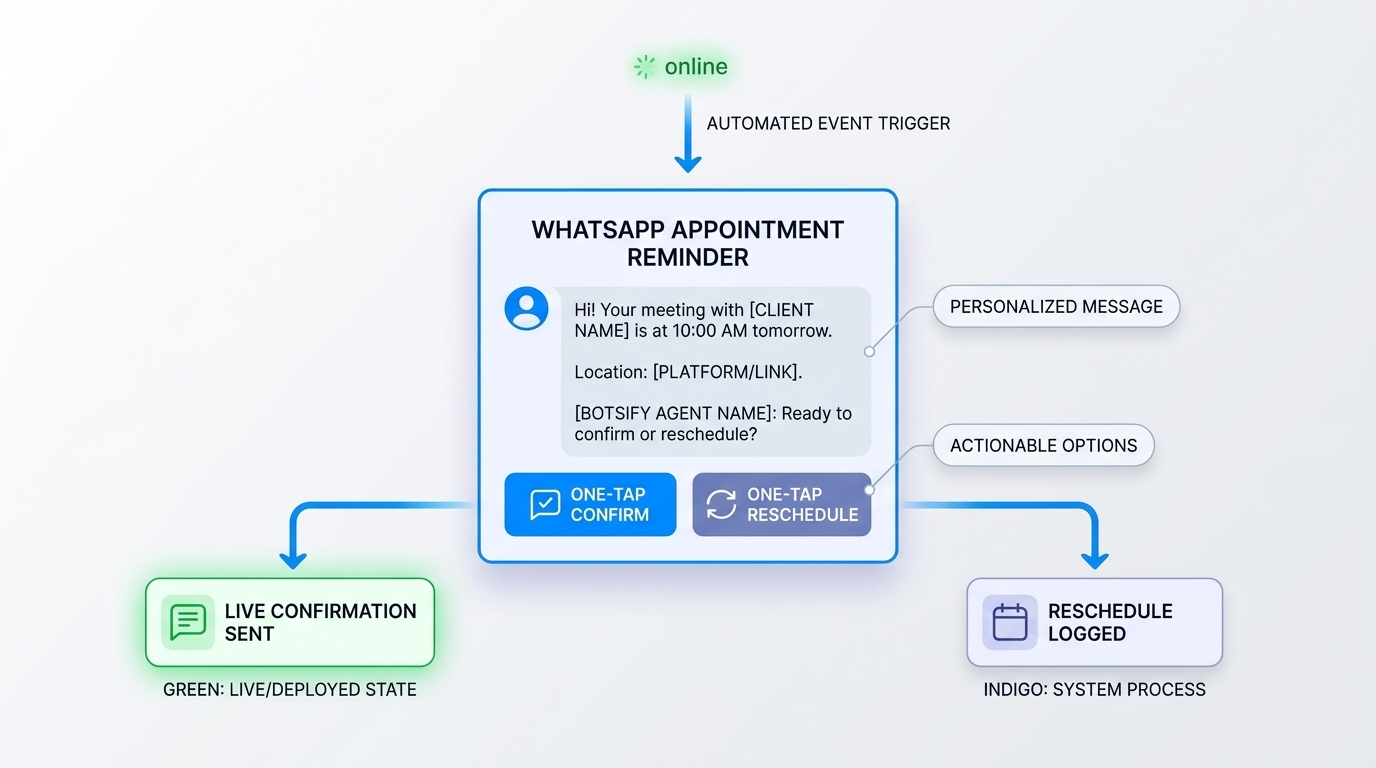
WhatsApp supports two-way messaging, making it useful for appointment reminders that require a response.
Instead of receiving a notification and then calling the business to change an appointment, customers can reply directly to confirm, cancel, or request another time.
For example, a customer who can’t attend a Friday appointment can ask for another slot in the same conversation. If the agent is connected to the booking system, it can check availability and help complete the change.
A WhatsApp chatbot can turn appointment reminders into two-way conversations, allowing customers to confirm bookings, request another time, or ask questions without switching channels.
However, WhatsApp isn’t automatically the right channel for every customer. Messaging preferences, consent, costs, and the availability of alternative channels should all influence the setup.
How to Schedule WhatsApp AI Appointment Reminders
Sending more reminders doesn’t automatically reduce missed appointments. The timing should give customers enough notice to confirm, reschedule, or cancel without overwhelming them with messages.
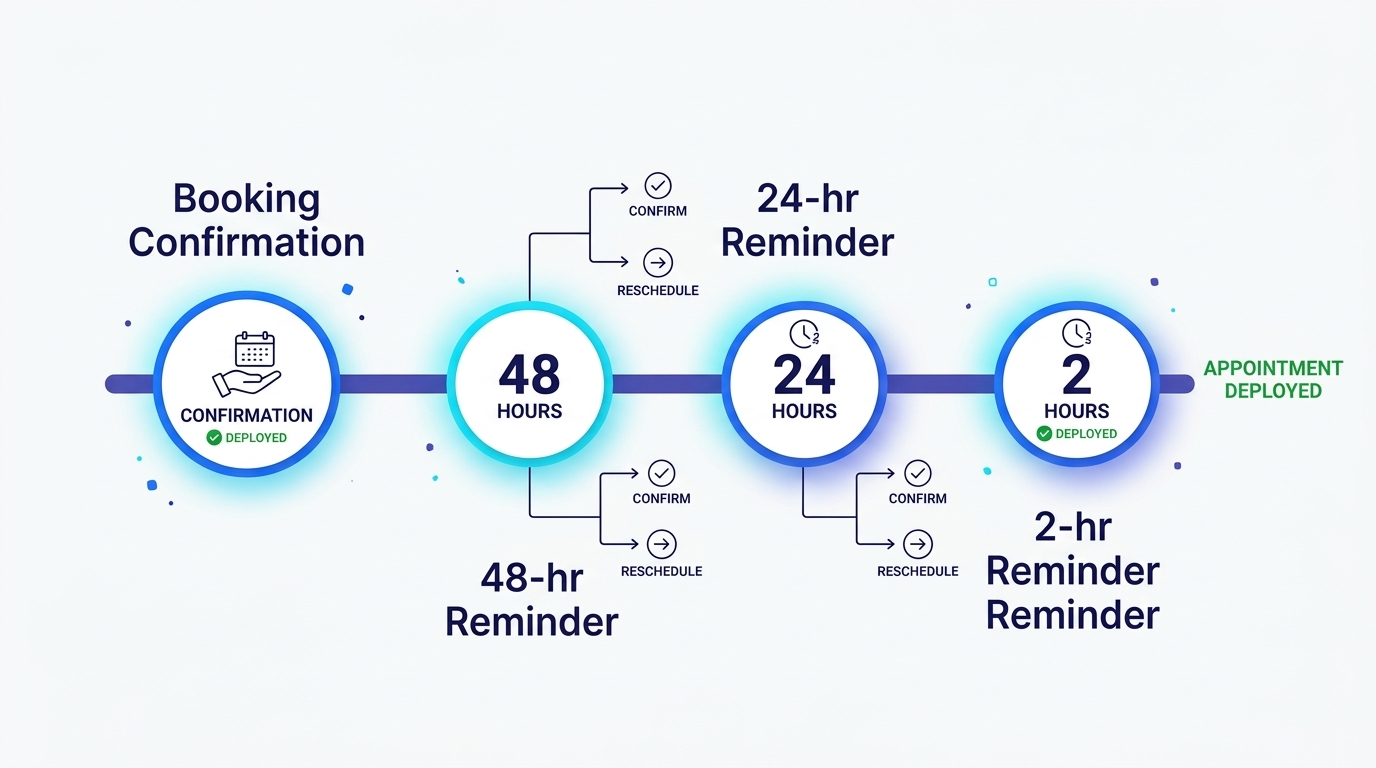
A practical starting point is a booking confirmation, one advance reminder, and an optional final reminder closer to the appointment. Adjust the schedule based on the type of service and customer preferences.
Example reminder schedule
| Timing | Purpose | Example message |
|---|---|---|
| At booking | Confirm appointment details | “Hi [Name], your [Service] is booked for [Date] at [Time]. Reply if you need to make a change.” |
| 48 hours before | Identify scheduling conflicts | “Your appointment is coming up on [Date] at [Time]. Reply 1 to confirm, 2 to reschedule, or 3 to cancel.” |
| 24 hours before | Follow up if needed | “Hi [Name], we’re looking forward to seeing you tomorrow at [Time]. Let us know if your plans have changed.” |
| 2 hours before | Provide last-minute details | “See you at [Time]. Our address is [Address]. Reply if you’re running late.” |
These are examples, not a mandatory four-message sequence. For some services, one reminder may be enough. Others may benefit from earlier notice because appointments are difficult to refill.
Make reminders easy to answer
Every reminder should give customers a clear next step.
For example:
Agent: “Hi Sarah! Your appointment is tomorrow at 2:30 PM. Reply 1 to confirm, 2 to reschedule, or 3 to cancel.”
Customer: “1”
Agent: “Thanks, Sarah. Your appointment is confirmed for tomorrow at 2:30 PM.”
If your WhatsApp setup supports interactive reply buttons, customers can select an option without typing a response.
Avoid unnecessary messages
Don’t send every reminder to every customer automatically.
If someone has already confirmed, consider whether another confirmation request is necessary. If an appointment is cancelled or rescheduled, stop the old reminder sequence and create a new one based on the updated booking.
The goal is to help customers manage appointments, not increase the number of messages they receive.
Handling reschedules automatically
Rescheduling is where basic reminder tools often fall short. An AI booking agent can help customers find another available time and complete the change through a connected booking system, without requiring staff to handle every request.
The reschedule flow:
- Customer replies “2” or “need to move it.”
- Agent offers available slots from the calendar: “I have Thursday 10 AM or Friday 2 PM — which works?”
- Customer picks one.
- Agent updates the calendar, confirms, and sends a new reminder cycle.
Rules to build in:
- Set reasonable rescheduling limits based on your business policies. Repeated changes may require human review, but the agent shouldn’t impose an arbitrary one-reschedule limit unless that is an established rule.
- Respect your cancellation policy. If same-day reschedules have a fee, the agent states it, it does not waive it.
- Never double-book. The agent books from real availability or escalates — never promises a slot it cannot see.
A reschedule handled well often leaves the customer more confident than the original booking. It proves the business is organized.
Turn WhatsApp Reminders Into Confirmed Appointments
Let customers confirm, reschedule, or cancel appointments through an AI agent instead of calling your team.
Handling Cancellations and Recovering Empty Appointment Slots
A cancellation doesn’t always have to mean lost revenue. If customers can cancel early and the business has a way to offer the opening to someone else, the appointment slot may still be filled.
Your WhatsApp agent should follow a clear cancellation process rather than simply deleting the booking.
Build a cancellation workflow
-
Confirm that the customer wants to cancel.
-
Check the applicable cancellation policy.
-
Cancel the booking in the connected system.
-
Confirm that the cancellation was completed.
-
Offer alternative appointment times if the customer wants to rebook.
-
Release the original slot and notify the waitlist if one is available.
For example, if a customer cancels a Friday afternoon appointment, the agent can offer the opening to eligible waitlisted customers through an approved messaging workflow.
The system should prevent two customers from accepting the same appointment. Once a slot is taken, it must no longer appear as available.
Apply deposits and cancellation policies consistently
| Policy | When it may help | Agent responsibility |
|---|---|---|
| Booking deposit | High-value or lengthy appointments | Explain the deposit requirement and share an approved payment link |
| Cancellation deadline | Services that require advance notice | Communicate the deadline before confirming cancellation |
| Late cancellation fee | Businesses with an established fee policy | Explain the applicable fee without inventing exceptions |
| Confirmation deadline | Appointments held pending confirmation | Notify customers of the deadline and follow the approved release policy |
The business decides these policies, while the agent applies them within its authorized limits. Clear AI agent governance helps define which cancellation fees, refunds, and booking exceptions require human approval.
Use waitlists carefully
Waitlist automation can help recover cancelled appointments, but offers need clear expiration rules.
If multiple customers receive the same opening, the booking system must confirm availability before assigning it. Don’t promise a slot until the booking has been successfully recorded.
Customers should also have agreed to receive relevant appointment or waitlist messages.
A well-designed cancellation workflow reduces wasted capacity while giving customers a straightforward way to change their plans.
Connecting Your WhatsApp AI Agent to a Calendar
WhatsApp AI appointment reminders become more useful when the agent can check real availability and update bookings. Connect the agent to Google Calendar or your existing booking system so confirmations, cancellations, and reschedules are reflected in the actual schedule.
- Agent reads availability from Google Calendar (or your booking system).
- Offers real slots, not invented ones.
- Writes confirmed bookings back to the calendar.
- Sends reminders on the cadence you defined.
- Updates statuses when customers confirm or cancel.
Without access to the booking system, the agent can send reminders but cannot reliably complete scheduling changes. This is where AI agent integration becomes important: the agent needs to read current availability, update bookings, and verify that each change was saved successfully.
Handling WhatsApp Appointment Reminder Edge Cases
Appointment reminders become more complicated when customers don’t respond, change plans at the last minute, or have multiple bookings.
Plan for these situations before launching the workflow.
| Situation | Recommended handling |
|---|---|
| Customer doesn’t respond | Keep the appointment status unchanged unless an agreed policy specifies otherwise |
| Customer replies to an old reminder | Check the current booking status before responding |
| Appointment changed by staff | Update the booking and cancel outdated reminders |
| Customer has multiple appointments | Identify the correct appointment before making changes |
| Customer uses a different timezone | Display the appointment time in the appropriate timezone |
| Customer has a recurring booking | Confirm the relevant occurrence without changing the entire series |
| Reminder falls during quiet hours | Schedule delivery according to customer preferences and applicable rules |
| Customer changes their WhatsApp number | Verify updated contact details and use an authorized alternative channel if available |
| Customer wants to speak to a person | Transfer the request with the relevant booking context |
| Booking system is unavailable | Avoid confirming changes that haven’t been saved |
Test the complete workflow
A successful test should verify more than whether the agent sends the right message. Practical AI agent testing should also cover failed calendar updates, outdated appointment details, duplicate bookings, and customers who respond unexpectedly.
Confirm that calendar updates are saved, cancelled reminders stop, new appointment times are available, and failed actions trigger appropriate responses.
For example, if the agent offers a 3 PM slot but another customer books it first, the agent should check availability again and suggest another time rather than creating a double booking.
WhatsApp Appointment Reminder Examples by Industry
The same reminder workflow can support different service businesses, but message content and timing should reflect the appointment type.
Clinics and healthcare
Medical practices can use WhatsApp for appointment confirmations, schedule changes, and general arrival instructions where permitted.
Avoid including diagnoses, treatment details, or other sensitive medical information in ordinary reminder messages. Any clinical preparation instructions should be approved by the practice and delivered through an appropriate channel.
Salons and barbershops
Salons can include the appointment time, stylist’s name, location, and basic preparation instructions.
Longer services may need earlier reminders because cancelled appointments are harder to refill at short notice.
Home services
Plumbers, electricians, cleaning teams, and other service providers can send arrival windows and appointment updates.
For example, a customer might receive a reminder the day before and an arrival notification when the technician is on the way.
Tutors and coaches
Tutors can remind clients about upcoming sessions, share approved preparation materials, and offer rescheduling options.
Recurring lessons may need a different reminder schedule from one-time bookings.
The core workflow remains the same: notify the customer, make it easy to respond, and update the booking system when changes are confirmed.
Should You Build or Buy a WhatsApp Appointment Reminder Agent?
You can build a WhatsApp appointment reminder workflow using the WhatsApp Business Platform, a calendar integration, and your own automation logic. Alternatively, you can use a platform that provides the agent-building and messaging components.
The right approach depends on your technical resources, existing booking software, and the complexity of the workflow.
| Approach | Advantages | Considerations |
|---|---|---|
| Custom WhatsApp API integration | Greater control over workflows and system architecture | Requires development, maintenance, and platform compliance work |
| Reminder-only software | Faster setup for basic notifications | May have limited conversational booking capabilities |
| No-code AI agent platform | Can combine reminders, customer replies, and connected workflows | Check supported integrations and available actions |
| Done-for-you implementation | Reduces internal setup work | Depends on provider scope, cost, and ongoing support |
What to check before choosing
Make sure the solution can read and update your actual booking system, not just send scheduled messages.
It should also support message templates, customer opt-outs, rescheduling rules, failed-booking handling, and human escalation when needed.
For businesses that only need simple notifications, a dedicated reminder tool may be sufficient. An AI agent builder becomes more useful when the workflow also needs to understand customer replies, follow scheduling rules, and connect conversations with booking tools.
WhatsApp Appointment Reminder Compliance and Privacy
WhatsApp appointment reminders involve customer contact information, booking details, and business-initiated messages. Configure the workflow to follow WhatsApp Business Platform requirements and applicable privacy laws.
Get permission before sending reminders
Customers should understand that they are agreeing to receive appointment-related messages through WhatsApp.
Record their preferences and provide a straightforward way to stop receiving messages.
Use approved message templates when required
Business-initiated WhatsApp messages generally require approved templates when sent outside the permitted customer-service messaging window.
Build reminder schedules around the platform’s current messaging rules rather than assuming every message can be sent as free-form text.
Limit personal information
Include only the details customers need to identify and manage their appointments.
For healthcare and other sensitive services, review whether the proposed message content and communication channel meet the applicable privacy requirements.
Handle opt-outs and data retention
When a customer withdraws consent, stop the relevant messages and update their communication preferences.
Keep appointment data only as long as needed under your retention policies and applicable requirements.
Check the workflow before launch
Confirm that message templates, consent records, contact preferences, and connected systems are configured correctly.
Compliance is part of the workflow design, not something to add after reminders have already started going out.
How to Measure WhatsApp AI Appointment Reminder Performance
The goal of a WhatsApp reminder agent isn’t simply to send messages. It’s to reduce missed appointments, make schedule changes easier, and save staff time.
Track performance before and after introducing automation so you can see whether the workflow is making a difference.
| Metric | What to measure |
|---|---|
| No-show rate | Percentage of booked appointments customers miss without cancelling |
| Reminder response rate | Percentage of delivered reminders that receive a response |
| Confirmation rate | Percentage of appointments explicitly confirmed |
| Self-service reschedule rate | Percentage of schedule changes completed without staff assistance |
| Waitlist fill rate | Percentage of cancelled slots successfully refilled |
| Staff time saved | Reduction in manual reminder calls and scheduling work |
Review results by service type
A dental clinic, salon, and consulting business may have different appointment patterns.
Compare results within similar services and appointment types rather than assuming every business should achieve the same response or no-show rate.
Look beyond message engagement
A high reminder response rate is useful, but it doesn’t necessarily mean fewer missed appointments.
Measure whether confirmed appointments are actually attended and whether cancellations happen early enough to refill the opening.
Review the results regularly and adjust reminder timing, message wording, and booking rules based on what customers actually do.
Rebooking lapsed customers
The same WhatsApp thread that sends reminders can recover lapsed customers:
“Hi [Name]! It’s been 6 weeks since your last appointment. Ready to book your next one? Here’s what’s available this week: [slots]”
For service businesses with recommended intervals (haircuts every 6 weeks, cleanings every 6 months), this rebooking message is worth more than any reminder, it prevents the lapse instead of reacting to it. Time it to each customer’s actual cycle, not a blanket interval.
Rebooking can also be part of a broader WhatsApp lead generation workflow, where interested customers receive relevant follow-ups and can move from a conversation to a confirmed appointment without unnecessary steps.
Automating WhatsApp Follow-Ups After Appointments
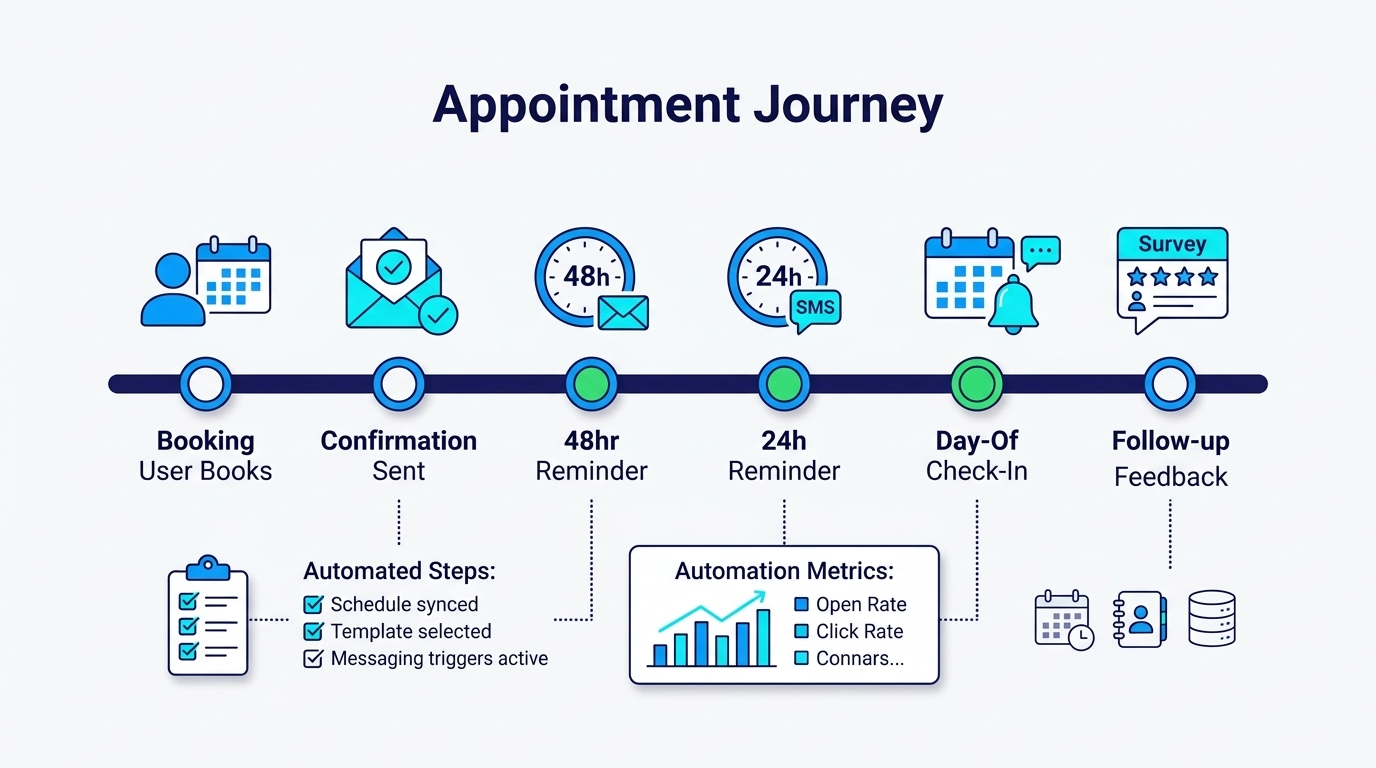
WhatsApp AI appointment reminders don’t have to be the end of the customer conversation. Once an appointment is complete, the same agent can send appropriate follow-ups, collect feedback, answer routine questions, and make future scheduling easier.
Send a post-appointment thank-you
For example, a salon might send:
“Hi [Name], thanks for visiting us today! We hope everything went well. If you have any questions about your appointment, feel free to reply here.”
Keep these messages short and relevant. Customers shouldn’t feel like every completed appointment triggers a sales campaign.
Collect feedback at the right time
A simple feedback request can help businesses identify problems before customers decide not to return.
“Thanks for visiting! We’d love to hear how your appointment went. You can share your feedback here: [Link].”
Send feedback requests only where permitted and appropriate for the service.
Make future bookings easier
For recurring services, the agent can offer another appointment when the customer is likely to need one.
For example, a salon might ask whether someone wants to schedule their next haircut, while a tutoring business could offer available times for the next session.
These messages should follow the customer’s preferences and applicable WhatsApp messaging rules.
Know when to stop
Don’t send repeated follow-ups to customers who haven’t responded. Respect opt-outs, avoid unnecessary promotional messages, and route sensitive questions to the appropriate team.
A good follow-up should feel like useful service, not an automated marketing sequence.
Keep Customer Conversations Going After Every Appointment
Build a WhatsApp AI agent that handles reminders, follow-ups, and repeat bookings in one connected workflow.
Multi-service and multi-staff setups
For businesses with several staff or service types:
- Reminders should include the staff member’s name — customers build relationships with people, not calendars.
- Different services get different reminder cadences (a 15-minute trim needs less notice than a 3-hour color job).
- Group appointments need per-attendee confirmations, not one message for the group.
- Staff schedules change — the agent must read live availability, not cached slots.
These details should be documented before the agent goes live. Defining AI agent requirements for staff availability, service durations, group bookings, and scheduling permissions helps prevent errors that may not appear in a simple demo.
Cost math: what reminders save
Missed appointments can create lost revenue, particularly when the business cannot fill the empty slot.
You can estimate the potential value of reducing no-shows using:
Avoided no-shows × Average appointment value = Potential appointment revenue preserved
For example, if a business experiences 40 no-shows per month and reduces them by 40%, that would mean 16 fewer missed appointments.
At an average appointment value of $60, those 16 appointments represent up to $960 in potential appointment revenue.
This is an illustrative estimate, not guaranteed additional revenue. Actual financial results depend on attendance, appointment margins, whether cancelled slots are refilled, and other factors.
You can also measure the time saved by reducing manual reminder calls and scheduling work.
Combining reminders with intake
The same agent can handle pre-appointment intake:
- New patients: share a link to an approved, secure intake form before arrival.
- Returning clients: “anything changed since last visit?”
-
Service-specific preparation: Share instructions approved by the service provider through an appropriate communication channel.
This turns the reminder thread from a broadcast into a workflow: confirm, prepare, arrive.
Recurring appointments
For clients with standing appointments (weekly coaching, monthly maintenance), the agent can manage the whole series:
- Confirm each occurrence individually rather than assuming attendance.
- Detect when a client skips two in a row and send a check-in.
- Offer to adjust the standing time if it keeps being missed.
That last case is delicate, a client who keeps missing Tuesdays may need a different slot, not a sterner reminder. Have the agent offer a schedule change rather than looping reminders. Retention comes from flexibility, not nagging.
A worked example: a dental clinic
Here is the full flow for a typical clinic appointment:
Consider a dental clinic that uses WhatsApp to manage appointment confirmations and schedule changes.
At booking
Agent: “Hi Sarah! Your dental cleaning is booked for Friday at 2 PM. Reply here if you need to make a change.”
Wednesday, 48 hours before
Agent: “Hi Sarah! Your cleaning is scheduled for Friday at 2 PM. Reply 1 to confirm, 2 to reschedule, or 3 to cancel.”
Customer: “2. Friday doesn’t work anymore.”
Agent: “No problem. I can check other available appointments. Would you prefer next Monday or Tuesday?”
Customer: “Monday morning.”
Agent: “I found an available appointment on Monday at 10 AM. Would you like me to book it?”
Customer: “Yes.”
Agent: “Your appointment has been moved to Monday at 10 AM. The Friday appointment has been released.”
After the booking system confirms the change, the agent stops the old reminder sequence and schedules reminders for the new appointment.
If the clinic maintains a waitlist, the released Friday slot can then be offered to eligible customers who have agreed to receive availability updates.
Rollout plan
Here’s an illustrative four-week rollout plan. Actual timelines depend on your booking integrations, WhatsApp template approvals, and testing requirements.
| Week | Focus |
|---|---|
| 1 | Connect calendar, define reminder cadences per service type, write message templates |
| 2 | Build confirmation, reschedule, and cancellation flows; test edge cases |
| 3 | Soft launch with one service type; review every interaction |
| 4 | Full rollout; add waitlist automation; measure no-show delta |
One service type first — usually your most no-show-prone one. Prove the flow there, then extend to everything else.
Common mistakes
- Sending reminders as broadcasts. If customers cannot reply, they cannot reschedule — and the no-show still happens.
- Sending too many reminders. Adjust the cadence to the service and customer preferences instead of using the same schedule for every booking.
- No opt-out path. WhatsApp requires it, and customers remember businesses that make leaving hard.
- Reminder content without context. “Your appointment is tomorrow” is worse than “your cleaning with Dr. Chen tomorrow at 2 PM.”
- No fallback channel. Customers without WhatsApp need an SMS fallback or they get nothing.
All of these are fixable in a week of setup. None of them are obvious until a real customer hits them — which is why the test phase matters.
FAQ
Do customers need to save our WhatsApp number first?
No. Customers generally don’t need to save your business number to receive messages sent through the WhatsApp Business Platform. However, your business must follow the applicable messaging and consent requirements.
Can a WhatsApp AI agent handle deposits or payments?
An agent may be able to share approved payment links through a connected payment system. Payment collection, refunds, and sensitive financial information should be handled through secure, authorized workflows.
What happens if a customer never replies to reminders?
Follow your existing booking policy. Don’t automatically cancel an appointment simply because the customer hasn’t replied unless that consequence was clearly communicated and agreed upon.
Can reminders work with Google Calendar or booking tools?
Yes, provided the agent has an appropriate integration. The workflow should check current availability and confirm that changes have been saved before notifying the customer.
Will customers find multiple reminders annoying?
They might. The appropriate number depends on the service, timing, and customer preferences. Start with fewer messages and adjust based on actual results.
Can customers reschedule through the agent?
Yes, if the agent can access available slots and update the connected booking system. Otherwise, it should direct the request to an authorized scheduling process.
What about customers without WhatsApp?
Offer another communication method, such as SMS or email, where available and permitted by the customer’s communication preferences.
How far in advance should we send the first reminder?
For many appointment-based services, 24–48 hours is a reasonable starting point. High-value or complex appointments may require earlier notice.
Final thought
Missed appointments aren’t always caused by customers forgetting their bookings. Sometimes, people know they can’t attend but find it inconvenient to call, cancel, or request another time.
WhatsApp AI appointment reminders remove some of that friction by allowing customers to confirm, reschedule, or cancel through a simple conversation. With the right calendar integration and follow-up rules, businesses can also recover cancelled slots and reduce repetitive scheduling work.
The goal isn’t to send more messages. It’s to make appointment management easier for customers while giving staff more time to focus on the people they’re serving.
Ready to Reduce Missed Appointments?
See how Botsify can help automate WhatsApp appointment reminders, scheduling conversations, and customer follow-ups.