
Instagram Reels have become a regular part of how businesses share product demonstrations, customer stories, tutorials, and behind-the-scenes content. For social media managers, these short videos are also useful for studying competitors, reviewing campaign ideas, and keeping track of content that performs well.
But what happens when you want to save a Reel instead of simply watching it?
Perhaps a client has shared a video that needs to be included in a presentation, or you’ve published a Reel on your business account and want a backup. Sometimes, you just want to keep a useful video available without searching through Instagram again.
Instagram offers a built-in download option for certain Reels, but it doesn’t always work the way people expect, particularly on desktop computers. Fortunately, there are other ways to save public Instagram videos without installing complicated software.
Here’s how to download Instagram Reels, what to do when the usual options aren’t available, and how to avoid common problems.
Why Downloading Instagram Reels Isn’t Always Straightforward
Watching a Reel and downloading it are two different things.
If an Instagram account is public, its Reels can generally be viewed by people who aren’t following the account. Public content may also be accessible through a web browser, although Instagram sometimes prompts visitors to log in.
Saving the video is where things become less convenient.
Instagram provides a download option for eligible public Reels through its mobile app. However, creators can disable downloads for their content, and the platform’s built-in downloading functionality isn’t equally available across devices.
For someone managing social media from a laptop, this can become frustrating. You might have the Reel open in your browser, but no straightforward way to save the video file.
This is especially inconvenient when you’re handling several client accounts, preparing content reports, or organizing approved videos for future campaigns.
A practical solution is to use a browser-based downloader that works with publicly accessible Instagram content.
How to Download Instagram Reels With FastDl
If you want to save a public Reel without installing another application, FastDl offers a straightforward approach.
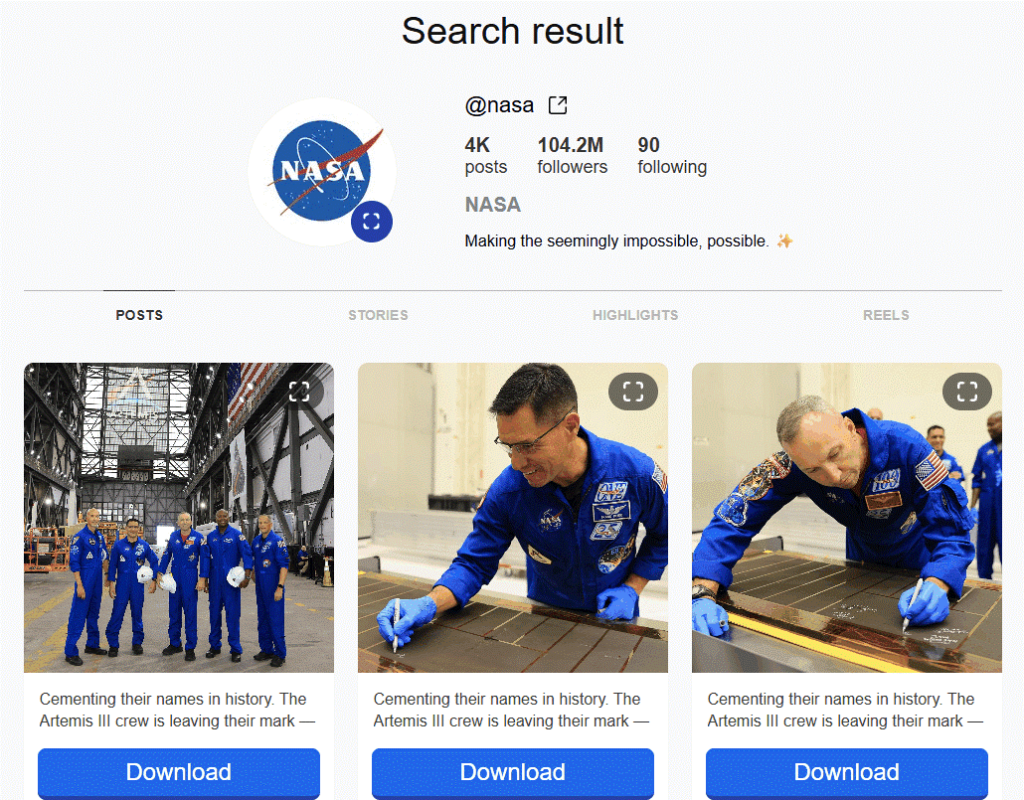
FastDl is an instagram reels download application that works directly through a web browser. Instead of requiring you to install software or sign in with your Instagram credentials, it allows you to paste a public Reel’s link and retrieve an available video file.
This makes it particularly useful for people who work primarily on desktop computers.
Downloading a Reel in a Few Steps
The process is simple:
- Open Instagram and find the public Reel you want to save.
- Copy the Reel’s link using Instagram’s sharing options.
- Visit FastDl’s Instagram Reels downloader in your browser.
- Paste the copied link into the input field.
- Select the download option and save the available video file to your device.
You can then organize the downloaded file in your usual content folders, provided you have the right to keep and use it.
For a social media manager working with client-approved content, this is more convenient than repeatedly opening Instagram to find the same video.
It also avoids one of the most common problems with downloading Reels on a computer: relying on mobile-only features.
What Makes FastDl Useful for Desktop Users?
The main advantage is accessibility.
FastDl works through a browser, so users don’t need a dedicated desktop application. Its Reels downloader is designed for publicly available Instagram videos, and the service states that it doesn’t require an Instagram password.
That matters because downloading a video shouldn’t require giving an unfamiliar website access to your social media account.
Another useful aspect is that FastDl provides tools for accessing different types of public Instagram content. Its viewer interface can display public profile content, including a Reels section, although the dedicated Reels downloader is the more direct option when you already have a video URL.
For marketers who regularly work with Instagram content, having a simple way to retrieve approved video files can save time during campaign preparation.
Of course, FastDl isn’t a way to bypass private-account restrictions. If a creator has made an account private, you should request access or ask the creator to share the video directly.
Can You Download Instagram Reels Without a Third-Party Tool?
Yes, and it’s worth understanding Instagram’s own option before choosing another method.
On supported mobile devices, Instagram allows downloads of eligible public Reels when the creator has enabled downloading.
To check whether the option is available, open the Reel in the Instagram app, use its sharing menu, and look for the download option.
If the option appears, you can save the video using Instagram’s built-in functionality.
However, there are a few limitations.
First, not every public Reel is available for downloading. Creators can control whether their content can be downloaded, so the option may be missing even when you can watch the video.
Second, Instagram’s native downloading feature is primarily intended for mobile use. Someone working from a desktop browser may find that viewing the Reel is possible while downloading it isn’t.
Third, a downloadable Reel isn’t automatically free to reuse. Being able to save a video doesn’t give you permission to publish it on another account, include it in advertising, or present it as your own work.
For users who need to download public Reels on a laptop, FastDl offers a browser-based alternative, but the same expectations around creator permission still apply.
Why Social Media Managers Often Need Saved Reels
Downloading Instagram content isn’t only about watching videos offline. For businesses and marketing teams, there are several practical reasons to keep approved copies.
Keeping a Backup of Published Content
Social media teams produce a considerable amount of content over time. Product demonstrations, promotional clips, announcements, and customer testimonials can become difficult to locate when they’re scattered across multiple accounts.
Saving copies of your own published Reels gives you a more organized archive.
This is particularly useful when a campaign needs to be reviewed months later or a client asks for the original content used in a promotion.
Reviewing Client Campaigns
Agencies often manage social media for several businesses simultaneously.
When clients share their own Reels for reporting or creative review, having the video file available can make internal discussions easier. Team members can examine the editing, messaging, pacing, and presentation without repeatedly navigating between accounts.
The same principle applies to other parts of a marketing campaign. Businesses that use AI workflow automation to coordinate repetitive tasks still need organized content assets and clear approval processes.
A reliable content archive makes those workflows easier to manage.
Studying Content Ideas
Instagram is full of creative examples, from short educational videos to product launches and storytelling campaigns.
Marketers can study publicly available Reels to understand how brands structure their opening hooks, communicate benefits, and encourage viewers to take action.
However, there is an important distinction between studying someone’s content and republishing it. For competitor research, saving the link and recording your observations may be enough. Downloading and reusing another creator’s footage should be done only with appropriate permission.
Common Problems When Downloading Instagram Reels
Even with a simple downloader, some videos may not be accessible. Usually, the problem comes down to the Reel’s availability or the link being used.
The Instagram Account Is Private
Public Reel downloaders generally cannot access videos from private Instagram accounts.
If you’re working with a client’s private account, the simplest solution is to ask them to provide the original file. This also avoids unnecessary quality loss from downloading a previously uploaded version.
The Reel Link Doesn’t Work
A copied URL may be incomplete, the Reel may have been removed, or the account’s privacy settings may have changed.
Before trying again, open the original link in your browser and confirm that the video is still publicly accessible.
If Instagram itself can’t display the Reel, a third-party downloader is unlikely to solve the problem.
The Downloaded Video Looks Different
Instagram processes uploaded videos, so a downloaded copy may not match the original recording in resolution, compression, or other technical details.
If you need a high-quality file for editing, advertising, or professional production, request the original export from the creator.
A downloaded Instagram version is often suitable for reference or archiving, but it shouldn’t automatically be treated as the highest-quality source.
A Website Asks for Your Instagram Password
This is a warning sign.
You shouldn’t need to provide your Instagram login credentials just to download a publicly accessible Reel. Avoid tools that ask for unnecessary account access, and be cautious about suspicious pop-ups, redirects, or browser extensions.
FastDl states that its public-content downloader doesn’t require an Instagram password, which is one reason its browser-based approach is convenient.
Downloading Reels Is Only One Part of Managing Instagram Content
Saving videos can make content management easier, but businesses still need a system for responding to the attention those videos generate.
A successful Reel might attract comments, questions about a product, or messages from potential customers. If those conversations go unanswered, even strong content can fail to produce meaningful results.
For businesses receiving frequent Instagram inquiries, an Instagram chatbot can help handle common questions and keep conversations moving when a team isn’t available to respond immediately.
This is separate from downloading Reels, but it matters when thinking about the full workflow behind an Instagram campaign.
Similarly, teams looking to reduce repetitive marketing and administrative work can explore AI automation tools for business to understand which processes are worth automating and which still require human judgment.
Downloading a video solves a small practical problem. Managing the content, approvals, and conversations around it is what makes the overall process more effective.
A Few Things to Check Before Saving or Reusing a Reel
Before downloading Instagram content, it’s worth considering why you need the file and what you plan to do with it.
For your own Reels, keeping a backup is generally straightforward. For client content, make sure you have permission to access and use the files as intended.
For videos published by other creators, avoid assuming that public visibility means unrestricted reuse. A video can be publicly viewable while still being protected by copyright.
If you want to feature someone else’s Reel in a campaign, advertisement, or commercial project, ask for permission first. Giving credit is good practice, but attribution alone doesn’t replace permission.
Also, remember that third-party download websites have their own privacy practices. Avoid entering personal information that isn’t necessary, and review a service’s policies if privacy is important to your organization.
Make Instagram Reel Downloads Less Complicated
Downloading Instagram Reels doesn’t need to become a technical project.
If you’re using a phone and the creator allows downloads, Instagram’s built-in option may be all you need. But if you’re working on a computer, handling client-approved videos, or organizing content for a marketing campaign, a browser-based tool can be more convenient.
FastDl provides a practical way to download publicly accessible Reels using their URLs, without requiring a separate desktop installation or an Instagram password.
The most important thing is to choose a method that suits your workflow while respecting the creator’s privacy settings and rights.
Once you have the right permissions and a reliable way to save your content, keeping track of Instagram Reels becomes much easier.
AI Agentic Platform For Building Portable AI Agents
Say Hello To Agentic AI That Connects With Your CRM And Even Other Agents
