
A customer asks why they were charged twice. Your team has three different refund policies across two help-center articles, a PDF, and a Slack message. Which one is correct?
This is the reality before building an AI knowledge base. Support knowledge lives in fragmented places such as articles, wikis, PDFs, tickets, and in the heads of team members no one has interviewed. When you deploy AI agents for customer support, every source becomes a candidate for the AI to learn from. The hard part is deciding which ones to trust.
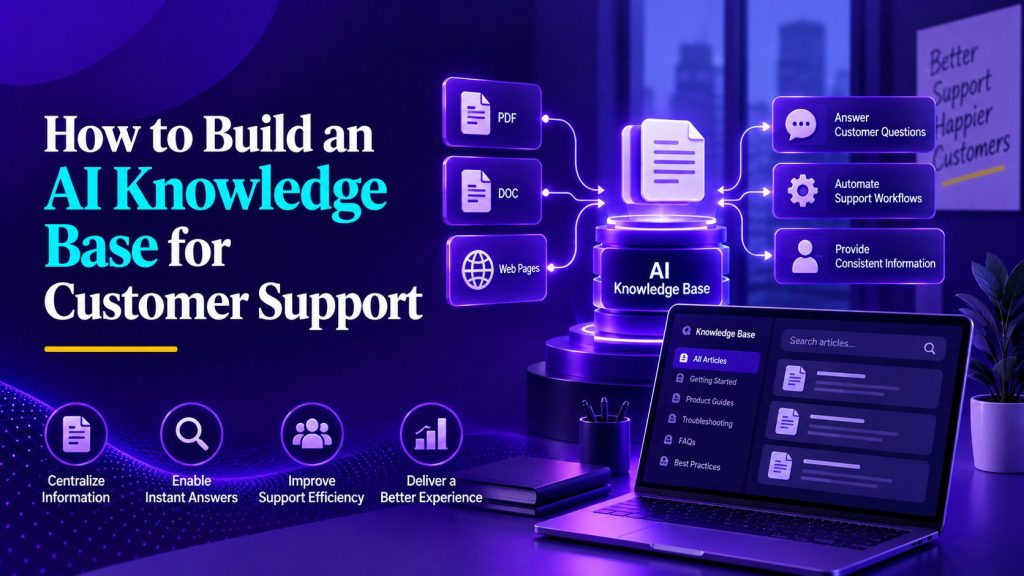
A useful AI knowledge base is not a dump of every document the company owns. It is a curated collection of authoritative information, structured so the right information can be retrieved when a customer needs it. A smaller, well-maintained knowledge base can be more useful than a large archive filled with outdated, duplicated, or conflicting content. This guide explains how to prepare, structure, test, and maintain that knowledge so an AI support agent has a more reliable source to work from.
Key Takeaways
- An AI knowledge base is a curated set of authoritative information designed for retrieval, not a general document repository.
- A well-maintained knowledge base is more useful than a large collection filled with outdated, duplicated, or conflicting content.
- The quality of an AI agent’s answers depends directly on what goes into the knowledge base and how it is structured.
- Testing with real customer questions reveals gaps that documentation alone will not catch.
- Failed answers provide useful signals for identifying documentation gaps and improving the knowledge base over time.
What Is an AI Knowledge Base?
An AI knowledge base is a collection of approved business information organized so relevant content can be retrieved and supplied to an AI model when it needs to answer a question. Unlike a general document repository, its value depends not only on what information it contains, but on whether the right information can be found when a real customer asks for help.
A traditional knowledge base stores information for human browsing. It can be organized by category, tagged for navigation, and written for visual scanning. An AI knowledge base stores information for machine retrieval. The system does not browse documentation the way a human does. It retrieves relevant information and provides that context to the model when generating an answer.
This does not mean you throw away your existing documentation. If your team already uses knowledge base software, you can start by reviewing the articles it contains and adapting the relevant information for AI retrieval. The key is deciding what belongs in the AI-facing knowledge base and what should remain in your internal document management system. The AI knowledge base is a subset of your total information, curated specifically for retrieval reliability.
Portable AI Agents In Seconds, Use Everywhere
Prompt, Test, and Deploy AI Agents Across Social Platforms and LLMs. Automate Everything.
What Should Go Into an AI Customer Support Knowledge Base?
The contents should reflect the information your support team actually needs to answer questions and handle common AI customer service use cases.
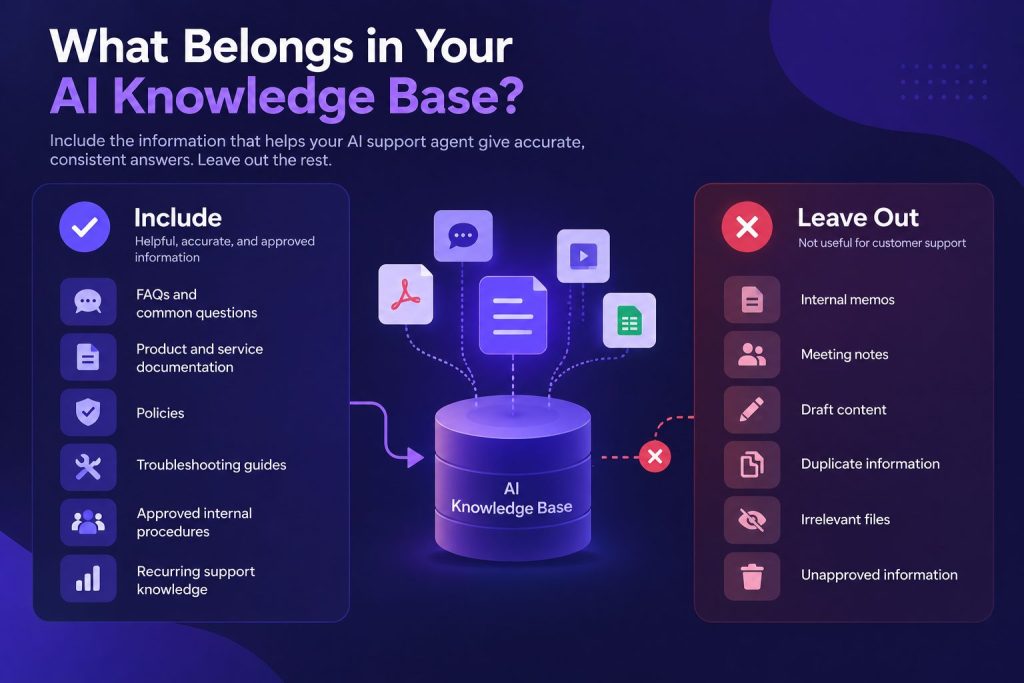
FAQs and common questions. Pull the most frequently asked questions from your support team and write clear answers. If a question comes up repeatedly, it belongs in the knowledge base.
Product and service documentation. Feature descriptions, setup instructions, configuration guides, and any technical details customers routinely ask about.
Policies. Refund policies, shipping policies, service-level agreements, cancellation terms, and warranty information. These are high-risk sources because an incorrect answer can directly affect what a customer is told about refunds, cancellations, warranties, or service terms.
Troubleshooting guides. Step-by-step instructions for resolving common issues.
Approved internal procedures. Account verification steps, escalation paths, and exception-handling guidelines that help your support team resolve issues efficiently.
Recurring support knowledge. Patterns you see in support tickets that are not yet documented. If your team answers the same question five times a week and there is no article for it, that reveals a documentation gap.
Not every company document belongs here. Internal memos, meeting notes, draft proposals, marketing collateral, and personal files are not useful to a customer support AI. Including irrelevant content makes retrieval harder. The rule is simple: if a piece of information helps the AI answer a customer question accurately, it belongs. Otherwise, leave it out.
Public Knowledge vs Internal Knowledge
Customer support AI agents need two categories of knowledge. Public knowledge is information customers can see themselves: help-center articles, public FAQs, published policies, and documentation. The AI can use this freely.
Internal knowledge is information that should not be shared with customers: internal escalation procedures, pricing approval limits, fraud detection rules, and internal notes about specific accounts. The AI needs access to this to resolve issues, but the answers it generates should not expose the underlying internal data.
Setting clear access boundaries prevents the AI from revealing information it should not. A customer asking about a refund should get the refund policy. They should not get the internal approval workflow for handling refund exceptions. Both types of information may be available to the same AI system, but access needs to be controlled so customer-facing responses only use information appropriate to that user and situation.
How to Build an AI Knowledge Base for Customer Support
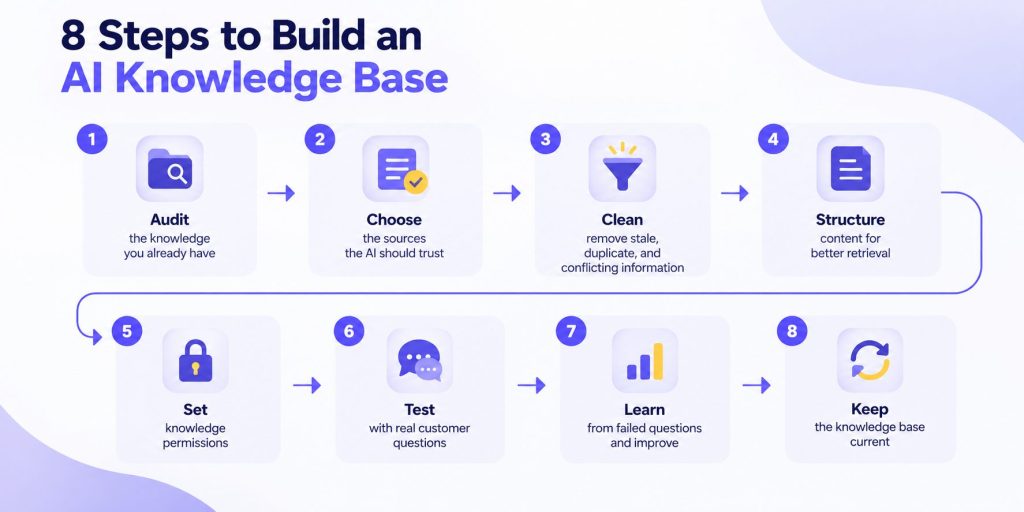
Once you know what belongs in the knowledge base and which information needs tighter access controls, the next step is turning that scattered knowledge into something an AI agent can reliably use. The process starts with what your support team already knows, then moves through cleanup, structure, permissions, testing, and ongoing improvement.
The following eight steps provide a practical way to build that foundation without simply uploading everything and hoping the AI finds the right answer.
Step 1: Audit the Knowledge You Already Have
Map where your team finds answers: help-center, wiki, shared drives, Slack, email, CRM. Each is a knowledge source with variable reliability.
If some of those sources need to remain connected rather than being manually copied into the knowledge base, AI agent integration also becomes part of keeping that information accessible and current.
Identify authoritative sources. The refund policy lives in a legal document. Product specs live in engineering documentation. Troubleshooting steps live in the guide maintained by the support lead.
Identify obsolete sources. Old product versions, retired features, outdated pricing pages, expired policies. Mark or remove them. An AI that retrieves a two-year-old pricing page creates a new problem.
Look for conflicting information. If two documents give different instructions for the same process, both cannot be right.
Document answers that exist only in employees’ heads. Tribal knowledge is hardest to capture but often most valuable. Interview experienced team members and turn their knowledge into articles.
Step 2: Decide Which Source the AI Should Trust
When an AI knowledge base contains conflicting information, the AI does not know which source to prefer. It may pick the wrong one, or it may blend both into a confusing answer. This must be resolved before the knowledge base goes live.
The rule is simple: the authorized source wins. If the legal team maintains the refund policy document, that document is the source of truth. If a well-meaning support agent created a help-center article that contradicts it, the legal document wins and the agent’s article should be corrected or removed.
Consider a company with a refund policy that says refunds are issued within 30 days, a product page that says 14 days, and a support article that says 60 days. The AI will retrieve whichever source matches the search best. If the 60-day article is more prominently written, the AI may tell customers they have two months to request a refund. The fix: the legal refund policy is the source of truth, and the other documents must match it.
Resolve every conflict before loading content into the knowledge base. The agent cannot reliably resolve a conflict that the business itself has not resolved.
Which sources the agent can trust, what information it can access, and how it should behave when sources conflict are also useful AI agent requirements to define before deployment.
Step 3: Remove Stale, Duplicate, and Conflicting Information
A clean knowledge base is more useful than a large one. Removing low-quality content is as important as adding good content.
Stale information refers to features, policies, or processes that no longer apply. A troubleshooting guide for a deprecated version should not be in the knowledge base. Neither should a pricing page from before the last update. Stale information causes the AI to give confidently wrong answers.
Duplicate information creates retrieval problems. When the same answer exists in multiple places, the AI may retrieve the wrong version. If duplicates do not match exactly, the AI has no way to reconcile them. Keep the authoritative version and remove the others.
Conflicting information should be reconciled against the source of truth established in Step 2. Update or remove versions that no longer reflect the approved information.
For each piece of content, ask: is it current, unique, and correct? If the answer to any of those is no, edit or remove it.
Step 4: Structure Content for Better Retrieval
How you write and organize content directly affects whether the AI can find the right answer.
Use descriptive headings. “Requesting a Refund Within 30 Days of Purchase” is better than “Refund Policy” because it contains terms a customer query is likely to match.
Write clear questions and answers. Phrase questions the way a customer would ask. “How do I cancel my subscription?” is better than “Subscription Cancellation Procedure.”
Keep one main topic per section. If a single article covers setup, troubleshooting, and billing, the retrieval system may pull the wrong passage. Split broad topics into focused documents.
Make each explanation self-contained. Retrieval systems often work with smaller sections or passages rather than treating every document as one indivisible block.
Use customer terminology, not internal jargon. Using the same language customers use can make it easier for the system to connect a real question with the right documentation.
Do not bury important information. If the answer to a common question appears in the third paragraph of a dense document or only inside an image, the retrieval system will struggle. Important information should be in plain text at a clear location.
This is not a technical chunking exercise. It is a practical writing discipline. Write clearly, stay focused, and use the language your customers use.
Step 5: Set Knowledge Permissions
Once public and internal knowledge have been separated, decide who or what is allowed to retrieve each source.
A customer-facing agent may be able to use public policies, product documentation, and verified account information, while internal escalation procedures or restricted business documents should only be available in approved contexts.
Customer-specific data also needs separate treatment. Information such as account history, billing details, or order status typically belongs in operational systems such as a CRM or database rather than in a general knowledge base. The agent may retrieve it when needed, but access should depend on identity, permissions, and the task being performed. These controls also form part of broader AI agent governance, especially when agents can access sensitive or internal business information.
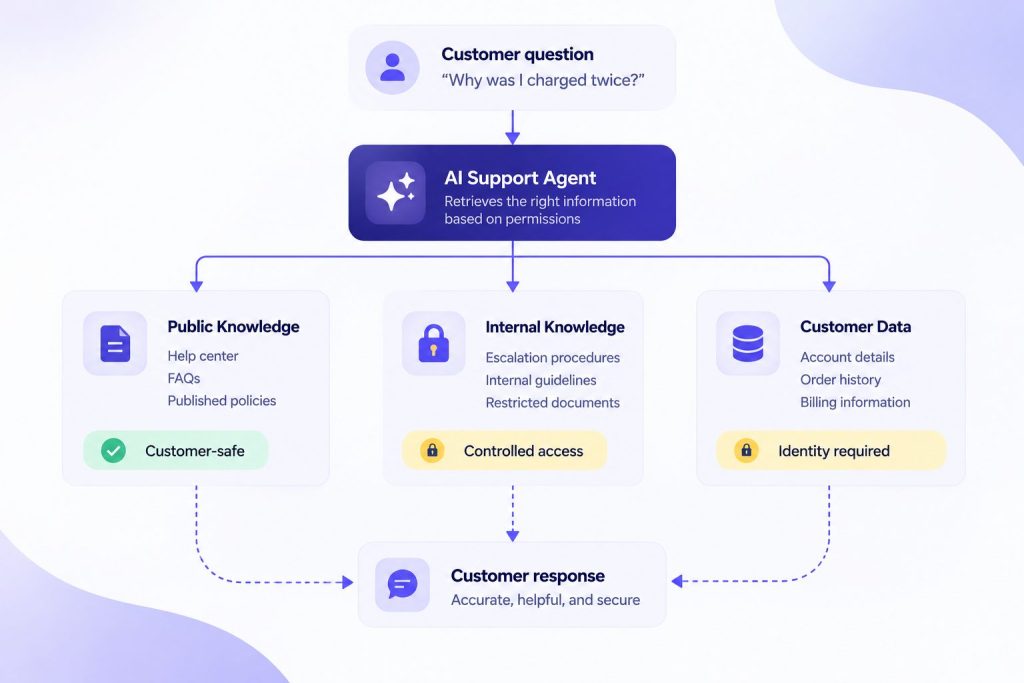
A broader context platform for AI agents can help manage which knowledge and data become available to an agent in a given situation, but the principle remains the same: access should follow the user, the request, and the sensitivity of the source.
Step 6: Test With Real Customer Questions
Testing with real customer questions reveals problems that are invisible when you review the content yourself. Your documentation can feel complete while missing exactly the questions customers actually ask.
Use actual customer queries from support tickets, not hypothetical ones.
Test direct questions. “How do I reset my password?” If the system retrieves the wrong source, investigate whether the problem is the content structure, the retrieval setup, or both.
Test vague questions. “My account is broken.” The AI needs to figure out intent. This reveals coverage issues.
Test misspellings. “How do I cancell my subscripion?” If the AI fails on common misspellings, something needs adjustment.
Test customer terminology versus yours. If documentation says “termination” but customers say “cancellation,” the article may not be retrieved.
Test follow-up questions. Does the AI maintain context for the clarifying question?
Test questions with no approved answer. Does the AI say it does not know? Does it guess?
Test questions where multiple documents could be relevant. Does the AI retrieve the right one, both, or the wrong one?
Track two things separately. First, did retrieval find the correct information? Second, did the AI use that information correctly? These are different failure points. Retrieval can succeed while the AI misinterprets the content. Retrieval can fail even when the AI would have used the information correctly.
Step 7: Turn Failed Questions Into Knowledge Improvements
Failed answers are signals about where your knowledge base needs improvement.
Missing documentation. Customers regularly ask a question and the AI cannot find the answer. Create new content to fill the gap.
Weak existing articles. If the correct source is retrieved but the answer is still poor, review both the source content and how the model is instructed to use it. The documentation may be ambiguous, incomplete, or missing the detail needed to answer the question correctly.
Tribal knowledge. If the AI fails on a question your most experienced agent can answer immediately, that knowledge needs to be documented. Interview the expert. Write it down.
Undocumented new features. When your product team ships a feature and customers start asking about it, add documentation before the questions pile up.
Terminology mismatches. Customers may use completely different words than your documentation. Add articles or alternative phrasings that bridge the terminology gap.
Build the feedback loop. Customer question triggers retrieval. Retrieval fails. The gap is identified and filled. The updated content is tested again. This cycle is how a knowledge base gets better over time.
Step 8: Keep the Knowledge Base Current
An AI knowledge base is not a one-time project. Information changes. Products update. Policies change. New questions emerge.
Assign clear ownership. Someone should be responsible for the knowledge base. Not necessarily a full-time role, but a named responsibility. Without an owner, updates happen sporadically or not at all.
Establish triggers for review. Product launches, policy changes, pricing updates, and feature releases should automatically trigger a knowledge base review.
Review knowledge whenever products, pricing, policies, or processes change so obsolete information can be removed and new contradictions resolved before they affect customer answers.
Pay attention to recurring new support issues. If a new type of question starts appearing in tickets, the knowledge base likely needs a new article.
There is no universal update schedule. The right frequency depends on how fast your product and policies change. The important thing is that updates happen when changes occur, not on an arbitrary calendar.
How RAG Uses the Knowledge Base
RAG, or Retrieval-Augmented Generation, is one common method AI support systems use to retrieve relevant business information before generating an answer.
Here is the process in simple terms. A customer asks a question such as “What is your return policy?” The RAG system searches the knowledge base for the most relevant information. It finds the return policy document. That document is supplied to the AI model alongside the customer’s question. The model reads both and generates an answer.
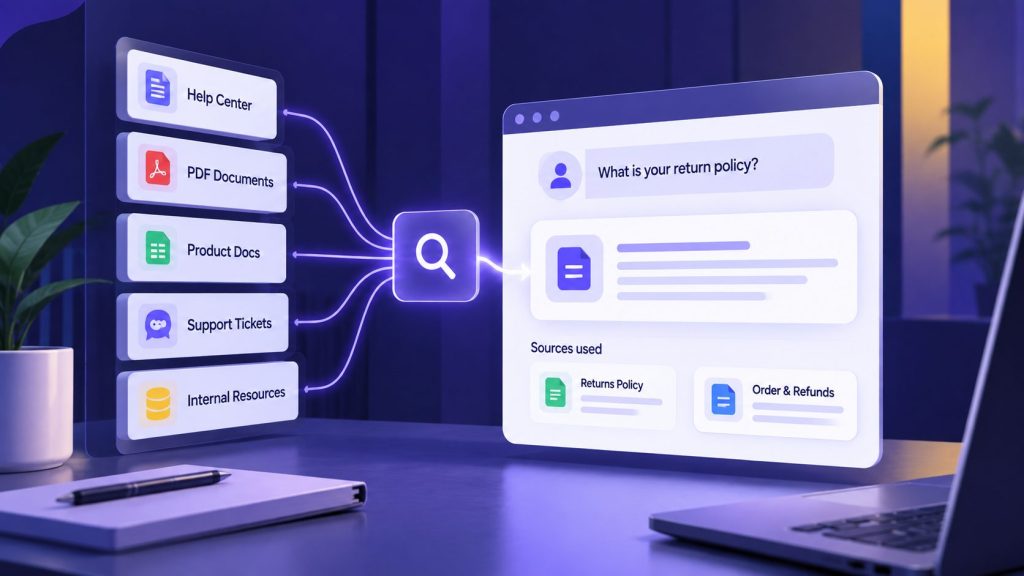
The key distinction: the knowledge base is the information itself. RAG is the method used to find and deliver that information. This is separate from AI agent memory, which handles conversational context across sessions. The knowledge base provides facts. Memory provides continuity. Both are useful, but they solve different problems.
Retrieval can fail for several reasons. The information might be missing entirely. It might be outdated, so the AI returns a policy that no longer applies. It might be written unclearly, so the system pulls an irrelevant section. Or conflicting documents might exist, and the system retrieves the wrong one.
Failures can come from either the knowledge base or the retrieval process. Missing, outdated, or contradictory information is a content problem. Failing to retrieve the correct information when it exists is a retrieval problem. Testing needs to distinguish between the two, because rewriting documentation will not necessarily fix poor retrieval, and changing retrieval settings will not fix incorrect source material.
Common AI Knowledge Base Mistakes
Uploading everything without filtering. Adding every document creates noise that makes retrieval less reliable.
Ignoring the terminology gap. Heavy internal jargon can make it harder for the system to connect customer phrasing with the right documentation.
Skipping the testing phase. Deploying without testing against real customer questions means deploying problems you have not seen yet.
Treating the knowledge base as a set-and-forget project. A knowledge base that was useful at launch will degrade without ongoing maintenance.
Confusing the knowledge base with the retrieval method. Retrieval cannot compensate for incorrect or incomplete source material. Fix the content itself rather than expecting the retrieval layer to solve it.
AI Knowledge Base Checklist
- Identify all existing knowledge sources across your organization.
- Resolve conflicting information and designate a single source of truth for each topic.
- Remove outdated, duplicate, and irrelevant content.
- Write or rewrite articles with clear headings, self-contained sections, and customer terminology.
- Separate public-facing knowledge from internal procedures.
- Tag content by access level for permission-aware retrieval.
- Test the knowledge base with real customer questions, including vague queries and misspellings.
- Distinguish between retrieval failures and AI misinterpretation during testing.
- Establish a feedback loop from failed answers to content improvements.
- Assign clear ownership for ongoing knowledge base maintenance.
Frequently Asked Questions
What is an AI knowledge base?
An AI knowledge base is a collection of structured information that an AI agent searches through to answer questions. Unlike a traditional help center designed for human browsing, it is organized so a retrieval system can find relevant information and provide it to an AI model when answering a question.
What should be included in an AI knowledge base for customer support?
Include FAQs, product documentation, policies, troubleshooting guides, approved internal procedures, and recurring support knowledge. Exclude internal memos, meeting notes, marketing collateral, and information that does not directly support customer-facing answers.
Can I use my existing help center or documents as an AI knowledge base?
Yes, most existing documentation can be adapted. Review each document for accuracy, relevance, and clarity. Remove outdated content, resolve contradictions, rewrite in customer-facing language, and structure for retrieval rather than human browsing.
What is the difference between an AI knowledge base and RAG?
The knowledge base contains the business information available to the system. RAG, or Retrieval-Augmented Generation, is one method used to retrieve relevant information from that knowledge base and provide it to the AI model as context for answering a question.
How do you keep an AI knowledge base up to date?
Assign ownership, establish review triggers tied to product and policy changes, monitor for obsolete content and contradictions, and track failed answers as signals for updates. There is no universal schedule. The right cadence depends on how quickly your products and policies evolve.
Can an AI knowledge base prevent hallucinations?
A well-maintained AI knowledge base can reduce unsupported answers by giving the model relevant, approved information to work from, but it cannot eliminate hallucinations completely. Reliability also depends on retrieval quality, model behavior, permissions, testing, and what the agent does when a trustworthy answer cannot be found. High-risk or uncertain requests should have an appropriate fallback or escalation path.
Building Knowledge the AI Can Actually Trust
Building an AI knowledge base for customer support is not about collecting every document a company owns. It is about deciding which information the agent can trust, making that information easy to retrieve, and keeping it aligned with the products, policies, and questions customers actually encounter.
Treat the knowledge base as a living part of the support operation. Failed answers, new product features, recurring questions, and policy changes should feed back into the documentation. The goal is a reliable, current, permission-aware source of truth that gives the AI better information to work from.
AI Agentic Platform For Building Portable AI Agents
Say Hello To Agentic AI That Connects With Your CRM And Even Other Agents

Pingback: AI Agent Escalation: When to Hand Off