Six weeks in, the pilot is stalled.
The engineering team built a prototype that works, technically. It processes requests, returns answers, and even hands off to a human when it gets stuck. But the sales team never got trained on it. IT wasn’t told about the API dependencies until week four. The legal review that should have happened before development started is now blocking the production launch. And nobody can agree on what “success” actually looks like because the business case was a three-line email the VP sent before going on leave.
This is not a technology problem. The AI works. This is a sequencing problem. Unlike traditional automation, Agentic AI systems make independent decisions within defined boundaries, making implementation planning far more important than simply deploying another software tool.
Every stalled AI project I’ve seen shares the same root cause: teams built before they aligned. They coded before they clarified. They deployed before they de-risked.
The difference between an AI agent that ships on time and one that dies in pilot purgatory comes down to one thing, a clear, phased roadmap with owners, dependencies, hard gates, and deliverables that actually connect to business outcomes.
This AI agent implementation roadmap is not a generic checklist or technology survey. It is a practical project sequence showing what happens first, who owns each phase, what it produces, and what must be completed before the next phase begins.
Key Takeaways
- The single biggest predictor of AI project success is executive sponsorship secured before a single line of code is written. Phase 0 is non-negotiable.
- Use-case selection should be ruthless: pick one high-value, low-complexity process. The goal is a win, not a moonshot.
- Every phase needs a hard go/no-go gate. No gate, no momentum. Soft gates kill timelines.
- Integration planning starts in week one, not week eight. API dependencies are the #1 cause of pilot delays.
- The pilot is not a beta test. It is a proof-of-value exercise with defined success criteria, a limited audience, and a fixed end date.
- Post-launch ownership must be assigned before launch day. An AI agent without a named owner drifts within 30 days.
- A focused AI agent implementation roadmap can move a single use case from idea to production in 90 days. Longer timelines often signal scope creep, unclear ownership, or unresolved dependencies.
How This AI Agent Implementation Roadmap Works
The AI Agent Implementation roadmap is divided into four gated phases: business alignment, discovery and requirements, development and testing, and pilot-to-production rollout. Each phase has defined owners, deliverables, dependencies, and go/no-go criteria.
Phase 0: Business Case and Sponsorship (Before Day 1)
This phase happens before the clock starts. Most teams skip it and pay for it later.
What Must Happen
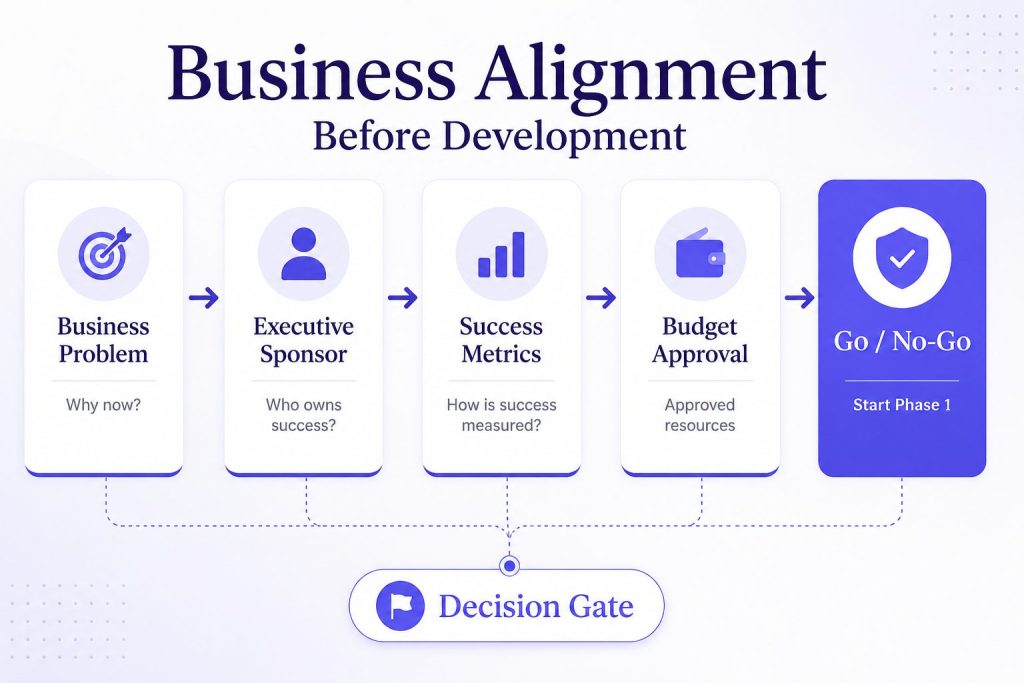
Identify the executive sponsor. An AI project without a named executive sponsor is a skunkworks project. It will lack budget priority, cross-departmental pull, and escalation paths. The sponsor needs budget authority and organizational influence. A department head or C-level leader who visibly champions the work.
Build the business case around a specific problem. Not “we should use AI.” But “our customer support team spends 14 hours per day answering the same three questions, and we need to cut that by 40%.” The more specific the problem, the easier the use case selection, the clearer the success metrics.
Define success criteria in business terms. Before any technical work, answer: what does good look like? Time saved per week. Cost per ticket reduced. Lead response time improved. Revenue influenced. These become the gates for every later phase.
Secure budget and resource commitment. Estimate the full cost: platform, development, integration, training, and three months of post-launch support. Get a written budget sign-off. Verbal approvals evaporate when the project hits its first snag.
Stage Gate: Go / No-Go
| Criteria | Pass / Fail |
| Named executive sponsor with budget authority | Required |
| Written business case with specific problem statement | Required |
| Defined success criteria (quantified) | Required |
| Budget approved and allocated | Required |
| Cross-functional stakeholder alignment confirmed | Required |
Go decision: All five criteria met. No-Go: Any one is missing.
Days 1–30: Discovery, Readiness, Use-Case Selection, and Requirements
Phase 0 answers why. The first 30 days of the AI agent implementation roadmap define what the organization will build, which problem it will solve, and what must be ready before development begins.
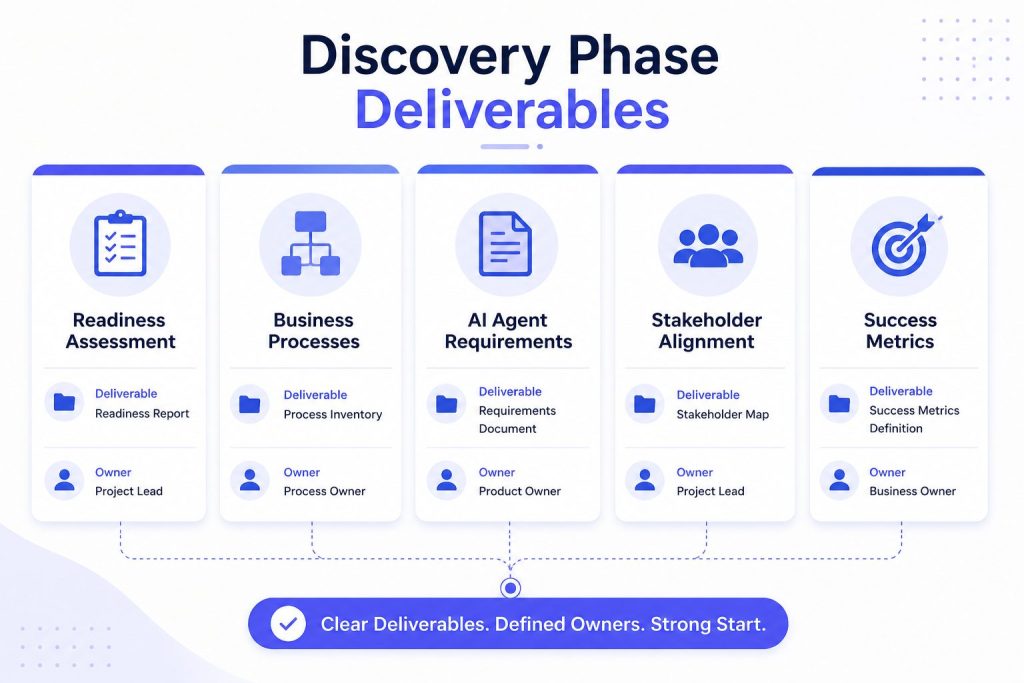
Discovery Workshop (Day 1–5)
Bring together the sponsor, the process owner, the technical lead, and the end users who will actually interact with the agent. Run a structured two-day workshop with three outputs:
Process inventory. List every repetitive, rule-based, or high-volume process the team runs. Before prioritizing automation opportunities, map your AI Agent Workflows so every request, decision, and handoff follows a documented path. Flag processes that involve structured data, clear decision trees, and low tolerance for error.
Pain point ranking. Rank each process by: frequency, time spent, cost of errors, and impact on customer experience. This gives you a heatmap of where automation delivers fastest.
Stakeholder map. Identify every team that touches the process. Sales, support, engineering, compliance, legal. Their input now prevents blockers later.
Readiness Check (Day 5–10)
Run a structured assessment across five dimensions: data availability, technical infrastructure, team capability, process maturity, and organizational readiness. This is not about perfection, it is about knowing your gaps before you commit to a timeline.
A structured AI readiness assessment surfaces the gaps that derail projects later. Teams that skip this step consistently underestimate their integration complexity by 2x.
Portable AI Agents In Seconds, Use Everywhere
Prompt, Test, and Deploy AI Agents Across Social Platforms and LLMs. Automate Everything.
Use-Case Selection (Day 10–15)
Now you have a shortlist. Pick one.
The selection criteria: high business value, low technical complexity, clear success metrics, and visible impact to stakeholders. The goal is a fast, obvious win that builds organizational confidence.
Good first use cases: Automated ticket triage, lead qualification, invoice processing, employee IT support, onboarding workflows.
Bad first use cases: Anything involving unstructured legal decisions, multi-step negotiations, or emotionally sensitive customer interactions.
Requirements Document (Day 15–25)
Write a requirements document that covers:
- The process flow (as-is and to-be)
- Inputs and outputs (data sources, formats, frequency)
- Decision rules and escalation paths
- Integration points (CRM, helpdesk, ERP, communication channels)
- Performance expectations (response time, accuracy, handle rate)
- Compliance and security constraints
The requirements should also define the AI Agent Memory strategy, including what information the agent retains, for how long, and when that context should be cleared.
A well-structured AI agent requirements document prevents scope creep during development. It becomes the single source of truth when the engineering team needs to push back on “one more feature.”
Dependency Check
Before this phase ends, confirm that your integration targets are accessible. Send your IT team the list of systems you need to connect to. Ask for API documentation, access credentials, and rate limits. This single step prevents the most common pilot delay: “We didn’t know the API existed.”
Phase 1 Deliverables
| Deliverable | Owner | Format |
| Discovery workshop summary | Project Manager | Document |
| Readiness assessment results | Technical Lead | Scorecard |
| Selected use case brief | PM + Sponsor | One-pager |
| Requirements document | Technical Lead | Spec document |
| Integration dependency map | IT / Engineering | Diagram |
Stage Gate: Go / No-Go
| Criteria | Pass / Fail |
| Use case approved by sponsor and process owner | Required |
| Requirements document signed off by engineering | Required |
| Integration dependencies identified and confirmed accessible | Required |
| Success criteria aligned with business case from Phase 0 | Required |
Days 31–60: Architecture, Platform Choice, Development, Integrations, and Testing
Phase 1 answered what. Days 31–60 of the AI agent implementation roadmap define how the agent will be designed, built, integrated, and tested.
Architecture Design (Day 31–35)
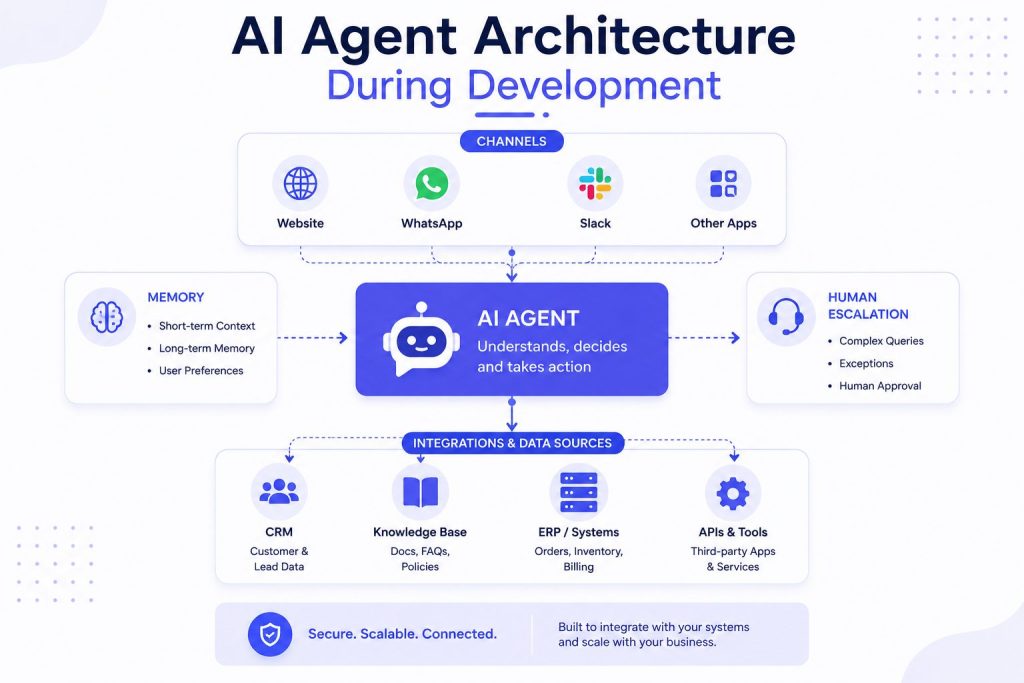
Start with the integration map from Phase 1 and build the technical architecture:
- How the agent receives inputs (API, webhook, chat widget, voice)
- How it processes requests (LLM, retrieval, rules engine)
- Where it reads and writes data (CRM, database, helpdesk)
- How it escalates to humans (handoff protocol, notification system)
- How it logs and audits decisions (for compliance and improvement)
Document the architecture in a diagram. Keep it simple. The goal is shared understanding, not system perfection.
Platform Selection (Day 35–40)
Before comparing the Best AI Agent Platforms, finalize your roadmap and requirements so every option is evaluated against the same implementation goals. This is the fork in the road. Three paths:
Build from scratch. Maximum control, maximum time. You need in-house LLM expertise, infrastructure management, and ongoing maintenance capacity. Suitable for organizations with dedicated AI engineering teams.
Platform-based development. Use an AI agent platform that handles the infrastructure, LLM orchestration, and channel integrations. You configure the agent behavior, decision logic, and data connections. Faster to production, lower ongoing maintenance.
Hybrid. Build the core agent on a platform, but develop custom integrations and interface layers in-house.
An AI Agent Platform like Botsify handles LLM orchestration, channel connectivity, and conversation management out of the box, letting teams focus on agent behavior and business logic instead of infrastructure. For teams evaluating the build vs buy decision, Custom AI Agents built on a platform offer a middle path: production speed without sacrificing control.
The choice depends on your team, timeline, and long-term strategy. A dedicated guide on the Build In-House vs Development Partner decision covers the trade-offs in detail.
Development Sprint (Day 35–55)
Build the agent in two-week sprints:
Sprint 1: Core flow. Get the basic conversation or process flow working in a staging environment. No polish, no edge cases. Just the happy path.
Sprint 2: Integrations and edge cases. Connect to the actual data sources. Handle the common exceptions. Add escalation logic. If your implementation depends on specialized capabilities, define the required AI Skills before development begins so each agent has clearly assigned responsibilities.
Integration testing. Test every integration point. The CRM connection. The helpdesk ticketing. The notification system. Each integration is a risk point. Test them in isolation before testing the full flow.
AI Agent Development Services that include integration testing as a separate workstream reduce the risk of post-launch surprises. The most common issue teams face is an integration that works in staging but fails under production load.
Internal Testing (Day 55–60)
Before the pilot, run internal testing with:
- The engineering team (functional testing)
- The process owner (business logic validation)
- A small group of internal users (experience testing)
Define the minimum performance bar: accuracy rate, handle rate, escalation rate, average response time. The agent must hit these before it goes to pilot users.
Phase 2 Deliverables
| Deliverable | Owner | Format |
| Architecture diagram | Solutions Architect | Diagram |
| Platform selection decision | PM + Technical Lead | Decision record |
| Working agent in staging | Engineering Team | Deployed instance |
| Integration test results | QA Engineer | Test report |
| Internal testing sign-off | Process Owner | Sign-off document |
Stage Gate: Go / No-Go
| Criteria | Pass / Fail |
| Internal testing passes minimum performance bar | Required |
| All integrations validated in staging | Required |
| Compliance and legal review completed | Required |
| Pilot user group identified and briefed | Required |
| Success criteria for pilot phase defined | Required |
Days 61–90: Pilot, Evaluation, Rollout, and Production Handover
Phase 2 answered how. This phase proves it works.
Pilot Launch (Day 61–65)
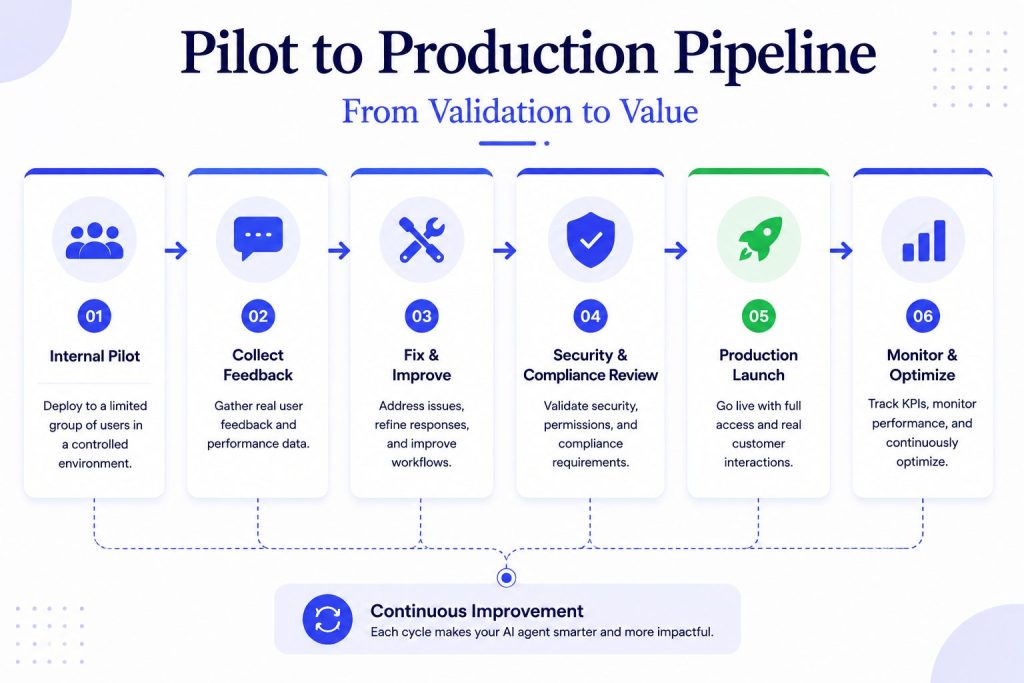
The pilot is not a beta test. It is a controlled experiment with:
- A limited audience. 10–20 users who represent the target user group. Not volunteers. Selected users who reflect real usage patterns.
- A defined scope. The agent handles a specific, bounded set of requests. No feature creep. The requirements document from Phase 1 is law.
- A fixed duration. 20 business days. Long enough to gather meaningful data. Short enough to maintain urgency.
- Clear success criteria. The exact metrics from Phase 0. No moving the goalposts.
Communication plan. Tell the pilot group: what the agent does, what it does not do, how to escalate when it fails, and how to provide feedback. Manage expectations. The agent will not be perfect. That is the point of the pilot.
Evaluation Period (Day 65–80)
Run the pilot. Collect data on every interaction.
Track against success criteria. Daily. Not weekly. If the agent is trending below the minimum bar on day three, you want to know on day three, not day fifteen.
Gather qualitative feedback. Survey the pilot users at the halfway point and at the end. What worked? What felt unnatural? What did they trust? What made them escalate?
Identify failure patterns. The agent will make mistakes. The question is whether the mistakes are random or systematic. A systematic failure means the requirements or logic need adjustment. Random failures within acceptable thresholds are normal.
The AI Agent Lifecycle treats the pilot as a learning phase, not a validation phase. Teams that approach it this way consistently find improvement opportunities that requirements documents miss.
Rollout Decision (Day 80–85)
Hard gate. The pilot data determines the next step.
| Outcome | Decision |
| All success criteria met | Full production rollout |
| Most criteria met, gaps identified | Conditional rollout with remediation plan |
| Critical criteria not met | Return to Phase 2 for fixes, re-pilot |
Production Rollout (Day 85–90)
Roll out in waves, not all at once:
Wave 1: One team or department. Monitor closely for 48 hours. Confirm the agent handles production load. Watch for integration failures under real traffic.
Wave 2: Expand to the full user group. If Wave 1 is stable, open the floodgates. Keep monitoring, but shift from active troubleshooting to passive observation.
Production documentation. Update the requirements document with the actual agent behavior. Write the runbook: how to monitor, how to handle escalations, how to retrain, how to roll back. This documentation is the handover to the operations team.
The most common AI Agent Deployment Mistakes happen in the 48 hours after launch. A phased rollout with a documented rollback plan is the single best defense against production incidents.
Production Handover (Day 90)
Transfer ownership from the project team to the operations team.
| Deliverable | Owner | Format |
| Pilot evaluation report | PM | Document with metrics |
| Rollout decision record | Sponsor + PM | Signed decision |
| Production runbook | Engineering Team | Document |
| Operations handover meeting | PM + Ops Team | Meeting |
| Named post-launch owner | Sponsor | Assignment |
Post-Launch: Monitoring, Ownership, Optimization, and Expansion
Launch day is not the finish line. It is the start of the operational phase.
Monitoring (Weeks 1–4 Post-Launch)
Monitor the agent against the success criteria continuously. Set up dashboards for:
- Handle rate (percentage of requests the agent completes without escalation)
- Accuracy rate (percentage of correct responses)
- User satisfaction score (post-interaction surveys)
- Escalation reasons (what triggers human handoffs)
Set alerts for significant drops. A 10% drop in handle rate within 24 hours triggers a review.
Ownership (Week 1 Post-Launch)
Assign a named owner for the agent in production. This person is responsible for:
- Monitoring performance
- Reviewing escalated interactions
- Coordinating updates and improvements
- Being the point of contact for user feedback
Without clear AI Agent Governance, the agent drifts. Performance degrades, user trust erodes, and the project that took 90 days to build is abandoned within three months. Named ownership prevents this.
Optimization (Ongoing)
Review agent performance monthly. Look at:
- Interactions where the agent failed or escalated unnecessarily
- New patterns or questions that emerged since launch
- User feedback trends
- Opportunities to expand the agent’s scope
Each optimization cycle follows a smaller version of the AI agent implementation roadmap: identify the gap, define the requirement, develop the improvement, test it, and deploy the change.
Expansion (Quarterly)
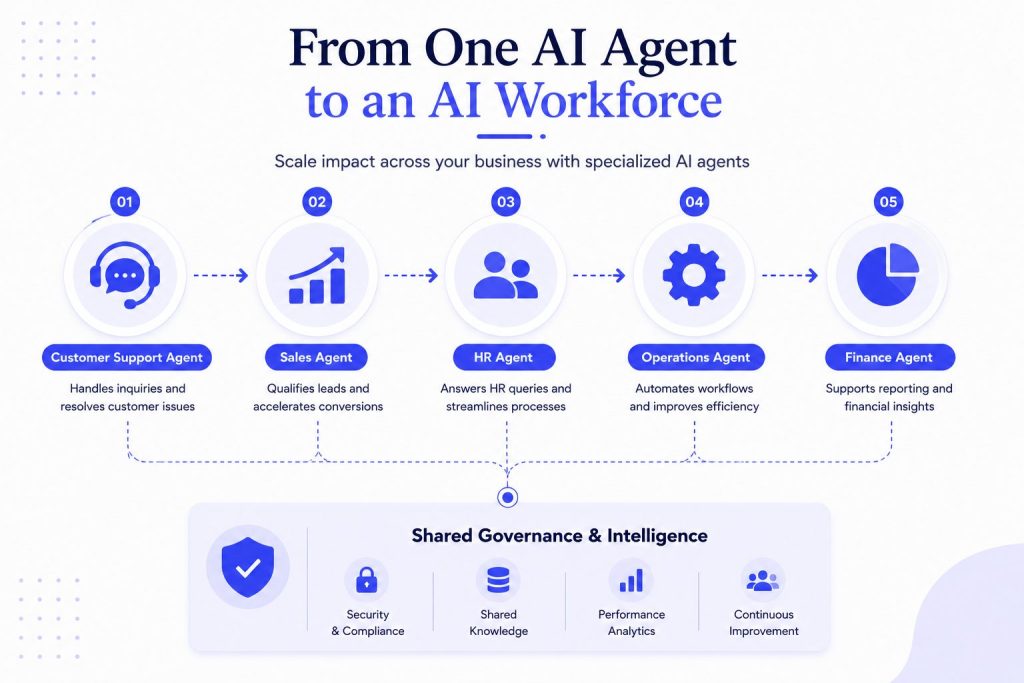
When the first agent is stable and delivering measurable value, plan the next use case. The infrastructure, platform, and governance structure you built for the first agent accelerate every subsequent one. Over time, these connected deployments evolve into an AI Workforce, where multiple specialized agents collaborate across different business functions.
AI agent integration becomes faster with each deployment because the data connections, authentication patterns, and escalation protocols are already established. The second agent takes half the time of the first.
The decision to build subsequent agents in-house or through a partner depends on your team’s capacity and your long-term AI strategy. The build-in-house vs. development partner framework helps you evaluate this at scale.
Conclusion
The difference between an AI agent that ships in 90 days and one that stalls indefinitely is not the technology. It is the sequence.
The teams that succeed follow a predictable pattern. They secure sponsorship before they write requirements. They document requirements before they build. They integrate before they test. They pilot before they launch. And they assign ownership before they move on.
Every phase has a gate. Every gate has a clear decision. Every decision is based on criteria defined before the work started.
This is not bureaucracy. It is discipline. And discipline is what separates AI projects that deliver from AI projects that drain.
This AI agent implementation roadmap gives your team the sequence, ownership model, milestones, and decision gates needed to move from idea to production. The only question is whether you start Phase 0 today or after the next stalled pilot.
AI Agentic Platform For Building Portable AI Agents
Say Hello To Agentic AI That Connects With Your CRM And Even Other Agents
Frequently Asked Questions
1. How long does an AI agent implementation roadmap take?
A focused AI agent implementation roadmap typically takes around 90 days for a single business use case. The timeline covers business planning, requirements, development, testing, pilot deployment, and production rollout. Larger enterprise projects with multiple integrations or compliance requirements may take longer.
2. Who should own an AI agent implementation?
Successful AI implementations usually have three key owners: an executive sponsor who provides strategic direction, a project manager who coordinates delivery, and an operational owner responsible for monitoring and improving the agent after launch. Clear ownership keeps the project moving and prevents accountability gaps.
3. What is the biggest challenge in AI agent implementation?
For most organizations, the biggest challenge is system integration, not the AI model itself. Projects often stall because APIs, data sources, or business processes are not prepared before development begins. Planning integrations early reduces delays and deployment risks.
4. How do you measure AI agent success?
Success should be measured using business outcomes rather than technical metrics alone. Common KPIs include response time, resolution rate, accuracy, customer satisfaction, cost savings, and escalation rate. Define these metrics before development so every phase can be evaluated consistently.
5. What happens if an AI agent pilot fails?
A failed pilot does not mean the project has failed. It helps identify gaps in requirements, integrations, training data, or workflows before a full rollout. Address the issues, update the solution, and run another pilot before moving to production.
6. Can businesses implement AI agents without an AI team?
Yes. Many organizations successfully deploy AI agents using an AI Agent Builder or by working with an experienced AI Agent Development Company. Modern platforms reduce the technical complexity, allowing business teams to launch AI solutions without building everything from scratch.
7. What should be included in an AI agent implementation roadmap?
A complete AI agent implementation roadmap should include business objectives, stakeholder ownership, project milestones, technical requirements, integration planning, testing, pilot deployment, production rollout, and post-launch optimization. Each phase should have clear deliverables and go/no-go criteria before moving to the next stage.