
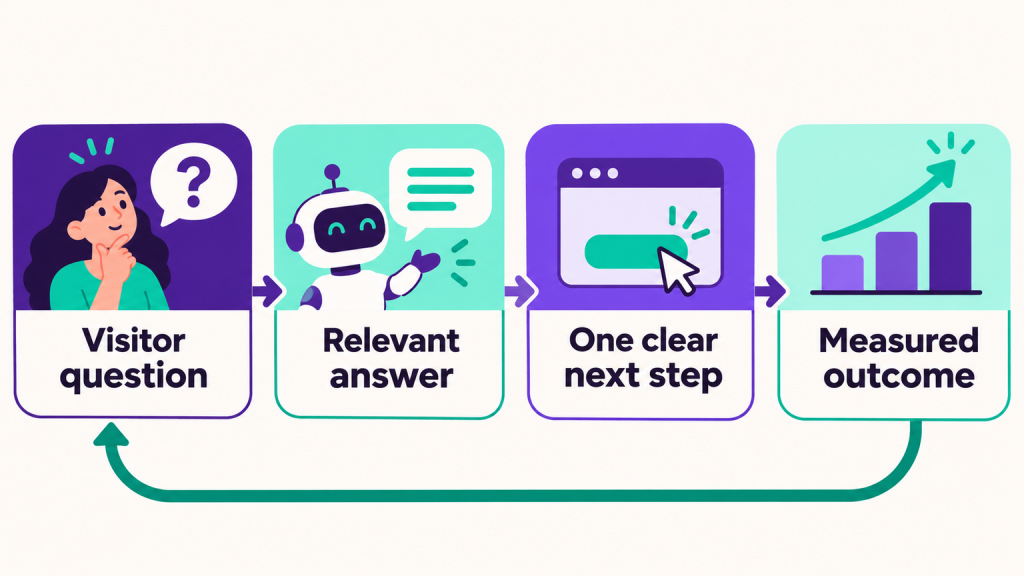
A visitor lands on your service page, has one question about fit, and leaves before anyone can answer. An AI agent may help close that gap, but adding chat does not automatically improve conversion. It can also interrupt visitors, collect low-quality leads, or create another dead end.
Treat AI agent conversion optimization as a measurable experiment. Define what a useful conversion means, identify where visitors get stuck, design a bounded conversation, and compare the result with a credible baseline. The goal is more of the right customer outcomes, supported by a useful visitor experience.
What AI agent conversion optimization means
Conversion rate is only meaningful when the numerator and denominator describe the same journey. For a service business, a qualified inquiry per eligible landing-page visitor may be more useful than a chat start. For a software company, a completed trial setup or sales meeting that fits the target account may matter more than a button click.
An agent is one possible change to the journey. It can answer approved questions, help a visitor choose a next step, collect information the team actually needs, or route a complex request to a person. These actions are useful only if they make the customer’s task easier and produce outcomes you can measure.
Separate outcomes from intermediate signals:
- Primary outcome: a qualified lead, completed booking, attended consultation, purchase, or another business result.
- Supporting events: conversation started, question answered, qualification completed, booking link opened, or handoff requested.
- Guardrails: lead quality, abandonment, complaints, incorrect answers, page performance, and support workload.
An increase in conversations can accompany a decrease in qualified inquiries. Reporting each stage separately helps reveal that tradeoff. Google Analytics distinguishes business-important key events from advertising conversions used to evaluate or optimize ad campaigns, so define the event for the job you need it to do.
1. Choose a business outcome before building the agent
Write one sentence that connects the visitor, action, and result. For example: “Among visitors to the service page, increase qualified consultation requests without lowering the share of requests that match our service area.” This statement defines both the intended outcome and a quality condition.
Then document the measurement details:
- Eligible audience: Which page, channel, device, geography, or visitor segment is in scope?
- Denominator: Is the rate based on unique eligible visitors, sessions, or another consistent unit?
- Outcome event: What event indicates the intended result, and where is it recorded?
- Qualification rule: What makes an inquiry useful to the business? Keep it observable and agreed with sales or operations.
- Attribution window: How long after exposure can the outcome count? Use a window that matches the real buying journey.
- Data owner: Who will check that tracking is firing and that the event has the right meaning?
If a booked meeting is the outcome, decide whether a booking counts when it is scheduled, attended, or accepted as qualified. A booking link click is not a booked meeting, and a booked meeting is not necessarily a good lead. Keep those events distinct in the report.
If the agent collects contact details, decide what is necessary before launch. A small number of relevant questions is usually easier to justify than a long intake form, but the right amount depends on the business and the handoff. A clear AI lead qualification workflow can help teams agree on which questions sales needs before a conversation reaches them.
2. Find the friction before adding chat
Start with evidence from the existing journey. Review support questions, sales notes, form abandonment, page analytics, and customer interviews. Look for repeated uncertainty: service fit, pricing, availability, implementation, eligibility, or what happens after a form is submitted.
A short friction inventory helps prioritize the problem:
| Visitor problem | Existing evidence | Possible agent role | Non-agent fix to consider |
|---|---|---|---|
| Unsure whether the service fits | Repeated pre-sales questions | Answer approved fit questions and route exceptions | Make eligibility clearer on the page |
| Cannot choose a next step | Visitors view several service pages | Offer a relevant route after learning the visitor’s goal | Improve page navigation and calls to action |
| Form asks for too much | High abandonment around required fields | Collect only essential details conversationally | Remove unnecessary form fields |
| Needs a person for a complex case | Escalations or unanswered requests | Summarize context and offer a human handoff | Clarify office hours and contact options |
Do not assume the agent is the remedy. A confusing offer, missing price information, slow page, or broken booking calendar may need a direct fix. If the same information would help every visitor, put it on the page instead of making people ask a bot.
For a sales-call journey, the website visitor booking workflow is a useful reference for mapping visitor questions and a booking handoff. Adapt its flow to your audience and verify that each connected booking or CRM action is available in your own setup.
3. Decide whether an agent fits the task
An agent is a reasonable candidate when visitors ask varied questions, need help choosing among clear options, or benefit from a guided route to a person or action. It is less suitable when the answer is a single obvious sentence, the experience requires sensitive information, or the next step depends on a decision the system cannot safely make.
Use this fit check with the people who handle the current journey:
- Do visitors have recurring questions that are not already answered clearly?
- Can the business provide accurate, approved answers for those questions?
- Is there a clear next step after the answer, such as a booking, an information page, or a human contact?
- Can a team member take over when the agent is uncertain or the visitor asks for help?
- Can the business measure the outcome without collecting more personal data than needed?
- Is someone available to review failures and keep answers current?
If several answers are no, fix the underlying journey first. A static FAQ, better service page, simpler form, or direct contact option may be a better first change.
Turn visitor questions into a measurable agent workflow
Map the journey, answer key questions, and track qualified next steps.
4. Design a focused conversation
Map a small number of visitor intents before writing prompts. Use real questions from the business, then decide what a safe answer and next step look like for each one. The agent should not try to qualify every person or push a meeting after every answer.
For each intent, document:
| Intent | Approved answer source | Optional follow-up | Next step | Escalation condition |
|---|---|---|---|---|
| Wants to understand service fit | Current service descriptions and eligibility rules | Ask which use case applies if needed | Relevant service page or consultation | Requirements fall outside published criteria |
| Asks about pricing | Approved pricing page or range | Ask which plan or scope they are considering | Pricing page or sales contact | Quote depends on a custom scope |
| Needs help choosing | Comparison or decision guidance | Ask about the visitor’s priority | Recommend a relevant option to review | The request is ambiguous or high impact |
| Has a complex issue | Support or operations contact details | Ask for only necessary context | Human handoff | Any uncertainty or explicit request for a person |
Keep questions purposeful. If the answer will not change routing, advice, or what the team needs next, do not ask it. For deeper guidance on qualification questions, the AI lead qualification prompts for service businesses offer examples to adapt to your own criteria.
Use the business’s approved content as the answer boundary. Set a clear response for unknown or conflicting information, and avoid inventing availability, pricing, guarantees, or customer outcomes. A strong answer can say what is known, note what requires confirmation, and offer a person as the next step.
The AI knowledge base setup guide provides a practical way to organize source material. Review those sources when pricing, policies, or service details change so the agent does not continue using outdated information.
5. Place the agent where it helps
Showing a chat widget on every page is not automatically a good placement strategy. Start on the page where the visitor problem is strongest, such as a service detail page with repeated fit questions. Keep it optional, make its purpose clear, and avoid blocking page content or the primary call to action.
Decide in advance how the experience behaves on mobile, keyboard navigation, and assistive technology. Check that the widget does not cover important content, trap focus, or make it difficult to close. Confirm that it loads without making the page noticeably slower, and provide a visible path to a human or standard contact method.
If you change placement and conversation copy at the same time, a result may not tell you which change mattered. Where practical, test one meaningful change at a time. If several changes must ship together, record exactly what changed and interpret the result as a combined treatment.
6. Set up a fair experiment
Write down the comparison before launch. A basic design may compare eligible visitors who see the current experience with eligible visitors who can use the agent. Random assignment helps reduce the risk that one group is made up of visitors who were already more likely to convert. If random assignment is not possible, use a carefully chosen comparison and be explicit about the limits of causal conclusions.
A well-defined AI agent workflow makes the visitor steps and system actions explicit, which helps keep the experiment treatment consistent.
The plan should specify:
- Hypothesis: what change you expect and why it might happen.
- Control and treatment: the exact experience each group receives.
- Assignment unit: for example, a stable visitor identifier or account, chosen to match the journey and available implementation.
- Primary metric: one preselected business outcome with a defined denominator.
- Guardrails: the quality and experience measures that must not deteriorate materially.
- Minimum useful effect: the smallest change that would justify the cost and operational work.
- Decision rule: how much evidence and exposure are needed before making a call.
Do not choose a two-week duration simply because it sounds convenient. Required exposure depends on baseline traffic, baseline rate, variability, allocation, and the size of effect worth detecting. Experiment power analysis uses these inputs to estimate a suitable sample and duration; its output is a planning estimate, not a forecast that the treatment will work.
If traffic is low, an adequately powered test may take longer than is practical. In that case, consider a narrower audience with enough volume, a staged rollout with explicit monitoring, or qualitative usability sessions to find interaction problems. These approaches answer different questions: usability feedback can reveal confusion, while a controlled comparison is needed to estimate an effect on outcomes.
Avoid repeatedly checking results and stopping as soon as a favorable number appears unless the analysis method supports that decision. Agree on the readout rule before launch, include the complete outcome window, and check that the control and treatment were assigned and measured correctly. Experiment monitoring guidance highlights exposure balance and event integrity; a sample ratio mismatch can mean the groups are no longer comparable.
7. Track the main outcome and guardrails
Choose one primary measure and a small set of supporting measures. Too many headline metrics make it easy to select whichever result looks best after the fact. Keep the primary measure tied to the business outcome, then use supporting measures to understand the path and guardrails to catch harm.
| Measurement layer | Example measures | What it helps answer |
|---|---|---|
| Primary business outcome | Qualified requests per eligible visitor; attended qualified meetings per eligible visitor | Did the experience improve the result the business values? |
| Journey diagnostics | Agent opens, useful answers, completed qualification, handoff, booking started | Where does the flow help or lose visitors? |
| Lead quality | Share matching service area, need, budget band, or agreed fit criteria | Did volume come at the expense of sales usefulness? |
| Experience guardrails | Abandonment, repeated questions, complaints, accessibility issues, page speed | Did the treatment create new friction? |
| Operations | Human handoff volume, unresolved questions, time spent correcting records | Can the team support the workflow? |
Do not treat engagement as success on its own. A visitor may open the widget because it is intrusive, ask a question the page should answer, and leave without a useful outcome. Likewise, an increase in qualified requests is not persuasive if incorrect advice or operational workload rises sharply.
Agree on metric definitions with the teams who will use them. For example, specify whether “qualified” means an agent’s classification, a sales review, or a later business event. If a human review determines lead quality, use a consistent rubric and, where feasible, review records without knowing which experience generated them.
The AI customer support metrics guide explains why volume alone can conceal service quality. For sales or lead flows, apply the same principle: pair the count with a quality check and the cost of handling the resulting work.
8. Verify tracking and the full journey
Before exposing real visitors, test the instrumented journey from the first page view through the final outcome. Confirm that each event fires once, has the right visitor or session identifier, and is attributed to the correct group. Test the booking confirmation, CRM update, or other destination as well as the agent conversation itself.
Run through normal and difficult cases:
- Visitor asks a common question and receives an approved answer.
- Visitor asks something outside the approved knowledge.
- Visitor changes their mind or gives incomplete information.
- Visitor requests a person explicitly.
- Booking or form submission fails, is canceled, or is duplicated.
- Visitor returns on another device or after a long gap, if that affects assignment.
- Mobile, keyboard, and screen-reader interactions work as intended.
Record the expected event sequence and compare it with the actual analytics or CRM record. If an important event is missing or duplicated, pause the experiment and fix measurement before using the results. A pre-launch AI agent test checklist can help structure conversation and edge-case checks.
Define a rollback condition before the test. Examples include a material rise in incorrect answers, a broken booking path, a privacy issue, a serious accessibility barrier, or unexpected pressure on the human team. Assign someone to monitor these conditions and tell the team how to disable the treatment if needed.
9. Read results without overstating them
At the end of the planned observation window, start with data quality. Confirm group allocation, exposure records, event counts, and the full outcome window. Then compare the primary metric with its uncertainty, not just the point estimate. Review the guardrails and segment results only where the segments were defined in advance or where the analysis accounts for exploratory comparisons.
Use a decision table to keep the next step clear:
| Finding | Practical next step |
|---|---|
| Outcome improves and guardrails remain acceptable | Expand gradually, keep monitoring, and verify the result persists across relevant traffic |
| Outcome is similar and the test had enough exposure to detect the useful effect | Keep the simpler experience or try a new, specific hypothesis |
| Result is uncertain because exposure or tracking was insufficient | Fix the measurement or plan a more suitable test; do not claim a win or a loss |
| Outcome improves but lead quality or experience worsens | Diagnose the tradeoff and revise the flow before expansion |
| Serious guardrail failure appears | Stop or roll back, then investigate the cause |
If the result is inconclusive, say so. A small sample that produces a positive point estimate does not establish that the agent caused an improvement. Qualitative feedback can explain why visitors struggled, but it should not be presented as a measured conversion lift.
When scaling, expand in stages and continue to inspect errors, handoff volume, and outcome quality. Keep the original control definition and event meanings available so future comparisons remain understandable. The AI agent implementation checklist can support the operational handoff from a test to a maintained workflow.
Worked example: evaluate a consultation-booking flow
Imagine a consultancy receives inquiries through a service page. The team suspects visitors leave because they cannot tell whether a consultation is relevant to their situation. This is a test design example, not a claim about results.
First, the team reviews current inquiries and agrees on what counts as a qualified request: the visitor is in a supported region, has a need the consultancy handles, and provides a valid way to follow up. They record the current number of qualified requests and eligible service-page visitors over a period that captures the normal buying cycle. A booking click is recorded as a diagnostic event, while a confirmed request that meets the agreed criteria is the primary outcome.
Next, they define a bounded agent treatment. It answers a few approved questions about service fit, asks one optional follow-up only when needed, and offers the existing consultation route. It does not promise eligibility or quote custom pricing. If it cannot answer or the visitor asks for a person, it provides the agreed human contact path.
Before launch, the team checks that eligible visitors are assigned consistently to the current page or the agent-enabled version. They confirm that the assignment persists for returning visitors, that each exposure is logged once, and that the final inquiry can be connected to the assigned experience without exposing unnecessary personal information. A small set of test submissions checks that routing and qualification are recorded correctly.
The team then writes down the readout plan. The primary rate is qualified requests divided by eligible visitors. Supporting measures include agent use, booking starts, and completed requests. Guardrails include unqualified inquiry share, visitor abandonment, unresolved questions, and staff time spent correcting agent summaries. The experiment duration is chosen using historical traffic and the smallest effect that would justify ongoing operating costs, rather than an arbitrary number of days.
At review, the team checks whether the visitor groups and events were measured correctly before comparing outcomes. If qualified requests improve while the quality and experience guardrails remain acceptable, it can expand gradually and continue monitoring. If the estimate is uncertain, the team records that limitation and decides whether a larger test is worthwhile. If requests increase but the team receives many more unsuitable inquiries, it revises the criteria or conversation instead of calling the change a success.
This simple example shows why the prompt is only one part of conversion work. The outcome definition, assignment, event quality, handoff, and decision rule all matter. If any of those pieces are unclear, the team risks mistaking more activity for a better customer journey.
Common mistakes to avoid
- Calling chat starts conversions. Track a business outcome separately from engagement.
- Testing without a baseline. Record the current journey and metric definitions before the change.
- Changing too many things at once. Keep the treatment interpretable, or document it as a combined change.
- Stopping when the chart looks good. Use a decision rule and exposure plan established before launch.
- Ignoring lead quality. Measure whether outcomes fit the business and whether sales can use them.
- Letting the agent guess. Keep answers within reviewed sources and route unknowns to a person.
- Capturing information “just in case.” Ask only for information that changes the next action or supports a necessary handoff.
- Treating handoffs as failure. A timely escalation can be the right outcome when the request is complex or uncertain. Define human handoff rules before launch.
- Expanding without monitoring. Set owners, review intervals, and stop conditions for the live workflow.
Frequently asked questions
Will an AI agent improve my conversion rate?
It may help when visitors have unanswered questions or need a clearer next step, but the effect depends on the audience, offer, implementation, and measurement. Treat improvement as a hypothesis to test, not a guaranteed result.
What should I measure first?
Choose the business outcome closest to the value you want, such as a qualified inquiry, attended meeting, or completed purchase. Define the eligible audience and denominator, then track chat starts and other events as diagnostics rather than substitutes.
How long should a conversion test run?
Set duration from the traffic and effect you need to detect, the metric’s variability, and the chosen analysis method. A fixed number of days cannot guarantee adequate evidence for every site.
Should every website visitor see the agent?
Not necessarily. Start where visitor questions create the most friction, keep the experience optional, and check whether placement interrupts the page’s main task. Expand only if evidence and guardrails support it.
What if the site does not get enough traffic for an A/B test?
Do not claim a precise lift from a small sample. Test usability with representative visitors, improve instrumentation, or use a staged rollout with clear monitoring. These methods can help identify problems, but they do not replace a sufficiently powered comparison for estimating causal impact.
Final takeaway
AI agent conversion optimization starts with the customer outcome, not the widget. Define a qualified result, map the friction, keep the conversation focused, and verify the full measurement path before comparing experiences. Scale only when the evidence supports the decision and the quality guardrails still hold.
Plan a measurable AI agent workflow
Set clear outcomes, test the experience, and improve with evidence.
