
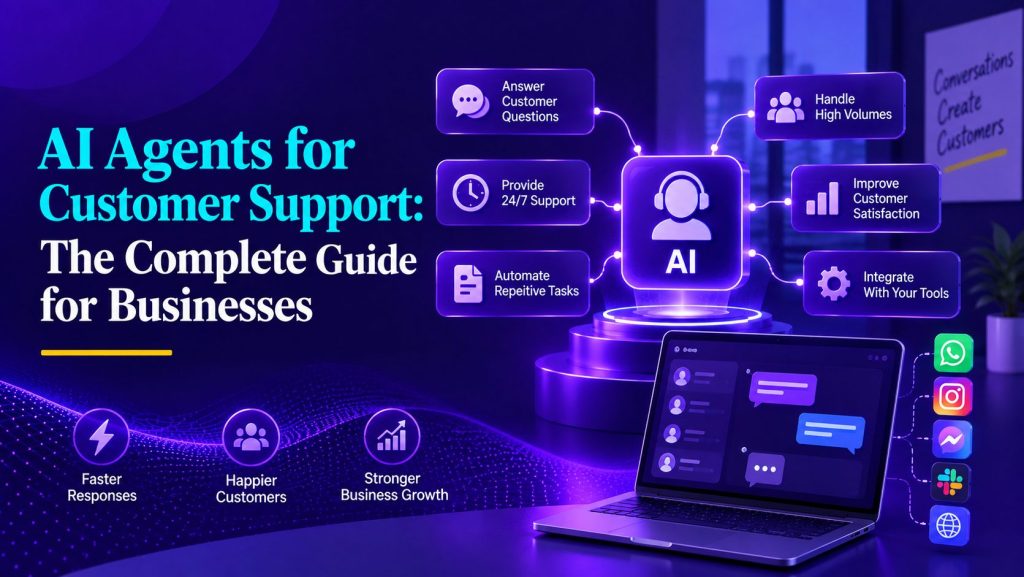
A practical guide to how AI customer support agents work, what they can handle, where humans still matter, and what businesses need to deploy them effectively.
Your customers do not care whether it is a human or an AI on the other end. They care about whether their problem gets solved, how fast it happens, and whether they have to repeat themselves to four different people along the way.
For years, support teams have relied on a familiar formula: hire more agents, build bigger FAQ pages, add chatbot deflection, and hope the queue shrinks. But that model stopped working when customer expectations outgrew the economics of scaling headcount.
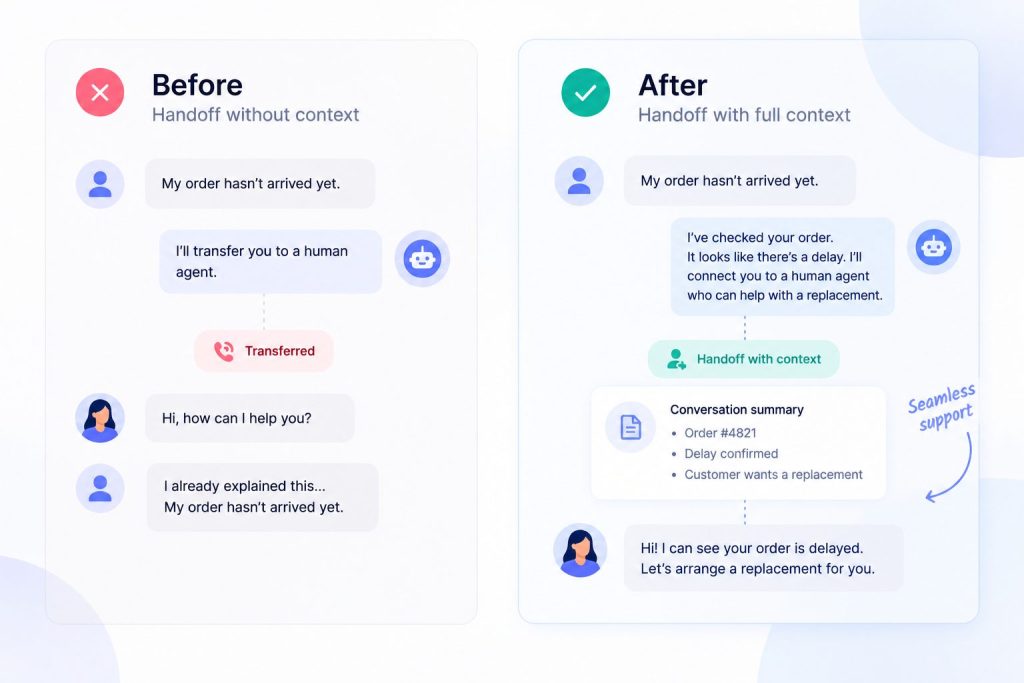
AI agents for customer support represent a different approach. Instead of only answering questions or routing tickets, they can use business knowledge, access connected systems, take approved actions, and work toward resolving the customer’s request. When the issue requires human judgment, they can transfer the conversation with the context already collected.
This guide covers what AI agents actually are, how they work under the hood, what they can and cannot do, how to implement them effectively, and how to avoid the mistakes that turn good automation into bad customer experiences. It is written for business owners, support leaders, operations teams, and anyone evaluating whether AI agents make sense for their organization.
Key Takeaways
- AI agents for customer support differ from chatbots in one critical way: they take action. A chatbot tells a customer where to find the refund policy. An AI agent checks whether the purchase qualifies, processes the refund, sends a confirmation, and updates the customer record. That distinction determines how much support volume you can realistically automate.
- The architecture matters. AI agents rely on large language models for reasoning, retrieval-augmented generation (RAG) to ground answers in your actual business data, and tool integrations to take action in your systems. Weakness in any of these layers produces an agent that sounds good but cannot deliver.
- Most support teams will need a hybrid model. AI handles routine, documented, and structured requests. Humans handle escalations, sensitive situations, edge cases, and anything requiring judgment. The quality of the handoff between AI and human determines whether customers feel well served or frustrated.
- Preparation matters as much as the AI itself. An agent depends on accurate knowledge, clearly defined workflows, reliable integrations, and sensible permissions. Poor source information or unclear processes will limit what even a capable AI agent can resolve.
- Start with a controlled scope, then expand. Begin with support requests that are frequent, well documented, and relatively predictable. Once the agent performs reliably, additional workflows, actions, and channels can be introduced.
What Is an AI Agent for Customer Support?
An AI agent for customer support is a software system that uses artificial intelligence to understand customer requests, reason about what needs to happen, access business systems to gather information or take action, and resolve issues with minimal human involvement.
The important difference is that an AI agent can move beyond providing information and work through the steps required to complete a task.
When a customer messages saying “I need to change the shipping address on my order,” a traditional chatbot might respond with a link to the account settings page or a generic explanation of how address changes work. An AI agent, by contrast, verifies the customer’s identity, looks up the order in the order management system, checks whether the order has already shipped, updates the address if possible, confirms the change with the customer, and logs the interaction in the CRM.
How Customer Support AI Agents Actually Work
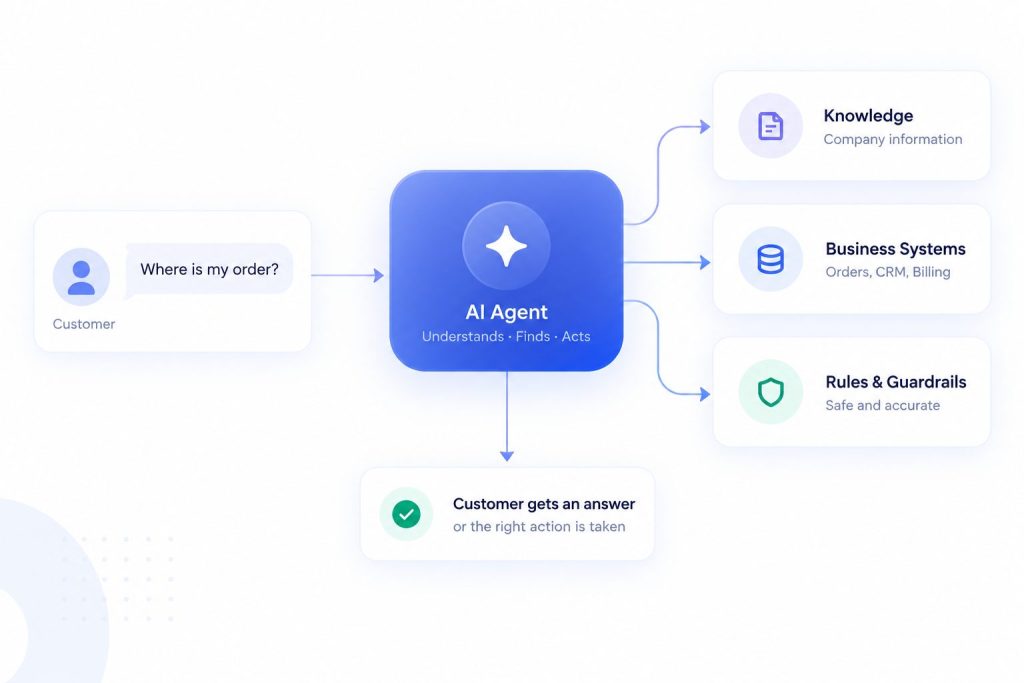
Understanding what happens inside an AI agent builder helps teams set realistic expectations about how knowledge, tools, actions, and guardrails work together. The architecture has four layered components.
The Language Model Layer
Modern generative AI agents typically use a large language model to interpret customer requests, maintain conversational context, generate responses, and help determine what should happen next.
Business-specific knowledge, customer data, and permitted actions come from the systems connected to the agent.
Portable AI Agents In Seconds, Use Everywhere
Prompt, Test, and Deploy AI Agents Across Social Platforms and LLMs. Automate Everything.
The Knowledge Layer (RAG)
Retrieval-Augmented Generation, or RAG, is the mechanism that grounds the AI agent in your actual business information. When a customer asks a question, the agent does not rely on what the language model already knows. Instead, it searches your knowledge base, help center articles, product documentation, and internal policies for relevant information, then uses that retrieved content to formulate its response.
This matters because language models can produce plausible-sounding but incorrect answers. Retrieving relevant business information gives the model a more reliable basis for responding to customer questions.
The Tool Integration Layer
This is what gives an AI agent the ability to do things rather than just say things. Through API connections, the agent can read data from your CRM, order system, shipping platform, billing system, and calendar. It can also write data back: updating a customer record, creating a support ticket, initiating a refund, or sending a confirmation email.
Each tool connection defines what the agent can do with that system. A connection to your order management system might allow read operations (check order status, view shipping details) and write operations (update shipping address, cancel an order). A connection to the billing system might allow read-only access to prevent any risk of unauthorized charges.
The agent decides which tools to use based on the customer’s request and the workflow you have defined. When a customer asks for a refund, the agent knows it needs to check the order system for eligibility, then potentially call the refund API in the billing system.
The Orchestration and Guardrail Layer
This layer manages the conversation flow and enforces your business rules. It determines how the agent processes multi-step requests, when it asks clarifying questions, and at what point it escalates to a human.
Guardrails define boundaries. They prevent the agent from taking actions it should not take, accessing data it should not see, or handling situations that require human judgment. Common guardrails include restrictions on refund amounts, requirements for identity verification before account changes, and automatic escalation when a customer expresses strong frustration.
AI Agents vs Traditional Chatbots, Copilots, and Rule-Based Automation
The customer support automation landscape has several categories that are often confused. Understanding the differences helps you choose the right tool for each situation.
| Capability | Rule-Based Chatbot | AI Copilot | AI Agent |
| Understands varied phrasing | No. Requires exact keywords or predefined paths | Yes. Reads conversation context | Yes. Understands intent and multiple simultaneous issues |
| Answers from knowledge base | Limited. Matches keywords to FAQ entries | Surfaces articles for human to use | Retrieves, synthesizes, and delivers answers directly |
| Takes action in business systems | Limited. Executes predefined actions or flows | Suggests actions for human to take | Executes actions via API connections |
| Handles multi-step workflows | Limited to predefined flows | Guides human through steps | Executes sequences with conditional logic |
| Escalates with context | Usually limited to predefined handoff data | N/A. Human was already involved | Transfers with full conversation history and attempted solutions |
The right model depends on how much autonomy the support process needs: chatbots suit predictable conversational tasks, copilots assist human agents, and AI agents are useful when the system needs to work across knowledge, tools, and multi-step processes.
Businesses still evaluating their options can explore this guide to AI chatbot solutions to compare available approaches and identify a platform that fits their customer support needs.
What Can AI Agents Actually Do in Customer Support?
The most common misconception about AI agents is that they are just smarter chatbots. The difference is not in how natural the conversation sounds. It is in what the system can actually accomplish.
AI agents perform three categories of action.
Read Actions
Retrieve information without changing the underlying system, such as checking an order, account status, support history, or inventory.
Write Actions
Create or update records, such as changing an address, creating a support ticket, updating a preference, or initiating a return.
Multi-Step Actions
More advanced AI agent workflows can combine several reads, decisions, and updates into one resolution, such as confirming return eligibility, generating a shipping label, updating the order, and notifying the customer.
The more authority an agent has to change business data, the more important permissions, validation, approval rules, and human escalation become.
What Does This Look Like in Practice?
Concrete examples make the capability clearer. Here are realistic scenarios showing what the agent does, which systems it accesses, and where human involvement may be triggered.
Checking an Order Status
The customer sends a message: “Where is my order? It was supposed to be here two days ago.”
The agent verifies the customer’s identity through an existing authenticated session or a security question. It queries the order management system using the customer ID to find recent orders. It identifies the order in question, retrieves the tracking number, and calls the shipping carrier’s tracking API. If the tracking shows the package is delayed, the agent checks the company’s shipping policy to determine what compensation or resolution applies. It informs the customer of the current status and offers options: wait for delivery, request a reship, or start a refund.
Systems accessed: CRM for customer lookup, order management system for order details, carrier API for tracking, knowledge base for shipping policy.
Troubleshooting a Technical Problem
“I keep getting an error when I try to upload my file. It says ‘format not supported.'”
The agent checks the customer’s account to see what plan they are on and what file formats are supported. It searches the knowledge base for the specific error message and retrieves the troubleshooting guide. It walks the customer through checking the file format, verifying file size limits, and trying alternative formats. If the issue persists, the agent asks for the file details and error logs, creates a support ticket with all gathered information, and escalates to the technical team with full context.
Systems accessed: CRM, knowledge base, ticketing system.
These are only a few AI customer service use cases. Depending on the systems and permissions available, agents can also assist with returns, subscription changes, account updates, ticket routing, billing questions, and other structured requests.
Why Knowledge Quality Matters
A reliable AI knowledge base is fundamental to customer support agents because the quality of their answers depends heavily on the information they can retrieve. That knowledge may include help-center articles, product documentation, policies, FAQs, and approved internal documents.
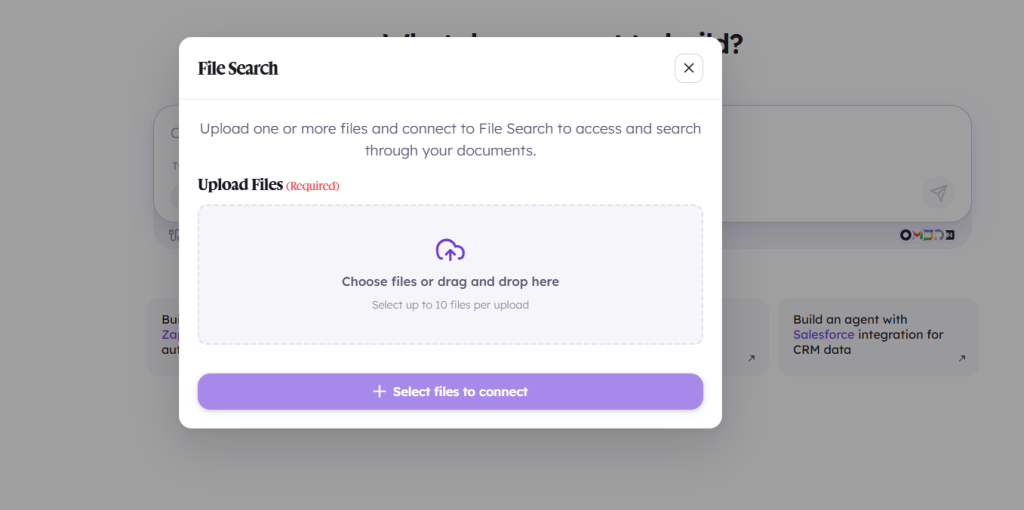
Retrieval-augmented generation (RAG) allows an agent to retrieve relevant information from those sources when responding to a customer rather than relying only on the language model’s general knowledge. This helps ground answers in information that belongs to the business.
But RAG cannot compensate for poor source material. Outdated policies, contradictory documentation, missing instructions, or unclear product information can all lead to weak responses. Businesses therefore need to treat knowledge quality as part of the AI support system itself.
Customer-specific questions require another layer. A knowledge base can explain a company’s return policy, for example, but answering “Is my order eligible for a return?” may require the agent to retrieve that customer’s order data from a connected system.
How AI Agents Connect With Business Systems
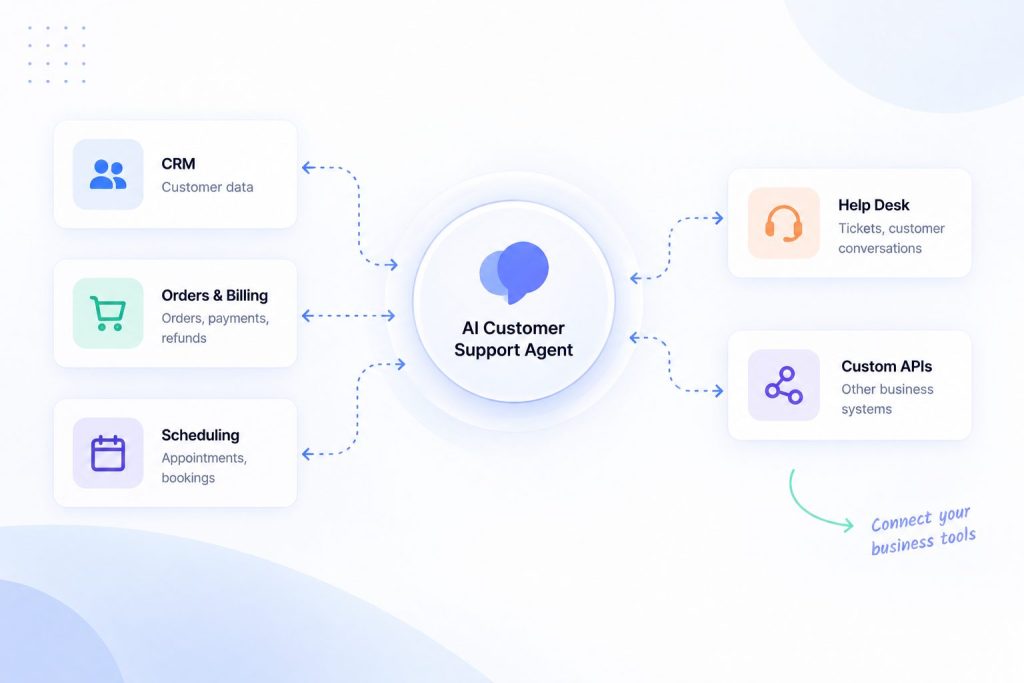
Effective AI agent integration gives the agent access to the systems required to resolve a customer’s request, rather than limiting it to information available inside the conversation.
Types of Integrations
CRM: customer profiles, history, account information.
Help desk: tickets, notes, routing and status.
Order/billing systems: orders, returns, subscriptions and refunds.
Scheduling systems: availability, booking and rescheduling.
Custom APIs: business-specific information or actions.
The Integration Pattern
Most AI agent platforms provide pre-built connectors for common systems and a way to add custom integrations through APIs. The integration works by defining a set of tools that the agent can call. Each tool has a name, a description of what it does, and the parameters it expects.
The agent decides which tool to call based on the customer’s request. The platform translates that decision into an actual API call to the connected system, passes the necessary parameters, receives the response, and returns the result to the agent for interpretation and response to the customer.
Connected systems typically use authentication methods such as OAuth or API credentials, with access controlled through the integration layer rather than exposed in the customer conversation. The agent receives only the information or action result required for the task.
In Botsify, integrations can give an AI agent access to external business tools and workflows, allowing a support conversation to use live business information or trigger actions when the use case requires it.
Human Handoff and When an AI Agent Should Escalate
Knowing when to hand off to a human is as important as knowing what to handle autonomously. A simple rule is to start with work that is frequent, well-documented, and follows a clear resolution path. Keep humans responsible for work that depends heavily on judgment, negotiation, sensitive decisions, or exceptions to policy. Tasks that are repetitive but poorly documented should usually be documented first rather than automated immediately.
When to Escalate
Low confidence. The agent’s confidence in its answer drops below a threshold. This happens when the customer’s question is ambiguous, the retrieved knowledge does not clearly answer it, or the required action is not within the agent’s defined capabilities.
Sensitive or judgment-heavy situations. Fraud concerns, policy exceptions, emotionally charged complaints, legal issues, and other cases requiring discretion should move to a person rather than forcing the agent to continue.
Authorization requirements. Actions that require manager approval, such as refunds over a dollar threshold, account deletions, or exceptions to standard policy.
Repeat failure. The customer has tried the same request through the agent multiple times and it has not been resolved. At this point, continued automation damages the customer relationship.
How Context Should Transfer
The quality of the handoff determines whether the customer feels well served or abandoned. A good handoff includes:
- The customer’s original request and intent
- What the agent has already attempted and what was found
- Any data the agent has collected from business systems (account number, order ID, error logs)
- The agent’s assessment of what may be needed for resolution
- The customer’s sentiment and urgency signals
The human agent should not have to ask the customer to repeat what they already said. The human should receive a ready-to-work case, not a case they need to reconstruct from scratch.
Human handoff is also an important part of AI support platforms such as Botsify, where live-chat takeover allows a human team member to step into a conversation when the AI should no longer handle it alone.
Guardrails, Permissions, and Reliable Answers
Strong AI agent governance becomes increasingly important when an agent can access customer conversations, business information, and connected systems or trigger actions on a customer’s behalf.
Content guardrails define what the agent is allowed to say. They can prevent unsupported promises, restricted topics, inappropriate responses, or answers outside the information the business has approved.
Action guardrails define what the agent is allowed to do in connected systems. Some actions may be read-only, while others may require customer confirmation or human approval before a record is changed, a refund is processed, or an account is modified.
Identity and privacy controls help ensure that sensitive information is only shown or changed after the customer has been appropriately verified. Access should also be limited to the data the agent actually needs for the task.
Escalation rules determine when the agent should stop trying to resolve the issue itself. Low confidence, missing information, sensitive requests, repeated failure, or actions outside the agent’s authority are all reasons to involve a human.
AI-generated answers can still be wrong even when these controls are in place. Missing knowledge, contradictory documentation, poor retrieval, or ambiguous customer questions can cause the model to produce an incorrect response.
The practical goal is therefore not to assume hallucinations can be eliminated completely. Businesses should ground answers in approved knowledge, restrict high-risk actions, define clear escalation paths, test realistic conversations, and review failures after deployment.
AI Customer Support Across Multiple Channels
Customer support rarely happens in one place. Depending on the business, customers may ask for help through a website chatbot, WhatsApp, social messaging, SMS, voice, or other channels.
The more important question is not simply how many channels an AI agent supports, but whether the same knowledge, workflows, customer information, and escalation rules can be used consistently across them. A customer should not receive one policy from the website agent and a different answer when they continue the conversation elsewhere.
Botsify, for example, allows AI agents to be deployed across channels including websites, WhatsApp, Instagram, Messenger, Telegram, SMS, Slack, and voice, helping businesses use the same AI-agent infrastructure across different customer touchpoints.
Cross-channel context also matters. Where customer identity and conversation history can be connected safely, the customer should not have to restart the entire support process simply because they moved to another channel.
Test Before You Trust the Agent With Customers
Testing should be a standard part of AI agent implementation before the system handles real customer requests. That includes straightforward questions, vague requests, misspellings, incomplete information, follow-up questions, policy exceptions, frustrated customers, and situations where a connected system fails.
Test answers and actions separately. An agent might correctly understand that a customer wants a refund but still call the wrong workflow, use incorrect account data, or take an action without the necessary approval.
Human handoff also needs testing. Trigger situations that should require escalation and check whether the human receives enough context to continue without asking the customer to start again.
Begin with controlled exposure rather than assuming that passing a few demo conversations means the agent is ready for every customer. Review early interactions closely and use failures to improve knowledge, workflows, and guardrails.
How to Measure Whether the Agent Is Actually Resolving Customer Problems
Measuring AI agent performance requires moving beyond simple metrics like deflection rate, which only tells you that the agent handled a conversation, not whether the customer’s problem was solved.
The Metrics That Matter
Resolution rate. The percentage of conversations the AI agent resolves without human intervention. It is one of the clearest indicators of whether the agent is actually solving customer problems rather than simply responding to them.
CSAT for AI-handled interactions. Customer satisfaction scores specifically for conversations the agent handled. Compare this to your overall CSAT and your human-only CSAT. Track this separately from overall and human-only CSAT so you can see whether AI-handled conversations are creating a noticeably different customer experience.
Escalation rate. The percentage of conversations the agent escalates to a human. High escalation rates suggest the agent is not handling enough on its own. Very low escalation rates may suggest the agent is not escalating when it should.
Metrics such as conversation volume or deflection should not be viewed in isolation, because avoiding a human interaction does not necessarily mean the customer’s problem was resolved.
Once the operating model is clear, comparing the best AI agents for customer support becomes less about which platform has the longest feature list and more about whether it supports the knowledge, integrations, controls, channels, and handoff model your team actually needs.
Building a Better Customer Support Model With AI Agents
AI agents are most useful when they are treated as part of the customer support operation, not simply as another chat interface. Their value comes from combining conversation with business knowledge, connected systems, defined actions, and a clear path to human support when needed.
The goal should not be to automate every customer conversation. It should be to identify the requests AI can resolve reliably, give the agent the knowledge and access required to handle them, and keep humans involved where judgment, sensitivity, or exceptions matter.
Start with the customer problems your team repeatedly solves today. If those problems are documented, predictable, and connected to systems an AI agent can safely access, they are strong candidates for automation. Build from there based on what actually improves resolution for your customers.
AI Agentic Platform For Building Portable AI Agents
Say Hello To Agentic AI That Connects With Your CRM And Even Other Agents

Pingback: How to Use AI Agents for Multilingual Customer Support - Botsify