



AI agents for lead follow-up can acknowledge a new inquiry, answer a routine question, or route a conversation to a salesperson. That can help small sales teams and business owners who want to respond promptly while still giving prospects thoughtful answers. The difficulty starts when a prospect asks something the agent can’t verify or needs a decision only a person can make.
This guide shows what to automate, when a salesperson should take over, and how to test the workflow before it sends live messages.
What can AI agents automate in lead follow-up?
AI sales agents can acknowledge inquiries, extract details from incoming messages, answer questions using approved information, and help prospects schedule a conversation. Give the agent clear rules about which actions it may take and which need review.
For example, AI appointment booking can help someone who requests a demo through a form receive an immediate confirmation and schedule a meeting without unnecessary back-and-forth. If their message also asks whether the service can support a configuration that isn’t documented, the agent can acknowledge that question and route it to a specialist. The prospect can book while the specialist investigates.
A fixed rule can stop reminders when someone replies. AI is useful when a free-text message needs interpretation, such as recognizing that “We’re all set” means the prospect wants to end the exchange.
How do you keep automated follow-up personal?
Respond to what the prospect actually said, identify the sender accurately, and offer one clear next step. Use details from the inquiry or verified conversation history. If a name or detail is missing, use a simple greeting or ask a focused question.
Here’s an example for someone who says they need to compare options before Friday:
Thanks for reaching out. You mentioned you’re comparing options before Friday. Which matters most for your decision: setup time or integration with your current system? I can pass that along to the sales team so they can focus on what you need.
A rep taking over can build on that answer. When a prospect replies that integration is the priority, the rep can address compatibility directly instead of sending a general introduction.
When should a salesperson take over?
Establish clear human handoff rules for situations that require judgment, a commitment, or information the agent cannot verify. Make the prospect’s request for a person a routing rule in its own right.
| Lead situation | Agent action | Sales team action |
| Prospect requests a demo | Confirm the request and share the approved booking link | Review the inquiry before the call |
| Prospect asks about a documented feature | Answer from the approved source | Review recurring questions for gaps in the documentation |
| Prospect asks for custom pricing or terms | Acknowledge the request and pause reminders | Confirm scope and respond with approved terms |
| Prospect asks for a person or raises a complaint | Assign the conversation and pause automation | Read the thread and reply directly |
| Prospect declines or opts out | Stop the sequence and record the preference | Check that connected tools honor the same preference |
Send the assigned rep the original message, a short summary, and any unanswered questions. If the rep is unavailable, send the task to a backup queue with a clear owner.
Portable AI Agents In Seconds, Use Everywhere
Prompt, Test, and Deploy AI Agents Across Social Platforms and LLMs. Automate Everything.
How do you set up sales follow-up automation?
Start with one lead source, one communication channel, and a narrow set of approved replies. A website demo form and its confirmation email give you a concrete workflow to test.
- Define the trigger. Start after a valid submission. Check for an active conversation before creating a new sequence.
- Set the response rules. Give the agent approved answers and instructions for handling missing or conflicting information.
- Assign the lead. Save the inquiry and its history in the customer relationship management system. Set a backup owner and a deadline for escalations.
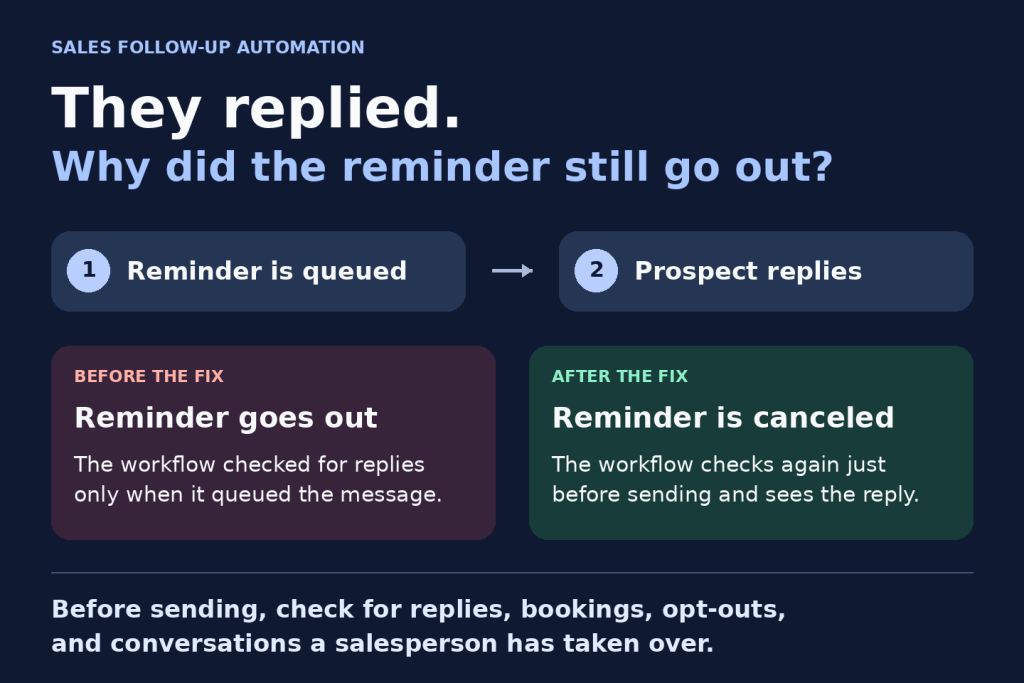
- Check before every send. Cancel queued reminders when the prospect replies, books, opts out, or moves to a human-owned conversation.
- Review drafts before launch. Have sales staff check accuracy, tone, and routing before allowing automatic sends for approved cases.
If you’re evaluating AI agent development services, use examples from your own workflow to check whether the integration can handle replies, ownership changes, and stop rules.
What can a test reveal before launch?
Include overlapping events and unexpected replies in your AI agent launch checklist. A message can sound helpful on its own and still be wrong for the moment it reaches the prospect.
In an illustrative test, a small sales team checks four sample leads. The expected outcomes are a demo confirmation, a pricing escalation, a canceled reminder after a reply, and a canceled reminder after an opt-out. In the first simulated run, three scenarios pass. The reply scenario fails because the reminder was queued before the prospect responded and the workflow only checked for replies when it scheduled the message.
The team adds a fresh status check immediately before sending and reruns the same scenarios. In the example, all four pass. That result illustrates the value of checking at send time. A broader test should also cover duplicate form submissions and a booking made through a different channel.

How do you measure whether follow-up is working?
When monitoring AI agent behavior, track how quickly prospects get a useful answer, how smoothly people take over, and whether the workflow causes avoidable friction. Review the conversation alongside the numbers so you can see what happened.
- Time for a useful answer: Measure when the prospect gets the information or next step they asked for.
- Time to a human reply: Measure from escalation until a salesperson responds.
- Unwanted sends: Count duplicate messages and reminders that arrive after a reply, booking, or opt-out.
Compare pilot results with your previous process using similar lead sources and time windows. Read a sample of conversations where people stopped replying. A repeated question, inaccurate detail, or awkward handoff can show you what to change next.
The Best Follow-Up Picks Up Where the Prospect Left Off
A prospect asks for custom pricing on Tuesday. On Wednesday, they get an automated email asking if they’re still interested. The reminder was on schedule, but the conversation had already moved on.
Start with one workflow, such as demo requests. Let the agent confirm receipt and share a booking link. When a prospect replies with a question that needs a salesperson, pause the reminders and pass along the full thread. Before expanding sales follow-up automation, check that the next message reflects what the prospect just said and gives them a clear way forward.
FAQs
Can AI handle the first reply to every lead?
It can handle routine acknowledgments. Send complaints, urgent requests, and questions involving commitments to a person. If a message contains both a simple request and a complex question, acknowledge both and route the part that needs review.
How many automated follow-ups should a lead receive?
Start with one reminder when the prospect is still eligible to receive it and the next step is relevant. Review replies and opt-outs before adding more. Stop the sequence as soon as a reply, booking, opt-out, or human takeover changes the lead’s status.
What information should the agent be allowed to use?
Give it access to the inquiry, relevant conversation history, approved answers, and the status fields it needs to route or stop messages. Limit access to unrelated records and have the sales team review the approved answers when policies change.
 :
AI Agentic Platform For Building Portable AI Agents
Say Hello To Agentic AI That Connects With Your CRM And Even Other Agents