


If your sales team still spends hours dialing numbers manually, repeating the same pitch, leaving the same voicemail, and tracking responses in spreadsheets, you already know how draining outbound calling can be. It slows your pipeline, exhausts your reps, and creates inconsistency in follow-ups.
Meanwhile, automation is quickly reshaping how modern teams work. According to McKinsey’s research on AI adoption, companies that automate sales outreach see faster lead conversion and more predictable revenue growth, not because they hire more reps, but because they remove repetitive tasks from the workflow.
This is where a Voice Agent becomes incredibly valuable. Instead of relying on manual dialing or expensive call centers, you can build an AI-powered voice agent inside Botsify that runs your entire sales calling campaign automatically.
Let’s walk through how this works and how you can use it to run automated sales campaigns from end to end.
Why Automating Sales Calls Actually Works
People assume automation makes outreach robotic. But the truth is the opposite. When your team is not stuck dialing, logging, or repeating basic conversations, they can spend more time closing, not chasing.
A voice agent helps by:
- Calling your entire contact list at the exact time you schedule
- Delivering a consistent message every time
- Logging every call automatically
- Playing recordings so you can review tone, objections, and interest
- Handling thousands of calls without tiring or missing follow-ups
It gives you scalability that human teams simply cannot match.
If your team already uses tools like the LinkedIn Profile Analyzer or Keyword Research AI Agent, adding a voice agent strengthens the top of your funnel even more.
How to Build and Launch a Sales Campaign with a Voice Agent
Below is a clean, human-friendly walkthrough so you can set up your campaign without confusion.
Step 1: Open Your Voice Agent Settings
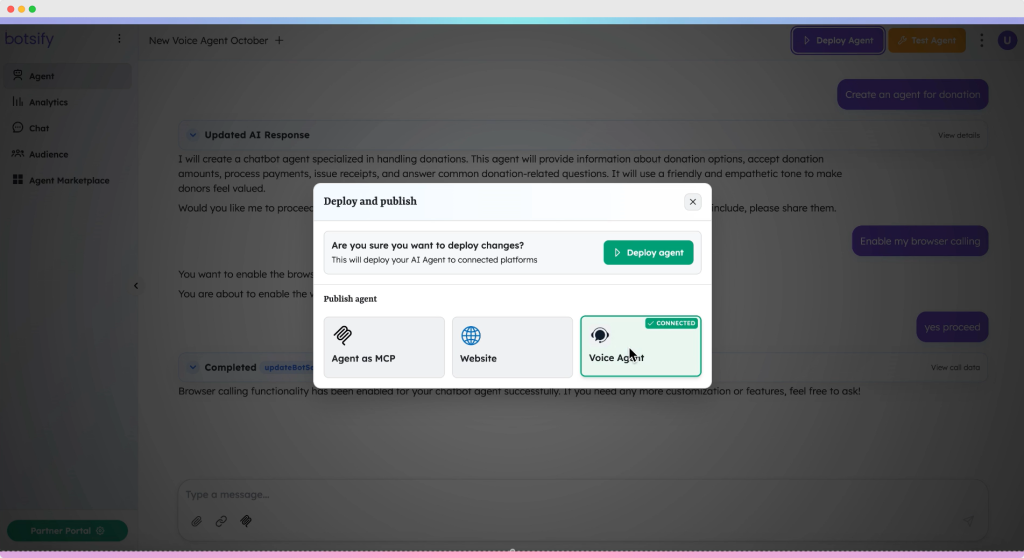
In your Botsify dashboard, go to your agent list and click Deploy Agent.
Inside the deployment options, you will see a section for Voice Agent.
Open it to start the setup.

Step 2: Connect Your Twilio Details
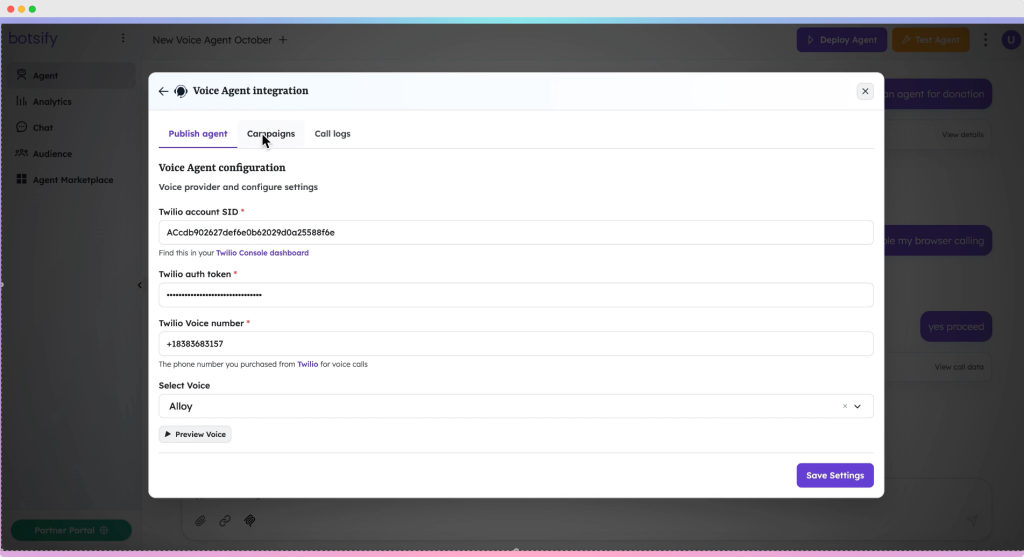
Voice calling requires integration with Twilio.
You will enter:
- Twilio Account SID
- Twilio Auth Token
- Twilio Phone Number
Once saved, your agent is now capable of making real outbound calls.

Step 3: Open the Campaign Dashboard
After Twilio is connected, a new Campaign tab appears.
This dashboard is where you will create, schedule, manage, and track all calling campaigns.

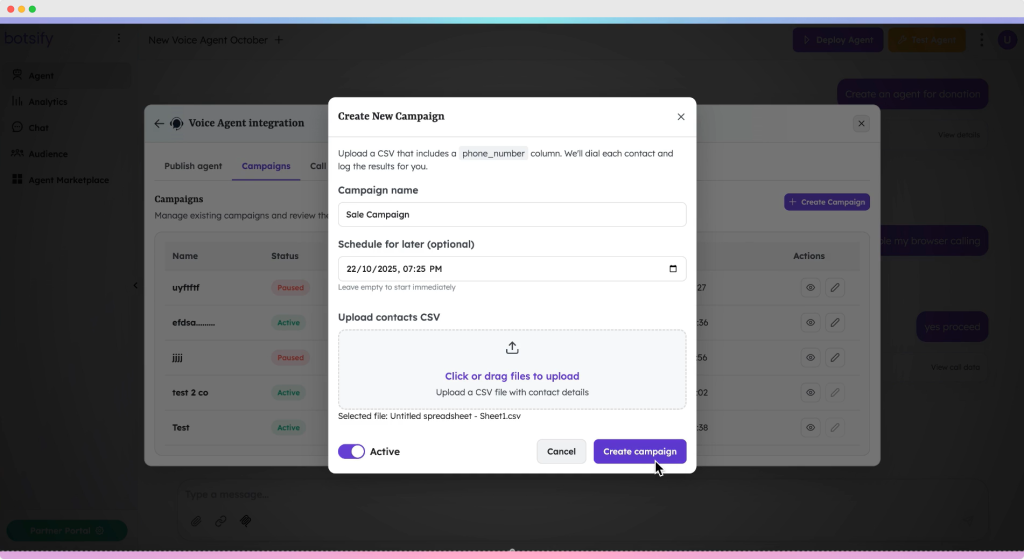
Step 4: Create Your Sales Campaign
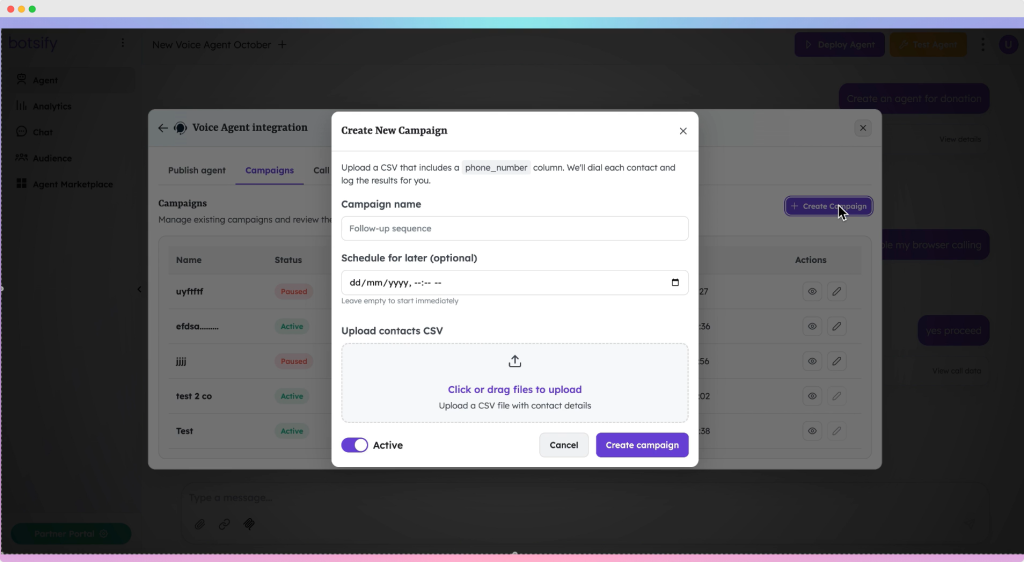
Click Create Campaign and fill in:
- Campaign Name
- Date and Time when calls should begin
- CSV Contact List (with phone numbers and any custom fields)
Then choose whether the campaign should be Active or Paused.
If active, it will start automatically at the time you selected.

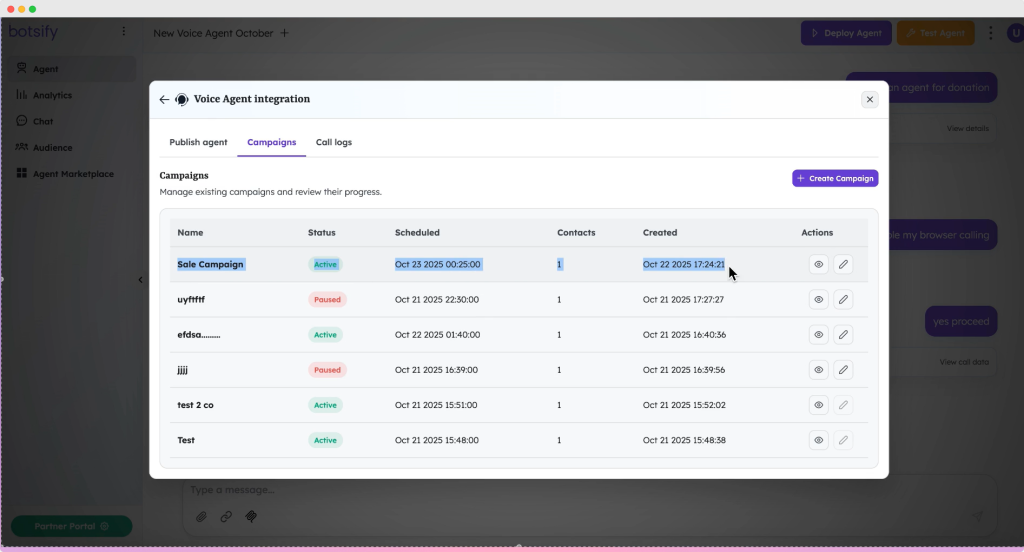
Step 5: Start the Campaign and Monitor Activity
Once the campaign begins, the dashboard starts showing call activity in real time.
You can see:
- All campaign calls
- Standard calls
- Call status (answered, missed, voicemail, failed)
- Time stamps
- Duration
This makes tracking smooth and transparent without the need for manual notes.

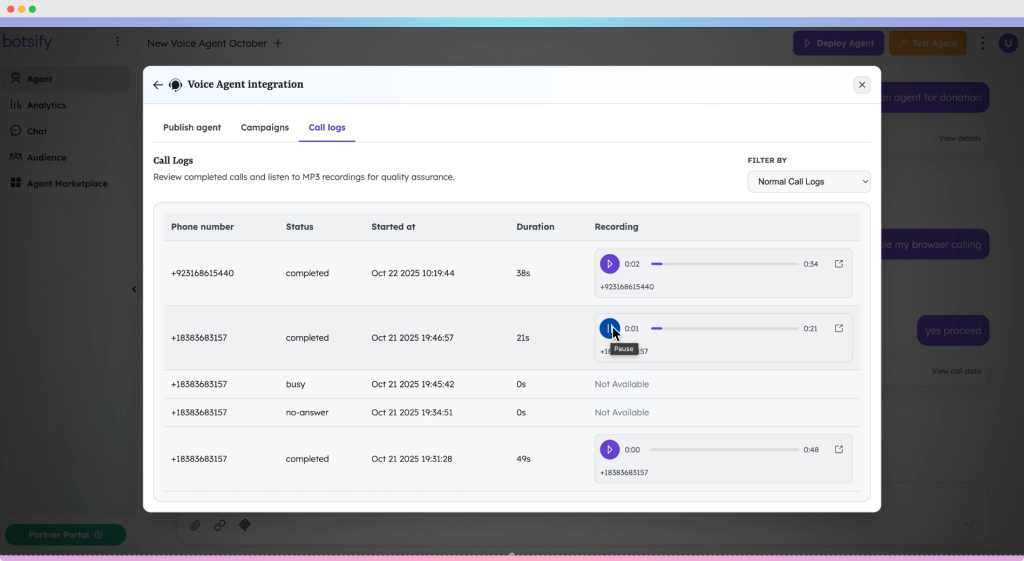
Step 6: Listen to Call Recordings
One of the most powerful features is the ability to play back each call.
You can review tone, interest level, objections, and call quality.
This is especially useful for:
- Coaching sales reps
- Understanding customer sentiment
- Identifying strong leads
- Improving future scripts
It is data you usually never get from manual cold calls.

Where This Voice Agent Helps the Most
This agent becomes a practical tool for:
- Sales teams doing daily cold calling
- Agencies running outreach campaigns
- Startups launching new product announcements
- Real estate agents calling lead lists
- Support teams doing customer reactivation
- Businesses that need consistent follow-ups
If you are already using automation like the Cold Emailing AI Agent or Lead Researcher AI Agent, combining them with a voice agent creates a multi-channel funnel that runs on autopilot.
Final Thoughts
Sales teams do their best work when they are closing deals, not dialing numbers. This voice agent removes the repetitive workload and gives your team superhuman calling capacity. Your outreach becomes timely, consistent, and measurable, without burning time or budget.
Whether you handle 100 calls a week or 10,000, this setup scales with you.
Build your Voice Agent Sales Campaign inside Botsify and let AI take care of the grunt work while your team focuses on what actually drives revenue: conversations that convert.
AI Agentic Platform For Building Portable AI Agents
Say Hello To Agentic AI That Connects With Your CRM And Even Other Agents