


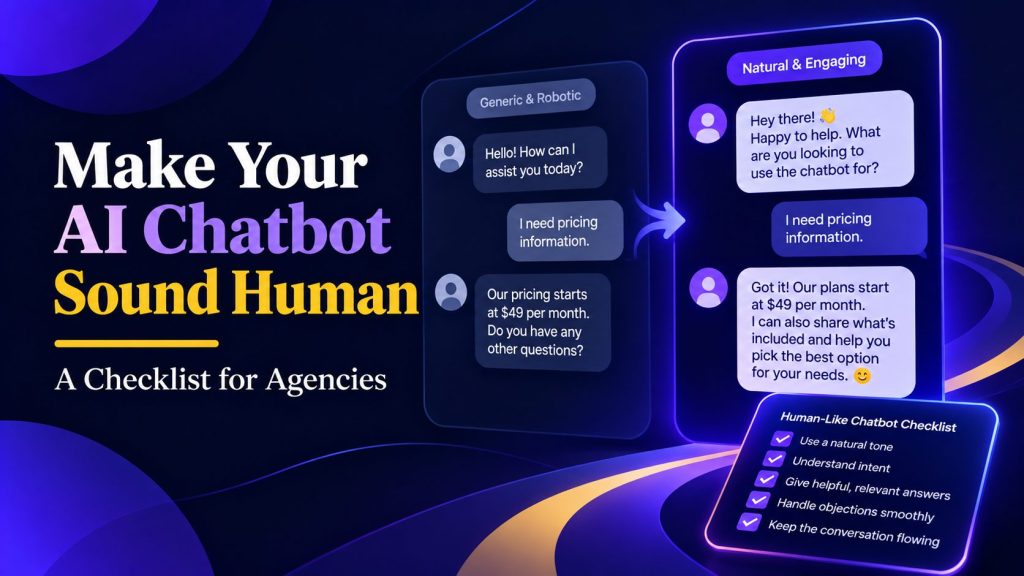
A customer asks whether an order will arrive by Friday. The chatbot responds with a formal greeting and a paragraph about shipping policies. The information may be accurate, but the customer still has to work out the answer.
For agencies, these small exchanges deserve attention before a client’s chatbot goes live. Every reply represents the client’s business, from the first product question to a complaint about a missed delivery.
To make your chatbot sound human, start with the conversations customers actually need to have. This checklist covers the writing, conversation design, and testing decisions that help agencies turn awkward exchanges into useful conversations.
What Makes a Chatbot Sound Human?
A human-like chatbot gives replies that feel appropriate to the exchange. Its wording is easy to follow, and the customer understands what to do next. A useful test is whether someone would need to reread the message before answering.
Natural conversation also leaves room for different ways of asking the same thing. Someone might write a complete question, send a few words, or change their mind halfway through. The bot should handle those differences without making the customer follow a rigid script.
For agencies, this gives chatbot conversation design a practical standard: can people complete their task comfortably? Read sample exchanges aloud and look for moments where the conversation becomes awkward or confusing. A friendly greeting can help, but the quality of the exchange depends on what follows.
A Practical Checklist for Human-Like Chatbot Conversations
Use the following checks when preparing a client’s chatbot for launch. Keep the agreed rules and approved examples together so everyone editing its responses has the same reference.
1. Define the Voice for Each Client
Before writing responses, ask the client for examples of how their team speaks to customers. Support emails, website copy, and approved sales messages can provide a starting point. Choose examples the client wants the bot to follow.
Turn those examples into a short guide for the chatbot personality, covering how it should speak, respond to customers, and reflect the client’s brand. Describe the voice through specific writing choices:
- Formality: Use everyday language or a more formal style.
- Warmth: Decide how greetings and acknowledgments should sound.
- Vocabulary: List preferred product names and terms customers recognize.
- Boundaries: Note expressions, jokes, and claims to avoid.
“Friendly and professional” leaves too much open to interpretation. Add sample replies that show what those words mean for this client. For example, an accounting firm might approve “I can help you find the right form” over “Let’s tackle those taxes!”
Google’s persona design guidance treats personality as a tool for writing consistent conversations. Have the client approve the guide before applying it across the bot’s responses.
2. Give Each Reply a Clear Purpose
Review each response and identify what the customer needs from it: an answer, an instruction, or a choice. Put that information first. If someone asks about delivery costs, they should see the price before a description of the shipping service.
Compare these replies to a question about standard delivery:
- Before: “Thank you for your interest in our delivery services. We offer several convenient shipping options. Our standard delivery option costs £4.”
- After: “Standard delivery costs £4 and takes three to five working days.”
A 2026 usability study by Nielsen Norman Group found that participants wanted quick answers they could scan easily. The revised reply follows that principle: it puts the delivery cost and timeframe together, without making the customer read an introduction.
Remove sentences that simply announce an answer, such as “I would be happy to provide that information.” Add a next step only when it helps with the current request. A customer checking delivery costs does not automatically need a product recommendation or an invitation to book a call.
3. Rewrite Stiff and Repetitive Wording
Improving chatbot messaging starts with reviewing draft responses and identifying phrases that sound like formal notices. Expressions such as “please be advised” and “at your earliest convenience” often have simpler replacements. Watch for repeated openings, too. Starting every reply with “Certainly!” becomes noticeable during a longer exchange.
For example, replace “Modifications to your reservation are permitted up to 24 hours prior to arrival” with “You can change your booking until 24 hours before arrival.”
To humanize AI chatbot responses, we recommend trying Clever AI Humanizer on a few draft replies. It is free, works in your browser, and accepts up to 3,000 words per request. Its two writing styles, Normal and Clear & Structured, let you choose how the text is revised. Start with Normal for customer replies, since this style is intended for simple, friendly wording.
Paste a draft response into the Original text field, select Normal, and click Humanize AI. Compare the result with your original, using Show changes to inspect the edits.
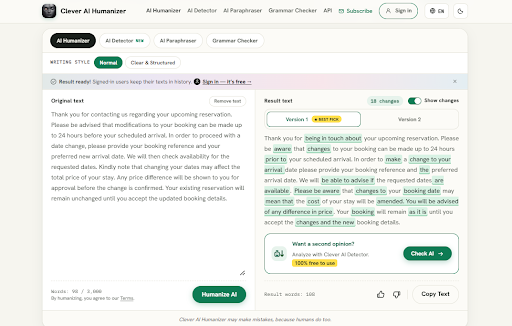

Check that the revised response keeps every price, deadline, and condition intact. Adjust it to the client’s voice, then add the approved wording to your response templates or the examples in your chatbot instructions.
4. Ask Questions That Move the Conversation Forward
When a request is unclear, ask for the specific detail needed to continue. “Could you provide more information?” leaves the customer guessing what to explain.
If someone writes “I need to change my booking,” ask, “Would you like to change the date or the number of guests?” A natural language chatbot should also understand answers such as “Both” and continue accordingly.
Ask one question at a time when the answer determines the next step. For a product recommendation, establish the customer’s needs before asking about colors or delivery.
Try the questions in a short exchange with a colleague to spot gaps or confusing transitions. Google’s video on writing sample dialogs explains how to get started.
5. Use Details the User Has Already Shared
A customer who has already provided an order number should not have to enter it again two messages later. Before requesting information, the bot should check whether it appears earlier in the current conversation.
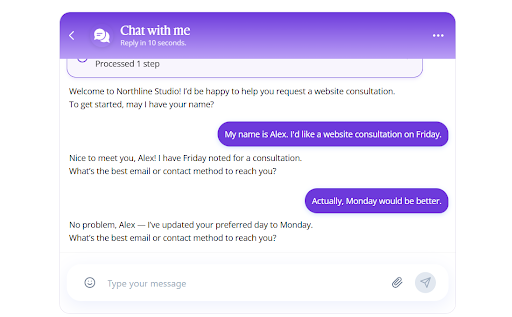
Include this rule in the chatbot’s instructions, along with how to handle corrections. If someone changes their preferred appointment from Friday to Monday, subsequent replies should use Monday. Confirm the updated detail briefly when it affects the next action.
Context also helps the bot understand short replies. After discussing a particular service, a customer may ask, “How much does it cost?” The response should refer to that service. If several services were mentioned, the bot should clarify which one the customer means.
Keep this use of context relevant to the task. Effective personalized chatbot conversations depend on remembering useful details, not repeating the customer’s name in every message. Remembering their selected service, budget, or corrected date makes the exchange easier to complete.
6. Match the Tone to the Situation
The same cheerful response will not suit every customer. Someone exploring a service may welcome an enthusiastic introduction. Someone reporting a duplicate charge needs a calm response that takes the problem seriously.
Prepare examples for different situations within the client’s voice guide. Cover routine questions, successful actions, delays, and complaints. Specify when to avoid exclamation marks, jokes, or celebratory language.
For example, “Great! I’d love to help with your payment issue!” sounds misplaced after a customer reports being charged twice. “I’m sorry about the duplicate charge. Let’s check the payment details” acknowledges the problem and introduces a useful action.
If a complaint response sounds overly cheerful, use a free paraphrasing tool to explore calmer wording. Choose a version that acknowledges the issue and offers a practical next step. Keep apologies brief and avoid claiming to know exactly how the customer feels.
7. Respond Clearly When the Bot Cannot Help
Write responses for situations where the bot lacks information or needs a staff member to take over. State the specific limitation so the customer understands why the conversation cannot continue as expected.
For example: “I can explain the refund policy, but a support agent needs to check your payment.” Follow this with an available next step, such as connecting to support or submitting a request. Only offer actions the bot can actually complete.
Microsoft’s guidelines for human-AI interaction recommend making system capabilities clear and helping users recover when things go wrong. Apply this by explaining what happens after the customer accepts help.
If live chat support is available, pass along the relevant conversation details so the customer does not have to start again. If staff are offline, explain how to contact them and give an approved response timeframe. Avoid saying “I’m connecting you now” when the bot is only recording a message for later review.
8. Test Full Conversations Before Launch
Run complete conversations with the configured bot, from the opening question to the final outcome. Use the tasks customers will actually bring, such as comparing services, changing a booking, or checking a refund.
For each task, try a straightforward request and a less predictable version. Include a correction, an incomplete answer, or a change of topic. Record where the bot loses track, gives an irrelevant reply, or leaves the customer without a next step.
In Botsify, open a Test Agent to try these exchanges before deployment. Save examples that show both successful responses and problems requiring changes.

For an additional text check, paste a longer draft response into Clever AI Detector. Treat its assessment as a prompt for editorial review; it does not measure whether a chatbot answers correctly or completes a task.
Fix the issues, repeat the affected conversations, and ask the client to approve representative examples. Keep these test cases for future updates. When instructions or business information change, rerun them to check that previously working conversations still behave as expected.
FAQ
Can Agencies Reuse One Chatbot Voice Guide Across Clients?
Yes, as a starting template. Keep reusable fields for tone, vocabulary, response length, and approved examples, then fill them with each client’s requirements. Separate shared writing standards from business-specific instructions, such as pricing or cancellation terms. For a chatbot agency managing multiple client projects, this reduces setup work while keeping each client’s information and communication style separate. Review copied examples carefully: a previous client’s service name or promise can easily survive in a reused document.
Should a Chatbot Use the Same Wording in Every Language?
Keep the meaning consistent, but adapt expressions and levels of formality to each language. A literal translation may sound awkward or make a simple instruction harder to follow. Have a fluent reviewer check the wording, dates, currencies, and conditions. Maintain approved examples for each language so later edits follow the same conventions.
Who Should Approve Changes to a Client’s Chatbot Responses?
Assign approval responsibilities when setting up an AI chatbot for agencies and their clients. An agency editor can handle wording changes within an approved guide. Changes to prices, eligibility, refund terms, or service commitments should go to the client’s responsible business contact. Record what changed, who approved it, and when it took effect. Agree on a separate route for urgent corrections, so an inaccurate response can be fixed without waiting for a routine review.
AI Agentic Platform For Building Portable AI Agents
Say Hello To Agentic AI That Connects With Your CRM And Even Other Agents